WinUI3のToolTipについて学んだ事をアウトプットしていきたいと思います。
何か追加情報があれば都度記事を更新していこうと思います。
ToolTipは私が学んだ限りではあまりプロパティもなく、単純にツールチップを出力することが可能です。
各要素の属性として使用するか、子要素として使用するかの2パターンあります。
属性として使用する
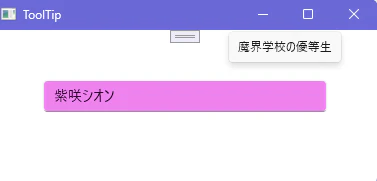
各要素のToolTipService.ToolTip属性を使用します。
MainWindow.xaml
<?xml version="1.0" encoding="utf-8"?>
<Window
    x:Class="ToolTip.MainWindow"
    xmlns="http://schemas.microsoft.com/winfx/2006/xaml/presentation"
    xmlns:x="http://schemas.microsoft.com/winfx/2006/xaml"
    xmlns:local="using:ToolTip"
    xmlns:d="http://schemas.microsoft.com/expression/blend/2008"
    xmlns:mc="http://schemas.openxmlformats.org/markup-compatibility/2006"
    mc:Ignorable="d"
    Title="ToolTip">

    <StackPanel Orientation="Vertical" Margin="50">
        <TextBox Text="紫咲シオン" Background="Violet"
                 ToolTipService.ToolTip="魔界学校の優等生" />
    </StackPanel>
</Window>
子要素として使用する
これは単純に先ほどの属性がタグになるだけです。
この要素を使用することにより、属性を使用するタイプよりも細かな設定が可能です。
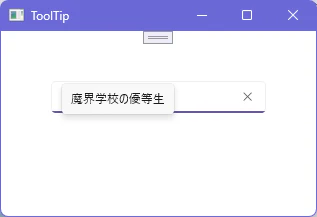
Placementでツールチップをカーソルから見てどの位置に出力するか設定できます。
VerticalOffsetまたはHorizontalOffsetを使用することでカーソルから出力するツールチップの位置までの距離を設定できます。
MainWindow.xaml
<?xml version="1.0" encoding="utf-8"?>
<Window
    x:Class="ToolTip.MainWindow"
    xmlns="http://schemas.microsoft.com/winfx/2006/xaml/presentation"
    xmlns:x="http://schemas.microsoft.com/winfx/2006/xaml"
    xmlns:local="using:ToolTip"
    xmlns:d="http://schemas.microsoft.com/expression/blend/2008"
    xmlns:mc="http://schemas.openxmlformats.org/markup-compatibility/2006"
    mc:Ignorable="d"
    Title="ToolTip">

    <StackPanel Orientation="Vertical" Margin="50">
        <TextBox Text="紫咲シオン" Background="Violet">
            <ToolTipService.ToolTip>
                <ToolTip Content="魔界学校の優等生"
                         Placement="Left"
                         HorizontalOffset="50" />
            </ToolTipService.ToolTip>
        </TextBox>
    </StackPanel>
</Window>
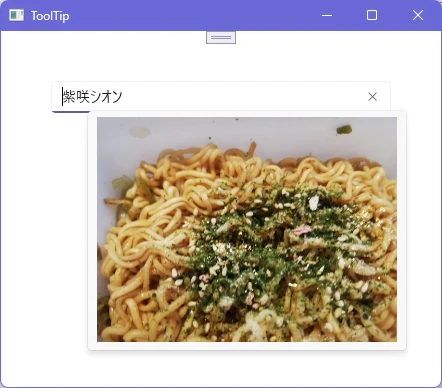
また、この形式でツールチップを使用する場合、ツールチップに画像なども使用することが可能です。
MainWindow.xaml
<?xml version="1.0" encoding="utf-8"?>
<Window
    x:Class="ToolTip.MainWindow"
    xmlns="http://schemas.microsoft.com/winfx/2006/xaml/presentation"
    xmlns:x="http://schemas.microsoft.com/winfx/2006/xaml"
    xmlns:local="using:ToolTip"
    xmlns:d="http://schemas.microsoft.com/expression/blend/2008"
    xmlns:mc="http://schemas.openxmlformats.org/markup-compatibility/2006"
    mc:Ignorable="d"
    Title="ToolTip">

    <StackPanel Orientation="Vertical" Margin="50">
        <TextBox Text="紫咲シオン" Background="Violet">
            <ToolTipService.ToolTip>
                <Image Source="E:\vs\WinUI3_Test\ToolTip\ToolTip\image1.jpg" />
            </ToolTipService.ToolTip>
        </TextBox>
    </StackPanel>
</Window>