
背景
Emacs備忘録(2024年版)という記事を投稿してから2年ほど経過し、そこそこ満足していましたが、不意に見かけた大西拓磨さんの動画(5分頃〜)を見て、見た目を良くするためだけの設定が多いなと感じ、設定の断捨離を行いました。
また、GnusというEmacsのメーラーも使用するようになり、より沼にハマっています。
大西拓磨さんの記事も面白かったので貼っておきます。
https://note.com/illlilllililill/n/n29c6ae425f4b
主な変更点
- アイコンや過剰なUIパッケージを減らしました
- vertico、corfu、orderless、prescientの設定を調整
- 過剰な最適化設定を削除しました
- 組み込み機能の設定を調整しました(ace-windowを廃止してrepeat-modeを使用するなど)
- gnusの設定を追加しました
- IMEをddskkにしました
- その他パッケージの入れ替え・追加をしました(reformatter・treesit-langs等)
- 自作パッケージを追加しました
UI
org-mode
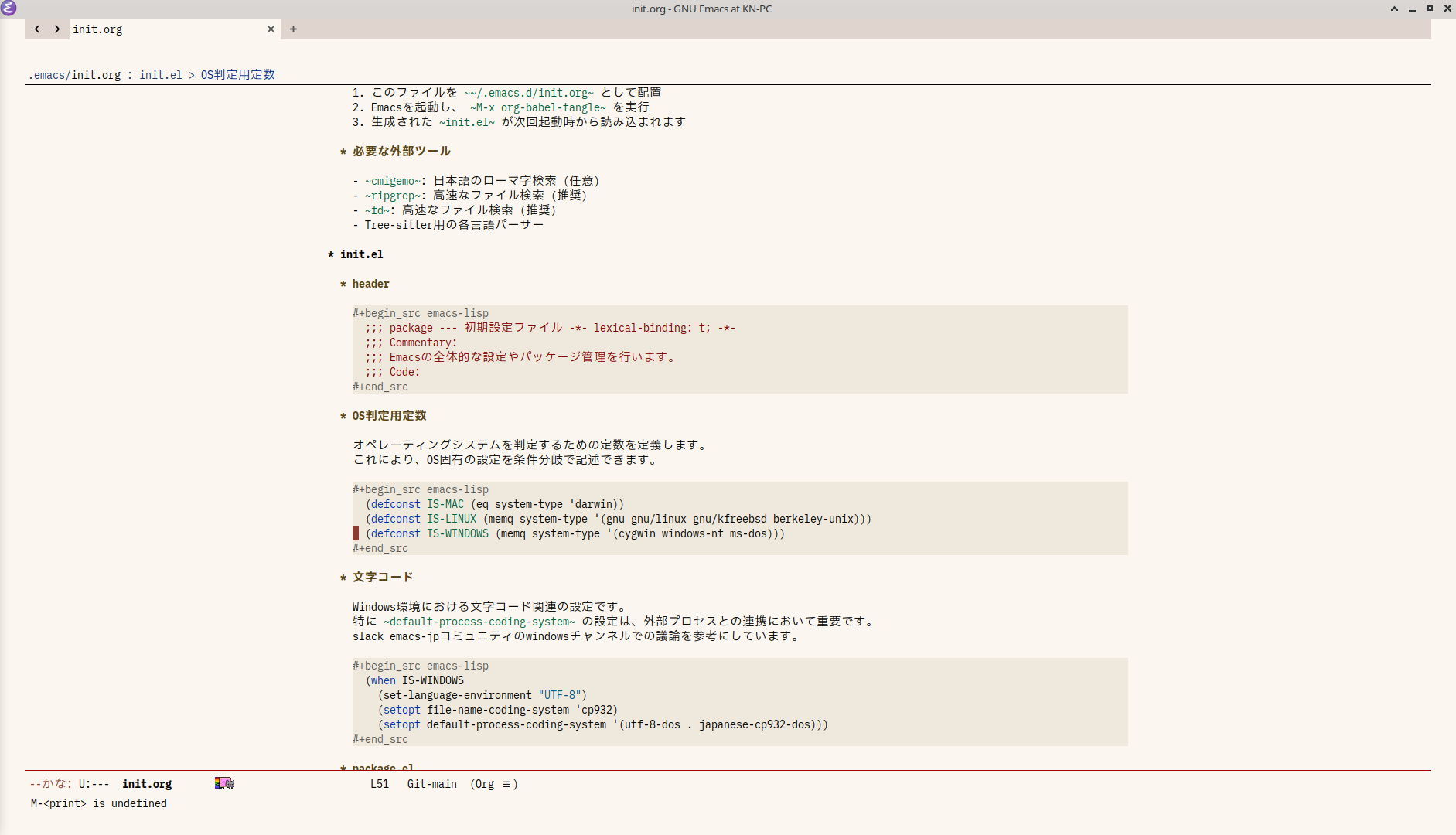
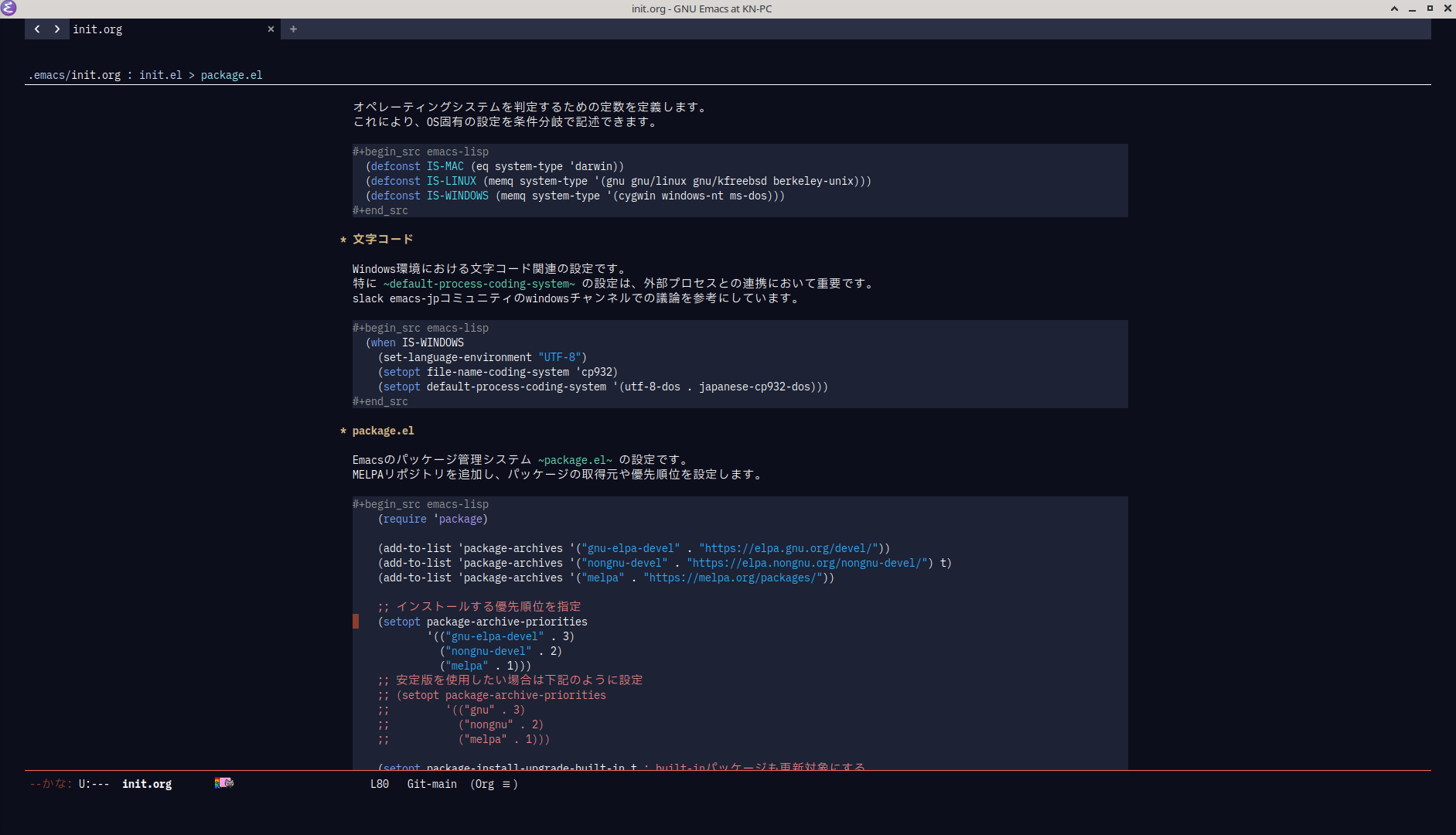
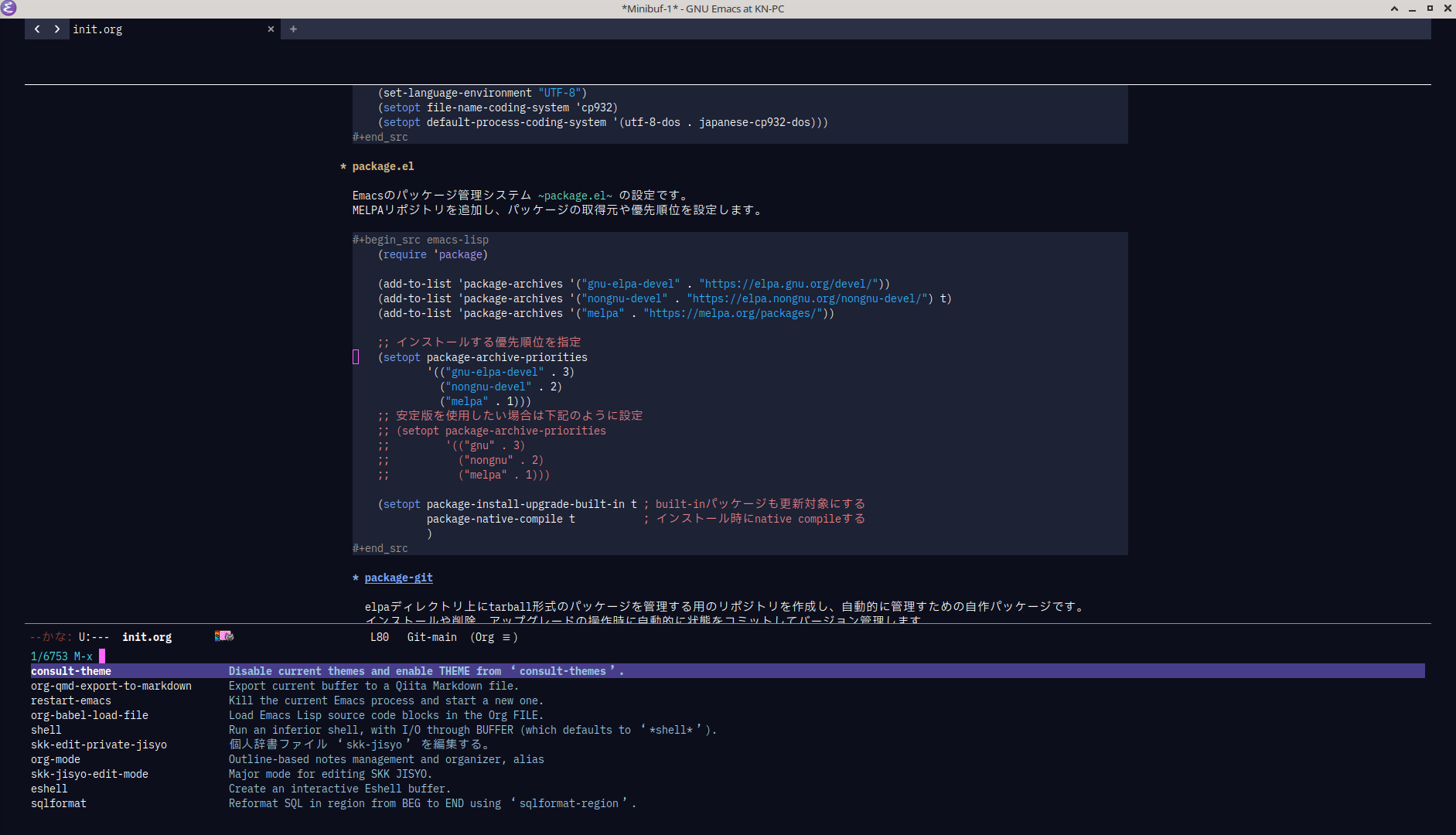
vertico

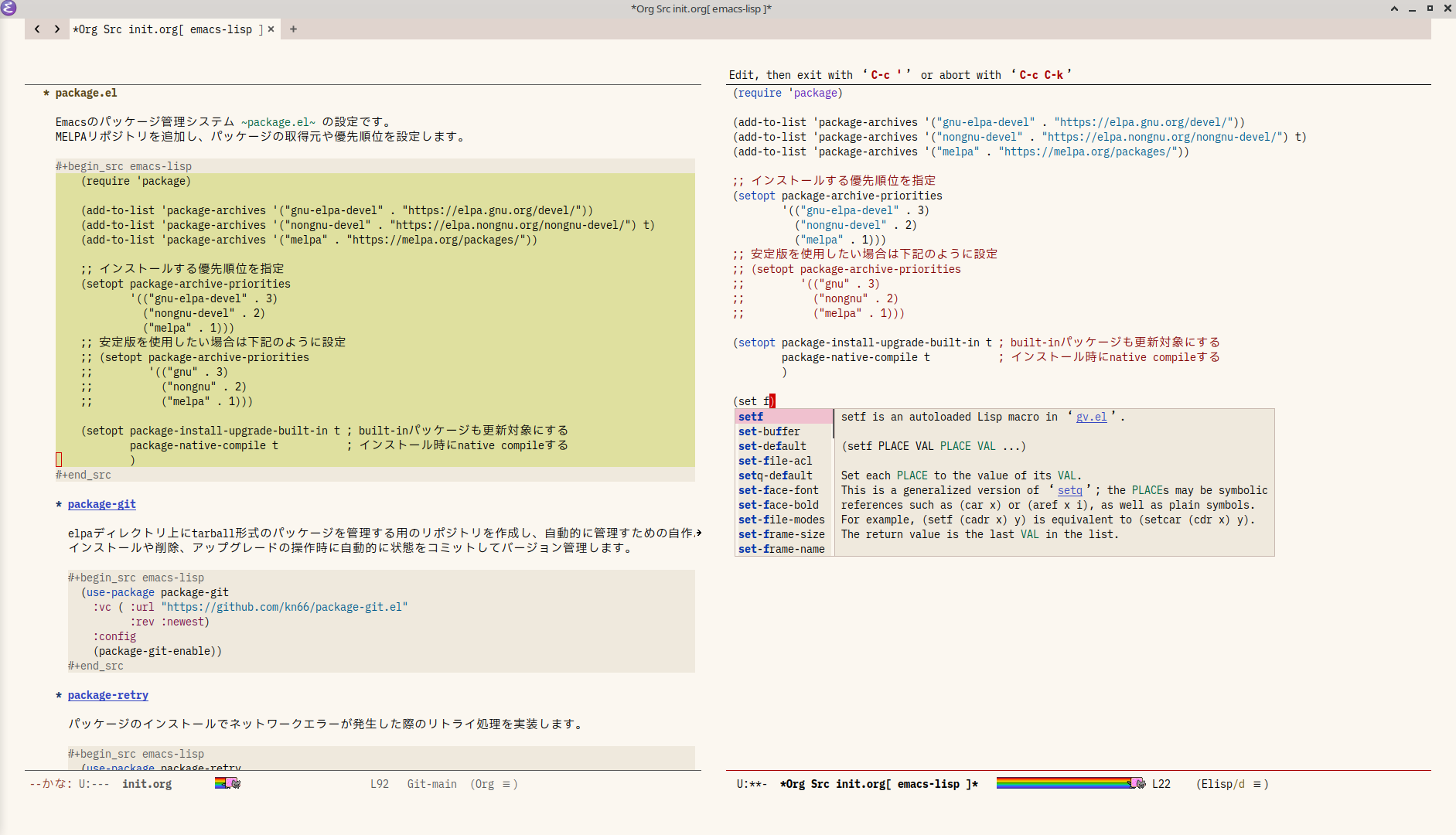
corfu
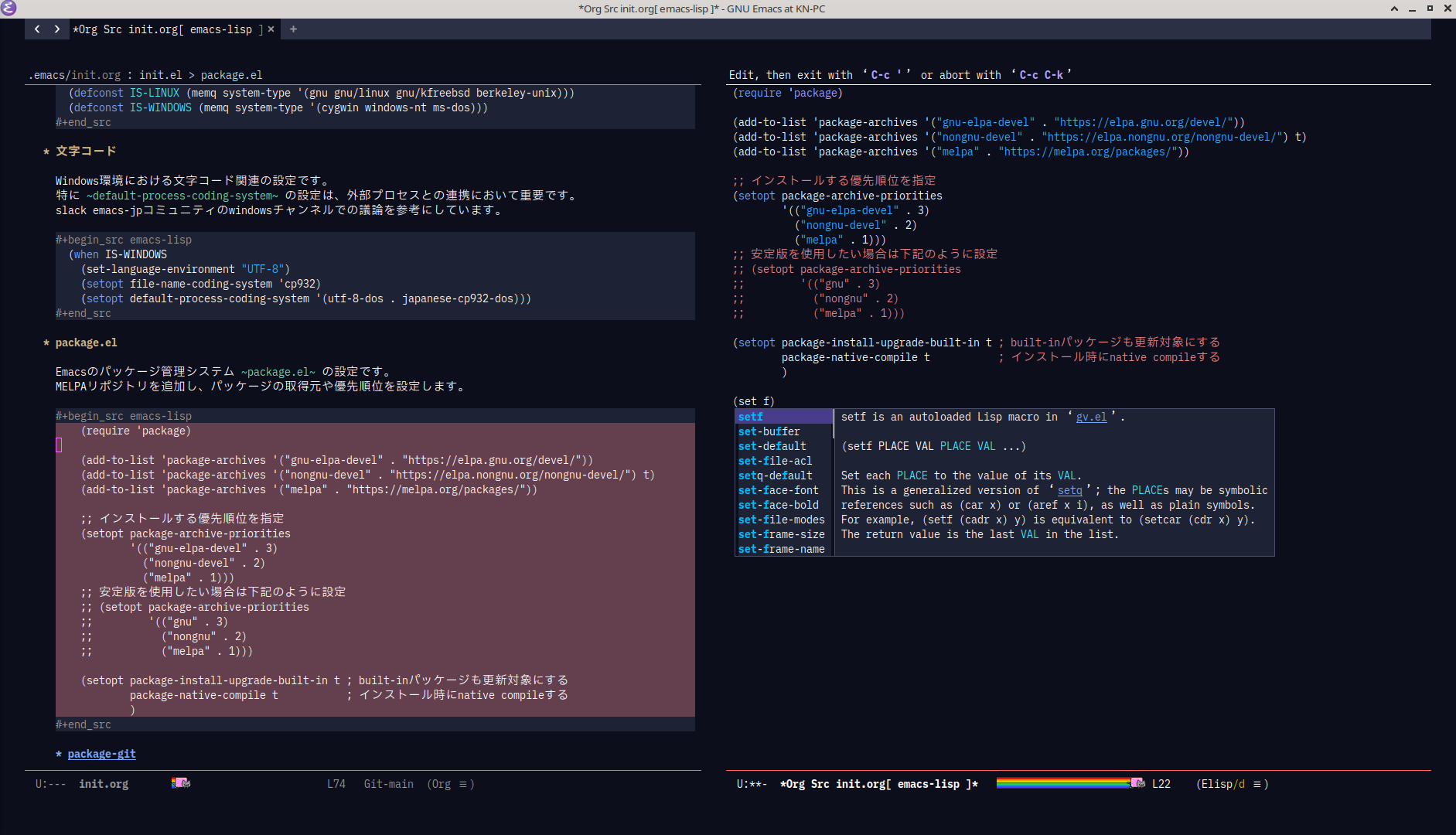
vundo
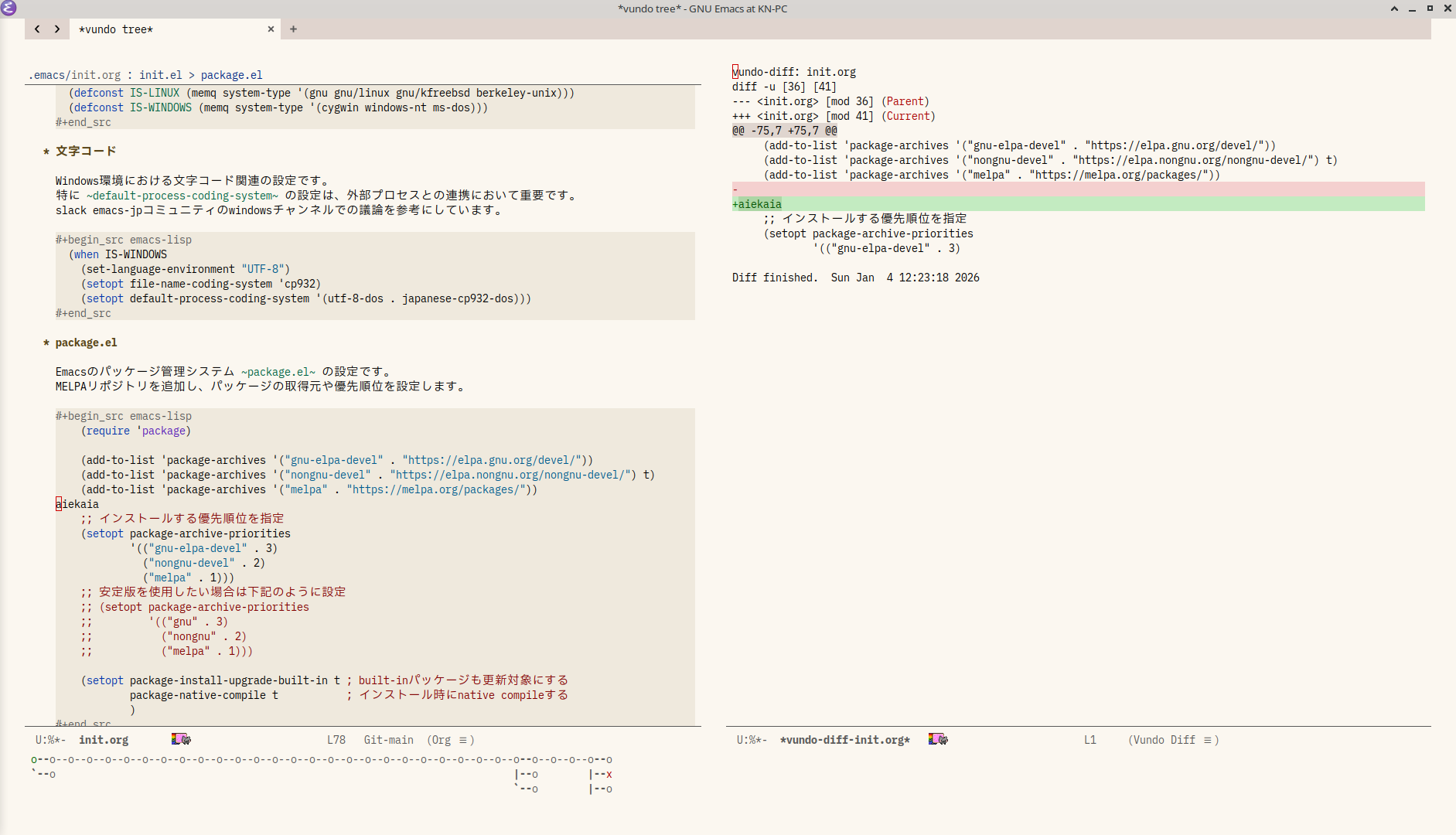
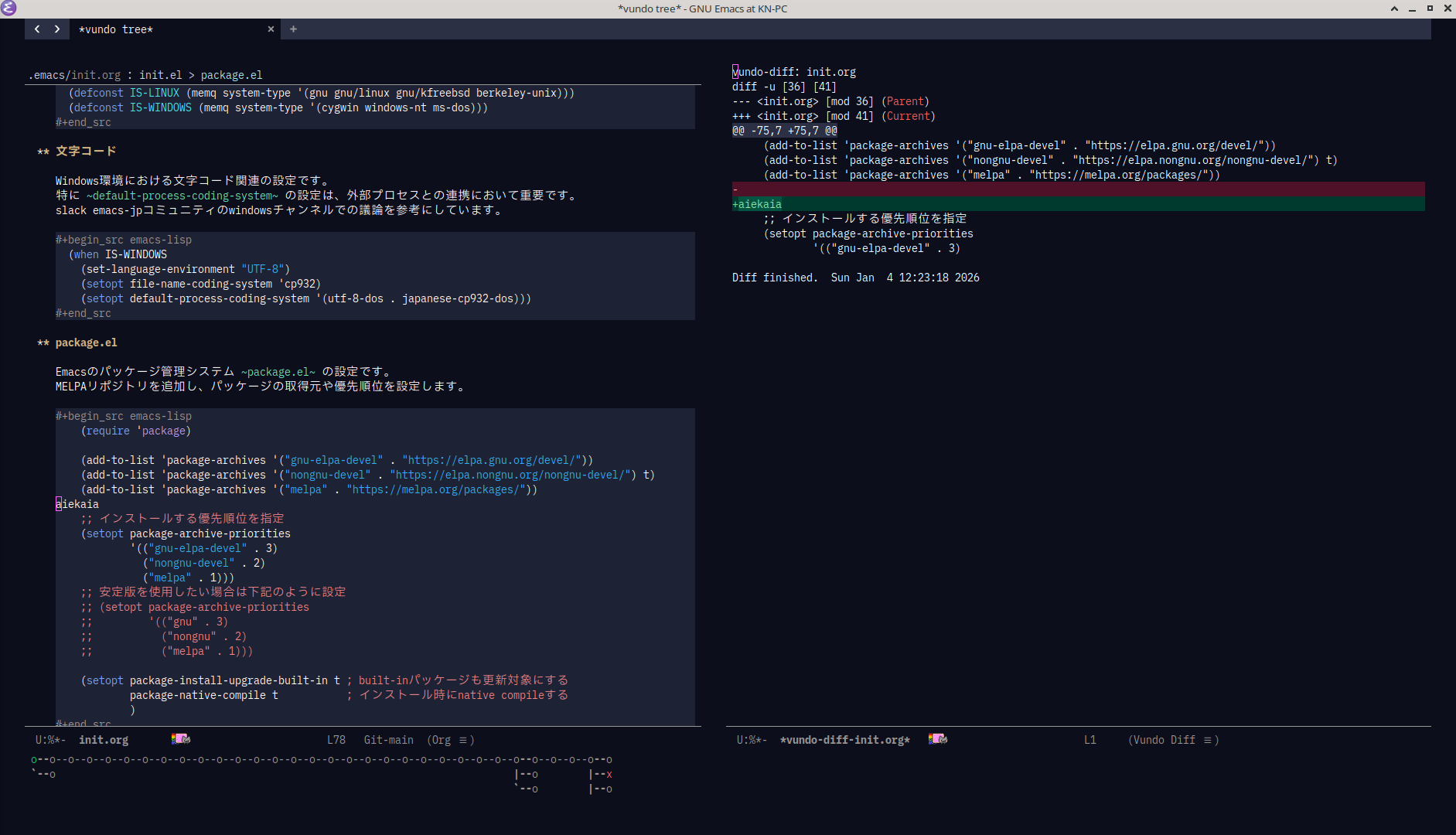
magit


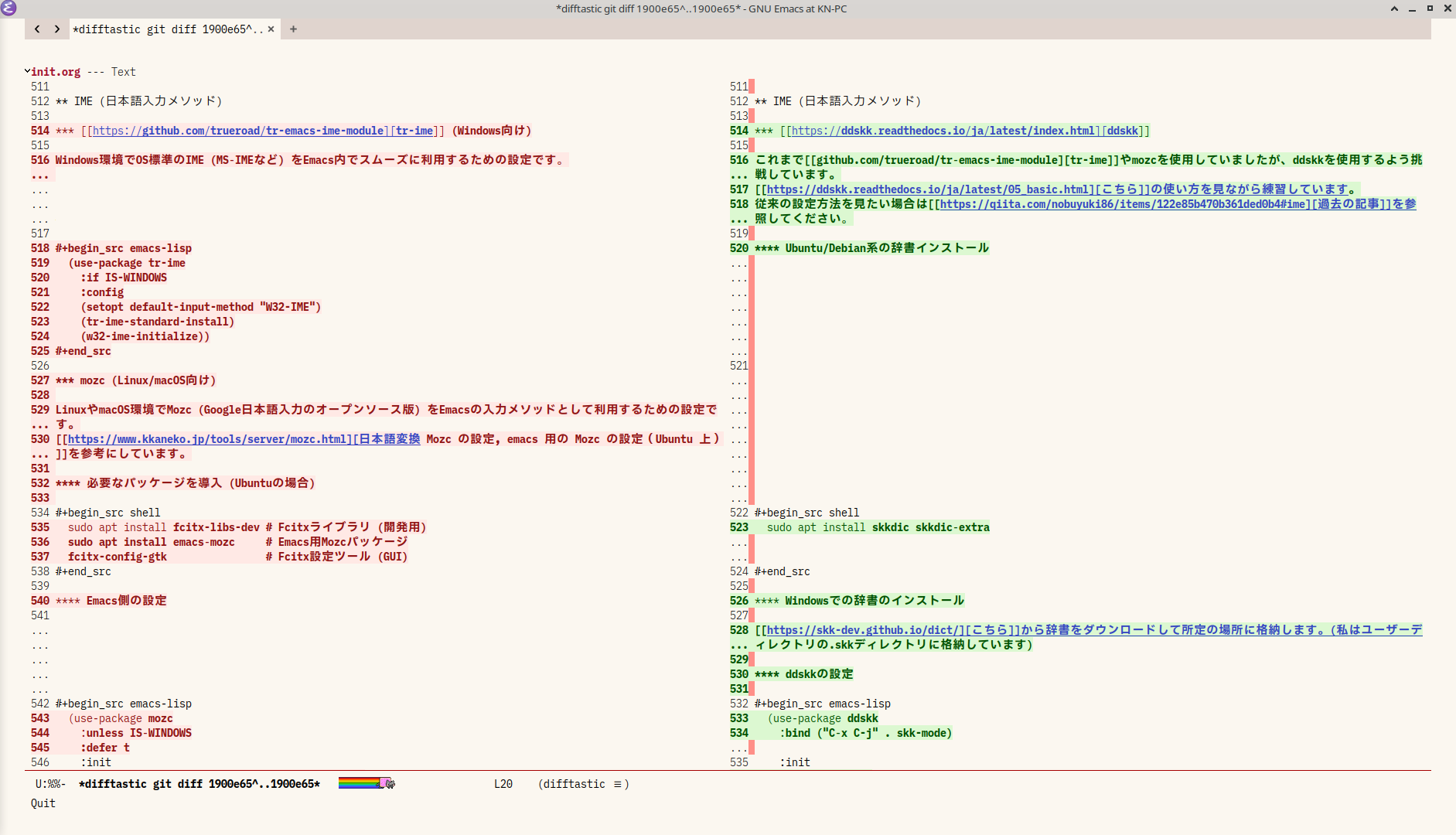
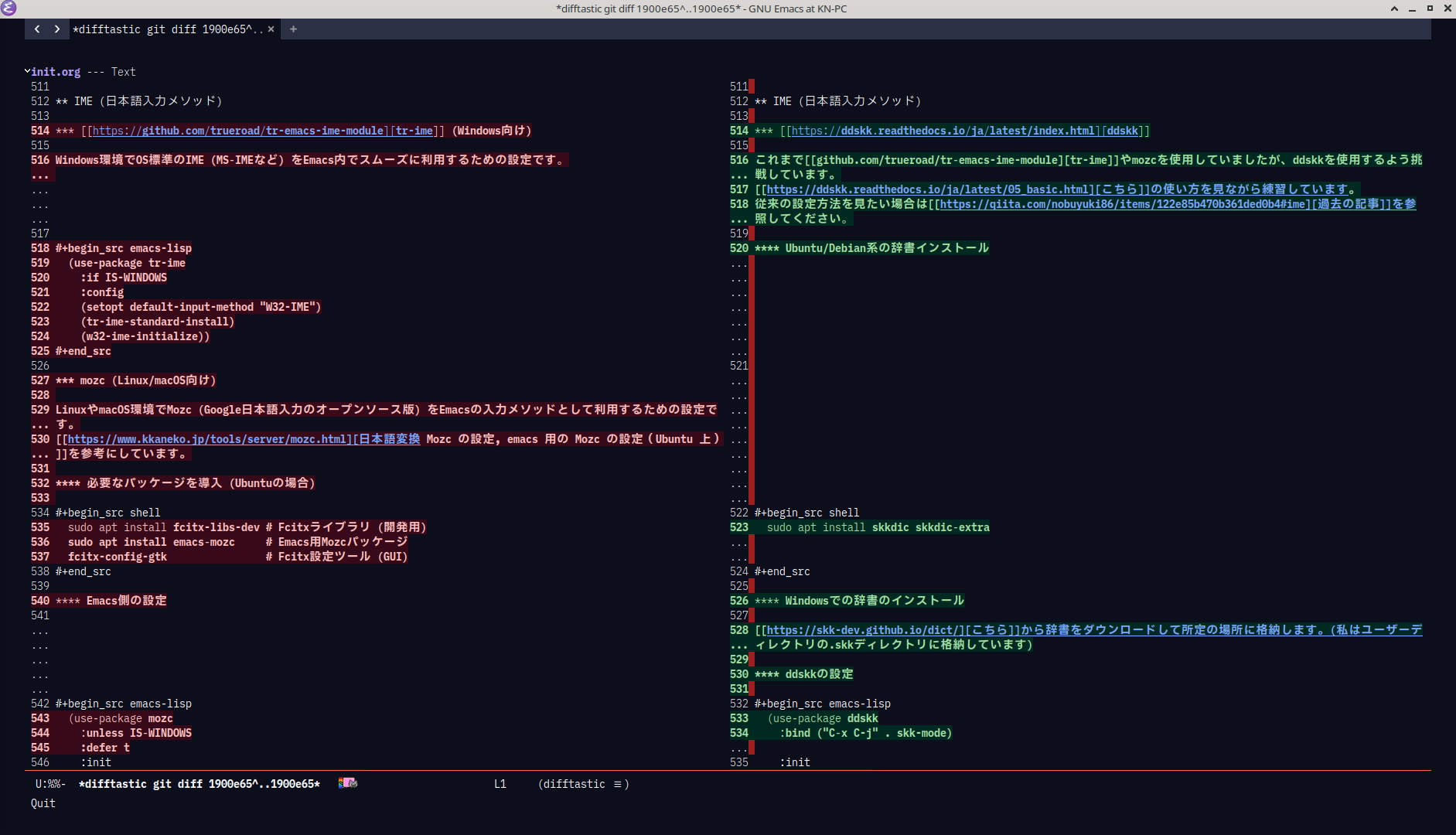
difftastic
Github
今回の設定リポジトリはこちらです。
使い方
-
init.org、early-init.orgを~/.emacs.d/上に配置 - Emacsを起動し、
M-x org-babel-load-fileを実行し、1のファイルを選択 - 生成された
early-init.el、init.elが次回起動時から読み込まれます
必要な外部ツール
-
cmigemo: 日本語のローマ字検索 (任意) -
ripgrep: 高速なファイル検索 (推奨) -
fd: 高速なファイル検索 (推奨)
注意点
copilot.elパッケージをインストールすると別のパッケージのインストールに失敗することがあります。
失敗する場合はcopilot.elをアンインストールして、init.orgに:tangle no を付与してinit.elの設定から除外してインストールを行ってください。
以下各設定の説明です
early-init.el
header
;;; package --- 初期設定ファイル -*- lexical-binding: t; -*-
;;; Commentary:
;;; Code:
custom変数の保存先を変更
M-x customize などで設定したカスタム変数を、 init.el とは別のファイルに保存します。これにより、自動生成されるカスタム設定と手動で記述した設定を分離できます。
(setq custom-file (locate-user-emacs-file "custom.el"))
(when (file-exists-p (expand-file-name custom-file))
  (load-file (expand-file-name custom-file)))
画面最大化
Emacsのフレームを起動時に最大化します。early-init.el で設定することで、起動時に一瞬小さいウィンドウが表示されてから最大化されるちらつきを防げます。
(push '(fullscreen . maximized) default-frame-alist)
スクロールバー非表示
GUIのスクロールバーを非表示にします。
(scroll-bar-mode -1)
メニューバー非表示
画面上部のメニューバー(File, Edit, …)を非表示にします。
(menu-bar-mode -1)
ツールバー非表示
GUIのツールバー(アイコンボタン群)を非表示にします。
(tool-bar-mode -1)
footer
(provide 'early-init)
;;; early-init.el ends here
init.el
header
;;; package --- 初期設定ファイル -*- lexical-binding: t; -*-
;;; Commentary:
;;; Emacsの全体的な設定やパッケージ管理を行います。
;;; Code:
OS判定用定数
オペレーティングシステムを判定するための定数を定義します。これにより、OS固有の設定を条件分岐で記述できます。
(defconst IS-MAC (eq system-type 'darwin))
(defconst IS-LINUX (memq system-type '(gnu gnu/linux gnu/kfreebsd berkeley-unix)))
(defconst IS-WINDOWS (memq system-type '(cygwin windows-nt ms-dos)))
文字コード
Windows環境における文字コード関連の設定です。特に default-process-coding-system の設定は、外部プロセスとの連携において重要です。slack emacs-jpコミュニティのwindowsチャンネルでの議論を参考にしています。
(when IS-WINDOWS
  (set-language-environment "UTF-8")
  (setopt file-name-coding-system 'cp932)
  (setopt default-process-coding-system '(utf-8-dos . japanese-cp932-dos)))
package.el
Emacsのパッケージ管理システム package.el の設定です。MELPAリポジトリを追加し、パッケージの取得元や優先順位を設定します。
(require 'package)

(add-to-list 'package-archives '("gnu-elpa-devel" . "https://elpa.gnu.org/devel/"))
(add-to-list 'package-archives '("nongnu-devel" . "https://elpa.nongnu.org/nongnu-devel/") t)
(add-to-list 'package-archives '("melpa" . "https://melpa.org/packages/"))

;; インストールする優先順位を指定
(setopt package-archive-priorities
        '(("gnu-elpa-devel" . 3)
          ("nongnu-devel" . 2)
          ("melpa" . 1)))
;; 安定版を使用したい場合は下記のように設定
;; (setopt package-archive-priorities
;;         '(("gnu" . 3)
;;           ("nongnu" . 2)
;;           ("melpa" . 1)))

(setopt package-install-upgrade-built-in t ; built-inパッケージも更新対象にする
        package-native-compile t           ; インストール時にnative compileする
        )
package-git
elpaディレクトリ上にtarball形式のパッケージを管理する用のリポジトリを作成し、自動的に管理すための自作パッケージです。インストールや削除、アップグレードの操作時に自動的に状態をコミットしてバージョン管理します。
(use-package package-git
  :vc ( :url "https://github.com/kn66/package-git.el"
        :rev :newest)
  :config
  (package-git-enable))
package-retry
パッケージのインストールでネットワークエラーが発生した際のリトライ処理を実装します。
(use-package package-retry
  :vc ( :url "https://github.com/kn66/package-retry.el.git"
        :rev :newest)
  :config
  (package-retry-mode))
use-package
パッケージの導入や設定を簡潔に記述するためのマクロ use-package の設定です。Emacs 29から標準機能として組み込まれました。
(use-package use-package
  :config
  (setopt use-package-enable-imenu-support t ; use-packageの設定をimenuで利用可能にする
          use-package-always-ensure t        ; :ensure t を全ての use-package 宣言に適用
          ))
Emacs標準機能の設定
Emacsの標準機能に関する各種カスタマイズを行います。
yes-or-noをy-or-nに変更
ミニバッファでの yes または no の問い合わせに対し、 y または n で応答できるようにします。
(setopt use-short-answers t)
ロックファイル・バックアップファイルを作成しない
(setopt make-backup-files nil
        backup-inhibited nil
        create-lockfiles nil)
ビープ音を無効化
Emacsがエラーや通知で発するビープ音を鳴らさないようにします。
(setopt ring-bell-function 'ignore)
デーモン起動
Emacsをサーバーとして起動し、~emacsclient~ コマンドからの接続を受け付けられるようにします。これにより、既存のEmacsプロセスでファイルを高速に開くことができます。
(use-package server
  :ensure nil
  :config
  (server-mode))
最後のカーソル位置を保存する
ファイルを開いたときに、前回閉じたときのカーソル位置を復元します。
(use-package saveplace
  :ensure nil
  :init
  (save-place-mode))
ファイルの閲覧履歴を保存する
最近開いたファイルのリストを保持し、簡単に再度アクセスできるようにします。
(use-package recentf
  :ensure nil
  :config
  (setopt recentf-max-saved-items 1024) ;; 保存する履歴の最大数
  (recentf-mode))
コマンドの履歴を保存
ミニバッファの入力履歴や、検索・置換の履歴などをEmacsセッション間で保存します。
(use-package savehist
  :ensure nil
  :init
  (savehist-mode))
対応括弧を自動補完
開き括弧 ( や引用符 " などを入力した際に、対応する閉じ括弧や引用符を自動的に挿入します。
(use-package elec-pair
  :ensure nil
  :config
  (electric-pair-mode))
他プロセスの編集をバッファに反映
auto-revertを使用していましたが、Windows環境で大きいプロジェクトを編集し、ブランチの切り替えを行なうと反映に時間が掛かる事があります。この問題を解決するために自作パッケージを作成しました。
(use-package visible-auto-revert
  :vc ( :url "https://github.com/kn66/visible-auto-revert.el"
        :rev :newest)
  :config
  (visible-auto-revert-mode))
camelCase単位で移動する
camelCase や snake_case のような複合語を、各部分(サブワード)ごとに単語として認識し、サブワード単位でのカーソル移動や編集操作を可能にします。
(use-package subword
  :ensure nil
  :init
  (global-subword-mode))
削除したファイルをゴミ箱に移動させる
Emacsからファイルを削除する際に、即座に完全削除するのではなく、システムのゴミ箱に移動させます。
(setopt delete-by-moving-to-trash t)
native-compの警告を表示しない
ネイティブコンパイル時の非同期な警告やエラーメッセージの表示を抑制します。
(setopt native-comp-async-report-warnings-errors 'silent)
ガベージコレクション
デフォルト設定ではガベージコレクション (GC) が頻繁に発生することがあるため、閾値を調整します。以前は gcmh パッケージを使用していましたが、タイマーによるGC起動が意図しないメモリ確保を招く場合があるとの情報に基づき、EmacsConf 2023の発表で推奨されている gc-cons-percentage の調整に変更しました。
(setopt gc-cons-percentage 0.2
        gc-cons-threshold (* 128 1024 1024))
長い行を含むファイルの最適化
非常に長い行を含むファイルを開いた際のパフォーマンスを改善します。
(use-package so-long
  :init
  (global-so-long-mode))
末尾のスペースやタブを可視化
行末の不要な空白文字(スペースやタブ)をバッファ内で視覚的に表示します。
(setopt show-trailing-whitespace t)
delsel
リージョン(選択範囲)がアクティブな状態で文字を入力した際に、選択範囲を削除してから文字を挿入するようにします (いわゆる CUA スタイル)。
(use-package delsel
  :ensure nil
  :config
  (delete-selection-mode))
tab-bar-mode
フレーム内のウィンドウ構成 (バッファの配置など) を「タブ」として管理する機能です。複数の作業コンテキストをタブで切り替えられます。
(use-package tab-bar
  :ensure nil
  :init
  (tab-bar-mode)
  (tab-bar-history-mode))
外部プロセスの読み取り最大値を変更
Emacsが外部プロセスから一度に読み取るデータの最大サイズを1MBに設定します。これは、大量の出力を伴うプロセス (LSPサーバーなど) との連携時に、プロセス出力が途中で打ち切られるのを防ぐのに役立ちます。
(setopt read-process-output-max (* 1024 1024))
その他便利設定
Protesilaos Stavrou氏の設定ファイル (dotemacs) から拝借した便利な設定です。
-
-
キルリングに新しいテキストを追加する前にクリップボードの内容を保存
キルリングに新しいテキストを追加する (killコマンド実行時) 直前に、現在のクリップボードの内容をEmacsの内部的な場所に保存します。これにより、他のアプリケーションからコピーした内容が、Emacs内でのkill操作によって意図せず上書きされてしまうのを防ぎます。
(setopt save-interprogram-paste-before-kill t)
-
project.el
Emacs標準のプロジェクト管理機能 project.el の設定です。プロジェクトルートの判定マーカーを追加したり、特定のディレクトリを無視するように設定します。
(use-package project
  :config
  (setopt project-vc-extra-root-markers '(".dir-locals.el" "package.json")))
repeat-mode
repeat-mode は、特定のコマンドを連続して実行する際に、プレフィックスキーを毎回入力する必要をなくす機能です。例えば C-x o (other-window) を実行した後、 o キーだけでウィンドウ間の移動を繰り返せるようになります。
(use-package repeat
  :ensure nil
  :config
  (repeat-mode))
flymake
Emacs標準のシンタックスチェックフレームワークです。リアルタイムでコードのエラーや警告を検出し、表示します。類似パッケージに flycheck があります。treesit-foldとインジケータが衝突するため無効にして、代わりに行末にエラーメッセージを表示するようにしています。
(use-package flymake
  :hook ((prog-mode
          conf-mode) . flymake-mode)
  :init
  (setopt flymake-indicator-type nil
          flymake-show-diagnostics-at-end-of-line t))
インデントの基本をスペースに変更
(use-package simple
  :ensure nil
  :init
  (setopt indent-tabs-mode nil))
gnus
Gnusをメールリーダーとして使用するための設定です。実際のメールサーバーの情報などは個人情報が含まれるため ~/.authinfo.gpg や ~/.gnus に詳細な設定を記述しています。
(use-package gnus
  :ensure nil
  :after bbdb
  :config
  (gnus-demon-init))
-
BBDB (The Insidious Big Brother Database) は、Emacs用の連絡先管理システムです。
(use-package bbdb :init (setopt bbdb-file (locate-user-emacs-file "bbdb") bbdb-mua-auto-action 'create bbdb-mua-action 'create bbdb-mua-pop-up nil bbdb-add-name t ; 既存レコードの名前変更を自動承認 bbdb-add-aka t ; 別名追加を自動承認 bbdb-message-all-addresses t bbdb-message-try-all-headers t bbdb-completion-display-record nil bbdb-complete-mail-allow-cycling t) :config (bbdb-initialize 'gnus 'message) (bbdb-mua-auto-update-init 'gnus 'message) (add-hook 'gnus-startup-hook #'bbdb-insinuate-gnus)) -
新着メールが届いた際にデスクトップ通知を表示するパッケージです。
gnus-demonと連携して定期的にメールをチェックし、新着があれば通知します。(use-package gnus-desktop-notify :config (gnus-desktop-notify-mode) (gnus-demon-add-rescan)) -
折り返し位置の可視化
デフォルトでは72文字目に改行文字が挿入されますが、これを視覚的に示すために折り返し位置インジケーターを有効化します。
(use-package message
  :ensure nil
  :hook (message-mode . display-fill-column-indicator-mode))
ediff
ediff は、Emacs標準のファイルまたはバッファ間の差分比較ツールです。2つのファイルやバッファの違いを視覚的に表示し、マージ操作を行えます。ここでは、差分比較時にウィンドウを垂直に分割するように設定しています。
(use-package ediff
  :ensure nil
  :config
  (setopt ediff-split-window-function 'split-window-horizontally))
テーマ
modus-themes
高い可読性とアクセシビリティを重視したEmacs用カラーテーマです。
(use-package modus-themes
  :config
  (modus-themes-select 'modus-operandi-tinted))
org
org-mode に関する基本的な設定をしています。
(use-package org
  :init
  (setopt org-return-follows-link t  ; Returnキーでリンク先を開く
          ))
org-indent
テキストの階層構造に基づいてインデントを自動的に調整します。
(use-package org-indent
  :ensure nil
  :hook (org-mode . org-indent-mode))
denote
シンプルな個人用ノート管理システムです。Org、Markdown、プレーンテキストなど複数の形式に対応しています。ファイル名に日時・タイトル・タグを含めることで、特別なデータベースなしにノートを整理できます。
(use-package denote
  :config
  ;; テキストモードでもDenoteのリンクをハイライト
  (add-hook 'text-mode-hook #'denote-fontify-links-mode)
  ;; DiredでDenoteディレクトリを開いた際にDenote関連の機能を利用可能に
  (add-hook 'dired-mode-hook #'denote-dired-mode-in-directories)
  ;; コンテキストメニュー (右クリックメニュー) にDenoteの操作を追加
  (add-hook 'context-menu-functions #'denote-context-menu)

  ;; バッファ名をDenoteノートのタイトルに合わせて自動的にリネーム
  (denote-rename-buffer-mode))
ox-qmd (Qiita投稿用)
orgファイルをmarkdownファイルに変換してくれます。組み込みの変換コマンドが存在しますが、ox-qmdでの出力の方がQiitaとの相性が良いです。
(use-package ox-qmd :defer t)
IME (日本語入力メソッド)
ddskk
これまでtr-imeやmozcを使用していましたが、ddskkを使用するよう挑戦しています。こちらの使い方を見ながら練習しています。従来の設定方法を見たい場合は過去の記事を参照してください。
-
Ubuntu/Debian系の辞書インストール
sudo apt install skkdic skkdic-extra -
Windowsでの辞書のインストール
こちらから辞書をダウンロードして所定の場所に格納します。(私はユーザーディレクトリの.skkディレクトリに格納しています)
-
ddskkの設定
(use-package ddskk
  :bind ("C-x C-j" . skk-mode)
  :init
  (cond (IS-LINUX
         (setopt skk-large-jisyo "/usr/share/skk/SKK-JISYO.L"
                 skk-extra-jisyo-file-list '("/usr/share/skk/SKK-JISYO.geo"
                                             "/usr/share/skk/SKK-JISYO.jinmei"
                                             "/usr/share/skk/SKK-JISYO.propernoun"
                                             "/usr/share/skk/SKK-JISYO.station"
                                             "/usr/share/skk/SKK-JISYO.law")))
        (IS-WINDOWS
         (setopt skk-large-jisyo (expand-file-name ".skk/SKK-JISYO.L" (getenv "USERPROFILE"))
                 skk-extra-jisyo-file-list
                 (list (expand-file-name ".skk/SKK-JISYO.geo" (getenv "USERPROFILE"))
                       (expand fido-mode ".skk/SKK-JISYO.jinmei" (getenv "USERPROFILE"))
                       (expand-file-name ".skk/SKK-JISYO.propernoun" (getenv "USERPROFILE"))
                       (expand-file-name ".skk/SKK-JISYO.station" (getenv "USERPROFILE"))
                       (expand-file-name ".skk/SKK-JISYO.law" (getenv "USERPROFILE")))))))
corfu
Emacsの補完UIを強化するパッケージです。軽量で、Emacs標準の補完機能と深く統合されています。類似パッケージに company-mode や auto-complete があります。以前まで orderless-flex を使用してあいまい検索で補完をしていましたがこちらのWikiを見てセパレータを使用するように修正しました。
(use-package corfu
  :bind ( :map corfu-map
          ("RET" . nil)
          ("<return>" . nil)
          ("SPC" . corfu-insert-or-escape-separator))
  :init
  (setopt corfu-cycle t
          corfu-auto t
          corfu-auto-prefix 1
          corfu-auto-delay 0.0
          corfu-preselect 'directory
          corfu-quit-no-match t
          corfu-on-exact-match 'show)

  (defun corfu-insert-or-escape-separator ()
    "Rotate prompt between inserting, escaping and removing the separator.
An alternative to `corfu-insert-separator', useful in cases where including the
separator in the query is important, and the user wants a single bind for
everything. It can be called repeatedly, and will do, in order (starting from a
prompt without any separators):

1. Insert the separator character at prompt end.
2. Insert a backslash character before the inserted separator, to treat it as
   part of the prompt instead of as a split point for components.
3. Remove the separator and backslash.

The sequence will loop to 1 if called further, allowing to fix accidental
changes to the prompt. Note this function can remove the separator character."
    (interactive)
    (if (char-equal (char-before) corfu-separator)
        (if (char-equal (char-before (1- (point))) ?\\)
            (save-excursion (delete-char -2))                   ;; Case 3
          (save-excursion (backward-char 1) (insert-char ?\\))) ;; Case 2
      (call-interactively #'corfu-insert-separator)))           ;; Case 1

  (global-corfu-mode))
corfu-popupinfo
補完候補の追加情報(ドキュメントや型情報など)をポップアップ表示する拡張機能です。
(use-package corfu-popupinfo
  :ensure nil
  :after corfu
  :hook (corfu-mode . corfu-popupinfo-mode))
corfu-history
Corfuで選択した補完候補の履歴を保存し、次回の補完時に優先的に表示します。savehist-mode と連携することで、Emacsセッション間で履歴が永続化されます。
(use-package corfu-history
  :ensure nil
  :after corfu
  :init
  (corfu-history-mode)
  (with-eval-after-load 'savehist
    (add-to-list 'savehist-additional-variables 'corfu-history)))
corfu向けEmacs標準機能の設定
Corfuをより快適に利用するための、Emacs標準機能に関する設定です。
(use-package emacs
  :ensure nil
  :config
  ;; TABキーの挙動を設定: インデントの後に補完を試みる (corfuのフックと重複するが、汎用的な設定としてここにも記述)
  (setopt tab-always-indent 'complete))
cape (Completion At Point Extensions)
Emacsの標準補完インターフェース completion-at-point-functions (CAPF) を拡張するパッケージ群です。これにより、CorfuやCompanyなどの補完UIで利用できる補完ソース (候補を提供する関数) を簡単に追加・管理できます。
(use-package cape
  :config
  (advice-add 'eglot-completion-at-point :around #'cape-wrap-buster)
  (advice-add 'eglot-completion-at-point :around #'cape-wrap-nonexclusive)
  (advice-add 'lsp-completion-at-point :around #'cape-wrap-buster)
  (advice-add 'lsp-completion-at-point :around #'cape-wrap-nonexclusive)
  (advice-add 'lsp-completion-at-point :around #'cape-wrap-noninterruptible)

  (add-hook 'completion-at-point-functions #'cape-dabbrev)
  (add-hook 'completion-at-point-functions #'cape-file)
  (add-hook 'completion-at-point-functions #'cape-keyword)
  (add-hook 'completion-at-point-functions #'cape-elisp-block)
  (add-hook 'completion-at-point-functions #'tempel-complete))
corfu-terminal
Corfuはデフォルトではターミナル環境 (CUI) でのポップアップ表示に対応していません。このパッケージを導入することで、ターミナル上でもCorfuの補完候補を適切に表示できるようになります。Emacs 31以降では、Emacs本体のchild frame機能がターミナルでも利用可能になるため、このパッケージは不要になる見込みです。
(use-package corfu-terminal
  :if (version< emacs-version "31")
  :after corfu
  :unless (display-graphic-p)
  :config
  (corfu-terminal-mode))
Combined sorting (Corfu補完候補の複合ソート)
Corfuの補完候補の並び順を、LSPサーバーなどが提供する display-sort-function とCorfu自体の corfu-sort-function の両方を考慮して決定するカスタムソート関数です。
(with-eval-after-load 'corfu
  (defun my-corfu-combined-sort (candidates)
    "display-sort-function と corfu-sort-function の両方を使用して候補 (CANDIDATES) をソートします。"
    (let ((candidates
           (let ((display-sort-func (corfu--metadata-get 'display-sort-function)))
             (if display-sort-func
                 (funcall display-sort-func candidates)
               candidates))))
      (if corfu-sort-function
          (funcall corfu-sort-function candidates)
        candidates)))

  ;; Corfuのデフォルトソート関数を上記カスタム関数で上書き
  (setopt corfu-sort-override-function #'my-corfu-combined-sort))
prescient.el
prescientは補完候補の並び替えやフィルター機能を提供します。gnusでorderlessの補完が効かないシチュエーションがあったため、絞り込みにもprescientを使用しています。
(use-package prescient
  :config
  (setopt completion-category-overrides '((eglot (styles prescient basic))
                                          (eglot-capf (styles prescient basic))))

  (with-eval-after-load 'migemo
    (defun my/prescient-regexp-regexp-advice (orig-fun query &rest args)
      "Advice function to replace QUERY with (migemo-get-pattern query)."
      (let ((migemo-query (migemo-get-pattern query)))
        (apply orig-fun migemo-query args)))
    (advice-add 'prescient-regexp-regexp :around #'my/prescient-regexp-regexp-advice))

  (prescient-persist-mode))
vertico-prescient
prescientをverticoに適用します。
(use-package vertico-prescient
  :after (vertico prescient)
  :config
  (vertico-prescient-mode))
corfu-prescient
prescientをcorfuに適用します。
(use-package corfu-prescient
  :after (corfu prescient)
  :config
  (corfu-prescient-mode))
vertico
ミニバッファの補完UIを強化するパッケージです。M-x やファイル検索などのミニバッファ操作で、候補を縦型リストで表示します。Corfuがバッファ内のテキスト補完を担当するのに対し、Verticoはミニバッファでの補完を担当します。
(use-package vertico
  :config
  (setopt vertico-resize t)
  (vertico-mode))
Emacs標準機能の設定 (vertico向け)
(use-package emacs
  :ensure nil
  :init
  (setopt enable-recursive-minibuffers t
          read-extended-command-predicate #'command-completion-default-include-p
          minibuffer-prompt-properties '(read-only t cursor-intangible t face minibuffer-prompt))

  (context-menu-mode))
vertico-repeat
Verticoの拡張機能の一つで、直前に実行したミニバッファコマンドを再度呼び出せるようにします。
(use-package vertico-repeat
  :ensure nil
  :after vertico
  :bind ("M-R" . vertico-repeat)
  :hook (minibuffer-setup . vertico-repeat-save))
vertico-directory
Verticoの拡張機能の一つで、ディレクトリ補完を強化します。
(use-package vertico-directory
  :ensure nil
  :after vertico
  :bind ( :map vertico-directory-map
          ("C-h" . vertico-directory-up))
  :hook (rfn-eshadow-update-overlay . vertico-directory-tidy))
vertico-multiform
Verticoの拡張機能の一つで、補完UIの表示形式をカテゴリごとにカスタマイズできます。
(use-package vertico-multiform
  :ensure nil
  :after vertico
  :config
  (setopt vertico-multiform-categories
          '((file (:keymap . vertico-directory-map))))
  (vertico-multiform-mode))
vertico-mouse
Verticoの拡張機能の一つで、マウス操作による補完候補の選択やスクロールを可能にします。
(use-package vertico-mouse
  :ensure nil
  :after vertico
  :config
  (vertico-mouse-mode))
AI (人工知能関連)
gptel (LLMフロントエンド)
Emacsから大規模言語モデル (LLM) を利用するための汎用インターフェースです。OpenAIのGPTモデル、GoogleのGeminiモデル、ローカルで動作するモデルなど、多様なバックエンドに対応しています。ここでは、GitHub Copilotの認証情報を利用してGeminiモデルを使用する設定例を示します。
(use-package gptel
  :config
  (setopt gptel-model 'gpt-4.1 ;; 使用するLLMのモデルを指定
          ;; gptelのバックエンドとしてGitHub Copilotの認証情報を使用する設定
          gptel-backend (gptel-make-gh-copilot "Copilot")
          gptel-default-mode 'org-mode
          gptel-curl-file-size-threshold 0)

  (require 'gptel-integrations))
-
gptel-commitは、Gitコミットメッセージの自動生成を支援するためのパッケージです。(use-package gptel-commit :ensure t :after (gptel magit) :custom (gptel-commit-stream t) :config (with-eval-after-load 'magit (define-key git-commit-mode-map (kbd "C-c g") #'gptel-commit) (define-key git-commit-mode-map (kbd "C-c G") #'gptel-commit-rationale)) (advice-add 'gptel-commit :around (lambda (orig-fun &rest args) (let ((gptel-model "gpt-4.1")) (apply orig-fun args)))) (advice-add 'gptel-commit-rationale :around (lambda (orig-fun &rest args) (let ((gptel-model "gpt-4.1")) (apply orig-fun args)))))
copilot.el
GitHub Copilotは、AIによるコード補完・生成サービスです。EmacsからCopilotを利用するには、~copilot.el~パッケージを使います。以下は基本的な設定例です。
(use-package copilot
  :vc (:url "https://github.com/copilot-emacs/copilot.el"
            :rev :newest
            :branch "main")
  :bind ( :map copilot-completion-map
          ("M-RET" . copilot-accept-completion))
  :hook ((prog-mode . copilot-mode)
         (text-mode . copilot-mode)
         (conf-mode . copilot-mode)))
consult (多機能検索・絞り込みコマンド群)
find-file~、~switch-to-buffer~、~grep などの標準コマンドを強化し、VerticoやSelectrumといった補完UIと連携して高度な検索・絞り込み機能を提供します。
;; Example configuration for Consult
(use-package consult
  ;; Replace bindings. Lazily loaded by `use-package'.
  :bind (;; C-c bindings in `mode-specific-map'
         ("C-c M-x" . consult-mode-command)
         ("C-c h" . consult-history)
         ("C-c k" . consult-kmacro)
         ("C-c m" . consult-man)
         ("C-c i" . consult-info)
         ([remap Info-search] . consult-info)
         ;; C-x bindings in `ctl-x-map'
         ("C-x M-:" . consult-complex-command)     ;; orig. repeat-complex-command
         ("C-x b" . consult-buffer)                ;; orig. switch-to-buffer
         ("C-x 4 b" . consult-buffer-other-window) ;; orig. switch-to-buffer-other-window
         ("C-x 5 b" . consult-buffer-other-frame)  ;; orig. switch-to-buffer-other-frame
         ("C-x t b" . consult-buffer-other-tab)    ;; orig. switch-to-buffer-other-tab
         ("C-x r b" . consult-bookmark)            ;; orig. bookmark-jump
         ("C-x p b" . consult-project-buffer)      ;; orig. project-switch-to-buffer
         ;; Custom M-# bindings for fast register access
         ("M-#" . consult-register-load)
         ("M-'" . consult-register-store)          ;; orig. abbrev-prefix-mark (unrelated)
         ("C-M-#" . consult-register)
         ;; Other custom bindings
         ("M-y" . consult-yank-pop)                ;; orig. yank-pop
         ;; M-g bindings in `goto-map'
         ("M-g e" . consult-compile-error)
         ("M-g f" . consult-flymake)               ;; Alternative: consult-flycheck
         ("M-g g" . consult-goto-line)             ;; orig. goto-line
         ("M-g M-g" . consult-goto-line)           ;; orig. goto-line
         ("M-g o" . consult-outline)               ;; Alternative: consult-org-heading
         ("M-g m" . consult-mark)
         ("M-g k" . consult-global-mark)
         ("M-g i" . consult-imenu)
         ("M-g I" . consult-imenu-multi)
         ;; M-s bindings in `search-map'
         ("M-s d" . consult-fd)
         ("M-s c" . consult-locate)
         ("M-s g" . consult-grep)
         ("M-s G" . consult-git-grep)
         ("M-s r" . consult-ripgrep)
         ("M-s l" . consult-line)
         ("M-s L" . consult-line-multi)
         ("M-s k" . consult-keep-lines)
         ("M-s u" . consult-focus-lines)
         ;; Isearch integration
         ("M-s e" . consult-isearch-history)
         :map isearch-mode-map
         ("M-e" . consult-isearch-history)         ;; orig. isearch-edit-string
         ("M-s e" . consult-isearch-history)       ;; orig. isearch-edit-string
         ("M-s l" . consult-line)                  ;; needed by consult-line to detect isearch
         ("M-s L" . consult-line-multi)            ;; needed by consult-line to detect isearch
         ;; Minibuffer history
         :map minibuffer-local-map
         ("M-s" . consult-history)                 ;; orig. next-matching-history-element
         ("M-r" . consult-history))                ;; orig. previous-matching-history-element

  ;; Enable automatic preview at point in the *Completions* buffer. This is
  ;; relevant when you use the default completion UI.
  :hook (completion-list-mode . consult-preview-at-point-mode)

  ;; The :init configuration is always executed (Not lazy)
  :init

  ;; Tweak the register preview for `consult-register-load',
  ;; `consult-register-store' and the built-in commands.  This improves the
  ;; register formatting, adds thin separator lines, register sorting and hides
  ;; the window mode line.
  (advice-add #'register-preview :override #'consult-register-window)
  (setopt register-preview-delay 0.5)

  ;; Use Consult to select xref locations with preview
  (setopt xref-show-xrefs-function #'consult-xref
          xref-show-definitions-function #'consult-xref)

  ;; Configure other variables and modes in the :config section,
  ;; after lazily loading the package.
  :config

  ;; Optionally configure preview. The default value
  ;; is 'any, such that any key triggers the preview.
  ;; (setopt consult-preview-key 'any)
  ;; (setopt consult-preview-key "M-.")
  ;; (setopt consult-preview-key '("S-<down>" "S-<up>"))
  ;; For some commands and buffer sources it is useful to configure the
  ;; :preview-key on a per-command basis using the `consult-customize' macro.
  (consult-customize
   consult-theme :preview-key '(:debounce 0.2 any)
   consult-ripgrep consult-git-grep consult-grep consult-man
   consult-bookmark consult-recent-file consult-xref
   consult--source-bookmark consult--source-file-register
   consult--source-recent-file consult--source-project-recent-file
   ;; :preview-key "M-."
   :preview-key '(:debounce 0.4 any))

  ;; Optionally configure the narrowing key.
  ;; Both < and C-+ work reasonably well.
  (setopt consult-narrow-key "<") ;; "C-+"

  ;; Optionally make narrowing help available in the minibuffer.
  ;; You may want to use `embark-prefix-help-command' or which-key instead.
  ;; (keymap-set consult-narrow-map (concat consult-narrow-key " ?") #'consult-narrow-help)
  )
現在のディレクトリのみgrepで検索するコマンド
consult-ripgrep や consult-grep を、プロジェクトルートではなくカレントディレクトリ (default-directory) のみを対象として実行するカスタムコマンドです。現在開いているファイルのディレクトリ配下のみを検索したい場合に便利です。
;; consult-ripgrep をカレントディレクトリのみを対象として実行
(defun consult-ripgrep-current-directory ()
  (interactive)
  (consult-ripgrep default-directory))

;; consult-grep をカレントディレクトリのみを対象として実行
(defun consult-grep-current-directory ()
  (interactive)
  (consult-grep default-directory))

;; M-s R でカレントディレクトリ ripgrep
(define-key search-map (kbd "R") #'consult-ripgrep-current-directory)
;; M-s M-g でカレントディレクトリ grep (元の M-s g はプロジェクト全体 grep)
(define-key search-map (kbd "M-g") #'consult-grep-current-directory)
consult-dir
ディレクトリのナビゲーションと管理を支援するパッケージです。
(use-package consult-dir
  :bind (("C-x C-d" . consult-dir)
         :map minibuffer-local-completion-map
         ("C-x C-d" . consult-dir)
         ("C-x C-j" . consult-dir-jump-file)))
marginalia (補完候補への注釈追加)
ミニバッファでの補完候補に、ファイルタイプ、日付、Git情報、関数の引数リストなどの詳細な注釈 (アノテーション) を追加表示します。これにより、補完候補の選択がより容易になります。
;; Enable rich annotations using the Marginalia package
(use-package marginalia
  ;; Bind `marginalia-cycle' locally in the minibuffer.  To make the binding
  ;; available in the *Completions* buffer, add it to the
  ;; `completion-list-mode-map'.
  :bind ( :map minibuffer-local-map
          ("M-A" . marginalia-cycle))

  ;; The :init section is always executed.
  :init

  ;; Marginalia must be activated in the :init section of use-package such that
  ;; the mode gets enabled right away. Note that this forces loading the
  ;; package.
  (marginalia-mode))
embark (コンテキストアクション実行)
VerticoやConsultなどの補完候補や、バッファ内の様々な対象 (ファイル名、URL、シンボルなど) に対して、コンテキストに応じた多様なアクション (開く、コピーする、定義を調べるなど) を実行できるようにするパッケージです。
(use-package embark
  :bind
  (("C-." . embark-act)         ;; pick some comfortable binding
   ("C-;" . embark-dwim)        ;; good alternative: M-.
   ("C-h B" . embark-bindings)) ;; alternative for `describe-bindings'

  :init

  ;; Optionally replace the key help with a completing-read interface
  (setopt prefix-help-command #'embark-prefix-help-command)

  ;; Show the Embark target at point via Eldoc. You may adjust the
  ;; Eldoc strategy, if you want to see the documentation from
  ;; multiple providers. Beware that using this can be a little
  ;; jarring since the message shown in the minibuffer can be more
  ;; than one line, causing the modeline to move up and down:

  ;; (add-hook 'eldoc-documentation-functions #'embark-eldoc-first-target)
  ;; (setopt eldoc-documentation-strategy #'eldoc-documentation-compose-eagerly)

  ;; Add Embark to the mouse context menu. Also enable `context-menu-mode'.
  ;; (context-menu-mode 1)
  ;; (add-hook 'context-menu-functions #'embark-context-menu 100)

  :config

  ;; Hide the mode line of the Embark live/completions buffers
  (add-to-list 'display-buffer-alist
               '("\\`\\*Embark Collect \\(Live\\|Completions\\)\\*"
                 nil
                 (window-parameters (mode-line-format . none)))))
embark-consult
EmbarkとConsultを連携させ、Consultの検索結果などからEmbarkのアクションを実行できるようにします。例えば、 consult-buffer で選択したバッファに対して「閉じる」「キルする」などのアクションを Embark経由で実行できます。
(use-package embark-consult
  :hook (embark-collect-mode . consult-preview-at-point-mode))
tempel (軽量スニペットエンジン)
Emacs用の軽量なテンプレート (スニペット) 展開パッケージです。類似パッケージに yasnippet がありますが、Tempelはよりシンプルな実装を目指しています。
(use-package tempel
  :bind (("M-+" . tempel-complete) ;; カーソル位置でスニペット候補を補完・展開 ( `tempel-expand` の代替としても)
         ("M-*" . tempel-insert))) ;; 指定したスニペットを挿入
tempel-collection
Tempel用のスニペット定義を集めたパッケージです。様々なプログラミング言語やモードに対応したスニペットが含まれています。
(use-package tempel-collection
  :after tempel)
Git
Git関連の操作をEmacsから快適に行うためのパッケージ設定です。
magit
Emacs上で高機能なGitクライアントを提供するパッケージです。コミット、ブランチ操作、差分確認など、ほとんどのGit操作をEmacs内で完結できます。
(use-package magit
  :config
  (require 'magit-extras)) ; Magitの追加機能 (magit-plusなど) をロード
diff-hl
ウィンドウのフリンジ(左端または右端の余白部分)に、Gitリポジトリでの未コミットの変更箇所 (追加・変更・削除行) を視覚的に表示します。
(use-package diff-hl
  ;; Magitのバッファ更新前後にdiff-hlも更新
  :hook ((magit-pre-refresh . diff-hl-magit-pre-refresh)
         (magit-post-refresh . diff-hl-magit-post-refresh))
  :init
  (add-hook 'magit-post-refresh-hook 'diff-hl-magit-post-refresh)
  (global-diff-hl-mode)                 ; diff-hlモードをグローバルに有効化
  (global-diff-hl-show-hunk-mouse-mode) ; マウスオーバーで変更差分 (hunk) を表示
  (diff-hl-margin-mode))                ; フリンジではなくマージン領域に差分表示
difftastic.el
Emacsでdifftasticを使用できるようにします。通常のコマンドとしても使用でき、magitにも統合させています。
(use-package difftastic
  :config
  (difftastic-bindings-mode))
フォントの設定
私はfontaineを使用してPlemolJPとIBM Plex Sans JPを設定しています。
(use-package fontaine
  :config
  (cond (IS-LINUX
         (setopt fontaine-presets
                 '((regular
                    :default-family "PlemolJP"
                    :fixed-pitch-family "PlemolJP"
                    :variable-pitch-family "IBM Plex Sans JP"
                    :italic-family "PlemolJP")
                   (large
                    :default-family "PlemolJP"
                    :variable-pitch-family "IBM Plex Sans JP"))))

        (IS-WINDOWS
         (setopt fontaine-presets
                 '((regular
                    :default-family "PlemolJP"
                    :fixed-pitch-family "PlemolJP"
                    :variable-pitch-family "IBM Plex Sans JP"
                    :italic-family "PlemolJP")
                   (large
                    :default-family "PlemolJP"
                    :variable-pitch-family "IBM Plex Sans JP")))))

  (fontaine-set-preset (or (fontaine-restore-latest-preset) 'regular))
  (add-hook 'kill-emacs-hook #'fontaine-store-latest-preset))
modeline
minions
デフォルトのモードラインでは各言語のメジャーモードやマイナーモードが全て表示されますが、こちらのパッケージを導入することで、マイナーモードがハンバーガーメニューで表示され、マウスクリックで表示されるようになります。
(use-package minions
  :init
  (minions-mode))
nyan-mode
Emacsのモードラインにニャンコが表示され、バッファ内のカーソル位置に応じてニャンコが進むアニメーションを表示します。
(use-package nyan-mode
  :config
  (setopt nyan-bar-length 24
          nyan-animate-nyancat t)
  (nyan-mode))
which-key (キーバインドガイド)
プレフィックスキー (例: C-x) に続くキーバインドの候補をポップアップ表示し、キー操作をガイドします。複雑なキーバインドを覚える助けになります。
(use-package which-key
  :config
  (which-key-mode))
undo (アンドゥ関連)
undo-fu、undo-fu-repeatを使用していましたが、Emacs組み込みのUndo機能が改善されたため組み込みのUndoを使用するように変更しました。
vundo (アンドゥ履歴の可視化)
アンドゥ履歴をツリー形式で視覚的に表示し、特定の編集状態へ簡単に戻れるようにするパッケージです。代表的な類似パッケージに undo-tree がありますが、vundoはよりシンプルな実装を目指しています。
(use-package vundo)
reformatter (コードフォーマッタ統合)
各種コードフォーマッタ (Prettier, Black, gofmtなど) を統一的なインターフェースで利用可能にするパッケージです。以前はapheleiaを使用していましたが、Windows環境で大きいプロジェクトで変更箇所が多くなると非同期プロセスの失敗が発生することがあったためよりシンプルなこちらのパッケージにしました。
(use-package reformatter
  :hook (((typescript-ts-mode
           tsx-ts-mode) . prettier-format-on-save-mode)
         ((csharp-mode
           csharp-ts-mode) . csharpier-format-on-save-mode))
  :config
  (reformatter-define prettier-format
    :program "npx"
    :args `("prettier" "--stdin-filepath" ,buffer-file-name)
    :lighter " PrettierFmt")

  (reformatter-define csharpier-format
    :program "csharpier"
    :args '("format" "--write-stdout")
    :lighter " CSharpierFmt"))
sqlformat
reformatterを使用したSQL用のフォーマットパッケージです。
(use-package sqlformat
  :init
  (setopt sqlformat-command 'sql-formatter
          sqlformat-args '("-l" "tsql")))
expreg (選択範囲の段階的拡張)
カーソル位置から意味的な単位 (単語、括弧内、S式など) で選択範囲を段階的に拡張するパッケージです。類似パッケージに expand-region がありますが、expregはよりシンプルな実装です。
(use-package expreg
  :defer t
  :bind ("C-=" . expreg-expand))
puni (構造的操作ユーティリティ)
括弧、クォート、タグなどのペア構造を操作するためのユーティリティ群を提供するパッケージです。ペアの選択、削除、入れ替え、ラップなどが簡単に行えます。こちらの記事 (Qiita)でも紹介されています。類似パッケージに smartparens があります。
(use-package puni
  :config
  (puni-global-mode))
treesit (Tree-sitter関連)
Tree-sitter (インクリメンタルな構文解析ライブラリ) をEmacsで利用するための設定です。より正確なシンタックスハイライト、インデント、コードナビゲーションなどが可能になります。
treesit-langs (Tree-sitter文法管理)
各種プログラミング言語用のTree-sitter文法 (パーサー) のダウンロードと管理を容易にするパッケージです。Emacs 29以降でTree-sitterが標準サポートされたことに伴い、公式に近い形でメンテナンスされています。最新の文法バンドルバージョンは こちら から確認できます。
(use-package treesit-langs
  :vc (treesit-langs :url "https://github.com/emacs-tree-sitter/treesit-langs" :rev :newest)
  :init
  ;; Emacs30でversion-mismatchが発生する場合は動作するバージョンを指定します。
  ;; (setopt treesit-langs-bundle-version "0.12.300")
  :config
  ;; 各メジャーモードでTree-sitterを利用するための基本的な設定を自動で行う
  (treesit-langs-major-mode-setup))
treesit-auto
Tree-sitter対応のメジャーモードを自動的に切り替えるパッケージです。
(use-package treesit-auto
  :config
  (global-treesit-auto-mode))
treesit-fold
Tree-sitterの構文解析情報を利用して、コードの折りたたみ (コードフォールディング) を実現するパッケージです。
(use-package treesit-fold
  :config
  (global-treesit-fold-mode)
  (global-treesit-fold-indicators-mode)

  ;; lsp-modeやflymakeとの競合を避けるため、オーバーレイ作成関数を上書き
  (with-eval-after-load 'treesit-fold-indicators
    (defun treesit-fold-indicators--create-overlay-at-point ()
      "Create indicator overlay at current point."
      (let* ((pos (line-beginning-position))
             (ov (make-overlay pos (1+ pos)))
             (window (selected-window)))
        (overlay-put ov 'treesit-fold-indicators-window window)
        (overlay-put ov 'window window)
        ;; overlayにkeymapを設定して優先させる
        (overlay-put ov 'keymap treesit-fold-indicators-mode-map)
        ov))))
string-inflection (単語ケース変換)
カーソル下の単語を、スネークケース (snakecase)、キャメルケース (camelCase)、アッパーケース (UPPERCASE) などの間で循環的に変換します。プログラミング言語の命名規則に合わせて素早く変換するのに便利です。
(use-package string-inflection
  :init
  ;; メジャーモードに応じて変換スタイルを自動で切り替える関数
  (defun my-string-inflection-cycle-auto ()
    "メジャーモードに応じて単語のケーススタイルを循環変換します。"
    (interactive)
    (cond
     ;; Emacs Lispモードの場合
     ((eq major-mode 'emacs-lisp-mode)
      (string-inflection-all-cycle)) ; 全てのスタイルを循環
     ;; Pythonモードの場合
     ((eq major-mode 'python-mode)
      (string-inflection-python-style-cycle)) ; Pythonスタイル (snake_case, CamelCaseなど)
     ;; Javaモードの場合
     ((eq major-mode 'java-mode)
      (string-inflection-java-style-cycle)) ; Javaスタイル (camelCase, PascalCaseなど)
     ;; Elixirモードの場合
     ((eq major-mode 'elixir-mode)
      (string-inflection-elixir-style-cycle)) ; Elixirスタイル
     (t
      ;; デフォルト (Rubyスタイル)
      (string-inflection-ruby-style-cycle)))))
gt (インライン翻訳)
Emacs内でテキストを選択し、Google翻訳などの外部サービスを利用して翻訳結果を表示します。
(use-package gt
  :defer t
  :config
  ;; 翻訳対象言語と言語のペアを設定 (英語 <-> 日本語)
  (setopt gt-langs '(en ja))
  ;; デフォルトの翻訳設定
  (setopt gt-default-translator
          (gt-translator
           ;; 翻訳対象のテキスト取得方法: 現在のバッファから段落単位で取得
           :taker   (gt-taker :text 'buffer :pick 'paragraph)
           ;; 使用する翻訳エンジン: Bing翻訳
           :engines (list (gt-bing-engine))
           ;; 翻訳結果の表示方法: 新しいバッファに表示
           :render  (gt-buffer-render))))
migemo (ローマ字による日本語検索)
ローマ字入力で日本語のインクリメンタル検索を可能にするパッケージです。別途 cmigemo などのMigemo辞書エンジンが必要です。Windows環境ではScoop経由で cmigemo をインストールしていることを想定しています。
(use-package migemo
  :init
  ;; Migemoコマンドの設定 (cmigemoをデフォルトとして使用)
  (setopt migemo-command "cmigemo")
  (setopt migemo-options '("-q" "--emacs")) ; cmigemoへのオプション

  ;; Migemo辞書のパス設定 (環境に合わせて調整が必要)
  (when IS-WINDOWS
    (setopt migemo-dictionary
            ;; 環境に合わせてパスを変更してください
            ;; Scoopでcmigemoをインストールした場合の例:
            ;; "C:/Users/<USERNAME>/scoop/apps/cmigemo/current/cmigemo-mingw64/share/migemo/utf-8/migemo-dict"
            (expand-file-name "scoop/apps/cmigemo/current/cmigemo-mingw64/share/migemo/utf-8/migemo-dict"
                              (getenv "USERPROFILE"))))
  (when IS-LINUX
    (setopt migemo-dictionary
            "/usr/share/cmigemo/utf-8/migemo-dict")) ; Linuxでの辞書パス例

  (setopt migemo-user-dictionary nil)   ; ユーザー辞書は使用しない
  (setopt migemo-regex-dictionary nil)  ; 正規表現辞書は使用しない
  (setopt migemo-coding-system 'utf-8-unix) ; 辞書のエンコーディング

  :config
  (migemo-init)) ; Migemoを初期化
editorconfig (.editorconfig サポート)
EditorConfigは、プロジェクトごとに異なるコードスタイルを設定するためのファイル( .editorconfig )をサポートします。
(use-package editorconfig
  :config
  (editorconfig-mode))
emacs-wgrep (Grep結果の直接編集)
grep や rg などの検索結果を直接編集できるようにするパッケージです。このパッケージを使用すると、検索結果のバッファ内で直接編集し、変更を元のファイルに反映させることができます。
(use-package wgrep)
spacious-padding
画面の余白を付けてくれます。カスタマイズ変数を調整することでモードラインも良い感じにしてくれます。
(use-package spacious-padding
  :config
  (setopt spacious-padding-widths
          '( :internal-border-width 32
             :header-line-width 4
             :mode-line-width 6
             :tab-width 4
             :right-divider-width 32
             :scroll-bar-width 0))

  ;; Read the doc string of `spacious-padding-subtle-mode-line' as it
  ;; is very flexible and provides several examples.
  (setopt spacious-padding-subtle-frame-lines
          `( :mode-line-active error
             :mode-line-inactive shadow))

  (spacious-padding-mode))
breadcrumb
バッファの先頭にパンくずリストを表示し、現在の位置を視覚的に把握しやすくするパッケージです。
(use-package breadcrumb
  :config
  (breadcrumb-mode))
avy
カーソル位置から離れた場所にある単語やシンボルへ素早くジャンプするためのパッケージです。
(use-package avy
  :bind ("C-:" . avy-goto-char))
pulsar
カーソルの移動や検索操作を視覚的に強調表示するパッケージです。
(use-package pulsar
  :config
  (pulsar-global-mode))
goggles
コードの変更箇所を一時的にハイライト表示するパッケージです。
(use-package goggles
  :hook ((prog-mode text-mode) . goggles-mode)
  :config
  (setq-default goggles-pulse t)) ;; set to nil to disable pulsing
dtrt-indent
自動インデント検出と設定を行うパッケージです。
(use-package dtrt-indent
  :config
  (dtrt-indent-global-mode))
aggressive-indent-mode
コードのインデントをリアルタイムで自動的に調整するパッケージです。
(use-package aggressive-indent
  :hook (emacs-lisp-mode . aggressive-indent-mode))
indent-bars
コードのインデントレベルを視覚的に示す縦線を表示するパッケージです。hookで有効にすると適切なインデントで描画されないことがあったので、タイマーで遅延させて有効化しています。
(use-package indent-bars
  :init
  (dolist (hook '(python-base-mode-hook
                  yaml-mode-hook
                  typescript-ts-mode-hook
                  tsx-ts-mode-hook
                  js-ts-mode-hook
                  json-ts-mode-hook
                  java-mode-hook
                  java-ts-mode-hook
                  csharp-ts-mode-hook))
    (add-hook hook
              (lambda ()
                (run-with-timer 3 nil #'indent-bars-mode)))))
perfect-margin
エディタの左右に均等な余白を追加し、テキストの可読性を向上させるパッケージです。
(use-package perfect-margin
  :config
  (perfect-margin-mode))
縦分割を優先する
perfect-marginを使用していると横分割が発生しやすいため、縦分割を優先する設定にしています。
(setopt split-height-threshold nil
        split-width-threshold 128)
lsp-mode
汎用的なLanguage Server Protocol (LSP) クライアントで、様々なプログラミング言語のコード補完、シンタックスチェック、リファクタリングなどの機能を提供します。
(use-package lsp-mode
  :hook ((html-ts-mode
          typescript-ts-mode
          tsx-ts-mode
          js-ts-mode
          json-ts-mode
          java-mode
          java-ts-mode
          csharp-ts-mode) . lsp)
  :init
  (setopt lsp-completion-provider :none
          lsp-keymap-prefix "M-l"
          lsp-headerline-breadcrumb-enable nil)

  (add-hook 'lsp-completion-mode-hook
            (lambda ()
              (setq-local completion-category-defaults
                          (assq-delete-all 'lsp-capf completion-category-defaults)))))
lsp-java
Java言語用のLSPクライアント拡張で、Eclipse JDT Language Serverを利用してJavaコードの補完、ナビゲーション、リファクタリングなどの機能を提供します。
(use-package lsp-java
  :after lsp-mode)
consult-lsp
LSPサーバーから提供されるシンボル情報をConsultのインターフェースで検索・参照できるようにするパッケージです。
(use-package consult-lsp
  :after lsp-mode
  :config
  (define-key lsp-mode-map [remap xref-find-apropos] #'consult-lsp-symbols))
lsp-snippet
LSPサーバーから取得したスニペット情報をTempelスニペットエンジンと連携して利用できるようにするパッケージです。
(use-package lsp-snippet
  :vc ( :url "https://github.com/svaante/lsp-snippet"
        :rev :newest)
  :config
  (with-eval-after-load 'lsp-mode
    (lsp-snippet-tempel-lsp-mode-init))
  (with-eval-after-load 'eglot
    (lsp-snippet-tempel-eglot-init)))
all-the-icons
アイコンフォントを利用して、EmacsのUI要素(バッファリスト、ファイルツリー、モードラインなど)に多彩なアイコンを表示するパッケージです。初回利用時は M-x all-the-icons-install-fonts でフォントをインストールしてください。
(use-package all-the-icons
  :if (display-graphic-p))
language (プログラミング言語関連モード)
elisp
-
Emacs Lispコードの自動フォーマットを行うパッケージです。このパッケージは、Emacs Lispコードのスタイルを一貫性のあるものに保つために使用されます。
(use-package elisp-autofmt
  :hook (emacs-lisp-mode . elisp-autofmt-mode))
mermaid-mode
Mermaid記法でダイアグラムを記述するためのメジャーモードです。シンタックスハイライトとMermaid CLIを使った図の生成機能を提供します。スケールを2倍に設定して、高解像度での図生成を行います。
(use-package mermaid-mode
  :config
  (setopt mermaid-flags "--scale 2"))

(use-package mermaid-ts-mode)
web (Web開発関連)
-
emmet-mode (Emmetサポート)
HTMLやCSSなどの記述を効率化するEmmet(旧Zen Coding)をEmacsで利用可能にします。CSSセレクタ風の短い記法から複雑なHTML/XML構造を素早く展開できます。
(use-package emmet-mode :hook ((html-ts-mode css-ts-mode) . emmet-mode)) -
prisma-mode (Prismaスキーマファイル用モード)
ORMツール Prisma のスキーマファイル (
.prisma) の編集をサポートするメジャーモードです。シンタックスハイライト、インデント、フォーマット機能などを提供します。(use-package prisma-mode :vc ( :url "https://github.com/pimeys/emacs-prisma-mode" :rev :newest))
pomo-cat.el
ポモドーロタイマーで休憩時間が来ると画面中央に猫が表示される自作パッケージです。
(use-package pomo-cat
  :config
  (setopt pomo-cat-use-dedicated-frame t)
  (pomo-cat-start))
その他便利関数
DBから抽出したデータをIN句用に変換
選択範囲のテキストを行ごとに読み取り、SQLのIN句の形式(例: IN ('A', 'B', 'C'))に変換して、選択範囲を置換します。重複行は削除されます。データベースからコピーしたIDリストなどをSQLクエリに整形するのに便利です。
(defun my/replace-region-with-in-clause (start end)
  "選択範囲 (START から END まで) の内容をSQLのIN句に変換し、元の選択範囲を置換します。"
  (interactive "r") ; リージョンがアクティブな場合に呼び出し可能
  (let* ((region-content (buffer-substring-no-properties start end)) ; 選択範囲の文字列を取得
         (records (split-string region-content "\n" t)) ; 改行で分割してリスト化 (空行は無視)
         (unique-records (delete-dups records))        ; 重複を削除
         ;; 各レコードをシングルクォートで囲む
         (quoted-records (mapcar (lambda (record) (format "'%s'" record)) unique-records))
         ;; IN句の文字列を生成
         (in-clause (format "IN (%s)" (mapconcat 'identity quoted-records ", "))))
    (delete-region start end) ; 元の選択範囲を削除
    (insert in-clause)))      ; 生成したIN句を挿入
footer
(provide 'init)
;;; init.el ends here