
1. はじめに
公式ドキュメント上は非対応となっているGitHub Copilot CLIで、
AWS Agent Toolkitを使うための手順をまとめます。
2. AWS Agent Toolkitとは?
AWS Agent Toolkitは、AIコーディングエージェントからAWSリソースを構築・操作するためのpluginです。
pluginには、MCP ServerとSkillsが含まれています。
現在公開されているプラグインは以下の4つです。
| プラグイン | 説明 |
|---|---|
| aws-core | 基本プラグイン。サービス選定、IaC、サーバレス、コンテナ、DB、監視、請求、SDK利用、デプロイまで幅広いAWSワークフローをカバー |
| aws-agents | Amazon API GatewayとAmazon Bedrock AgentCoreを使ったAIエージェント構築スキル |
| aws-data-analytics | S3 Tables、AWS Glue、Amazon Athenaを使ったデータレイク・ETL・分析スキル |
| aws-agents-for-devsecops | インシデント調査、コードセキュリティスキャン、ペネトレーションテストスキル |
3. インストール方法
(GH copilot非対応)AWS CLIで一括セットアップ aws configure agent-toolkit
AWS CLI v2.35.0以降がインストールされている場合、
以下のコマンドでインタラクティブなセットアップウィザードが起動します。
aws configure agent-toolkit
このウィザードは、インストール済みのAIコーディングエージェントを自動検出し、デフォルトスキルのインストールとAWS MCP Serverの設定を一括で行ってくれます。
しかし、現時点では対応エージェントは以下となっており、
GitHub Copilot CLIは非対応です。
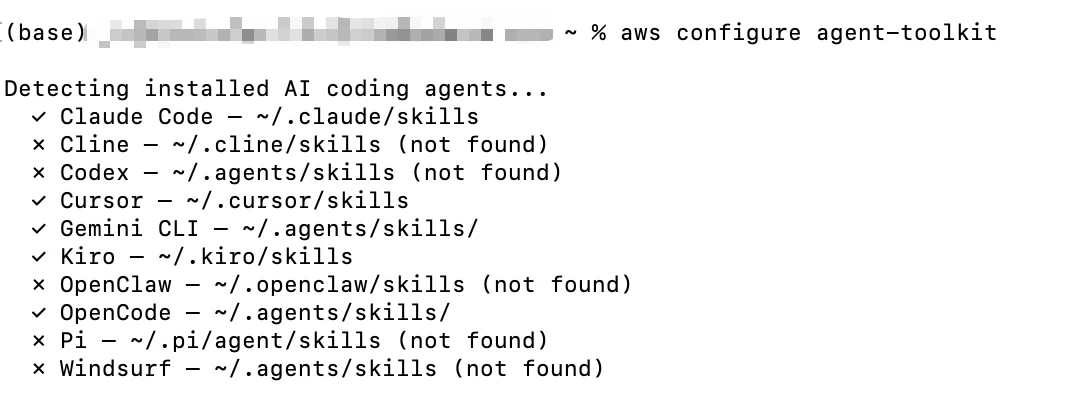
GitHub Copilot CLIでのインストール手順
ここからが本題です。
marketplaceの追加 → pluginのインストール → 動作確認の順に進めます。
Step 1:marketplaceの追加
pluginのmarketplaceを追加します。
/plugin marketplace add aws/agent-toolkit-for-aws

marketplaceが追加されたことを確認します。
/plugin marketplace list
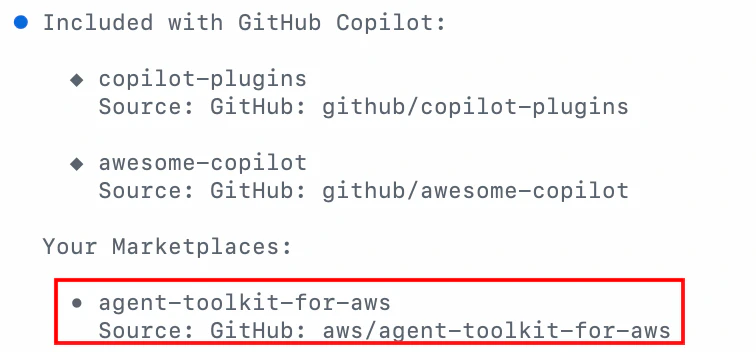
browseを実行することで、marketplaceに含まれるpluginの一覧が確認できます。
/plugin marketplace browse agent-toolkit-for-aws
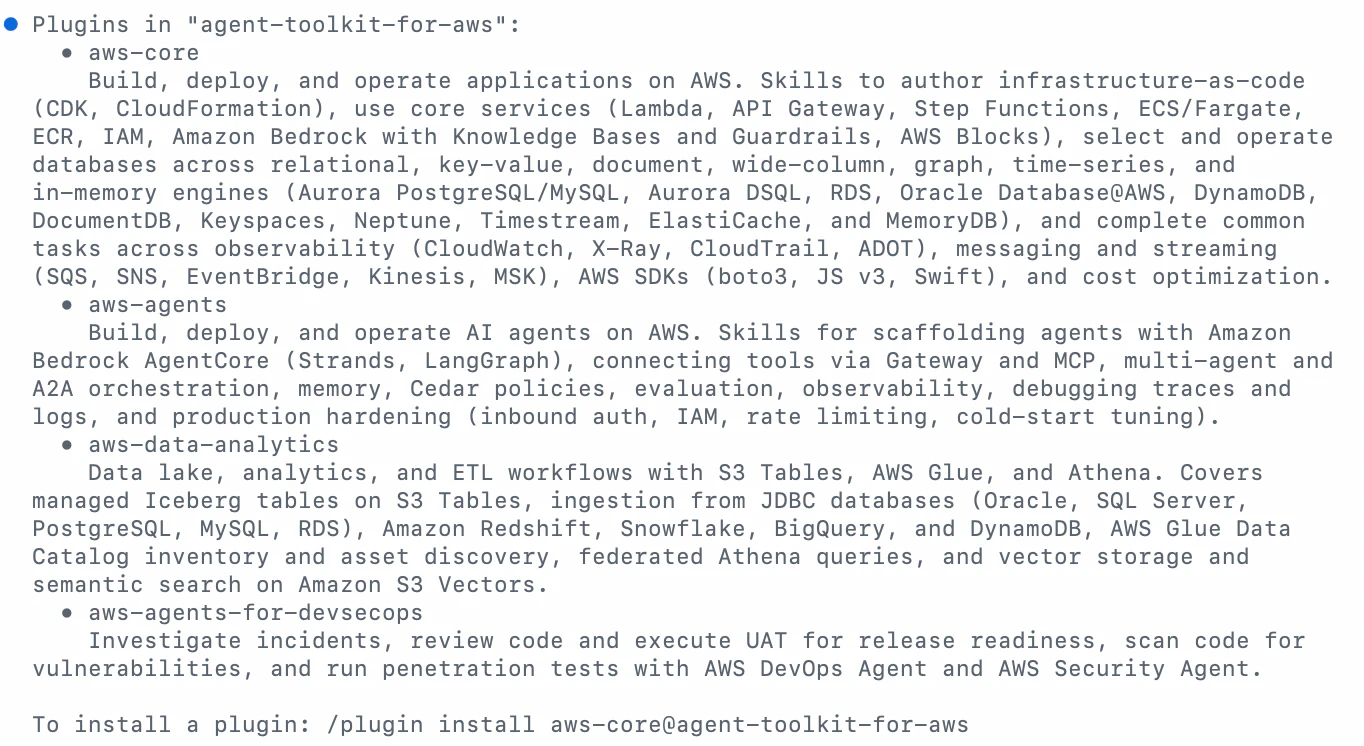
Step 2:pluginのインストール実施
追加したmarketplaceよりpluginをインストールします。
今回は、aws-coreを試してみます。
/plugin install aws-core@agent-toolkit-for-aws

Step 3:pluginのインストール確認
install済みのplugin一覧を確認します。
/plugin list

skillsがinstall済みであることを確認します。
/skills list
補足:pluginファイルの配置先
GitHub Copilot CLIでは、以下の~/.copilot/installed-pluginsフォルダ配下にplugin関連のファイルが配置されます。
Copilot CLI (コパイロット CLI) は、marketplace.json ディレクトリ内の.claude-plugin/ ファイルも検索します。
※GitHub Copilot CLI プラグイン リファレンス
GitHub Copilot CLIは.claude-pluginディレクトリ内のプラグイン定義を読み込む仕組みとなっているようですね。
agent-toolkit-for-aws/
└── aws-core/                          # プラグインルート(v1.1.0)
    ├── .claude-plugin/plugin.json     # Claude用プラグイン定義 ←これをロード
    ├── .codex-plugin/plugin.json      # Codex用プラグイン定義
    ├── .cursor-plugin/plugin.json     # Cursor用プラグイン定義
    ├── .mcp.json                      # MCPサーバー定義(aws-mcp)
    ├── README.md
    ├── hooks/                         # フックスクリプト
    │   ├── hooks.json
    │   └── secret-safety.py           # シークレット検出フック
    └── skills/                        # 20個のスキル
        ├── amazon-bedrock/
...
Step 4:動作確認(MCP・skills)
MCP
AWS MCPのツールsearch_documentationが実行され、回答が生成されました。
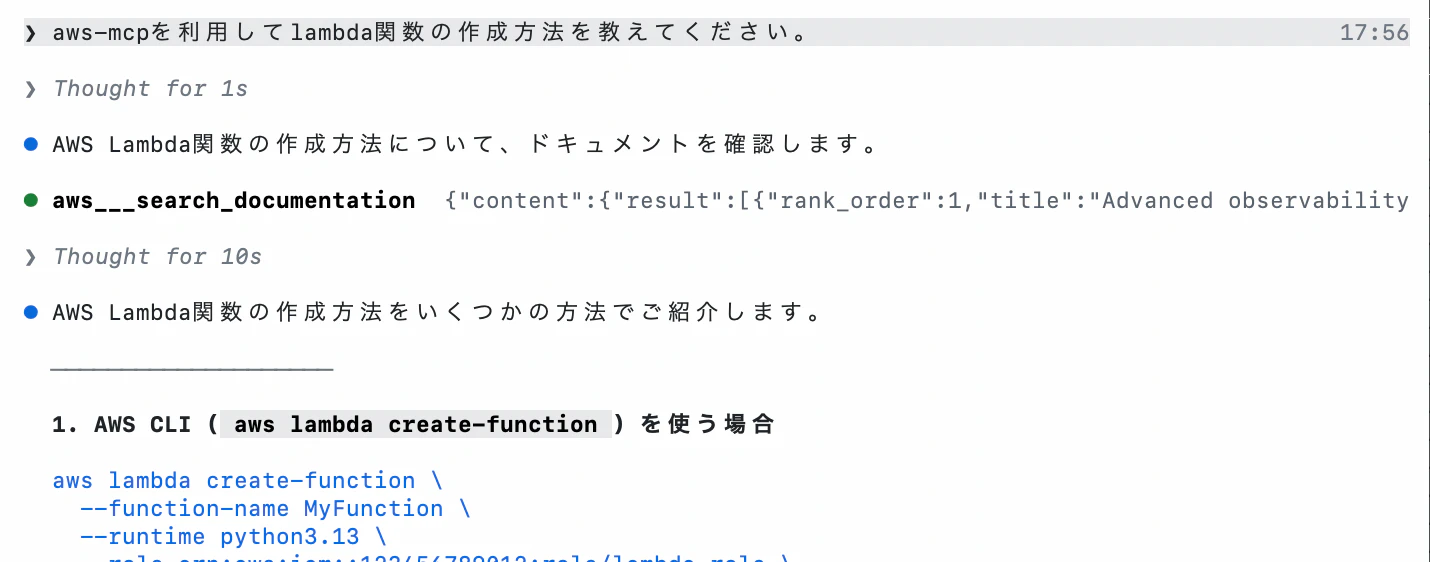
skills
今回は、aws-billing-and-cost-managementを試しました。
※テスト用の環境のため、内容はあまり参考にならないですが、現状のコスト分析から削減提案までうまく動作してそうですね。
/aws-core:aws-billing-and-cost-management 現在利用中のサービスのコスト最適化方針について教えてください。
Thought for 5s

コスト最適化のアドバイスをするために、まず現在の利用状況を確認します。

aws___run_script  {"status":"success","stdout":"","stderr":null,"return_value":{"current_date":..

Thought for 5s

aws___run_script  {"status": "success", "stdout": "", "stderr": null, "return_value": {"current..

Thought for 4s

aws___run_script  {"status": "success", "stdout": "", "stderr": null, "return_value": {"cost_op..

Thought for 5s

aws___run_script  {"status":"success","stdout":"","stderr":null,"return_value":{"current_month_..

Thought for 13s

現在のコスト状況サマリー

┌───────────────────────┬────────────┐
│ 項目                  │ 金額 (USD) │
├───────────────────────┼────────────┤
│ 今月の総額 (7/1-7/26) │ $0.005     │
├───────────────────────┼────────────┤
│ 先月の総額 (6/1-6/30) │ $0.007     │
├───────────────────────┼────────────┤
│ 前月比変化            │ -28.56%    │
└───────────────────────┴────────────┘

サービス別コスト (今月)

┌────────────────────────────────────────────────────────┬──────────┐
│ サービス                                               │ 金額     │
├────────────────────────────────────────────────────────┼──────────┤
│ Amazon Redshift                                        │ $0.00498 │
├────────────────────────────────────────────────────────┼──────────┤
│ Amazon S3                                              │ $0.00004 │
├────────────────────────────────────────────────────────┼──────────┤
│ その他 (Glue, Lambda, KMS, Step Functions, CloudWatch) │ $0.00    │
└────────────────────────────────────────────────────────┴──────────┘

────────────────────

コスト最適化方針

1. 現状の評価

現在の月額コストは約$0.005と非常に低く、Free Tierの範囲内で運用されています。Cost Optimization HubとCompute Optimizerにも具体的な最適化推奨事項は見つかりませんでした。

2. 主要サービス別の最適化アドバイス

Amazon Redshift (最大コスト要因)

• 現在のコストは$0.005/月と微小ですが、Redshiftは一般的に高コストになりやすいサービスです
• 推奨事項:
• Serverless Redshiftの使用を検討(ワークロードに応じて自動スケーリング)
• RA3インスタンスを使用している場合、スナップショットのS3ストレージコストに注意
• アイドル状態のクラスターがないか確認

Amazon S3

• 現状$0.00004/月と問題なし
• 推奨事項:
• 不要なオブジェクトのライフサイルポリシー設定
• ストレージクラスの最適化(Standard → Infrequent Access等)
6. まとめ
公式非対応のGitHub Copilot CLIでも、/plugin marketplaceコマンドを利用することでAWS Agent Toolkitが利用できました。
github copilotでは、別のツール(claude codeやcursor等)のpluginに関しても読み取ってくれるので、様々なpluginが利用できそうです。