
JavaScriptで年齢を計算するだけなら、
const age = currentYear - birthYear;
と書けばよさそうに見えます。
しかし、これだけでは正しい満年齢になりません。
たとえば、2000年8月11日生まれの人を2026年8月10日時点で計算すると、
2026 - 2000 = 26
ですが、まだ2026年の誕生日を迎えていないため、満年齢は25歳です。
実際に年齢計算を実装する場合は、
- 今年の誕生日を迎えたか
- 今日ではなく任意の基準日時点で何歳か
- 2月29日生まれをどう扱うか
- 「○歳○か月○日」をどう求めるか
- 次の誕生日をどう求めるか
- 次の誕生日までの日数をどう計算するか
といった点まで考える必要があります。
この記事では、JavaScriptで年齢計算を実装するときに整理したポイントをまとめます。
基本は「基準年 - 出生年」
満年齢のベースになる計算は単純です。
let age =
  referenceDate.getFullYear()
  - birthDate.getFullYear();
たとえば、
生年月日:2000年8月11日
基準日 :2026年8月12日
なら、
2026 - 2000 = 26
です。
この場合はすでに2026年の誕生日を迎えているので、満26歳になります。
しかし、基準日が、
2026年8月10日
なら、まだ誕生日を迎えていません。
そのため、単純な年の差から1歳引く必要があります。
今年の誕生日を迎えたか判定する
通常の誕生日であれば、基準日の「月・日」と生年月日の「月・日」を比較できます。
function calculateAge(birthDate, referenceDate) {
  let age =
    referenceDate.getFullYear()
    - birthDate.getFullYear();

  const birthMonth = birthDate.getMonth();
  const birthDay = birthDate.getDate();

  const referenceMonth = referenceDate.getMonth();
  const referenceDay = referenceDate.getDate();

  const beforeBirthday =
    referenceMonth < birthMonth ||
    (
      referenceMonth === birthMonth &&
      referenceDay < birthDay
    );

  if (beforeBirthday) {
    age--;
  }

  return age;
}
たとえば、
const birthDate = new Date(2000, 7, 11);
const referenceDate = new Date(2026, 7, 10);

console.log(
  calculateAge(birthDate, referenceDate)
);
結果は、
25
です。
基準日を誕生日当日にすると、
const birthDate = new Date(2000, 7, 11);
const referenceDate = new Date(2026, 7, 11);

console.log(
  calculateAge(birthDate, referenceDate)
);
結果は、
26
になります。
「今日」ではなく「基準日」を引数にする
年齢計算を作るとき、
const today = new Date();
を計算関数の内部で直接使う方法もあります。
ただ、計算ロジック自体を「今日」に依存させない方が再利用しやすくなります。
function calculateAge(
  birthDate,
  referenceDate
) {
  // 年齢計算
}
この形なら、
今日時点の年齢
過去のある日時点の年齢
将来のある日時点の年齢
を同じ関数で計算できます。
今日時点で計算したい場合だけ、
const referenceDate = new Date();
を渡せば十分です。
たとえば、
const birthDate = new Date(2000, 7, 11);

const ageToday = calculateAge(
  birthDate,
  new Date()
);
という使い方ができます。
生年月日より前の基準日はエラーにする
入力値のチェックも必要です。
たとえば、
生年月日:2000年8月11日
基準日 :1999年1月1日
という組み合わせでは、通常の年齢として扱えません。
そのため、
if (referenceDate < birthDate) {
  throw new Error(
    "基準日は生年月日以降を指定してください"
  );
}
のようなチェックを入れておきます。
ただし、Date には時刻も含まれます。
日付だけを比較したい場合は、時・分・秒・ミリ秒をそろえておく方法があります。
function normalizeDate(date) {
  const result = new Date(date);

  result.setHours(0, 0, 0, 0);

  return result;
}
そして、
const birthDate =
  normalizeDate(originalBirthDate);

const referenceDate =
  normalizeDate(originalReferenceDate);
としてから比較します。
input type="date" の値をDateに変換する
HTMLでは、生年月日や基準日の入力に、
<input type="date" id="birth-date">
を使うことができます。
取得できる値は、
2000-08-11
のような形式です。
これを、
new Date("2000-08-11");
とすることもできますが、日付だけを扱う用途では年月日を分解してローカル日付として生成しておくと処理の意図が明確になります。
function parseLocalDate(value) {
  const [year, month, day] =
    value
      .split("-")
      .map(Number);

  return new Date(
    year,
    month - 1,
    day
  );
}
使い方は、
const birthDate =
  parseLocalDate("2000-08-11");
です。
JavaScriptの Date は月が0始まりなので、
month - 1
としている点に注意します。
0  = 1月
1  = 2月
...
11 = 12月
となります。
2月29日生まれをどう扱うか
年齢計算で特に考える必要があるのが、2月29日生まれです。
たとえば、
2000年2月29日生まれ
の場合、2026年には2月29日がありません。
ここでは一例として、
2月29日がない平年では、3月1日を誕生日相当日として扱う
という仕様にします。
この場合、
2026年2月28日
時点ではまだ誕生日相当日前なので年齢は増えず、
2026年3月1日
になった時点で1歳増える、という扱いになります。
これはJavaScriptの問題というより、年齢計算ツールとしてどのルールを採用するかという仕様の問題です。
その年の誕生日相当日を作る
2月29日を含めて処理するため、その年の「誕生日相当日」を返す関数を用意します。
function getBirthdayInYear(
  birthDate,
  year
) {
  const month = birthDate.getMonth();
  const day = birthDate.getDate();

  const isFeb29 =
    month === 1 &&
    day === 29;

  if (isFeb29) {
    const leapDay =
      new Date(year, 1, 29);

    const isLeapYear =
      leapDay.getMonth() === 1;

    if (!isLeapYear) {
      return new Date(
        year,
        2,
        1
      );
    }
  }

  return new Date(
    year,
    month,
    day
  );
}
2月29日を、
new Date(year, 1, 29);
として生成します。
うるう年であれば、そのまま2月29日になります。
平年の場合は存在しない2月29日が自動的に3月へ繰り越されるため、
leapDay.getMonth() === 1
で本当に2月になっているか確認できます。
誕生日相当日を使って満年齢を計算する
この関数を使えば、通常の誕生日と2月29日生まれをまとめて扱えます。
function calculateAge(
  birthDate,
  referenceDate
) {
  const birth =
    normalizeDate(birthDate);

  const reference =
    normalizeDate(referenceDate);

  if (reference < birth) {
    throw new Error(
      "基準日は生年月日以降を指定してください"
    );
  }

  let age =
    reference.getFullYear()
    - birth.getFullYear();

  const birthdayThisYear =
    getBirthdayInYear(
      birth,
      reference.getFullYear()
    );

  if (
    reference <
    birthdayThisYear
  ) {
    age--;
  }

  return age;
}
通常の生年月日で確認します。
const birthDate =
  new Date(2000, 7, 11);

console.log(
  calculateAge(
    birthDate,
    new Date(2026, 7, 10)
  )
);
結果は、
25
です。
誕生日当日なら、
console.log(
  calculateAge(
    birthDate,
    new Date(2026, 7, 11)
  )
);
結果は、
26
になります。
2月29日生まれを確認する
次に、
2000年2月29日生まれ
を確認します。
const birthDate =
  new Date(2000, 1, 29);
平年の2月28日時点です。
console.log(
  calculateAge(
    birthDate,
    new Date(2026, 1, 28)
  )
);
今回の仕様では、3月1日を誕生日相当日としているため、この時点ではまだ年齢は増えません。
3月1日にすると、
console.log(
  calculateAge(
    birthDate,
    new Date(2026, 2, 1)
  )
);
誕生日相当日に到達したものとして年齢が1つ増えます。
「○歳○か月○日」も表示したい
満年齢だけでなく、
26歳3か月5日
のように詳しい年齢を表示したい場合があります。
ここで単純に、
経過日数 ÷ 365
としてはいけません。
月の日数は、
28日
29日
30日
31日
と異なり、うるう年もあるためです。
基本的にはカレンダー上の、
年
月
日
の差として考えます。
年・月・日の差を計算する
単純化した例では次のように実装できます。
function calculateDetailedAge(
  birthDate,
  referenceDate
) {
  let years =
    referenceDate.getFullYear()
    - birthDate.getFullYear();

  let months =
    referenceDate.getMonth()
    - birthDate.getMonth();

  let days =
    referenceDate.getDate()
    - birthDate.getDate();

  if (days < 0) {
    const previousMonthLastDay =
      new Date(
        referenceDate.getFullYear(),
        referenceDate.getMonth(),
        0
      ).getDate();

    days += previousMonthLastDay;
    months--;
  }

  if (months < 0) {
    months += 12;
    years--;
  }

  return {
    years,
    months,
    days,
  };
}
使用例です。
const birthDate =
  new Date(2000, 7, 11);

const referenceDate =
  new Date(2026, 11, 20);

console.log(
  calculateDetailedAge(
    birthDate,
    referenceDate
  )
);
結果をオブジェクトで返すようにしておけば、
{
  years: 26,
  months: 4,
  days: 9
}
のような値をUI側で、
26歳4か月9日
として表示できます。
ただし、月末や2月29日を含むケースでは「○歳○か月○日」をどのように定義するかによって結果が変わることがあります。
この部分についても、サービス側で計算仕様を決めておく必要があります。
「0日」で前月の末日を取得できる
先ほどのコードでは、
new Date(
  referenceDate.getFullYear(),
  referenceDate.getMonth(),
  0
)
という処理を使っています。
JavaScriptの Date では、日の部分に 0 を指定すると前月の最終日になります。
たとえば、
const date =
  new Date(2026, 2, 0);

console.log(date);
は、2026年2月の最終日を表します。
そのため、
function getLastDayOfPreviousMonth(
  year,
  month
) {
  return new Date(
    year,
    month,
    0
  ).getDate();
}
のようにすれば、前月の日数を取得できます。
日付計算では便利な書き方です。
次の誕生日を計算する
年齢と一緒に「次の誕生日」を表示したい場合もあります。
今年の誕生日相当日を取得し、すでに過ぎていれば翌年の誕生日を取得します。
function getNextBirthday(
  birthDate,
  referenceDate
) {
  let year =
    referenceDate.getFullYear();

  let birthday =
    getBirthdayInYear(
      birthDate,
      year
    );

  if (birthday < referenceDate) {
    year++;

    birthday =
      getBirthdayInYear(
        birthDate,
        year
      );
  }

  return birthday;
}
たとえば、
const birthDate =
  new Date(2000, 7, 11);

const referenceDate =
  new Date(2026, 7, 12);

console.log(
  getNextBirthday(
    birthDate,
    referenceDate
  )
);
なら、次の誕生日は2027年8月11日になります。
なお、
誕生日当日を「次の誕生日」とする
のか、
誕生日当日はすでに到達済みとして翌年を返す
のかは仕様次第です。
比較条件を birthday < referenceDate にするか birthday <= referenceDate 相当の判定にするかで調整できます。
次の誕生日までの日数を求める
次の誕生日が分かれば、基準日から何日あるかも計算できます。
ただし、「日付」の差を求めたいだけなのにローカル時刻同士のミリ秒差をそのまま使うと、タイムゾーンやDSTを考慮する地域では扱いに注意が必要です。
日付部分だけをUTC値へ変換する方法があります。
function dateToUTCValue(date) {
  return Date.UTC(
    date.getFullYear(),
    date.getMonth(),
    date.getDate()
  );
}
日数差を求めます。
function differenceInDays(
  from,
  to
) {
  const milliseconds =
    dateToUTCValue(to)
    - dateToUTCValue(from);

  return Math.round(
    milliseconds /
    (1000 * 60 * 60 * 24)
  );
}
使用例です。
const nextBirthday =
  getNextBirthday(
    birthDate,
    referenceDate
  );

const daysUntilBirthday =
  differenceInDays(
    referenceDate,
    nextBirthday
  );

console.log(daysUntilBirthday);
これで、
基準日
↓
次の誕生日
までの日数を取得できます。
和暦表示はIntl.DateTimeFormatを利用できる
日本向けの年齢計算では、生年月日を、
1990年5月10日
平成2年5月10日
の両方で表示したいことがあります。
表示だけであれば、元号の開始日をすべて自前で管理しなくても Intl.DateTimeFormat を利用できます。
const formatter =
  new Intl.DateTimeFormat(
    "ja-JP-u-ca-japanese",
    {
      era: "long",
      year: "numeric",
      month: "long",
      day: "numeric",
    }
  );
使い方は、
const date =
  new Date(1990, 4, 10);

console.log(
  formatter.format(date)
);
です。
年齢計算のロジックと和暦表示の処理は分離しておくと、後から表示形式を変更しやすくなります。
計算ロジックとDOM操作を分ける
実際のWebツールでは、
入力
↓
計算
↓
画面表示
という処理になります。
ここで計算関数の中から直接DOMを書き換えるよりも、計算結果をオブジェクトとして返す方が扱いやすくなります。
たとえば、
const result = {
  age: 26,
  years: 26,
  months: 0,
  days: 1,
  nextBirthday: new Date(2027, 7, 11),
  daysUntilBirthday: 364,
};
のようなデータを作ります。
UI側で、
満26歳
26歳0か月1日
次の誕生日:2027年8月11日
次の誕生日まで:364日
のように表示します。
こうしておけば、計算処理とHTML表示をそれぞれ変更しやすくなります。
テストしておきたいケース
年齢計算では、通常の日付だけ確認すると境界条件のバグを見逃しやすくなります。
最低限、次のようなケースは確認しておきたいところです。
誕生日前日
生年月日:2000-08-11
基準日 :2026-08-10

満25歳
誕生日当日
生年月日:2000-08-11
基準日 :2026-08-11

満26歳
誕生日翌日
生年月日:2000-08-11
基準日 :2026-08-12

満26歳
年をまたぐケース
生年月日:2000-12-31
基準日 :2026-01-01

満25歳
2月29日生まれ・平年2月28日
生年月日:2000-02-29
基準日 :2026-02-28
今回の仕様では、まだ誕生日相当日前です。
2月29日生まれ・平年3月1日
生年月日:2000-02-29
基準日 :2026-03-01
今回の仕様では、誕生日相当日です。
基準日と生年月日が同じ
生年月日:2026-08-12
基準日 :2026-08-12

満0歳
基準日が生年月日より前
生年月日:2026-08-12
基準日 :2026-08-11

エラー
特に、
- 誕生日前日
- 誕生日当日
- 年末年始
- 2月29日
- 月末
あたりは必ず確認しておくと安心です。
まとめ
JavaScriptで満年齢を求める基本は、
基準年 - 出生年
です。
ただし、それだけでは誕生日前の年齢を正しく計算できません。
実際に年齢計算を実装する場合は、
- その年の誕生日を迎えたか
- 任意の基準日
- 生年月日より前の日付
- 2月29日生まれ
- 「○歳○か月○日」
- 次の誕生日
- 誕生日までの日数
- 西暦・和暦表示
なども考える必要があります。
特に2月29日の扱いは、JavaScriptの処理だけで決めるのではなく、
このサービスでは何日を誕生日相当日として扱うのか
という仕様を先に決めることが重要です。
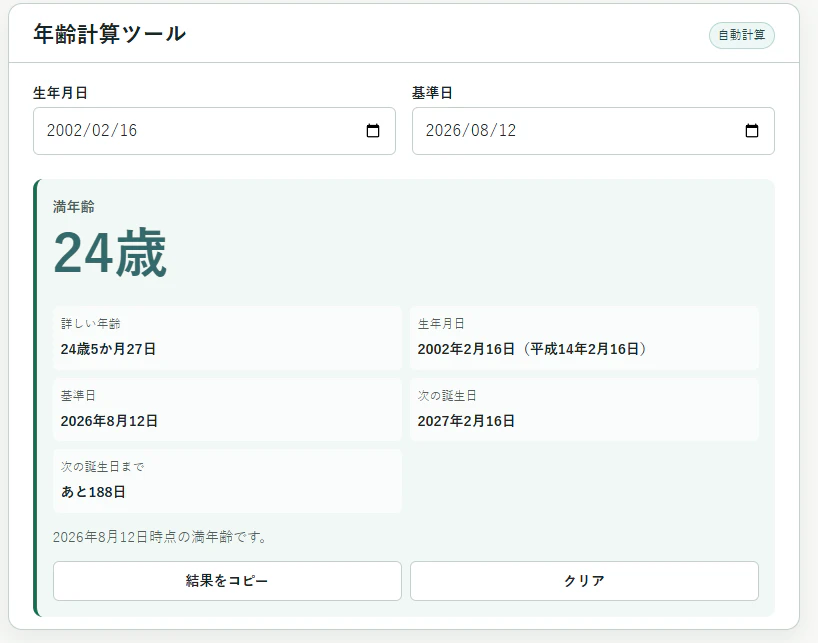
今回、この考え方を使って、生年月日と基準日から満年齢や詳しい年齢、次の誕生日などを確認できる年齢計算ツールを実装しました。