
Unityでアニメーションを使うとき、こんな経験ありませんか?
- 背景に簡単なループアニメを設定したいだけなのに…
→AnimationClip作って、わざわざ1対1でAnimatorControllerも作らなきゃいけないのメンドすぎて死ぬぅ -
Playable APIで頑張ってAnimatorControllerを回避したのに…
→ 結局AnimationClipを編集しようと思ったらまたAnimatorControllerが必要になって草
その煩わしさ、実は簡単に解決できます。
答えは → IAnimationClipSource です!
公式ドキュメント
超絶簡単な実装例
SimpleAnimation.cs
public class SimpleAnimation : MonoBehaviour,IAnimationClipSource
{
    //Animationウィンドウに対応させたいアニメーションクリップ
    [SerializeField]
    AnimationClip[] clips;

    void IAnimationClipSource.GetAnimationClips(List<AnimationClip> results)
    {
        foreach(var clip in clips)
            results.Add(clip);
    }
}
使い方は超簡単
任意のMonoBehaviourにIAnimationClipSourceを継承し、GetAnimationClips()を実装。
引数で渡されるList<AnimationClip>に好きなAnimationClipをAddするだけです。
あとはこのスクリプトとAnimatorを同じGameObjectにアタッチすればこの通り。
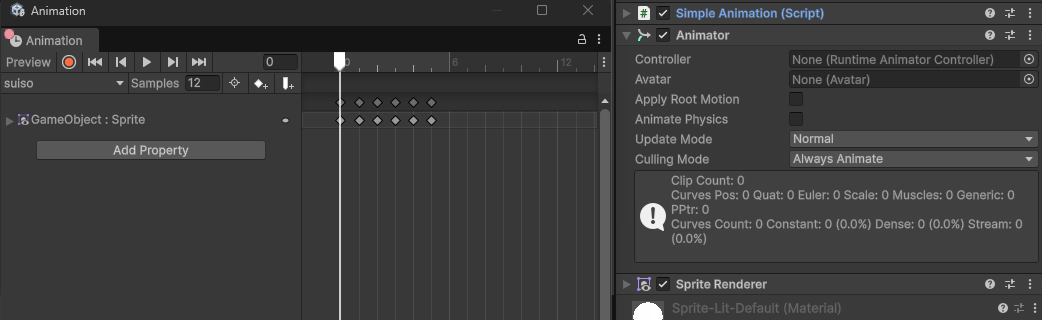
Animatorに対してAnimatorControllerを設定しなくてもAnimationWindowで先のスクリプトで受け渡したAnimationClipを選択、編集、プレビュー可能になります。
Playable APIを用いたAnimationの再生の実装については既に記事が沢山存在するためここでは説明しません。
それではよきUnityライフを。