0
0

Delete article

Deleted articles cannot be recovered.

Draft of this article would be also deleted.

Are you sure you want to delete this article?

VSCodeでブランチを切り替える方法とPullする方法

0
Posted at

はじめに

Git の操作を VSCode 上で完結させたい場合、ブランチ切り替えや Pull はステータスバーやコマンドパレットから簡単に実行できます。

1. ブランチを切り替える

VSCode では、ウィンドウ左下に現在のブランチ名が表示されます。
ここをクリックすることで、ブランチ一覧を開き、目的のブランチへ切り替えられます。

下の画像では、左下に表示されているブランチ名をクリックした状態です。

ブランチ切り替え

表示された一覧から、チェックアウトしたいブランチ名を選択すれば切り替えが完了します。

2. リモートリポジトリからPullする

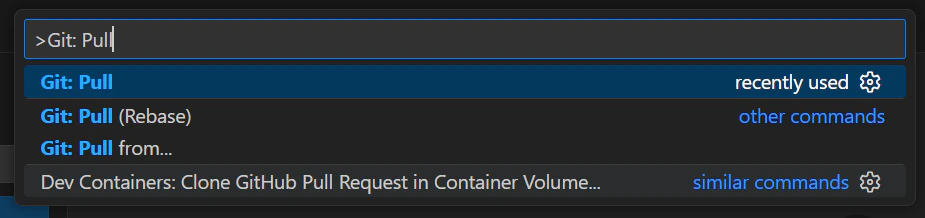
ブランチを最新状態に更新したい場合は、コマンドパレットから Pull を実行します。

手順は次のとおりです。

  1. Ctrl + Shift + P を押してコマンドパレットを開く
  2. 「Git: Pull」と入力
  3. 表示された「Git: Pull」を選択

Pull 実行

環境情報

  • VSCode Version: 1.106.2 (user setup)
  • git version 2.43.0
0
0
0

Register as a new user and use Qiita more conveniently

  1. You get articles that match your needs
  2. You can efficiently read back useful information
  3. You can use dark theme
What you can do with signing up
0
0

Delete article

Deleted articles cannot be recovered.

Draft of this article would be also deleted.

Are you sure you want to delete this article?