0
0

Delete article

Deleted articles cannot be recovered.

Draft of this article would be also deleted.

Are you sure you want to delete this article?

指定桁で折り返した状態でコピー&ペーストしたい

0
Posted at

Question

サクラエディタには折り返し機能がありますが、Ctrl+Vでコピーすると、折り返しが解除された状態で、ペーストされます。

たとえば、以下のようなテキストがあるとします。

image.png

これをCtrl+Vでコピーし、別のテキストエディタにペーストすると、折り返しが解除されていることがわかります。

image.png

では、折り返しを解除せずにペーストするにはどうすればよいでしょうか?

Answer

「折り返し位置に改行を付けてコピー」機能を利用します。

対象のテキストを選択状態にする → 右クリック → 折り返し位置に改行を付けてコピー(H)
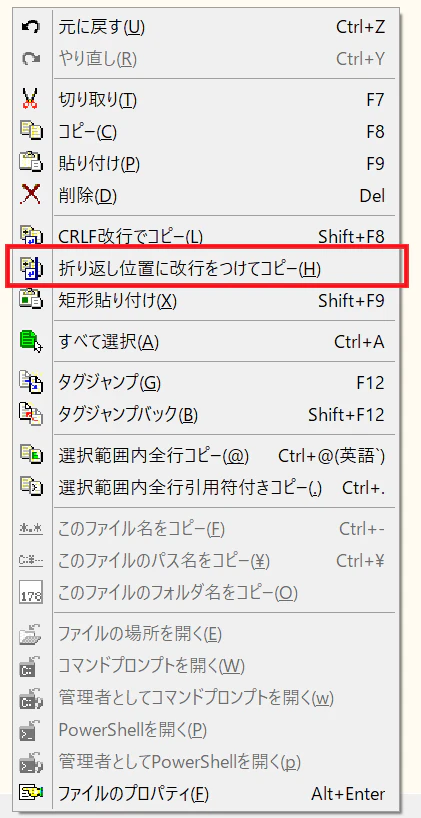
image.png

試してみましょう。以下のようなテキストがあるとします。

image.png

これを全選択し、「折り返し位置に改行を付けてコピー」を選択。別のテキストエディタにCtrl+Vでペーストすると、指定桁で折り返した状態が保持されていることがわかります。
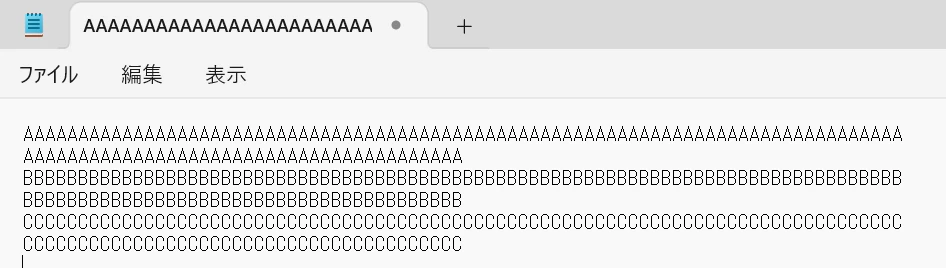
image.png

0
0
0

Register as a new user and use Qiita more conveniently

  1. You get articles that match your needs
  2. You can efficiently read back useful information
  3. You can use dark theme
What you can do with signing up
0
0

Delete article

Deleted articles cannot be recovered.

Draft of this article would be also deleted.

Are you sure you want to delete this article?