
MongoDB (Basic)
- MongoDB Explanation
- Data Model Design
- MongoDB Data types
- Run the MongoDB
- MongoDB method
- Set Up a Replica Set
- Backup & Restore
- Deployment
- Exercise
- Index
- MongoDB - Java
参照サイト
MongoDB Explanation
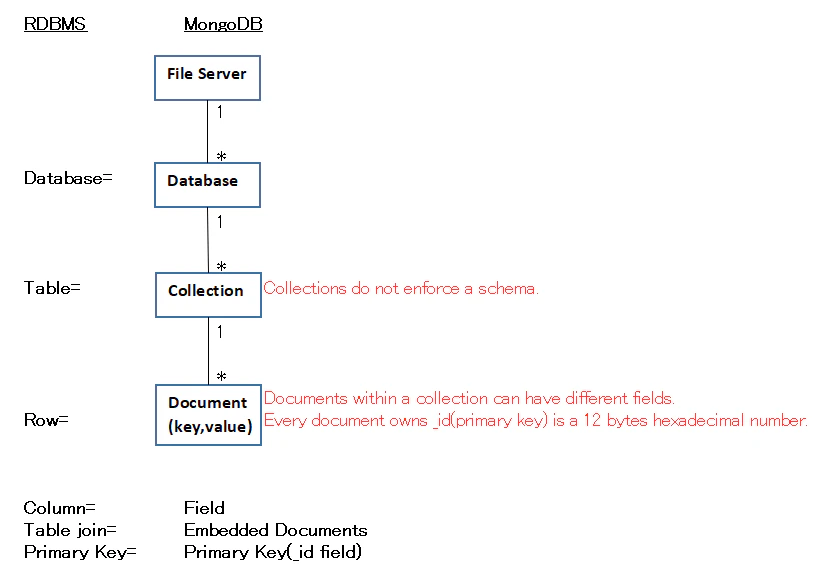
Primary key(_id)
| _id(12 bytes) eg. 7df78ad8902c |
Description |
|---|---|
| first 4 bytes | current timestamp |
| next 3 bytes | machine id |
| next 2 bytes | process id of MongoDB server |
| next 3 bytes | simple incremental VALUE |
Sample Document
{
   _id: ObjectId(7df78ad8902c)
   title: 'MongoDB Overview',
   description: 'MongoDB is no sql database',
   by: 'tutorials point',
   url: 'http://www.tutorialspoint.com',
   tags: ['mongodb', 'database', 'NoSQL'],
   likes: 100,
   comments: [
      {
         user:'user1',
         message: 'My first comment',
         dateCreated: new Date(2011,1,20,2,15),
         like: 0
      },
      {
         user:'user2',
         message: 'My second comments',
         dateCreated: new Date(2011,1,25,7,45),
         like: 5
      }
   ]
}
Data Model Design
- MongoDB provides two types of data models:
Embedded data modelandNormalized data model.
Embedded data model
- In this model, you can have (embed) all the related data in a single document, it is also known as de-normalized data model.
- Following sample Embedded Document show that getting the details of employees in three different documents namely, Personal_details, Contact and, Address, you can embed all the three documents in a single one/
{
	_id: ,
	Emp_ID: "10025AE336"
	Personal_details:{
		First_Name: "Radhika",
		Last_Name: "Sharma",
		Date_Of_Birth: "1995-09-26"
	},
	Contact: {
		e-mail: "radhika_sharma.123@gmail.com",
		phone: "9848022338"
	},
	Address: {
		city: "Hyderabad",
		Area: "Madapur",
		State: "Telangana"
	}
}
Normalized Data Model
- In this model, you can refer the sub documents in the original document, using references.
- For example, you can re-write the above document in the normalized model as:
Employee:
{
	_id: <ObjectId101>,
	Emp_ID: "10025AE336"
}
Personal_details:
{
	_id: <ObjectId102>,
	empDocID: " ObjectId101",
	First_Name: "Radhika",
	Last_Name: "Sharma",
	Date_Of_Birth: "1995-09-26"
}
Contact:
{
	_id: <ObjectId103>,
	empDocID: " ObjectId101",
	e-mail: "radhika_sharma.123@gmail.com",
	phone: "9848022338"
}
Address:
{
	_id: <ObjectId104>,
	empDocID: " ObjectId101",
	city: "Hyderabad",
	Area: "Madapur",
	State: "Telangana"
}
MongoDB Data types
| Type | Description |
|---|---|
| String | This is the most commonly used datatype to store the data. String in MongoDB must be UTF-8 valid. |
| Integer | This type is used to store a numerical value. Integer can be 32 bit or 64 bit depending upon your server. |
| Boolean | This type is used to store a boolean (true/ false) value. |
| Double | This type is used to store floating point values. |
| Min/ Max keys | This type is used to compare a value against the lowest and highest BSON elements. |
| Arrays | This type is used to store arrays or list or multiple values into one key. |
| Timestamp | ctimestamp. This can be handy for recording when a document has been modified or added. |
| Object | This datatype is used for embedded documents. |
| Null | This type is used to store a Null value. |
| Symbol | This datatype is used identically to a string; however, it's generally reserved for languages that use a specific symbol type. |
| Date | This datatype is used to store the current date or time in UNIX time format. You can specify your own date time by creating object of Date and passing day, month, year into it. |
| Object ID | This datatype is used to store the document’s ID. |
| Binary data | This datatype is used to store binary data. |
| Code | This datatype is used to store JavaScript code into the document. |
| Regular expression | This datatype is used to store regular expression. |
Run the MongoDB
> open another command prompt
> go to mongoDB bin folder
> mongo.exe
MongoDB method
Create/Drop Database
- In MongoDB default database is test. If you didn't create any database, then collections will be stored in test database.
| method | Description | Example |
|---|---|---|
| use DATABASE_NAME | is used to create database. The command will create a new database if it doesn't exist, otherwise it will return the existing database. Your created database is not present in list(check using show dbscmd) when created database is new one.To display database, you need to insert at least one document into it. |
>use mydb switched to db mydb |
| db | check currently selected database | >db mydb ←db name |
| show dbs | check databases list | >show dbs local 0.78125GB test 0.23012GB |
| db.dropDatabase() | This will delete the selected database. If you have not selected any database, then it will delete default 'test' database. |
>use mydb switched to db mydb >db.dropDatabase() >{ "dropped" : "mydb", "ok" : 1 } > |
Create/Drop Collection
| method | Description | Example |
|---|---|---|
| db.createCollection(name, options) | create collection [name] String : Name of the collection to be created. [options] Document : (Optional) Specify options about memory size and indexing. While inserting the document, MongoDB first checks size field of capped collection, then it checks max field. |
>use test switched to db test >db.createCollection("mycollection") { "ok" : 1 } > |
| show collections | check created collection | >show collections mycollection system.indexes |
| db.COLLECTION_NAME.drop() | Drop a collection. drop() method will return true, if the selected collection is dropped successfully, otherwise it will return false. |
First, check the available collections into your database mydb and then drop collection. >use mydb switched to db mydb >show collections mycollection system.indexes tutorialspoint >db.mycollection.drop() true >show collections system.indexes tutorialspoint > |
Options list
| Field | Type | Description |
|---|---|---|
| capped | Boolean | (Optional) If true, enables a capped collection. Capped collection is a fixed size collection that automatically overwrites its oldest entries when it reaches its maximum size. If you specify true, you need to specify size parameter also. |
| autoIndexId | Boolean | (Optional) If true, automatically create index on _id field.s Default value is false. |
| size | number | (Optional) Specifies a maximum size in bytes for a capped collection. If capped is true, then you need to specify this field also. |
| max | number | (Optional) Specifies the maximum number of documents allowed in the capped collection. |
# Create 'mycol' Collection with few important options
> db.createCollection("mycol", { capped : true, autoIndexID : true, size : 6142800, max : 10000 } ){
"ok" : 0,
"errmsg" : "BSON field 'create.autoIndexID' is an unknown field.",
"code" : 40415,
"codeName" : "Location40415"
}
>
Insert Document
| method | Description | Example |
|---|---|---|
| db.COLLECTION_NAME.insert(document) or db.COLLECTION_NAME.save(document) |
[insert() or save()] : Create document (can insert 1 or more doc). If the collection doesn't exist in the database, then MongoDB will create this collection and then insert a document into it. In the inserted document, if we don't specify the _id parameter, then MongoDB assigns a unique ObjectId for this document. If you specify _id then it will replace whole data of document containing _id. _id: ObjectId(4 bytes timestamp, 3 bytes machine id, 2 bytes process id, 3 bytes incrementer) |
db.tutorialspoint.insert({"name":"tutorials point"}) Insert 1 document to 'tuorialspoint' collection. (insert data) |
| db.COLLECTION_NAME.insertOne(document) | insert only one document into a collection | Refer next |
| db.COLLECTION_NAME.insertMany(document) | Insert multiple documents | Refer next |
Update Document
| method | Description | Example |
|---|---|---|
| db.COLLECTION_NAME.update( SELECTION_CRITERIA, UPDATED_DATA) db.COLLECTION_NAME.update( SELECTION_CRITERIA, UPDATED_DATA, {multi:true}) |
Updates the values in the existing document. By default, MongoDB will update only a single document. To update multiple documents, you need to set a parameter 'multi' to true. |
# Update title value to 'New MongoDB Tutorial' >db.mycol.update({'title':'MongoDB Overview'},{$set:{'title':'New MongoDB Tutorial'}}) WriteResult({ "nMatched" : 1, "nUpserted" : 0, "nModified" : 1 }) Example |
| db.COLLECTION_NAME.save( {_id:ObjectId(),NEW_DATA}) |
Replaces the existing document | >db.mycol.save({"_id" : ObjectId("507f191e810c19729de860ea"), "title":"Tutorials Point New Topic","by":"Tutorials Point"}) WriteResult({"nMatched" : 0,"nUpserted" : 1,"nModified" : 0,"_id" : ObjectId("507f191e810c19729de860ea")}) Example |
| db.COLLECTION_NAME.findOneAndUpdate( SELECTIOIN_CRITERIA, UPDATED_DATA) |
Updates the values in the existing document. | > db.empDetails.findOneAndUpdate({First_Name: 'Radhika'},{ $set: { Age: '30',e_mail: 'radhika_newemail@gmail.com'}}) Example |
| db.COLLECTION_NAME.findAndModify(...) | Find and modify | Example |
db.COLLECTION_NAME.updateOne(<filter>,<update>) |
Updates a single document which matches the given filter. | >db.empDetails.updateOne({First_Name: 'Radhika'},{ $set: { Age: '30',e_mail: 'radhika_newemail@gmail.com'}}) { "acknowledged" : true, "matchedCount" : 1, "modifiedCount" : 0 }> Example |
| db.COLLECTION_NAME.update(, ) | Updates all the documents that matches the given filter. | > db.empDetails.updateMany({Age:{ $gt: "25" }}, { $set: { Age: '00'}}) { "acknowledged" : true, "matchedCount" : 2, "modifiedCount" : 2 } |
Delete Document
| method | Description | Example |
|---|---|---|
| db.COLLECTION_NAME.remove( DELETION_CRITERIA ) |
Remove a document from the collection. deletion criteria : (Optional) deletion criteria according to documents will be removed. |
>db.mycol.remove({'title':'MongoDB Overview'}) WriteResult({"nRemoved" : 1}) Example |
| db.COLLECTION_NAME.remove( DELETION_CRITERIA, 1 ) |
Remove Only First One. If there are multiple records and you want to delete only the first record, then set justOne parameter in remove() method.justOne : (Optional) if set to true or 1, then remove only one document. |
- |
| db.COLLECTION_NAME.remove( {} ) |
Remove All Documents. If you don't specify deletion criteria, then MongoDB will delete whole documents from the collection. This is equivalent of SQL's truncate command. |
> db.mycol.remove({}) WriteResult({ "nRemoved" : 2 }) > db.mycol.find() > |
Query Document & Projection & Limit & Skip & Sorting
-
Projectionmeans selecting only the necessary data rather than selecting whole of the data of a document. - If a document has 5 fields and you need to show only 3, then select only 3 fields from them.
-
Second optional parameter of find() methodthat is list of fields that you want to retrieve. - When you execute find() method, then it displays all fields of a document.
- To limit this, you need to set a list of fields with value 1 or 0.
1is used to show the field
0is used to hide the fields.
note:_id field is always displayed while executing find() method, if you don't want this field, then you need to set it as 0.
| Operation | Syntax | Example | RDBMS Equivalent |
|---|---|---|---|
| Search : Display all the documents in a non-structured way. | db.COLLECTION_NAME.find() | > db.mycol.find() Refer Example |
- |
| Search : Display the results in a formatted way. | db.COLLECTION_NAME.find().pretty() | > db.mycol.find().pretty() Refer Example |
- |
| Search : Returns only one document | db.COLLECTIONNAME.findOne() or db.COLLECTIONNAME.findOne(SEARCH_KEY) |
> db.mycol.findOne({title: "MongoDB Overview"}) Refer Example |
- |
| Search : show/hide field setting | db.COLLECTION_NAME.find({},{KEY:1}) | > db.mycol.find({},{"title":1,_id:0}) Refer Example |
SELECT title FROM mycol |
| To limit the records. If don't specify the number argument, it will display all documents from the collection. |
db.COLLECTION_NAME.find() .limit(NUMBER) |
> db.mycol.find({},{"title":1,_id:0}) .limit(2) Refer Example |
SELECT title FROM mycol LIMIT 2 |
| Skip the number of documents. Default : 0 |
db.COLLECTION_NAME.find() .limit(NUMBER) .skip(NUMBER) |
> db.mycol.find({},{"title":1,_id:0}) .limit(1) .skip(1) Result : Get 1Record of second row Refer Example |
SELECT title FROM mycol LIMIT 1 OFFSET 2 |
| Sorting 1 : ascending -1 : descending If not set number, will do ascending |
db.COLLECTION_NAME.find() .sort({KEY:1}) |
> db.mycol.find({},{"title":1,_id:0}) .sort({"title":-1}) Refer Example |
SELECT title FROM mycol ORDER desc |
| Equality | {<key>:{$eg;<value>}} |
db.mycol.find({"by":"tutorials point"}).pretty() | where by = 'tutorials point' |
| Less Than | {<key>:{$lt:<value>}} |
db.mycol.find({"likes":{$lt:50}}).pretty() | where likes < 50 |
| Less Than Equals | {<key>:{$lte:<value>}} |
db.mycol.find({"likes":{$lte:50}}).pretty() | where likes <= 50 |
| Greater Than | {<key>:{$gt:<value>}} |
db.mycol.find({"likes":{$gt:50}}).pretty() | where likes > 50 |
| Greater Than Equals | {<key>:{$gte:<value>}} |
db.mycol.find({"likes":{$gte:50}}).pretty() | where likes >= 50 |
| Not Equals | {<key>:{$ne:<value>}} |
db.mycol.find({"likes":{$ne:50}}).pretty() | where likes != 50 |
| Values in an array | {<key>:{$in:[<value1>, <value2>,……<valueN>]}} |
db.mycol.find({"name":{$in:["Raj", "Ram", "Raghu"]}}).pretty() | Where name matches any of the value in :["Raj", "Ram", "Raghu"] |
| Values not in an array | {<key>:{$nin:<value>}} |
db.mycol.find({"name":{$nin:["Ramu", "Raghav"]}}).pretty() | Where name values is not in the array :["Ramu", "Raghav"] or, doesn’t exist at all |
| AND | { $and: [ {<key1>:<value1>}, { <key2>:<value2>} ] } |
db.mycol.find({$and:[{"by":"tutorials point"},{"title": "MongoDB Overview"}]}).pretty() | where by = 'tutorials point' AND title = 'MongoDB Overview' |
| OR | {$or: [{key1: value1}, {key2:value2}]} |
db.mycol.find({$or:[{"by":"tutorials point"},{"title": "MongoDB Overview"}]}).pretty() | where by = 'tutorials point' OR title = 'MongoDB Overview' |
| AND and OR Together | {key1: value1, $or: [{key2: value2},{key3: value3}]} |
db.mycol.find( {"likes": {$gt:10}, $or: [{"by": "tutorials point"},{"title": "MongoDB Overview"}]}).pretty() |
where likes > 10 AND (by = 'tutorials point' OR title = 'MongoDB Overview') |
| NOR | {$not: [{key1: value1}, {key2:value2}]} |
db.empDetails.find( {$nor: [ {"First_Name": "Radhika"}, {"Last_Name": "Christopher"} ] }).pretty() |
Retrieve the document(s) whose first name is not "Radhika" and last name is not "Christopher". |
| NOT | {key1 : {$not: [{key1: value1}]}} |
db.empDetails.find( { "Age": { $not: { $gt: "25" } } } ) |
Retrieve the document(s) whose age is not greater than 25. |
Index
- Indexes are special data structures, that store a small portion of the data set in an easy-to-traverse form.
- The index stores the value of a specific field or set of fields, ordered by the value of the field as specified in the index.
| method | Description | Example |
|---|---|---|
| db.COLLECTION_NAME.createIndex({KEY:1}) | Create an index. 1 : ascending order-1 : descending orderAlso accept list of options (which are optional) Refer : option |
> db.mycol.createIndex({"title":1}) { "createdCollectionAutomatically" : false, "numIndexesBefore" : 1, "numIndexesAfter" : 2, "ok" : 1 } > db.mycol.createIndex({"title":1,"description":-1}) |
| db.COLLECTION_NAME.dropIndex({KEY:1}) | Drop an index | > db.mycol.dropIndex({"title":1}) { "ok" : 0, "errmsg" : "can't find index with key: { title: 1.0 }", "code" : 27, "codeName" : "IndexNotFound" } |
| db.COLLECTION_NAME.dropIndexes() | Drop multiple indexes | > db.mycol.dropIndexes({"title":1,"description":-1}) { "nIndexesWas" : 2, "ok" : 1 } > |
| db.COLLECTION_NAME.getIndexes() | Get all the indexes in the collection | > db.mycol.getIndexes() Refer : Example |
Aggregation(=GROUP BY)
- Aggregations operations process data records and return computed results.
- Aggregation operations group values from multiple documents together, and can perform a variety of operations on the grouped data to return a single result.
- In SQL count(*) and with group by is an equivalent of MongoDB aggregation.
| method | Description | Example |
|---|---|---|
| db.COLLECTION_NAME .aggregate(AGGREGATE_OPERATION) |
GROUP BY | db.mycol.aggregate( [{ $group : {_id : " $by_user",num_tutorial : { $sum : 1}} }]) SELECT by_user, count(*) FROM mycol GROUP BY by_user Refer : Example |
| Expression | Description | Example |
|---|---|---|
| $sum | Sums up the defined value from all documents in the collection. |
db.mycol.aggregate([{$group :{ _id : " $by_user", num_tutorial : {$sum : "$likes"}}}]) |
| $avg | Calculates the average of all given values from all documents in the collection. |
db.mycol.aggregate([{$group : { _id : " $by_user", num_tutorial : {$avg : "$likes"} }}]) |
| $min | Gets the minimum of the corresponding values from all documents in the collection. |
db.mycol.aggregate([{$group : { _id : " $by_user", num_tutorial : {$min : "$likes"} }}]) |
| $max | Gets the maximum of the corresponding values from all documents in the collection. |
db.mycol.aggregate([{$group : { _id : " $by_user", num_tutorial : {$max : "$likes"} }}]) |
| $push | Inserts the value to an array in the resulting document. |
db.mycol.aggregate([{$group : { _id : " $by_user", url : {$push: "$url"} }}]) |
| $addToSet | Inserts the value to an array in the resulting document but does not create duplicates. |
db.mycol.aggregate([{$group : { _id : " $by_user", url : {$addToSet : "$url"} }}]) |
| $first | Gets the first document from the source documents according to the grouping. Typically this makes only sense together with some previously applied “ $sort”-stage. |
db.mycol.aggregate([{$group : { _id : " $by_user", first_url : {$first : "$url"} }}]) |
| $last | Gets the last document from the source documents according to the grouping. Typically this makes only sense together with some previously applied “ $sort”-stage. |
db.mycol.aggregate([{$group : { _id : " $by_user", last_url : {$last : "$url"} }}]) |
Set Up a Replica Set
- Step of Convert standalone MongoDB instance to a replica set
- Shutdown already running MongoDB server.
- Start the MongoDB server by specifying -- replSet option. Following is the basic syntax of --replSet
Syntax  : mongod --port "PORT" --dbpath "YOUR_DB_DATA_PATH" --replSet "REPLICA_SET_INSTANCE_NAME"
Example : mongod --port 27017 --dbpath "D:\....\mongodb\data" --replSet rs0
Add Members to Replica Set
- Firstly, start mongod instances on multiple machines.
- Then, execute
rs.add().
| method | Description | Example |
|---|---|---|
| rs.add(HOST_NAME:PORT) | Add Members to Replica Set. You can add mongod instance to replica set only when you are connected to primary node. |
> rs.add("mongod1.net:27017") Suppose your mongod instance name is mongod1.net and it is running on port 27017. Add this instance to replica set. Refer : Replication |
| db.isMaster() | check whether you are connected to primary or not | Refer : Replication |
Backup & Restore
| cmd | Description | Example |
|---|---|---|
| mongodump Refer : Available options |
dump the entire data of your server into the dump directory | > Start your mongod server and execute following cmd for backup. > mongodump |
| mongorestore | restores all of the data from the backup directory. | > mongorestore |
Deployment
To monitor your deployment, MongoDB provides some of the following commands −
| cmd | Description | Example |
|---|---|---|
| mongostat | Checks the status of all running mongod instances and return counters of database operations. These counters include inserts, queries, updates, deletes, and cursors. Command also shows when you’re hitting page faults, and showcase your lock percentage. This means that you're running low on memory, hitting write capacity or have some performance issue. |
> Firstly, start your mongod instance. > In another command prompt, go to bin directory of your mongodb installation. > Execute mongostat. |
| mongotop | tracks and reports the read and write activity of MongoDB instance on a collection basis. By default, mongotop returns information in each second, which you can change it accordingly. You should check that this read and write activity matches your application intention, and you’re not firing too many writes to the database at a time, reading too frequently from a disk, or are exceeding your working set size. |
> Firstly, start your mongod instance. > In another command prompt, go to bin directory of your mongodb installation. > Execute mongotop. |
| mongotop NUMBER_OF_SECOND | To change mongotop command to return information less frequently. | C:....\mongodb\bin>mongotop 30 Explanation : will return values every 30 seconds. |
Exercise
database name   : study1
collection name : coll1
document        : coll1 > document


> db.stats()
{
        "db" : "test",
        "collections" : 0,
        "views" : 0,
        "objects" : 0,
        "avgObjSize" : 0,
        "dataSize" : 0,
        "storageSize" : 0,
        "totalSize" : 0,
        "indexes" : 0,
        "indexSize" : 0,
        "scaleFactor" : 1,
        "fileSize" : 0,
        "fsUsedSize" : 0,
        "fsTotalSize" : 0,
        "ok" : 1
}

> see all db
> show dbs

> choose db
> use study1
switched to db study1


> see current db
> db
study1

> create collection & insert 1document
> db.coll1.insert({"doc1":"doc1Value"})
WriteResult({ "nInserted" : 1 })


> show collections
coll1


> search
> db.coll1.find()
{ "_id" : ObjectId("60beccc0d769547c0e7cf731"), "doc1" : "doc1Value" }


> Update
> db.coll1.update({"doc1":"doc1Value"}, {"doc1_col2":"doc1_col2_Value"})
WriteResult({ "nMatched" : 1, "nUpserted" : 0, "nModified" : 1 })

> search
> db.coll1.find()
{ "_id" : ObjectId("60beccc0d769547c0e7cf731"), "doc1_col2" : "doc1_col2_Value" }


> insert second document
> db.coll1.insert({"doc2":"doc2Value"})
WriteResult({ "nInserted" : 1 })

> db.coll1.find()
{ "_id" : ObjectId("60beccc0d769547c0e7cf731"), "doc1_col2" : "doc1_col2_Value" }
{ "_id" : ObjectId("60becef9d769547c0e7cf732"), "doc2" : "doc2Value" }


> insert third document
> db.coll1.insert({"doc2":"doc2Value"})
WriteResult({ "nInserted" : 1 })

> db.coll1.find()
{ "_id" : ObjectId("60beccc0d769547c0e7cf731"), "doc1_col2" : "doc1_col2_Value" }
{ "_id" : ObjectId("60becef9d769547c0e7cf732"), "doc2" : "doc2Value" }
{ "_id" : ObjectId("60becf76d769547c0e7cf733"), "doc2" : "doc2Value" }
>


> Delete document
> db.coll1.remove({"doc2":"doc2Value"})
WriteResult({ "nRemoved" : 2 })

> db.coll1.find()
{ "_id" : ObjectId("60beccc0d769547c0e7cf731"), "doc1_col2" : "doc1_col2_Value" }
Index
# view indexes
db.getCollection('collectionName').getIndexes()

# create index
db.getCollection('collectionName').createIndex(
{ columnName1 : 1, columnName2 : -1 }, // 1 : ASC, -1 : DESC, eg.columnName=emp.shopCode, emp_id
{ name : "indexName"} )

# drop index
db.getCollection('collectionName').dropIndex("indexName")
MongoDB - Java
import com.mongodb.client.FindIterable;
import com.mongodb.client.MongoCollection;
import com.mongodb.client.MongoDatabase;
import com.mongodb.client.model.Filters;
import com.mongodb.client.model.Updates;
import java.util.Iterator;
import org.bson.Document;
import com.mongodb.MongoClient;
import com.mongodb.MongoCredential;
public class UpdatingDocuments {

   public static void main( String args[] ) {

      // ***********************************************
      //                 Connect
      // ***********************************************
      // Creating a Mongo client
      MongoClient mongo = new MongoClient( "localhost" , 27017 );

      // Creating Credentials
      MongoCredential credential;
      credential = MongoCredential.createCredential("sampleUser", "myDb", "password".toCharArray());
      System.out.println("Connected to the database successfully");

      // ***********************************************
      //                 Choose DB
      // ***********************************************
      // Accessing the database
      MongoDatabase database = mongo.getDatabase("myDb");


      // ***********************************************
      //                  Create a Collection
      // ***********************************************
      //Creating a collection
      database.createCollection("sampleCollection");
      System.out.println("Collection created successfully");


      // ***********************************************
      //                 Getting/Selecting a Collection
      // ***********************************************
      // Retrieving a collection
      MongoCollection<Document> collection = database.getCollection("myCollection");
      System.out.println("Collection myCollection selected successfully");

      // ***********************************************
      //                 Insert a Document
      // ***********************************************
      Document document = new Document("title", "MongoDB")
        .append("description", "database")
        .append("likes", 100)
        .append("url", "http://www.tutorialspoint.com/mongodb/")
        .append("by", "tutorials point");

      //Inserting document into the collection
      collection.insertOne(document);
      System.out.println("Document inserted successfully");

      // ***********************************************
      //                 Insert many Documents
      // ***********************************************
      Document document1 = new Document("title", "MongoDB")
		.append("description", "database")
		.append("likes", 100)
		.append("url", "http://www.tutorialspoint.com/mongodb/")
		.append("by", "tutorials point");
      Document document2 = new Document("title", "RethinkDB")
		.append("description", "database")
		.append("likes", 200)
		.append("url", "http://www.tutorialspoint.com/rethinkdb/")
		.append("by", "tutorials point");
      List<Document> list = new ArrayList<Document>();
      list.add(document1);
      list.add(document2);
      collection.insertMany(list);
      System.out.println("Document inserted successfully");

      // ***********************************************
      //                 Retrieve All Documents
      // ***********************************************
      // Getting the iterable object
		FindIterable<Document> iterDoc = collection.find();
		int i = 1;
		// Getting the iterator
		Iterator it = iterDoc.iterator();
		while (it.hasNext()) {
			System.out.println(it.next());
			i++;
		}

      // ******** Result :
      // Connected to the database successfully
      // Collection sampleCollection selected successfully
      // Document{{_id=5dce4e9ff68a9c2449e197b2, title=MongoDB, description=database, likes=100, url=http://www.tutorialspoint.com/mongodb/, by=tutorials point}}
      // Document{{_id=5dce4e9ff68a9c2449e197b3, title=RethinkDB, description=database, likes=200, url=http://www.tutorialspoint.com/rethinkdb/, by=tutorials point}}


      // ***********************************************
      //                 Update Document
      // ***********************************************
      collection.updateOne(Filters.eq("title", 1), Updates.set("likes", 150));
      System.out.println("Document update successfully...");

      collection.updateOne(Filters.eq("title", 1), Updates.set("likes", 150));
      System.out.println("Document update successfully...");

      // Retrieving the documents after updation
      // Getting the iterable object
      FindIterable<Document> iterDoc = collection.find();
      int i = 1;
      // Getting the iterator
      Iterator it = iterDoc.iterator();
      while (it.hasNext()) {
         System.out.println(it.next());
         i++;
      }
   }

    // ******** Result :
    // Document{{_id=5dce4e9ff68a9c2449e197b2, title=MongoDB, description=database, likes=100, url=http://www.tutorialspoint.com/mongodb/, by=tutorials point}}
    // Document{{_id=5dce4e9ff68a9c2449e197b3, title=RethinkDB, description=database, likes=200, url=http://www.tutorialspoint.com/rethinkdb/, by=tutorials point}}

      // ***********************************************
      //                 Delete a Document
      // ***********************************************
      // Deleting the documents
      collection.deleteOne(Filters.eq("title", "MongoDB"));
      System.out.println("Document deleted successfully...");

      // ******** Result :
      // Document{{_id=5dce4e9ff68a9c2449e197b3, title=RethinkDB, description=database, likes=200, url=http://www.tutorialspoint.com/rethinkdb/, by=tutorials point}}


      // ***********************************************
      //                 Dropping a Collection
      // ***********************************************
      // Dropping a Collection
      collection.drop();
      System.out.println("Collection dropped successfully");


      // ***********************************************
      //                 Listing All the Collections
      // ***********************************************
      for (String name : database.listCollectionNames()) {
         System.out.println(name);
      }


      // ******** Result :
      // myCollection
      // myCollection1
      // myCollection5

}