

初見で手こずったので記録を残す。
手順
-
ストレージアカウント と blob コンテナーの作成
-
Azure Cognitive Search サービスの作成
- プランなどを選択する
-
Azure Cognitive Search の データソースの作成
- 前工程で作成した blob コンテナー を参照させる
-
Azure Cognitive Search のインデックスを作成
- 最初は特に設定しない

-
インデクサーを作成する
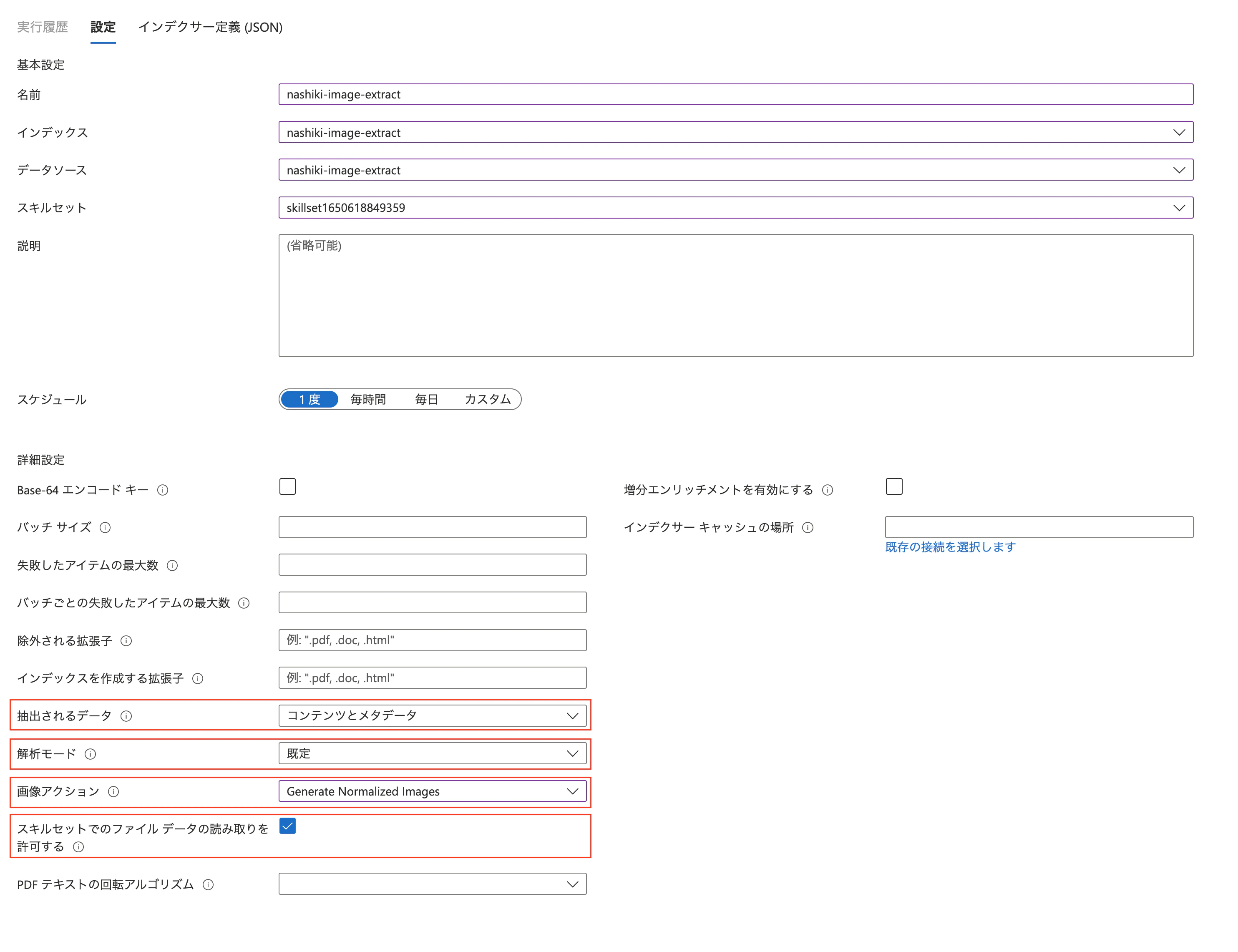
- 抽出されるデータ
- コンテンツとメタデータを選択する
- 解析モード
- 規定を選択する
- 画像アクション
imageActionは 3パターン-
None: image を出さない -
generateNormalizedImages: ドキュメント解析の一部として正規化された画像の配列を生成 -
generateNormalizedImagePerPage: PDF 内の各ページを 1 つの出力画像にレンダリングする正規化された画像の配列を生成
-
- スキルセットでのファイルデータの読み取りを許可する
- チェックをつける
カスタムスキルで画像を入力にする際
- カスタム スキル内で画像を使用するには、カスタム スキルへの入力として
/document/normalized_images/*/dataを設定します
参考
- AI エンリッチメントの概念 - Azure Cognitive Search | Microsoft Docs
- 画像からテキストを抽出する - Azure Cognitive Search | Microsoft Docs
- プロジェクションを定義する - Azure Cognitive Search | Microsoft Docs
- ドキュメント抽出の認知技術 - Azure Cognitive Search | Microsoft Docs
- スキルセットを作成する - Azure Cognitive Search | Microsoft Docs
- スキルの出力フィールドをマップする - Azure Cognitive Search | Microsoft Docs
- AI エンリッチメントの設計に関するヒント - Azure Cognitive Search | Microsoft Docs
- スキルセットで入力と出力を参照する - Azure Cognitive Search | Microsoft Docs
- スキル コンテキストと入力注釈の参照言語 - Azure Cognitive Search | Microsoft Docs
-
Shaper コグニティブ スキル - Azure Cognitive Search | Microsoft Docs
- 複合の強化ツリーを作成する
- 強化ツリーを作成する