

ネタ記事です。真に受けないでください。
.unwrap() がこの世を滅ぼしかけた
先月11月中旬、Cloudflareが大規模障害を起こし、世界のネットワークは破滅の危機に瀕しました。
この障害の原因はなんでしょうか...?
そうです、Rustaceanが最も忌避する .unwrap() という破滅の呪文を唱えた ことです1!
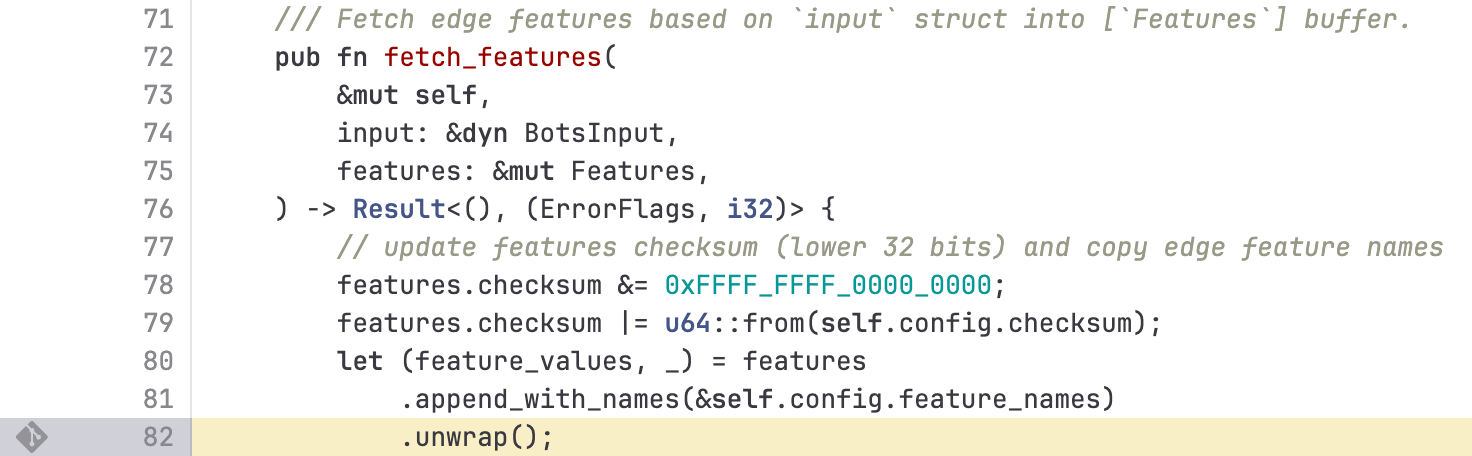
画像引用元: https://blog.cloudflare.com/ja-jp/18-november-2025-outage/
.unwrap() をソースコードからなくす
ソースコード中で 「unwrap」とか「expect」とか「panic」という縁起が悪い言葉を使った のが障害の原因です2。Rustソースコード中ではこの言葉を使いたくありませんね。
これを解決するために今回特別に祈祷師の方を連れてきました!
hooqというRustの属性マクロです。このお方にお願いすれば、もう「unwrap」をソースコード中で書く必要はなくなります!プロジェクトルートで次のようにしてhooq先生を呼べます。
cargo add hooq --features consume-question
筆者「では先生、さっそく次のコード3への祈祷をお願いします!」
use std::env;
use std::fs;

fn main() {
    // コマンドライン引数の第一引数(プログラム名の次)を取得
    let args: Vec<String> = env::args().collect();
    let filename = args.get(1).unwrap();

    // ファイル読み込み
    let contents = fs::read_to_string(filename).unwrap();

    // JSONをパース
    let json_value: serde_json::Value = serde_json::from_str(&contents).unwrap();

    // threshold フィールドから数値を取り出して表示
    let threshold = json_value.get("threshold").unwrap().as_f64().unwrap();
    println!("{}", threshold);
}
hooq「いいでしょう。ではまずは封印対象の語句をお札に記しましょう。プロジェクトルートに hooq.toml というファイルを用意し、そこに次のように書きなさい。」
[default]
method = ".unwrap()!" # 封印対象
hook_targets = ["?"] # 封印のために使う印
hooq「 src/main.rs の書に直接書くわけにはゆきませんからな。TOMLの札の中ならば .unwrap() は暴れぬでしょう。」
筆者「わかりました!」カキカキ
hooq「お札が完成したならば、我を関数の頭に加えてくだされ。」
筆者「こうですね?」
+use hooq::hooq;
use std::env;
use std::fs;

+#[hooq]
fn main() {
    let args: Vec<String> = env::args().collect();
    let filename = args.get(1).unwrap();

    let contents = fs::read_to_string(filename).unwrap();

    let json_value: serde_json::Value = serde_json::from_str(&contents).unwrap();

    let threshold = json_value.get("threshold").unwrap().as_f64().unwrap();
    println!("{}", threshold);
}
hooq「よろしい。では祈祷しましょう。 ? の力によって悪しきパニックの邪気を追い払います!!! 」
_人人人人人人人人人人人人人人人人人人_
> スゥウウウ、...ハーーーーーッ!! <
 ̄Y^Y^Y^Y^Y^Y^Y^Y^Y^Y^Y^Y^Y^Y^Y^Y^Y^Y^ ̄
use hooq::hooq;
use std::env;
use std::fs;

#[hooq]
fn main() {
    let args: Vec<String> = env::args().collect();
    let filename = args.get(1)?;

    let contents = fs::read_to_string(filename)?;

    let json_value: serde_json::Value = serde_json::from_str(&contents)?;

    let threshold = json_value.get("threshold")?.as_f64()?;
    println!("{}", threshold);
}
筆者「おぉおお!! .unwrap() がソースコードから一掃されました!!!」
筆者「早速この安全になったプログラムを実行してみましょう!」
$ cat test.json
{
  "threshold": 0.75
}
$ cargo run -- ./test.json
    Finished `dev` profile [unoptimized + debuginfo] target(s) in 0.06s
     Running `target/debug/project_with_hooq ./test.json`
0.75
筆者「( Result 型を返り値にしてないのに意外にも)しっかり動きました!」
hooq「そうでしょうそうでしょう。」
筆者「この感じだとエラーになる場合でも安全に終了しそうです!試してみましょ」
hooq「ア」
$ cargo run
    Finished `dev` profile [unoptimized + debuginfo] target(s) in 0.01s
     Running `target/debug/project_with_hooq`

thread 'main' (1020663) panicked at src/main.rs:8:31:
called `Option::unwrap()` on a `None` value
note: run with `RUST_BACKTRACE=1` environment variable to display a backtrace
筆者「パニック!!!!  」
」
終わり!!!!
 バーーーン
バーーーン
ネタで終わるのもなんなので解説と実用的?な話を少しだけ
この規模なら、パニックと大差ないですがanyhowやeyreをトップレベルで返しておけばとりあえず unwrap 書かなくて良くなりますよねというツッコミはさておき...
hooq属性マクロが何をしたかと、このネタがまともに使えるかもしれない可能性について話してこの記事を締めたいと思います。
hooq属性マクロを使うことで ? 演算子にメソッドをフックしたり、 ? 演算子が付いた式や ? 演算子自体を別なものに置き換えることができます。
今回は hooq.toml で以下の設定を施していました。
[default]
method = ".unwrap()!"
hook_targets = ["?"]
-
method = ".unwrap()!":?を.unwrap()に置き換えるようにする-
!は後続の?を消す指定 (consume-questionフィーチャーが必要)
-
-
hook_targets = ["?"]:?のみを対象とする。returnや末尾式は無視- デフォルトだと
returnや末尾式へのフックも試みてしまうので設定
- デフォルトだと
よってこの属性マクロによる展開後の結果は、 .unwrap() を使うコードとなります 
$ cargo expand
    Checking project_with_hooq v0.1.0 (/home/namn/workspace/qiita_adv_articles_2025/programs/adv15/project_with_hooq)
    Finished `dev` profile [unoptimized + debuginfo] target(s) in 0.07s

#![feature(prelude_import)]
#[macro_use]
extern crate std;
#[prelude_import]
use std::prelude::rust_2024::*;
use hooq::hooq;
use std::env;
use std::fs;
fn main() {
    let args: Vec<String> = env::args().collect();
    let filename = args.get(1).unwrap();
    let contents = fs::read_to_string(filename).unwrap();
    let json_value: serde_json::Value = serde_json::from_str(&contents).unwrap();
    let threshold = json_value.get("threshold").unwrap().as_f64().unwrap();
    {
        ::std::io::_print(format_args!("{0}\n", threshold));
    };
}
見栄えだけ良くしていたというネタでした!
テスト時だけunwrapしたい時に使えるかも?
hooqは属性マクロなので #[cfg_attr(..., hooq)] のように付与することで、条件を満たしている時だけ条件付きコンパイルでhooqを適用するといった芸当ができます。
テスト時は Result を返すのではなくパニックしてくれるようになると、パニックした行数を得られるというメリットがあるかも...?需要があるかわからないですが例を載せておきます。
[package]
name = "test_unwrap"
version = "0.1.0"
edition = "2024"

[dependencies]
hooq = { version = "0.3.1", features = ["consume-question"] }
use hooq::hooq;

#[cfg_attr(test, hooq)] // テスト時にフックを行う指定
#[cfg_attr(not(test), hooq(empty))] // 通常時は何もフックしない指定
#[hooq::method(.unwrap()!)] // `?` を `.unwrap()` に置き換える
pub fn add<'a>(left: &'a str, right: &'a str) -> Result<u64, &'a str> {
    let left = left.parse::<u64>().map_err(|_| left)?;
    let right = right.parse::<u64>().map_err(|_| right)?;

    Ok(left + right)
}

#[cfg(test)]
mod tests {
    use super::*;

    #[test]
    fn it_works() {
        let result = add("2", "2").unwrap();
        assert_eq!(result, 4);
    }

    #[test]
    // #[should_panic] // 以下は一旦これを消して実行
    fn it_panics() {
        add("a", "2").unwrap();
    }
}
$ cargo test --package test_unwrap --lib -- tests::it_panics
   Compiling test_unwrap v0.1.0 (/home/namn/workspace/qiita_adv_articles_2025/programs/adv15/test_unwrap)
    Finished `test` profile [unoptimized + debuginfo] target(s) in 0.24s
     Running unittests src/lib.rs (target/debug/deps/test_unwrap-78bb11c8a8bdae38)

running 1 test
test tests::it_panics ... FAILED

failures:

---- tests::it_panics stdout ----

thread 'tests::it_panics' (1073081) panicked at src/lib.rs:25:23:
called `Result::unwrap()` on an `Err` value: "a"
note: run with `RUST_BACKTRACE=1` environment variable to display a backtrace


failures:
    tests::it_panics

test result: FAILED. 0 passed; 1 failed; 0 ignored; 0 measured; 1 filtered out; finished in 0.00s

error: test failed, to rerun pass `-p test_unwrap --lib`
$ cargo test --package test_unwrap --lib -- tests::it_panics
   Compiling test_unwrap v0.1.0 (/home/namn/workspace/qiita_adv_articles_2025/programs/adv15/test_unwrap)
    Finished `test` profile [unoptimized + debuginfo] target(s) in 0.22s
     Running unittests src/lib.rs (target/debug/deps/test_unwrap-78bb11c8a8bdae38)

running 1 test
test tests::it_panics ... FAILED

failures:

---- tests::it_panics stdout ----

thread 'tests::it_panics' (1071541) panicked at src/lib.rs:7:53:
called `Result::unwrap()` on an `Err` value: "a"
note: run with `RUST_BACKTRACE=1` environment variable to display a backtrace


failures:
    tests::it_panics

test result: FAILED. 0 passed; 1 failed; 0 ignored; 0 measured; 1 filtered out; finished in 0.00s

error: test failed, to rerun pass `-p test_unwrap --lib`
微妙な差ですが、 .unwrap() する場所が変わっているために得られる情報が少しだけ増えています。
thread 'tests::it_panics' (1073081) panicked at src/lib.rs:25:23: だと add 関数のどこでパニックしたかわからない一方で thread 'tests::it_panics' (1071541) panicked at src/lib.rs:7:53: では7行目、つまり left の変換でコケたのだとわかります!
...まぁ anyhow::Error とバックトレースを使えばよいだけの話なので需要があるかは不明です Result<T, E> の E にバックトレース系統の何かを入れたくない場合とかには活躍するかもしれない...?
まとめ・所感
実はこの記事で話したかったこと
- hooqマクロは置換モード &
consume-questionフィーチャーを用いることで?を好きなメソッドに置換できます - (hooqに限らず一般に)属性マクロ
#[xxx]は#[cfg_attr(test, xxx)]のように書くことで、条件付きコンパイルができます- 例1:
#[cfg_attr(debug_assertions, xxx)]はデバッグ時のみ#[xxx]を付与 - 例2:
#[cfg_attr(feature = yyy, xxx)]はフィーチャーyyyが有効時のみ#[xxx]を付与
- 例1:
というわけで、 hooqアドベントカレンダー 15日目の記事でした!
hooqは本来はメソッドを ? 演算子にフックする属性マクロです。よかったら使ってやってください 