

htmx とは
htmx は「HTML中心で動くフロントエンド」を実現するための軽量な JavaScript ライブラリです。
React / Vue などのフロントエンドフレームワークとは異なり、
バックエンドからは JSON ではなく HTML を受け取り、DOM を部分更新する というアプローチで UI を構築します。
最近よく名前を見かけるようになったので、
Rust のバックエンドと組み合わせて少し触ってみました。
今回やること
今回は Rust の Web フレームワーク axum を使い
テンプレートエンジン askama と htmx を組み合わせた簡単な Web アプリを作ってみます。
- バックエンド:
- Rust: 1.94.0
- axum: 0.8
- tokio: 1.50
- HTML テンプレート
- askama: 0.15
- フロントエンド
- htmx: 2.0
ボタンをクリックすると Rust 側にリクエストが送られ
レスポンスとして返された HTML を htmx が画面の一部に反映する
シンプルな例を作ってみます。
ディレクトリ構成
ディレクトリの構成はこのイメージです。
rust-htmx-example
├─ Cargo.toml
├─ src
│  └─ main.rs
└─ templates
   └─ index.html
では、プロジェクトを作成します。
cargo new rust-htmx-example
cd rust-htmx-example
次に Cargo.toml に依存ライブラリを追加します。
[dependencies]
axum = "0.8.8"
tokio = { version = "1.50.0", features = ["full"] }
askama = "0.15.4"
htmx を使った HTML の実装
templates ディレクトリを作成し、その中に index.html を追加します。
<!DOCTYPE html>
<html lang="ja">
  <head>
    <meta charset="UTF-8">
    <meta name="viewport" content="width=device-width, initial-scale=1">
    <title>作って学ぼう Rust と htmx</title>

    <!-- htmx -->
	  <script src="https://cdn.jsdelivr.net/npm/htmx.org@2.0.8/dist/htmx.min.js"></script>
  </head>
  <body>
    <button hx-get="/greet" hx-target="#message" hx-swap="beforeend">
      Hello
    </button>

    <ul id="message"></ul>
  </body>
</html>
この HTML は htmx の属性を使ってサーバーへリクエストを投げています。
hx-get
hx-get="/greet"
ボタンがクリックされると /greet に GET リクエストを送ります。
hx-target
hx-target="#message"
サーバーから返ってきた HTML を挿入する DOM 要素を指定します。
hx-swap
hx-swap="beforeend"
DOM への挿入方法を指定します。
beforeend を指定すると、
対象要素の末尾に HTML が追加されます。
Rust 側の実装
では次にバックエンド側の実装を行います。
use askama::Template;
use axum::{Router, response::Html, routing::get};

#[derive(Template)]
#[template(path = "index.html")]
struct IndexTemplate;

async fn index() -> Html<String> {
    Html(IndexTemplate.render().unwrap())
}

async fn greet() -> Html<&'static str> {
    Html("<li>こんにちは👋</li>")
}

#[tokio::main]
async fn main() {
    let app = Router::new()
        .route("/", get(index))
        .route("/greet", get(greet));

    let listener = tokio::net::TcpListener::bind("127.0.0.1:3000")
        .await
        .unwrap();

    println!("server running at http://localhost:3000");

    axum::serve(listener, app).await.unwrap();
}
/greet にリクエストが来ると
<li>こんにちは👋</li>
という HTML をレスポンスとして返すようにしてみました
動作確認
それでは実行してみましょう
cargo run でサーバーを起動します
cargo run
   Compiling rust-htmx-example v0.1.0 (/Users/nakamura/Projects/rust-htmx-example)
    Finished `dev` profile [unoptimized + debuginfo] target(s) in 0.81s
     Running `target/debug/rust-htmx-example`
server running at http://localhost:3000
ブラウザで http://localhost:3000 にアクセスします
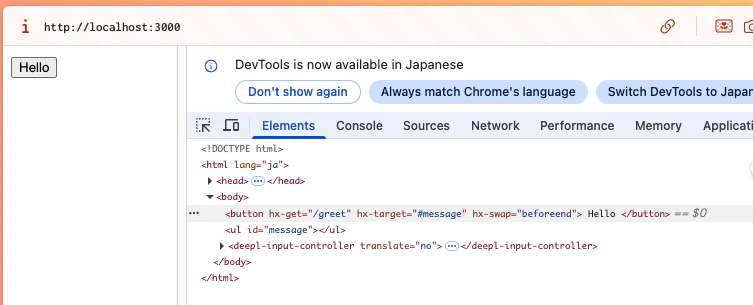
Hello ボタンをクリックすると
こんにちは👋が追加されます
つづけてクリック、クリックすると…
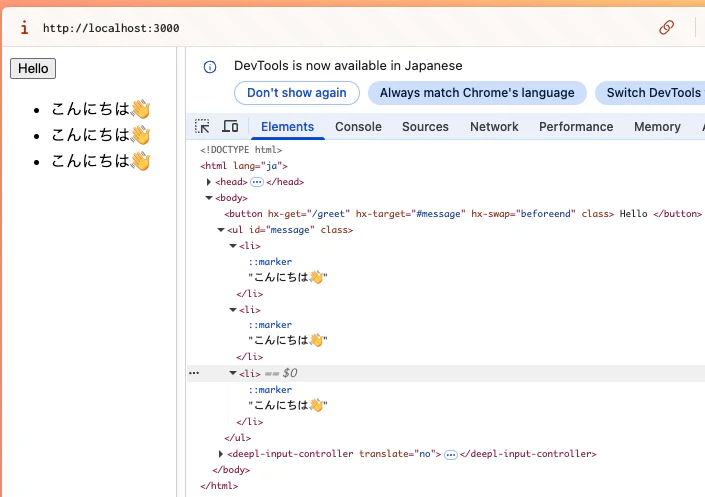
人気者ですね😌
JavaScript を書かなくても簡単に非同期更新を実装することができました!
htmx はバックエンド主導で状態管理を行い、
フロントエンドには極力ビジネスロジックを持たせない
アプローチになっていると感じました。
今回は試してみただけなのでもう少し深ぼって触ってみたいと思いました👋