
この記事は「【リアルタイム電力予測】需要・価格・電源最適化ダッシュボード構築記」シリーズの24日目です
Day1はこちら | 全体構成を見る
Day23では、予測結果を可視化する Streamlit アプリの中身を作成しました。
今日はその一歩手前、「毎日自動でデータ取得・予測・最適化を回す仕組み」を GitHub Actions で構築します。
GitHub Actions
ローカルで手動実行している間は問題ありませんが、ダッシュボードとして公開する場合、
- 毎日決まった時間に更新したい
- 実行環境を固定したい
- 実行ログを残したい
- 人が操作しなくても動いてほしい
といった要件が出てきます。
GitHub Actions は、
- cron によるスケジューリング
- conda / Python 環境の再現
- APIキーなどの秘匿情報管理
- 結果をそのままリポジトリに push
がすべて揃っており、今回の用途に相性が良いです。
GitHub Actionsで必要なもの
GitHub Actions を使うために新しく必要なのは、これだけです。
.github/workflows/daily_pipeline.yaml
この YAML ファイルが「いつ・どの環境で・何を実行するか」をすべて定義します。
daily_pipeline.yaml の全体像
まずは全体を見てみます。
name: Run daily pipeline

on:
  schedule:
    - cron: '0 21 * * *'   # JST 6:00
  workflow_dispatch:   # 手動実行もできるように

permissions:
  contents: write

jobs:
  run-pipeline:
    runs-on: ubuntu-latest

    steps:
      - name: Checkout repo
        uses: actions/checkout@v4

      - name: Set up Miniconda
        uses: conda-incubator/setup-miniconda@v3
        with:
          activate-environment: op_py311
          environment-file: environment.yaml
          python-version: 3.11
          auto-activate-base: false

      - name: Install dependencies
        run: |
          conda env update -n op_py311 -f environment.yaml

      - name: Install Playwright browsers
        run: conda run -n op_py311 python -m playwright install # モジュールをスクリプトとして実行する

      - name: Run daily pipeline
        env:
          EIA_API_KEY: ${{ secrets.EIA_API_KEY }}
        run: |
          conda run -n op_py311 python run_daily_pipeline.py

      - name: Commit and push updated cache
        run: |
          git config user.name "github-actions[bot]"
          git config user.email "41898282+github-actions[bot]@users.noreply.github.com"
          git add data/cache/*.parquet data/cache/metadata.json || echo "nothing to add"
          git commit -m "Update cache $(date -u +"%Y-%m-%dT%H:%M:%SZ")" || echo "nothing to commit"
          git push
以降では、この YAML を 上から順に分解して説明していきます。
スケジュール実行(cron)
on:
  schedule:
    - cron: '0 21 * * *'   # JST 6:00
  workflow_dispatch:
- GitHub Actions の cron は UTC基準
- 0 21 * * * は UTC 21:00 → JST 6:00
- workflow_dispatch を入れることで、UI から手動実行も可能
なぜ朝6時にしたかというと、00:30に設定した場合にJEPX(電力価格)のサイトからデータ自動取得がエラーになってしまうことが多く、6時にすると安定したのでそのようにしています。
permissions:
  contents: write
permissions:
contents: write
これは Actions からリポジトリに push するために必須です。
- cache(parquet, metadata.json)を更新
- そのまま commit & push
- Streamlit 側は GitHub の raw ファイルを読む
という設計なので、書き込み権限を明示しています。
実行環境の構築(Miniconda)
- name: Set up Miniconda
  uses: conda-incubator/setup-miniconda@v3
  with:
    activate-environment: op_py311
    environment-file: environment.yaml
    python-version: 3.11
    auto-activate-base: false
- ローカルで使っていた環境を ほぼそのまま再現できる
- PyTorch / xgboost / statsmodels などが混ざっていても破綻しにくい
今回は、ローカルで使っていた environment.yaml をそのまま使用していますが、多少不要なライブラリが含まれていても「確実に動く」ことを優先しました。
conda env update を使っている理由
- name: Install dependencies
  run: |
    conda env update -n op_py311 -f environment.yaml
- create ではなく update
- 既存環境との差分だけ反映
これにより、Actions の初回実行も、依存関係が増えた後の再実行も同じ YAML で対応できます。
Playwright のインストール
- name: Install Playwright browsers
  run: conda run -n op_py311 python -m playwright install
Playwright は Python パッケージとは別にブラウザ実体のインストールが必要です。
pip install playwright-
python -m playwright install←これも必要
Python スクリプトの実行
- name: Run daily pipeline
  env:
    EIA_API_KEY: ${{ secrets.EIA_API_KEY }}
  run: |
    conda run -n op_py311 python run_daily_pipeline.py
- 石油や天然ガス価格を取得するときに使ったEIAはAPI_KEYが必要でした。そのため、
EIA_API_KEYは事前に設定したものを、リポジトリのSettingにあるSecrets and VariablesからActionsを選んで設定します。今回、EIA_EPI_KEYとしてローカルで使用していたものを登録しました - Actions では
${{ secrets.EIA_API_KEY }}として参照できます

これにより、以下がすべて同じコードで動かせます。
- ローカル
- GitHub Actions
- Hugging Face Spaces
cache を commit & push
- name: Commit and push updated cache
  run: |
    git config user.name "github-actions[bot]"
    git config user.email "41898282+github-actions[bot]@users.noreply.github.com"
    git add data/cache/*.parquet data/cache/metadata.json || echo "nothing to add"
    git commit -m "Update cache $(date -u +"%Y-%m-%dT%H:%M:%SZ")" || echo "nothing to commit"
    git push
- Actions とローカルの push を区別するため、bot 名義で commit
-
|| echo "nothing to commit"を入れることで差分がない日も workflow が失敗しない
この設計により、
- 毎日 Actions が動く
- 差分がある日だけ commit が積まれる
- Streamlit 側は常に最新 cache を参照
という流れが完成しました!
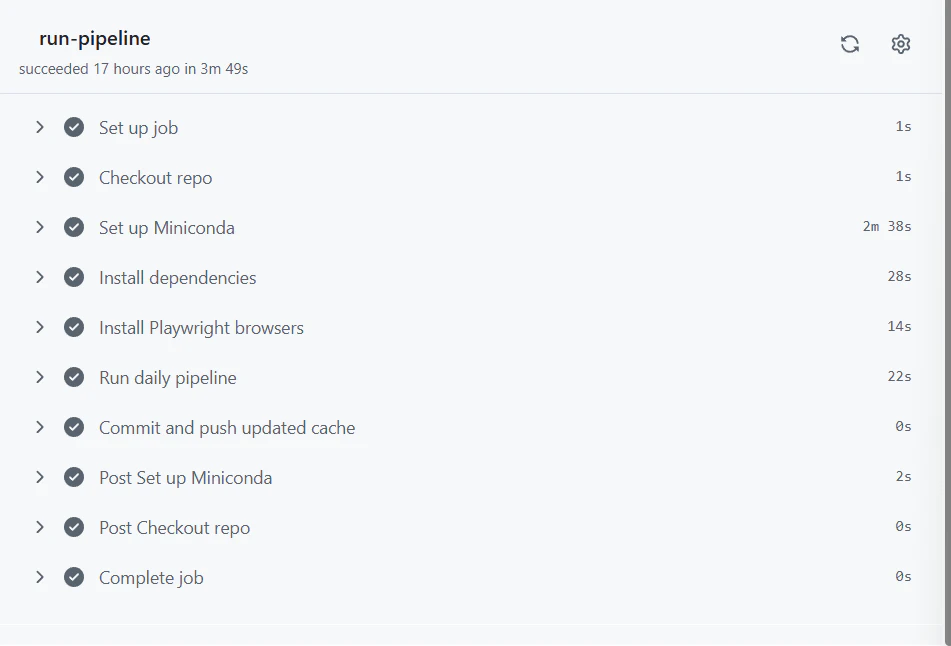
このyamlファイルをpushした後、Actionsタブをクリックして中身を見てみるときちんと反映されていました。
yaml内にnameで記載した項目が反映されています。
明日
とうとう最終日..!
Hugging Face Spacesでのモデル公開について記載します!