


はじめに
組織異動の季節になり、システム障害対応やインシデント対応可能なメンバーを増やしたいと考えるようになりました。引き継ぎ書等を用意するだけでなく、この業務自体をエージェント化してみたくなりました。
AIエージェント化できると次のような魅力があります。
- システム障害調査、インシデント対応時の初期応答速度を向上することができる
- 特定のチームメンバーの依存度が下がり、緊急時対応を均質化(再現可能)にできる
少し前置きが長くなりましたが、AWS上でどのようにシステム障害対応エージェントを構築し、非常事態への対応に再現性をもたらすかを記述します!
満たしたい要件
- CloudWatchAlarmやメトリクスをきっかけに、イベント駆動(非同期)でエージェントが調査を開始すること
- ChatGPT等の一般的な生成AIサービスに相談するような感じで、同期的にシステム障害対応エージェントに対応を依頼できること
- システム障害調査エージェントによる事故を防止するために、エージェントはリソースの作成、更新、削除はできず、ReadOnlyの権限範囲で活動すること
- エージェントがシステム障害を検知し調査した内容をメールで受け取れること
(↓ 下記のようなメールを受け取って、社員が即概要を把握できること)

アーキテクチャ
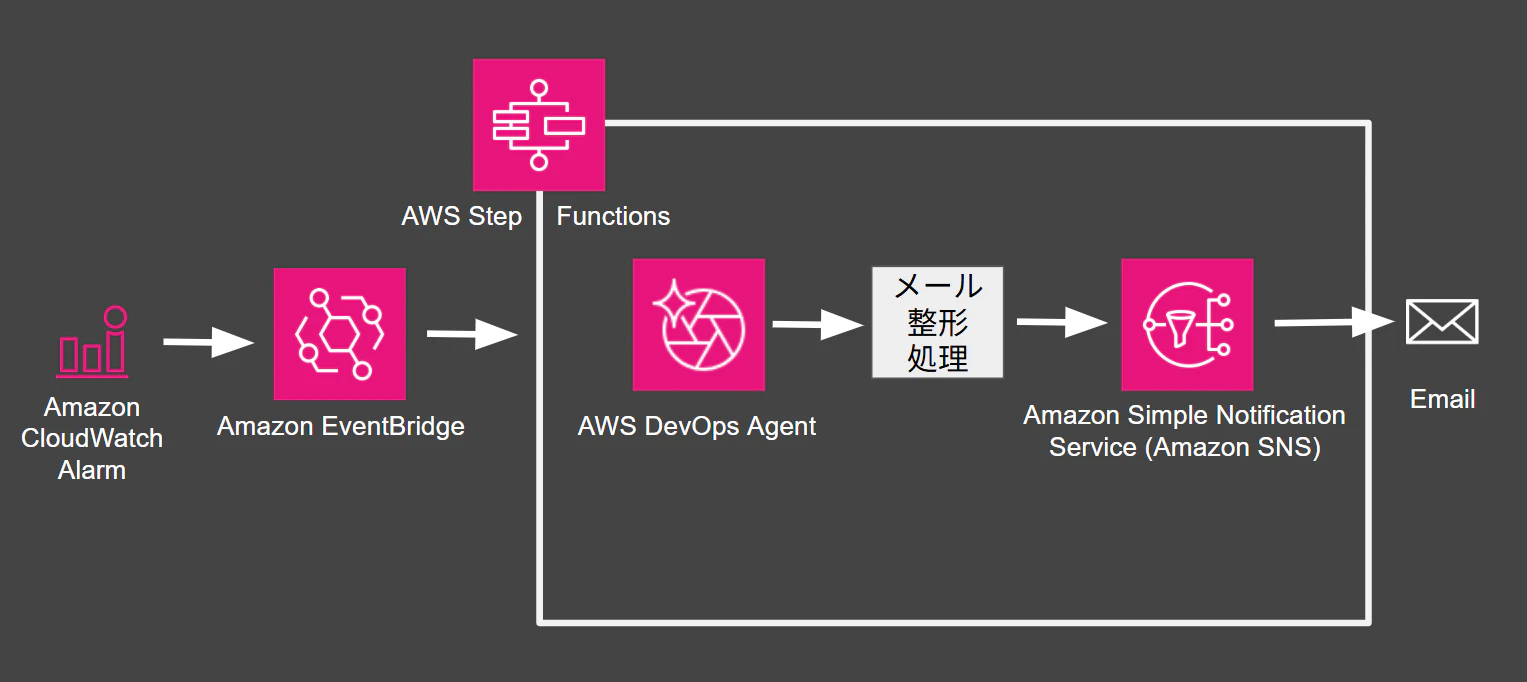
システム障害調査エージェント部分はAWSのDevOps Agentを利用しました。
発火用のEventBridgeルールを用意して、EventBridgeからStep Functionsを起動します。Step Functionsのワークフローの中でDevOps Agentを起動し、そのレポート内容をメール用に整形、最終的にAmazon SNSを利用して、担当チームのメーリングリストに通知する仕組みです。
開発/運用チームにメール通知する機能は必須にしたかったです。複数のAWSサービスをまたがったワークフローに仕立てるため、Step Functionsを採用しています。
DevOps Agentとは
AWS DevOps Agentは、インシデント調査や運用改善を支援するAWSのマネージドAIエージェントです。2026年3月31日にGA(General Availability)となりました。
UI上でエージェントと会話しながら調査することもできますし、Eventをトリガーにエージェントを起動することも可能です。
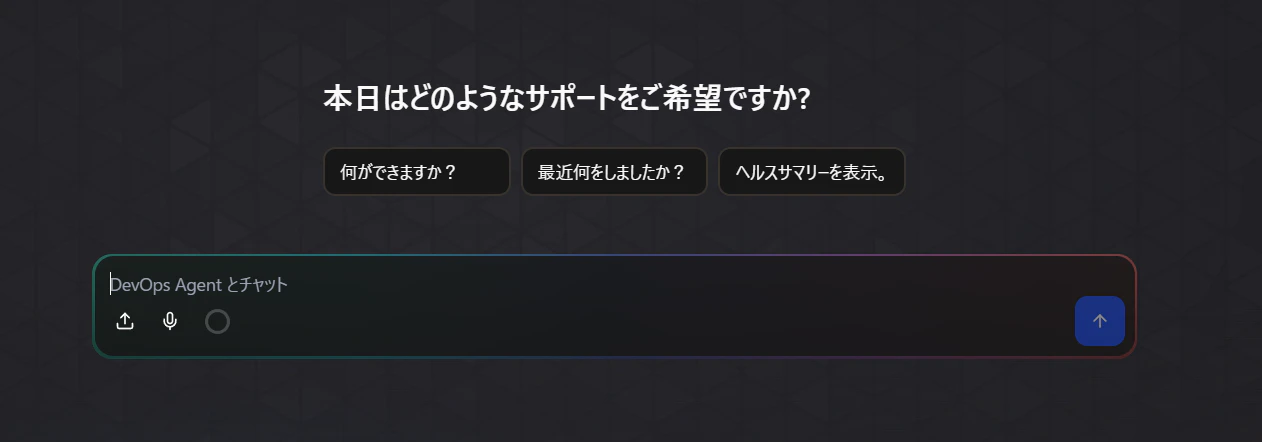
Amazon Bedrockシリーズに内包されるのではなく、独立したAWSサービスとして提供されています。AWS内だけでなく、Datadog、Dynatrace、New Relic、Splunk、GitHub、GitLabなどの外部サービスとも連携できるマネージドなAIエージェントサービスになっています。
個人的にはエンタープライズ機能で求められそうな非機能要件にも対応している点が素晴らしいと感じているため、一部ご紹介します。
エージェントの権限管理
エージェントの実行範囲をIAMロールを用いて制限することができます。
システム障害調査の後に止血処理までお願いしたい組織もあれば、エージェントに調査のみお願いしたい組織もあるでしょう。AWSが用意するマネージドなIAMポリシーも複数用意されていますし、最小権限で設定する独自のIAMポリシーを設定することも可能です。
今回の利用では、あらゆるリソースへの参照のみを許可します。
AIDevOpsAgentAccessPolicyは、DevOps Agentが調査に使うデフォルトの読み取り権限を提供するAWS管理ポリシーです。厳密にはReadOnlyではなく、CloudWatchLogsInsightのクエリ実行権限等を含みます。
AWS DevOps AgentのIAMロール構成とアクセス制御の仕組み
似た名前の AIDevOpsAgentReadOnlyAccessとは用途が異なりますので、ご注意ください。(パッと見の名前だとこちらを選びがちですが、このロールだとCloudWatchやCloudTrailのログにアクセスできません。自分も一度失敗しましたw)
| ポリシー | 用途 |
|---|---|
AIDevOpsAgentAccessPolicy |
DevOps Agentが各種AWSリソースにアクセス+その他するための原則読み取りポリシー |
AIDevOpsAgentReadOnlyAccess |
人間やアプリケーションが「DevOps Agent サービス自体の情報」を参照するための読み取りポリシー |
agent_role = iam.Role(
    self,
    "DevOpsAgentInvestigationRole",
    assumed_by=iam.ServicePrincipal(
        "aidevops.amazonaws.com",
        conditions={
            "StringEquals": {"aws:SourceAccount": Aws.ACCOUNT_ID},
            "ArnLike": {
                "aws:SourceArn": (
                    f"arn:{Aws.PARTITION}:aidevops:{Aws.REGION}:"
                    f"{Aws.ACCOUNT_ID}:agentspace/*"
                )
            },
        },
    ),
    description=(
        "Read-only investigation role assumed by AWS DevOps Agent"
    ),
    managed_policies=[
        iam.ManagedPolicy.from_aws_managed_policy_name(
            "AIDevOpsAgentAccessPolicy"
        )
    ],
)
エージェントの閉域接続
AWSリソースや監視基盤をプライベートサブネット配下で管理している/管理したい組織も多いと思います。
DevOpsAgentがそういった閉域リソースにアクセスする方法として、Amazon VPC Latticeを用いてVPC内に接続する方法がAWS公式から公開されています。
本記事では実際に動かして検証まではしないので、気になる方は下記記事をご参照ください!
VPC 内のプライベートサービスに AWS DevOps Agent をセキュアに接続する方法
要件との整合性
本記事の冒頭で整理した要件に対して、AWS DevOps Agent がどのように対応できるのかを整理します。
| 要件 | DevOps Agentでの実現可否 | 実現方法 |
|---|---|---|
| 1. CloudWatch Alarmやメトリクスをきっかけにイベント駆動で調査を開始したい | ○ | CloudWatch AlarmからAmazon EventBridge、もしくはStep Functionsを経由してDevOps Agentを起動できます。システム障害発生時に自動で調査を開始し、オペレーターの操作を待たずに初動対応を実施できます。 |
| 2. ChatGPTのように対話形式で調査を依頼したい | ○ | 提供されている「webアプリ」という機能から実行可能です。 |
| 3. ReadOnly権限で安全に利用したい | ○ | IAMポリシーにより権限の制御が可能です。マネージドポリシーも充実してます! |
| 4. 調査結果をメールで受け取りたい | ○ | SNSを組み合わせることで、調査結果をメール通知できます。本記事では調査結果を要約したメールを運用担当者へ配信しています。 |
Bedrock AgentCore +Strands Agentsで独自実装する場合と比較
本記事のテーマは当初StrandsAgents + Amazon Bedrock AgentCoreを用いて実装するつもりでした。AWSのサービスアップデート情報を調べるうちに、「DevOps Agentでいいじゃん」と考えるようになったので、その理由だけ記述しておこうと思います。
| 観点 | AWS DevOps Agent | AgentCore + Strands Agentsで自作 |
|---|---|---|
| 導入速度 | GUIのみでも始められる。CDKでの構築も可能。 | エージェント、ツール、プロンプト、実行基盤の設計が必要 |
| システム障害調査能力 | AWS/外部監視/コード/CI/CD連携などがサービス機能として用意されている | 実装したツールとプロンプトの品質に依存する |
| カスタマイズ性 | Agent Skills、MCP、連携機能で拡張可能。ただしモデルや内部推論はサービス側に委ねる | モデル、プロンプト、ツール選択、出力形式、分岐ロジックを細かく制御可能 |
| 出力形式 | Markdownサマリーやテキスト中心 | AIモデルを選べば画像形式での出力等も可能か? |
| 金銭コスト | エージェントの駆動時間(秒)課金 | Bedrockモデルのトークン消費量課金 |
モデルを選べない点がDevOpsAgentのイマイチな部分ですが、システム障害調査部分にフォーカスすれば機能差分がないように思えます。
「ナレッジ」という設定項目の中で、いわゆるAgents.mdとSkill.md相当の内容を設定可能なため、エージェントのカスタマイズ性もある程度は担保されているといえます。
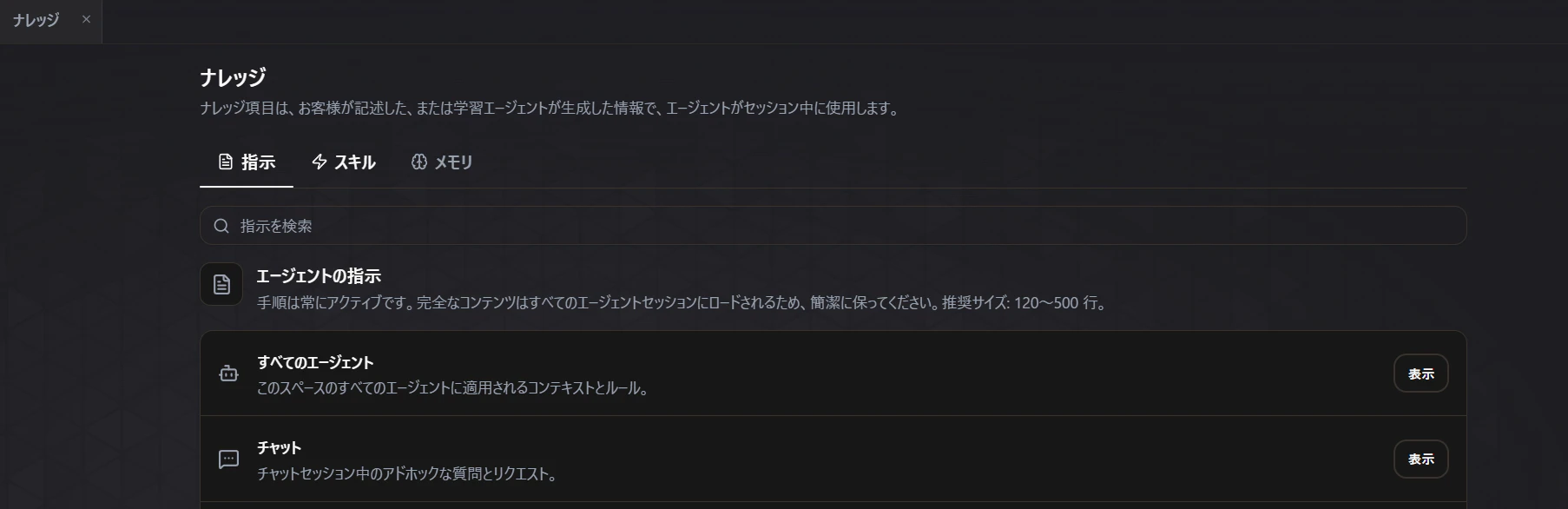
これらをマネージドサービスとして利用できるDevOpsAgentは、開発/運用稼働の面で優れていると思います。
金銭コストに関する補足
DevOps Agentは時間(秒)課金、Bedrockモデルはトークン消費量課金であり課金モデルが異なるためフラットの比較は正直難しいです。
AWS DevOps Agentは、$0.0083 / 秒の単価であり、公式が公表しているサンプルでは月10回の調査、各8分の場合は、次のような例が示されています。
10 investigations x 8 min x 60 sec/min x $0.0083 = $39.84
トークン消費量を1M input 200k outputと仮定して、Claude Sonnet4.6を使用した場合、$60ドル/10回程度になると予想しており(個人の意見です)、StrandsAgentsを利用した自作システム障害調査エージェントのほうが高くなる可能性もあります。
DevOps Agentを用いて実際にログを調査させてみた
意図的なログをCloudWatchLogs,メトリクスに書き込むことで下記シチュエーションを再現してみました。果たしてDevOps Agentはどのようなアウトプットを見せてくれるのでしょうか?
想定シチュエーション
バックエンドのAPIにて、GETメソッドのAPI GET /v1/request?requestId=... が提供されている。本来このAPIは認証が設定されているが、運用過程で不幸にも認証が外れてしまった。
総当たり的な攻撃により、存在しないrequestIdへのアクセスが急増し、Error大量発生によるアラームが発火した。
なお手動で認証設定を戻すことにより、止血処理は完了している。
投入するログとメトリクス
ログの内訳は次のとおりです。
| 種別 | 件数 | 意味 |
|---|---|---|
| 認証あり正常アクセス | 20 | 認証が有効な状態で200を返していた通常時ログ |
AuthDisabled |
1 | 認証が外れていたことを示すログ |
| 匿名アクセス404 | 965 | 存在しない requestId への大量アクセス |
| 匿名アクセス200 | 12 | 実在した requestId のデータ返却 |
Unexpected404Spike |
1 | 404急増の集計ログ |
ContainmentApplied |
1 | JWT Authorizerを復旧した止血ログ |
認証の有無が分かるように、正常時ログには次のような判別用メタデータを残しています。
実際のログメッセージはこのようなものを設定しています。
2026-06-22T16:35:51Z ALERT service=request-api route=GET /v1/request requestId=req-20260623-18037 status=200 principal=anonymous sourceIp=10.92.19.41 userAgent=python-requests/2.31.0 auth=none authorizationPresent=false authScheme=none authorizer=none event=UnauthenticatedMetadataRead dataClass=request_metadata piiFields=none redaction=applied piiValues=masked responseBytes=420
2026-06-22T16:36:21Z INFO service=request-api route=GET /v1/request requestId=req-20260623-10965 status=404 principal=anonymous sourceIp=10.92.20.43 userAgent=python-requests/2.31.0 auth=none authorizationPresent=false authScheme=none authorizer=none responseBytes=92 dataReturned=false
成果物
まずは通知のメール内容から見てみましょう。
## Symptoms

### Request APIで977件の認証なしリクエストが発生、965件が404エラーを返した
**Description:** 2026-06-22T16:36:00に、Request APIで977件の認証なしリクエストが到達。そのうち965件が404エラーを返し、2件のPII候補データ読み取りが発生。通常時は認証なしリクエストは発生しないかほぼゼロ。メトリクス: BackendApi/Request Unauthorized404Count=965, UnauthenticatedRequestCount=977, PiiCandidateReadCount=2
**Time:** 2026-06-22T16:36:00Z

## Findings

### Cause: セキュリティ監視システムが認証なしリクエスト攻撃を検知し、メトリクスとアラームを発行
**Description:** 2026-06-22T16:36:00に、何らかのセキュリティ監視システムが977件の認証なしリクエスト攻撃を検知し、CloudWatchカスタムメトリクス(Unauthorized404Count=965、UnauthenticatedRequestCount=977、PiiCandidateReadCount=2)を発行しました。しかし、実際のHTTPトラフィックの証拠は以下のシステムで一切見つかりませんでした:

1. API Gateway メトリクス(Count、4XXError、IntegrationLatency)= すべて0
2. Lambda関数メトリクス(Invocations)= すべて0
3. Lambda関数ログ = 0件
4. API Gatewayアクセスログ = メトリクスフィルターパターンに一致するエントリなし
5. CloudTrail = 設定変更なし

唯一のログエントリは16:36:35の集約イベント「ContainmentApplied authorizer=jwt restored=true anonymousRequestsBlocked=true expectedNextStep=assess_accessed_request_ids_and_pii_scope」で、これは攻撃検知後の自動対応を示しています。

ロググループとアラームがインシデント時刻(16:36:26)に同時作成されていることから、これは実際のトラフィックではなく、セキュリティ検知システムによる脅威シミュレーション、またはWAF/外部セキュリティツールからの集約レポートである可能性が高いです。
- 件数という事実ベースで調査が整理されていること
- 実際にLambdaやAPIGatewayといったイベント発火時には名前が出てこないリソースまで自主的に参照しに行っている
- 最終的に「シミュレーションではないか?」という示唆まで出している
続いてDevOps Agentから提供されるUIを利用して、より詳しい調査内容を確認してみましょう。
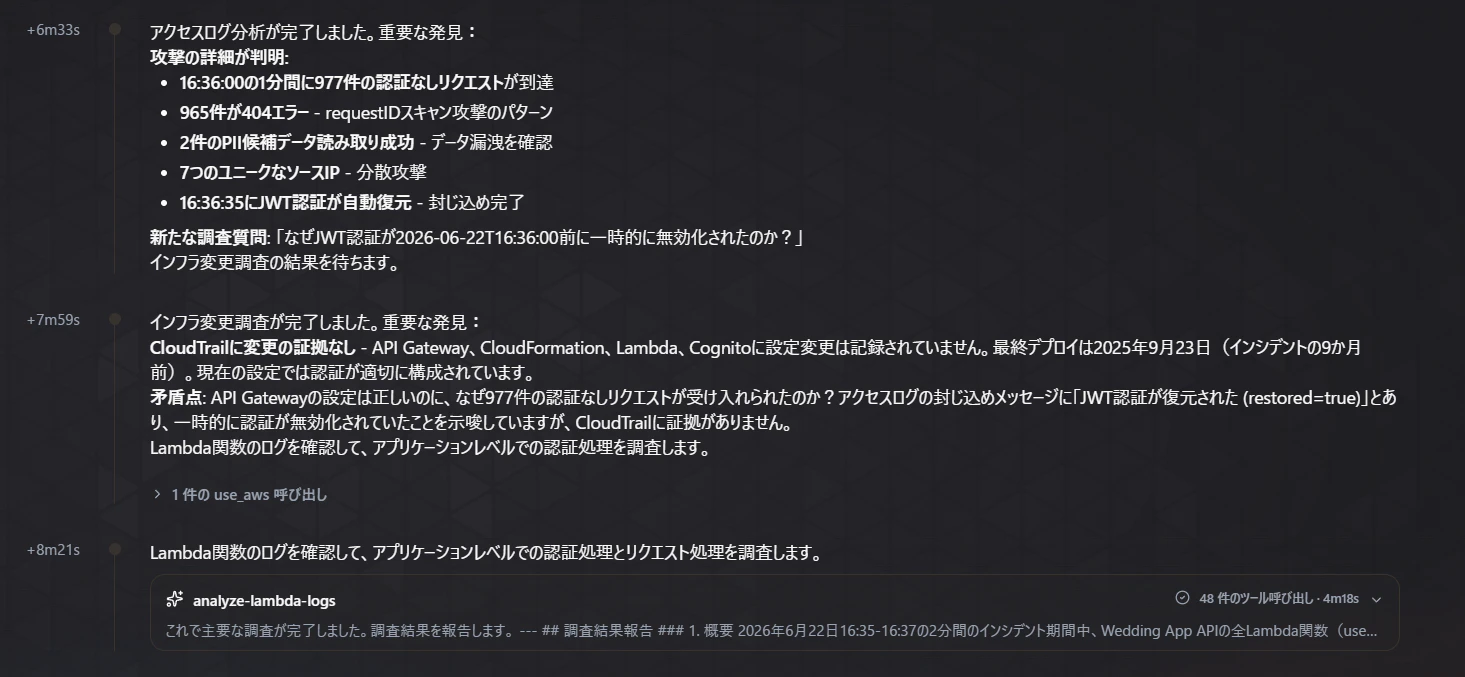
調査過程がより詳細に残されており、サブエージェントへの切り出しやTool Useを試みた形跡が確認されます。
総合的にすごいなと思ったのは、この操作がテストっぽいことを自力で見抜いている点です。今回のサンプルリソースにはdemoといったわかりやすい名称をつけていません。CloudTrailの設置変更履歴やそのほか関連ログを複合的に検討したうえで、この結論に至っています。
感想・まとめ
イベント型/チャット型双方において、簡単にシステム障害調査の相棒として利用できるDevOps Agentは非常に便利だなと思いました。
DevOps Agent自体にリードエンジニアの知見/ノウハウを詰めこむことで、システム障害対応できるエンジニアを実質増やすことができます。再現性をもって保守運用業務を維持し続けるという点で活躍してくれるサービスだと感じました。
参考_検証に利用したソースコード
コーディングエージェントにソースコード書かせることが多いと思いますが、参考までに置いておきます。
スタック
import json
from typing import Any

from aws_cdk import (
    Aws,
    CfnOutput,
    Duration,
    Stack,
    aws_cloudwatch as cloudwatch,
    aws_devopsagent as devopsagent,
    aws_events as events,
    aws_events_targets as targets,
    aws_iam as iam,
    aws_logs as logs,
    aws_sns as sns,
    aws_sns_subscriptions as subscriptions,
    aws_stepfunctions as sfn,
)
from constructs import Construct

from infrastructure.workflow_definition import build_workflow_definition


class IncidentInvestigationStack(Stack):
    def __init__(self, scope: Construct, construct_id: str, **kwargs: Any) -> None:
        super().__init__(scope, construct_id, **kwargs)

        agent_space_name = str(
            self.node.try_get_context("agentSpaceName")
            or "incident-investigation-space"
        )
        notification_email = self.node.try_get_context("notificationEmail")
        alarm_name = str(
            self.node.try_get_context("alarmName")
            or "devops-agent-incident-signal"
        )
        poll_interval = int(
            self.node.try_get_context("pollIntervalSeconds") or 60
        )
        timeout_hours = int(
            self.node.try_get_context("workflowTimeoutHours") or 24
        )

        agent_role = iam.Role(
            self,
            "DevOpsAgentInvestigationRole",
            assumed_by=iam.ServicePrincipal(
                "aidevops.amazonaws.com",
                conditions={
                    "StringEquals": {"aws:SourceAccount": Aws.ACCOUNT_ID},
                    "ArnLike": {
                        "aws:SourceArn": (
                            f"arn:{Aws.PARTITION}:aidevops:{Aws.REGION}:"
                            f"{Aws.ACCOUNT_ID}:agentspace/*"
                        )
                    },
                },
            ),
            description=(
                "Read-only investigation role assumed by AWS DevOps Agent"
            ),
            managed_policies=[
                iam.ManagedPolicy.from_aws_managed_policy_name(
                    "AIDevOpsAgentAccessPolicy"
                )
            ],
        )
        agent_role.add_to_policy(
            iam.PolicyStatement(
                sid="AllowResourceExplorerServiceLinkedRoleBootstrap",
                actions=["iam:CreateServiceLinkedRole"],
                resources=[
                    (
                        f"arn:{Aws.PARTITION}:iam::{Aws.ACCOUNT_ID}:role/"
                        "aws-service-role/resource-explorer-2.amazonaws.com/"
                        "AWSServiceRoleForResourceExplorer"
                    )
                ],
                conditions={
                    "StringEquals": {
                        "iam:AWSServiceName": (
                            "resource-explorer-2.amazonaws.com"
                        )
                    }
                },
            )
        )

        agent_space = devopsagent.CfnAgentSpace(
            self,
            "IncidentAgentSpace",
            name=agent_space_name,
            description=(
                "AWS DevOps Agent space for automated CloudWatch alarm "
                "investigations"
            ),
            locale="ja-JP",
        )

        association = devopsagent.CfnAssociation(
            self,
            "MonitoringAccountAssociation",
            agent_space_id=agent_space.ref,
            service_id="aws",
            configuration=devopsagent.CfnAssociation.ServiceConfigurationProperty(
                aws=devopsagent.CfnAssociation.AWSConfigurationProperty(
                    account_id=Aws.ACCOUNT_ID,
                    account_type="monitor",
                    assumable_role_arn=agent_role.role_arn,
                    resources=[],
                )
            ),
        )
        association.add_dependency(agent_space)

        topic = sns.Topic(
            self,
            "IncidentReportTopic",
            display_name="AWS DevOps Agent investigation reports",
        )
        if notification_email:
            topic.add_subscription(
                subscriptions.EmailSubscription(str(notification_email))
            )

        workflow_role = iam.Role(
            self,
            "InvestigationWorkflowRole",
            assumed_by=iam.ServicePrincipal("states.amazonaws.com"),
            description=(
                "Starts and monitors DevOps Agent investigations and publishes "
                "the final report"
            ),
        )
        workflow_role.add_to_policy(
            iam.PolicyStatement(
                sid="OperateOnlyThisAgentSpace",
                actions=[
                    "aidevops:CreateBacklogTask",
                    "aidevops:GetBacklogTask",
                    "aidevops:ListJournalRecords",
                ],
                resources=[agent_space.attr_arn],
            )
        )
        topic.grant_publish(workflow_role)

        definition = build_workflow_definition(
            agent_space_id=agent_space.ref,
            topic_arn=topic.topic_arn,
            poll_interval_seconds=poll_interval,
            partition=Aws.PARTITION,
        )
        state_machine = sfn.StateMachine(
            self,
            "IncidentInvestigationWorkflow",
            definition_body=sfn.DefinitionBody.from_string(
                json.dumps(definition, ensure_ascii=True)
            ),
            role=workflow_role,
            state_machine_type=sfn.StateMachineType.STANDARD,
            timeout=Duration.hours(timeout_hours),
            logs=sfn.LogOptions(
                destination=logs.LogGroup(
                    self,
                    "WorkflowLogGroup",
                    retention=logs.RetentionDays.ONE_MONTH,
                ),
                level=sfn.LogLevel.ERROR,
                include_execution_data=False,
            ),
            tracing_enabled=True,
        )
        state_machine.node.add_dependency(association)

        metric = cloudwatch.Metric(
            namespace=str(
                self.node.try_get_context("metricNamespace")
                or "Custom/IncidentDemo"
            ),
            metric_name=str(
                self.node.try_get_context("metricName") or "IncidentSignal"
            ),
            statistic=str(
                self.node.try_get_context("metricStatistic") or "Average"
            ),
            period=Duration.minutes(
                int(self.node.try_get_context("metricPeriodMinutes") or 1)
            ),
        )
        alarm = cloudwatch.Alarm(
            self,
            "IncidentSignalAlarm",
            alarm_name=alarm_name,
            metric=metric,
            threshold=float(
                self.node.try_get_context("alarmThreshold") or 1
            ),
            evaluation_periods=int(
                self.node.try_get_context("alarmEvaluationPeriods") or 1
            ),
            comparison_operator=(
                cloudwatch.ComparisonOperator
                .GREATER_THAN_OR_EQUAL_TO_THRESHOLD
            ),
            treat_missing_data=cloudwatch.TreatMissingData.NOT_BREACHING,
        )

        alarm_rule = events.Rule(
            self,
            "AlarmStartsInvestigationRule",
            description=(
                "Starts the DevOps Agent workflow when the managed alarm enters "
                "ALARM"
            ),
            event_pattern=events.EventPattern(
                source=["aws.cloudwatch"],
                detail_type=["CloudWatch Alarm State Change"],
                resources=[alarm.alarm_arn],
                detail={"state": {"value": ["ALARM"]}},
            ),
        )
        alarm_rule.add_target(
            targets.SfnStateMachine(
                state_machine,
                retry_attempts=2,
                max_event_age=Duration.hours(2),
            )
        )

        CfnOutput(self, "AlarmName", value=alarm.alarm_name)
        CfnOutput(self, "AgentSpaceId", value=agent_space.ref)
        CfnOutput(self, "AgentSpaceArn", value=agent_space.attr_arn)
        CfnOutput(self, "StateMachineArn", value=state_machine.state_machine_arn)
        CfnOutput(self, "NotificationTopicArn", value=topic.topic_arn)
Step Functionsワークフロー定義
from typing import Any


def build_workflow_definition(
    *,
    agent_space_id: str,
    topic_arn: str,
    poll_interval_seconds: int,
    partition: str = "aws",
) -> dict[str, Any]:
    devops_resource = f"arn:{partition}:states:::aws-sdk:devopsagent"
    sns_resource = f"arn:{partition}:states:::sns:publish"

    retry = [
        {
            "ErrorEquals": [
                "DevOpsAgent.ThrottlingException",
                "DevOpsAgent.InternalServerException",
            ],
            "IntervalSeconds": 5,
            "MaxAttempts": 5,
            "BackoffRate": 2,
        }
    ]

    return {
        "Comment": "Investigate a CloudWatch alarm with AWS DevOps Agent.",
        "StartAt": "Create investigation",
        "States": {
            "Create investigation": {
                "Type": "Task",
                "Resource": f"{devops_resource}:createBacklogTask",
                "Parameters": {
                    "AgentSpaceId": agent_space_id,
                    "ClientToken.$": "$.id",
                    "TaskType": "INVESTIGATION",
                    "Priority": "HIGH",
                    "Title.$": (
                        "States.Format('CloudWatch alarm investigation: {}', "
                        "$.detail.alarmName)"
                    ),
                    "Description.$": (
                        "States.Format('Investigate this CloudWatch alarm state-change "
                        "event. Determine the likely root cause, evidence, impact, and "
                        "recommended human actions. Do not modify resources. Event: {}', "
                        "States.JsonToString($))"
                    ),
                },
                "ResultPath": "$.investigation",
                "Retry": retry,
                "Next": "Wait before polling",
            },
            "Wait before polling": {
                "Type": "Wait",
                "Seconds": poll_interval_seconds,
                "Next": "Get investigation status",
            },
            "Get investigation status": {
                "Type": "Task",
                "Resource": f"{devops_resource}:getBacklogTask",
                "Parameters": {
                    "AgentSpaceId": agent_space_id,
                    "TaskId.$": "$.investigation.Task.TaskId",
                },
                "ResultPath": "$.taskStatus",
                "Retry": retry,
                "Next": "Investigation finished?",
            },
            "Investigation finished?": {
                "Type": "Choice",
                "Choices": [
                    {
                        "Variable": "$.taskStatus.Task.Status",
                        "StringEquals": "COMPLETED",
                        "Next": "Get completed report",
                    },
                    {
                        "Or": [
                            {
                                "Variable": "$.taskStatus.Task.Status",
                                "StringEquals": "FAILED",
                            },
                            {
                                "Variable": "$.taskStatus.Task.Status",
                                "StringEquals": "TIMED_OUT",
                            },
                            {
                                "Variable": "$.taskStatus.Task.Status",
                                "StringEquals": "CANCELED",
                            },
                        ],
                        "Next": "Prepare failure notification",
                    },
                ],
                "Default": "Wait before polling",
            },
            "Get completed report": {
                "Type": "Task",
                "Resource": f"{devops_resource}:listJournalRecords",
                "Parameters": {
                    "AgentSpaceId": agent_space_id,
                    "ExecutionId.$": "$.taskStatus.Task.ExecutionId",
                    "RecordType": "investigation_summary_md",
                    "Order": "DESC",
                    "Limit": 1,
                },
                "ResultPath": "$.report",
                "Retry": retry,
                "Next": "Report available?",
            },
            "Report available?": {
                "Type": "Choice",
                "Choices": [
                    {
                        "Variable": "$.report.Records[0].Content",
                        "IsPresent": True,
                        "Next": "Prepare success notification",
                    }
                ],
                "Default": "Wait for report",
            },
            "Wait for report": {
                "Type": "Wait",
                "Seconds": 15,
                "Next": "Get completed report",
            },
            "Prepare success notification": {
                "Type": "Pass",
                "Parameters": {
                    "alarmName.$": "$.detail.alarmName",
                    "taskId.$": "$.taskStatus.Task.TaskId",
                    "status.$": "$.taskStatus.Task.Status",
                    "report.$": "$.report.Records[0].Content",
                },
                "ResultPath": "$.notification",
                "Next": "Publish completed report",
            },
            "Publish completed report": {
                "Type": "Task",
                "Resource": sns_resource,
                "Parameters": {
                    "TopicArn": topic_arn,
                    "Subject": "AWS DevOps Agent incident investigation completed",
                    "Message.$": (
                        "States.Format('AWS DevOps Agent システム障害調査レポート | "
                        "Alarm: {} | Status: {} | Task ID: {} | Report: {}', "
                        "$.notification.alarmName, "
                        "$.notification.status, "
                        "$.notification.taskId, "
                        "$.notification.report)"
                    ),
                },
                "End": True,
            },
            "Prepare failure notification": {
                "Type": "Pass",
                "Parameters": {
                    "alarmName.$": "$.detail.alarmName",
                    "task.$": "$.taskStatus.Task",
                },
                "ResultPath": "$.notification",
                "Next": "Publish investigation failure",
            },
            "Publish investigation failure": {
                "Type": "Task",
                "Resource": sns_resource,
                "Parameters": {
                    "TopicArn": topic_arn,
                    "Subject": "AWS DevOps Agent incident investigation failed",
                    "Message.$": (
                        "States.Format('AWS DevOps Agent システム障害調査に失敗しました | "
                        "Alarm: {} | Task detail: {}', "
                        "$.notification.alarmName, "
                        "States.JsonToString($.notification.task))"
                    ),
                },
                "Next": "Investigation failed",
            },
            "Investigation failed": {
                "Type": "Fail",
                "Error": "DevOpsAgentInvestigationFailed",
                "Cause": "AWS DevOps Agent did not complete the investigation.",
            },
        },
    }