

はじめに
最近、個人で開発するときにawslabs.cdk-mcp-serverを気に入ってよく使ってます。
公式提供のMCPサーバーと似たような形で案件独自のMCPサーバーから知見を引き出せたら、業務上でのプロジェクト管理も楽になるだろうなと思い、AWSを使ってオリジナルMCPサーバーのホストにチャレンジしてみました!
対象読者
- 長期化/複雑化したプロジェクトの細かい仕様把握を高速化したいプロジェクトリーダー、マネージャーの方(エンジニアに直接質問するような会話ラリーを効率化したい方)
- 開発チームで使いまわしたいコンポーネントやチームルールが存在するが、配布方法に困っている方
- オリジナルのMCPサーバーをAWS上でセキュアに構築してみたい方
今回の全体構成
今回実践するケース情報
プロジェクトリーダーもしくはプロジェクトマネージャー相当の方が、担当するシステムの挙動を忘れてしまいました。AIエージェントに質問することで実装内容や仕様書/設計書を基にした回答を得るケース例を想定します。
プロジェクトがよほど小さい場合を除き、フロントエンド、バックエンド、IaC(インフラ構成情報)がリポジトリレベルで分離されており、それに伴いREADMEや設計書も分散していることが多いと考えます。それらのドキュメントがAWS上に点在していることを想定し、MCPサーバーがそれらを横断的に検索してAIエージェントの補助をしてくれる想定です。
構成図
構成図を添付します。
- AWS Bedrock AgentCoreはAIエージェントを動かすランタイム環境だけではなく、Gatewayと呼ばれるAIエージェントが利用するツールを管理する機能も具備しています。エンドポイントURLへの認証方式も選択できる点が魅力です。
- 「リポジトリ」という単語を上述したのですが、今回は実装簡単化のためにS3バケットにドキュメントが存在するものとします。git管理している方はCodeCommitに接続するイメージで読んでいただければと思います。

mcp-proxy-for-awsとは
AWS認証情報をMCP接続時のリクエストに追加するオープンソースのパッケージです。
mcp-proxy-for-awsを実行する端末に存在するクレデンシャル情報ベースの認証情報を用いて、AWSへのアクセスを実現することができます。
利用方法としては、主に二つです。
- ローカル端末にて、uvxでパッケージを起動する
- ローカル端末にて、dockerコンテナをホストする
公式リポジトリにそれぞれの使い方が掲載されているので、皆様のご利用環境にとって使いやすい方を選択していただければと思います。
mcp-proxy-for-awsのGithubリポジトリ
アーキテクチャの解説
今回利用するAWSサービスは下記です。CloudFormationのテンプレートファイルも用意していますので、参考にしてください。
- AWS Bedrock AgentCore Gateway
- AWS Lambda
- Amazon S3
- Bedrock AgentCore Gateway用のIAMロール
- Lambda用のIAMロール
Bedrock AgentCore Gatewayの設定
認証方式の設定
- 下記3パターンの中から選べます!マネコン上のGUI操作であれば1ポチでできますね。
- IAM
- JWT
- No authorization

認証なし(No authorization)を選ばないように、注意してください
- CloudFormationテンプレートであれば、
AuthorizerTypeキーのValueとして設定します。McpGateway: Type: AWS::BedrockAgentCore::Gateway Properties: Name: McpS3Gateway RoleArn: !GetAtt GatewayRole.Arn AuthorizerType: AWS_IAM ProtocolType: MCP ExceptionLevel: DEBUG
Gateway Targetの紹介
Gatewayが利用可能なツールがどこにデプロイされているのか、またツールとしてどのようなものが用意されているのか(スキーマ)を設定する必要があります。
-
ツールのデプロイ先について
- 今回はAWS Lambdaを設定します。APIGW等の選択肢も用意されているので、利用したいサービスを選定しましょう。
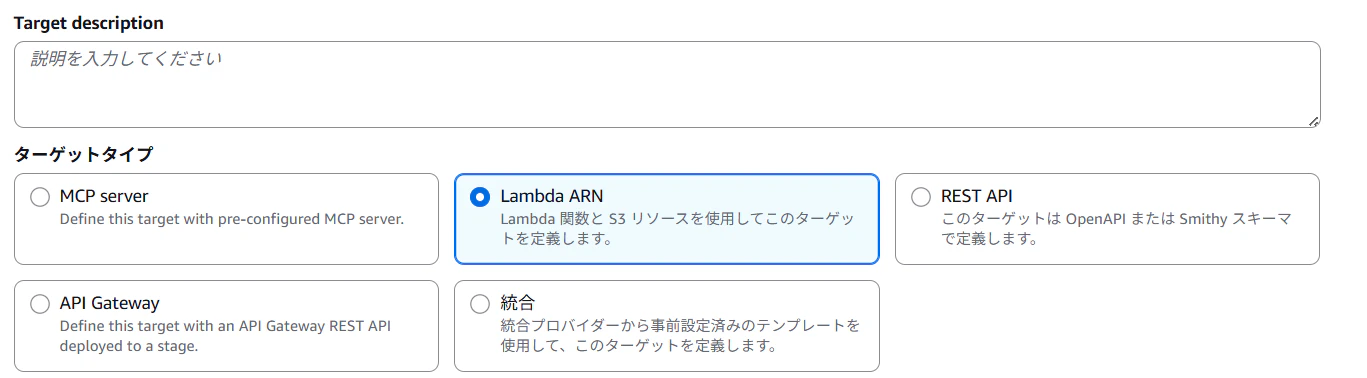
- 今回はAWS Lambdaを設定します。APIGW等の選択肢も用意されているので、利用したいサービスを選定しましょう。
-
スキーマについて
- 特にスキーマが重要で、用意するツールの名前と詳細はしっかり定義しましょう。
AIエージェントがツールとして認識する手がかりになります。
McpGatewayTarget: Type: AWS::BedrockAgentCore::GatewayTarget Properties: GatewayIdentifier: !Ref McpGateway Name: McpServerLambdaTarget TargetConfiguration: Mcp: Lambda: LambdaArn: !GetAtt McpServerFunction.Arn ToolSchema: InlinePayload: - Name: get_requirement_document Description: Get the requirement document (01_requirements.md) InputSchema: Type: object - Name: get_frontend_spec_document Description: Get the frontend specification document (02_frontend_spec.md) InputSchema: Type: object - Name: get_backend_spec_document Description: Get the backend specification document (03_backend_spec.md) InputSchema: Type: object - Name: get_infrastructure_spec_document Description: Get the infrastructure specification document (04_infrastructure_spec.md) InputSchema: Type: object - Name: get_database_schema_document Description: Get the database table schema document (05_database_table_schema.md) InputSchema: Type: object CredentialProviderConfigurations: - CredentialProviderType: GATEWAY_IAM_ROLE - 特にスキーマが重要で、用意するツールの名前と詳細はしっかり定義しましょう。
AWS Lambdaでやっていること
今回のLambdaでは、下記機能を実現しています。
- 引数eventの内容を分解して、リクエストされたツール名を特定
- ツール名に応じた特定のドキュメントをS3バケットからget_objectする
ドキュメントがCodeCommit等のGitリモートリポジトリにある場合/外部SaaS上にある場合は、皆様の環境に合わせて取得関数を変更していただければと思います。
def get_document(bucket_name, file_key):
try:
response = s3.get_object(Bucket=bucket_name, Key=file_key)
body_bytes = response['Body'].read()
try:
content = body_bytes.decode('utf-8')
encoding = 'utf-8'
except UnicodeDecodeError:
content = base64.b64encode(body_bytes).decode('ascii')
encoding = 'base64'
return {
"content": content,
"key": file_key,
"encoding": encoding
}
except Exception as e:
return {"error": str(e)}
(Tips) AIの目線に立って、シンプルで分かりやすいツール名とツール内容にしよう
これは検証している間に経験した失敗談です。
オリジナルMCPサーバー作る経験が足りていなかったので、勉強になりました。
当初ツールはfind_objectとget_documentの二つを予定していました。
ユーザーが入力した内容に応じて、必要そうなオブジェクトをfind_objectツールを使って検索し、確度が高そうなドキュメントをget_objectを用いて取得するプランです。
しかし、エージェントはMCPサーバーを使ってくれませんでした。
「MCPサーバーの全容を把握して、ツールを使う順番を計画し、タスクを完遂する」ことができなかったのです。
自分なりの解決策としては、AIエージェントが「わざわざツール利用に対する計画を立てなくてもいいような」シンプルなツール設計に切り替えることでした。その結果がドキュメントごとのツールを用意することでした。
- get_requirement_document
- get_frontend_spec_document
- get_backend_spec_document
- get_infrastructure_spec_document
- get_database_schema_document
AIエージェントが使いやすいツール自体の設計も重要であるということをお伝えできればと思います。
動かしてみた
VSCodeでの接続方法
- CloudFormationテンプレートを用いて、AWSにリソースをデプロイ
- マネジメントコンソールからBedrock AgnetCore Gatewayの作成リソースにアクセスし、ゲートウェイリソースURLをコピーする。
- VSCodeのターミナルを開いて、
uvx mcp-proxy-for-aws@latest {先ほどコピーしたゲートウェイリソースURL}を実行し、必要なパッケージをインストールする。 - VSCodeにて
ctrl + shift + pを押してmcp.jsonファイルを開く。 - mcp.jsonに下記mcpサーバー情報を追記して、MCPサーバーを起動する。(
profileやregion等のパラメータ部分は適宜置き換えてください。)
{
"servers": {
"mcp-for-project-document": {
"disabled": false,
"type": "stdio",
"command": "uvx",
"args": [
"mcp-proxy-for-aws",
"{先ほどコピーしたゲートウェイリソースURL}",
"--profile",
"default",
"--region",
"us-east-1",
"--log-level",
"INFO"
]
}
},
"inputs": []
}
余談_クレデンシャル情報に誤りがある等のエラー時の挙動(表示内容)
エラー時にどんなレスポンスしてくれるのかも試してみました。
デバッグする際に参考にしてください!
- ケース1_間違ってるとき
[error] Error: MPC -32001: Authentication error - Invalid credentials
- ケース2_プロファイル名が見つからない時
[warning] [server stderr] ValueError: No AWS credentials found with profile 'default'. Please configure your AWS credentials using 'aws configure' or environment variables.
- ケース3_デプロイ先AWSアカウント以外のプロファイル情報を参照したとき
[warning] [server stderr] 2026-01-08 02:59:30 | WARNING |
mcp_proxy_for_aws.sigv4_helper |
HTTP 403 Error Details: {'jsonrpc': '2.0', 'id': 0,
'error': {'code': -32002, 'message': 'Authorization error - Insufficient permissions'}}
質問と返ってくる内容
今回は「会員情報の取得ロジック」について聞いてみます。登録したツールを用いてバックエンド関連のドキュメントを検索してくれたら大成功です。

実は用意したドキュメントには「会員情報の取得API」の情報を記載してません。
「わからない」と回答できるかどうかが見所です。
さてMCPサーバーをうまく使って回答してくれるでしょうか!?

(AIのレスポンスから一部抜粋)
※ただし、今回取得したバックエンド仕様には GET /users/me のレスポンス例がまだ載っていません。
なので、ここは「実装パターン」を確定しつつ、レスポンス型は UserMe として
後から埋める形にするのが安全です。
ちゃんとドキュメント情報を取得したうえで、正確な回答できているので上手くオリジナルMCPサーバーを活用できてそうです!
感想
AWSのIAM認証を通して、AIエージェント向けのチーム内共通知見を展開できるのは、汎用性ありそうだなと感じました!!業務でもうまく使ってみたいな。
「MCPサーバー便利そうだけど、どうやって実現しようか...」と悩んでいた方には、AWSの認証情報使えば実現できるかも!と期待感を持ってもらえると嬉しいです!!
参考
Amazon Bedrock AgentCore上にホストしているリモートMCPサーバーに、AIコーディングツールからアクセスする
CloudFormationテンプレート全文
AWSTemplateFormatVersion: '2010-09-09'
Description: 'Deploy an MCP Server (S3 File Reader) connected to Bedrock AgentCore Gateway with SigV4 Auth'
Resources:
# ============================================================================
# S3 Bucket (Data Source)
# ============================================================================
TargetBucket:
Type: AWS::S3::Bucket
Properties:
BucketEncryption:
ServerSideEncryptionConfiguration:
- ServerSideEncryptionByDefault:
SSEAlgorithm: AES256
# ============================================================================
# Lambda Function (MCP Server)
# ============================================================================
McpServerRole:
Type: AWS::IAM::Role
Properties:
AssumeRolePolicyDocument:
Version: '2012-10-17'
Statement:
- Effect: Allow
Principal:
Service:
- lambda.amazonaws.com
Action: sts:AssumeRole
Policies:
- PolicyName: McpServerPolicy
PolicyDocument:
Version: '2012-10-17'
Statement:
- Effect: Allow
Action:
- logs:CreateLogGroup
- logs:CreateLogStream
- logs:PutLogEvents
Resource: arn:aws:logs:*:*:*
- Effect: Allow
Action:
- s3:ListBucket
- s3:GetObject
Resource:
- !GetAtt TargetBucket.Arn
- !Sub '${TargetBucket.Arn}/*'
McpServerFunction:
Type: AWS::Lambda::Function
Properties:
Runtime: python3.11
Handler: index.lambda_handler
Role: !GetAtt McpServerRole.Arn
Timeout: 30
Code:
ZipFile: |
import json
import boto3
import os
import base64
s3 = boto3.client('s3')
def get_document(bucket_name, file_key):
try:
response = s3.get_object(Bucket=bucket_name, Key=file_key)
body_bytes = response['Body'].read()
try:
content = body_bytes.decode('utf-8')
encoding = 'utf-8'
except UnicodeDecodeError:
content = base64.b64encode(body_bytes).decode('ascii')
encoding = 'base64'
return {
"content": content,
"key": file_key,
"encoding": encoding
}
except Exception as e:
return {"error": str(e)}
def lambda_handler(event, context):
print("Received event:", json.dumps(event))
# AgentCore Gateway (ProtocolType: MCP) からの呼び出しは JSON-RPC 2.0 です。
# ここでは tools/list と tools/call の2種類を扱い、
# 返り値は必ず JSON としてシリアライズ可能な dict を返します。
bucket_name = os.environ['BUCKET_NAME']
req_id = event.get('id')
method = event.get('method')
params = event.get('params') or {}
# Mapping tool names to file keys
tool_to_key = {
'get_requirement_document': '01_requirements.md',
'get_frontend_spec_document': '02_frontend_spec.md',
'get_backend_spec_document': '03_backend_spec.md',
'get_infrastructure_spec_document': '04_infrastructure_spec.md',
'get_database_schema_document': '05_database_table_schema.md'
}
tools = [
{
"name": "McpServerLambdaTarget___get_requirement_document",
"description": "Get the requirement document (01_requirements.md)",
"inputSchema": {"type": "object"},
},
{
"name": "McpServerLambdaTarget___get_frontend_spec_document",
"description": "Get the frontend specification document (02_frontend_spec.md)",
"inputSchema": {"type": "object"},
},
{
"name": "McpServerLambdaTarget___get_backend_spec_document",
"description": "Get the backend specification document (03_backend_spec.md)",
"inputSchema": {"type": "object"},
},
{
"name": "McpServerLambdaTarget___get_infrastructure_spec_document",
"description": "Get the infrastructure specification document (04_infrastructure_spec.md)",
"inputSchema": {"type": "object"},
},
{
"name": "McpServerLambdaTarget___get_database_schema_document",
"description": "Get the database table schema document (05_database_table_schema.md)",
"inputSchema": {"type": "object"},
},
]
try:
if method == 'tools/list':
return {
"jsonrpc": "2.0",
"id": req_id,
"result": {"tools": tools},
}
if method == 'tools/call':
# MCP標準だと params: { name: string, arguments: object }
tool_name = params.get('name')
arguments = params.get('arguments') or {}
# AgentCore Gateway のツール名は Target 名prefix付きになるので両方許容
# McpServerLambdaTarget___get_backend_spec_document
if isinstance(tool_name, str) and '___' in tool_name:
tool_name = tool_name.split('___', 1)[1]
if tool_name not in tool_to_key:
return {
"jsonrpc": "2.0",
"id": req_id,
"error": {
"code": -32601,
"message": f"Unknown tool: {tool_name}",
},
}
file_key = tool_to_key[tool_name]
doc = get_document(bucket_name, file_key)
if 'error' in doc:
return {
"jsonrpc": "2.0",
"id": req_id,
"error": {
"code": -32000,
"message": doc['error'],
},
}
# MCP tool result: content の配列を返す
# テキストなら type:text で返す(必要なら encoding/base64 も同梱)
return {
"jsonrpc": "2.0",
"id": req_id,
"result": {
"content": [
{
"type": "text",
"text": doc["content"],
}
],
"meta": {
"key": doc.get("key"),
"encoding": doc.get("encoding"),
"arguments": arguments,
},
},
}
return {
"jsonrpc": "2.0",
"id": req_id,
"error": {
"code": -32601,
"message": f"Unsupported method: {method}",
},
}
except Exception as e:
return {
"jsonrpc": "2.0",
"id": req_id,
"error": {
"code": -32000,
"message": str(e),
},
}
Environment:
Variables:
BUCKET_NAME: !Ref TargetBucket
# ============================================================================
# AgentCore Gateway Resources
# もし組織内の特定のロールからのIAM認証のみを許可したい場合には、Policies内を追記してください。
# ============================================================================
GatewayLogGroup:
Type: AWS::Logs::LogGroup
Properties:
LogGroupName: !Sub "/aws/bedrock-agentcore/gateway/${McpGateway}"
RetentionInDays: 30
GatewayRole:
Type: AWS::IAM::Role
Properties:
AssumeRolePolicyDocument:
Version: '2012-10-17'
Statement:
- Effect: Allow
Principal:
Service: bedrock-agentcore.amazonaws.com
Action: sts:AssumeRole
Policies:
- PolicyName: GatewayInvokePolicy
PolicyDocument:
Version: '2012-10-17'
Statement:
- Effect: Allow
Action:
- lambda:InvokeFunction
- bedrock:InvokeModel
Resource: "*"
GatewayLoggingPolicy:
Type: AWS::IAM::Policy
Properties:
PolicyName: GatewayLoggingPolicy
Roles:
- !Ref GatewayRole
PolicyDocument:
Version: '2012-10-17'
Statement:
- Effect: Allow
Action:
- logs:CreateLogGroup
- logs:CreateLogStream
- logs:PutLogEvents
Resource: !GetAtt GatewayLogGroup.Arn
McpGateway:
Type: AWS::BedrockAgentCore::Gateway
Properties:
  Name: McpS3Gateway
  RoleArn: !GetAtt GatewayRole.Arn
  AuthorizerType: AWS_IAM
  ProtocolType: MCP
  ExceptionLevel: DEBUG
# ============================================================================
# AgentCore Gateway Target Resources
# ToolSchemaの定義は、皆様のご利用したいシチュエーションに応じて、書き換えてください。
# ============================================================================
McpGatewayTarget:
Type: AWS::BedrockAgentCore::GatewayTarget
Properties:
  GatewayIdentifier: !Ref McpGateway
  Name: McpServerLambdaTarget
  TargetConfiguration:
    Mcp:
      Lambda:
        LambdaArn: !GetAtt McpServerFunction.Arn
        ToolSchema:
          InlinePayload:
            - Name: get_requirement_document
              Description: Get the requirement document (01_requirements.md)
              InputSchema:
                Type: object
            - Name: get_frontend_spec_document
              Description: Get the frontend specification document (02_frontend_spec.md)
              InputSchema:
                Type: object
            - Name: get_backend_spec_document
              Description: Get the backend specification document (03_backend_spec.md)
              InputSchema:
                Type: object
            - Name: get_infrastructure_spec_document
              Description: Get the infrastructure specification document (04_infrastructure_spec.md)
              InputSchema:
                Type: object
            - Name: get_database_schema_document
              Description: Get the database table schema document (05_database_table_schema.md)
              InputSchema:
                Type: object
  CredentialProviderConfigurations:
    - CredentialProviderType: GATEWAY_IAM_ROLE
Outputs:
BucketName:
Value: !Ref TargetBucket
Description: Name of the created S3 bucket
GatewayId:
Value: !Ref McpGateway
Description: ID of the AgentCore Gateway
LambdaFunctionName:
Value: !Ref McpServerFunction
Description: Name of the MCP Server Lambda