

前回記事はこちらです。
Raspberry Pi Pico でタッチディスプレイを動かす
LVGLは、オープンソースのグラフィックス・ライブラリーです。多くのハードウェアに対応し、OSレスのベアメタルでも動きます。GUI作成(ボタンなどの配置)やイベント(ボタン押時の処理など)はLVGLを利用し、ハード固有の処理(ディスプレイ制御、タッチ位置取得など)はユーザーで作成するような使い方も出来ます。
詳細はこちらをご覧下さい。
Light and Versatile Graphics Library
今回は VSCode と Pico C++ SDK の環境へ LVGL を導入し、タッチスクリーンディスプレイを動かしてみます。
使用したタッチスクリーンディスプレイはこちらです。
Waveshare 3.5型静電容量式タッチスクリーンディスプレイ(320 x 480、SPI/I2C接続)
3.5inch Capacitive Touch LCD Wiki
次の項目順にすすめます。
空のプロジェクト作成
LVGLのダウンロード
lv_conf.h の編集
CMakeLists.txt の編集
タッチスクリーンディスプレイのコーディング
LVGLのコーディング
空のプロジェクト作成
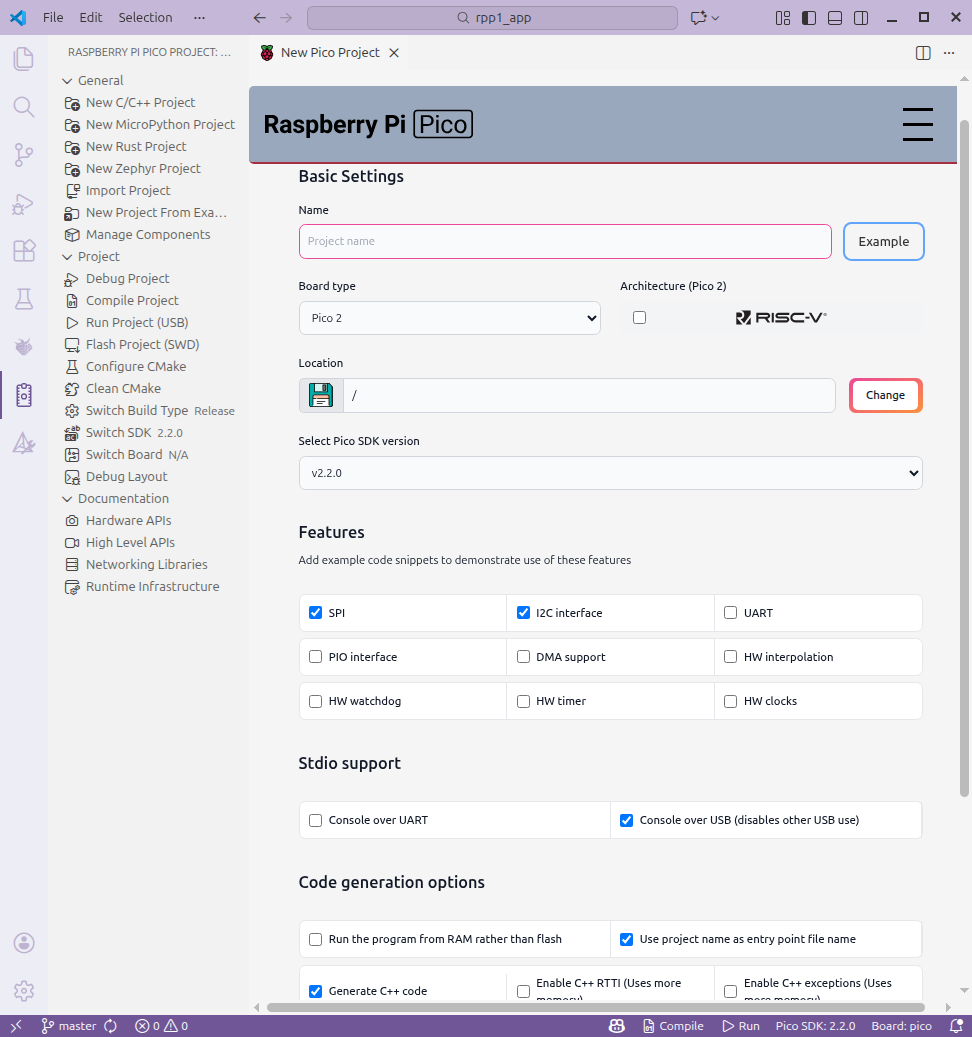
General > New C/C++ Project でプロジェクトを作成します。SPI・I2C・C++にチェックしましたが、後でCMakeLists.txtを編集しても良いです。
LVGLのダウンロード
こちらからダウンロードできます。
The LVGL Repository
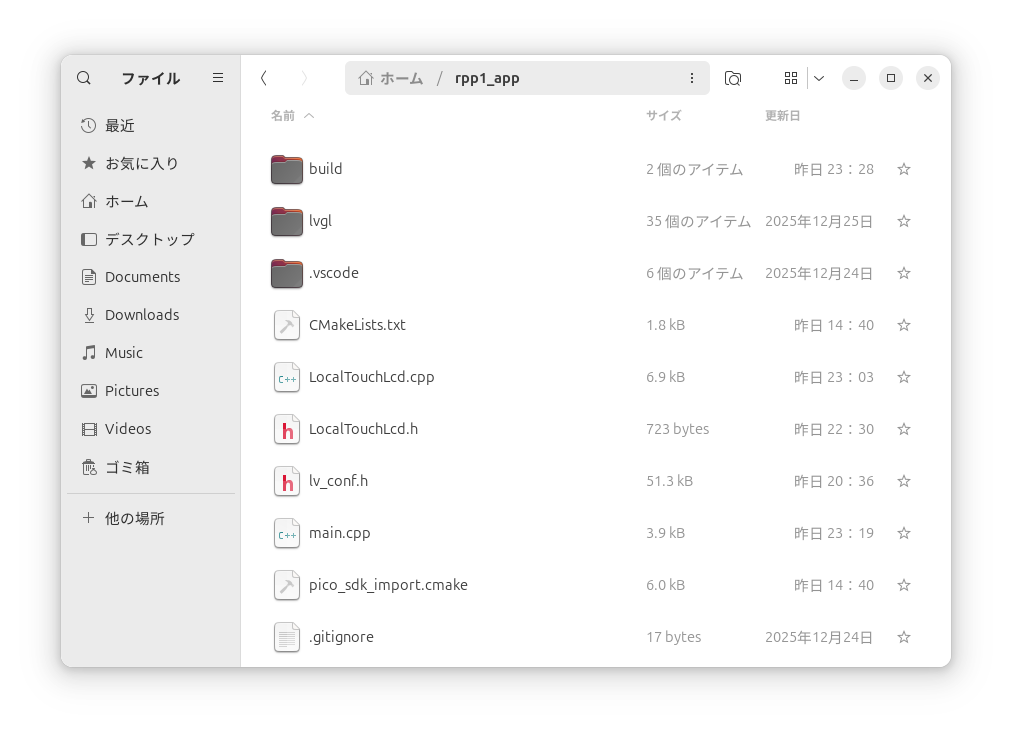
執筆時点のバージョンはv9.5でした。lvglフォルダーをプロジェクト先頭フォルダーへコピーします。プロジェクト内は次の画像のようになります。
lv_conf.h の編集
lvglフォルダーにある lv_conf_template.h をプロジェクト先頭フォルダーへコピーしてファイル名をlv_conf.hへ変更します(上の画像をご覧下さい)。
最初の方(v9.5では15行目)にある if 0 を #if 1 へ変更します(下記は変更後です)。
/* clang-format off */
#if 1 /* Set this to "1" to enable content */
今回は大きめのフォントを使用したので、ついでに
#define LV_FONT_MONTSERRAT_36 1 も 0から1へ変更しました。
CMakeLists.txt の編集
次の2行を最後に追加すると、LVGLもビルドするようになります。
set(LV_CONF_INCLUDE_SIMPLE OFF)
add_subdirectory(lvgl)
ビルドが終わると、build/lvgl/lib へ liblvgl.a というスタティックライブラリーを生成します。
target_include_directories と target_link_libraries を編集して /lvgl/lvgl.h へパスを通し、build/lvgl/lib/liblvgl.a をリンクすることで、ユーザーアプリケーションからLVGLを利用することが可能になります。
# Generated Cmake Pico project file

cmake_minimum_required(VERSION 3.13)

set(CMAKE_C_STANDARD 11)
set(CMAKE_CXX_STANDARD 17)
set(CMAKE_EXPORT_COMPILE_COMMANDS ON)

# Initialise pico_sdk from installed location
# (note this can come from environment, CMake cache etc)

# == DO NOT EDIT THE FOLLOWING LINES for the Raspberry Pi Pico VS Code Extension to work ==
if(WIN32)
    set(USERHOME $ENV{USERPROFILE})
else()
    set(USERHOME $ENV{HOME})
endif()
set(sdkVersion 2.2.0)
set(toolchainVersion 14_2_Rel1)
set(picotoolVersion 2.2.0-a4)
set(picoVscode ${USERHOME}/.pico-sdk/cmake/pico-vscode.cmake)
if (EXISTS ${picoVscode})
    include(${picoVscode})
endif()
# ====================================================================================
set(PICO_BOARD pico CACHE STRING "Board type")

# Pull in Raspberry Pi Pico SDK (must be before project)
include(pico_sdk_import.cmake)

project(rpp1_app C CXX ASM)

# Initialise the Raspberry Pi Pico SDK
pico_sdk_init()

# Add executable. Default name is the project name, version 0.1

add_executable(rpp1_app main.cpp LocalTouchLcd.cpp)

pico_set_program_name(rpp1_app "rpp1_app")
pico_set_program_version(rpp1_app "0.1")

# Modify the below lines to enable/disable output over UART/USB
pico_enable_stdio_uart(rpp1_app 0)
pico_enable_stdio_usb(rpp1_app 1)

# Add the standard library to the build
target_link_libraries(rpp1_app
        pico_stdlib
        pico_multicore
        hardware_spi
        hardware_gpio
        hardware_i2c
        ${CMAKE_CURRENT_LIST_DIR}/build/lvgl/lib/liblvgl.a
)

# Add the standard include files to the build
target_include_directories(rpp1_app PRIVATE
        ${CMAKE_CURRENT_LIST_DIR}
        ${CMAKE_CURRENT_LIST_DIR}/lvgl
)

pico_add_extra_outputs(rpp1_app)

set(LV_CONF_INCLUDE_SIMPLE OFF)
add_subdirectory(lvgl)
タッチスクリーンディスプレイのコーディング (LocalTouchLcd.cpp)
前回の記事で作成したコードを活用しました。
今回使用したタッチスクリーンディスプレイは320x480の縦長がディフォルトですが、本記事では480x320の横長として使用しています。ST7796SのMemory Data Access Controlコマンド(36h)にあるRow/Column Exchangeビットを利用しています。
タッチパネルはLCDと独立して別々に動いていますので、こちらも縦横を反転します。
なお、ハード側は縦長のまま、LVGL側で横長画面を90度(または270度)回転する方法もあります。詳細はこちらをご覧下さい。
#include <stdio.h>
#include <string.h>
#include "pico/stdlib.h"
#include "hardware/spi.h"
#include "hardware/i2c.h"
#include "LocalTouchLcd.h"

#define	LDEF_LCD_WIDTH		480
#define	LDEF_LCD_HEIGHT		320


//==============================================================================
// LCD class
//==============================================================================
#define LDEF_SPI_PORT		spi1
#define	LDEF_SPI_SCK		10
#define	LDEF_SPI_MOSI		11
#define	LDEF_SPI_MISO		12
#define	LDEF_LCD_RST		13
#define	LDEF_LCD_BL			15
#define	LDEF_LCD_DC			14
#define	LDEF_LCD_CS			9


CLocalLcd::CLocalLcd()
{
}


CLocalLcd::~CLocalLcd()
{
}


void CLocalLcd::Init(void)
{
	InitRpp();
	InitLcd();
}


void CLocalLcd::DrawLvgl(int nX1, int nY1, int nX2, int nY2, uint8_t *bpData, int nQty)
{
	SetWindows(nX1, nY1, nX2, nY2);
	gpio_put(LDEF_LCD_DC, 1);
	gpio_put(LDEF_LCD_CS, 0);
	SpiWriteBase(bpData, nQty);
	gpio_put(LDEF_LCD_CS, 1);
}


void CLocalLcd::InitRpp(void)
{
	gpio_init(LDEF_LCD_CS);
	gpio_set_dir(LDEF_LCD_CS, GPIO_OUT);
	gpio_init(LDEF_LCD_RST);
	gpio_set_dir(LDEF_LCD_RST, GPIO_OUT);
	gpio_init(LDEF_LCD_BL);
	gpio_set_dir(LDEF_LCD_BL, GPIO_OUT);
	gpio_put(LDEF_LCD_BL, 1);
	gpio_put(LDEF_LCD_CS, 1);

	spi_init(LDEF_SPI_PORT, (125*1000*1000));
	gpio_set_function(LDEF_SPI_MISO, GPIO_FUNC_SPI);
	gpio_set_function(LDEF_SPI_SCK, GPIO_FUNC_SPI);
	gpio_set_function(LDEF_SPI_MOSI, GPIO_FUNC_SPI);

	gpio_init(LDEF_LCD_DC);
	gpio_set_dir(LDEF_LCD_DC, GPIO_OUT);
	gpio_put(LDEF_LCD_DC, 1);
}


void CLocalLcd::InitLcd(void)
{
	gpio_put(LDEF_LCD_RST, 0);
	busy_wait_us(100*1000);
	gpio_put(LDEF_LCD_RST, 1);
	busy_wait_us(10*1000);

	SpiWriteCmd(0x11);

	busy_wait_us(120*1000);

	SpiWriteCmd(0x36);
	SpiWriteData(0xe8);			// original 0x08  changed "Row/Column Exchange"

	SpiWriteCmd(0x3A);
	SpiWriteData(0x05);

	SpiWriteCmd(0xF0);
	SpiWriteData(0xC3);

	SpiWriteCmd(0xF0);
	SpiWriteData(0x96);

	SpiWriteCmd(0xB4);
	SpiWriteData(0x01);

	SpiWriteCmd(0xB7);
	SpiWriteData(0xC6);

	SpiWriteCmd(0xC0);
	SpiWriteData(0x80);
	SpiWriteData(0x45);

	SpiWriteCmd(0xC1);
	SpiWriteData(0x13);

	SpiWriteCmd(0xC2);
	SpiWriteData(0xA7);

	SpiWriteCmd(0xC5);
	SpiWriteData(0x0A);

	SpiWriteCmd(0xE8);
	SpiWriteData(0x40);
	SpiWriteData(0x8A);
	SpiWriteData(0x00);
	SpiWriteData(0x00);
	SpiWriteData(0x29);
	SpiWriteData(0x19);
	SpiWriteData(0xA5);
	SpiWriteData(0x33);

	SpiWriteCmd(0xE0);
	SpiWriteData(0xD0);
	SpiWriteData(0x08);
	SpiWriteData(0x0F);
	SpiWriteData(0x06);
	SpiWriteData(0x06);
	SpiWriteData(0x33);
	SpiWriteData(0x30);
	SpiWriteData(0x33);
	SpiWriteData(0x47);
	SpiWriteData(0x17);
	SpiWriteData(0x13);
	SpiWriteData(0x13);
	SpiWriteData(0x2B);
	SpiWriteData(0x31);

	SpiWriteCmd(0xE1);
	SpiWriteData(0xD0);
	SpiWriteData(0x0A);
	SpiWriteData(0x11);
	SpiWriteData(0x0B);
	SpiWriteData(0x09);
	SpiWriteData(0x07);
	SpiWriteData(0x2F);
	SpiWriteData(0x33);
	SpiWriteData(0x47);
	SpiWriteData(0x38);
	SpiWriteData(0x15);
	SpiWriteData(0x16);
	SpiWriteData(0x2C);
	SpiWriteData(0x32);

	SpiWriteCmd(0xF0);
	SpiWriteData(0x3C);

	SpiWriteCmd(0xF0);
	SpiWriteData(0x69);

	busy_wait_us(120*1000);

	SpiWriteCmd(0x21);

	SpiWriteCmd(0x29);
}


void CLocalLcd::SetWindows(int nXstart, int nYstart, int nXend, int nYend)
{
	unsigned char bData;

	SpiWriteCmd(0x2A);
	bData = (unsigned char)((nXstart >> 8) & 0xff);
	SpiWriteData(bData);
	bData = (unsigned char)(nXstart & 0xff);
	SpiWriteData(bData);
	bData = (unsigned char)((nXend >> 8) & 0xff);
	SpiWriteData(bData);
	bData = (unsigned char)(nXend & 0xff);
	SpiWriteData(bData);

	SpiWriteCmd(0x2B);
	bData = (unsigned char)((nYstart >> 8) & 0xff);
	SpiWriteData(bData);
	bData = (unsigned char)(nYstart & 0xff);
	SpiWriteData(bData);
	bData = (unsigned char)((nYend >> 8) & 0xff);
	SpiWriteData(bData);
	bData = (unsigned char)(nYend & 0xff);
	SpiWriteData(bData);

	SpiWriteCmd(0x2C);
}


void CLocalLcd::SpiWriteBase(unsigned char *bpTxBuf, int nLen)
{
	spi_write_blocking(LDEF_SPI_PORT, bpTxBuf, nLen);
}


void CLocalLcd::SpiWriteCmd(unsigned char bCmd)
{
	gpio_put(LDEF_LCD_DC, 0);
	gpio_put(LDEF_LCD_CS, 0);
	SpiWriteBase(&bCmd, 1);
}


void CLocalLcd::SpiWriteData(unsigned char bData)
{
	gpio_put(LDEF_LCD_DC, 1);
	gpio_put(LDEF_LCD_CS, 0);
	SpiWriteBase(&bData, 1);
	gpio_put(LDEF_LCD_CS, 1);
}


//==============================================================================
// Touch class
//==============================================================================
#define LDEF_I2C_PORT				i2c1
#define LDEF_I2C_ADDRESS			0x38
#define	LDEF_I2C_SDA				6
#define	LDEF_I2C_SCL				7
#define	LDEF_I2C_IRQ				8
#define	LDEF_I2C_RST				5
#define	LDEF_I2C_REG_NUM			0X02
#define	LDEF_I2C_REG_XY				0X03

static CLocalTouch *sctp;

CLocalTouch::CLocalTouch()
{
	CP = new tagClassParameter;
	memset(CP, 0, sizeof(tagClassParameter));
	sctp = this;
}


CLocalTouch::~CLocalTouch()
{
	delete CP;
}


void CLocalTouch::Init(void)
{
    i2c_init(LDEF_I2C_PORT, 400 * 1000);
    gpio_set_function(LDEF_I2C_SDA, GPIO_FUNC_I2C);
    gpio_set_function(LDEF_I2C_SCL, GPIO_FUNC_I2C);
    gpio_pull_up(LDEF_I2C_SDA);
    gpio_pull_up(LDEF_I2C_SCL);

    gpio_init(LDEF_I2C_IRQ);
    gpio_set_dir(LDEF_I2C_IRQ, GPIO_IN);
    gpio_pull_up(LDEF_I2C_IRQ);

	gpio_init(LDEF_I2C_RST);
	gpio_set_dir(LDEF_I2C_RST, GPIO_OUT);
    gpio_put(LDEF_I2C_RST, 1);
	sleep_ms(200);
    gpio_put(LDEF_I2C_RST, 0);
	sleep_ms(200);
    gpio_put(LDEF_I2C_RST, 1);
	sleep_ms(200);

	gpio_set_irq_enabled_with_callback(LDEF_I2C_IRQ, GPIO_IRQ_EDGE_FALL, true, CLocalTouch::IrqHandler);
}


int CLocalTouch::GetTouchXy(int *npOutX, int *npOutY)
{
	if((CP->nPointCount)==0) {
		return(-1);
	}
	(CP->nPointCount) = 0;
	(*npOutX) = (CP->nPosX);
	(*npOutY) = (CP->nPosY);
	return(0);
}


void CLocalTouch::IrqHandler(uint gpio, uint32_t events)
{
	unsigned char bCmd;
	unsigned char sRxBuf[64];
	int nRet, nLen, nLocalPC;
	//--------
	bCmd = LDEF_I2C_REG_NUM;
    i2c_write_blocking(LDEF_I2C_PORT, LDEF_I2C_ADDRESS, &bCmd, 1, false);
	nRet = i2c_read_blocking(LDEF_I2C_PORT, LDEF_I2C_ADDRESS, sRxBuf, 1, false);
	if(nRet==0) {
		return;
	}
	nLocalPC = (int)(sRxBuf[0]);
	nLen = (int)(sRxBuf[0]) * 6;
	//--------
	bCmd = LDEF_I2C_REG_XY;
    i2c_write_blocking(LDEF_I2C_PORT, LDEF_I2C_ADDRESS, &bCmd, 1, false);
	nRet = i2c_read_blocking(LDEF_I2C_PORT, LDEF_I2C_ADDRESS, sRxBuf, nLen, false);
	if(nRet==0) {
		return;
	}
	//--------
	(sctp->CP->nPosY) = 0 + (((int)((sRxBuf[0])&0x0f) << 8) + (int)(sRxBuf[1]));
	(sctp->CP->nPosX) = LDEF_LCD_WIDTH - (((int)((sRxBuf[2])&0x0f) << 8) + (int)(sRxBuf[3]));
	(sctp->CP->nPointCount) = nLocalPC;
	//printf("tpirq x=%03d y=%03d\n", (sctp->CP->nPosX), (sctp->CP->nPosY));
}
class CLocalLcd {
public:
	CLocalLcd();
	virtual ~CLocalLcd();
	void Init(void);
	void DrawLvgl(int nX1, int nY1, int nX2, int nY2, uint8_t *bpData, int nQty);

private:
	void InitRpp(void);
	void InitLcd(void);
	void SetWindows(int nXstart, int nYstart, int nXend, int nYend);
	void SpiWriteCmd(unsigned char bCmd);
	void SpiWriteData(unsigned char bData);
	void SpiWriteBase(unsigned char *bpTxBuf, int nLen);
};


class CLocalTouch {
public:
	CLocalTouch();
	virtual ~CLocalTouch();
	void Init(void);
	int GetTouchXy(int *npOutX, int *npOutY);
	typedef struct {
		int nPointCount;
		int nPosX;
		int nPosY;
	} tagClassParameter;
	tagClassParameter *CP;

private:
	static void IrqHandler(uint gpio, uint32_t events);
};
LVGLのコーディング (main.cpp)
まず、LVGLを利用するために #include "lvgl.h" を記述して下さい。
ディスプレイ表示
最低限のコードについての説明が次のサイトにあります。
Learn the Basics
かいつまんで箇条書きすると次の手順です。
ハードウェア初期化
lv_init();
ミリ秒単位の経過時間を通知するコールバック関数作成
画面の作成。バッファー確保、画面のコールバックを関数作成
ポーリング(無限ループ)内で5ミリ秒間隔でlv_timer_handler()をコール
ミリ秒単位の経過時間を通知するコールバック関数は次のWebサイトを参考にしました。
LVGL Demo on Raspberry Pi Pico with Attached HUB75 RGB LED Matrix
使用したタッチスクリーンディスプレイではエンディアンの問題がありました。
今回は、各ピクセルの色をRGB565というフォーマットで指定しています。赤5ビット、緑6ビット、青5ビットの計16ビット(65536色)で表現する方法です。例えば緑は (00000 111111 00000) = 0x07E0 なので、0x07 0xE0 の2バイトをSPIで送れば良いのですが...。
Raspberry Pi Pico というか RP2040 というか arm はリトルエンディアンなので、LVGLが出力するワード(=2バイト)のデータは 1バイトめが0xE0、 2バイトめが0x07 となっていて、このままLCDへ送ると正しい色が表示出来ません。
そこで、lv_display_set_color_format()を使って LV_COLOR_FORMAT_RGB565 ではなくLV_COLOR_FORMAT_RGB565_SWAPPED を設定します。
画面のコールバック関数は、描画エリアの座標とデータが引数にありますので、この内容をタッチスクリーンディスプレイへ送ります。
終了前に lv_display_flush_ready(disp); が必要です。
ここまで出来たら、Learn the Basics のサンプルコードが動くと思います。
タッチパネル
次に、タッチパネルの動作確認へ移ります。
タッチパネルも画面と同様に、Createでインスタンスを作り、コールバック関数で現在の状態をLVGLへ伝えることで機能します。詳細は下記をご覧下さい。
こちらのページ にLVGLのサンプルコードがいっぱいありますので、このうち Create a slider and write its value on a label を試しました。
使ったコントロールはSliderとLabelです。ほぼサンプル通りにcreateでインスタンスを作成し、sliderのコールバック関数を用意すると、LVGLのWebサイトと同様の動作が冒頭画像のようにタッチスクリーンディスプレイでも出来るようになります。
#include <stdio.h>
#include "pico/stdlib.h"
#include "pico/multicore.h"
#include "pico/critical_section.h"
#include "lvgl.h"
#include "LocalTouchLcd.h"

#define	LDEF_LCD_WIDTH				480
#define	LDEF_LCD_HEIGHT				320
#define LDEF_LED_DELAY_MS			500
#define LDEF_SLIDER_WIDTH			300
#define LDEF_LABEL1_OFFSET_Y		(-20)

static void my_flush_cb(lv_display_t * disp, const lv_area_t * area, uint8_t * px_buf);
static void my_touchpad_read(lv_indev_t *indev, lv_indev_data_t *data);
static uint32_t my_get_millis(void);
static void slider_event_cb(lv_event_t * e);
static void Core1Main(void);

static semaphore_t sem;
static CLocalLcd *LLP;
static CLocalTouch *LTP;
static lv_obj_t * label1;

int main()
{
    stdio_init_all();
	LLP = new CLocalLcd;
	(LLP->Init)();
	LTP = new CLocalTouch;
	(LTP->Init)();
	sem_init(&sem, 1, 1);
    multicore_launch_core1(Core1Main);

    //-------------------------------- LVGL
	lv_init();
    lv_tick_set_cb(my_get_millis);

    //-------------------------------- display
    static uint8_t buf[2 * LDEF_LCD_WIDTH * LDEF_LCD_HEIGHT / 8];
	lv_display_t *display = lv_display_create(LDEF_LCD_WIDTH, LDEF_LCD_HEIGHT);
    lv_display_set_color_format(display, LV_COLOR_FORMAT_RGB565_SWAPPED);
    lv_obj_set_style_bg_color(lv_screen_active(), lv_color_hex(0xa0a0a0), LV_PART_MAIN);
	lv_display_set_buffers(display, buf, NULL, sizeof(buf), LV_DISPLAY_RENDER_MODE_PARTIAL);
	lv_display_set_flush_cb(display, my_flush_cb);

    //-------------------------------- touch panel
	lv_indev_t *indev = lv_indev_create();
	lv_indev_set_type(indev, LV_INDEV_TYPE_POINTER);
	lv_indev_set_read_cb(indev, my_touchpad_read);

    //-------------------------------- slider
    lv_obj_t *slider = lv_slider_create(lv_screen_active());
    lv_obj_set_width(slider, LDEF_SLIDER_WIDTH);
    lv_obj_center(slider);
    lv_obj_add_event_cb(slider, slider_event_cb, LV_EVENT_VALUE_CHANGED, NULL);

    //-------------------------------- label
    label1 = lv_label_create(lv_screen_active());
    lv_obj_set_style_text_font(label1, &lv_font_montserrat_36, LV_PART_MAIN);
	lv_obj_set_style_text_color(label1, lv_color_make(0x00, 0x40, 0x00), LV_PART_MAIN);
    lv_label_set_text(label1, "0");
    lv_obj_align_to(label1, slider, LV_ALIGN_OUT_TOP_MID, 0, LDEF_LABEL1_OFFSET_Y);

	//--------------------------------
    while(1) {
        lv_timer_handler();
		sleep_ms(5);
    }

    delete LTP;
    delete LLP;
	return(0);
}

//-------------------------------- display callback
static void my_flush_cb(lv_display_t *disp, const lv_area_t *area, uint8_t *px_buf)
{
	int nPix = ((area->x2)-(area->x1)+1) * ((area->y2)-(area->y1)+1);
	(LLP->DrawLvgl)((area->x1), (area->y1), (area->x2), (area->y2), px_buf, (nPix*2));
    //--------
    lv_display_flush_ready(disp);
}

//-------------------------------- touchpanel callback
static void my_touchpad_read(lv_indev_t *indev, lv_indev_data_t *data) {
	int nRet, nPosX, nPosY;
	nRet = (LTP->GetTouchXy)(&nPosX, &nPosY);
	if(nRet==0) {
		(data->point.x) = nPosX;
		(data->point.y) = nPosY;
		(data->state) = LV_INDEV_STATE_PRESSED;
	}
	else {
		(data->state) = LV_INDEV_STATE_RELEASED;
	}
}

//-------------------------------- slider callback
static void slider_event_cb(lv_event_t * e)
{
    lv_obj_t * slider = lv_event_get_target_obj(e);
	//--------
    lv_label_set_text_fmt(label1, "%" LV_PRId32, lv_slider_get_value(slider));
    lv_obj_align_to(label1, slider, LV_ALIGN_OUT_TOP_MID, 0, LDEF_LABEL1_OFFSET_Y);
}

//-------------------------------- tick callback
static uint32_t my_get_millis(void)
{
    critical_section_t crit_sec;
    critical_section_enter_blocking(&crit_sec);
    uint32_t ms = to_ms_since_boot(get_absolute_time());
    critical_section_exit(&crit_sec);
    return(ms);
}

//-------------------------------- LED blinking
static void Core1Main(void)
{
    gpio_init(PICO_DEFAULT_LED_PIN);
    gpio_set_dir(PICO_DEFAULT_LED_PIN, GPIO_OUT);

	while(1) {
		gpio_put(PICO_DEFAULT_LED_PIN, 1);
		sleep_ms(LDEF_LED_DELAY_MS);
		gpio_put(PICO_DEFAULT_LED_PIN, 0);
		sleep_ms(LDEF_LED_DELAY_MS);
	}
}