プリザンターのグループについて試してみました。
グループをユーザーがバラバラに作っても、それが他のユーザーへは影響せず、そのユーザーのみが使える状態にする。
という事をサーバースクリプトで実施しました。
=>自分が管理者のグループだけでフィルターする
やりたいこと
ユーザーの選択肢一覧をグループの選択肢一覧で絞られるようにしています。
この時にグループ選択肢を自分が管理者だけのものを選択肢一覧となるようにします。
- ClassDがグループ選択肢
- ClassEがユーザー選択肢
サーバースクリプトでフィルター
サーバースクリプトに以下を追加します。
条件は画面表示の前。
- 自分が所属している一覧を対象にループ
- グループで自分が管理者か確認
- 対象だったら選択肢に追加
という内容です。
try {
  for (const groupId of context.Groups) {
    const group = groups.Get(groupId);

    for (const member of group.GetMembers()) {
      if (member.UserId === context.UserId && member.Admin) {
        columns.ClassD.AddChoiceHash(group.GroupId, group.GroupName);
        break;
      }
    }
  }
} catch (error) {
  context.Log(error.stack);
}
サーバースクリプトで取得したグループのメンバーについて。
マニュアルのgroup.GetMembersでは、member.DeptIdとmember.UserIdが使われています。
https://www.pleasanter.org/ja/manual/server-script-group-get-members
GroupMemberModel.csをみると他にもありました。
これでAdmin/管理者か確認できることが分かりました。
https://github.com/Implem/Implem.Pleasanter/blob/main/Implem.Pleasanter/Models/GroupMembers/GroupMemberModel.cs
注意的なこと
色々と設定の仕方とかを気を付けないと動かないことがあってつまづきました。
- columns.AddChoiceHashとする選択肢には一つ以上の選択肢を入れておかないといけません
ClassDへ選択肢一覧に9999,未定義とかで入れておきます
と、自動ポストバックもチェックする - ClassEの選択肢一覧の指定の仕方
ClassDが複数選択かどうかで違います
複数選択:"=[@ClassD]"
単選択:"[@ClassD]"
テーブルの管理:エディタ:項目の詳細設定:選択肢一覧:フィルタ(選択肢一覧を他の項目の値で絞り込む)より
下記のように記載すると、画面上の分類Aの「値」をJSON文字列に変換せずに直接渡すことができます。
例えば、分類Aが複数選択項目の場合、[@ClassA]には既にJSON形式の文字列が入っています。
左辺が選択肢ありの場合、自動的にJSON配列に変換される仕組みがありますが、既にJSONが入っている場合に変換をさせないよう=を記述します。
[
    {
        "TableName": "Users",
        "View": {
            "ColumnFilterExpressions": {
                "Groups": "=[@ClassD]"
            }
        }
    }
]
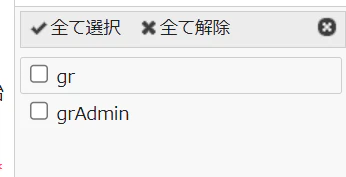
- 選択肢に表示されるのは、自分が管理者のグループだけになる
- 他のユーザーが自分を入れたグループを作っていても表示されない
次にやりたいこと
ユーザー個人がバラバラにグループを作ることを想定しています。
通常だと自分がメンバーに入っているものが表示されます。
表示したいのは、自分が管理者のものだけにしたいです。
グループの一覧画面からは設定画面がなさそうでしたので、拡張サーバースクリプトで設定しました。
内容的には先ほどと同じような事をしています。
groupIdを配列にして、それをjsonでフィルターに入れます。
複数入れる時は、JSON.stringify()でないとダメです。
拡張サーバースクリプトは、定義するjsonファイルとjsファイルを分けられるのでそのようにしています。
.¥Pleasanter¥App_Data¥Parameters¥ExtendedServerScripts¥配下に以下を置いてiisを再起動します。
{
    "Name": "GroupsView",
    "Controllers": ["groups"],
    "WhenViewProcessing": true,
    "Body": ""
}
try {
  view.Filters.GroupId = JSON.stringify(AdminGroups());

  function AdminGroups() {
    const ary = [];
    for (const groupId of context.Groups) {
      const group = groups.Get(groupId);

      for (const member of group.GetMembers()) {
        if (member.UserId === context.UserId && member.Admin) {
          //   columns.ClassD.AddChoiceHash(group.GroupId, group.GroupName);
          ary.push(group.GroupId);
          break;
        }
      }
    }
    context.Log(ary.join(","));
    return ary;
  }
} catch (error) {
  context.Log(error.stack);
}
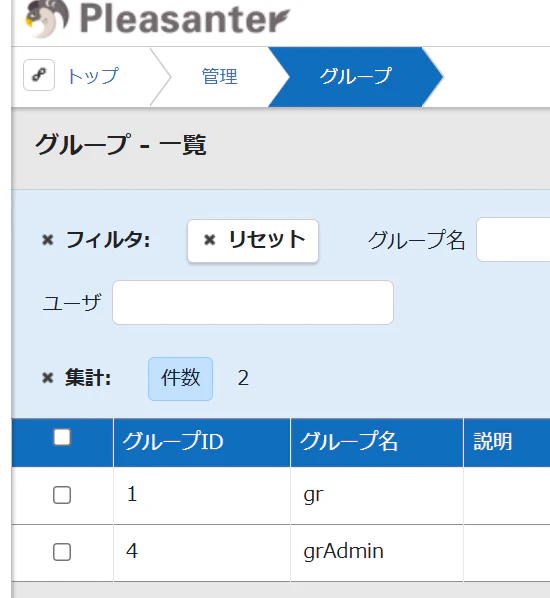
- グループ1と4で自分が管理者なので表示される
- 他のユーザーが作ったグループは表示されない