
LaTeXで行列を書くとき,普通は以下のように記述するかと思います.
\begin{pmatrix}
    a & b \\
    c & d \\
\end{pmatrix}
これによる出力は次のようになります.
\begin{pmatrix}
    a & b \\
    c & d \\
\end{pmatrix}
これはまったくもって問題ないのですが,これを displaystyle にして文中数式で使うと,私の環境(LuaLaTeX)では画像のようになってしまいました.

画像元PDFのTeXソース
% プリアンブルや\begin{document}などは省略

\centering インライン $\displaystyle \begin{pmatrix} a & b \\ c & d \end{pmatrix}$ インライン

\[
\text{比較用の別行立て}
\begin{pmatrix}
  a & b \\
  c & d
\end{pmatrix}
\text{比較用の別行立て}
\]
括弧のサイズが妙に大きくてダサいですね. これを何とかしましょう.
なんとかした(かった)結果
その1. とりあえずChatGPTに実装してもらった
\newcommand{\inlinematt}[4]{% インライン数式でpmatrix
  \displaystyle% 消すとうまくいかない
  \left(%
  \vphantom{0 \atop 0}% 括弧サイズ調整用vphantom
    \raise0.56pt\hbox{$% ちょっと上にずらしたかった
      \vcenter{%
        \offinterlineskip% 自動の行間を切る
        \halign{\hfil$\textstyle##$\hfil&\hfil$\textstyle##$\hfil\cr
          \vphantom{0}\mathord#1 \ \,&\,\  #2\cr
          \noalign{\vskip 5.2pt}% 1行目と2行目の行間
          \vphantom{0}\mathord#3 \ \,&\,\  #4\cr
        }%
      }%
    $}%
  \right)%
}
おぞましいもの すばらしいコマンドが完成しました! いや~最近のAIは便利ですね
たとえば,
ここで,行列 \( A = \inlinematt{1}{2}{3}{4} \) は正則で,
とすれば

と,いい感じのサイズになりましたね.ところが,この \inlinematt には致命的な弱点があって

マイナス記号を付けるとなぜか成分の位置する高さが変わってしまいます.(左上の $1$ と括弧の位置関係を見るとわかりやすい.)マイナスがというより,文字の高さが原因みたいです.アルファベット大文字もこうなります.
その2. じゃあそれを気合で調整しよう
先に断っておきますが, 自動調整ではありません.完全に手動です.
\newcommand{\inlinematta}[6]{% 行間と高さを変更可能
  \displaystyle%
  \left(%
  \vphantom{0 \atop 0}%
        \raise\dimexpr 0.56pt + #1\relax\hbox{$% #1 : 高さの変化分.単位 "pt" を忘れずに
      \vcenter{%
        \offinterlineskip%
        \halign{\hfil$\textstyle##$\hfil&\hfil$\textstyle##$\hfil\cr
          \vphantom{0}\mathord#3 \ \,&\,\  #4\cr
          \noalign{\vskip\dimexpr 5.2pt + #2\relax}% #2 : 行間の変化分.
          \vphantom{0}\mathord#5 \ \,&\,\  #6\cr
        }%
      }%
    $}%
  \right)%
}
気合で調整をすることにより
行列 \( B = \inlinematta{-0.75pt}{-0.75pt}{1}{-2}{3}{-6} \) は正則でない.
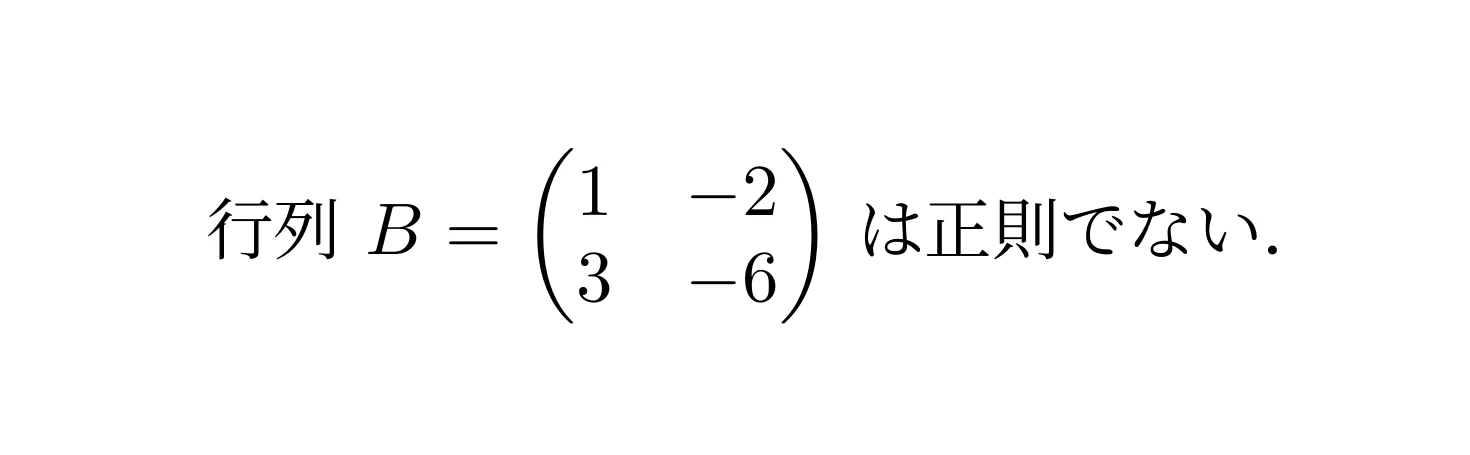
とさっきより見た目がマシになりました! なんとこの調整に7分くらいかかっています! 時間の無駄!
結論
インラインに行列を書くのは諦めろ!(爆発オチ)
普通に諦めて別行立てにしたほうがいいです.それか,なんかいい感じのパッケージが存在していればそれを使いましょう.
一応コピペ用に置いておきます.vmatt と dett は同じです.
\newcommand{\inlinematt}[4]{\displaystyle\left(\vphantom{0 \atop 0}\raise0.56pt\hbox{$\vcenter{\offinterlineskip\halign{\hfil$\textstyle##$\hfil&\hfil$\textstyle##$\hfil\cr\vphantom{0}\mathord#1 \ \,&\,\  #2\cr\noalign{\vskip 5.2pt}\vphantom{0}\mathord#3 \ \,&\,\  #4\cr}}$}\right)}
\newcommand{\inlinevecc}[2]{\displaystyle\left(\vphantom{0 \atop 0}\raise0.56pt\hbox{$\vcenter{\offinterlineskip\halign{\hfil$\textstyle##$\hfil&\hfil$\textstyle##$\hfil\cr \vphantom{0}\mathord#1\cr\noalign{\vskip 5.2pt} \vphantom{0}\mathord#2\cr}}$}\right)}
\newcommand{\inlinevmatt}[4]{\displaystyle\left|\vphantom{0 \atop 0}\raise0.56pt\hbox{$\vcenter{\offinterlineskip\halign{\hfil$\textstyle##$\hfil&\hfil$\textstyle##$\hfil\cr \vphantom{0}\mathord#1 \ \,&\,\  #2\cr\noalign{\vskip 5.2pt} \vphantom{0}\mathord#3 \ \,&\,\  #4\cr}}$}\right|}
\newcommand{\inlinedett}[4]{\displaystyle\left|\vphantom{0 \atop 0}\raise0.56pt\hbox{$\vcenter{\offinterlineskip\halign{\hfil$\textstyle##$\hfil&\hfil$\textstyle##$\hfil\cr \vphantom{0}\mathord#1 \ \,&\,\  #2\cr\noalign{\vskip 5.2pt} \vphantom{0}\mathord#3 \ \,&\,\  #4\cr}}$}\right|}

\newcommand{\inlinematta}[6]{\displaystyle\left(\vphantom{0 \atop 0}\raise\dimexpr 0.56pt + #1\relax\hbox{$\vcenter{\offinterlineskip\halign{\hfil$\textstyle##$\hfil&\hfil$\textstyle##$\hfil\cr\vphantom{0}\mathord#3 \ \,&\,\  #4\cr\noalign{\vskip\dimexpr 5.2pt + #2\relax}\vphantom{0}\mathord#5 \ \,&\,\  #6\cr}}$}\right)}
\newcommand{\inlinevecca}[4]{\displaystyle\left(\vphantom{0 \atop 0}\raise\dimexpr 0.56pt + #1\relax\hbox{$\vcenter{\offinterlineskip\halign{\hfil$\textstyle##$\hfil&\hfil$\textstyle##$\hfil\cr \vphantom{0}\mathord#3\cr\noalign{\vskip\dimexpr 5.2pt + #2\relax} \vphantom{0}\mathord#4\cr}}$}\right)}
\newcommand{\inlinevmatta}[6]{\displaystyle\left|\vphantom{0 \atop 0}\raise\dimexpr 0.56pt + #1\relax\hbox{$\vcenter{\offinterlineskip\halign{\hfil$\textstyle##$\hfil&\hfil$\textstyle##$\hfil\cr \vphantom{0}\mathord#3 \ \,&\,\  #4\cr\noalign{\vskip\dimexpr 5.2pt + #2\relax} \vphantom{0}\mathord#5 \ \,&\,\  #6\cr}}$}\right|}
\newcommand{\inlinedetta}[6]{\displaystyle\left|\vphantom{0 \atop 0}\raise\dimexpr 0.56pt + #1\relax\hbox{$\vcenter{\offinterlineskip\halign{\hfil$\textstyle##$\hfil&\hfil$\textstyle##$\hfil\cr \vphantom{0}\mathord#3 \ \,&\,\  #4\cr\noalign{\vskip\dimexpr 5.2pt + #2\relax} \vphantom{0}\mathord#5 \ \,&\,\  #6\cr}}$}\right|}