0
0

Delete article

Deleted articles cannot be recovered.

Draft of this article would be also deleted.

Are you sure you want to delete this article?

Excelでステータスに応じて特定の行をグレーアウトする方法

0
Posted at

はじめに

Excelの課題管理表などでステータスが完了になった際、その行をすべてグレーアウトしたい。
手動でセルの色を変えるのは効率が悪いので、ステータスに応じて自動的に色が塗られるようになる方法をまとめました。

やりたいこと

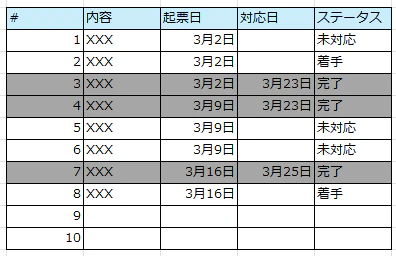
このようなExcelを👇
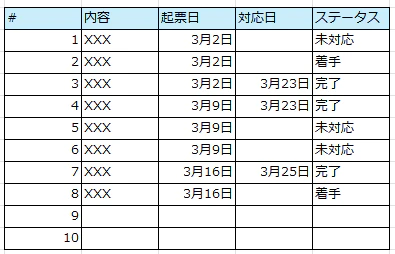
Excelグレーアウト①.png

こうしたい👇
Excelグレーアウト②.png

手順

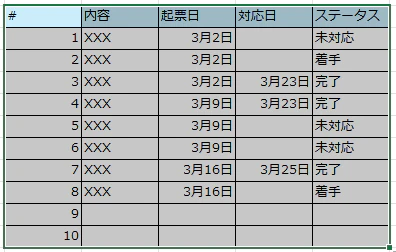
①対象の範囲を選択
Excelグレーアウト③.png

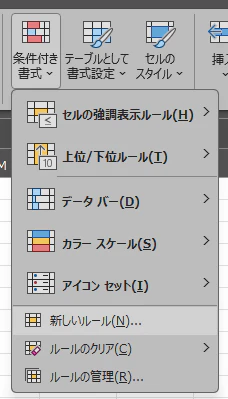
②「ホーム」タブ → 「条件付き書式」 → 「新しいルール」 をクリック
Excelグレーアウト④.png

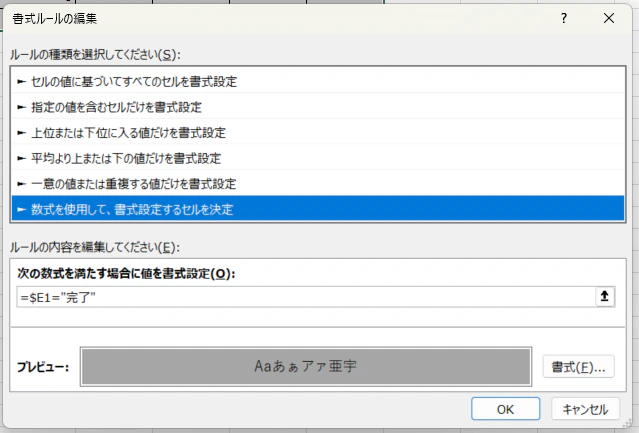
③新しい書式ルールで「数式を使用して、書式設定するセルを決定」を選択し、以下の設定を行い「OK」押下

・次の数式を満たす場合に値を書式設定で以下の式を入力
※ステータスのE列に「完了」と入力される場合

=$E1="完了"

・プレビューで塗りつぶしたい色を設定
Excelグレーアウト⑤.png

補足

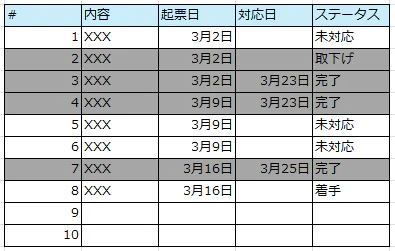
ステータスが「完了」もしくは「取下げ」の時に行をグレーアウトしたい時は、数式を以下に修正する

=OR($E1="完了", $E1="取下げ")
Excelグレーアウト⑥.png

0
0
0

Register as a new user and use Qiita more conveniently

  1. You get articles that match your needs
  2. You can efficiently read back useful information
  3. You can use dark theme
What you can do with signing up
0
0

Delete article

Deleted articles cannot be recovered.

Draft of this article would be also deleted.

Are you sure you want to delete this article?