1
4

Delete article

Deleted articles cannot be recovered.

Draft of this article would be also deleted.

Are you sure you want to delete this article?

More than 5 years have passed since last update.

GoogleChromeをキオスクモード実行ショートカット

1
Last updated at Posted at 2019-10-29

Chromeでキオスクモードしたかったのでメモ

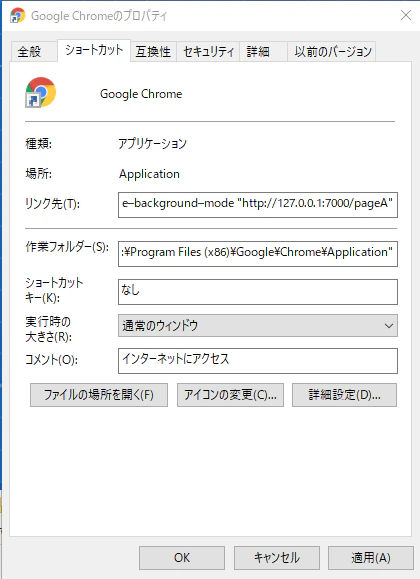
Chromeのショートカット作成してリンクを編集
NoName_2019-10-29_11-27-43_No-00.png

Chromeのショートカット作成して
「リンク先」の末尾に下記のコード追加、URLのところは任意

 --chrome-frame --kiosk "http://127.0.0.1:7000/pageA"

全部

"C:\Program Files (x86)\Google\Chrome\Application\chrome.exe" --chrome-frame --kiosk "http://127.0.0.1:7000/pageA"

一度、すべてのChromeを閉じないと
効果が発揮されないようでした。

位置を指定したい場合

--window-position=-3960,0
"C:\Program Files (x86)\Google\Chrome\Application\chrome.exe" --kiosk --window-position=-3960,0

参考サイト

キオスクモードで最新のChrome for Windowsを実行する
https://kotaeta.com/70985394

1
4
0

Register as a new user and use Qiita more conveniently

  1. You get articles that match your needs
  2. You can efficiently read back useful information
  3. You can use dark theme
What you can do with signing up
1
4

Delete article

Deleted articles cannot be recovered.

Draft of this article would be also deleted.

Are you sure you want to delete this article?