

概要
AWS STSのリージョナルエンドポイントを使うことで、レイテンシ削減・冗長性向上・セキュリティ強化が実現できます。本記事では、2025年の最新仕様に基づき、実践的な設定方法とトラブルシューティングを解説します。
目次
STSエンドポイントの基礎
AWS Security Token Service (STS) には2種類のエンドポイントがあります。
| タイプ | URL形式 | ホスト先 |
|---|---|---|
| グローバル | sts.amazonaws.com |
US East (N. Virginia) |
| リージョナル | sts.<region>.amazonaws.com |
各リージョン |
AWS公式ドキュメント ( https://docs.aws.amazon.com/IAM/latest/UserGuide/id_credentials_temp_enable-regions.html ) では、リージョナルエンドポイントの使用が推奨されています。
リージョナルエンドポイントを使うべき理由
- レイテンシ削減:地理的に近いエンドポイントで応答時間が改善
- 冗長性向上:障害の影響範囲を予測可能な範囲に限定
- トークンの有効性:すべてのAWSリージョンで有効なセッショントークンを発行

2025年の重要な変更点
2025年4月:グローバルエンドポイントの動作変更
AWS公式ブログ ( https://aws.amazon.com/blogs/security/announcing-upcoming-changes-to-the-aws-security-token-services-global-endpoint/ ) によると、『AWS STS requests to the global endpoint are automatically served in the same AWS Region as your workloads』という変更が行われました。
デフォルト有効化リージョンでは、グローバルエンドポイントへのリクエストがワークロードと同じリージョンで処理されるようになりました。ただし、opt-inリージョン(香港、バーレーンなど)からのリクエストは引き続きus-east-1で処理されます。
2025年7月:SDKデフォルト変更
AWS Developer Tools Blog ( https://aws.amazon.com/blogs/developer/updating-aws-sdk-defaults-aws-sts-service-endpoint-and-retry-strategy/ ) によると、2025年7月31日以降、以下のSDK/ツールではデフォルトでregionalエンドポイントが使用されます。
- AWS CLI v2(v1は引き続きlegacy)
- AWS SDK for Python (boto3)
- AWS SDK for PHP、C++、.NET
- AWS Tools for PowerShell
リージョナルエンドポイントの設定方法
方法1:SDK/CLIでリージョン指定(推奨)
AWS CLI
aws sts assume-role \
  --role-arn arn:aws:iam::123456789012:role/MyRole \
  --role-session-name my-session \
  --region ap-northeast-1
環境変数
export AWS_REGION=ap-northeast-1
aws sts get-caller-identity
Python (boto3)
import boto3

sts = boto3.client('sts', region_name='ap-northeast-1')
response = sts.assume_role(
    RoleArn='arn:aws:iam::123456789012:role/MyRole',
    RoleSessionName='my-session'
)
方法2:sts_regional_endpoints設定
共有設定ファイル(~/.aws/config)
[default]
region = ap-northeast-1
sts_regional_endpoints = regional
環境変数
export AWS_STS_REGIONAL_ENDPOINTS=regional
export AWS_REGION=ap-northeast-1
方法3:エンドポイントURL直指定
レガシーツールで設定変更が困難な場合に有効です。
aws sts assume-role \
  --role-arn arn:aws:iam::123456789012:role/MyRole \
  --role-session-name my-session \
  --endpoint-url https://sts.ap-northeast-1.amazonaws.com
sts = boto3.client(
    'sts',
    endpoint_url='https://sts.ap-northeast-1.amazonaws.com'
)
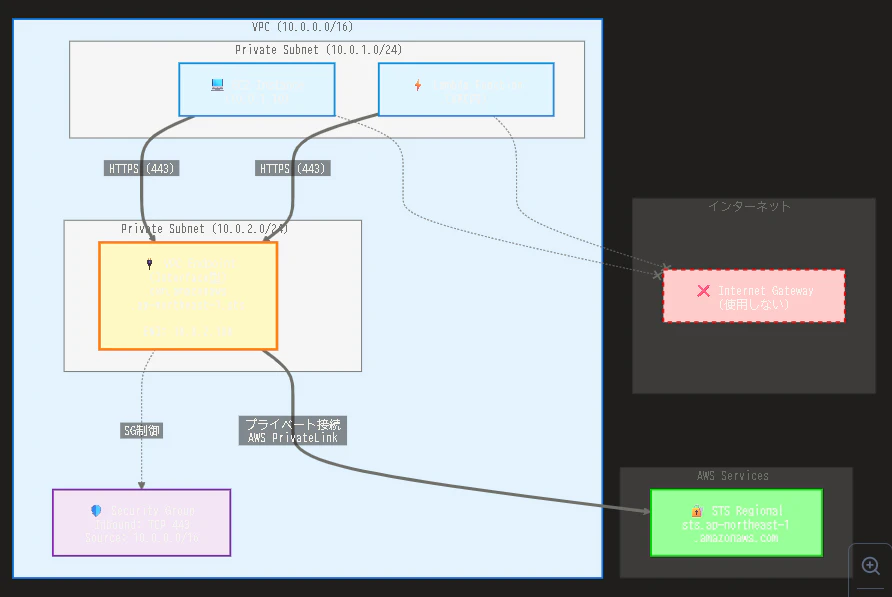
方法4:VPCエンドポイント経由
プライベートネットワーク環境でSTSを使用する場合に推奨されます。
aws ec2 create-vpc-endpoint \
  --vpc-id vpc-xxxxx \
  --vpc-endpoint-type Interface \
  --service-name com.amazonaws.ap-northeast-1.sts \
  --subnet-ids subnet-xxxxx \
  --security-group-ids sg-xxxxx
トラブルシューティング
問題1:InvalidClientTokenIdエラー
症状
An error occurred (InvalidClientTokenId) when calling the AssumeRole operation:
The security token included in the request is invalid.
原因と対処法
| 原因 | 対処法 |
|---|---|
| opt-inリージョンでグローバルエンドポイントを使用 | リージョナルエンドポイントに切り替え |
| セッショントークンのバージョンが古い | IAMコンソールでトークンバージョンをv2に変更 |
| システム時刻のずれ | NTPで時刻同期 |
対処例
# opt-inリージョンではリージョナルエンドポイントを使用
aws sts assume-role \
  --role-arn arn:aws:iam::123456789012:role/MyRole \
  --role-session-name my-session \
  --region ap-east-1 \
  --endpoint-url https://sts.ap-east-1.amazonaws.com
問題2:VPCエンドポイントでのタイムアウト
原因:セキュリティグループの設定不足またはプライベートDNSの無効化
対処法
# セキュリティグループでポート443を許可
aws ec2 authorize-security-group-ingress \
  --group-id sg-endpoint-xxxxx \
  --protocol tcp \
  --port 443 \
  --source-group sg-instance-xxxxx
プライベートDNSが無効な場合は、エンドポイント固有のURLを使用します。
sts = boto3.client(
    'sts',
    endpoint_url='https://vpce-xxxxx.sts.ap-northeast-1.vpce.amazonaws.com'
)
問題3:使用中のエンドポイントの確認
--debugオプションで使用されているエンドポイントを確認できます。
aws sts get-caller-identity --debug 2>&1 | grep -i endpoint
セキュリティベストプラクティス
aws:RequestedRegion条件キーの活用
IAMポリシーで特定のリージョンでのみSTSの使用を許可できます。
{
  "Version": "2012-10-17",
  "Statement": [
    {
      "Effect": "Allow",
      "Action": "sts:AssumeRole",
      "Resource": "*",
      "Condition": {
        "StringEquals": {
          "aws:RequestedRegion": [
            "ap-northeast-1",
            "us-west-2"
          ]
        }
      }
    }
  ]
}
マルチリージョン運用での注意点
| 項目 | ベストプラクティス | 避けるべき設定 |
|---|---|---|
| エンドポイント | ワークロードと同じリージョンのSTS | グローバルエンドポイントへの依存 |
| 障害対応 | リージョンごとに独立したアクセス | 単一リージョンへの集中 |
| モニタリング | CloudTrailでawsServingRegionを確認 |
エンドポイント使用状況の未確認 |
よくある誤解:SetSecurityTokenServicePreferences
SetSecurityTokenServicePreferences APIは、グローバルエンドポイントから発行されるトークンのバージョン(v1/v2)を設定するものです。リージョナルエンドポイントへの切り替えとは関係ありません。
リージョナルエンドポイントから発行されるトークンは、自動的にすべてのリージョンで有効です。
料金について
AWS STS自体の利用料金は無料です。nOps社のドキュメント ( https://www.nops.io/glossary/what-is-aws-sts/ ) でも『There is no cost involved in using AWS STS』と明記されています。
ただし、以下の関連リソースには料金が発生します(2025年2月時点)。
| リソース | 料金の目安(東京リージョン) |
|---|---|
| VPCエンドポイント(Interface型) | 約$0.01/時間 + データ処理料金 |
| CloudTrail | S3ストレージ料金のみ |
| データ転送 | リージョン間のみ課金(同一リージョン内は無料) |
料金は変動する可能性があります。最新の情報は AWS公式料金ページ ( https://aws.amazon.com/pricing/ ) でご確認ください。
終わりに
AWS STSのリージョナルエンドポイントを使用することで、レイテンシの削減、冗長性の向上、セキュリティの強化が実現できます。2025年7月のSDKデフォルト変更により、多くの環境で自動的にリージョナルエンドポイントが使用されるようになりました。
既存のワークロードでは、CloudTrailログで現在のエンドポイント使用状況を確認し、必要に応じて設定を変更することをお勧めします。特に、opt-inリージョンやマルチリージョン環境では、リージョナルエンドポイントの明示的な使用が重要です。
次のステップ
- CloudTrailログで現在のエンドポイント使用状況を確認する
- 開発環境でリージョナルエンドポイントの設定をテストする
- VPCエンドポイントの導入を検討する(プライベートネットワーク環境)
参考文献・参考サイト
AWS公式ドキュメント
- 「Manage AWS STS in an AWS Region」AWS Identity and Access Management User Guide, https://docs.aws.amazon.com/IAM/latest/UserGuide/id_credentials_temp_enable-regions.html
- 「AWS STS Regionalized endpoints」AWS SDKs and Tools Reference Guide, https://docs.aws.amazon.com/sdkref/latest/guide/feature-sts-regionalized-endpoints.html
- 「AWS Security Token Service endpoints and quotas」AWS General Reference, https://docs.aws.amazon.com/general/latest/gr/sts.html
AWS公式ブログ・アナウンス
- 「How to use Regional AWS STS endpoints」AWS Security Blog, 2025年7月10日, https://aws.amazon.com/blogs/security/how-to-use-regional-aws-sts-endpoints/
- 「Announcing upcoming changes to the AWS Security Token Service global endpoint」AWS Security Blog, 2025年5月29日, https://aws.amazon.com/blogs/security/announcing-upcoming-changes-to-the-aws-security-token-services-global-endpoint/
- 「AWS STS global endpoint now serves your requests locally in regions enabled by default」AWS What's New, 2025年4月, https://aws.amazon.com/about-aws/whats-new/2025/04/aws-sts-global-endpoint-requests-locally-regions-default/
- 「Updating AWS SDK defaults – AWS STS service endpoint and Retry Strategy」AWS Developer Tools Blog, 2025年8月29日, https://aws.amazon.com/blogs/developer/updating-aws-sdk-defaults-aws-sts-service-endpoint-and-retry-strategy/
その他参考資料
- nOps「What is AWS STS?」2024年9月18日, https://www.nops.io/glossary/what-is-aws-sts/
- AWS Well-Architected Framework「Use fault isolation to protect your workload」https://docs.aws.amazon.com/wellarchitected/latest/reliability-pillar/use-fault-isolation-to-protect-your-workload.html