
目的
さくらインターネットのVRT環境にllamaを実装するためのステップを記録
VRT作成
さくらインターネットのクラウドのコントロールパネルでVRTを作成
※左上の”石狩第1ゾーン”を選択
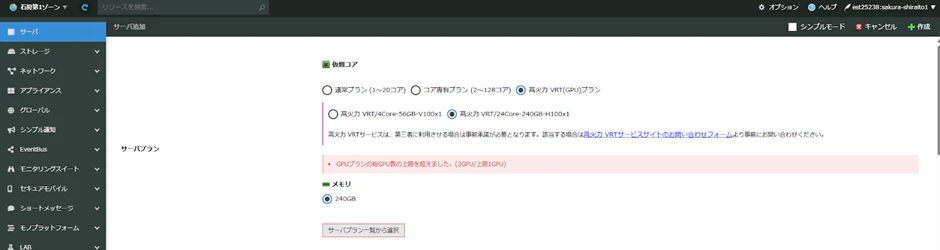
※GPUプランの総GPU数の上限を超えました。(2GPU/上限1GPU)
画面をキャプチャしていなく、二度目の作成で画面キャプチャしたところは怒られる。。
一度目は出ませんので、ご安心ください。


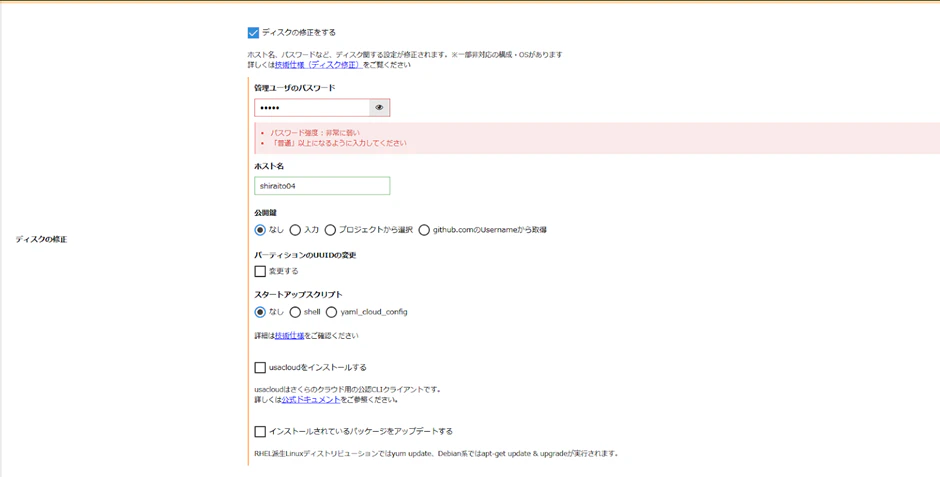
※もちろんPWは強固な適正PWを設定。

シンプル監視はすればよかったかな。作成後にコントロールパネルで出来るので、スキップでもOK
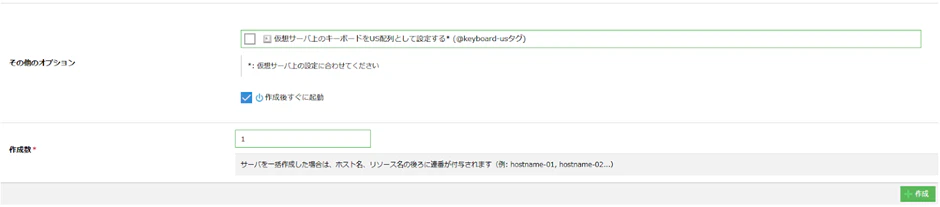
完成

この後、リモート接続して、作業を行うので、IPアドレスは控えておく。
※セキュリティ観点からIP、ホスト名はマスクさせていただいています。
コンソール接続
まずはコンソールで確認
右の▼をクリックして、”コンソール”をクリック

ID:ubuntu
(これはOSをubuntuにしたからね。)
PWはさっき指定したもの

接続できたので、この後の作業でもし失敗しても、コンソールログインできる。
安心!
IPアドレス確認
$ ip a
IPを確認
ターミナルアプリで接続
先ほど確認したIPアドレスとID/PWで接続

OSの設定
パッケージのupdate
リスト更新
ubuntu@shiraito04:~$ sudo apt update
リスト確認
ubuntu@shiraito04:~$ apt list --upgradable
アップデート
ubuntu@shiraito04:~$ sudo apt upgrade
基本パッケージのインストール
sudo apt install -y build-essential cmake git wget curl
NVIDIA ドライバ+CUDA インストール
ドライバのインストール
ubuntu@shiraito04:~$ sudo ubuntu-drivers install --gpgpu
CUDA Toolkit のインストール
NVIDIAのAPTリポジトリを登録
DL
ubuntu@shiraito04:~$ wget https://developer.download.nvidia.com/compute/cuda/repos/ubuntu2404/x86_64/cuda-keyring_1.1-1_all.deb
install
ubuntu@shiraito04:~$ sudo dpkg -i cuda-keyring_1.1-1_all.deb
リポジトリの更新
ubuntu@shiraito04:~$ sudo apt-get update
cuda-toolkitのインストール
ubuntu@shiraito04:~$ sudo apt-get -y install cuda-toolkit-12-5
cuda-driverのインストール
周辺アプリを入れるため
ubuntu@shiraito04:~$ sudo apt-get install -y cuda-drivers-555
確認
再起動
ubuntu@shiraito04:~$ sudo reboot
GPU状態確認
ubuntu@shiraito04:~$ nvidia-smi
Sun Nov  9 13:02:41 2025
+-----------------------------------------------------------------------------------------+
| NVIDIA-SMI 555.42.06              Driver Version: 555.42.06      CUDA Version: 12.5     |
|-----------------------------------------+------------------------+----------------------+
| GPU  Name                 Persistence-M | Bus-Id          Disp.A | Volatile Uncorr. ECC |
| Fan  Temp   Perf          Pwr:Usage/Cap |           Memory-Usage | GPU-Util  Compute M. |
|                                         |                        |               MIG M. |
|=========================================+========================+======================|
|   0  NVIDIA H100 80GB HBM3          Off |   00000000:00:04.0 Off |                    0 |
| N/A   24C    P0             70W /  700W |       1MiB /  81559MiB |      0%      Default |
|                                         |                        |             Disabled |
+-----------------------------------------+------------------------+----------------------+

+-----------------------------------------------------------------------------------------+
| Processes:                                                                              |
|  GPU   GI   CI        PID   Type   Process name                              GPU Memory |
|        ID   ID                                                               Usage      |
|=========================================================================================|
|  No running processes found                                                             |
+-----------------------------------------------------------------------------------------+
Minicondaの導入
インストール
ubuntu@shiraito04:~$ cd ~
ubuntu@shiraito04:~$ curl -fsSLo miniconda.sh https://repo.anaconda.com/miniconda/Miniconda3-latest-Linux-x86_64.sh
ubuntu@shiraito04:~$ bash miniconda.sh -b -p $HOME/miniconda
ubuntu@shiraito04:~$ eval "$($HOME/miniconda/bin/conda shell.bash hook)"
(base) ubuntu@shiraito04:~$ conda init
確認
(base) ubuntu@shiraito04:~$ conda --version
conda 25.9.1
参考(conda非アクティブ)
(base) ubuntu@shiraito04:~$ conda deactivate
参考(condaアクティブ)
ubuntu@shiraito04:~$ conda activate
miniConda 環境の作成
※minicondaアクティブな状態で実行
Pythonのバージョンは、3.10がインストールした時点では安定しているとの事
確認
(base) ubuntu@shiraito04:~$ python --version
Python 3.13.9
(base) ubuntu@shiraito04:~$ /home/ubuntu/miniconda/bin/python --version
Python 3.13.9
anacondaの利用条件に同意
(base) ubuntu@shiraito04:~$ conda tos accept --override-channels --channel https://repo.anaconda.com/pkgs/main
accepted Terms of Service for https://repo.anaconda.com/pkgs/main
(base) ubuntu@shiraito04:~$ conda tos accept --override-channels --channel https://repo.anaconda.com/pkgs/r
accepted Terms of Service for https://repo.anaconda.com/pkgs/r
環境作成
(base) ubuntu@shiraito04:~$ conda create -n ai-dev python=3.10 -y
ai-dev環境をアクティベーション
(base) ubuntu@shiraito04:~$ conda activate ai-dev
(ai-dev) ubuntu@shiraito04:~$
コマンドプロンプト先頭がbase->ai-devに
vLLM と周辺ライブラリの導入
バージョン確認
(ai-dev) ubuntu@shiraito04:~$ python -V
Python 3.10.19
インストール
(ai-dev) ubuntu@shiraito04:~$ pip install --upgrade pip
(ai-dev) ubuntu@shiraito04:~$ pip install vllm "transformers>=4.44" accelerate huggingface_hub openai
Hugging Faceの設定
アカウント登録
https://huggingface.co/
HuggingFaceのWebサイトで登録
利用同意
https://huggingface.co/meta-llama/Meta-Llama-3-8B
ここから必要な情報を入力し、同意
Access Tokenの作成

※ReadでOK
hugginfaceトークン登録
(ai-dev) ubuntu@shiraito04:~$ pip install --upgrade huggingface_hub
**ERROR**: pip's dependency resolver does not currently take into account all the packages that are installed. This behaviour is the source of the following dependency conflicts.
transformers 4.57.1 requires huggingface-hub<1.0,>=0.34.0, but you have huggingface-hub 1.1.2 which is incompatible.
バージョンコンフリクト!
バージョンコンフリクト解消
(ai-dev) ubuntu@shiraito04:~$ pip install -U "huggingface_hub<1.0,>=0.34.0"
(ai-dev) ubuntu@shiraito04:~$ pip check
No broken requirements found.
(ai-dev) ubuntu@shiraito04:~$ python - <<'PY' import transformers, huggingface_hub print("transformers:", transformers.__version__) print("huggingface_hub:", huggingface_hub.__version__) PY
transformers: 4.57.1
huggingface_hub: 0.36.0
トークン登録
(ai-dev) ubuntu@shiraito04:~$ huggingface-cli login
⚠️  Warning: 'huggingface-cli login' is deprecated. Use 'hf auth login' instead.

    _|    _|  _|    _|    _|_|_|    _|_|_|  _|_|_|  _|      _|    _|_|_|      _|_|_|_|    _|_|      _|_|_|  _|_|_|_|
    _|    _|  _|    _|  _|        _|          _|    _|_|    _|  _|            _|        _|    _|  _|        _|
    _|_|_|_|  _|    _|  _|  _|_|  _|  _|_|    _|    _|  _|  _|  _|  _|_|      _|_|_|    _|_|_|_|  _|        _|_|_|
    _|    _|  _|    _|  _|    _|  _|    _|    _|    _|    _|_|  _|    _|      _|        _|    _|  _|        _|
    _|    _|    _|_|      _|_|_|    _|_|_|  _|_|_|  _|      _|    _|_|_|      _|        _|    _|    _|_|_|  _|_|_|_|

    To log in, `huggingface_hub` requires a token generated from https://huggingface.co/settings/tokens .
Enter your token (input will not be visible):
先ほど作ったトークンをコピペ
Add token as git credential? (Y/n) y
Token is valid (permission: read).
The token `XXXXXXXXXXXXX` has been saved to /home/ubuntu/.cache/huggingface/stored_tokens
確認
(ai-dev) ubuntu@shiraito04:~$ hf auth whoami
user: XXXX
自分のユーザ名が帰ってきたらOK!
Llama3.0起動
(ai-dev) ubuntu@shiraito04:~$ python -m vllm.entrypoints.openai.api_server \ --model meta-llama/Meta-Llama-3-8B-Instruct \ --dtype auto \ --max-model-len 8192 \ --gpu-memory-utilization 0.92 \ --tensor-parallel-size 1 \ --host 0.0.0.0 --port 8000
(APIServer pid=2430) INFO:     Started server process [2430]
(APIServer pid=2430) INFO:     Waiting for application startup.
(APIServer pid=2430) INFO:     Application startup complete.
確認
(別セッションで)
(base) ubuntu@shiraito04:~$ curl http://localhost:8000/v1/chat/completions \ -H "Content-Type: application/json" \ -d '{ "model": "meta-llama/Meta-Llama-3-8B-Instruct", "messages":[{"role":"user","content":"こんにちは、動いてる?"}], "max_tokens":64 }'
{"id":"chatcmpl-661921246a8f4c79816056586a398b2a","object":"chat.completion","created":1762674994,"model":"meta-llama/Meta-Llama-3-8B-Instruct","choices":[{"index":0,"message":{"role":"assistant","content":"こんにちは!私はAIのchatbotなので、動いてるという意味で「生きている」とは言えないのですが、常に準備万端でお客様の問い合わせに応じて話をしています!","refusal":null,"annotations":null,"audio":null,"function_call":null,"tool_calls":[],"reasoning_content":null},"logprobs":null,"finish_reason":"stop","stop_reason":null,"token_ids":null}],"service_tier":null,"system_fingerprint":null,"usage":{"prompt_tokens":16,"total_tokens":65,"completion_tokens":49,"prompt_tokens_details":null},"prompt_logprobs":null,"prompt_token_ids":null,"kv_transfer_params":null}
返答在り!
成功!!