
$\LaTeX$にはさまざまなエンジンがあり、近年盛り上がっているのが$\mathrm{Lua}\LaTeX$だと思います。
フォントの設定も$\mathrm{(u)p}\LaTeX$などと比べて楽ちんですので、私も普段のレポート作成などには$\mathrm{Lua}\LaTeX$を使用しています。
一方で論文フォーマットなどでは未だに(u)pLaTeXのみしか対応していない場合もあります。
今回はvscodeで$\mathrm{Lua}\LaTeX$と$\mathrm{(u)p}\LaTeX$を使い分ける方法をお教えします。
前提
- TeXLive等で各種コマンドが使用できるようになっている
- VSCode + $\LaTeX$ Workshopが導入済みである
設定
以下のファイル.latexmkrcをユーザーディレクトリ直下に配置する。
#!/usr/bin/env perl

# デフォルトの設定
$pdf_mode = 1;

# uplatex
if ($ENV{'LATEX_ENGINE'} eq 'uplatex') {
    $latex = 'uplatex -halt-on-error';
    $latex_silent = 'uplatex -halt-on-error -interaction=batchmode';
    $bibtex = 'upbibtex';
    $pdf_mode = 3;
    $dvipdf = 'dvipdfmx %O -o %D %S';
    $makeindex = 'mendex %O -o %D %S';
    $out_dir = 'out';
}

# platex
elsif ($ENV{'LATEX_ENGINE'} eq 'platex') {
    $latex = 'platex -halt-on-error';
    $latex_silent = 'platex -halt-on-error -interaction=batchmode';
    $bibtex = 'pbibtex';
    $pdf_mode = 3;
    $dvipdf = 'dvipdfmx %O -o %D %S';
    $makeindex = 'mendex %O -o %D %S';
    $out_dir = 'out';
}

# lualatex
else {
    $pdf_mode = 4;
    $lualatex = 'lualatex -halt-on-error -shell-escape -synctex=1 -interaction=nonstopmode %O %S';
    $lualatex_silent = 'lualatex -halt-on-error -shell-escape -synctex=1 -interaction=batchmode %O %S';

    $bibtex = 'upbibtex %O %S';
    $biber = 'biber --bblencoding=utf8 -u -U --output_safechars %O %S';
    $makeindex = 'makeindex %O -o %D %S';
    $out_dir = 'out';
    $pdf_previewer = 'open -ga /Applications/Skim.app';
}
VSCodeのsetting.jsonに以下の内容を追記
- VSCodeを開いてCtrl(⌘)+,を押す
- VSCodeの設定画面が開くので右上の紙に矢印みたいなマークを押す
そうするとsetting.jsonが開きます。
"latex-workshop.latex.recipes": [
    {
      "name": "latexmk (lualatex)",
      "tools": [
        "lualatexmk"
      ]
    },
    {
      "name": "latexmk (uplatex)",
      "tools": [
        "uplatexmk"
      ]
    },
    {
      "name": "latexmk (platex)",
      "tools": [
        "platexmk"
      ]
    }
  ],
  "latex-workshop.latex.tools": [
    {
      "name": "uplatexmk",
      "command": "latexmk",
      "args": [
        "-silent",
        "-outdir=out",
        "%DOC%"
      ],
      "env": {
        "LATEX_ENGINE": "uplatex"
      }
    },
    {
      "name": "platexmk",
      "command": "latexmk",
      "args": [
        "-silent",
        "-outdir=out",
        "%DOC%"
      ],
      "env": {
        "LATEX_ENGINE": "platex"
      }
    },
    {
      "name": "lualatexmk",
      "command": "latexmk",
      "args": [
        "-silent",
        "-outdir=out",
        "-lualatex",
        "--shell-escape",
        "%DOC%"
      ],
      "env": {
        "LATEX_ENGINE": "lualatex"
      }
    }
  ],
このように設定することで、$\LaTeX$ WorkshopのタブからビルドするときにLua$\LaTeX$と$\mathrm{(u)p}\LaTeX$を選択することができます。
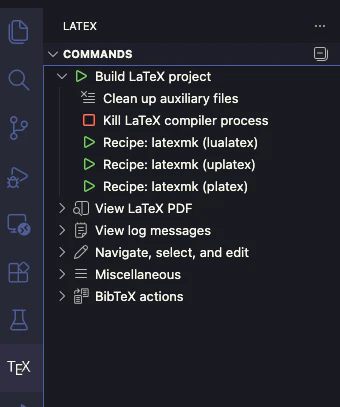
保存時の自動ビルドを設定している場合は、最後に使用したものが使用されるようです。
(2026/01/11追記)
"latex-workshop.latex.recipe.default": "lastUsed"とすると最後に使用したものが使用されるようになります。
デフォルトではrecipeの最初に書いてあるもの(今回のコードだと$\mathrm{Lua}\LaTeX$)が使われます。
何をしている?
latex-workshop.latex.toolsの設定で、環境変数LATEX_ENGINEに値を入れてそれをlatexmkにわたすことでエンジンを判定しています。
.latexmkrcの設定は適当なので適宜調整してください。