

OSSのメンテナをやっていると、プルリクエストをマージする前に手元でテストしたり修正するためにチェックアウトしたいことは多いでしょう。
"Git プルリクエスト チェックアウト" で検索するとそのための bash や git の alias がいくつか見つかります。
しかし、 Github 純正のコマンドラインクライアント hub を使うと、よくあるエイリアスよりも楽になります。
プルリクエストの作者が編集を許可している(diff画面で鉛筆アイコンを使える)場合、 git push で修正を直接 push できるのです。
試しにこのプルリクエストをチェックアウトしてみます。
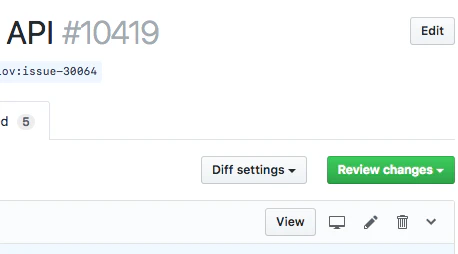
鉛筆アイコンが有効なので、このプルリクエストは修正を許可していることがわかります。 hub pr checkout でチェックアウトしてみます。
$ hub pr checkout 10419
remote: Enumerating objects: 71, done.
remote: Counting objects: 100% (71/71), done.
remote: Total 98 (delta 70), reused 70 (delta 70), pack-reused 27
Unpacking objects: 100% (98/98), done.
From https://github.com/python/cpython
 * [new ref]               refs/pull/10419/head -> issue-30064
Switched to branch 'issue-30064'

$ git config --local --list
core.repositoryformatversion=0
...
branch.issue-30064.remote=git@github.com:asvetlov/cpython.git
branch.issue-30064.merge=refs/heads/issue-30064
よくあるエイリアスと違い、ブランチ名がプルリクエスト元のブランチ名になっています。 (このブランチ名が嫌な場合は第二引数にブランチ名を指定できます)
そして、このブランチの remote が自動的に設定されているのがわかります。 hub pr checkout コマンドを使うようになるまでは git push git@github.com:asvetlov/cpython.git のようにしていたのですが、 この設定のおかげで普通に git push できるようになりました。
なお、このブランチの設定は git branch -D issue-30064 したら消えるので、ローカルブランチを常に掃除しているマメな人は、設定にゴミが溜まる心配をする必要もありません。