
データベースに登録する型を間違えた時の修正方法を
ご紹介します。
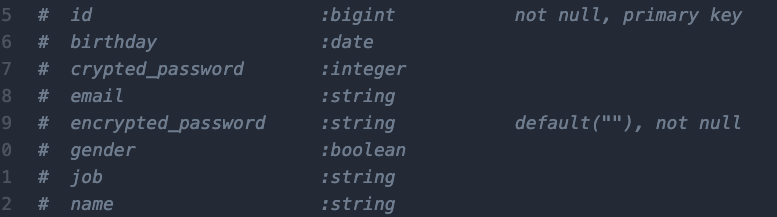
今回は上記のカラム型の中の
「gender」性別のところを
boolean型からstring型に変更してみます。
前提知識 カラムの型の種類

前提知識2 マイグレーションとはなんぞや

カラムの型の変更方法
①コンソールにてコマンドを打ちます。
$ rails g migration [マイグレーションファイル名]

$ rails g migration ChangeStatusTypeForTasks
※マイグレーションファイル名は見る人がわかりやすいもの推奨です☺️
するとこんなファイルができます。

開くとこんな感じ。
class ChangeStatusTypeForTasks < ActiveRecord::Migration[7.2]
  def change
  end
end
②ここに変更したい内容を入れていきます。
class ChangeStatusTypeForTasks < ActiveRecord::Migration[7.2]
  def change
    # カラムの型を変更します。ここでは status カラムを文字列型から整数型に変更しています。
    change_column :tasks, :status, :integer

    # もしデフォルト値や null 制約も設定したい場合は、以下のように追加します。
    # change_column :tasks, :status, :integer, default: 0, null: false
  end
end
③出来上がったら変更!(マイグレーション)
rails db:migrate
④できているか確認しよう!

db/migrate/schema.rbの中身を確認して
変更されていればOKです!