

はじめに
みなさん、こんにちは!
この記事はAWS CDK Advent Calendar 202525日目の記事になります!
今回紹介するAI Agentは先日開催された AI Builders Day プレイベントでお話しさせていただいたAI Agentを深く掘り下げてみた記事になります!!
イベントページ
そこでは話しきれなかった細かい技術スタックの説明を解説していきますのでぜひ最後まで読んでいってください!!
スライド
アーカイブ動画
この記事の対象読書
- x402について知りたい人
- x402 MCPサーバーの実装方法が知りたい人
- MastraをAgentCore上で動かす方法を知りたい人
- CDKでAgentCoreをデプロイしてみたい人
- AgentCore上にデプロイしたAI Agentをフロントエンドから呼び出す方法を知りたい人
今回作ったもの
GitHub
イメージ
フロントエンドは以下のような感じです!
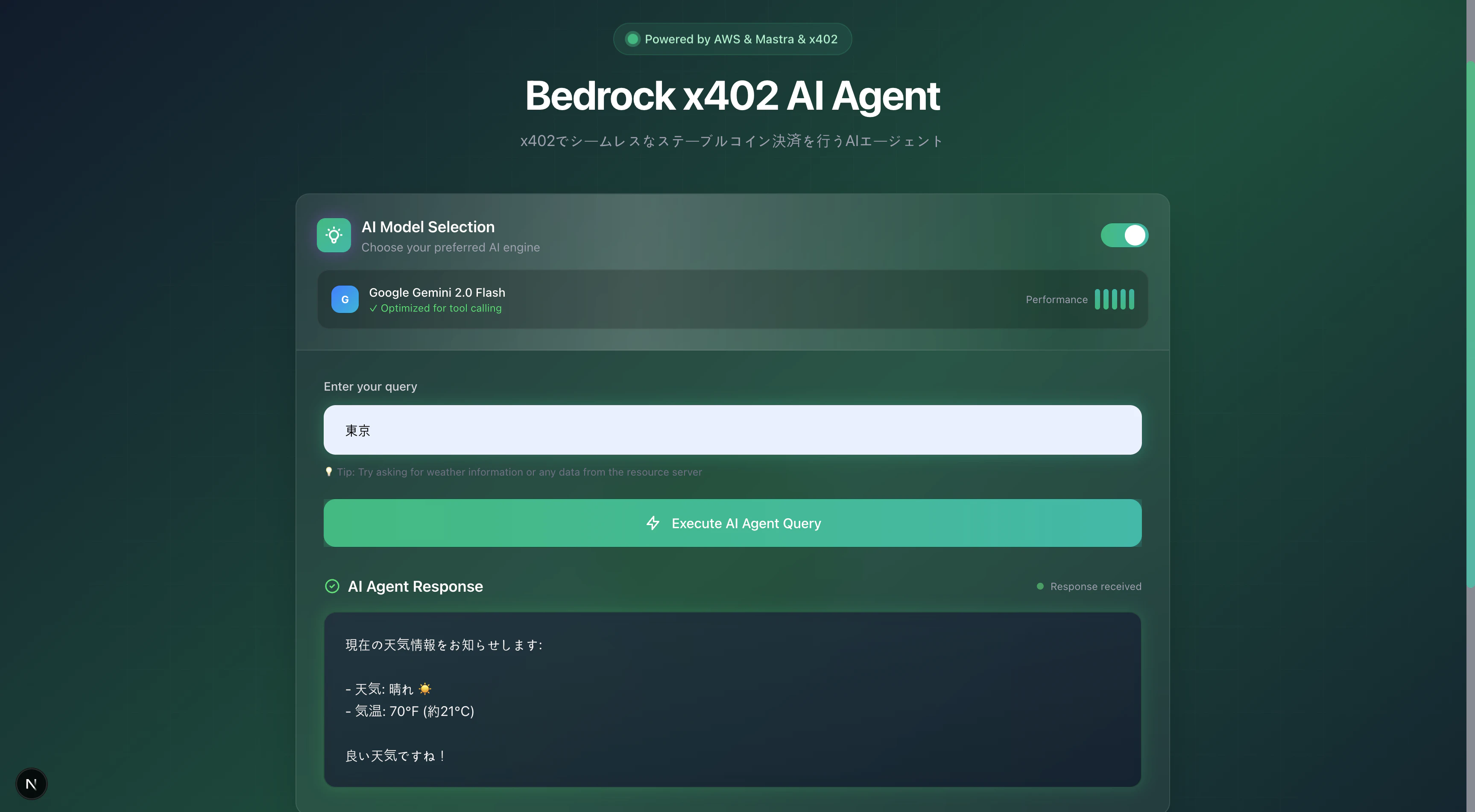
入力フォームに場所を入力すると天気情報が取得できるようになっています!
※ (今回はダミー値で固定)
Amazon Bedrock AgentCore Runtime上にデプロイすると動作確認のためにSandbox環境でも動かすことができるのですが、その実行画面のイメージは以下のようになります!
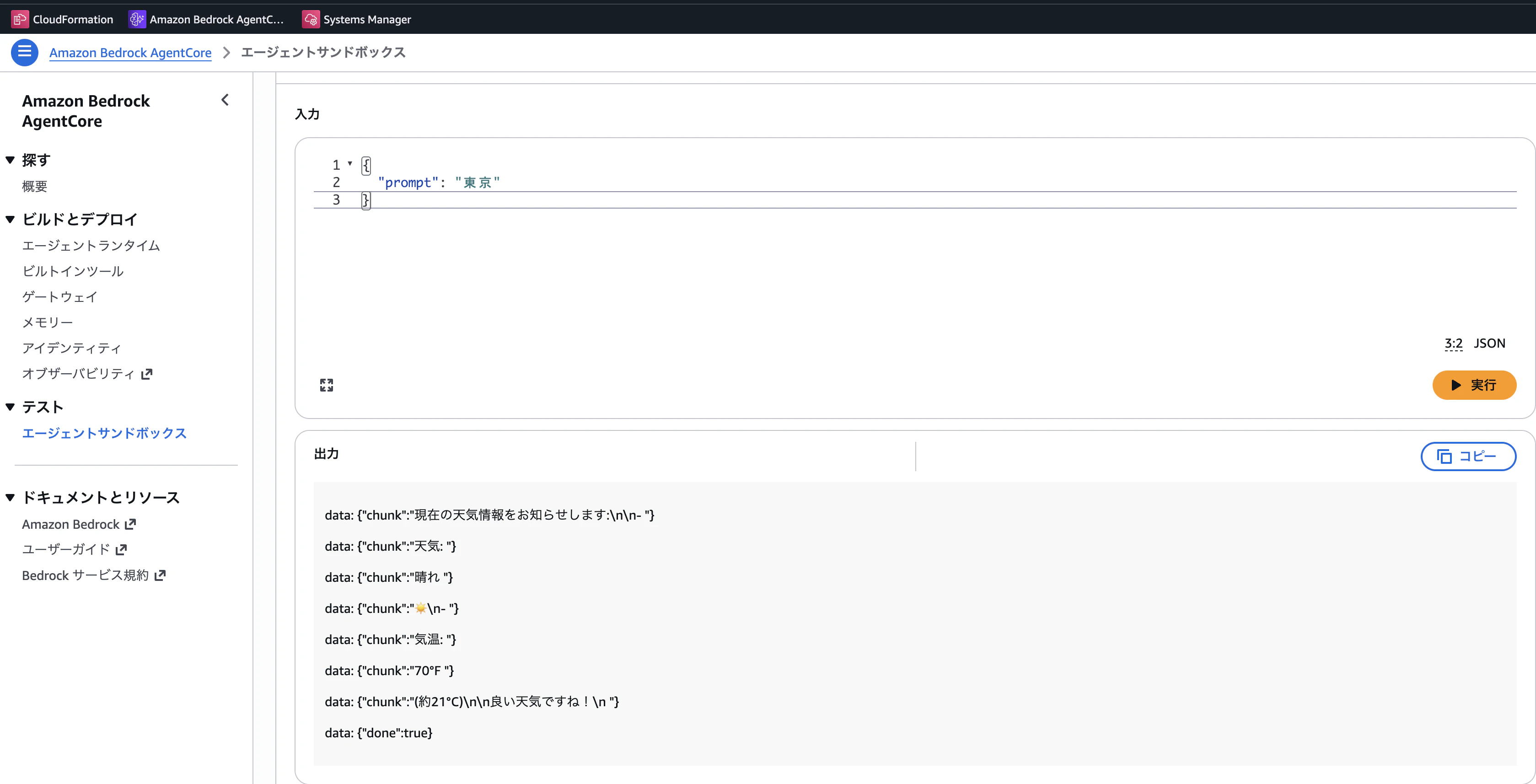
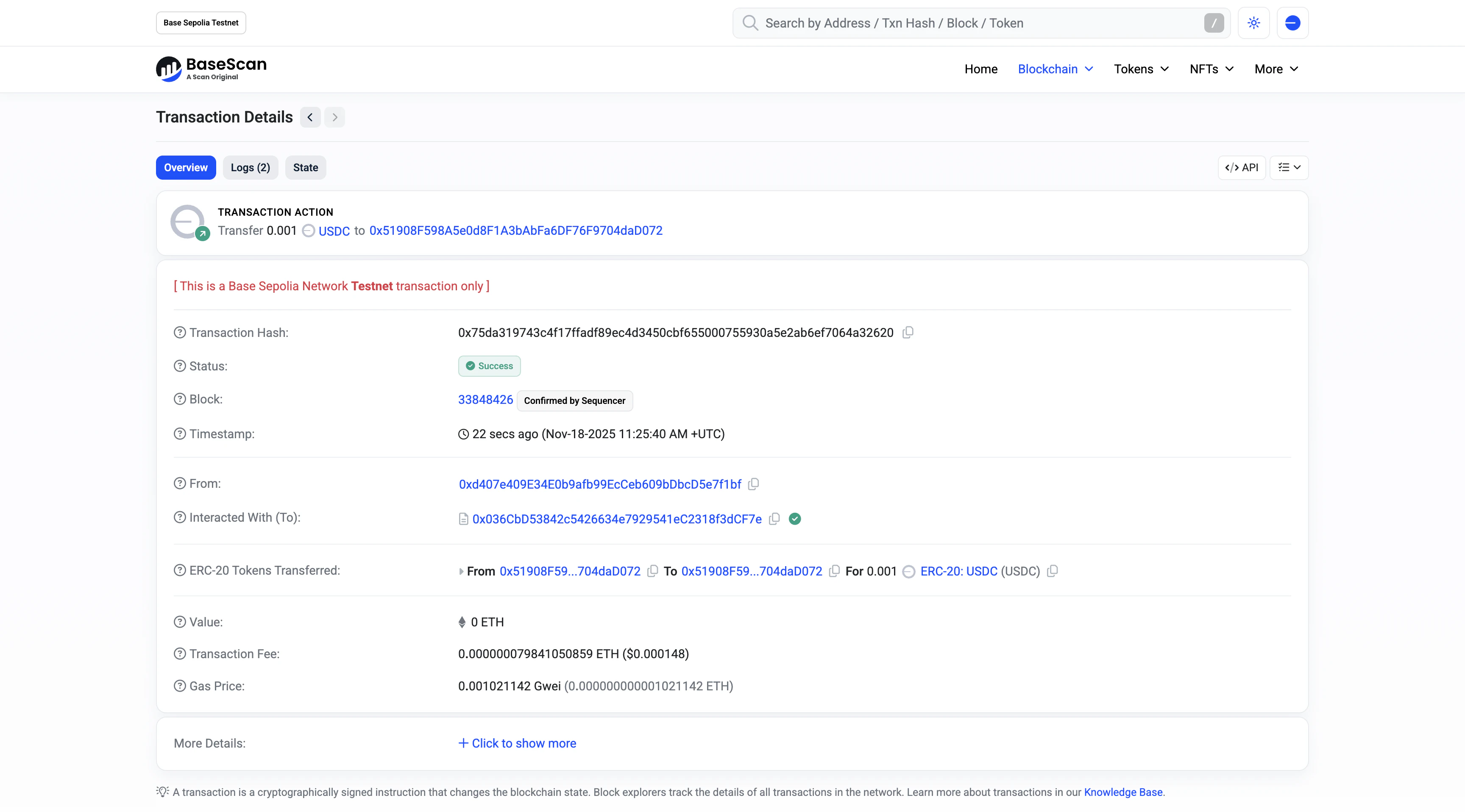
最終的にAI AgentからMCPが呼び出されてステーブルコインによる決済が行われるようになっています(テストネットであるBase Sepoliaで試しています)!
システム構成図
今回のAI Agentのシステム構成はこんな感じです!
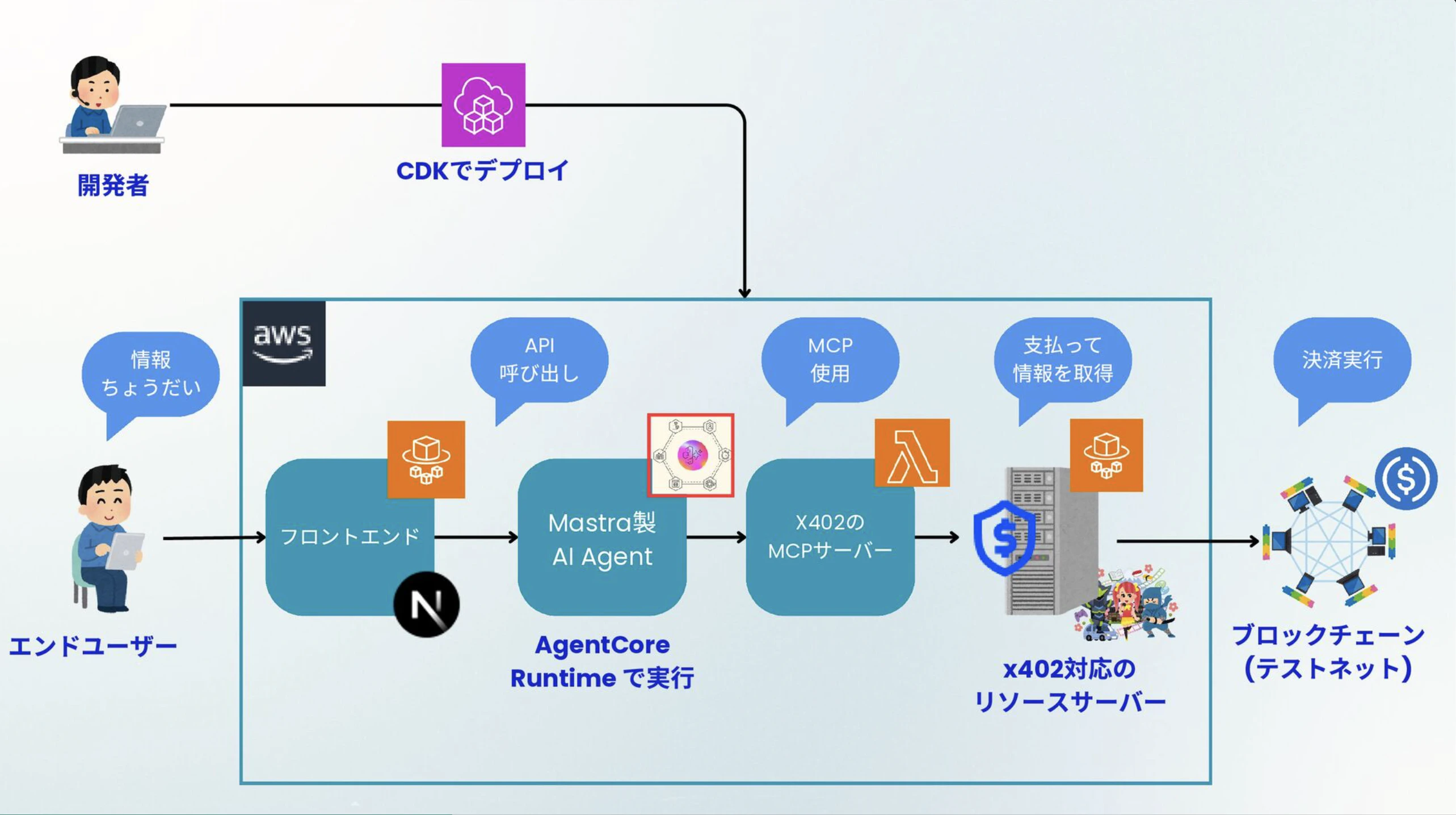
全てのリソースをCDKでデプロイできるようになっています!!
技術スタック
今回採用した技術スタック一覧です!!
-
AWS
- CDK
- AWSリソース管理として
- Amazon Bedrock AgentCore
- Runtime
- AI Agentの実行環境として
- Runtime
- ECR
- コンテナリポジトリとして
- ECS
- Fargate
- コンテナの実行環境として
- Fargate
- Lambda
- MCPサーバーの実行環境として
- ALB
- ECSが外部と通信できるように設置
- CDK
-
Web3
- x402
- ステーブルコイン
- スマートコントラクト
- Solidity
- ERC20
- Openzeppelin
- USDC
- Base Sepolia
- x402
-
AI Agent
- mastra
- Next.js のサーバーコンポーネントの部分のみを利用(Honoとかの方がいいかも...)
- MCP
- AI Agentと外部ツールとの接続用プロトコル
- mastra
-
フロントエンド
- Next.js
- フロントエンドフレームワーク
- Next.js
実装でポイントとなった箇所
ここからは重要な実装ポイントを解説していきます!
AgentCore上にデプロイするAI AgentのDockerfile
まずはAgentCore Runtimeで実行するAI Agent用のDockerfileの解説から!
Dockerfileの解説
今回は以下のようなDockerfileを用意しました!
Next.jsアプリ用のDockerfileを作る感じで良いのですが、1点だけ注意すべき点があります!
それは、Arm64に対応させる必要があるということです!
ビルド時には--platform linux/arm64オプションを忘れないようにしましょう!
docker build --platform linux/arm64 -t mastra-agent:latest .
Amazon Bedrock AgentCore Runtimeの制約でDockerコンテナがArm64に対応している必要があります!これを忘れるとDockerコンテナのビルドが成功するになぜかうまく動作しないという事象が発生します。
# ==============================================================================
# Multi-stage Dockerfile for Mastra AI Agent
# Optimized for Amazon Bedrock AgentCore Runtime (ARM64, Port 8080)
# ==============================================================================

# ------------------------------------------------------------------------------
# Stage 1: Dependencies
# ------------------------------------------------------------------------------
FROM --platform=linux/arm64 node:22-alpine AS deps

# Install pnpm
RUN corepack enable && corepack prepare pnpm@10.7.0 --activate

WORKDIR /app

# Copy package files
COPY package.json ./

# Install dependencies (without lockfile for monorepo compatibility)
# Use --shamefully-hoist to reduce duplication
RUN pnpm install --no-lockfile --shamefully-hoist

# ------------------------------------------------------------------------------
# Stage 2: Builder
# ------------------------------------------------------------------------------
FROM --platform=linux/arm64 node:22-alpine AS builder

# Install pnpm
RUN corepack enable && corepack prepare pnpm@10.7.0 --activate

WORKDIR /app

# Copy dependencies
COPY --from=deps /app/node_modules ./node_modules

# Copy source code
COPY . .

# Build TypeScript
ENV NODE_ENV=production
RUN pnpm build

# ------------------------------------------------------------------------------
# Stage 3: Runner - Production runtime
# ------------------------------------------------------------------------------
FROM --platform=linux/arm64 node:22-alpine AS runner

# Install dumb-init for proper signal handling (SIGTERM/SIGKILL)
RUN apk add --no-cache dumb-init

WORKDIR /app

# Set production environment
ENV NODE_ENV=production

# Create non-root user for security
RUN addgroup --system --gid 1001 nodejs && \
    adduser --system --uid 1001 agentuser

# Copy package.json and install ONLY production dependencies
COPY --from=builder /app/package.json ./package.json

# Install pnpm for production install
RUN corepack enable && corepack prepare pnpm@10.7.0 --activate

# Install only production dependencies
RUN pnpm install --prod --no-lockfile --shamefully-hoist && \
    pnpm store prune

# Copy built application
COPY --from=builder /app/dist ./dist

# Set proper ownership
RUN chown -R agentuser:nodejs /app

# Switch to non-root user
USER agentuser

# Expose port 8080 as required by AgentCore Runtime
EXPOSE 8080

# Set AgentCore Runtime required environment variables
ENV PORT=8080
ENV HOST=0.0.0.0
ENV NODE_ENV=production
# Use Bedrock models in production
ENV USE_GEMINI=true
# Default AWS region (can be overridden at runtime)
ENV AWS_REGION=ap-northeast-1
# MCP_SERVER_URL will be set at runtime through container environment variables
# or injected through a configuration mechanism

# Health check for /ping endpoint
HEALTHCHECK --interval=30s --timeout=5s --start-period=30s --retries=3 \
  CMD node -e "require('http').get('http://localhost:8080/ping', (r) => {process.exit(r.statusCode === 200 ? 0 : 1)})"

# Use dumb-init to handle signals properly
ENTRYPOINT ["dumb-init", "--"]

# Start the agent server
CMD ["node", "dist/server.js"]
Mastraの実装
次にMastraの実装の解説になります!
Mastraの実装の解説
まずはx402 MCPクライアントの設定部分からみていきましょう!
import { ConsoleLogger } from "@mastra/core/logger";
import { MCPClient } from "@mastra/mcp";

/**
 * Create MCP Client for x402 MCP Server
 * @returns MCPClient instance
 */
export const createx402MCPClient = () => {
  // create MCPClient instance
  // this mcp has 3 tools
  const mcpClient = new MCPClient({
    id: "x402-tools",
    servers: {
      // リモートの場合
      x402: {
        // sse: true,
        url: new URL(`${process.env.MCP_SERVER_URL}mcp`),
        // @ts-expect-error server is not a function
        log: new ConsoleLogger(),
      },
      // ローカル開発用の場合は以下のコメントをアウトを外す
      // "x402-mcp-server": {
      //   command: "node",
      //   args: [`${process.cwd()}/../mcp/dist/index.js`],
      //   env: {
      //     PRIVATE_KEY: process.env.PRIVATE_KEY as string,
      //     RESOURCE_SERVER_URL: process.env.RESOURCE_SERVER_URL as string,
      //     ENDPOINT_PATH: process.env.ENDPOINT_PATH as string,
      //   },
      //   timeout: 60000, // Timeout: 60 seconds,
      // },
    },
  });

  return mcpClient;
};

/**
 * Method to get only tools
 */
export const getx402MCPCTools = async () => {
  const x402MCPClient = createx402MCPClient();
  return await x402MCPClient.getTools();
};

/**
 * MCP接続をテストするメソッド
 */
export const testMCPConnection = async () => {
  try {
    console.log("Testing MCP connection...");
    // MCPサーバーはCDKスタックでデプロイした時のLambda関数URLの値を割り当てる
    console.log("MCP_SERVER_URL:", process.env.MCP_SERVER_URL);

    const x402MCPClient = createx402MCPClient();
    const tools = await x402MCPClient.getTools();

    console.log("MCP connection successful!");
    console.log("Available tools:", Object.keys(tools));

    return {
      success: true,
      tools: Object.keys(tools),
      serverUrl: process.env.MCP_SERVER_URL,
    };
  } catch (error) {
    console.error("MCP connection failed:", error);
    return {
      success: false,
      error: error instanceof Error ? error.message : "Unknown error",
      serverUrl: process.env.MCP_SERVER_URL,
    };
  }
};
あとはこれをAgent初期化の際にツールとして設定すればOKです!
import { Agent } from "@mastra/core/agent";
import { bedrockModel, gemini } from "../models";
import { createx402MCPClient, testMCPConnection } from "../tools/x402";

/**
 * x402 Agent を作成する関数
 * @param useGemini - trueの場合はGeminiモデルを使用(デフォルト: false)
 */
export const createx402Agent = async (useGemini: boolean) => {
  try {
    console.log("Testing MCP connection...");
    const connectionTest = await testMCPConnection();

    if (!connectionTest.success) {
      throw new Error(`MCP connection failed: ${connectionTest.error}`);
    }

    console.log("Creating x402 MCP client...");
    // MCPクライアントインスタウンスを初期化
    const x402MCPClient = createx402MCPClient();

    console.log("Getting tools from MCP client...");
    // ツールを取得
    const tools = await x402MCPClient.getTools();
    console.log("Available tools:", tools);

    console.log("Creating x402 Agent with tools...");
    // モデルを用意
    const selectedModel = useGemini ? gemini : bedrockModel;
    console.log(`Using model: ${useGemini ? "Gemini" : "Amazon Nova Lite"}`);

    return new Agent({
      name: "x402 Agent",
      instructions: `
        You are a helpful assistant that retrieves information from a resource server using available tools.

        IMPORTANT INSTRUCTIONS:
        1. When a user asks for weather information or any data from the resource server, you MUST use the "get-data-from-resource-server" tool.
        2. Always call the tool first before providing any response.
        3. After receiving the tool's response, format it in a user-friendly way in Japanese.
        4. The tool returns data in JSON format with properties like "weather" and "temperature".
        5. Convert temperature from Fahrenheit to Celsius if needed (°C = (°F - 32) × 5/9).

        Example flow:
        User: "天気を教えて"
        You: [Call get-data-from-resource-server tool]
        Tool returns: {"weather": "sunny", "temperature": 70}
        You respond: "現在の天気情報をお知らせします:\n\n- 天気: 晴れ ☀️\n- 気温: 70°F (約21°C)\n\n良い天気ですね!"

        Never provide made-up information. Always use the tool to get real data.
      `,
      model: selectedModel, //モデルの割り当て
      tools: tools, // ツールの割り当て
    });
  } catch (error) {
    console.error("Failed to create x402 Agent:", error);
    // Fallback: エージェントをツールなしで作成
    const fallbackModel = useGemini ? gemini : bedrockModel;
    console.log(
      `Fallback mode - using model: ${useGemini ? "Gemini" : "Amazon Nova Lite"}`,
    );
    return new Agent({
      name: "x402 Agent (fallback)",
      instructions: `
        You are a helpful x402 assistant.
        However, there was an issue connecting to the MCP tools.
        Please inform the user that the weather service is currently unavailable.
      `,
      model: fallbackModel,
      tools: {},
    });
  }
};

/**
 * x402 Agent (後方互換性のため)
 * @deprecated Use createx402Agent() instead
 */
export let x402Agent: Agent;
Mastraインスタンスの初期化は以下のようになります。
import type { Agent } from "@mastra/core/agent";
import { createLogger } from "@mastra/core/logger";
import { Mastra } from "@mastra/core/mastra";
import "dotenv/config";

import { createx402Agent } from "./agents";

// グローバルなMastraインスタンス
let _mastra: Mastra | null = null;
let _x402Agent: Agent | null = null;
let _currentModelType: "bedrock" | "gemini" = "bedrock";

/**
 * Mastra用のインスタンスを取得(遅延初期化)
 * @param useGemini - trueの場合はGeminiモデルを使用
 */
export const getMastra = async (useGemini: boolean): Promise<Mastra> => {
  const requestedModelType = useGemini ? "gemini" : "bedrock";

  // モデルが変わる場合は再初期化
  if (_mastra && requestedModelType !== _currentModelType) {
    console.log("Model preference changed, reinitializing Mastra...");
    _mastra = null;
    _x402Agent = null;
  }

  if (_mastra) {
    return _mastra;
  }

  console.log("Initializing Mastra instance...");

  // x402Agentを非同期で作成
  _x402Agent = await createx402Agent(useGemini);
  _currentModelType = requestedModelType;

  _mastra = new Mastra({
    agents: { x402Agent: _x402Agent },
    logger: createLogger({
      name: "Mastra",
      level: "info",
    }),
  });

  console.log("Mastra instance created successfully");
  return _mastra;
};

/**
 * 後方互換性のためのエクスポート
 * @deprecated Use getMastra() instead
 */
export const mastra = {
  async getAgent(name: string, useGemini: boolean) {
    const instance = await getMastra(useGemini);
    return instance.getAgent(name);
  },
};
サーバーとして呼び出すため専用のファイルを用意する必要があります(今回は、Express.jsをベースに作成しています)。
ポイントは以下の2つのエンドポイントを実装することです。
-
GET /ping- ヘルスチェック用エンドポイント -
POST /invocations- エージェント呼び出し用エンドポイント
これらのエンドポイントはAmazon Bedrock AgentCore Runtimesの利用要件で定められており、これらのエンドポイントを実装しないとちゃんと呼び出すことができないようになっています。
あと、Amazon Bedrockに加えてGeminiに使えるようにAPIキーの設定も追加しています。
import dotenv from "dotenv";
// Load environment variables from .env file
dotenv.config();

import { GetParameterCommand, SSMClient } from "@aws-sdk/client-ssm";
import express, { type Request, type Response } from "express";
import { createx402Agent } from "./mastra/agents";

const app = express();
const PORT = process.env.PORT || 8080;
const HOST = "0.0.0.0";

/**
 * Load configuration from SSM Parameter Store if running in AWS
 * Falls back to environment variables for local development
 */
async function loadConfigFromSSM(): Promise<void> {
  // Check if we're running in AWS (AWS_REGION is set in AWS environments)
  const region = process.env.AWS_REGION || process.env.AWS_DEFAULT_REGION;
  const isAws = !!region;

  console.log(`Environment check - AWS_REGION: ${region}, isAws: ${isAws}`);

  if (!isAws) {
    console.log("Not running in AWS - using environment variables");
    return;
  }

  // SSMを使えるようにクライアントインスタンスを初期化
  const ssmClient = new SSMClient({ region });

  // Load MCP_SERVER_URL
  if (!process.env.MCP_SERVER_URL) {
    const mcpServerUrlParam = "/agentcore/mastra/mcp-server-url";
    try {
      console.log(
        `Loading MCP_SERVER_URL from SSM Parameter Store: ${mcpServerUrlParam}`,
      );

      // MCPサーバーURLの値を取得
      const response = await ssmClient.send(
        new GetParameterCommand({
          Name: mcpServerUrlParam,
          WithDecryption: false,
        }),
      );

      const mcpServerUrl = response.Parameter?.Value;
      if (mcpServerUrl) {
        console.log(
          `✅ Successfully loaded MCP_SERVER_URL from SSM: ${mcpServerUrl}`,
        );
        process.env.MCP_SERVER_URL = mcpServerUrl;
      } else {
        console.warn("⚠️  MCP_SERVER_URL parameter returned empty value");
      }
    } catch (error) {
      console.error("Failed to load MCP_SERVER_URL from SSM:");
      console.error(
        `  Error: ${(error as Error).name} - ${(error as Error).message}`,
      );
      console.error(`  Parameter: ${mcpServerUrlParam}`);
      console.error(`  Region: ${region}`);
      console.error("  Falling back to environment variable");
    }
  }

  // Load GOOGLE_GENERATIVE_AI_API_KEY
  if (!process.env.GOOGLE_GENERATIVE_AI_API_KEY) {
    const geminiApiKeyParam = "/agentcore/mastra/gemini-api-key";
    try {
      console.log(
        `Loading GOOGLE_GENERATIVE_AI_API_KEY from SSM Parameter Store: ${geminiApiKeyParam}`,
      );

      const response = await ssmClient.send(
        new GetParameterCommand({
          Name: geminiApiKeyParam,
          WithDecryption: true, // Decrypt SecureString
        }),
      );

      const apiKey = response.Parameter?.Value;
      if (apiKey) {
        console.log(
          "✅ Successfully loaded GOOGLE_GENERATIVE_AI_API_KEY from SSM",
        );
        process.env.GOOGLE_GENERATIVE_AI_API_KEY = apiKey;
      } else {
        console.warn(
          "⚠️  GOOGLE_GENERATIVE_AI_API_KEY parameter returned empty value",
        );
      }
    } catch (error) {
      console.error("Failed to load GOOGLE_GENERATIVE_AI_API_KEY from SSM:");
      console.error(
        `  Error: ${(error as Error).name} - ${(error as Error).message}`,
      );
      console.error(`  Parameter: ${geminiApiKeyParam}`);
      console.error(`  Region: ${region}`);

      if (
        (error as Error).name === "ParameterNotFound" ||
        (error as Error).message?.includes("ParameterNotFound")
      ) {
        console.error("  💡 To create this parameter, run:");
        console.error(
          `     aws ssm put-parameter --name ${geminiApiKeyParam} --value "YOUR_API_KEY" --type SecureString --region ${region}`,
        );
      }

      console.error("  Falling back to environment variable");
    }
  }

  // Final validation
  if (!process.env.MCP_SERVER_URL) {
    console.warn(
      "⚠️  WARNING: MCP_SERVER_URL is not set. Agent functionality will be limited.",
    );
  }

  if (
    !process.env.GOOGLE_GENERATIVE_AI_API_KEY &&
    process.env.USE_GEMINI === "true"
  ) {
    console.warn(
      "⚠️  WARNING: GOOGLE_GENERATIVE_AI_API_KEY is not set but USE_GEMINI=true. Gemini model will fail.",
    );
  }
}

// Log environment variables for debugging
console.log("Environment variables loaded:");
console.log("- PORT:", PORT);
console.log("- USE_GEMINI:", process.env.USE_GEMINI);
console.log(
  "- GOOGLE_GENERATIVE_AI_API_KEY:",
  process.env.GOOGLE_GENERATIVE_AI_API_KEY ? "set (hidden)" : "not set",
);
console.log("- RESOURCE_SERVER_URL:", process.env.RESOURCE_SERVER_URL);
console.log("- ENDPOINT_PATH:", process.env.ENDPOINT_PATH);
console.log("- AWS_REGION:", process.env.AWS_REGION);

// JSON parsing middleware with raw body support for AgentCore Runtime
app.use(express.json({ limit: "100mb" }));
// Also support raw body parsing for binary payloads from AgentCore Runtime
app.use(express.raw({ type: "application/octet-stream", limit: "100mb" }));
app.use(express.text({ type: "text/plain", limit: "100mb" }));

// Logging middleware
app.use((req, _res, next) => {
  console.log(`${new Date().toISOString()} - ${req.method} ${req.path}`);
  next();
});

// Agent instance (lazy initialization)
let agentInstance: Awaited<ReturnType<typeof createx402Agent>> | null = null;
let agentInitError: Error | null = null;

/**
 * Initialize agent on startup
 */
async function initializeAgent() {
  try {
    console.log("Initializing x402 Agent...");
    const useGemini = process.env.USE_GEMINI === "true";
    agentInstance = await createx402Agent(useGemini);
    console.log(`Agent initialized with useGemini=${useGemini}`);
    console.log("Agent initialized successfully");
  } catch (error) {
    agentInitError = error as Error;
    console.error("Failed to initialize agent:", error);
  }
}

/**
 * Health check endpoint - Required by AgentCore Runtime
 * GET /ping
 *
 * Returns agent health status
 */
app.get("/ping", (_req: Request, res: Response) => {
  if (agentInstance) {
    res.status(200).json({
      status: "Healthy",
      time_of_last_update: Math.floor(Date.now() / 1000),
    });
  } else if (agentInitError) {
    res.status(503).json({
      status: "Unhealthy",
      error: agentInitError.message,
      time_of_last_update: Math.floor(Date.now() / 1000),
    });
  } else {
    res.status(503).json({
      status: "HealthyBusy",
      message: "Agent is initializing",
      time_of_last_update: Math.floor(Date.now() / 1000),
    });
  }
});

/**
 * Main invocation endpoint - Required by AgentCore Runtime
 * POST /invocations
 *
 * Processes user prompts through the AI agent
 */
app.post("/invocations", async (req: Request, res: Response) => {
  try {
    // Check if agent is initialized
    if (!agentInstance) {
      return res.status(503).json({
        error: "Agent not initialized",
        details: agentInitError?.message || "Agent is still initializing",
      });
    }

    // Log raw request for debugging
    console.log("Content-Type:", req.headers["content-type"]);
    console.log("Request body type:", typeof req.body);
    console.log(
      "Request body:",
      req.body instanceof Buffer
        ? `Buffer(${req.body.length} bytes)`
        : JSON.stringify(req.body, null, 2),
    );

    // Validate request body
    // AgentCore Runtime sends the payload as binary/JSON, so we need to handle both formats
    let prompt: string | undefined;
    let requestData: { prompt?: string; modelId?: string };

    // Handle Buffer (binary payload from AgentCore Runtime)
    if (req.body instanceof Buffer) {
      try {
        const textData = req.body.toString("utf-8");
        console.log("Decoded buffer:", textData);
        requestData = JSON.parse(textData);
      } catch (parseError) {
        // If JSON parsing fails, treat entire buffer as the prompt
        console.warn("Failed to parse buffer as JSON:", parseError);
        prompt = req.body.toString("utf-8");
        requestData = { prompt };
      }
    } else if (typeof req.body === "string") {
      // If body is a string, try to parse it
      try {
        requestData = JSON.parse(req.body);
      } catch {
        // If parsing fails, treat the entire body as the prompt
        prompt = req.body;
        requestData = { prompt };
      }
    } else if (typeof req.body === "object" && req.body !== null) {
      // Standard JSON object
      requestData = req.body;
    } else {
      return res.status(400).json({
        error: "Invalid request",
        details:
          "Request body must be a string, Buffer, or contain a 'prompt' string field",
        receivedBody: typeof req.body,
      });
    }

    // Extract prompt from requestData
    if (!prompt) {
      prompt = requestData.prompt || "";
    }

    if (!prompt || typeof prompt !== "string") {
      return res.status(400).json({
        error: "Invalid request",
        details: "Request must contain a valid 'prompt' string field",
        receivedData: requestData,
      });
    }

    console.log(`Processing prompt: ${prompt.substring(0, 100)}...`);

    // Check if streaming is requested
    const acceptHeader = req.headers.accept || "";
    const isStreaming = acceptHeader.includes("text/event-stream");

    if (isStreaming) {
      // Streaming response (SSE)
      res.setHeader("Content-Type", "text/event-stream");
      res.setHeader("Cache-Control", "no-cache");
      res.setHeader("Connection", "keep-alive");

      try {
        const result = await agentInstance.generate(prompt);

        // Simulate streaming for now (proper streaming requires different approach)
        const text = result.text;
        const chunks = text.split(" ");

        for (const chunk of chunks) {
          res.write(`data: ${JSON.stringify({ chunk: `${chunk} ` })}\n\n`);
        }

        res.write(`data: ${JSON.stringify({ done: true })}\n\n`);
        res.end();
      } catch (streamError) {
        console.error("Streaming error:", streamError);
        res.write(
          `data: ${JSON.stringify({ error: "Streaming failed", details: (streamError as Error).message })}\n\n`,
        );
        res.end();
      }
    } else {
      // Non-streaming JSON response
      const result = await agentInstance.generate(prompt);

      res.status(200).json({
        response: result.text,
        status: "success",
        metadata: {
          model: "gemini-2.0-flash",
          tokens: result.usage?.totalTokens || 0,
        },
      });
    }
  } catch (error) {
    console.error("Invocation error:", error);
    res.status(500).json({
      error: "Internal server error",
      details: (error as Error).message,
    });
  }
});

/**
 * Root endpoint for basic connectivity test
 */
app.get("/", (_req: Request, res: Response) => {
  res.json({
    service: "Mastra x402 Agent",
    version: "0.1.0",
    status: agentInstance ? "ready" : "initializing",
    endpoints: {
      ping: "GET /ping",
      invocations: "POST /invocations",
    },
  });
});

/**
 * 404 handler
 */
app.use((_req: Request, res: Response) => {
  res.status(404).json({
    error: "Not found",
    message: "The requested endpoint does not exist",
  });
});

/**
 * Global error handler
 */
app.use(
  (
    err: Error,
    _req: Request,
    res: Response,
    // eslint-disable-next-line @typescript-eslint/no-unused-vars
    _next: express.NextFunction,
  ) => {
    console.error("Unhandled error:", err);
    res.status(500).json({
      error: "Internal server error",
      details: err.message,
    });
  },
);

/**
 * Start server
 */
async function startServer() {
  // Load configuration from SSM if in AWS environment
  await loadConfigFromSSM();

  console.log("Configuration loaded:");
  console.log("- MCP_SERVER_URL:", process.env.MCP_SERVER_URL || "not set");
  console.log(
    "- GOOGLE_GENERATIVE_AI_API_KEY:",
    process.env.GOOGLE_GENERATIVE_AI_API_KEY ? "set (hidden)" : "not set",
  );
  console.log("- USE_GEMINI:", process.env.USE_GEMINI);

  // Initialize agent before starting server
  await initializeAgent();

  app.listen(Number(PORT), HOST, () => {
    console.log(`🚀 Mastra Agent Server running on http://${HOST}:${PORT}`);
    console.log(`📍 Health check: http://${HOST}:${PORT}/ping`);
    console.log(`📍 Invocations: http://${HOST}:${PORT}/invocations`);
    console.log(
      `🤖 Agent status: ${agentInstance ? "Ready" : "Failed to initialize"}`,
    );
  });
}

// Handle graceful shutdown
process.on("SIGTERM", () => {
  console.log("SIGTERM signal received: closing HTTP server");
  process.exit(0);
});

process.on("SIGINT", () => {
  console.log("SIGINT signal received: closing HTTP server");
  process.exit(0);
});

// Start the server
startServer().catch((error) => {
  console.error("Failed to start server:", error);
  process.exit(1);
});
x402 MCPとx402 Serverの実装
まずはx402 MCPサーバーの実装から!
x402 MCPの解説
Express.jsをベースにMCP SDKとViem、x402のライブラリを使って実装しています!
Lambda上で動かすためにaws-lambdaライブラリも使っています。
import { McpServer } from "@modelcontextprotocol/sdk/server/mcp.js";
import { StreamableHTTPServerTransport } from "@modelcontextprotocol/sdk/server/streamableHttp.js";
import serverlessExpress from "@vendia/serverless-express";
import type {
  APIGatewayProxyEvent,
  APIGatewayProxyResult,
  Context,
} from "aws-lambda";
import axios from "axios";
import express from "express";
import type { Hex } from "viem";
import { privateKeyToAccount } from "viem/accounts";
import { withPaymentInterceptor } from "x402-axios";

// Environment variables
const PORT = Number.parseInt(process.env.PORT || "8080", 10);
const RESOURCE_SERVER_URL = process.env.RESOURCE_SERVER_URL as string;

const privateKey = process.env.PRIVATE_KEY as Hex;
const baseURL = process.env.RESOURCE_SERVER_URL as string;
const endpointPath = process.env.ENDPOINT_PATH as string;

console.log("Lambda function started!");
console.log("Using RESOURCE_SERVER_URL:", RESOURCE_SERVER_URL);
console.log("Environment variables:", JSON.stringify(process.env, null, 2));

// ステーブルコインを支払うウォレットインスタンスを生成
// ※ 今後要改良ポイント
const account = privateKeyToAccount(privateKey);
// x402を適用させるベースエンドポイントを指定してクライアントインスタンスを生成
const client = withPaymentInterceptor(axios.create({ baseURL }), account);

// Create an MCP server
const server = new McpServer({
  name: "x402 MCP Server",
  version: "1.0.0",
});

// Express app
const app = express();
app.use(express.json());

// リクエストログ用ミドルウェア
app.use((req, res, next) => {
  console.log(`[${new Date().toISOString()}] ${req.method} ${req.path}`);
  console.log("Headers:", JSON.stringify(req.headers, null, 2));
  console.log("Body:", JSON.stringify(req.body, null, 2));
  next();
});

/**
 * get Weather date tool
 */
server.tool(
  "get-data-from-resource-server",
  "Get data from the resource server (in this example, the weather)",
  async () => {
    try {
      // 環境変数で渡されたエンドポイントを指定してAPIを実行する
      // ここでx402の支払い処理が自動的に行われる
      const res = await client.get(endpointPath);
      return {
        content: [{ type: "text", text: JSON.stringify(res.data) }],
      };
    } catch (error) {
      const errorMessage =
        error instanceof Error ? error.message : String(error);
      console.error("Failed to fetch data from resource server:", errorMessage);
      return {
        content: [
          {
            type: "text",
            text: `Error fetching data: ${errorMessage}`,
          },
        ],
        isError: true,
      };
    }
  },
);

// Create HTTP transport
const transport = new StreamableHTTPServerTransport({
  sessionIdGenerator: undefined, // Disable session management
});

// Routes
app.post("/mcp", async (req, res) => {
  console.log("MCP POST request received!");
  console.log("Request body:", JSON.stringify(req.body, null, 2));
  try {
    await transport.handleRequest(req, res, req.body);
  } catch (error) {
    console.error("MCP request handling error:", error);
    if (!res.headersSent) {
      res.status(500).json({
        jsonrpc: "2.0",
        error: {
          code: -32603,
          message: "Internal server error",
        },
        id: null,
      });
    }
  }
});

app.get("/mcp", async (req, res) => {
  res.writeHead(405).end(
    JSON.stringify({
      jsonrpc: "2.0",
      error: {
        code: -32000,
        message: "Method not allowed.",
      },
      id: null,
    }),
  );
});

app.delete("/mcp", async (req, res) => {
  res.writeHead(405).end(
    JSON.stringify({
      jsonrpc: "2.0",
      error: {
        code: -32000,
        message: "Method not allowed.",
      },
      id: null,
    }),
  );
});

// Health check endpoint
app.get("/health", (req, res) => {
  res.json({ status: "healthy", timestamp: new Date().toISOString() });
});

// For AWS Lambda
let serverConnected = false;
const ensureServerConnection = async () => {
  if (!serverConnected) {
    await server.connect(transport);
    serverConnected = true;
  }
};

/**
 * Lambda handler メソッド
 * @param event APIGatewayProxyEvent
 * @param context Context
 * @returns APIGatewayProxyResult
 */
export const handler = async (
  event: APIGatewayProxyEvent,
  context: Context,
): Promise<APIGatewayProxyResult> => {
  console.log("Lambda handler called!");
  console.log("Event:", JSON.stringify(event, null, 2));
  console.log("Context:", JSON.stringify(context, null, 2));

  try {
    await ensureServerConnection();
    const serverlessHandler = serverlessExpress({ app });
    return new Promise((resolve, reject) => {
      serverlessHandler(event, context, (error, result) => {
        if (error) {
          console.error("Serverless handler error:", error);
          reject(error);
        } else {
          console.log("Serverless handler success:", result);
          resolve(result as APIGatewayProxyResult);
        }
      });
    });
  } catch (error) {
    console.error("Lambda handler error:", error);
    throw error;
  }
};

server
  .connect(transport)
  .then(() => {
    app.listen(PORT, () => {
      console.log(`MCP server listening on port ${PORT}`);
    });
  })
  .catch((error) => {
    console.error("Server setup failed:", error);
    process.exit(1);
  });
かなりシンプルです!
次にx402のバックエンドサーバーの解説になります!
x402 Serverの解説
Honoをベースに作成しています!
x402-honoというライブラリが提供されており、これを使うことでとても手軽にHonoで作ったAPIをx402に対応させることが可能となります!!
import { serve } from "@hono/node-server";
import { config } from "dotenv";
import { Hono } from "hono";
import { cors } from "hono/cors";
import type { Network, Resource } from "x402-hono";
import { paymentMiddleware } from "x402-hono";
// Import walrus functions from relative paths

config();

// 環境変数から facilitatorUrlと支払い先のウォレットアドレス、ブロックチェーンを読み込む
const facilitatorUrl = process.env.FACILITATOR_URL as Resource;
const payTo = process.env.ADDRESS as `0x${string}`;
const network = process.env.NETWORK as Network;

if (!facilitatorUrl || !payTo || !network) {
  console.error("Missing required environment variables");
  process.exit(1);
}

const app = new Hono();

console.log("Server is running");

// CORS
app.use(
  cors({
    origin: ["*"],
    allowHeaders: ["Content-Type", "Authorization"],
    allowMethods: ["GET", "POST", "PUT", "DELETE", "OPTIONS"],
    exposeHeaders: ["Content-Length", "X-Requested-With"],
    maxAge: 600,
    credentials: true,
  }),
);

// Health check endpoint (before payment middleware)
app.get("/health", async (c) => {
  return c.json({
    status: "ok",
    timestamp: new Date().toISOString(),
    port,
  });
});

app.use(
  // この設定を加えるだけでx402に対応したバックエンドサーバーに生まれ変わる
  // /weather endpoint にアクセスした時に requires paymentを発動させる
  paymentMiddleware(
    payTo,
    {
      "/weather": {
        price: "$0.001",
        network,
      },
    },
    {
      url: facilitatorUrl,
    },
  ),
);

// get weather report API
app.get("/weather", async (c) => {
  // 任意の処理をここに入れる
  console.log("Payment received, processing weather report request...");
  // ステーブルコインを支払った結果としてダミーの天気データを返す
  return c.json({
    report: {
      weather: "sunny",
      temperature: 70,
    },
  });
});

// Use PORT from environment variable for Cloud Run compatibility
const port = process.env.PORT ? Number.parseInt(process.env.PORT, 10) : 4021;

serve({
  fetch: app.fetch,
  port,
});

console.log(`Server is running on port ${port}`);
CDKスタックファイル
最後にCDKスタックファイルの解説になります!
CDKスタックファイルの解説
CDKスタックはかなりのコード量になっています!!
import * as cdk from "aws-cdk-lib";
import * as agentcore from "aws-cdk-lib/aws-bedrockagentcore";
import * as ec2 from "aws-cdk-lib/aws-ec2";
import * as ecr from "aws-cdk-lib/aws-ecr";
import * as ecr_assets from "aws-cdk-lib/aws-ecr-assets";
import * as ecs from "aws-cdk-lib/aws-ecs";
import * as ecsPatterns from "aws-cdk-lib/aws-ecs-patterns";
import * as iam from "aws-cdk-lib/aws-iam";
import * as lambda from "aws-cdk-lib/aws-lambda";
import * as logs from "aws-cdk-lib/aws-logs";
import * as ssm from "aws-cdk-lib/aws-ssm";
import type { Construct } from "constructs";
import * as dotenv from "dotenv";
import { execSync } from "node:child_process";
import * as fs from "node:fs";
import { join } from "node:path";
dotenv.config();

// Lambda関数やMCPサーバーに割り当てる環境変数を読み込む
const { FACILITATOR_URL, ADDRESS, NETWORK, ENDPOINT_PATH, PRIVATE_KEY } =
  process.env;

/**
 * Amazon Bedrock AgentCore ✖️ Mastra ✖️ x402 MCP サーバーリソース用のスタック
 *
 * デプロイするリソース
 * 1. Amazon Bedrock AgentCore
 * 2. Mastra製AI Agent
 * 3. x402 MCP サーバー
 * 4. x402 に対応したコンテンツサーバー
 */
export class AgentCoreMastraX402Stack extends cdk.Stack {
  /**
   * コンストラクター
   * @param scope
   * @param id
   * @param props
   */
  constructor(scope: Construct, id: string, props?: cdk.StackProps) {
    super(scope, id, props);

    // Create VPC for Fargate service
    const vpc = new ec2.Vpc(this, "AgentCoreMastraX402Vpc", {
      maxAzs: 2,
      natGateways: 1,
    });

    // ===========================================================================
    // Fargateでx402のバックエンドサーバー(コンテンツサーバー)をデプロイ
    // コンテナリポジトリを作成してコンテナをデプロイ
    // ===========================================================================

    // Create ECR repository reference (assuming it already exists)
    const backendRepo = ecr.Repository.fromRepositoryName(
      this,
      "AgentCoreMastraX402BackendRepo",
      "x402-backend-api",
    );

    // Create ECS cluster
    const cluster = new ecs.Cluster(this, "AgentCoreMastraX402Cluster", {
      vpc,
      clusterName: "x402-cluster",
    });

    // Create Fargate service for backend API
    const backendService =
      new ecsPatterns.ApplicationLoadBalancedFargateService(
        this,
        "AgentCoreMastraX402BackendService",
        {
          cluster,
          serviceName: "x402-backend-api",
          cpu: 512,
          memoryLimitMiB: 1024,
          desiredCount: 1,
          taskImageOptions: {
            // コンテナイメージの指定
            image: ecs.ContainerImage.fromEcrRepository(backendRepo, "latest"),
            containerPort: 4021,
            // 環境変数の割り当て
            environment: {
              PORT: "4021",
              NODE_ENV: "production",
              // Add other environment variables as needed
              FACILITATOR_URL: FACILITATOR_URL as string,
              ADDRESS: ADDRESS as string,
              NETWORK: NETWORK as string,
            },
            logDriver: ecs.LogDrivers.awsLogs({
              streamPrefix: "x402-backend",
              logGroup: new logs.LogGroup(
                this,
                "AgentCoreMastraX402BackendLogGroup",
                {
                  logGroupName: "/aws/ecs/x402-backend",
                  retention: logs.RetentionDays.ONE_WEEK,
                  removalPolicy: cdk.RemovalPolicy.DESTROY,
                },
              ),
            }),
          },
          publicLoadBalancer: true,
          assignPublicIp: true,
          healthCheckGracePeriod: cdk.Duration.seconds(300),
        },
      );

    // Configure health check for the target group
    backendService.targetGroup.configureHealthCheck({
      path: "/health",
      healthyHttpCodes: "200",
      interval: cdk.Duration.seconds(30),
      timeout: cdk.Duration.seconds(5),
      healthyThresholdCount: 2,
      unhealthyThresholdCount: 5,
    });

    // ===========================================================================
    // Lambda Web Adapter を使って Lambda上にMCPサーバーをデプロイ
    // ===========================================================================

    // Create Lambda function for MCP server (force rebuild v3 - bundle.js fix)
    const mcpLambdaFunction = new lambda.Function(
      this,
      "AgentCoreMastraX402MCPServerFunction",
      {
        runtime: lambda.Runtime.NODEJS_22_X,
        code: lambda.Code.fromAsset(join(__dirname, "../../mcp"), {
          bundling: {
            image: lambda.Runtime.NODEJS_22_X.bundlingImage,
            user: "root",
            command: ["echo", "local bundling"], // Dummy command - local bundling will be used
            local: {
              tryBundle(outputDir: string) {
                try {
                  const sourceDir = join(__dirname, "../../mcp");
                  console.log(
                    `Building MCP Lambda from: ${sourceDir} to: ${outputDir}`,
                  );

                  // Check if bundle.js exists in source directory
                  const sourceBundlePath = join(sourceDir, "bundle.js");
                  if (!fs.existsSync(sourceBundlePath)) {
                    console.error(
                      "bundle.js not found in source directory. Please run 'pnpm mcp build' first.",
                    );
                    throw new Error(
                      "bundle.js not found. Run 'pnpm mcp build' before deploying.",
                    );
                  }

                  // Copy only necessary files for Lambda deployment
                  const filesToCopy = ["bundle.js", "run.sh"];

                  for (const file of filesToCopy) {
                    const srcPath = join(sourceDir, file);
                    const destPath = join(outputDir, file);
                    if (fs.existsSync(srcPath)) {
                      console.log(`Copying: ${file}`);
                      execSync(`cp ${srcPath} ${destPath}`, {
                        stdio: "inherit",
                      });
                    } else {
                      throw new Error(`Required file not found: ${file}`);
                    }
                  }

                  // Make run.sh executable
                  const runShPath = join(outputDir, "run.sh");
                  execSync(`chmod +x ${runShPath}`, {
                    stdio: "inherit",
                  });

                  // Verify bundle.js exists
                  const bundlePath = join(outputDir, "bundle.js");
                  if (!fs.existsSync(bundlePath)) {
                    throw new Error("bundle.js was not copied successfully");
                  }

                  // Get bundle.js file size
                  const bundleStats = fs.statSync(bundlePath);
                  console.log(
                    `Bundle file size: ${(bundleStats.size / 1024 / 1024).toFixed(2)} MB`,
                  );

                  // List final contents
                  console.log("Final Lambda package contents:");
                  execSync(`ls -la ${outputDir}`, { stdio: "inherit" });

                  console.log("Local bundling completed successfully");
                  return true;
                } catch (error) {
                  console.error("Local bundling failed:", error);
                  return false;
                }
              },
            },
          },
        }),
        handler: "run.sh",
        // 環境変数の割り当て
        environment: {
          AWS_LAMBDA_EXEC_WRAPPER: "/opt/bootstrap",
          AWS_LAMBDA_INVOKE_MODE: "response_stream",
          RUST_LOG: "info",
          ENDPOINT_PATH: ENDPOINT_PATH || "/weather",
          PRIVATE_KEY: PRIVATE_KEY || "",
          RESOURCE_SERVER_URL: `http://${backendService.loadBalancer.loadBalancerDnsName}`,
        },
        timeout: cdk.Duration.minutes(15), // Lambda maximum timeout is 15 minutes (900 seconds)
        memorySize: 1024,
        architecture: lambda.Architecture.X86_64,
        // LambdaWebAdapterを使うのでその設定を Lambda Layerに加える
        layers: [
          lambda.LayerVersion.fromLayerVersionArn(
            this,
            "LambdaWebAdapterLayer",
            `arn:aws:lambda:${this.region}:753240598075:layer:LambdaAdapterLayerX86:24`,
          ),
        ],
      },
    );

    // Create Function URL for the MCP server
    const mcpFunctionUrl = mcpLambdaFunction.addFunctionUrl({
      authType: lambda.FunctionUrlAuthType.NONE,
      cors: {
        allowCredentials: true,
        allowedHeaders: ["*"],
        allowedMethods: [lambda.HttpMethod.ALL],
        allowedOrigins: ["*"],
        maxAge: cdk.Duration.seconds(86400),
      },
    });

    // Store MCP Server URL in SSM Parameter Store for runtime access
    const mcpServerUrlParameter = new ssm.StringParameter(
      this,
      "McpServerUrlParameter",
      {
        parameterName: "/agentcore/mastra/mcp-server-url",
        stringValue: mcpFunctionUrl.url,
        description:
          "MCP Server Function URL for Mastra Agent runtime configuration",
        tier: ssm.ParameterTier.STANDARD,
      },
    );

    // Store Google Gemini API Key in SSM Parameter Store (SecureString)
    // Note: This should be set manually or via CDK context/secrets
    // For now, create a placeholder that needs to be updated manually
    const geminiApiKey = process.env.GOOGLE_GENERATIVE_AI_API_KEY;
    if (!geminiApiKey || geminiApiKey === "PLACEHOLDER_UPDATE_MANUALLY") {
      throw new Error(
        "GOOGLE_GENERATIVE_AI_API_KEY environment variable must be set with a valid API key",
      );
    }
    // Gemini APIキーをSSMパラメータストアの設定
    const geminiApiKeyParameter = new ssm.StringParameter(
      this,
      "GeminiApiKeyParameter",
      {
        parameterName: "/agentcore/mastra/gemini-api-key",
        stringValue: geminiApiKey,
        description: "Google Gemini API Key for Mastra Agent",
      },
    );

    // ===========================================================================
    // Amazon Bedrock AgentCore Runtime
    // ===========================================================================

    // Build Docker image for AgentCore Runtime using ECR Assets
    // Note: Environment variables like MCP_SERVER_URL must be set at runtime
    // since they contain CDK tokens that are resolved during deployment
    const agentCoreDockerImage = new ecr_assets.DockerImageAsset(
      this,
      "AgentCoreDockerImage",
      {
        directory: join(__dirname, "../../mastra-agent"),
        file: "Dockerfile",
        platform: ecr_assets.Platform.LINUX_ARM64, // ARM64 for cost optimization
      },
    );

    // Create IAM role for AgentCore Runtime
    const agentCoreRole = new iam.Role(this, "BedrockAgentCoreRole", {
      assumedBy: new iam.ServicePrincipal("bedrock-agentcore.amazonaws.com"),
      description: "IAM role for Bedrock AgentCore Runtime",
    });

    const region = cdk.Stack.of(this).region;
    const accountId = cdk.Stack.of(this).account;

    // ECR permissions
    agentCoreRole.addToPolicy(
      new iam.PolicyStatement({
        sid: "ECRImageAccess",
        effect: iam.Effect.ALLOW,
        actions: ["ecr:BatchGetImage", "ecr:GetDownloadUrlForLayer"],
        resources: [`arn:aws:ecr:${region}:${accountId}:repository/*`],
      }),
    );
    // ポリシーを設定
    agentCoreRole.addToPolicy(
      new iam.PolicyStatement({
        sid: "ECRTokenAccess",
        effect: iam.Effect.ALLOW,
        actions: ["ecr:GetAuthorizationToken"],
        resources: ["*"],
      }),
    );

    // CloudWatch Logs permissions
    agentCoreRole.addToPolicy(
      new iam.PolicyStatement({
        effect: iam.Effect.ALLOW,
        actions: ["logs:DescribeLogStreams", "logs:CreateLogGroup"],
        resources: [
          `arn:aws:logs:${region}:${accountId}:log-group:/aws/bedrock-agentcore/runtimes/*`,
        ],
      }),
    );

    agentCoreRole.addToPolicy(
      new iam.PolicyStatement({
        effect: iam.Effect.ALLOW,
        actions: ["logs:DescribeLogGroups"],
        resources: [`arn:aws:logs:${region}:${accountId}:log-group:*`],
      }),
    );

    agentCoreRole.addToPolicy(
      new iam.PolicyStatement({
        effect: iam.Effect.ALLOW,
        actions: ["logs:CreateLogStream", "logs:PutLogEvents"],
        resources: [
          `arn:aws:logs:${region}:${accountId}:log-group:/aws/bedrock-agentcore/runtimes/*:log-stream:*`,
        ],
      }),
    );

    // X-Ray and CloudWatch Metrics permissions
    agentCoreRole.addToPolicy(
      new iam.PolicyStatement({
        effect: iam.Effect.ALLOW,
        actions: [
          "xray:PutTraceSegments",
          "xray:PutTelemetryRecords",
          "xray:GetSamplingRules",
          "xray:GetSamplingTargets",
        ],
        resources: ["*"],
      }),
    );

    agentCoreRole.addToPolicy(
      new iam.PolicyStatement({
        effect: iam.Effect.ALLOW,
        actions: ["cloudwatch:PutMetricData"],
        resources: ["*"],
        conditions: {
          StringEquals: {
            "cloudwatch:namespace": "bedrock-agentcore",
          },
        },
      }),
    );

    // Bedrock model invocation permissions
    agentCoreRole.addToPolicy(
      new iam.PolicyStatement({
        sid: "BedrockModelInvocation",
        effect: iam.Effect.ALLOW,
        actions: [
          "bedrock:InvokeModel",
          "bedrock:InvokeModelWithResponseStream",
        ],
        resources: [
          "arn:aws:bedrock:*::foundation-model/*",
          `arn:aws:bedrock:${region}:${accountId}:*`,
        ],
      }),
    );

    // AgentCore workload identity permissions
    agentCoreRole.addToPolicy(
      new iam.PolicyStatement({
        sid: "GetAgentAccessToken",
        effect: iam.Effect.ALLOW,
        actions: [
          "bedrock-agentcore:GetWorkloadAccessToken",
          "bedrock-agentcore:GetWorkloadAccessTokenForJWT",
          "bedrock-agentcore:GetWorkloadAccessTokenForUserId",
        ],
        resources: [
          `arn:aws:bedrock-agentcore:${region}:${accountId}:workload-identity-directory/default`,
          `arn:aws:bedrock-agentcore:${region}:${accountId}:workload-identity-directory/default/workload-identity/agentName-*`,
        ],
      }),
    );

    // SSM Parameter Store read permissions for runtime configuration
    // Grant explicit read access to configuration parameters
    agentCoreRole.addToPolicy(
      new iam.PolicyStatement({
        sid: "ReadSSMParameters",
        effect: iam.Effect.ALLOW,
        actions: [
          "ssm:GetParameter",
          "ssm:GetParameters",
          "ssm:GetParametersByPath",
        ],
        resources: [
          // Specific parameters
          mcpServerUrlParameter.parameterArn,
          geminiApiKeyParameter.parameterArn,
          // Wildcard for all parameters under this path
          `arn:aws:ssm:${region}:${accountId}:parameter/agentcore/mastra/*`,
        ],
      }),
    );

    // Also grant read access via the Parameter resource directly
    mcpServerUrlParameter.grantRead(agentCoreRole);
    geminiApiKeyParameter.grantRead(agentCoreRole);

    // Create AgentCore Runtime
    // Note: CfnRuntime does not support direct environment variable configuration
    // The mastra-agent must:
    // 1. Use default/placeholder values for MCP_SERVER_URL during build
    // 2. Allow runtime configuration through external mechanisms (e.g., Parameter Store, Secrets Manager)
    // 3. Or implement a configuration service that reads from AWS resources
    //
    // For now, the MCP_SERVER_URL can be:
    // - Hardcoded if known in advance
    // - Retrieved from Parameter Store at container startup
    // - Passed through a custom runtime configuration endpoint
    //
    // The Dockerfile sets:
    // - PORT=8080 (required by AgentCore)
    // - NODE_ENV=production
    // - USE_GEMINI=true (for Bedrock models)
    const agentCoreRuntime = new agentcore.CfnRuntime(
      this,
      "MastraAgentCoreRuntime",
      {
        agentRuntimeName: "MastraAgentRuntime",
        agentRuntimeArtifact: {
          containerConfiguration: {
            containerUri: agentCoreDockerImage.imageUri,
          },
        },
        networkConfiguration: {
          networkMode: "PUBLIC",
        },
        roleArn: agentCoreRole.roleArn,
        protocolConfiguration: "HTTP",
      },
    );

    // Ensure proper dependency chain: Parameters -> Role -> Runtime
    agentCoreRuntime.node.addDependency(agentCoreRole);
    agentCoreRuntime.node.addDependency(mcpServerUrlParameter);
    agentCoreRuntime.node.addDependency(geminiApiKeyParameter);

    // Create AgentCore Runtime Endpoint
    const agentCoreEndpoint = new agentcore.CfnRuntimeEndpoint(
      this,
      "MastraAgentCoreEndpoint",
      {
        agentRuntimeId: agentCoreRuntime.attrAgentRuntimeId,
        agentRuntimeVersion: agentCoreRuntime.attrAgentRuntimeVersion,
        name: "MastraAgentRuntimeEndpoint",
      },
    );

    // ===========================================================================
    // Fargateで Next.js Frontend をデプロイ
    // ===========================================================================

    // Create ECR repository reference for Frontend
    const frontendRepo = ecr.Repository.fromRepositoryName(
      this,
      "AgentCoreMastraFrontendRepo",
      "agentcore-mastra-frontend",
    );

    // Create Fargate service for Frontend
    const frontendService =
      new ecsPatterns.ApplicationLoadBalancedFargateService(
        this,
        "AgentCoreMastraFrontendService",
        {
          cluster,
          serviceName: "agentcore-frontend",
          cpu: 512,
          memoryLimitMiB: 1024,
          desiredCount: 1,
          taskImageOptions: {
            image: ecs.ContainerImage.fromEcrRepository(frontendRepo, "latest"),
            containerPort: 3000,
            environment: {
              PORT: "3000",
              NODE_ENV: "production",
              AWS_REGION: this.region,
              // AgentCore Runtime Endpoint ARN (正しいエンドポイントARNを使用)
              // CfnRuntimeEndpointから取得した正式なARNを渡す
              // フロントエンドからの呼び出し時に必要
              AGENTCORE_RUNTIME_ARN: agentCoreEndpoint.attrAgentRuntimeArn,
              AGENTCORE_RUNTIME_QUALIFIER: "MastraAgentRuntimeEndpoint",
            },
            logDriver: ecs.LogDrivers.awsLogs({
              streamPrefix: "agentcore-frontend",
              logGroup: new logs.LogGroup(
                this,
                "AgentCoreMastraFrontendLogGroup",
                {
                  logGroupName: "/aws/ecs/agentcore-frontend",
                  retention: logs.RetentionDays.ONE_WEEK,
                  removalPolicy: cdk.RemovalPolicy.DESTROY,
                },
              ),
            }),
          },
          publicLoadBalancer: true,
          assignPublicIp: true,
          healthCheckGracePeriod: cdk.Duration.seconds(300),
        },
      );

    // Configure health check for Frontend
    frontendService.targetGroup.configureHealthCheck({
      path: "/api/health",
      healthyHttpCodes: "200",
      interval: cdk.Duration.seconds(30),
      timeout: cdk.Duration.seconds(5),
      healthyThresholdCount: 2,
      unhealthyThresholdCount: 5,
    });

    // Grant Frontend task role permission to invoke AgentCore Runtime
    frontendService.taskDefinition.taskRole.addToPrincipalPolicy(
      new iam.PolicyStatement({
        sid: "InvokeAgentCoreRuntime",
        effect: iam.Effect.ALLOW,
        actions: [
          "bedrock-agentcore:InvokeAgentRuntime",
          "bedrock-agentcore:InvokeAgentRuntimeWithResponseStream",
        ],
        resources: [
          agentCoreRuntime.attrAgentRuntimeArn,
          `${agentCoreRuntime.attrAgentRuntimeArn}/*`,
        ],
      }),
    );

    // ===========================================================================
    // 成果物
    // ===========================================================================

    new cdk.CfnOutput(this, "AgentCoreMastraX402BackendApiUrl", {
      value: `http://${backendService.loadBalancer.loadBalancerDnsName}`,
      description: "x402 Backend API Load Balancer URL",
    });

    new cdk.CfnOutput(this, "AgentCoreMastraX402MCPServerUrl", {
      value: mcpFunctionUrl.url,
      description: "MCP Server Function URL",
    });

    new cdk.CfnOutput(this, "AgentCoreMastraX402MCPServerUrlParameter", {
      value: mcpServerUrlParameter.parameterName,
      description:
        "SSM Parameter Store name for MCP Server URL (used by AgentCore Runtime)",
    });

    new cdk.CfnOutput(this, "AgentCoreMastraX402MCPServerUrlParameterArn", {
      value: mcpServerUrlParameter.parameterArn,
      description: "SSM Parameter ARN (for IAM permissions verification)",
    });

    new cdk.CfnOutput(this, "AgentCoreMastraX402GeminiApiKeyParameter", {
      value: geminiApiKeyParameter.parameterName,
      description:
        "SSM Parameter Store name for Gemini API Key (update manually if needed)",
    });

    new cdk.CfnOutput(this, "AgentCoreMastraRuntimeArn", {
      value: agentCoreRuntime.attrAgentRuntimeArn,
      description: "Amazon Bedrock AgentCore Runtime ARN",
    });

    new cdk.CfnOutput(this, "AgentCoreMastraRuntimeRegion", {
      value: region,
      description: "AWS Region for runtime resources",
    });

    new cdk.CfnOutput(this, "AgentCoreMastraRuntimeId", {
      value: agentCoreRuntime.attrAgentRuntimeId,
      description: "Amazon Bedrock AgentCore Runtime ID",
    });

    new cdk.CfnOutput(this, "AgentCoreMastraEndpointArn", {
      value: agentCoreEndpoint.attrAgentRuntimeEndpointArn,
      description: "Amazon Bedrock AgentCore Runtime Endpoint ARN",
    });

    new cdk.CfnOutput(this, "AgentCoreMastraFrontendUrl", {
      value: `http://${frontendService.loadBalancer.loadBalancerDnsName}`,
      description: "Frontend Application Load Balancer URL",
    });

    new cdk.CfnOutput(this, "AgentCoreMastraX402VpcId", {
      value: vpc.vpcId,
      description: "VPC ID",
    });
  }
}
長かったですが、実装の時にポイントになった点の解説は以上になります!!!
動かし方
最後に動かし方について解説します!
セットアップ
まずGitHubリポジトリを自分のアカウントにフォークしてきてクローンしてきます。
git clone https://github.com/<your_account_id>/AgentCore-Mastra-x402.git
そして依存関係をインストールします。
pnpm install
次に環境変数用のファイルを作成します。
cp pkgs/cdk/.env.example pkgs/cdk/.env
以下の環境変数を設定する必要があります。
FACILITATOR_URL=https://x402.org/facilitator
NETWORK=base-sepolia
# 送金先のウォレットアドレスを指定
ADDRESS=
ENDPOINT_PATH=/weather
# 送金元のウォレットアドレスを指定
PRIVATE_KEY=
GOOGLE_GENERATIVE_AI_API_KEY=
コマンド系
AgentCore用のDockerコンテナイメージの登録
まずはAmazon ECRにMastra AgentCore Runtime用のDockerコンテナイメージを登録します。
以下のコマンドを順番に実行してECRの作成〜コンテナイメージの登録を行います。
# ECRリポジトリを作成
aws ecr create-repository --repository-name agentcore-mastra-agent
# pkgs/mastra-agent配下で実行
docker build --platform linux/arm64 -t mastra-agent:latest .

export AWS_ACCOUNT_ID=$(aws sts get-caller-identity --query Account --output text)

# ECRログイン
aws ecr get-login-password --region ap-northeast-1 | \
  docker login --username AWS --password-stdin $AWS_ACCOUNT_ID.dkr.ecr.ap-northeast-1.amazonaws.com

# タグ付け
docker tag mastra-agent:latest $AWS_ACCOUNT_ID.dkr.ecr.ap-northeast-1.amazonaws.com/agentcore-mastra-agent:latest

# プッシュ
docker push $AWS_ACCOUNT_ID.dkr.ecr.ap-northeast-1.amazonaws.com/agentcore-mastra-agent:latest
フロントエンド用のDockerコンテナイメージの登録
次にAmazon ECRにフロントエンド用のDockerコンテナイメージを登録します。
以下のコマンドを順番に実行してECRの作成〜コンテナイメージの登録を行います。
# ECRリポジトリを作成
aws ecr create-repository --repository-name agentcore-mastra-frontend
export AWS_ACCOUNT_ID=$(aws sts get-caller-identity --query Account --output text)

# ECRログイン
aws ecr get-login-password --region ap-northeast-1 | \
  docker login --username AWS --password-stdin $AWS_ACCOUNT_ID.dkr.ecr.ap-northeast-1.amazonaws.com

# linux/amd64プラットフォーム向けにビルド (Fargate x86_64用)
cd pkgs/frontend
docker buildx build --platform linux/amd64 \
  -t $AWS_ACCOUNT_ID.dkr.ecr.ap-northeast-1.amazonaws.com/agentcore-mastra-frontend:latest \
  --push .
Lambda関数用のビルドを行う
以下のコマンドでMCP用のLambda関数のビルドを行います。
pnpm mcp build
ここまでできたら準備OKです!
CDKスタックリソースをデプロイ
以下のコマンドでリソースを丸ごとデプロイします!!
pnpm cdk run deploy 'AgentCoreMastraX402Stack'
CDKスタックリソースを取り除く
検証が終わったら忘れずに以下のコマンドを実行してリソースを削除しましょう!
pnpm cdk run destroy 'AgentCoreMastraX402Stack' --force
ECRリポジトリやパラメータストアは手動で削除が必要になります!
まとめ
Amazon Bedrock AgentCoreを使ってみようということで今回はx402を組み合わせてみました!
Strands AgentのTypeScript SDKが出たので今度はそれを使ってみてもいいなと思っています。
MCPの実装は今のままだとセキュアとは言えないのでその部分を改善したいのと、秘密鍵も環境変数として設定しており、ユーザーごとに切り替えることができない状態なのでここもユーザーごとに切り替えられるようにKMSとDynamoDBを組み合わせてみたいなと思っています!
ここまで読んでいただきありがとうございました!!!