
概要
Azure Event Grid には、サブスクライバー(Azure Functions など)の処理が 30 秒以内に完了しない場合にリトライが発生する という仕様があります。本記事では、Azure Durable Functions を活用してこの制約を回避できるかを検証した結果を共有します。
具体的には、Event Grid トリガー関数の役割を 「オーケストレーションを起動するだけ」 に限定し、長時間処理は Durable Functions の Activity 関数内で実行するパターンを検証します。これにより、Event Grid から見たエンドポイントは常に短時間で応答を返すため、30 秒タイムアウトの影響を受けずに任意の長さの処理を完遂できます。
Azure Event Grid のリトライ仕様そのものについては、下記の記事で詳しく検証しています。
アーキテクチャ概要
直接実行パターンと Durable Functions パターンの比較
| 観点 | 直接実行パターン | Durable Functions パターン(本記事) |
|---|---|---|
| Event Grid から呼ばれる関数の責務 | 長時間処理を直接実行 | オーケストレーションを起動して即座に返却 |
| 長時間処理の実行場所 | Event Grid トリガー関数 | Activity 関数 |
| 30 秒タイムアウトの影響 | 受ける(リトライが発生) | 受けない |
| 重複配送・リトライ対策 | 個別実装が必要 |
instance_id ベースで抑制可能 |
| 実装の複雑度 | 低 | 中(Orchestrator / Activity の分離が必要) |
処理フロー
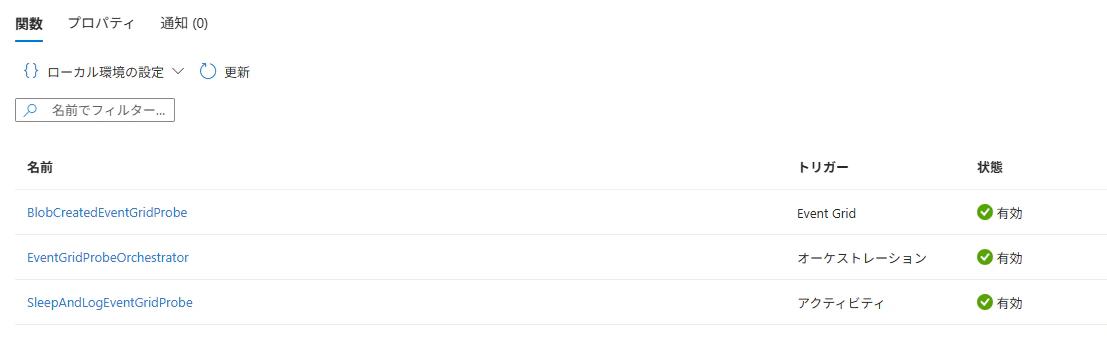
- Blob 作成イベントが発生
- Event Grid が
BlobCreatedEventGridProbe関数(Event Grid トリガー)を呼び出す - 同関数は Durable Orchestration を起動して 即座に終了(本検証では約 0.5 秒)
- Event Grid には正常応答が返る → タイムアウト・リトライは発生しない
-
EventGridProbeOrchestrator(オーケストレーター)がSleepAndLogEventGridProbe(Activity)を呼び出す - Activity 内で長時間処理(本検証では 240 秒の
time.sleep)を実行 - Activity 完了後、オーケストレーターが再開してフローを完了させる
事前準備
利用したリソース
| リソース | 用途 |
|---|---|
| Azure Storage | イベント発生源となる Blob ストレージ |
| Azure Functions | Event Grid トリガー関数(エンドポイント) |
| Azure Event Grid | Blob 作成イベントを Functions にルーティング |
関数のデプロイ
検証用のコードは前回の記事を踏襲しつつ、Durable Functions パターンに改修しています。実装上のポイントは以下の通りです。
-
Event Grid トリガー関数 では
client.start_new()でオーケストレーションを起動するだけで、長時間処理は行わない -
instance_idをevent.idベース(f"eg-{event.id}")で生成し、Event Grid 側でリトライが発生した場合でも重複起動を抑制 - 起動前に
client.get_status(instance_id)で既存インスタンスの状態を確認し、running/pending/continuedAsNewのいずれかであればスキップ - 長時間処理(
time.sleep)は Activity 関数 内で実行
コードはこちら
import json
import logging
import os
import time
from datetime import datetime, timezone, timedelta

import azure.functions as func
import azure.durable_functions as df


app = df.DFApp()

# 既存の WAITE_SECONDS も互換で読む。今後は WAIT_SECONDS 推奨。
WAIT_SECONDS = int(os.getenv("WAIT_SECONDS", os.getenv("WAITE_SECONDS", "50")))
ACTIVE_RUNTIME_STATUSES = {"running", "pending", "continuedasnew"}


def _runtime_status_text(runtime_status):
    if runtime_status is None:
        return None

    runtime_status_value = (
        getattr(runtime_status, "value", None)
        or getattr(runtime_status, "name", None)
        or runtime_status
    )
    return str(runtime_status_value)


def _is_active_runtime_status(runtime_status):
    if runtime_status is None:
        return False

    normalized = runtime_status.rsplit(".", 1)[-1].lower()
    return normalized in ACTIVE_RUNTIME_STATUSES


def _existing_status_for_log(existing_status):
    if isinstance(existing_status, dict):
        return existing_status

    for method_name in ("to_json", "to_dict"):
        method = getattr(existing_status, method_name, None)
        if callable(method):
            try:
                return method()
            except Exception as exc:
                return {
                    "repr": repr(existing_status),
                    "serialization_error": f"{method_name}: {exc}",
                }

    status_dict = getattr(existing_status, "__dict__", None)
    if status_dict is not None:
        return status_dict

    return existing_status


@app.function_name(name="BlobCreatedEventGridProbe")
@app.event_grid_trigger(arg_name="event")
@app.durable_client_input(client_name="client")
async def blob_created_event_grid_probe(
    event: func.EventGridEvent,
    client: df.DurableOrchestrationClient,
) -> None:
    """
    Event Grid から直接呼ばれる関数。

    ここでは長時間処理をしない。
    Durable Orchestration を開始して、すぐに正常終了する。
    """

    data = event.get_json()
    blob_url = data.get("url") if isinstance(data, dict) else None

    event_time = event.event_time
    if event_time is not None and event_time.tzinfo is None:
        event_time = event_time.replace(tzinfo=timezone.utc)
    elif event_time is not None:
        event_time = event_time.astimezone(timezone.utc)

    payload = {
        "probe": "event-grid-blob-created-latency",
        "utc_now": datetime.now(timezone.utc).isoformat(),
        "event_id": event.id,
        "event_type": event.event_type,
        "event_time": event_time.isoformat() if event_time else None,
        "subject": event.subject,
        "blob_url": blob_url,
        "data": data,
        "wait_seconds": WAIT_SECONDS,
    }

    # Event Grid の同一イベントが再配信されたか確認しやすくするため、
    # event.id から固定 instance_id を作る。
    instance_id = f"eg-{event.id}"

    logging.info(
        "EVENTGRID_PROBE_RECEIVED %s",
        json.dumps(
            {
                **payload,
                "instance_id": instance_id,
            },
            ensure_ascii=False,
            default=str,
        ),
    )

    # 重複配送、または Event Grid retry が発生した場合に、
    # 同じ event_id / instance_id で検知しやすくする。
    existing_status = await client.get_status(instance_id)

    if existing_status is not None:
        runtime_status = getattr(existing_status, "runtime_status", None)

        if runtime_status is None:
            runtime_status = getattr(existing_status, "runtimeStatus", None)

        if runtime_status is None and isinstance(existing_status, dict):
            runtime_status = (
                existing_status.get("runtimeStatus")
                or existing_status.get("runtime_status")
            )

        runtime_status_text = _runtime_status_text(runtime_status)

        logging.info(
            "EVENTGRID_PROBE_EXISTING_STATUS_RAW %s",
            json.dumps(
                {
                    "event_id": event.id,
                    "instance_id": instance_id,
                    "existing_status_type": str(type(existing_status)),
                    "existing_status": _existing_status_for_log(existing_status),
                    "existing_status_repr": repr(existing_status),
                    "runtime_status": runtime_status_text,
                    "utc_now": datetime.now(timezone.utc).isoformat(),
                },
                ensure_ascii=False,
                default=str,
            ),
        )

        if _is_active_runtime_status(runtime_status_text):
            logging.info(
                "EVENTGRID_PROBE_DUPLICATE_OR_ALREADY_STARTED %s",
                json.dumps(
                    {
                        "event_id": event.id,
                        "instance_id": instance_id,
                        "runtime_status": runtime_status_text,
                        "utc_now": datetime.now(timezone.utc).isoformat(),
                    },
                    ensure_ascii=False,
                    default=str,
                ),
            )
            return

        logging.info(
            "EVENTGRID_PROBE_EXISTING_STATUS_NOT_DUPLICATE %s",
            json.dumps(
                {
                    "event_id": event.id,
                    "instance_id": instance_id,
                    "runtime_status": runtime_status_text,
                    "reason": "runtime_status_is_not_active",
                    "utc_now": datetime.now(timezone.utc).isoformat(),
                },
                ensure_ascii=False,
                default=str,
            ),
        )

    started_instance_id = await client.start_new(
        "EventGridProbeOrchestrator",
        instance_id,
        payload,
    )

    logging.info(
        "EVENTGRID_PROBE_ORCHESTRATION_STARTED %s",
        json.dumps(
            {
                "event_id": event.id,
                "instance_id": started_instance_id,
                "wait_seconds": WAIT_SECONDS,
                "utc_now": datetime.now(timezone.utc).isoformat(),
            },
            ensure_ascii=False,
            default=str,
        ),
    )

    # ここで return するため、Event Grid にはすぐ成功応答される。
    return


@app.function_name(name="EventGridProbeOrchestrator")
@app.orchestration_trigger(context_name="context")
def event_grid_probe_orchestrator(context: df.DurableOrchestrationContext):
    """
    Durable Orchestrator。
    Activity 内で time.sleep する。
    """

    payload = context.get_input()
    result = yield context.call_activity("SleepAndLogEventGridProbe", payload)
    return result


@app.function_name(name="SleepAndLogEventGridProbe")
@app.activity_trigger(input_name="payload")
def sleep_and_log_event_grid_probe(payload: dict) -> dict:
    """
    Activity 内で time.sleep する。
    """

    wait_seconds = int(payload.get("wait_seconds", 50))

    logging.info(
        "EVENTGRID_PROBE_ACTIVITY_SLEEP_STARTED %s",
        json.dumps(
            {
                "utc_now": datetime.now(timezone.utc).isoformat(),
                "event_id": payload.get("event_id"),
                "wait_seconds": wait_seconds,
            },
            ensure_ascii=False,
            default=str,
        ),
    )

    time.sleep(wait_seconds)

    record = {
        "probe": "event-grid-blob-created-latency",
        "phase": "activity_sleep_completed",
        "utc_now": datetime.now(timezone.utc).isoformat(),
        "event_id": payload.get("event_id"),
        "event_type": payload.get("event_type"),
        "event_time": payload.get("event_time"),
        "subject": payload.get("subject"),
        "blob_url": payload.get("blob_url"),
        "wait_seconds": wait_seconds,
    }

    logging.info(
        "EVENTGRID_PROBE_ACTIVITY_SLEEP_COMPLETED %s",
        json.dumps(record, ensure_ascii=False, default=str),
    )

    return record
requirements.txtは下記です。
# Uncomment to enable Azure Monitor OpenTelemetry
# Ref: aka.ms/functions-azure-monitor-python
# azure-monitor-opentelemetry

azure-functions
azure-functions-durable
host.jsonは下記です。
{
  "version": "2.0",
  "logging": {
    "applicationInsights": {
      "samplingSettings": {
        "isEnabled": true,
        "excludedTypes": "Request"
      }
    }
  },
  "extensionBundle": {
    "id": "Microsoft.Azure.Functions.ExtensionBundle",
    "version": "[4.*, 5.0.0)"
  },
  "extensions": {
    "durableTask": {
      "hubName": "EventGridProbeHub"
    }
  }
}
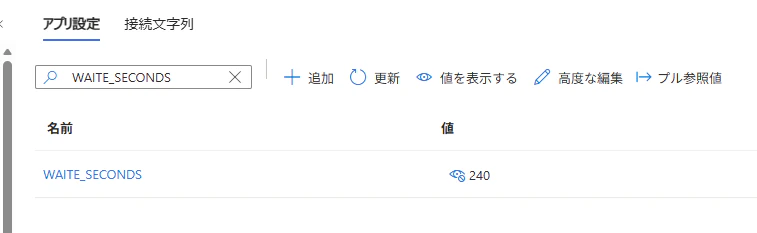
WAIT_SECONDS 環境変数に 240 を設定
Activity 関数内での待機時間を、Event Grid のタイムアウト(30 秒)を大きく超える 240 秒 に設定します。これにより「直接実行パターンであれば確実にタイムアウト → リトライが発生する」状況を再現しています。
ファイルを配置
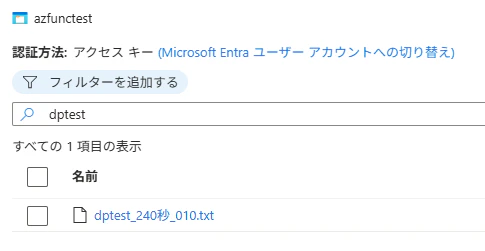
Blob ストレージにファイルを配置し、Event Grid イベントをトリガーします。
検証結果
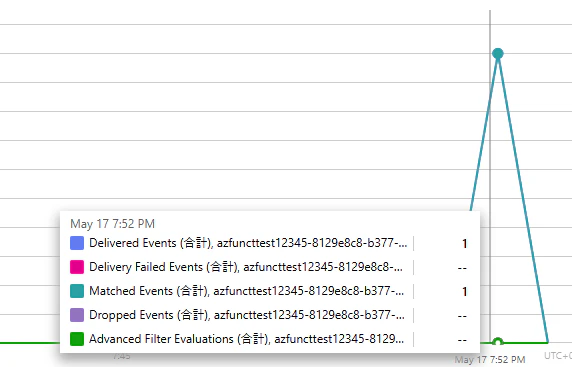
Azure Event Grid のログを確認
Delivered Events として記録されており、リトライが発生していない ことを確認できました。Event Grid トリガー関数が即座に正常応答を返したため、Event Grid 側からは「正常に配信完了したイベント」として扱われています。
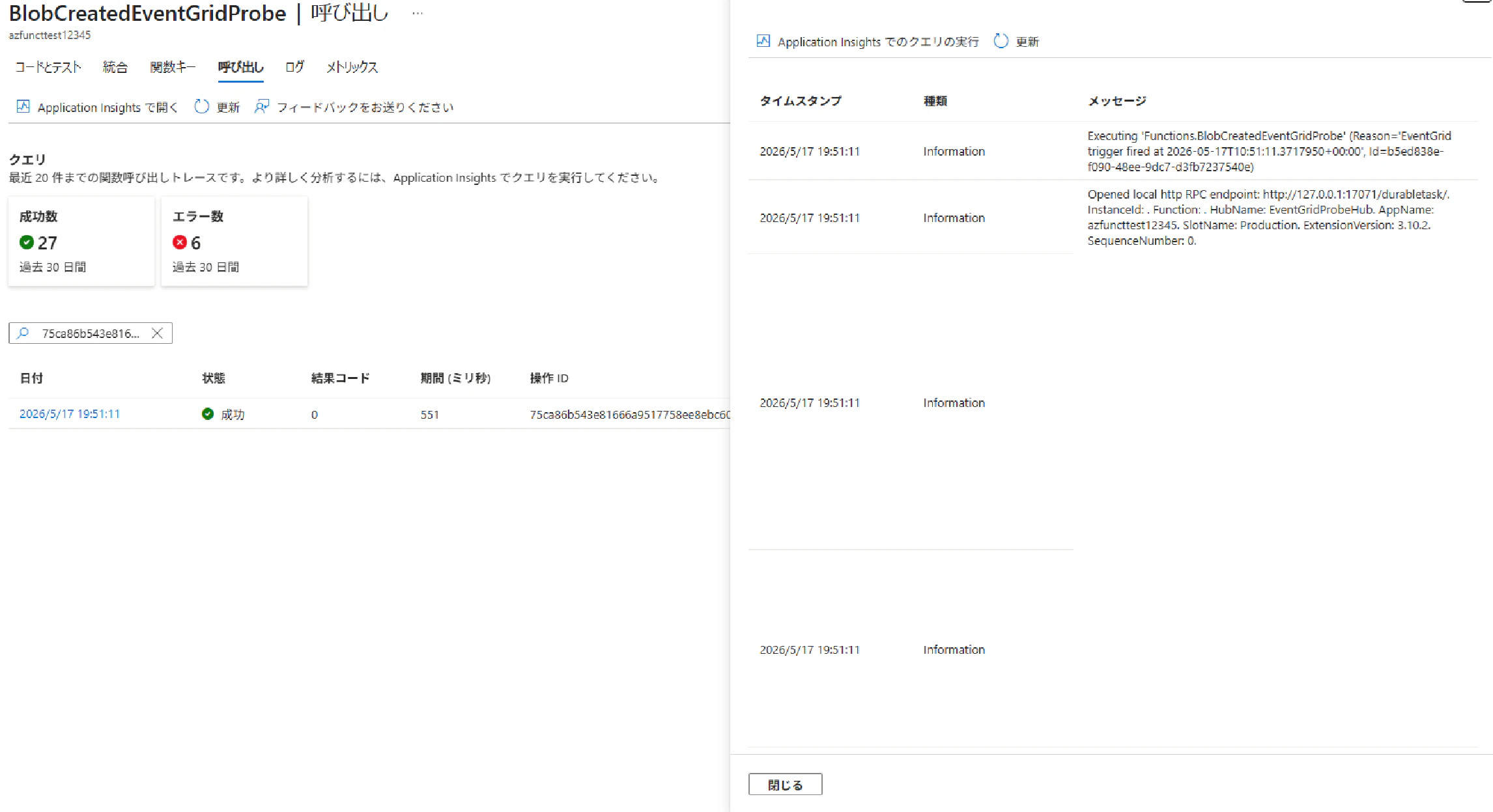
blob_created_event_grid_probe 関数の確認
Event Grid トリガー関数自体は 約 0.5 秒で完了 しており、30 秒以下という Event Grid の要件を満たしていることを確認できました。この関数の内部から event_grid_probe_orchestrator(オーケストレーター)を起動しています。
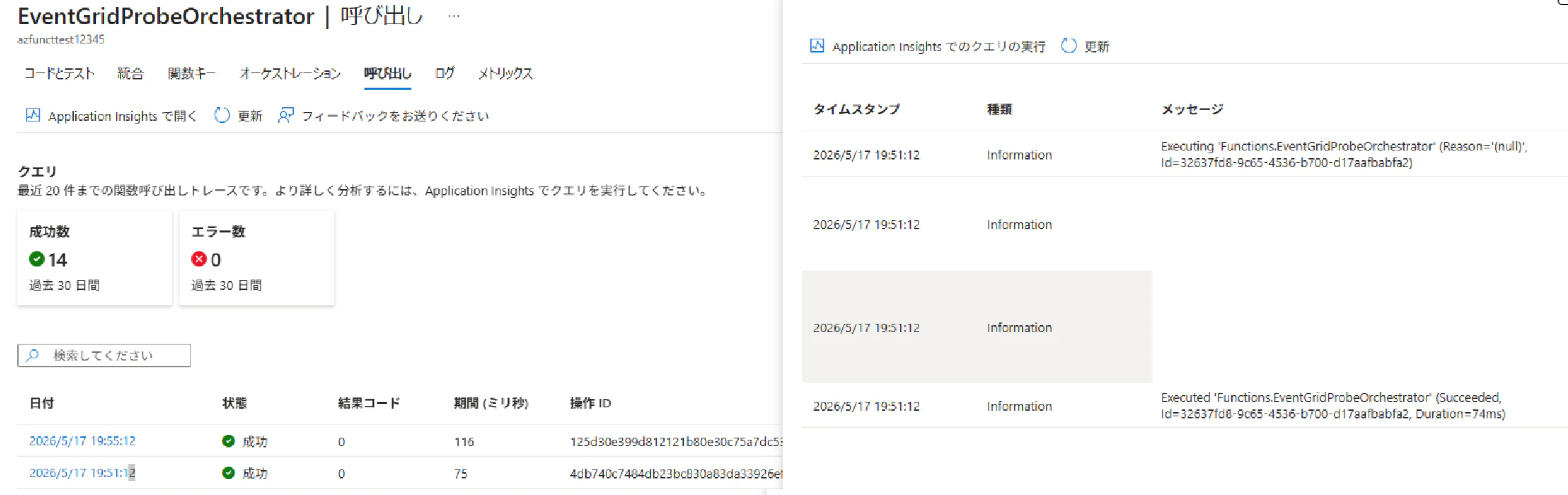
event_grid_probe_orchestrator 関数の確認
オーケストレーター関数が sleep_and_log_event_grid_probe Activity を呼び出していることを確認できます。
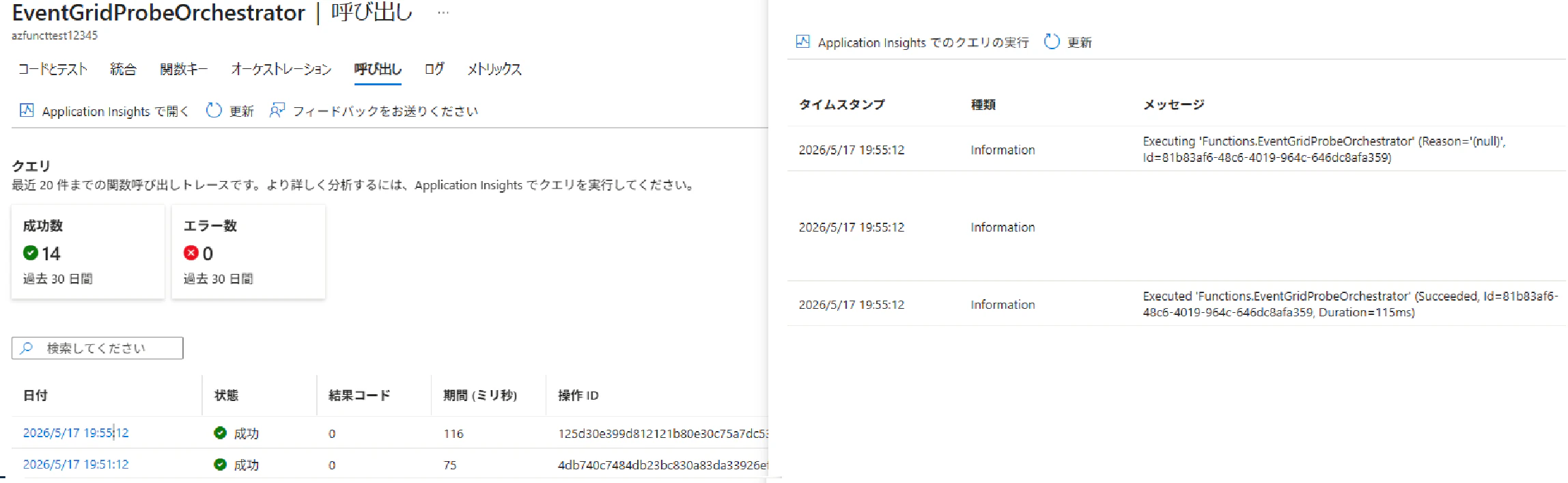
ここで注意すべきは、Durable Functions のオーケストレーターは Activity の完了を同期的にブロックして待っているわけではない という点です。yield context.call_activity(...) の時点で一度サスペンドし、Activity 完了イベントを受けて再開する、というイベントソーシング型の挙動になります。そのため、最初の実行ログは Activity を起動した時点で出力されます。
Activity 完了後にオーケストレーターが再開され、もう一度ログが出力されることを確認できました。
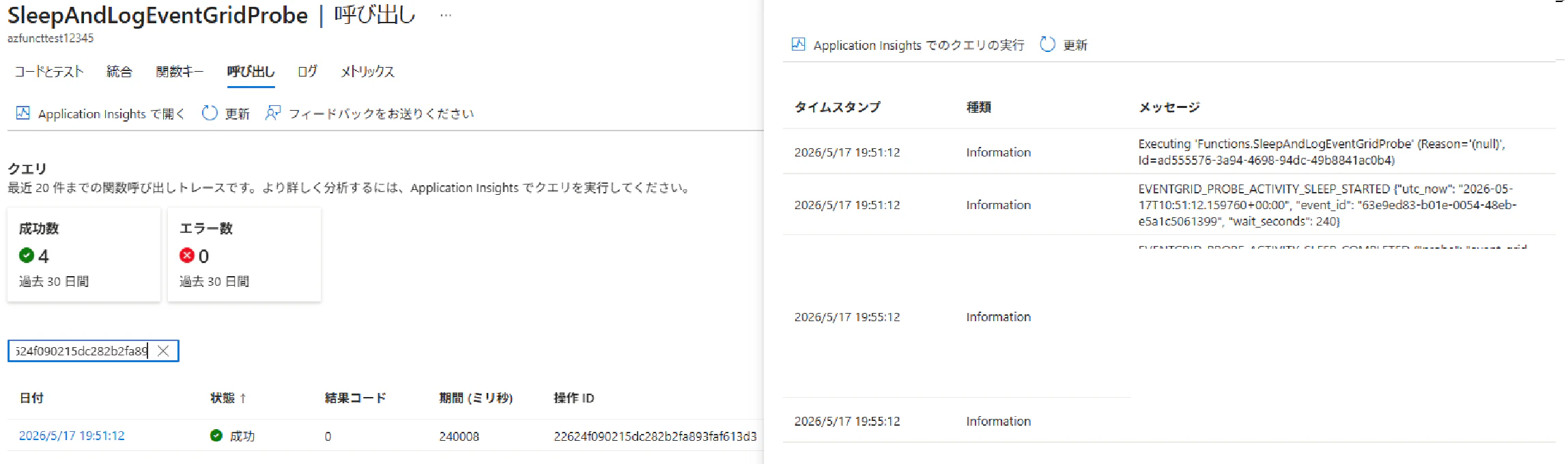
sleep_and_log_event_grid_probe 関数の確認
環境変数で指定した 240 秒の待機が完遂 されていることを確認できます。Event Grid の 30 秒タイムアウトを大きく超える処理であっても、リトライが発生せず最後まで実行されました。
まとめ
本検証で確認できた事項は以下の通りです。
- Event Grid トリガー関数の中で直接長時間処理を実行すると、30 秒タイムアウトでリトライが発生する仕様がある
- Event Grid トリガー関数の責務を 「Durable Orchestration の起動のみ」 に限定し、実処理を Activity 関数に切り出すことで、この制約を回避できる
-
instance_idをevent.idベース(f"eg-{event.id}")に設定することで、Event Grid のリトライ時にも重複起動を抑制できる(本検証では Event Grid 側でリトライ自体が発生しなかったため、抑制ロジックが発火するケースは観測されませんでした) - 環境変数で指定した 240 秒の長時間処理を、Event Grid 側でリトライさせることなく完遂できることを確認した
長時間処理が必要なイベント駆動ワークロード(大容量ファイルの後段処理、外部 API への連続呼び出しなど)では、Event Grid + Durable Functions の組み合わせが有力な選択肢になります。