

1. この会議に何円かかってるんだろう、、、
「この会議、本当にこれだけの人数が必要なのだろうか?」「会議に参加していたとしても時給分の価値を出せているだろうか?」とふと思ったことがあります。
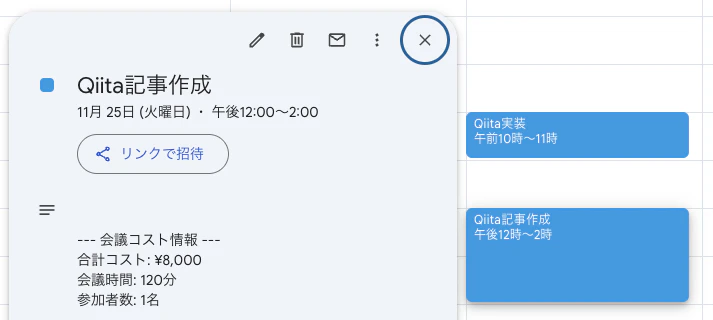
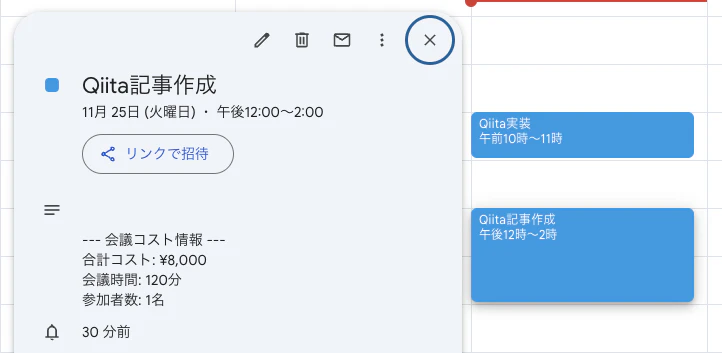
そこで、添付画像のように会議自体にかかっている費用を実際に記載すれば参加者がその価値を出そうとするのではと思い、Google Clender APIを用いて、会議自体にかかる費用をイベント説明欄に自動記載するプログラムを実装してみました。
※ ここでの合計コストはとりあえずの値を出しています。
2. ディレクトリ構成
メインスクリプトとおなじ階層に認証情報と参加者の時給をまとめたcsvファイルを入れておきます。
meeting-cost-calculator/
├── credentials.json            # Google Cloud Consoleからダウンロードしたファイル
├── hourly_rates.csv            # 参加者の時給データ
└── meeting_cost_calculator.py  # メインスクリプト
csvファイルは以下のような内容になります。実際は自分のメールアドレス等に変更してください。
email,name,hourly_rate
taro.yamada@example.com,山田太郎,3000
hanako.sato@example.com,佐藤花子,4000
3. 実装
3.1. Google Calendar API の認証設定
3.1.1. Google Colud Consoleにアクセス
Google Colud Console(下記URL)にアクセスして既存のプロジェクト選択するか新規プロジェクトを作成します。
3.1.2. Google Calender APIを有効化
左メニューから「APIとサービス」→「ライブラリ」をクリックし、Google Calender APIと検索し、Google Calender APIを選択します。
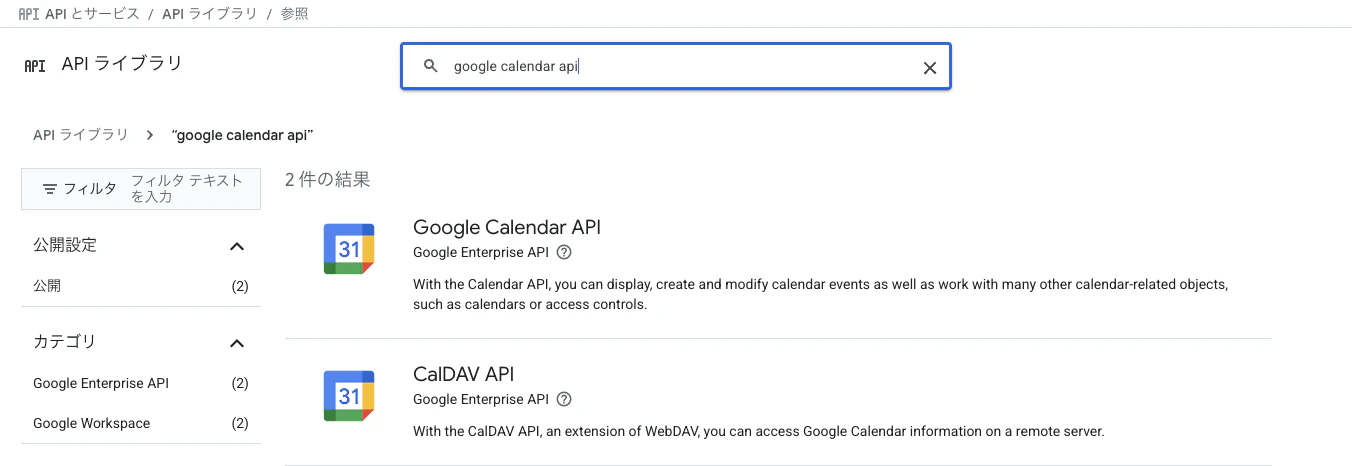
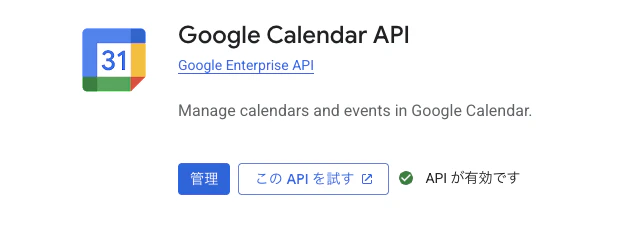
その後、有効にするボタンをクリックします。
3.1.3. OAuth同意画面の設定
左メニューから「APIとサービス」→「OAuth同意画面」をクリックし、UserTypeは「外部」を選択します。
アプリ情報の入力は
- アプリ名:例「Meeting Cost Calculator」
- ユーザーサポートメール:自分のメールアドレス
- デベロッパーの連絡先:自分のメールアドレス
としました。
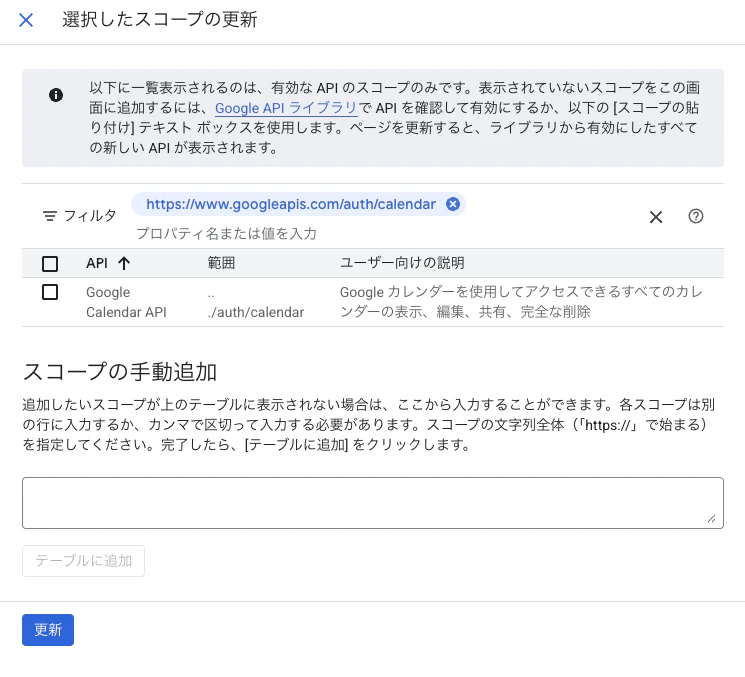
次にスコープの設定です。「スコープを追加または削除」をクリックし、calenderと検索して「Google Calendar API」の「.../auth/calendar」を選択します。
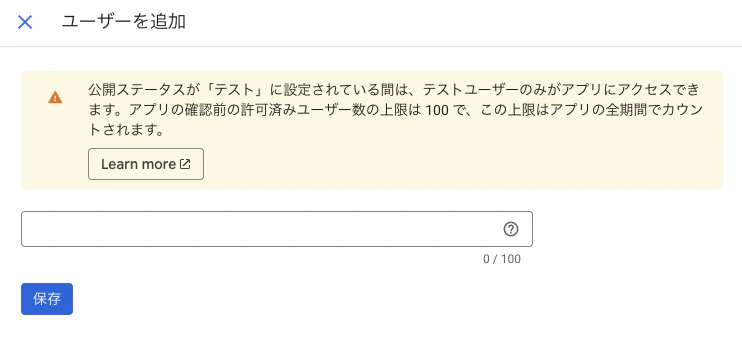
次はテストユーザーの追加です。「ADD USERS」をクリックし、自分のGoogleアカウントのメールアドレスを追加します。
3.1.4. OAuth 2.0クライアントIDの作成
左メニューから「APIとサービス」→「認証情報」をクリックし、上部の「+認証情報を作成」→「OAuth クライアント ID」をクリックします。
アプリケーションの種類は
- 「デスクトップアプリ」を選択
- 名前:例「Meeting Cost Calculator Desktop」
としました。
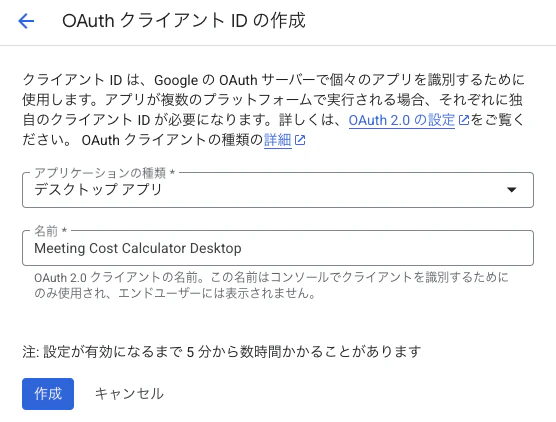
作成をクリックし、表示されたダイアログで「JSONをダウンロード」をクリックします。
3.2. コードの実装
meeting_cost_calculator.pyの全コード
import os
import pickle
import pandas as pd
from datetime import datetime, timedelta
from google.auth.transport.requests import Request
from google_auth_oauthlib.flow import InstalledAppFlow
from googleapiclient.discovery import build

# Google Calendar APIのスコープ(読み書き権限)
SCOPES = ['https://www.googleapis.com/auth/calendar']

# 設定
CSV_FILE = 'hourly_rates.csv'  # 時給データのCSVファイル
TOKEN_FILE = 'token.pickle'    # 認証トークンの保存ファイル
CREDENTIALS_FILE = 'credentials.json'  # Google Cloud Consoleからダウンロードした認証情報


class MeetingCostCalculator:
    """会議コスト計算クラス"""

    def __init__(self, csv_file=CSV_FILE):
        """初期化"""
        self.service = self._authenticate()
        self.hourly_rates = self._load_hourly_rates(csv_file)

    def _authenticate(self):
        """Google Calendar APIの認証"""
        creds = None

        # token.pickleファイルが存在する場合は読み込む
        if os.path.exists(TOKEN_FILE):
            with open(TOKEN_FILE, 'rb') as token:
                creds = pickle.load(token)

        # 認証情報が無効または存在しない場合
        if not creds or not creds.valid:
            if creds and creds.expired and creds.refresh_token:
                # トークンをリフレッシュ
                creds.refresh(Request())
            else:
                # 新規認証フロー
                flow = InstalledAppFlow.from_client_secrets_file(
                    CREDENTIALS_FILE, SCOPES)
                creds = flow.run_local_server(port=0)

            # 認証情報を保存
            with open(TOKEN_FILE, 'wb') as token:
                pickle.dump(creds, token)

        return build('calendar', 'v3', credentials=creds)

    def _load_hourly_rates(self, csv_file):
        """CSVファイルから時給データを読み込む"""
        try:
            df = pd.read_csv(csv_file)
            # emailをキーとした辞書に変換
            hourly_rates = dict(zip(df['email'], df['hourly_rate']))
            print(f"✓ 時給データを読み込みました: {len(hourly_rates)}名")
            return hourly_rates
        except FileNotFoundError:
            print(f"エラー: {csv_file} が見つかりません")
            return {}
        except Exception as e:
            print(f"エラー: CSVファイルの読み込みに失敗しました - {e}")
            return {}

    def get_recent_events(self, days=7):
        """今日のイベントを取得(日本時間基準)"""
        from datetime import timezone

        # 日本時間(JST = UTC+9)のタイムゾーンを定義
        jst = timezone(timedelta(hours=9))

        # 現在の日本時間を取得
        now_jst = datetime.now(jst)

        # 今日の開始時刻(00:00:00 JST)
        today_start = datetime(now_jst.year, now_jst.month, now_jst.day, 0, 0, 0, tzinfo=jst)
        # 今日の終了時刻(23:59:59 JST)
        today_end = datetime(now_jst.year, now_jst.month, now_jst.day, 23, 59, 59, tzinfo=jst)

        # RFC3339形式に変換
        time_min = today_start.isoformat()
        time_max = today_end.isoformat()

        try:
            events_result = self.service.events().list(
                calendarId='primary',
                timeMin=time_min,
                timeMax=time_max,
                singleEvents=True,
                orderBy='startTime'
            ).execute()

            events = events_result.get('items', [])
            print(f"✓ {len(events)}件のイベントを取得しました")
            return events
        except Exception as e:
            print(f"エラー: イベントの取得に失敗しました - {e}")
            return []

    def calculate_meeting_cost(self, event):
        """会議のコストを計算"""
        # 参加者リストを取得
        attendees = event.get('attendees', [])

        # 主催者(organizer)を取得
        organizer = event.get('organizer', {})
        organizer_email = organizer.get('email', '')

        # 主催者を参加者リストに追加(重複チェック)
        attendee_emails = [att.get('email', '') for att in attendees]
        if organizer_email and organizer_email not in attendee_emails:
            attendees.append({'email': organizer_email, 'responseStatus': 'accepted'})

        if not attendees:
            return None, "参加者なし"

        # 会議時間を計算(分単位)
        start = event.get('start', {})
        end = event.get('end', {})

        # 日時情報の取得
        start_time = start.get('dateTime') or start.get('date')
        end_time = end.get('dateTime') or end.get('date')

        if not start_time or not end_time:
            return None, "時間情報なし"

        # 終日イベントの場合はスキップ
        if 'T' not in start_time:
            return None, "終日イベント"

        # 時間の計算
        start_dt = datetime.fromisoformat(start_time.replace('Z', '+00:00'))
        end_dt = datetime.fromisoformat(end_time.replace('Z', '+00:00'))
        duration_minutes = (end_dt - start_dt).total_seconds() / 60

        if duration_minutes <= 0:
            return None, "時間が不正"

        # 参加者ごとのコストを計算
        total_cost = 0
        unknown_attendees = []

        for attendee in attendees:
            email = attendee.get('email', '')
            if email in self.hourly_rates:
                hourly_rate = self.hourly_rates[email]
                cost = (hourly_rate / 60) * duration_minutes
                total_cost += cost
            else:
                unknown_attendees.append(email)

        return {
            'total_cost': int(total_cost),
            'duration_minutes': int(duration_minutes),
            'attendee_count': len(attendees),
            'unknown_attendees': unknown_attendees
        }, None

    def update_event_description(self, event, cost_info):
        """イベントの説明欄にコスト情報を追記"""
        event_id = event['id']
        current_description = event.get('description', '')

        # コスト情報のマーカー
        cost_marker = "--- 会議コスト情報 ---"

        # 既にコスト情報が追記されているかチェック
        if cost_marker in current_description:
            print(f"  ⊙ 既にコスト情報が追記されています")
            return False

        # 新しい説明文を作成
        cost_text = f"\n\n{cost_marker}\n"
        cost_text += f"合計コスト: ¥{cost_info['total_cost']:,}\n"
        cost_text += f"会議時間: {cost_info['duration_minutes']}分\n"
        cost_text += f"参加者数: {cost_info['attendee_count']}名"

        # 時給未登録の参加者がいる場合は注記
        if cost_info.get('unknown_attendees'):
            cost_text += f"\n※ 時給未登録: {len(cost_info['unknown_attendees'])}名"

        new_description = current_description + cost_text

        # イベントを更新
        try:
            self.service.events().patch(
                calendarId='primary',
                eventId=event_id,
                body={'description': new_description}
            ).execute()
            print(f"  ✓ コスト情報を追記しました: ¥{cost_info['total_cost']:,}")
            return True
        except Exception as e:
            print(f"  ✗ 更新に失敗しました - {e}")
            return False

    def process_events(self, days=7):
        """イベントを処理してコスト情報を追加"""
        print(f"\n{'='*60}")
        print(f"会議コスト計算ツール実行開始")
        print(f"対象期間: 本日")
        print(f"{'='*60}\n")

        events = self.get_recent_events(days)

        if not events:
            print("処理対象のイベントがありません")
            return

        processed_count = 0
        skipped_count = 0

        for event in events:
            summary = event.get('summary', '(タイトルなし)')
            print(f"\n {summary}")

            # コストを計算
            cost_info, error = self.calculate_meeting_cost(event)

            if error:
                print(f"  ⊙ スキップ: {error}")
                skipped_count += 1
                continue

            # イベントを更新
            if self.update_event_description(event, cost_info):
                processed_count += 1
            else:
                skipped_count += 1

        print(f"\n{'='*60}")
        print(f"処理完了: {processed_count}件更新, {skipped_count}件スキップ")
        print(f"{'='*60}\n")


def main():
    """メイン処理"""
    # 計算ツールを初期化
    calculator = MeetingCostCalculator()

    # 今日のイベントを処理
    calculator.process_events()


if __name__ == '__main__':
    main()
3.2.1. 必要なライブラリのインストール
pip install google-auth google-auth-oauthlib google-auth-httplib2 google-api-python-client pandas
3.2.2. Google Calender APIへの接続と時給データの読み込み
Google Calender APIを使うためにOAuth認証を行います。
def _authenticate(self):
    creds = None

    if os.path.exists(TOKEN_FILE):
        with open(TOKEN_FILE, 'rb') as token:
            creds = pickle.load(token)

    if not creds or not creds.valid:
        if creds and creds.expired and creds.refresh_token:
            creds.refresh(Request())
        else:
            flow = InstalledAppFlow.from_client_secrets_file(
                CREDENTIALS_FILE, SCOPES)
            creds = flow.run_local_server(port=0)

        with open(TOKEN_FILE, 'wb') as token:
            pickle.dump(creds, token)

    return build('calendar', 'v3', credentials=creds)
hourly_rates.csvを読み込み、メールアドレスと時給情報を辞書化します。
df = pd.read_csv(csv_file)
hourly_rates = dict(zip(df['email'], df['hourly_rate']))
3.2.3. カレンダーから今日のイベントを取得
日本時間に対応した「今日の会議」を取得します。
jst = timezone(timedelta(hours=9))
now_jst = datetime.now(jst)

today_start = datetime(now_jst.year, now_jst.month, now_jst.day, 0, 0, 0, tzinfo=jst)
today_end   = datetime(now_jst.year, now_jst.month, now_jst.day, 23, 59, 59, tzinfo=jst)
RFC3339形式に変換し、Google Calendar APIを叩きます。
events_result = self.service.events().list(
    calendarId='primary',
    timeMin=time_min,
    timeMax=time_max,
    singleEvents=True,
    orderBy='startTime'
).execute()
3.2.4. 会議参加者と時給データを使ったコスト計算
参加者を抽出し、主催者が参加者リストに含まれていなければ追加します。
attendees = event.get('attendees', [])
organizer = event.get('organizer', {})
organizer_email = organizer.get('email', '')

if organizer_email and organizer_email not in attendee_emails:
    attendees.append({'email': organizer_email, 'responseStatus': 'accepted'})
会議時間(分)を計算し、参加者の時給からコストを計算します。
start_dt = datetime.fromisoformat(start_time.replace('Z', '+00:00'))
end_dt   = datetime.fromisoformat(end_time.replace('Z', '+00:00'))

duration_minutes = (end_dt - start_dt).total_seconds() / 60


for attendee in attendees:
    email = attendee.get('email', '')
    if email in self.hourly_rates:
        hourly_rate = self.hourly_rates[email]
        cost = (hourly_rate / 60) * duration_minutes
        total_cost += cost
    else:
        unknown_attendees.append(email)
3.2.5. イベントの説明欄にコスト情報を追記する処理
既存の説明欄を確認します。
current_description = event.get('description', '')
cost_marker = "--- 会議コスト情報 ---"

if cost_marker in current_description:
    print("⊙ 既に追記されています")
    return False
新しい説明文を作成し、Google Calenderを更新します。
cost_text = f"\n\n{cost_marker}\n"
cost_text += f"合計コスト: ¥{cost_info['total_cost']:,}\n"
cost_text += f"会議時間: {cost_info['duration_minutes']}分\n"
cost_text += f"参加者数: {cost_info['attendee_count']}名"


if cost_info.get('unknown_attendees'):
    cost_text += f"\n※ 時給未登録: {len(cost_info['unknown_attendees'])}名"

new_description = current_description + cost_text


try:
    self.service.events().patch(
        calendarId='primary',
        eventId=event_id,
        body={'description': new_description}
    ).execute()
    print(f"  ✓ コスト情報を追記しました: ¥{cost_info['total_cost']:,}")
    return True
except Exception as e:
    print(f"  ✗ 更新に失敗しました - {e}")
    return False
3.3. 実行
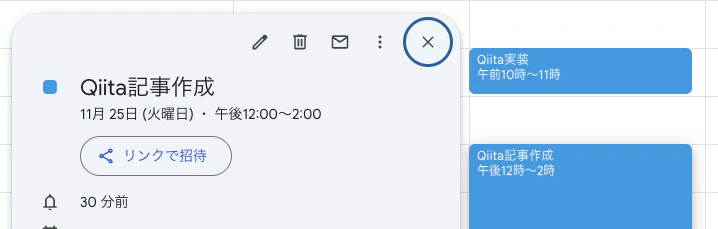
実行するとカレンダー説明がない状態からコストが記載された状態になります。
(※ とりあえず時給4000にしました。)
まとめ
今回はPythonスクリプトのみですが、AWS LambdaやEventBridgeを用いれば、定期実行できて完全自動化もできるのでより良いかなと思いました。
また、今回は個人的に作ってみましたが、もし社内で実行できるのであれば、会議参加者の発言など変わったりするのか気になりますね。