

1. 毎回Wi-Fiパスワードを共有するの、面倒じゃないですか?
家に友人が来たとき、ほぼ毎回こうなります。
- 「WiFiパスワード教えて〜」
- 「いいよ〜!これパスワード!」
- 「ありがとう!(入力…)あれ、つながらない、、、」
- 「えっ、ここ一文字間違えてるかも」
いつもちょっと面倒だなと思ってました。
口頭で伝えるのもそれはそれで面倒なので、いっそのことちょっと変な共有の仕方にしたいと思い、WifiパスワードをQRコードで共有することにしました。
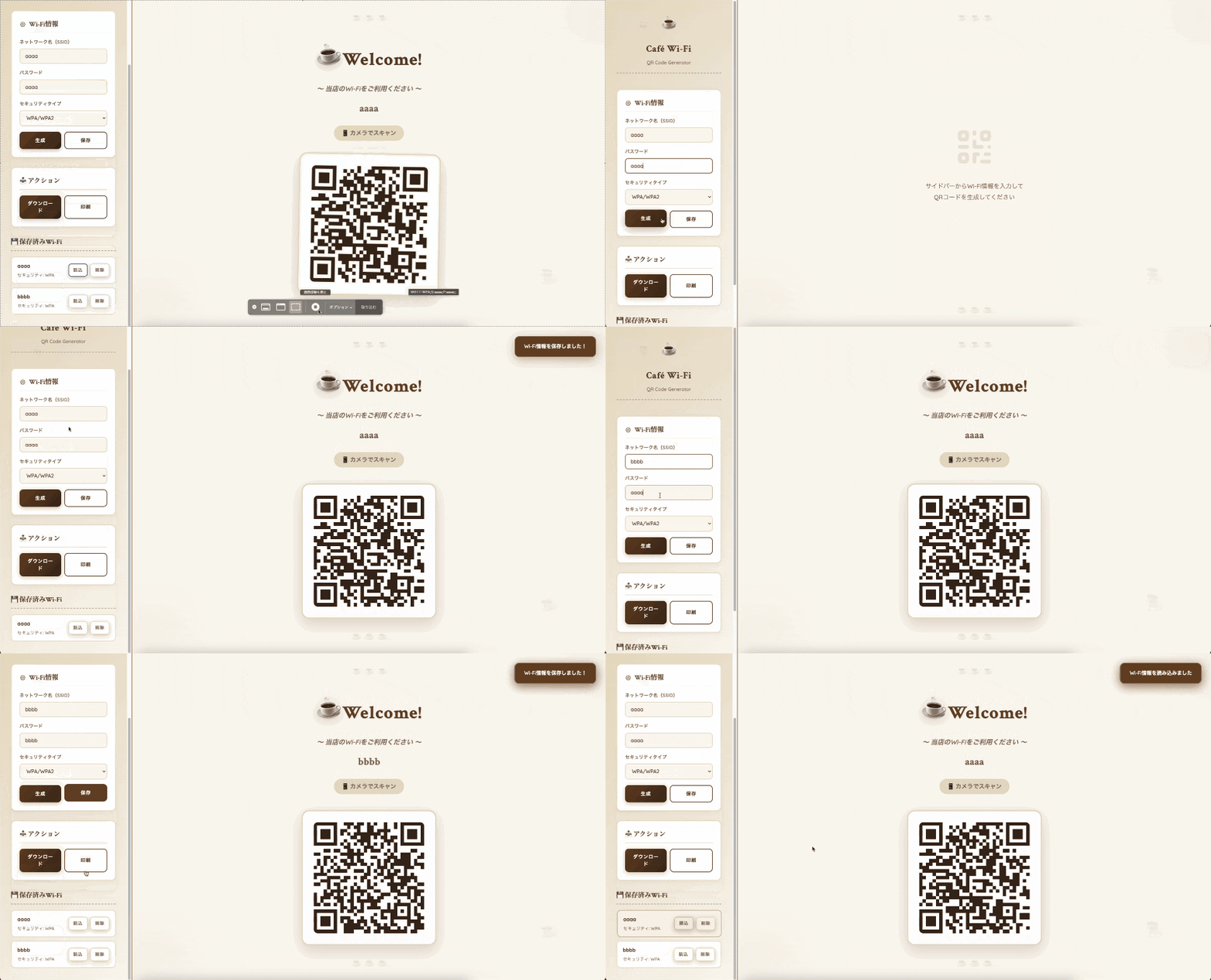
2. できたものがこちらです!
どう考えても家には必要ありませんが、おしゃれにできたのではないかと思います。
3. 実装
3.1. 全体コード
コード全体はこちらです
<!DOCTYPE html>
<html lang="ja">
<head>
<meta charset="UTF-8">
<meta name="viewport" content="width=device-width, initial-scale=1.0">
<title>Wi-Fi QRコードジェネレーター - カフェスタイル</title>
<script src="https://cdnjs.cloudflare.com/ajax/libs/qrcodejs/1.0.0/qrcode.min.js"></script>
<link rel="preconnect" href="https://fonts.googleapis.com">
<link rel="preconnect" href="https://fonts.gstatic.com" crossorigin>
<link href="https://fonts.googleapis.com/css2?family=Crimson+Text:wght@400;600;700&family=Quicksand:wght@400;500;600;700&display=swap" rel="stylesheet">
<style>
:root {
--cream: #faf7f0;
--coffee: #6b4423;
--light-coffee: #a0745f;
--dark-coffee: #3d2817;
--espresso: #2d1810;
--foam: #ffffff;
--caramel: #d4a574;
--latte: #e8dcc4;
--mocha: #8b6f47;
}
* {
margin: 0;
padding: 0;
box-sizing: border-box;
}
body {
font-family: 'Quicksand', sans-serif;
background: var(--cream);
color: var(--coffee);
min-height: 100vh;
line-height: 1.6;
position: relative;
overflow-x: hidden;
}
/* Coffee beans background pattern */
body::before {
content: '☕';
position: fixed;
top: 5%;
left: 5%;
font-size: 3rem;
opacity: 0.05;
animation: float 6s ease-in-out infinite;
}
body::after {
content: '☕';
position: fixed;
bottom: 10%;
right: 8%;
font-size: 4rem;
opacity: 0.05;
animation: float 8s ease-in-out infinite 2s;
}
@keyframes float {
0%, 100% { transform: translateY(0px) rotate(0deg); }
50% { transform: translateY(-20px) rotate(10deg); }
}
.container {
max-width: 100%;
height: 100vh;
margin: 0;
padding: 0;
display: flex;
animation: fadeIn 0.8s ease-out;
}
@keyframes fadeIn {
from { opacity: 0; }
to { opacity: 1; }
}
.sidebar {
width: 420px;
background: linear-gradient(135deg, var(--latte) 0%, var(--cream) 100%);
border-right: 3px solid var(--caramel);
padding: 40px 35px;
overflow-y: auto;
display: flex;
flex-direction: column;
gap: 30px;
box-shadow: 5px 0 20px rgba(107, 68, 35, 0.1);
}
.sidebar-header {
text-align: center;
margin-bottom: 20px;
padding-bottom: 20px;
border-bottom: 2px dashed var(--caramel);
}
.cafe-logo {
font-size: 3rem;
margin-bottom: 15px;
animation: steam 2s ease-in-out infinite;
display: inline-block;
}
@keyframes steam {
0%, 100% { transform: translateY(0px); }
50% { transform: translateY(-5px); }
}
.sidebar-header h1 {
font-family: 'Crimson Text', serif;
font-size: 1.8rem;
font-weight: 700;
color: var(--coffee);
margin-bottom: 8px;
letter-spacing: 1px;
}
.sidebar-header p {
font-size: 0.95rem;
color: var(--light-coffee);
font-weight: 500;
}
.main-display {
flex: 1;
display: flex;
align-items: center;
justify-content: center;
padding: 60px;
background: var(--cream);
position: relative;
overflow: hidden;
}
/* Coffee stain decorations */
.coffee-stain {
position: absolute;
border-radius: 50%;
opacity: 0.03;
}
.coffee-stain-1 {
width: 300px;
height: 300px;
background: radial-gradient(circle, var(--coffee) 0%, transparent 70%);
top: -100px;
right: -100px;
}
.coffee-stain-2 {
width: 400px;
height: 400px;
background: radial-gradient(circle, var(--mocha) 0%, transparent 70%);
bottom: -150px;
left: -150px;
}
@media (max-width: 1024px) {
.container {
flex-direction: column;
height: auto;
}
.sidebar {
width: 100%;
border-right: none;
border-bottom: 3px solid var(--caramel);
}
.main-display {
min-height: 70vh;
padding: 40px 20px;
}
}
.section {
background: var(--foam);
border-radius: 15px;
padding: 25px;
border: 2px solid var(--latte);
box-shadow: 0 4px 15px rgba(107, 68, 35, 0.08);
}
.section h2 {
font-family: 'Crimson Text', serif;
font-size: 1.3rem;
margin-bottom: 18px;
color: var(--coffee);
display: flex;
align-items: center;
gap: 10px;
font-weight: 600;
border-bottom: 1px solid var(--latte);
padding-bottom: 10px;
}
.icon {
width: 20px;
height: 20px;
color: var(--mocha);
}
.form-group {
margin-bottom: 18px;
}
label {
display: block;
margin-bottom: 8px;
color: var(--light-coffee);
font-weight: 600;
font-size: 0.9rem;
text-transform: uppercase;
letter-spacing: 0.5px;
}
input, select {
width: 100%;
padding: 12px 16px;
background: var(--cream);
border: 2px solid var(--latte);
border-radius: 10px;
color: var(--coffee);
font-size: 1rem;
font-family: 'Quicksand', sans-serif;
font-weight: 500;
transition: all 0.3s ease;
}
input:focus, select:focus {
outline: none;
border-color: var(--mocha);
box-shadow: 0 0 0 3px rgba(160, 116, 95, 0.1);
background: var(--foam);
}
input::placeholder {
color: var(--light-coffee);
opacity: 0.6;
}
.button-group {
display: flex;
gap: 10px;
margin-top: 18px;
}
button {
flex: 1;
padding: 14px 22px;
background: linear-gradient(135deg, var(--coffee) 0%, var(--dark-coffee) 100%);
color: var(--foam);
border: none;
border-radius: 12px;
font-size: 0.95rem;
font-weight: 700;
cursor: pointer;
transition: all 0.3s ease;
text-transform: uppercase;
letter-spacing: 1px;
font-family: 'Quicksand', sans-serif;
box-shadow: 0 4px 15px rgba(107, 68, 35, 0.3);
}
button:hover {
transform: translateY(-3px);
box-shadow: 0 8px 25px rgba(107, 68, 35, 0.4);
}
button:active {
transform: translateY(-1px);
}
button.secondary {
background: transparent;
border: 2px solid var(--coffee);
color: var(--coffee);
box-shadow: none;
}
button.secondary:hover {
background: var(--coffee);
color: var(--foam);
}
#qrcode-container {
display: flex;
flex-direction: column;
align-items: center;
justify-content: center;
z-index: 1;
}
.welcome-section {
text-align: center;
margin-bottom: 50px;
animation: fadeInDown 1s ease-out;
}
@keyframes fadeInDown {
from {
opacity: 0;
transform: translateY(-40px);
}
to {
opacity: 1;
transform: translateY(0);
}
}
.welcome-icon {
font-size: 5rem;
margin-bottom: 25px;
display: inline-block;
filter: drop-shadow(0 8px 16px rgba(107, 68, 35, 0.2));
animation: wiggle 3s ease-in-out infinite;
}
@keyframes wiggle {
0%, 100% { transform: rotate(-5deg); }
50% { transform: rotate(5deg); }
}
.welcome-message {
font-family: 'Crimson Text', serif;
font-size: 3.5rem;
font-weight: 700;
color: var(--coffee);
margin-bottom: 15px;
text-shadow: 2px 2px 4px rgba(107, 68, 35, 0.1);
position: relative;
display: inline-block;
letter-spacing: 2px;
}
.welcome-subtitle {
font-size: 1.3rem;
color: var(--light-coffee);
font-weight: 600;
margin-bottom: 20px;
font-style: italic;
}
.wifi-name-display {
font-size: 2rem;
color: var(--mocha);
font-weight: 700;
margin-bottom: 10px;
font-family: 'Crimson Text', serif;
}
.instruction-text {
font-size: 1.15rem;
color: var(--light-coffee);
margin-top: 18px;
font-weight: 600;
background: var(--latte);
padding: 10px 25px;
border-radius: 25px;
display: inline-block;
}
#qrcode {
padding: 35px;
background: var(--foam);
border-radius: 25px;
box-shadow: 0 15px 50px rgba(107, 68, 35, 0.2);
z-index: 1;
transition: transform 0.5s ease;
animation: fadeInUp 1.2s ease-out;
border: 4px solid var(--latte);
}
@keyframes fadeInUp {
from {
opacity: 0;
transform: translateY(40px);
}
to {
opacity: 1;
transform: translateY(0);
}
}
#qrcode:hover {
transform: scale(1.05) rotate(1deg);
}
#qrcode canvas, #qrcode img {
border-radius: 12px;
}
.empty-state {
text-align: center;
color: var(--light-coffee);
animation: pulse 2s ease-in-out infinite;
}
.empty-state svg {
width: 140px;
height: 140px;
margin-bottom: 30px;
opacity: 0.15;
color: var(--mocha);
}
.empty-state p {
font-size: 1.2rem;
line-height: 1.8;
font-weight: 500;
}
.saved-wifi h2 {
font-family: 'Crimson Text', serif;
font-size: 1.3rem;
margin-bottom: 18px;
color: var(--coffee);
font-weight: 700;
border-bottom: 2px dashed var(--caramel);
padding-bottom: 10px;
}
.wifi-list {
display: flex;
flex-direction: column;
gap: 12px;
}
.wifi-item {
background: var(--foam);
border: 2px solid var(--latte);
border-radius: 12px;
padding: 15px 18px;
display: flex;
justify-content: space-between;
align-items: center;
transition: all 0.3s ease;
cursor: pointer;
}
.wifi-item:hover {
border-color: var(--mocha);
background: var(--latte);
transform: translateX(5px);
box-shadow: 0 4px 12px rgba(107, 68, 35, 0.15);
}
.wifi-info h3 {
font-size: 1rem;
margin-bottom: 4px;
color: var(--coffee);
font-weight: 700;
}
.wifi-info p {
font-size: 0.85rem;
color: var(--light-coffee);
font-weight: 500;
}
.wifi-actions {
display: flex;
gap: 8px;
}
.icon-button {
padding: 8px 14px;
background: transparent;
border: 2px solid var(--latte);
border-radius: 8px;
color: var(--light-coffee);
cursor: pointer;
transition: all 0.3s ease;
font-size: 0.85rem;
font-weight: 600;
}
.icon-button:hover {
border-color: var(--mocha);
color: var(--coffee);
background: var(--latte);
}
.icon-button.delete:hover {
border-color: #c17a4a;
color: #8b4423;
background: #fde5d4;
}
.notification {
position: fixed;
top: 30px;
right: 30px;
padding: 18px 28px;
background: var(--coffee);
color: var(--foam);
border-radius: 15px;
box-shadow: 0 8px 30px rgba(107, 68, 35, 0.4);
animation: slideIn 0.4s ease-out;
z-index: 1000;
font-weight: 600;
border: 2px solid var(--mocha);
}
@keyframes slideIn {
from {
transform: translateX(400px);
opacity: 0;
}
to {
transform: translateX(0);
opacity: 1;
}
}
.print-section {
display: none;
}
@media print {
body {
background: white;
color: var(--coffee);
}
body::before,
body::after {
display: none;
}
.container {
display: block;
}
.sidebar, .button-group {
display: none !important;
}
.main-display {
background: white;
padding: 0;
}
.print-section {
display: block;
text-align: center;
padding: 60px 40px;
}
#qrcode-container {
margin: 0 auto;
box-shadow: none;
}
.coffee-stain {
display: none;
}
}
/* Decorative elements */
.decoration-top {
position: absolute;
top: 30px;
left: 50%;
transform: translateX(-50%);
font-size: 2rem;
opacity: 0.1;
}
.decoration-bottom {
position: absolute;
bottom: 30px;
left: 50%;
transform: translateX(-50%);
font-size: 2rem;
opacity: 0.1;
}
</style>
</head>
<body>
<div class="container">
<!-- Sidebar -->
<div class="sidebar">
<div class="sidebar-header">
<div class="cafe-logo">☕</div>
<h1>Café Wi-Fi</h1>
<p>QR Code Generator</p>
</div>
<!-- Form Section -->
<div class="section">
<h2>
<svg class="icon" fill="none" stroke="currentColor" viewBox="0 0 24 24">
<path stroke-linecap="round" stroke-linejoin="round" stroke-width="2" d="M10.325 4.317c.426-1.756 2.924-1.756 3.35 0a1.724 1.724 0 002.573 1.066c1.543-.94 3.31.826 2.37 2.37a1.724 1.724 0 001.065 2.572c1.756.426 1.756 2.924 0 3.35a1.724 1.724 0 00-1.066 2.573c.94 1.543-.826 3.31-2.37 2.37a1.724 1.724 0 00-2.572 1.065c-.426 1.756-2.924 1.756-3.35 0a1.724 1.724 0 00-2.573-1.066c-1.543.94-3.31-.826-2.37-2.37a1.724 1.724 0 00-1.065-2.572c-1.756-.426-1.756-2.924 0-3.35a1.724 1.724 0 001.066-2.573c-.94-1.543.826-3.31 2.37-2.37.996.608 2.296.07 2.572-1.065z"></path>
<path stroke-linecap="round" stroke-linejoin="round" stroke-width="2" d="M15 12a3 3 0 11-6 0 3 3 0 016 0z"></path>
</svg>
Wi-Fi情報
</h2>
<form id="wifi-form">
<div class="form-group">
<label for="ssid">ネットワーク名(SSID)</label>
<input type="text" id="ssid" placeholder="例: Cafe_Guest_WiFi" required>
</div>
<div class="form-group">
<label for="password">パスワード</label>
<input type="text" id="password" placeholder="Wi-Fiパスワードを入力" required>
</div>
<div class="form-group">
<label for="security">セキュリティタイプ</label>
<select id="security">
<option value="WPA">WPA/WPA2</option>
<option value="WEP">WEP</option>
<option value="nopass">なし(オープン)</option>
</select>
</div>
<div class="button-group">
<button type="submit">生成</button>
<button type="button" class="secondary" onclick="saveWiFi()">保存</button>
</div>
</form>
</div>
<!-- Actions Section -->
<div class="section">
<h2>📥 アクション</h2>
<div class="button-group">
<button type="button" onclick="downloadQRCode()">ダウンロード</button>
<button type="button" class="secondary" onclick="window.print()">印刷</button>
</div>
</div>
<!-- Saved WiFi Section -->
<div class="saved-wifi">
<h2>💾 保存済みWi-Fi</h2>
<div class="wifi-list" id="saved-list"></div>
</div>
</div>
<!-- Main Display Area -->
<div class="main-display">
<div class="coffee-stain coffee-stain-1"></div>
<div class="coffee-stain coffee-stain-2"></div>
<div class="decoration-top">☕ ☕ ☕</div>
<div class="decoration-bottom">☕ ☕ ☕</div>
<div id="qrcode-container">
<div class="empty-state">
<svg fill="none" stroke="currentColor" viewBox="0 0 24 24">
<path stroke-linecap="round" stroke-linejoin="round" stroke-width="2" d="M12 4v1m6 11h2m-6 0h-2v4m0-11v3m0 0h.01M12 12h4.01M16 20h4M4 12h4m12 0h.01M5 8h2a1 1 0 001-1V5a1 1 0 00-1-1H5a1 1 0 00-1 1v2a1 1 0 001 1zm12 0h2a1 1 0 001-1V5a1 1 0 00-1-1h-2a1 1 0 00-1 1v2a1 1 0 001 1zM5 20h2a1 1 0 001-1v-2a1 1 0 00-1-1H5a1 1 0 00-1 1v2a1 1 0 001 1z"></path>
</svg>
<p>サイドバーからWi-Fi情報を入力して<br>QRコードを生成してください</p>
</div>
<div id="qr-display" style="display: none;">
<div class="welcome-section">
<div class="welcome-icon">☕</div>
<div class="welcome-message">Welcome!</div>
<div class="welcome-subtitle">〜 当店のWi-Fiをご利用ください 〜</div>
<div class="wifi-name-display" id="display-ssid"></div>
<div class="instruction-text">📱 カメラでスキャン</div>
</div>
<div id="qrcode"></div>
</div>
</div>
</div>
<div class="print-section">
<div style="text-align: center; padding: 60px 40px;">
<div style="font-size: 4rem; margin-bottom: 20px;">☕</div>
<h1 style="font-family: 'Crimson Text', serif; font-size: 3rem; color: var(--coffee); margin-bottom: 15px;">Welcome!</h1>
<p style="font-size: 1.3rem; font-style: italic; color: var(--light-coffee); margin-bottom: 20px;">〜 当店のWi-Fiをご利用ください 〜</p>
<h2 style="font-family: 'Crimson Text', serif; color: var(--mocha); margin-bottom: 40px; font-size: 2rem;" id="print-ssid"></h2>
<p style="font-size: 1.1rem; color: var(--light-coffee);">スマートフォンのカメラでこのQRコードをスキャンしてください</p>
</div>
</div>
</div>
<script>
let currentQRCode = null;
let currentWiFiData = null;
// フォーム送信時の処理
document.getElementById('wifi-form').addEventListener('submit', function(e) {
e.preventDefault();
generateQRCode();
});
// QRコード生成関数
function generateQRCode() {
const ssid = document.getElementById('ssid').value;
const password = document.getElementById('password').value;
const security = document.getElementById('security').value;
if (!ssid) {
showNotification('ネットワーク名を入力してください', 'error');
return;
}
// Wi-Fi QRコードのフォーマット
let wifiString;
if (security === 'nopass') {
wifiString = `WIFI:T:nopass;S:${ssid};;`;
} else {
wifiString = `WIFI:T:${security};S:${ssid};P:${password};;`;
}
// 現在のWi-Fiデータを保存
currentWiFiData = { ssid, password, security };
// 空の状態を非表示、QR表示エリアを表示
document.querySelector('.empty-state').style.display = 'none';
document.getElementById('qr-display').style.display = 'block';
// SSIDを表示
document.getElementById('display-ssid').textContent = ssid;
// 印刷用にも設定
document.getElementById('print-ssid').textContent = ssid;
// 既存のQRコードをクリア
const qrcodeElement = document.getElementById('qrcode');
qrcodeElement.innerHTML = '';
// QRコード生成
currentQRCode = new QRCode(qrcodeElement, {
text: wifiString,
width: 350,
height: 350,
colorDark: '#3d2817',
colorLight: '#ffffff',
correctLevel: QRCode.CorrectLevel.H
});
showNotification('QRコードを生成しました!');
}
// Wi-Fi情報を保存
function saveWiFi() {
if (!currentWiFiData) {
showNotification('先にQRコードを生成してください', 'error');
return;
}
let savedWiFis = JSON.parse(localStorage.getItem('savedWiFis') || '[]');
// 重複チェック
const exists = savedWiFis.some(wifi => wifi.ssid === currentWiFiData.ssid);
if (exists) {
showNotification('このWi-Fiは既に保存されています', 'error');
return;
}
savedWiFis.push(currentWiFiData);
localStorage.setItem('savedWiFis', JSON.stringify(savedWiFis));
loadSavedWiFis();
showNotification('Wi-Fi情報を保存しました!');
}
// 保存済みWi-Fiを読み込み
function loadSavedWiFis() {
const savedWiFis = JSON.parse(localStorage.getItem('savedWiFis') || '[]');
const listElement = document.getElementById('saved-list');
if (savedWiFis.length === 0) {
listElement.innerHTML = '<p style="text-align: center; color: var(--light-coffee); padding: 30px; font-size: 0.9rem;">保存されたWi-Fiはありません</p>';
return;
}
listElement.innerHTML = savedWiFis.map((wifi, index) => `
<div class="wifi-item" onclick="loadWiFi(${index})">
<div class="wifi-info">
<h3>${wifi.ssid}</h3>
<p>セキュリティ: ${wifi.security === 'nopass' ? 'なし' : wifi.security}</p>
</div>
<div class="wifi-actions">
<button class="icon-button" onclick="event.stopPropagation(); loadWiFi(${index})">読込</button>
<button class="icon-button delete" onclick="event.stopPropagation(); deleteWiFi(${index})">削除</button>
</div>
</div>
`).join('');
}
// Wi-Fi情報を読み込み
function loadWiFi(index) {
const savedWiFis = JSON.parse(localStorage.getItem('savedWiFis') || '[]');
const wifi = savedWiFis[index];
document.getElementById('ssid').value = wifi.ssid;
document.getElementById('password').value = wifi.password;
document.getElementById('security').value = wifi.security;
generateQRCode();
showNotification('Wi-Fi情報を読み込みました');
}
// Wi-Fi情報を削除
function deleteWiFi(index) {
if (!confirm('このWi-Fi情報を削除しますか?')) return;
let savedWiFis = JSON.parse(localStorage.getItem('savedWiFis') || '[]');
savedWiFis.splice(index, 1);
localStorage.setItem('savedWiFis', JSON.stringify(savedWiFis));
loadSavedWiFis();
showNotification('Wi-Fi情報を削除しました');
}
// QRコードをダウンロード
function downloadQRCode() {
if (!currentQRCode) {
showNotification('先にQRコードを生成してください', 'error');
return;
}
const canvas = document.querySelector('#qrcode canvas');
const image = canvas.toDataURL('image/png');
const link = document.createElement('a');
link.download = `wifi-qr-${currentWiFiData.ssid}.png`;
link.href = image;
link.click();
showNotification('QRコードをダウンロードしました!');
}
// 通知を表示
function showNotification(message, type = 'success') {
const notification = document.createElement('div');
notification.className = 'notification';
notification.textContent = message;
if (type === 'error') {
notification.style.background = '#c17a4a';
}
document.body.appendChild(notification);
setTimeout(() => {
notification.remove();
}, 3000);
}
// ページ読み込み時に保存済みWi-Fiを表示
window.addEventListener('DOMContentLoaded', loadSavedWiFis);
</script>
</body>
</html>
3.2. 技術的なポイント
3.2.1. Wi-Fi接続用のフォーマット生成
Wi-Fi QRコードには標準的なフォーマットがあります。
WIFI:T:WPA;S:SSID_NAME;P:PASSWORD;;
フォーマットの説明
-
T:- セキュリティタイプ(WPA, WPA2, WEP, nopass) -
S:- SSID(ネットワーク名) -
P:- パスワード -
;;- 終端記号(必須)
全体コード内では
// セキュリティありの場合
wifiString = `WIFI:T:${security};S:${ssid};P:${password};;`;

// セキュリティなし(オープンネットワーク)の場合
wifiString = `WIFI:T:nopass;S:${ssid};;`;
これは Android / iOS どちらでも使える共通形式です。
3.2.2. QRCode.jsを利用してQR画像生成
外部ライブラリの読み込み
<script src="https://cdnjs.cloudflare.com/ajax/libs/qrcodejs/1.0.0/qrcode.min.js"></script>
生成
new QRCode(qrcodeElement, {
    text: wifiString,
    width: 350,
    height: 350,
    colorDark: '#0f172a',
    colorLight: '#ffffff',
    correctLevel: QRCode.CorrectLevel.H
});
3.2.3. ローカルストレージにWi-Fi情報を保存
複数の SSID を保存して切り替え可能です。
来客用 Wi-Fi と自宅用 Wi-Fi の両方を登録することもできる仕様。
// Wi-Fi情報を配列に追加して保存
localStorage.setItem('savedWiFis', JSON.stringify(savedWiFis));

// 保存した情報を読み込み
const savedWiFis = JSON.parse(localStorage.getItem('savedWiFis') || '[]');
4. おまけ
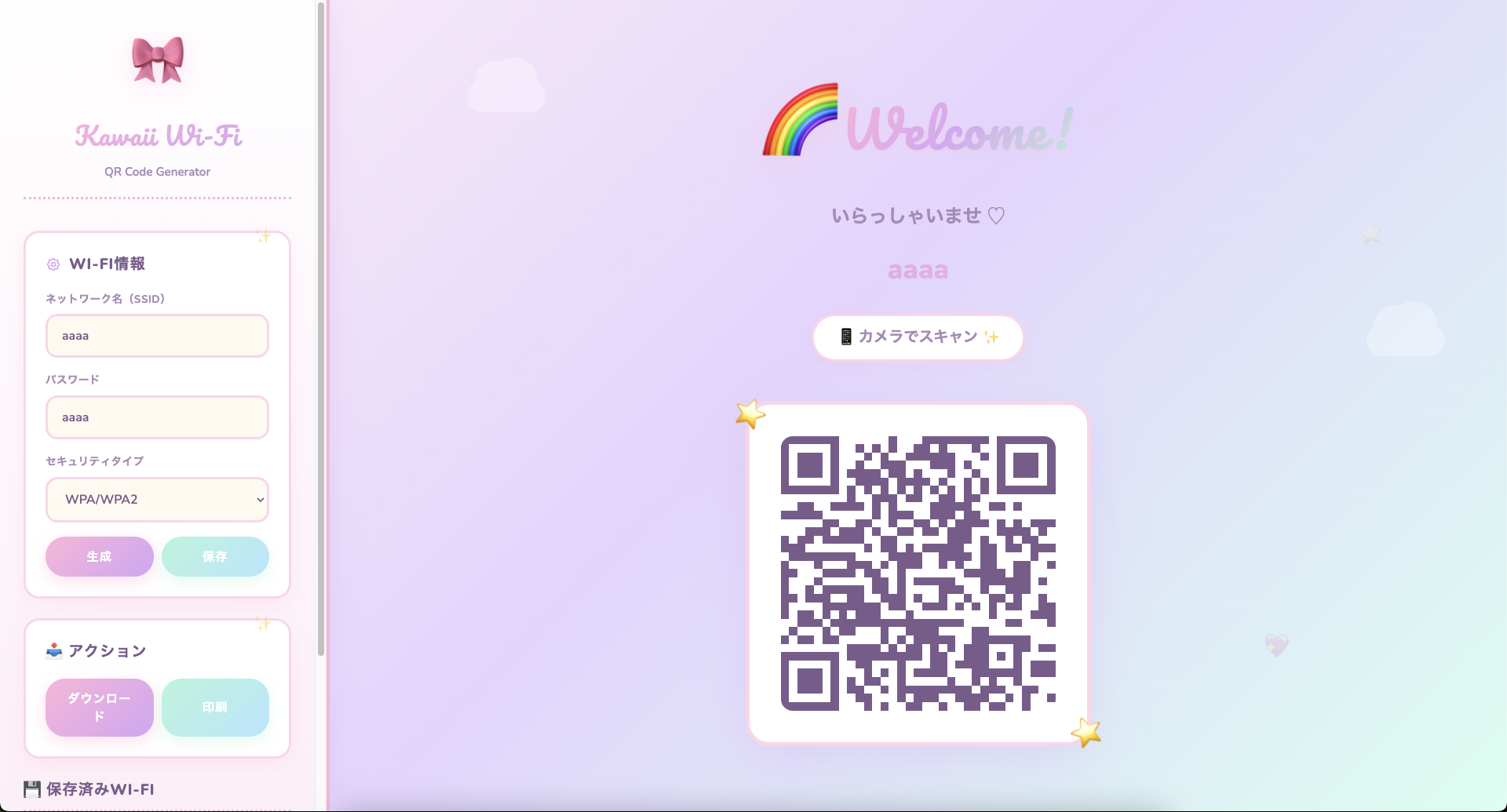
かわいい系のものも作りました。
5. まとめ
今回はWi-Fiパスワードの共有が面倒なのを解決するためにページを作成しました。
必要かどうかはさておき、これからも日常のちょっとした困りごとを解決できるような記事を書きたいなと思います。