
はじめに
ChatGPTを絡めたアプリを作ってみたくて、オセロを作りました。
(やってる人めっちゃ多そう)

めちゃ弱ですし、自分が置いたところを上書きしてきたりします。
(そういう面白さが狙いだったりする)
プロンプトを調整したら多少強くなるかもしれませんが、そこまでこだわりませんでした。
こちらからどうぞ

ご自由に遊んでください
技術スタック
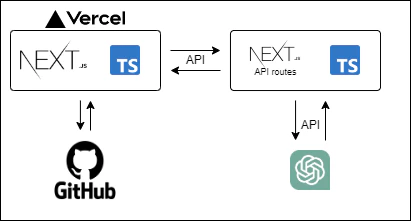
- vercelにデプロイしており、バックエンドにはNextjsのAPI routeを使っています
- デザインに関しては、tailwindCSS、daisyUIを採用しました
- また、sweetalert2や、animateCSSでちょっといい感じになるようにしてみました
ChatGPT利用部分解説
GitHub: 公開しています
(結構適当なので、あまり見ないで)
前提
- openai: v3.3.0
全体
src/app/api/send-chatgpt/route.ts
import { Configuration, OpenAIApi } from 'openai'
import { NextResponse, NextRequest } from 'next/server'

const postGPT = async (params: { board: string; stone: string }) => {
  const apiKey = process.env.NEXT_PUBLIC_API_KEY
  const configuration = new Configuration({
    apiKey,
  })
  const openai = new OpenAIApi(configuration)
  const model = 'gpt-4'

  const { board, stone } = params
  const nextStone = stone === 'black' ? -1 : 1

  const systemContent = `
  What is the next move in Othello?
  The current board is as follows
  ${board}
  I play as ${stone} (${nextStone}). Where is the best place to place the stone?

  [row][col] = `

  return await openai.createChatCompletion({
    model,
    temperature: 2,
    messages: [
      {
        role: 'system',
        content: systemContent,
      },
    ],
  })
}
中身を簡単に解説
まず、OpenAIのAPIをインスタンス化します。
apiKeyは各自発行してください。
  const apiKey = process.env.NEXT_PUBLIC_API_KEY
  const configuration = new Configuration({ apiKey })
  const openai = new OpenAIApi(configuration)
そのインスタンスを使って、リクエストを生成するのですが、今回は補完系の、
createChatCompletionというものを選択しました。
openai.createChatCompletion({
  model: "使うモデルを選択",
  // temperature等のプロパティを設定
  messages: [
    {
      role: 'system',
      content: 'システムへの命令を記述',
    }
  ],
})
これを実行すると、返答が返ってくるので、その値を使ってオセロをしています
私のオセロで使用しているプロンプトは以下の通りです。
  const systemContent = `
  What is the next move in Othello?
  The current board is as follows
  ${board}
  I play as ${stone} (${nextStone}). Where is the best place to place the stone?

  [row][col] = `
パラメータ部分を代入してみると、、、
  const systemContent = `
  What is the next move in Othello?
  The current board is as follows
  [[0,0,0,0,0,0,0,0],[0,0,0,0,0,0,0,0],[0,0,0,0,0,0,0,0],[0,0,0,1,-1,0,0,0],[0,0,0,-1,-1,-1,0,0],[0,0,0,0,0,0,0,0],[0,0,0,0,0,0,0,0],[0,0,0,0,0,0,0,0]]
  I play as white (1). Where is the best place to place the stone?

  [row][col] = `
このようになります。
2次元配列で盤面を表現して、0と1と-1で駒を表しています。
[[0, -1, 0], [1, 1, -1], [0, 0, 0]]

ChatGPTは[row][col] =の後を補完する返答を考えるので、
[5][5]
のように返ってきます。
これをフロントアプリで反映させているという流れです。
(思ったフォーマットではない時は再度リクエストを送っています)
最後に
難易度選択をプロンプトを変えることで実装したり、ヒント機能を作ったり、
自分の手についての意見を生成したりしてみたいですね〜