1
0

Delete article

Deleted articles cannot be recovered.

Draft of this article would be also deleted.

Are you sure you want to delete this article?

【VSCode】ERBファイルでインデントの不一致を示す赤いラインが消えない場合の対処法

1
Posted at

問題

久しぶりにERBファイルを触ったところ、インデントの不一致を示す赤いラインが消えない現象に遭遇しました。
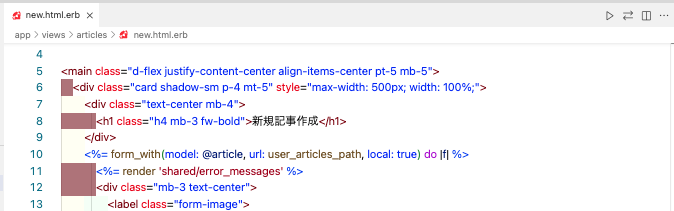
image.png

ERBファイル上で右クリックし、「ドキュメントのフォーマット」→「ERB」を選択しても、赤いラインは消えません。

image.png

解決方法

VS Codeの右下ステータスバーを確認すると、「スペース: 8」と表示されていました。

image.png

コマンドパレットから settings.json を開き、
"editor.tabSize": 8, を "editor.tabSize": 2, に修正します。

  • 変更前
settings.json
  "editor.tabSize": 8,
  • 変更後
settings.json
  "editor.tabSize": 2,

これで赤いラインが消え、インデントの警告が解消されました。
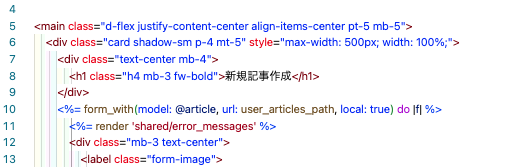
image.png

  • "editor.tabSize": 8 だと、VS Codeは「インデント1段=スペース8個」とみなします。
  • ファイル内のインデントが2個や4個で揃っている場合、設定と不一致と判断され、赤いラインで警告されます。
  • "editor.tabSize": 2 に変更し、ファイル内のインデント幅とエディタ設定を一致させることで、警告が消えます。

終わりに

ちょっとした設定の違いで意外とハマってしまい、苦戦しました。同じ現象で困っている方の参考になれば幸いです。

1
0
0

Register as a new user and use Qiita more conveniently

  1. You get articles that match your needs
  2. You can efficiently read back useful information
  3. You can use dark theme
What you can do with signing up
1
0

Delete article

Deleted articles cannot be recovered.

Draft of this article would be also deleted.

Are you sure you want to delete this article?