はじめに & 内容
2025 年最後の記事!
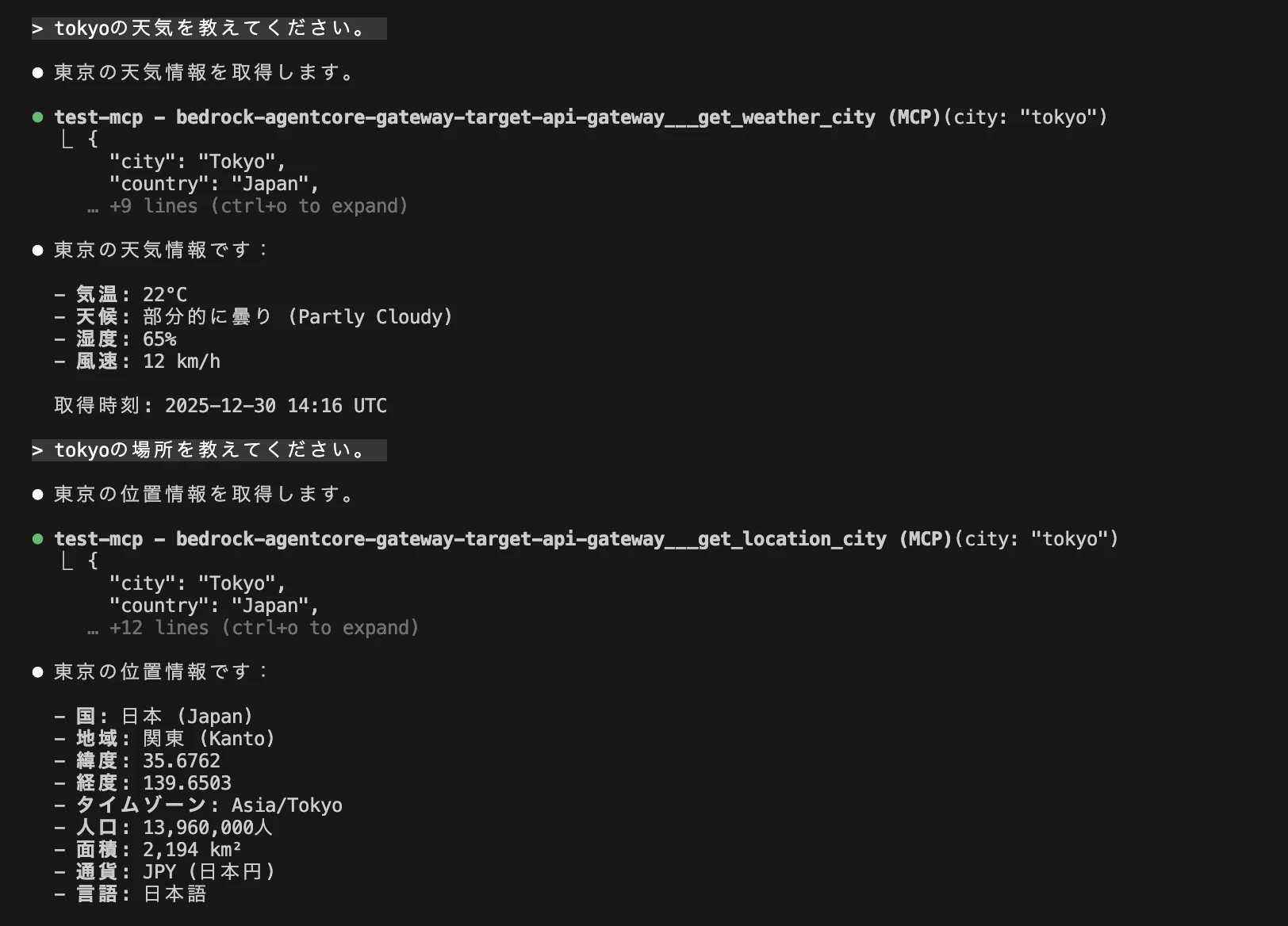
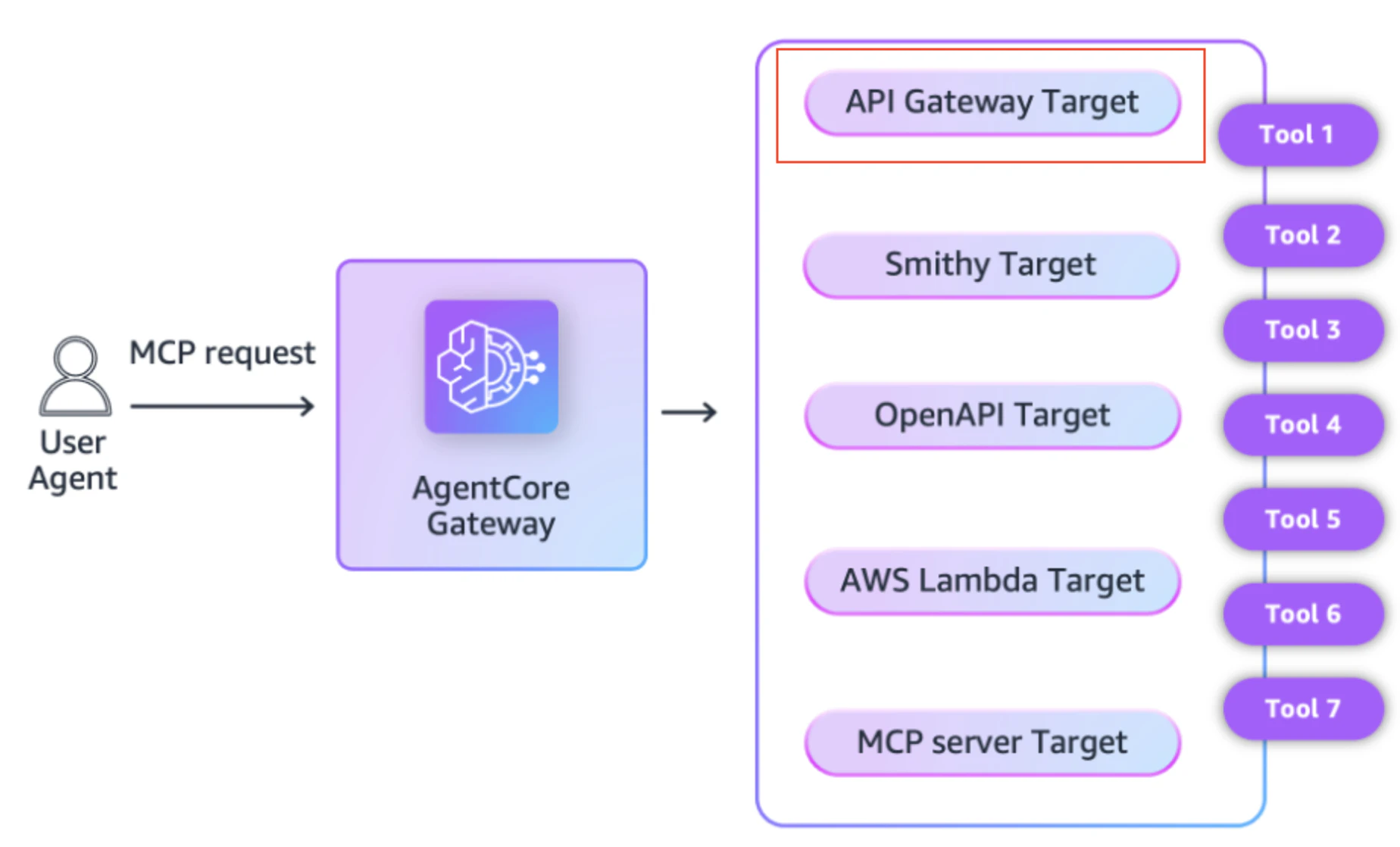
AWS re:Invent 2025 で発表があった Amazon Bedrock AgentCore Gateway のターゲットに Amazon API Gateway が追加されたことについてシンプルに纏めるのと、実際に触ってみることを主としています。
Amazon Bedrock AgentCore Gateway とは何かをざっくり勉強したい方はよければ過去の記事を参考にご覧ください。
考慮事項
Amazon Bedrock AgentCore Gateway のターゲットに Amazon API Gateway を指定する場合、AWS ドキュメントの考慮事項を読んでいると、押さえておきたい点がいくつかあったので予め確認しておいた方が良さそうです。
- パブリック REST API のみをサポート
- API のデフォルトエンドポイントの無効化は不可
- API のすべてのメソッドにオペレーション名が必要
- Amazon Cognito ユーザープールや Lambda オーソライザーは未サポート
- API と AgentCore Gateway は同じアカウント・リージョンに存在する必要がある
最終的な想定の構成図
Bedrock AgentCore Gateway のターゲットに Amazon API Gateway を指定し試してみる
API Gateway + Lambda の準備
get_location は都市の位置情報を取得する Lambda 関数です。デモ実装としてモックデータを使用しています。
get_weather は、都市の天気情報を取得する Lambda 関数です。こちらもデモ実装としてモックデータを使用しています。
get_location
"""
Lambda function to get location information for a city.
This is a demo implementation with mock data.
"""
import json
import logging
from typing import Dict, Any

logger = logging.getLogger()
logger.setLevel(logging.INFO)

# Mock location data
MOCK_LOCATION_DATA = {
    "tokyo": {
        "city": "Tokyo",
        "country": "Japan",
        "region": "Kanto",
        "latitude": 35.6762,
        "longitude": 139.6503,
        "timezone": "Asia/Tokyo",
        "population": 13960000,
        "area_km2": 2194,
        "currency": "JPY",
        "languages": ["Japanese"]
    },
    "newyork": {
        "city": "New York",
        "country": "USA",
        "region": "New York",
        "latitude": 40.7128,
        "longitude": -74.0060,
        "timezone": "America/New_York",
        "population": 8336817,
        "area_km2": 783,
        "currency": "USD",
        "languages": ["English"]
    },
    "seattle": {
        "city": "Seattle",
        "country": "USA",
        "region": "Washington",
        "latitude": 47.6062,
        "longitude": -122.3321,
        "timezone": "America/Los_Angeles",
        "population": 753675,
        "area_km2": 217,
        "currency": "USD",
        "languages": ["English"]
    },
    "london": {
        "city": "London",
        "country": "UK",
        "region": "England",
        "latitude": 51.5074,
        "longitude": -0.1278,
        "timezone": "Europe/London",
        "population": 9002488,
        "area_km2": 1572,
        "currency": "GBP",
        "languages": ["English"]
    }
}


def handler(event: Dict[str, Any], context: Any) -> Dict[str, Any]:
    """
    Lambda handler for getting location information.

    Args:
        event: API Gateway event
        context: Lambda context

    Returns:
        API Gateway response
    """
    logger.info(f"Received event: {json.dumps(event)}")

    try:
        # Get city from path parameters
        city = event.get('pathParameters', {}).get('city', '').lower()

        if not city:
            return {
                'statusCode': 400,
                'headers': {
                    'Content-Type': 'application/json',
                    'Access-Control-Allow-Origin': '*'
                },
                'body': json.dumps({
                    'error': 'City parameter is required'
                })
            }

        # Get location data
        location_data = MOCK_LOCATION_DATA.get(city)

        if not location_data:
            return {
                'statusCode': 404,
                'headers': {
                    'Content-Type': 'application/json',
                    'Access-Control-Allow-Origin': '*'
                },
                'body': json.dumps({
                    'error': f'Location data not found for city: {city}',
                    'available_cities': list(MOCK_LOCATION_DATA.keys())
                })
            }

        # Add source
        response_data = {
            **location_data,
            'source': 'mock-location-service'
        }

        logger.info(f"Returning location data for {city}: {response_data}")

        return {
            'statusCode': 200,
            'headers': {
                'Content-Type': 'application/json',
                'Access-Control-Allow-Origin': '*'
            },
            'body': json.dumps(response_data)
        }

    except Exception as e:
        logger.error(f"Error processing request: {str(e)}", exc_info=True)
        return {
            'statusCode': 500,
            'headers': {
                'Content-Type': 'application/json',
                'Access-Control-Allow-Origin': '*'
            },
            'body': json.dumps({
                'error': 'Internal server error',
                'message': str(e)
            })
        }
get_weather
"""
Lambda function to get weather information for a city.
This is a demo implementation with mock data.
"""
import json
import logging
from datetime import datetime, timezone
from typing import Dict, Any

logger = logging.getLogger()
logger.setLevel(logging.INFO)

# Mock weather data
MOCK_WEATHER_DATA = {
    "tokyo": {
        "city": "Tokyo",
        "country": "Japan",
        "temperature": 22,
        "unit": "celsius",
        "condition": "Partly Cloudy",
        "humidity": 65,
        "wind_speed": 12,
        "wind_unit": "km/h"
    },
    "newyork": {
        "city": "New York",
        "country": "USA",
        "temperature": 18,
        "unit": "celsius",
        "condition": "Sunny",
        "humidity": 55,
        "wind_speed": 10,
        "wind_unit": "km/h"
    },
    "seattle": {
        "city": "Seattle",
        "country": "USA",
        "temperature": 15,
        "unit": "celsius",
        "condition": "Rainy",
        "humidity": 80,
        "wind_speed": 15,
        "wind_unit": "km/h"
    },
    "london": {
        "city": "London",
        "country": "UK",
        "temperature": 12,
        "unit": "celsius",
        "condition": "Cloudy",
        "humidity": 70,
        "wind_speed": 18,
        "wind_unit": "km/h"
    }
}


def handler(event: Dict[str, Any], context: Any) -> Dict[str, Any]:
    """
    Lambda handler for getting weather information.

    Args:
        event: API Gateway event
        context: Lambda context

    Returns:
        API Gateway response
    """
    logger.info(f"Received event: {json.dumps(event)}")

    try:
        # Get city from path parameters
        city = event.get('pathParameters', {}).get('city', '').lower()

        if not city:
            return {
                'statusCode': 400,
                'headers': {
                    'Content-Type': 'application/json',
                    'Access-Control-Allow-Origin': '*'
                },
                'body': json.dumps({
                    'error': 'City parameter is required'
                })
            }

        # Get weather data
        weather_data = MOCK_WEATHER_DATA.get(city)

        if not weather_data:
            return {
                'statusCode': 404,
                'headers': {
                    'Content-Type': 'application/json',
                    'Access-Control-Allow-Origin': '*'
                },
                'body': json.dumps({
                    'error': f'Weather data not found for city: {city}',
                    'available_cities': list(MOCK_WEATHER_DATA.keys())
                })
            }

        # Add timestamp
        response_data = {
            **weather_data,
            'timestamp': datetime.now(timezone.utc).isoformat().replace('+00:00', 'Z'),
            'source': 'mock-weather-service'
        }

        logger.info(f"Returning weather data for {city}: {response_data}")

        return {
            'statusCode': 200,
            'headers': {
                'Content-Type': 'application/json',
                'Access-Control-Allow-Origin': '*'
            },
            'body': json.dumps(response_data)
        }

    except Exception as e:
        logger.error(f"Error processing request: {str(e)}", exc_info=True)
        return {
            'statusCode': 500,
            'headers': {
                'Content-Type': 'application/json',
                'Access-Control-Allow-Origin': '*'
            },
            'body': json.dumps({
                'error': 'Internal server error',
                'message': str(e)
            })
        }
これらを SAM でサクッとデプロイしておきます。ポイントとしては、OpenAPI 仕様で API を定義していないと Gateway 化できないことに注意が必要です。
◼️ API Gateway ターゲットの要件
ドキュメント: https://docs.aws.amazon.com/bedrock-agentcore/latest/devguide/gateway-target-api-gateway.html
"The exported API is subject to the same considerations and limitations as the OpenAPI target type."
API Gateway から GetExport で取得した OpenAPI 仕様は、OpenAPI ターゲットタイプと同じ制限に従うと明記されています。
なので、一から API Gateway を構築するというよりもすでに OpenAPI 仕様に従った既存の API Gateway を Amazon Bedrock AgentCore Gateway と統合できるという点で活躍します。
SAMテンプレート
AWSTemplateFormatVersion: '2010-09-09'
Transform: AWS::Serverless-2016-10-31
Description: Amazon API Gateway + Lambda for AgentCore Gateway Demo

Globals:
  Function:
    Runtime: python3.12
    Timeout: 30
    MemorySize: 256
    Environment:
      Variables:
        LOG_LEVEL: INFO

Resources:
  # API Gateway with OpenAPI Definition
  AgentCoreApi:
    Type: AWS::Serverless::Api
    Properties:
      Name: AgentCore Gateway Demo API
      StageName: prod
      TracingEnabled: true
      Cors:
        AllowOrigin: "'*'"
        AllowHeaders: "'Content-Type,X-Amz-Date,Authorization,X-Api-Key'"
        AllowMethods: "'GET,POST,OPTIONS'"
      MethodSettings:
        - ResourcePath: '/*'
          HttpMethod: '*'
          LoggingLevel: INFO
          DataTraceEnabled: true
          MetricsEnabled: true
      DefinitionBody:
        openapi: 3.0.1
        info:
          title: AgentCore Gateway Demo API
          description: Demo REST API for AgentCore Gateway integration with weather and location endpoints
          version: 1.0.0
        paths:
          /weather/{city}:
            get:
              summary: Get weather information for a city
              description: Returns current weather conditions including temperature, humidity, and wind speed for the specified city
              operationId: getWeather
              parameters:
                - name: city
                  in: path
                  required: true
                  description: City name (tokyo, newyork, seattle, london)
                  schema:
                    type: string
              responses:
                '200':
                  description: Successful response with weather data
                  content:
                    application/json:
                      schema:
                        type: object
                        properties:
                          city:
                            type: string
                            description: City name
                          country:
                            type: string
                            description: Country name
                          temperature:
                            type: number
                            description: Temperature value
                          unit:
                            type: string
                            description: Temperature unit
                          condition:
                            type: string
                            description: Weather condition
                          humidity:
                            type: number
                            description: Humidity percentage
                          wind_speed:
                            type: number
                            description: Wind speed value
                          wind_unit:
                            type: string
                            description: Wind speed unit
                          timestamp:
                            type: string
                            description: Timestamp of the data
                          source:
                            type: string
                            description: Data source
                '400':
                  description: Bad request - city parameter missing
                  content:
                    application/json:
                      schema:
                        type: object
                        properties:
                          error:
                            type: string
                '404':
                  description: City not found
                  content:
                    application/json:
                      schema:
                        type: object
                        properties:
                          error:
                            type: string
                          available_cities:
                            type: array
                            items:
                              type: string
                '500':
                  description: Internal server error
                  content:
                    application/json:
                      schema:
                        type: object
                        properties:
                          error:
                            type: string
                          message:
                            type: string
              x-amazon-apigateway-integration:
                type: aws_proxy
                httpMethod: POST
                uri:
                  Fn::Sub: arn:aws:apigateway:${AWS::Region}:lambda:path/2015-03-31/functions/${GetWeatherFunction.Arn}/invocations
                responses:
                  default:
                    statusCode: '200'
          /location/{city}:
            get:
              summary: Get location information for a city
              description: Returns detailed location information including coordinates, population, timezone, and more for the specified city
              operationId: getLocationInfo
              parameters:
                - name: city
                  in: path
                  required: true
                  description: City name (tokyo, newyork, seattle, london)
                  schema:
                    type: string
              responses:
                '200':
                  description: Successful response with location data
                  content:
                    application/json:
                      schema:
                        type: object
                        properties:
                          city:
                            type: string
                            description: City name
                          country:
                            type: string
                            description: Country name
                          region:
                            type: string
                            description: Region or state
                          latitude:
                            type: number
                            description: Latitude coordinate
                          longitude:
                            type: number
                            description: Longitude coordinate
                          timezone:
                            type: string
                            description: Timezone identifier
                          population:
                            type: integer
                            description: Population count
                          area_km2:
                            type: number
                            description: Area in square kilometers
                          currency:
                            type: string
                            description: Currency code
                          languages:
                            type: array
                            items:
                              type: string
                            description: Spoken languages
                          source:
                            type: string
                            description: Data source
                '400':
                  description: Bad request - city parameter missing
                  content:
                    application/json:
                      schema:
                        type: object
                        properties:
                          error:
                            type: string
                '404':
                  description: City not found
                  content:
                    application/json:
                      schema:
                        type: object
                        properties:
                          error:
                            type: string
                          available_cities:
                            type: array
                            items:
                              type: string
                '500':
                  description: Internal server error
                  content:
                    application/json:
                      schema:
                        type: object
                        properties:
                          error:
                            type: string
                          message:
                            type: string
              x-amazon-apigateway-integration:
                type: aws_proxy
                httpMethod: POST
                uri:
                  Fn::Sub: arn:aws:apigateway:${AWS::Region}:lambda:path/2015-03-31/functions/${GetLocationFunction.Arn}/invocations
                responses:
                  default:
                    statusCode: '200'

  # Lambda Function: Get Weather
  GetWeatherFunction:
    Type: AWS::Serverless::Function
    Properties:
      FunctionName: agentcore-demo-get-weather
      Description: Get weather information for a city
      CodeUri: src/get_weather/
      Handler: app.handler

  # Lambda Permission for API Gateway
  GetWeatherFunctionPermission:
    Type: AWS::Lambda::Permission
    Properties:
      FunctionName: !Ref GetWeatherFunction
      Action: lambda:InvokeFunction
      Principal: apigateway.amazonaws.com
      SourceArn: !Sub 'arn:aws:execute-api:${AWS::Region}:${AWS::AccountId}:${AgentCoreApi}/*/*/*'

  # Lambda Function: Get Location
  GetLocationFunction:
    Type: AWS::Serverless::Function
    Properties:
      FunctionName: agentcore-demo-get-location
      Description: Get location information for a city
      CodeUri: src/get_location/
      Handler: app.handler

  # Lambda Permission for API Gateway
  GetLocationFunctionPermission:
    Type: AWS::Lambda::Permission
    Properties:
      FunctionName: !Ref GetLocationFunction
      Action: lambda:InvokeFunction
      Principal: apigateway.amazonaws.com
      SourceArn: !Sub 'arn:aws:execute-api:${AWS::Region}:${AWS::AccountId}:${AgentCoreApi}/*/*/*'

Outputs:
  ApiUrl:
    Description: API Gateway URL
    Value: !Sub 'https://${AgentCoreApi}.execute-api.${AWS::Region}.amazonaws.com/prod/'
    Export:
      Name: AgentCoreGatewayApiUrl

  ApiId:
    Description: API Gateway ID
    Value: !Ref AgentCoreApi
    Export:
      Name: AgentCoreGatewayApiId

  ApiArn:
    Description: API Gateway ARN
    Value: !Sub 'arn:aws:apigateway:${AWS::Region}::/restapis/${AgentCoreApi}'
    Export:
      Name: AgentCoreGatewayApiArn

  GetWeatherFunctionArn:
    Description: Get Weather Lambda Function ARN
    Value: !GetAtt GetWeatherFunction.Arn

  GetLocationFunctionArn:
    Description: Get Location Lambda Function ARN
    Value: !GetAtt GetLocationFunction.Arn
Amazon Bedrock AgentCore Gateway のデプロイ
▼ ゲートウェイの詳細
適当な「ゲートウェイ名」を入力。
追加設定 - optional で細かい設定もできますが、本題とか異なり掘り下げていきたいなと思ったので、今後別の記事で書いていこうかなと思っています。

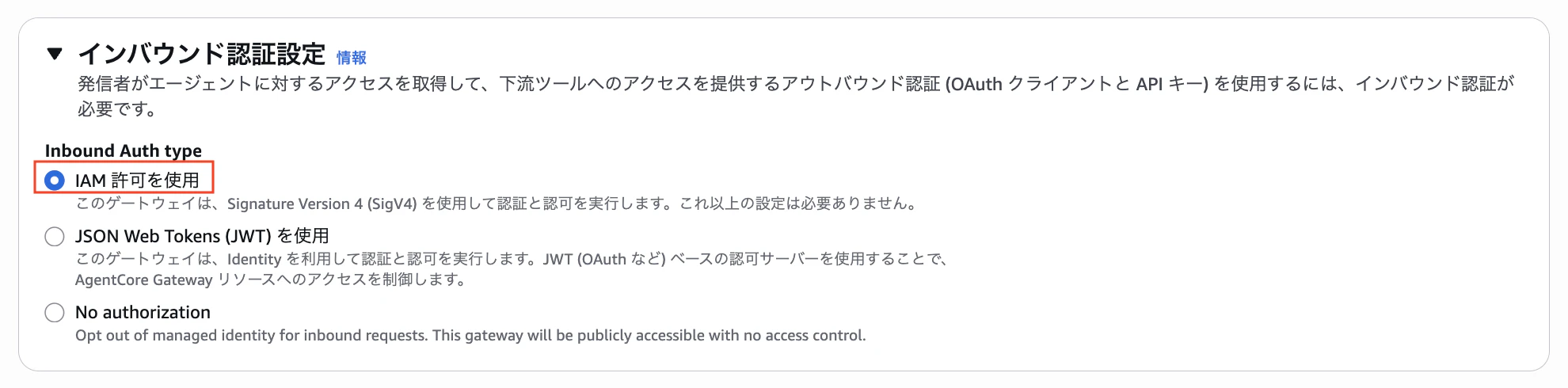
▼ インバウンド認証設定
「IAM 許可を使用」を選択。
▼ Policy
後で検証するので、一旦何も設定せずにいきます。

ちなみに、Policy も AWS re:Invent 2025 で発表があった新しい Amazon Bedrock AgentCore の新しいコンポーネントです。
一応、Policy のざっくりとした概要を説明しておきます。
Policy 機能は、AI エージェントが「やっていいこと」と「やってはいけないこと」を明確に制御するための仕組みです。
AI エージェントは便利な反面、自律的に動くからこそ以下のリスクがあります:
- 機密データへの不正アクセス
- 許可されていない操作の実行
- 予期しない行動
Policy 機能は、エージェントが実行する前に「この操作をしていいか?」をチェックするガードレールの役割を果たします。
ざっくりとした特徴:
- 自然言語でルールを書ける
専門的なコードを書かなくても、日本語や英語で「こういう条件のときだけ許可する」と書けば、システムが自動でポリシーコードを生成してくれます。 - 事前チェックで安全性を確保
ツールが実際に動く前にリクエストを検証します。問題のある操作は実行される前にブロックされます。 - どんなエージェントでも使える
使用する AI モデルやフレームワークに関係なく、一貫したポリシーを適用できます。
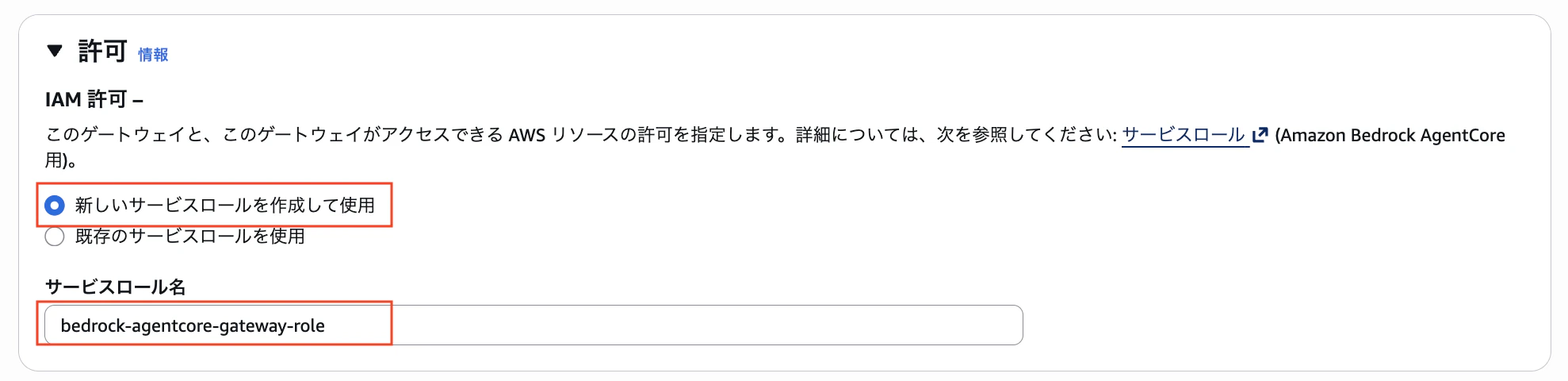
▼ 許可
「新しいサービスロールを作成して使用」を選択し、適当な「サービスロール名」を入力。
▼ KMS キー
今回は何も設定しません。

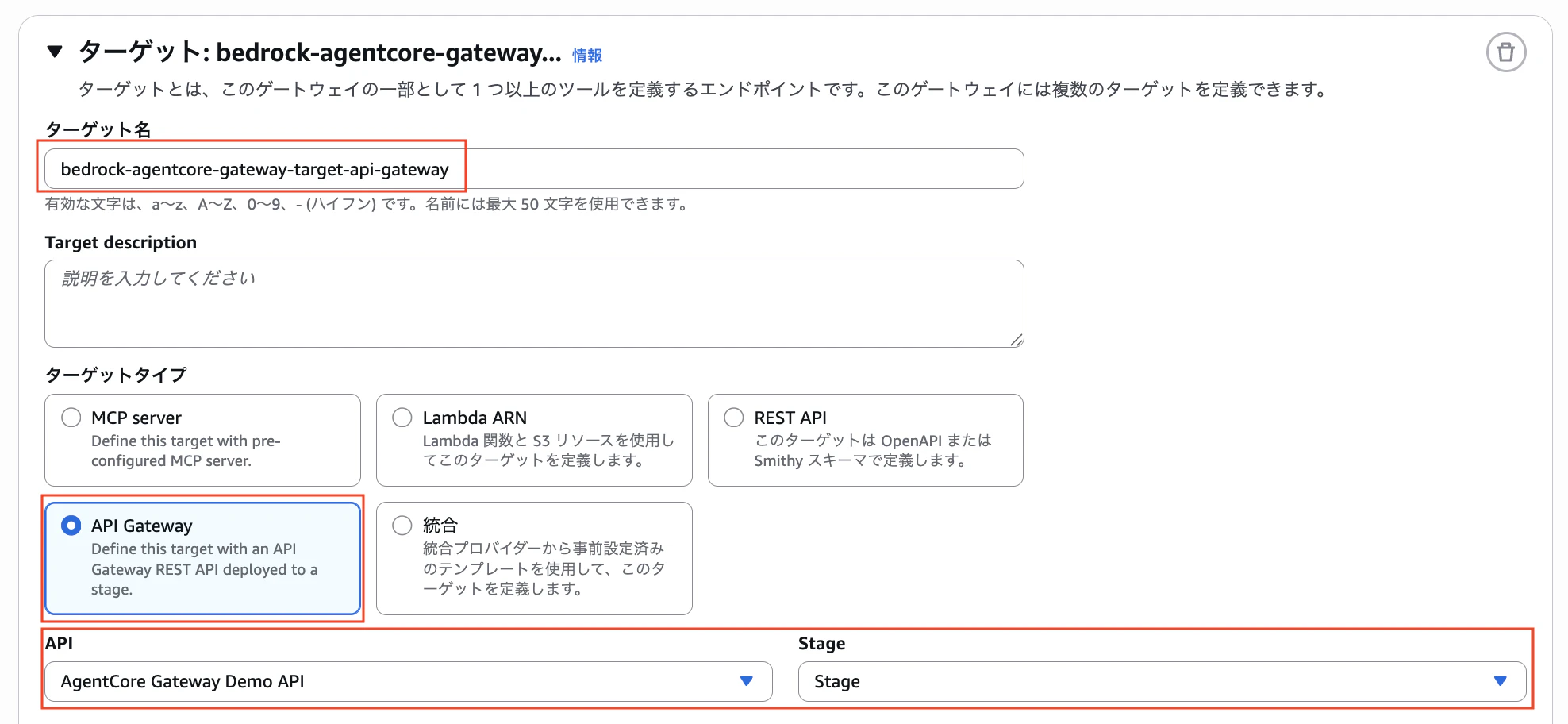
▼ ターゲット
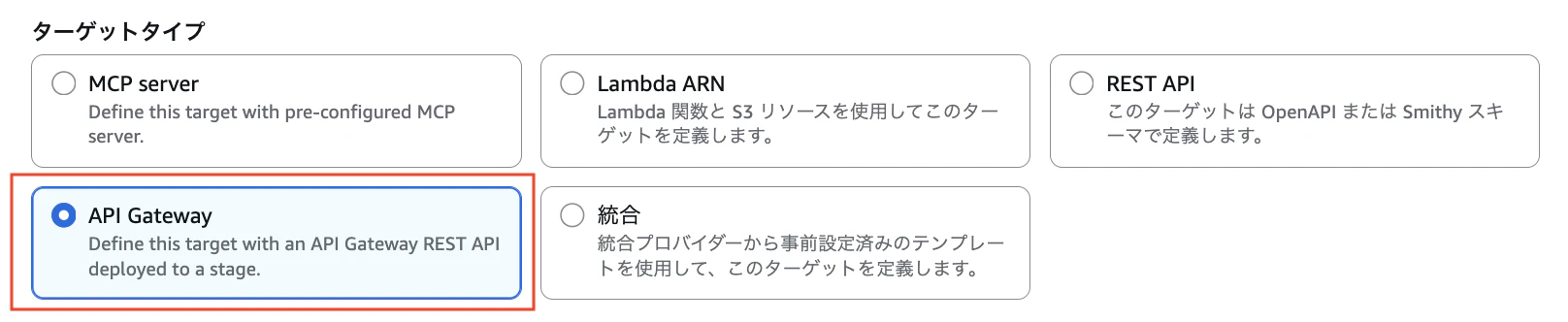
適当な「ターゲット名」を入力し、ターゲットタイプに今回メインとなる「API Gateway」を選択。デプロイ済みの API Gateway の API と Stage を選択します。
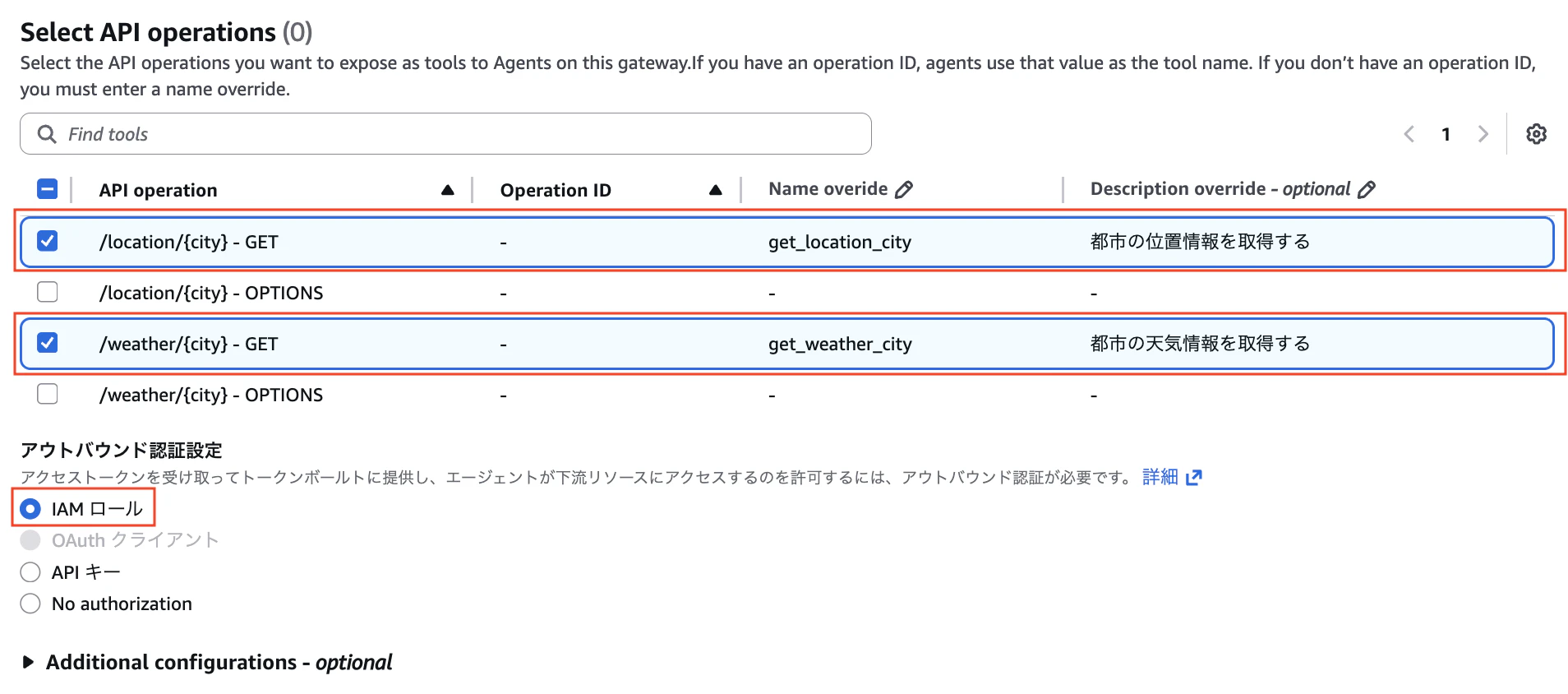
ツールとして公開する API Operetion を選択します。
Operation ID がある場合は、エージェントはその値をツール名として使用します。
Operation ID がない場合は、Name overide を入力する必要があります。
アウトバウンド認証設定では「IAM ロール」としておきます。
「ゲートウェイを作成」
ClaudeCode から呼び出す
まず、Amazon Bedrock AgentCore > ゲートウェイ > bedrock-agentcore-gateway から、「ゲートウェイリソース URL」をコピーしておきます。
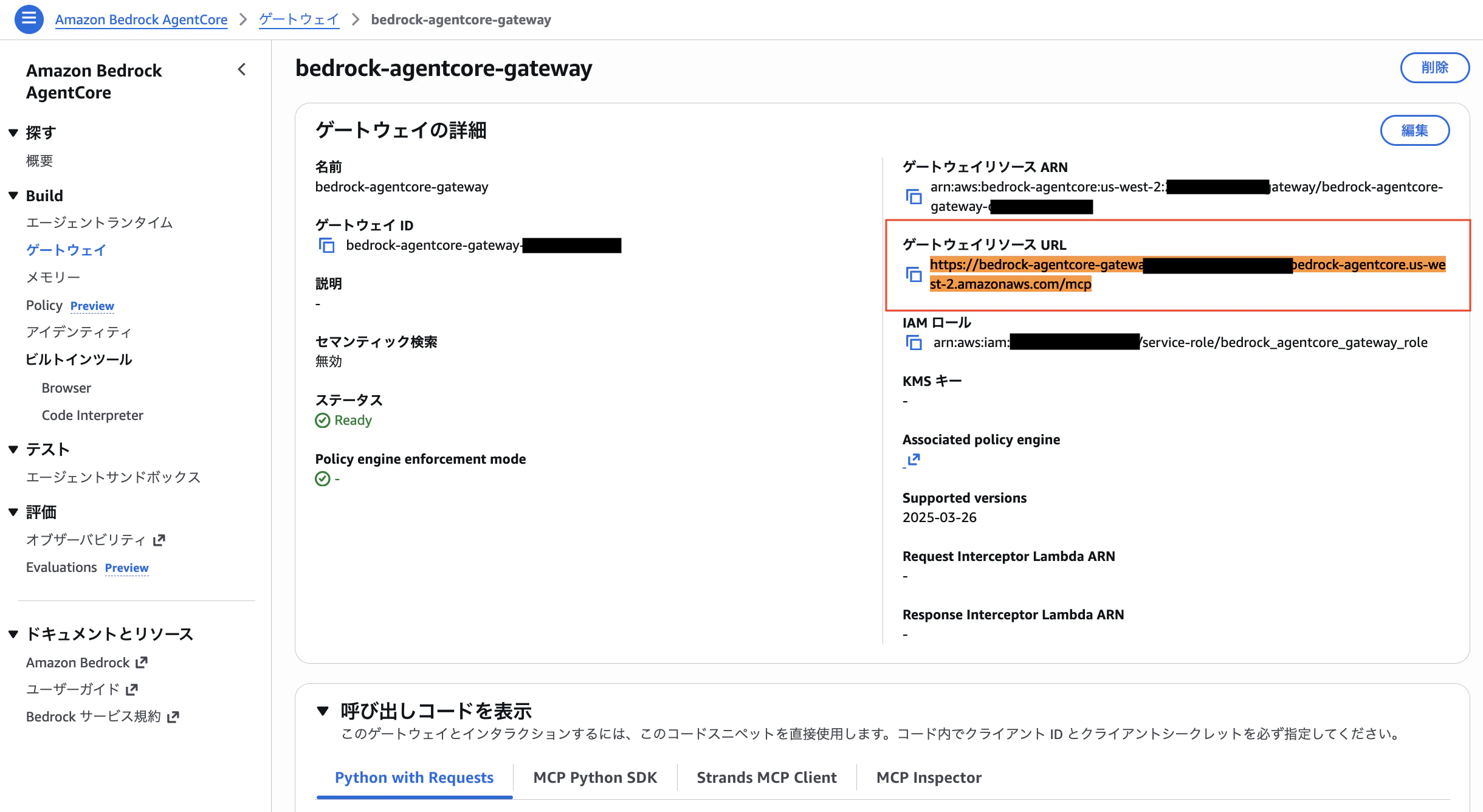
ClaudeCode から MCP Proxy for AWS を使って接続するので、次の通り MCP の設定を行います。<ゲートウェイリソース URL> は先程確認した自身のものに置き換えてください。
MCP Proxy for AWS については過去に以下の記事でも詳しく紹介してますので、参考にしてください。
{
  "mcpServers": {
    "test-mcp": {
      "type": "stdio",
      "command": "uvx",
      "args": [
        "mcp-proxy-for-aws@latest",
        "<ゲートウェイリソース URL>",
        "--service",
        "bedrock-agentcore",
        "--profile",
        "default",
        "--region",
        "us-west-2",
        "--log-level",
        "INFO"
      ]
    }
  }
}
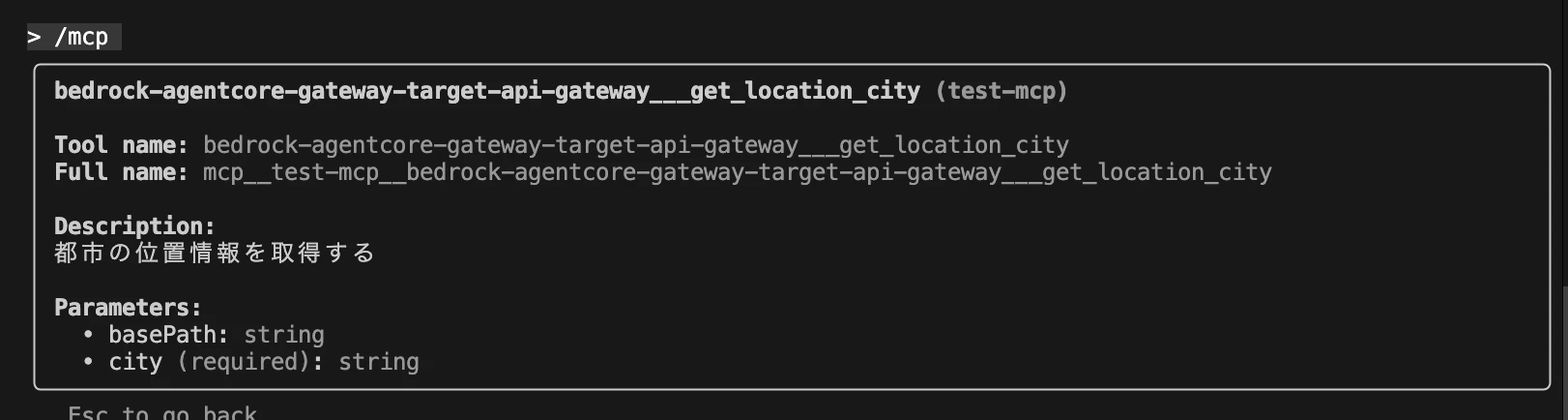
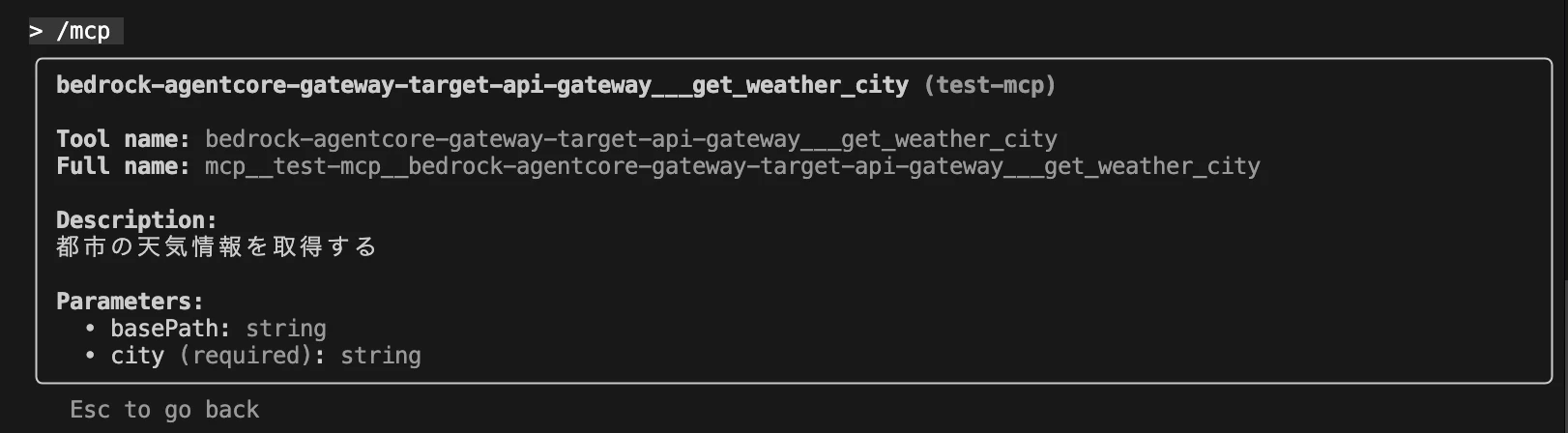
ClaudeCode を起動し、/mcp コマンドでツールとして認識しているか確認しておきます。
【ターゲット】に登録した、get_location_city と get_weathet_city が登録されていることが確認できました。

では最後に次の通り質問し、各ツールが使われていることが確認できれば検証は完了です。
tokyoの天気を教えてください。
get_weathet_city が使われること。
tokyoの場所を教えてください。
get_location_city が使われること。