
はじめに
この記事は是非以下の記事とセットで読んでください
AI エージェントを業務ワークフローに組み込むときに、考えるべき点として「どこまでをエージェントに任せるか」です。
この記事では「今週の AWS 生成AI アップデートを調べて Slack に通知する」を題材に、調べる部分だけを AI エージェントに任せ、通知は従来どおり機械的に実行する構成を Terraform で作ってみます。
「決定論的」と「非決定的」

同じ入力に対して常に同じ結果が返る性質を 決定論的、
同じ入力でも結果が一通りに定まらない性質を 非決定的
と呼びます。
Slack に POST する処理は決定論的です。同じ文面を渡せば同じ投稿になり、失敗すれば HTTP のステータスコードで分かります。
一方「今週の話題をまとめる」処理は非決定的です。何を重要と判断するかは毎回揺れますし、そもそも今週何が起きたかは実行してみないと分かりません。
エージェントが向いているのは非決定的なほうです。決定論的であってほしい処理まで一緒に AI エージェントへ任せてしまうと、失敗しても誰にも気づかれない「静かに何も起きない」状態へと陥ります。
通知までエージェントに任せると何が起きるか
「調べて Slack に通知して」と一息に指示すると、通知するかどうかもモデルの判断になります。調査がうまくいかなかったとき、モデルは「通知するほどの内容がないので終了します」と勝手に判断して、何も起こさずに正常終了してしまうことがあります。
Slack への通知を AgentCore の外側、つまり Step Functions のステートとして分離しておけば、AI エージェントが成功しても失敗しても必ず同じ経路を通ります。
やってみよう
0. 簡易構成図

1. 非決定的パート: Bedrock AgentCore harness
完成版は「3. デプロイする」で示す main.tf をコピーして実行すれば作れるようにしてますので、ここではポイントだけを整理します。
Bedrock AgentCore Harness は、モデル・ツール・メモリなどを設定するだけで動くマネージドなエージェントループで、オーケストレーションのコードを書かずに済むのが特徴です。
次の通り、リモート MCP サーバーは URL を書くだけで繋がります。
  tool {
    type = "remote_mcp"
    name = "AWSKnowledgeMCPServer"

    config {
      remote_mcp {
        url = "https://knowledge-mcp.global.api.aws"
      }
    }
  }
2. 決定論的パート: Step Functions
ここも完成版は「3. デプロイする」で示す main.tf をコピーして実行すれば作れるようにしてますので、ここではポイントだけを整理します。
Bedrock AgentCore Harness の呼び出し自体はシンプルで、arn:aws:states:::bedrockagentcore:invokeHarness を Task の Resource に指定するだけです(AWS マネージメントコンソールの Workflow Studio では AgentCore InvokeHarness で検索すると出てきます)。
ステートマシンの中身はざっくりとこんなイメージになります。
このセクションで抑えておきたいポイントを 2 つだけ整理しておきます。
-
日付はワークフロー側から渡す: 「今日が何日か」を調べるのはエージェントの仕事ではないので、JSONata の
$now()でプロンプトに埋め込みます -
失敗も同じ通知経路に流す:
SummarizeUpdatesにCatchを付けてStates.ALLを拾い、NotifyFailureを経由して必ず Slack に届くようにします
        Catch = [{
          ErrorEquals = ["States.ALL"]
          Next        = "NotifyFailure"
          Output      = "{% { 'text': '調査に失敗しました: ' & $states.errorOutput.Error } %}"
        }]
3. デプロイする
Slack の Incoming Webhook URL を用意して、以下をそのままコピーして実行すれば動くようにしてあります。
main.tf(全文)
// Terraform 設定ファイル
terraform {
  required_version = ">= 1.5"
  required_providers {
    aws = {
      source  = "hashicorp/aws"
      version = ">= 6.61"
    }
  }
}

// AWS プロバイダの設定
provider "aws" {
  region = var.region
}

// 変数定義
variable "region" {
  type    = string
  default = "ap-northeast-1"
}

variable "slack_webhook_url" {
  type      = string
  sensitive = true
}

variable "model_id" {
  type    = string
  default = "global.amazon.nova-2-lite-v1:0"
}

// ローカル変数定義
locals {
  name         = "weekly-aws-news"
  harness_name = "weekly_aws_news"
}

// 現在の AWS アカウント情報を取得
data "aws_caller_identity" "current" {}

########################################
# 1. AgentCore harness (非決定的パート)
########################################

// Bedrock AgentCore Harness の IAM ロールを作成
resource "aws_iam_role" "harness" {
  name = "${local.name}-harness-role"

  assume_role_policy = jsonencode({
    Version = "2012-10-17"
    Statement = [{
      Effect    = "Allow"
      Principal = { Service = "bedrock-agentcore.amazonaws.com" }
      Action    = "sts:AssumeRole"
      Condition = {
        StringEquals = { "aws:SourceAccount" = data.aws_caller_identity.current.account_id }
        ArnLike      = { "aws:SourceArn" = "arn:aws:bedrock-agentcore:${var.region}:${data.aws_caller_identity.current.account_id}:*" }
      }
    }]
  })
}

// Bedrock AgentCore Harness の IAM ポリシーを作成
resource "aws_iam_role_policy" "harness" {
  role = aws_iam_role.harness.name

  policy = jsonencode({
    Version = "2012-10-17"
    Statement = [
      {
        Sid    = "BedrockModelInvocation"
        Effect = "Allow"
        Action = ["bedrock:InvokeModel", "bedrock:InvokeModelWithResponseStream"]
        Resource = [
          "arn:aws:bedrock:*::foundation-model/*",
          "arn:aws:bedrock:${var.region}:${data.aws_caller_identity.current.account_id}:*",
        ]
      },
      {
        Sid      = "EcrPublicPull"
        Effect   = "Allow"
        Action   = ["ecr-public:GetAuthorizationToken", "sts:GetServiceBearerToken"]
        Resource = "*"
      },
      {
        Sid      = "XRayTracing"
        Effect   = "Allow"
        Action   = ["xray:PutTraceSegments", "xray:PutTelemetryRecords", "xray:GetSamplingRules", "xray:GetSamplingTargets"]
        Resource = "*"
      },
      {
        Sid      = "Metrics"
        Effect   = "Allow"
        Action   = "cloudwatch:PutMetricData"
        Resource = "*"
        Condition = {
          StringEquals = { "cloudwatch:namespace" = "bedrock-agentcore" }
        }
      },
      {
        Sid    = "Logs"
        Effect = "Allow"
        Action = ["logs:CreateLogGroup", "logs:CreateLogStream", "logs:PutLogEvents", "logs:DescribeLogStreams", "logs:DescribeLogGroups"]
        Resource = [
          "arn:aws:logs:${var.region}:${data.aws_caller_identity.current.account_id}:log-group:/aws/bedrock-agentcore/runtimes/*",
          "arn:aws:logs:${var.region}:${data.aws_caller_identity.current.account_id}:log-group:*",
        ]
      },
      {
        Sid    = "AgentCoreMemory"
        Effect = "Allow"
        Action = [
          "bedrock-agentcore:CreateEvent",
          "bedrock-agentcore:GetEvent",
          "bedrock-agentcore:ListEvents",
          "bedrock-agentcore:DeleteEvent",
          "bedrock-agentcore:RetrieveMemoryRecords",
        ]
        Resource = "arn:aws:bedrock-agentcore:${var.region}:${data.aws_caller_identity.current.account_id}:memory/${local.harness_name}-*"
      },
      {
        Sid    = "WorkloadIdentity"
        Effect = "Allow"
        Action = ["bedrock-agentcore:GetWorkloadAccessToken", "bedrock-agentcore:GetWorkloadAccessTokenForJWT"]
        Resource = [
          "arn:aws:bedrock-agentcore:${var.region}:${data.aws_caller_identity.current.account_id}:workload-identity-directory/default",
          "arn:aws:bedrock-agentcore:${var.region}:${data.aws_caller_identity.current.account_id}:workload-identity-directory/default/workload-identity/*",
        ]
      },
    ]
  })
}

// Bedrock AgentCore Harness を作成
resource "aws_bedrockagentcore_harness" "news" {
  harness_name       = local.harness_name
  execution_role_arn = aws_iam_role.harness.arn

  model {
    bedrock_model_config {
      model_id = var.model_id
    }
  }

  system_prompt {
    text = <<-EOT
      あなたは AWS の最新情報を調べて日本語で要約するアシスタントです。
      調査には必ず AWS Knowledge MCP のツールを使い、推測で書かないでください。
      出力は Slack にそのまま投稿されます。前置き・締めの挨拶・見出しは書かず、本文だけを返してください。
    EOT
  }

  tool {
    type = "remote_mcp"
    name = "AWSKnowledgeMCPServer"

    config {
      remote_mcp {
        url = "https://knowledge-mcp.global.api.aws"
      }
    }
  }

  allowed_tools   = ["*"]
  max_iterations  = 15
  timeout_seconds = 600
}

########################################
# 2. Slack 通知の接続情報 (決定論的パート)
########################################

// Slack Incoming Webhook は URL 自体が資格情報なので、EventBridge connection はダミーの値を1つ入れておけば通ります
resource "aws_cloudwatch_event_connection" "slack" {
  name               = "${local.name}-slack"
  authorization_type = "API_KEY"

  auth_parameters {
    api_key {
      key   = "x-unused-auth"
      value = "unused"
    }
  }
}

########################################
# 3. Step Functions ワークフロー
########################################

// Step Functions の実行ロールを作成
resource "aws_iam_role" "sfn" {
  name = "${local.name}-sfn-role"

  assume_role_policy = jsonencode({
    Version = "2012-10-17"
    Statement = [{
      Effect    = "Allow"
      Principal = { Service = "states.amazonaws.com" }
      Action    = "sts:AssumeRole"
    }]
  })
}

// Step Functions の実行ロールにポリシーをアタッチ
resource "aws_iam_role_policy" "sfn" {
  role = aws_iam_role.sfn.name

  policy = jsonencode({
    Version = "2012-10-17"
    Statement = [
      {
        Sid      = "InvokeHarness"
        Effect   = "Allow"
        Action   = ["bedrock-agentcore:InvokeHarness", "bedrock-agentcore:InvokeAgentRuntime"]
        Resource = "${aws_bedrockagentcore_harness.news.arn}*"
      },
      {
        Sid      = "CallSlack"
        Effect   = "Allow"
        Action   = "states:InvokeHTTPEndpoint"
        Resource = "arn:aws:states:${var.region}:${data.aws_caller_identity.current.account_id}:stateMachine:${local.name}"
        Condition = {
          StringEquals = { "states:HTTPMethod" = "POST" }
          StringLike   = { "states:HTTPEndpoint" = "https://hooks.slack.com/*" }
        }
      },
      {
        Sid      = "UseConnection"
        Effect   = "Allow"
        Action   = "events:RetrieveConnectionCredentials"
        Resource = aws_cloudwatch_event_connection.slack.arn
      },
      {
        Sid      = "ReadConnectionSecret"
        Effect   = "Allow"
        Action   = ["secretsmanager:GetSecretValue", "secretsmanager:DescribeSecret"]
        Resource = "arn:aws:secretsmanager:${var.region}:${data.aws_caller_identity.current.account_id}:secret:events!connection/*"
      },
    ]
  })
}

// Step Functions のステートマシンを作成
resource "aws_sfn_state_machine" "news" {
  name     = local.name
  role_arn = aws_iam_role.sfn.arn

  definition = jsonencode({
    QueryLanguage = "JSONata"
    Comment       = "非決定的な調査は harness に、決定論的な通知は Step Functions に"
    StartAt       = "SummarizeUpdates"
    States = {
      # 非決定的パート: 何を何回調べるかはモデルが決める
      SummarizeUpdates = {
        Type     = "Task"
        Resource = "arn:aws:states:::bedrockagentcore:invokeHarness"
        Arguments = {
          HarnessArn       = aws_bedrockagentcore_harness.news.arn
          RuntimeSessionId = "{% $uuid() %}"
          Messages = [{
            Role = "user"
            Content = [{
              Text = "{% '今日は ' & $substring($now(), 0, 10) & ' です。直近1週間に発表された AWS の生成AI関連アップデートを AWS Knowledge MCP で調べ、重要なものを3件に絞って日本語の箇条書きにまとめてください。各項目はサービス名から始め、1〜2文で説明してください。' %}"
            }]
          }]
        }
        Output = "{% { 'text': '今週の生成AIアップデート\n\n' & $states.result.Output.Message.Content[0].Text } %}"
        Retry = [{
          ErrorEquals     = ["BedrockAgentCore.ThrottlingException"]
          IntervalSeconds = 5
          MaxAttempts     = 3
          BackoffRate     = 2
        }]
        Catch = [{
          ErrorEquals = ["States.ALL"]
          Next        = "NotifyFailure"
          Output      = "{% { 'text': '調査に失敗しました: ' & $states.errorOutput.Error } %}"
        }]
        Next = "NotifySlack"
      }

      # 決定論的パート: 成功しても失敗しても必ず同じ経路で通知する
      NotifySlack = {
        Type     = "Task"
        Resource = "arn:aws:states:::http:invoke"
        Arguments = {
          ApiEndpoint      = var.slack_webhook_url
          Method           = "POST"
          InvocationConfig = { ConnectionArn = aws_cloudwatch_event_connection.slack.arn }
          Headers          = { "Content-Type" = "application/json" }
          RequestBody      = { text = "{% $states.input.text %}" }
        }
        Retry = [{
          ErrorEquals     = ["States.Http.StatusCode429", "States.Http.StatusCode500", "States.Http.StatusCode503"]
          IntervalSeconds = 3
          MaxAttempts     = 3
          BackoffRate     = 2
        }]
        End = true
      }

      NotifyFailure = {
        Type     = "Task"
        Resource = "arn:aws:states:::http:invoke"
        Arguments = {
          ApiEndpoint      = var.slack_webhook_url
          Method           = "POST"
          InvocationConfig = { ConnectionArn = aws_cloudwatch_event_connection.slack.arn }
          Headers          = { "Content-Type" = "application/json" }
          RequestBody      = { text = "{% $states.input.text %}" }
        }
        Next = "Fail"
      }

      Fail = {
        Type  = "Fail"
        Error = "AgentInvocationFailed"
      }
    }
  })
}

// 出力値を定義
output "state_machine_arn" {
  value = aws_sfn_state_machine.news.arn
}

output "harness_arn" {
  value = aws_bedrockagentcore_harness.news.arn
}
# ディレクトリを作って移動
mkdir -p sfn-harness-tf && cd sfn-harness-tf

# 上記の main.tf をこのディレクトリに保存してから

# terraform.tfvars を作って Slack の Incoming Webhook URL を書き込む
cat > terraform.tfvars <<EOF
slack_webhook_url = "https://hooks.slack.com/services/XXXX/YYYY/ZZZZ"
EOF

# Terraform を初期化してデプロイ
terraform init
terraform apply -auto-approve
4. 実行し結果を確認する
ステートマシンを実行します。
aws stepfunctions start-execution \
  --state-machine-arn $(terraform output -raw state_machine_arn) \
  --region ap-northeast-1
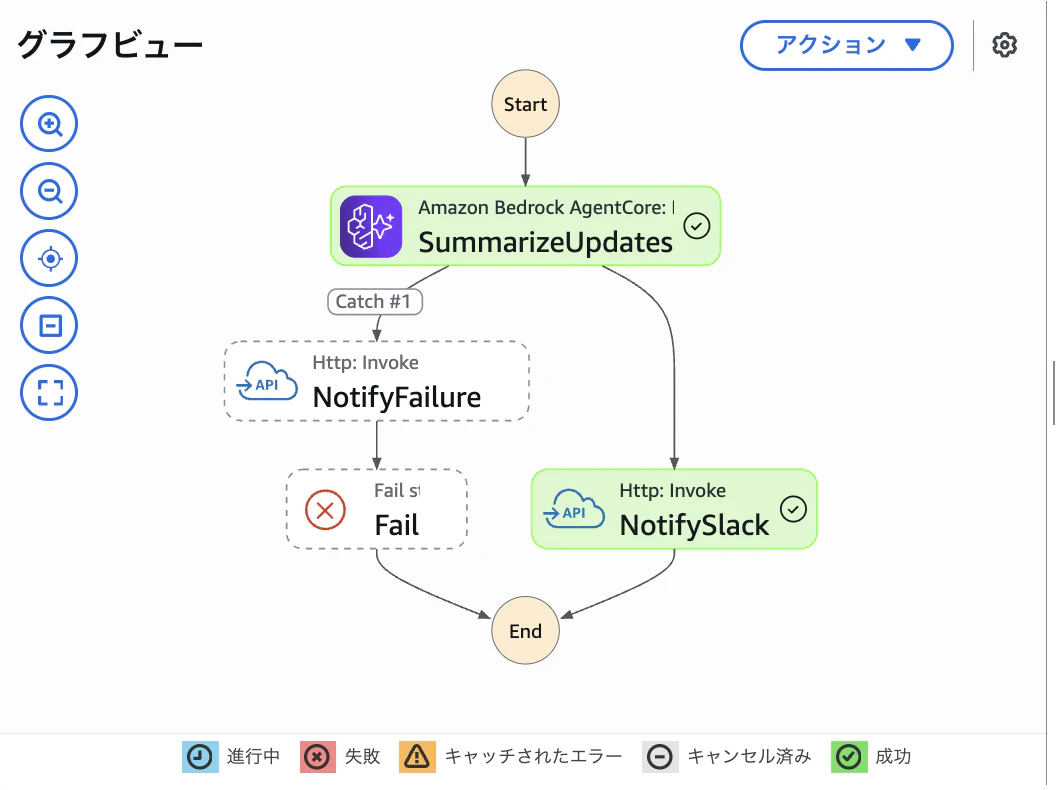
AWS マネージメントコンソールの Step Functions から実行履歴を確認してみましょう。SummarizeUpdates → NotifySlack の順に成功していることが確認できます。
Slack へ通知された内容はこんな感じです。

5. AI エージェントが失敗しても通知が届くことを確認する
「AI エージェントが失敗しても通知は届く」がこの構成の要なので、わざと失敗させて確かめてみます。harness の実行ロールに、モデル呼び出しを拒否する Deny ポリシーを一時的に付けます。
# harness の実行ロールに一時的に Deny ポリシーを付与
cat > deny-bedrock.json <<'JSON'
{
  "Version": "2012-10-17",
  "Statement": [{
    "Effect": "Deny",
    "Action": ["bedrock:InvokeModel", "bedrock:InvokeModelWithResponseStream"],
    "Resource": "*"
  }]
}
JSON

aws iam put-role-policy \
  --role-name weekly-aws-news-harness-role \
  --policy-name deny-bedrock-temporarily \
  --policy-document file://deny-bedrock.json
再度ステートマシンを実行します。
aws stepfunctions start-execution \
  --state-machine-arn $(terraform output -raw state_machine_arn) \
  --region ap-northeast-1
AWS マネージメントコンソールの Step Functions から実行履歴を確認してみましょう。SummarizeUpdates → NotifyFailure で通知が届き、Fail でワークフローとしては失敗していることが確認できます。

Slack へ通知された内容はこんな感じです。

確認できたら Deny ポリシーを外して元に戻します。これを忘れると、以降 harness を呼ぶたびに同じ理由で失敗し続けてしまいます。
aws iam delete-role-policy \
  --role-name weekly-aws-news-harness-role \
  --policy-name deny-bedrock-temporarily
後片付け
terraform destroy -auto-approve