
Manual invoice processing is one of the most expensive habits a business keeps.
The average cost to process a single invoice manually is 15.97. With invoice automation software, that same invoice costs 2.36 to process. That is an 85 reduction per invoice, per the 2025 Ardent Partners State of AP Report. For a business processing 1,000 invoices a month, the difference adds up to over $163,000 in annual savings from processing costs alone, before factoring in late payment penalties avoided and early payment discounts captured.
Yet 68% of businesses still manually key invoice data into their ERP or accounting software. The gap between knowing automation works and actually implementing it is where most finance teams lose money quietly, month after month.
This blog breaks down exactly how invoice processing software removes manual accounting work, what the automation looks like technically, and how to implement it in your own workflow.
The Real Cost of Manual Invoice Processing
Before measuring what automation saves, it helps to understand what manual processing actually costs beyond the per-invoice figure.
A fully automated AP employee can process over 23,000 invoices a year compared to just 6,000 in manual setups. Manual invoice processing takes nearly two weeks.
Nearly 39% of all invoices contain at least one error, and over half of all invoices are paid after their due date. Those errors and delays are almost entirely process-generated. When a human is keying data from a PDF into an accounting system, the error rate is between 5% and 10%. With automation, that drops below 1%.
Only 6% of manually processed invoices are paid within 30 days, compared to 33% of invoices processed through automated systems. The payment timeline is not just a cash flow number. It affects vendor relationships, early payment discount eligibility, and the overall predictability of your business finances.
The manual process does not just cost money. It costs time, accuracy, and relationships simultaneously.
What Invoice Automation Software Actually Does
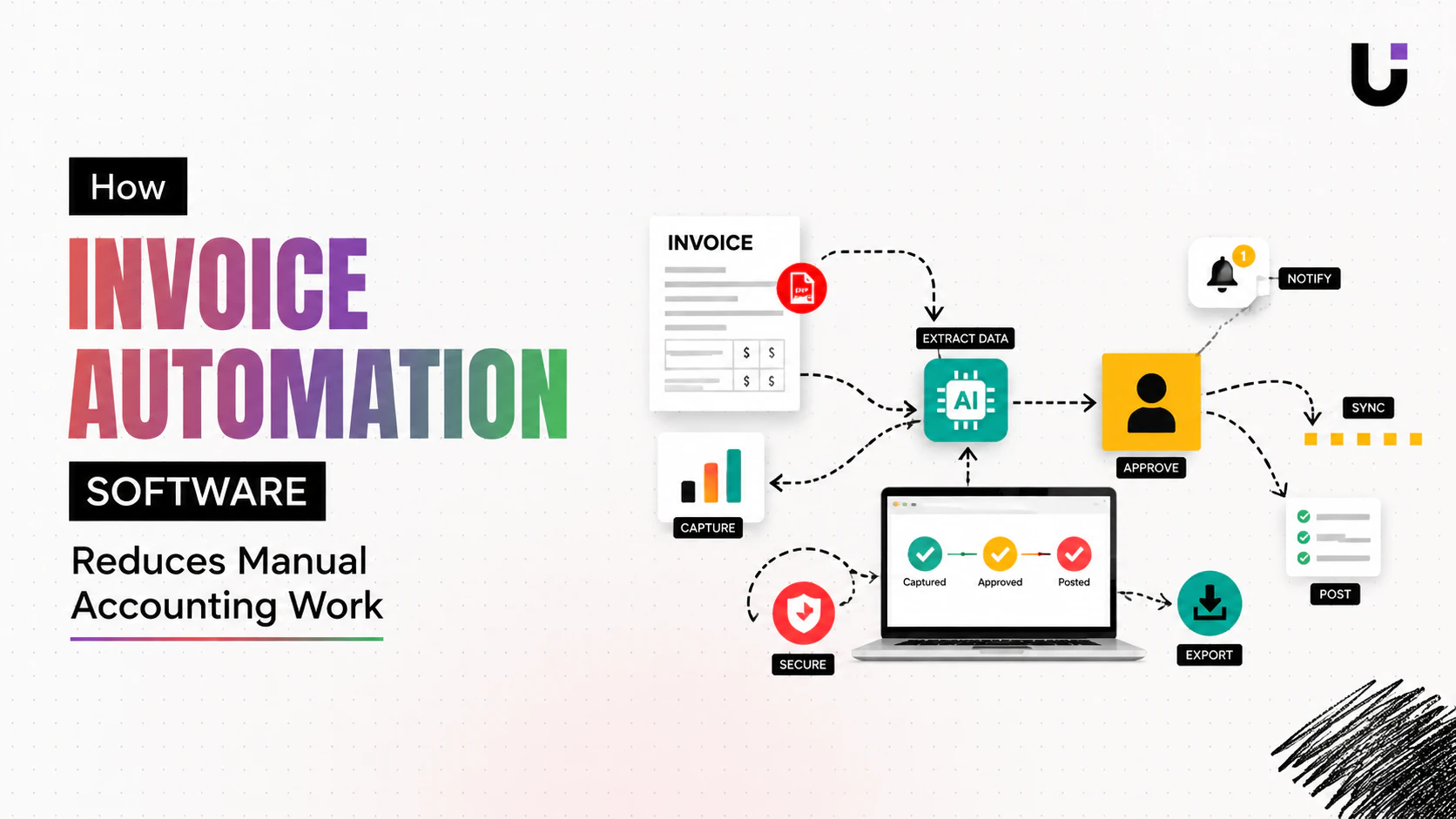
Invoice automation software handles the full invoice lifecycle from the moment a document arrives to the moment payment is recorded, without a human touching most steps in between.
Here is the workflow in practical terms:
Capture. The system ingests invoices regardless of how they arrive. Email attachments, uploaded PDFs, scanned documents, or direct supplier integrations. OCR and AI extract the relevant fields automatically: vendor name, invoice number, date, line items, totals, payment terms.
Validation. Extracted data is checked against your purchase orders, vendor records, and accounting rules. Duplicate invoices are flagged. Mismatched amounts trigger an exception. Invoices that pass validation move forward automatically.
Routing. The invoice routes to the right approver based on amount, department, vendor, or any other rule your business defines. No one decides manually who needs to see it. The logic runs every time, consistently.
Payment and recording. Approved invoices trigger payment on schedule and update your accounting records without manual data entry.
Follow up and collections (outbound). For businesses issuing invoices rather than receiving them, the system tracks payment status, sends reminders on a smart schedule, and escalates overdue accounts automatically.
Building an Invoice Automation Workflow in Node.js
Here is a practical example of what invoice processing software logic looks like in code. This demonstrates how to extract invoice data, validate it, and trigger the right actions automatically.
Step 1: Extract Invoice Data with OCR
javascript
import OpenAI from "openai";
import fs from "fs";
const client = new OpenAI({ apiKey: process.env.OPENAI_API_KEY });
async function extractInvoiceData(invoicePath) {
const invoiceFile = fs.readFileSync(invoicePath);
const base64Invoice = invoiceFile.toString("base64");
const response = await client.chat.completions.create({
model: "gpt-4o-mini",
messages: [
{
role: "user",
content: [
{
type: "image_url",
image_url: {
url: data:image/png;base64,${base64Invoice},
},
},
{
type: "text",
text: Extract all invoice data and return ONLY a JSON object with these fields: { "vendor_name": string, "invoice_number": string, "invoice_date": string (ISO 8601), "due_date": string (ISO 8601), "line_items": [{ "description": string, "quantity": number, "unit_price": number, "total": number }], "subtotal": number, "tax": number, "total_amount": number, "currency": string, "payment_terms": string },
},
],
},
],
});
const raw = response.choices[0].message.content;
const clean = raw.replace(/json|/g, "").trim();
return JSON.parse(clean);
}
export { extractInvoiceData };
Step 2: Validate the Invoice Against Business Rules
javascript
function validateInvoice(invoiceData, purchaseOrders = []) {
const errors = [];
const warnings = [];
const required = [
"vendor_name", "invoice_number", "invoice_date",
"due_date", "total_amount", "currency"
];
for (const field of required) {
if (!invoiceData[field]) {
errors.push(Missing required field: ${field});
}
}
const isDuplicate = purchaseOrders.some(
(po) => po.invoice_number === invoiceData.invoice_number
);
if (isDuplicate) {
errors.push(Duplicate invoice number: ${invoiceData.invoice_number});
}
const calculatedTotal = invoiceData.line_items?.reduce(
(sum, item) => sum + item.total, 0
) || 0;
const totalWithTax = calculatedTotal + (invoiceData.tax || 0);
if (Math.abs(totalWithTax - invoiceData.total_amount) > 0.01) {
errors.push(
Total mismatch: calculated ${totalWithTax}, invoice shows ${invoiceData.total_amount}
);
}
if (invoiceData.total_amount > 10000) {
warnings.push("Invoice exceeds $10,000 - requires senior approval");
}
const dueDate = new Date(invoiceData.due_date);
const daysUntilDue = (dueDate - new Date()) / (1000 * 60 * 60 * 24);
if (daysUntilDue <= 3 && daysUntilDue > 0) {
warnings.push(Invoice due in ${Math.ceil(daysUntilDue)} day(s) - prioritize approval);
}
return {
valid: errors.length === 0,
errors,
warnings,
};
}
export { validateInvoice };
Step 3: Route the Invoice Automatically
javascript
async function routeInvoice(invoiceData, validationResult) {
const routes = {
standard: { approver: "finance_team", sla_hours: 48 },
high_value: { approver: "finance_director", sla_hours: 24 },
urgent: { approver: "finance_director", sla_hours: 4 },
exception: { approver: "accounts_payable_manager", sla_hours: 2 },
};
let routeKey = "standard";
if (!validationResult.valid) {
routeKey = "exception";
} else if (invoiceData.total_amount > 10000) {
routeKey = "high_value";
}
const daysUntilDue =
(new Date(invoiceData.due_date) - new Date()) / (1000 * 60 * 60 * 24);
if (daysUntilDue <= 3 && validationResult.valid) {
routeKey = "urgent";
}
const route = routes[routeKey];
console.log(Routing invoice ${invoiceData.invoice_number} to ${route.approver});
console.log(SLA: ${route.sla_hours} hours);
console.log(Validation warnings: ${validationResult.warnings.join(", ") || "None"});
return {
invoice_number: invoiceData.invoice_number,
routed_to: route.approver,
sla_hours: route.sla_hours,
status: validationResult.valid ? "pending_approval" : "exception",
errors: validationResult.errors,
warnings: validationResult.warnings,
};
}
export { routeInvoice };
Step 4: Automate Follow Up on Outbound Invoices
javascript
const followUpSchedule = [
{ days_after_due: 1, tone: "friendly_reminder", subject: "Friendly reminder: Invoice due" },
{ days_after_due: 7, tone: "firm_reminder", subject: "Invoice overdue - payment required" },
{ days_after_due: 14, tone: "final_notice", subject: "Final notice: Invoice requires immediate attention" },
{ days_after_due: 21, tone: "escalate", subject: null },
];
async function processOverdueInvoices(invoices) {
const today = new Date();
for (const invoice of invoices) {
if (invoice.status === "paid") continue;
const dueDate = new Date(invoice.due_date);
const daysOverdue = Math.floor((today - dueDate) / (1000 * 60 * 60 * 24));

if (daysOverdue <= 0) continue;

const action = followUpSchedule
  .filter((s) => daysOverdue >= s.days_after_due)
  .pop();

if (!action) continue;

if (action.tone === "escalate") {
  console.log(`ESCALATION: Invoice ${invoice.invoice_number} is ${daysOverdue} days overdue.`);
  console.log(`Client: ${invoice.client_name} | Amount: $${invoice.total_amount}`);
} else {
  const message = generateFollowUpMessage(invoice, action.tone, daysOverdue);
  console.log(`Sending ${action.tone} to ${invoice.client_email}`);
  console.log(`Subject: ${action.subject}`);
}
}
}
function generateFollowUpMessage(invoice, tone, daysOverdue) {
const messages = {
friendly_reminder: Hi ${invoice.client_name}, just a quick note that invoice #${invoice.invoice_number} for $${invoice.total_amount} was due yesterday. Please let us know if you have any questions.,
firm_reminder: Hi ${invoice.client_name}, invoice #${invoice.invoice_number} for $${invoice.total_amount} is now ${daysOverdue} days overdue. Please arrange payment at your earliest convenience.,
final_notice: Hi ${invoice.client_name}, this is a final notice regarding invoice #${invoice.invoice_number} for $${invoice.total_amount}, now ${daysOverdue} days overdue. Please contact us immediately to resolve this account.,
};
return messages[tone];
}
export { processOverdueInvoices };
Putting It Together
javascriptimport dotenv from "dotenv";
dotenv.config();
import { extractInvoiceData } from "./invoice-extractor.js";
import { validateInvoice } from "./invoice-validator.js";
import { routeInvoice } from "./invoice-router.js";
import { processOverdueInvoices } from "./invoice-followup.js";
async function processIncomingInvoice(invoicePath, existingInvoices = []) {
console.log(Processing invoice: ${invoicePath});
const invoiceData = await extractInvoiceData(invoicePath);
console.log(Extracted: ${invoiceData.vendor_name} | $${invoiceData.total_amount});
const validation = validateInvoice(invoiceData, existingInvoices);
console.log(Validation: ${validation.valid ? "Passed" : "Failed"});
const routing = await routeInvoice(invoiceData, validation);
console.log(Routed to: ${routing.routed_to} (SLA: ${routing.sla_hours}h));
return routing;
}
async function runCollectionsCycle(outboundInvoices) {
console.log(Running collections cycle for ${outboundInvoices.length} invoices);
await processOverdueInvoices(outboundInvoices);
}
processIncomingInvoice("./invoices/vendor-invoice-april.png");
export { processIncomingInvoice, runCollectionsCycle };
In production: Replace the mock console logs with real integrations: use SendGrid or Resend for email, the Slack Web API for escalation alerts, and connect to your accounting system (QuickBooks, Xero, or NetSuite) via their respective SDKs to record approved invoices automatically:::
:::note warn
On the AI extraction step: For high-volume invoice processing, consider a dedicated OCR service like Parseur or AWS Textract rather than vision models for every invoice. Vision models add token cost per document. Purpose-built OCR handles structured extraction faster and cheaper at scale
The Numbers Behind the Decision
Organizations that fully automate their AP processes reduce invoice processing costs from 15.97 per invoice to 2.36, an 85% reduction. Processing time drops from an average of 10.1 days to 3.2 days, and exception rates fall from 22.6% to 5.4%.
A mid-size company processing 5,000 invoices per year spends 40,000 annually on manual labor. With automation, that drops to 8,000. Net savings in year one, after software costs, come to 17,000. In year two, there is no implementation cost.
Automated routing speeds invoice approval by 50% to 70%, which means businesses capture early payment discounts they would miss when approvals take two weeks.
These are not theoretical projections. They are documented results from businesses that made the shift.
What to Look for in Invoice Automation Software
End-to-end coverage. The system should handle inbound invoice capture, validation, routing, and payment, as well as outbound invoice generation, delivery, follow up, and collections. Tools that cover only one side leave the other as a manual process.
Accounting system integration. If approved invoices still require manual entry into QuickBooks, Xero, or your ERP, the bottleneck has just moved rather than been removed. Native integration or API access is non-negotiable for a complete solution.
Configurable approval rules. Approval thresholds, routing logic, and escalation schedules need to match your business rules, not a preset that requires workarounds.
Automated follow up on the outbound side. Generating and sending an invoice is only half the job. The system should monitor payment status and escalate overdue accounts automatically without anyone setting reminders.
Audit trail. Every action, every approval, every exception, every payment, should be logged automatically for compliance and dispute resolution.
How WorksBuddy Inzo Handles This
Inzo is WorksBuddy's AI finance agent and handles invoice automation as part of a connected business workflow rather than as a standalone tool.
When a deal closes inside WorksBuddy, Inzo generates the invoice automatically from the deal data, attaches a payment link, and delivers it to the client. No one opens a billing tool. No one copies the client name from a CRM. The invoice is in the client's inbox before the closing call has ended.
From there, Inzo monitors payment status and runs the follow up cycle automatically. Friendly reminder on day one. Firmer nudge on day seven. Final notice on day fourteen. Escalation to your team on day twenty-one with the full payment history attached so the conversation starts informed.
Because Inzo is part of the WorksBuddy platform, it connects directly to the other agents. When Taro marks a project milestone complete, Inzo releases the next invoice in a staged billing schedule. When Sigi records a signed contract, Inzo prepares the first invoice without waiting for anyone to trigger it.
The finance function runs in step with the rest of the business. Not as a separate department chasing information from everyone else.
Final Thought
The manual invoice processing problem is not a people problem. It is a process problem. And unlike most process problems, this one has a solution with a documented, measurable return that pays back within months.
Invoice automation software removes the data entry, the routing decisions, the reminder emails, and the collections calls from your team's plate entirely. What remains is the judgment layer: the exceptions, the disputes, the relationships. The work that actually requires a human.
That is a better use of your finance team's time. And it is available now, not as a future investment but as an operational improvement that starts paying back from the first invoice it processes.
See how WorksBuddy Inzo handles your invoice workflow from deal close to payment collected at worksbuddy.ai/inzo