
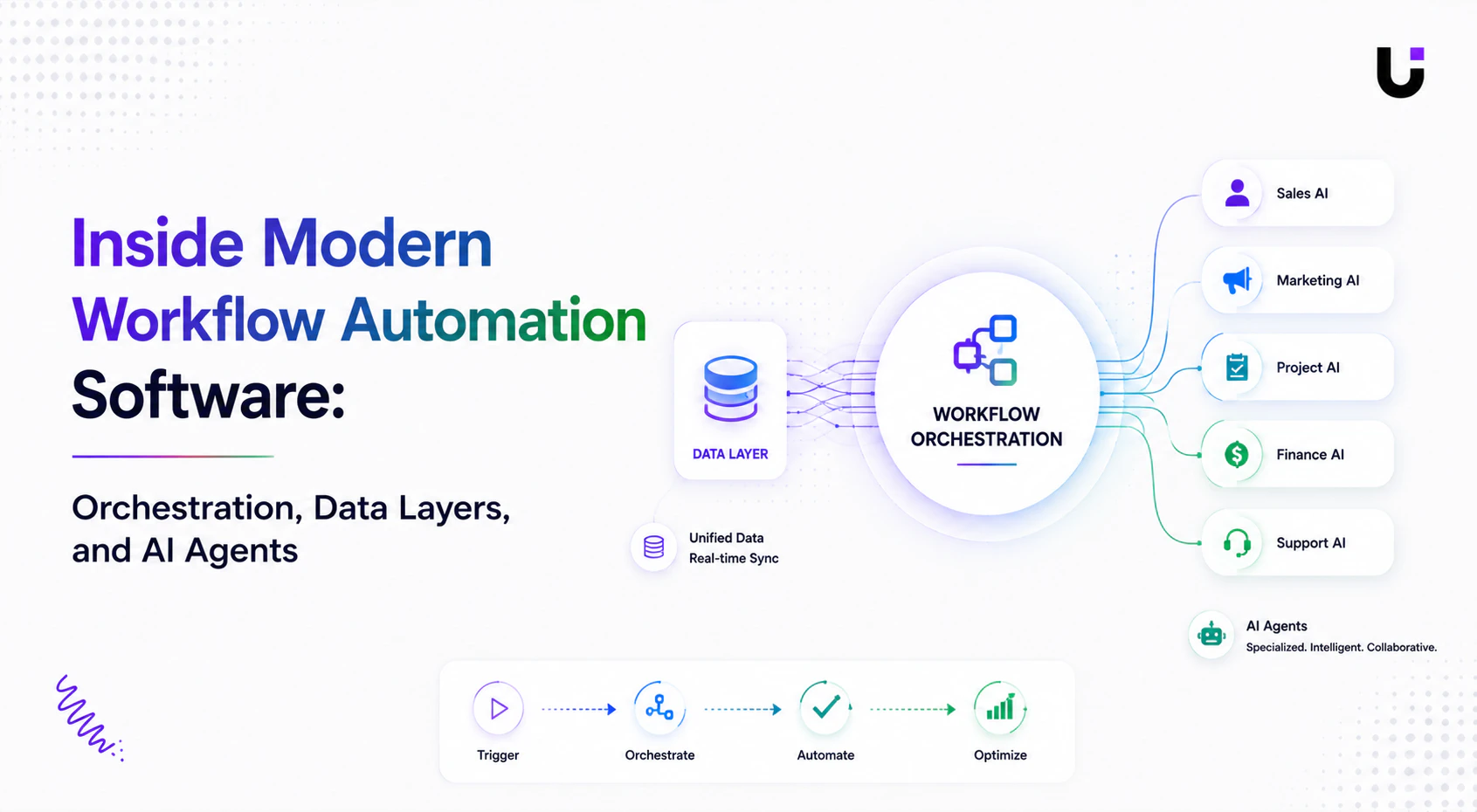
Most AI automation projects fail at the seams.
Individual agents work. Individual integrations work. But when multiple agents need to share state, coordinate actions, and operate across system boundaries, the architecture that looked clean in a diagram starts to fall apart in production.
IDC predicts that by 2026, 60% of AI failures will stem from governance gaps, not model performance. Modern enterprise workflows now average 40 to 60 system touchpoints per process. Without orchestration that manages state across those touchpoints, agents either duplicate work, lose context, or produce inconsistent outputs that surface as bugs in production and compliance failures in audits.
This guide goes inside the three layers that separate workflow automation software that works in demos from systems that work in production: orchestration, data layers, and agent coordination. With code examples throughout.
What Orchestration Actually Means in 2026
Orchestration is a word that gets used broadly. In the context of ai workflow automation, it has a specific technical meaning: the coordination of multiple steps, tools, agents, and decision points within a single workflow, with managed state across all of them.
Gartner identifies an emerging class of workflow automation software that enables enterprises to automate and orchestrate end-to-end business processes while connecting multiple enterprise systems of records via any applicable integration method. The key phrase is end-to-end. Not one step. Not one system. The full process, from trigger to outcome, with every intermediate state tracked.
Your workflows do not live in one system. Customer onboarding touches your CRM, ERP, HR system, security tools, and communication platforms. Each system has its own automation capabilities, but none of them orchestrate the end-to-end process. Next-generation workflow platforms act as orchestration layers that connect automation across all your systems, so one workflow definition triggers actions in multiple platforms and coordinates their execution with centralized error handling.
The difference between a workflow that is orchestrated and one that is assembled from connected tools is what happens when something breaks at step four of an eight-step process. In an assembled system, the failure is silent and the downstream steps may execute against stale state. In an orchestrated system, the failure is caught, the state is preserved, and the workflow resumes or escalates with full context.
Here is what a stateful orchestration layer looks like in code.
// Stateful workflow orchestrator with checkpoint and resume capability
class WorkflowStateMachine {
  constructor(workflowId, steps) {
    this.workflowId = workflowId;
    this.steps = steps;
    this.state = {
      status: "pending",
      current_step: 0,
      completed_steps: [],
      failed_step: null,
      context: {},
      checkpoints: [],
      created_at: new Date().toISOString()
    };
  }

  // Save a checkpoint before each step so the workflow can resume
  checkpoint(stepName) {
    this.state.checkpoints.push({
      step: stepName,
      state_snapshot: JSON.parse(JSON.stringify(this.state.context)),
      timestamp: new Date().toISOString()
    });
    // In production: persist to database or cache (Redis, Postgres, DynamoDB)
    console.log(`[CHECKPOINT] Step "${stepName}" — state saved`);
  }

  async execute(initialContext = {}) {
    this.state.context = { ...initialContext };
    this.state.status = "running";

    console.log(`[WORKFLOW ${this.workflowId}] Starting with ${this.steps.length} steps`);

    for (let i = this.state.current_step; i < this.steps.length; i++) {
      const step = this.steps[i];
      this.checkpoint(step.name);

      try {
        console.log(`[STEP ${i + 1}/${this.steps.length}] ${step.name}`);

        const result = await step.execute(this.state.context);

        // Merge step output into shared context
        this.state.context = { ...this.state.context, ...result };
        this.state.completed_steps.push({ name: step.name, output: result });
        this.state.current_step = i + 1;

      } catch (error) {
        this.state.status = "failed";
        this.state.failed_step = { name: step.name, error: error.message, step_index: i };

        console.error(`[FAILED] Step "${step.name}": ${error.message}`);

        // Can resume from last checkpoint after fixing the issue
        return { success: false, failed_at: step.name, state: this.state };
      }
    }

    this.state.status = "completed";
    console.log(`[WORKFLOW ${this.workflowId}] Completed successfully`);
    return { success: true, context: this.state.context };
  }

  // Resume from where the workflow failed
  async resume() {
    if (this.state.status !== "failed") {
      throw new Error("Cannot resume a workflow that has not failed");
    }

    console.log(`[RESUME] Restarting from step ${this.state.current_step + 1}`);
    this.state.status = "running";
    this.state.failed_step = null;
    return this.execute(this.state.context);
  }
}

// Example: a lead-to-contract workflow with five steps
const leadToContractWorkflow = new WorkflowStateMachine("deal_001", [
  {
    name: "qualify_lead",
    execute: async (ctx) => {
      console.log("Qualifying lead...");
      return { lead_score: 8, qualified: true };
    }
  },
  {
    name: "create_project",
    execute: async (ctx) => {
      if (!ctx.qualified) throw new Error("Cannot create project for unqualified lead");
      console.log("Creating project...");
      return { project_id: "proj_2847" };
    }
  },
  {
    name: "generate_contract",
    execute: async (ctx) => {
      console.log("Generating contract...");
      return { contract_id: "con_2847", status: "draft" };
    }
  },
  {
    name: "send_for_signature",
    execute: async (ctx) => {
      console.log(`Sending contract ${ctx.contract_id} for signature...`);
      return { signature_status: "pending", envelope_id: "env_2847" };
    }
  },
  {
    name: "generate_invoice",
    execute: async (ctx) => {
      console.log("Generating invoice...");
      return { invoice_id: "inv_2847", amount: 12000, status: "sent" };
    }
  }
]);

leadToContractWorkflow.execute({ deal_id: "deal_001", client: "Acme Corp", value: 12000 });
Why checkpoints matter in production: If step 4 fails on a real deal, you do not want to rerun qualification, project creation, and contract generation. The checkpoint system saves state at each step so recovery only requires rerunning from the failure point. In production, replace the console log in checkpoint() with a database write.
The Data Layer Problem Nobody Talks About Enough
An agentic AI agent working from stale or inconsistent data will produce unreliable outputs, fail to reflect the current state of the business, and make decisions that look correct in isolation but conflict with decisions made by other agents operating from different data snapshots.
This is the data layer problem. It is architectural, not algorithmic.
Most multi-agent workflow automation software deployments fail to solve it because they treat each agent as a standalone system with its own data access rather than as a participant in a shared, consistent data layer.
The solution has two components: a shared context store that all agents read from and write to, and an event sourcing pattern that ensures every agent is working from the same version of truth.
// Shared context store with versioning and conflict detection
class SharedContextStore {
  constructor() {
    this.store = new Map();
    this.version = 0;
    this.history = [];
  }

  // Write with optimistic locking to prevent conflicts between agents
  async write(key, value, agentId, expectedVersion = null) {
    const existing = this.store.get(key);
    const currentVersion = existing?.version ?? 0;

    // Conflict detection: if expectedVersion is provided, ensure no concurrent write happened
    if (expectedVersion !== null && currentVersion !== expectedVersion) {
      throw new Error(
        `Conflict: ${agentId} expected version ${expectedVersion} but found ${currentVersion} for key "${key}"`
      );
    }

    this.version++;
    const entry = {
      value,
      version: this.version,
      written_by: agentId,
      timestamp: new Date().toISOString()
    };

    this.store.set(key, entry);
    this.history.push({ key, ...entry });

    return entry;
  }

  async read(key) {
    return this.store.get(key) ?? null;
  }

  // Subscribe to changes on a key — agents get notified when shared data updates
  subscribe(key, callback) {
    // In production: use Redis pub/sub or a message broker
    // This in-memory version demonstrates the pattern
    const originalWrite = this.write.bind(this);
    this.write = async (k, value, agentId, expectedVersion) => {
      const result = await originalWrite(k, value, agentId, expectedVersion);
      if (k === key) await callback({ key: k, ...result });
      return result;
    };
  }

  // Audit trail: full history of every write to the store
  getAuditTrail(key = null) {
    return key
      ? this.history.filter(h => h.key === key)
      : this.history;
  }
}

// Example: three agents sharing a deal context
const context = new SharedContextStore();

async function demonstrateSharedContext() {
  // Lead agent writes qualification result
  await context.write("deal_001.qualified", true, "lio_agent");
  await context.write("deal_001.lead_score", 8, "lio_agent");

  // Project agent reads qualification and writes project ID
  const qualified = await context.read("deal_001.qualified");
  if (qualified?.value) {
    await context.write("deal_001.project_id", "proj_2847", "taro_agent");
  }

  // Finance agent reads project ID and writes invoice
  const project = await context.read("deal_001.project_id");
  if (project?.value) {
    await context.write("deal_001.invoice_id", "inv_2847", "inzo_agent");
  }

  // Full audit trail for compliance
  console.log("Audit trail:", JSON.stringify(context.getAuditTrail(), null, 2));
}

demonstrateSharedContext();
In production: Replace the in-memory Map with a persistent store. Redis is suitable for real-time shared context with TTL controls. PostgreSQL or DynamoDB works for long-lived workflow state that requires querying. The versioning and audit trail patterns remain the same regardless of the backing store.
Building the Orchestration Layer Over Your Agents
Once you have stateful workflows and a shared data layer, the orchestration layer connects them. The orchestrator's job is to receive a high-level goal, determine which agents and steps are needed, sequence them correctly, handle failures with preserved context, and surface the right decisions to humans when autonomous resolution is not appropriate.
import OpenAI from "openai";

const client = new OpenAI({ apiKey: process.env.OPENAI_API_KEY });

// Tool definitions for the orchestrator — each tool maps to an agent
const orchestratorTools = [
  {
    type: "function",
    function: {
      name: "invoke_lead_agent",
      description: "Invoke the lead qualification agent for a specific lead or deal",
      parameters: {
        type: "object",
        properties: {
          lead_id: { type: "string" },
          instruction: { type: "string", description: "What to do with this lead" }
        },
        required: ["lead_id", "instruction"]
      }
    }
  },
  {
    type: "function",
    function: {
      name: "invoke_project_agent",
      description: "Invoke the project management agent to create or update a project",
      parameters: {
        type: "object",
        properties: {
          deal_id: { type: "string" },
          instruction: { type: "string" }
        },
        required: ["deal_id", "instruction"]
      }
    }
  },
  {
    type: "function",
    function: {
      name: "invoke_finance_agent",
      description: "Invoke the finance agent to generate an invoice or process payment",
      parameters: {
        type: "object",
        properties: {
          deal_id: { type: "string" },
          instruction: { type: "string" }
        },
        required: ["deal_id", "instruction"]
      }
    }
  },
  {
    type: "function",
    function: {
      name: "invoke_contract_agent",
      description: "Invoke the contract agent to generate and send a contract for signature",
      parameters: {
        type: "object",
        properties: {
          deal_id: { type: "string" },
          instruction: { type: "string" }
        },
        required: ["deal_id", "instruction"]
      }
    }
  },
  {
    type: "function",
    function: {
      name: "request_human_review",
      description: "Pause the workflow and request human review for a specific decision",
      parameters: {
        type: "object",
        properties: {
          reason: { type: "string" },
          context: { type: "object" }
        },
        required: ["reason", "context"]
      }
    }
  }
];

// Mock agent executors
const agentExecutors = {
  invoke_lead_agent: async ({ lead_id, instruction }) => {
    console.log(`[LIO] Processing lead ${lead_id}: ${instruction}`);
    return JSON.stringify({ lead_id, qualified: true, score: 8, icp_fit: "high" });
  },
  invoke_project_agent: async ({ deal_id, instruction }) => {
    console.log(`[TARO] Creating project for deal ${deal_id}: ${instruction}`);
    return JSON.stringify({ deal_id, project_id: "proj_2847", tasks_created: 12 });
  },
  invoke_finance_agent: async ({ deal_id, instruction }) => {
    console.log(`[INZO] Processing finance for deal ${deal_id}: ${instruction}`);
    return JSON.stringify({ deal_id, invoice_id: "inv_2847", amount: 12000, sent: true });
  },
  invoke_contract_agent: async ({ deal_id, instruction }) => {
    console.log(`[SIGI] Generating contract for deal ${deal_id}: ${instruction}`);
    return JSON.stringify({ deal_id, contract_id: "con_2847", signature_status: "pending" });
  },
  request_human_review: async ({ reason, context }) => {
    console.log(`[HUMAN REVIEW REQUIRED] Reason: ${reason}`);
    console.log(`Context: ${JSON.stringify(context)}`);
    // In production: create task, send Slack notification, write to review queue
    return JSON.stringify({ escalated: true, review_id: `review_${Date.now()}` });
  }
};

async function runOrchestrator(businessGoal, maxIterations = 12) {
  const messages = [
    {
      role: "system",
      content: `You are a business process orchestrator.
      You coordinate specialized AI agents to complete business workflows.
      Think through the complete sequence of steps needed before acting.
      Invoke agents in the correct order — qualification before project creation,
      project creation before invoicing, contracts parallel with project creation.
      Request human review if any deal value exceeds $50,000 or if an agent returns an error.`
    },
    { role: "user", content: businessGoal }
  ];

  for (let i = 0; i < maxIterations; i++) {
    const response = await client.chat.completions.create({
      model: "gpt-4o-mini",
      messages,
      tools: orchestratorTools,
      tool_choice: "auto"
    });

    const message = response.choices[0].message;
    messages.push(message);

    if (!message.tool_calls?.length) {
      console.log("\n[ORCHESTRATOR COMPLETE]", message.content);
      return message.content;
    }

    for (const call of message.tool_calls) {
      const args = JSON.parse(call.function.arguments);
      const executor = agentExecutors[call.function.name];
      const result = executor
        ? await executor(args)
        : JSON.stringify({ error: `Unknown agent: ${call.function.name}` });

      messages.push({ role: "tool", tool_call_id: call.id, content: result });
    }
  }
}

runOrchestrator(
  "Close deal DEAL-001 for Acme Corp at $12,000. Qualify the lead, set up the project, generate the contract, and raise the invoice."
);
What this demonstrates: The orchestrator decides the sequence autonomously. It knows that qualification must come before project creation, and that contracts and invoices should be triggered together. That sequencing logic lives in the system prompt, not in hardcoded flow control. To change the order or add a new step, update the prompt and add a new tool.
The MCP Standard and Vendor Lock-In
One architectural decision that receives insufficient attention in most workflow automation software evaluations: vendor lock-in at the orchestration layer.
Enterprises that build their agentic workflows on a vendor's proprietary orchestration layer face compounding lock-in at every layer of the stack. The model choice, the tool definitions, the state management, and the integration layer all become difficult to migrate when the vendor's pricing or capabilities change.
MCP (Model Context Protocol), originally developed by Anthropic and now donated to the Linux Foundation's Agentic AI Foundation, is an open standard for connecting AI agents to external tools, data sources, and APIs. Enterprises that build on MCP-compatible infrastructure preserve interoperability across models and vendors.
// MCP-compatible tool definition structure
// Agents built on MCP can connect to any MCP server without rewriting integration code

const mcpToolDefinition = {
  name: "get_deal_context",
  description: "Retrieve the full context for a deal including lead data, project status, and payment history",
  inputSchema: {
    type: "object",
    properties: {
      deal_id: {
        type: "string",
        description: "The unique identifier for the deal"
      },
      include_history: {
        type: "boolean",
        description: "Whether to include full event history",
        default: false
      }
    },
    required: ["deal_id"]
  }
};

// MCP server handler — expose your data sources as MCP-compatible tools
async function handleMCPRequest(toolName, params) {
  const handlers = {
    get_deal_context: async ({ deal_id, include_history }) => {
      const context = {
        deal_id,
        client: "Acme Corp",
        value: 12000,
        stage: "closed_won",
        project_status: "active",
        invoice_status: "sent",
        payment_status: "pending"
      };

      if (include_history) {
        context.history = [
          { event: "lead.qualified", timestamp: "2026-05-01T09:00:00Z" },
          { event: "deal.closed", timestamp: "2026-05-15T14:30:00Z" },
          { event: "contract.signed", timestamp: "2026-05-16T10:00:00Z" }
        ];
      }

      return context;
    }
  };

  const handler = handlers[toolName];
  if (!handler) throw new Error(`Unknown MCP tool: ${toolName}`);
  return handler(params);
}
Build for portability from day one. The choice of orchestration framework and the choice of foundation model are not independent decisions. If your agents are built on a proprietary orchestration layer, replacing the underlying model later means rewriting the integration layer. MCP-compatible architecture separates the agent logic from the connectivity layer so both can evolve independently.
Observability: What Production Systems Require
Scaling ai workflow automation requires aligning data, governance, and infrastructure before automation expands. Observability is the governance mechanism that makes expansion safe.
Without observability, debugging a production workflow failure requires reconstructing what happened from logs that were never designed to be queried together. With it, you can trace every workflow from trigger to outcome, identify where failures cluster, and catch performance degradation before it affects business outcomes.
class WorkflowObserver {
  constructor() {
    this.traces = new Map();
  }

  startTrace(workflowId, metadata = {}) {
    this.traces.set(workflowId, {
      workflow_id: workflowId,
      started_at: Date.now(),
      metadata,
      spans: [],
      status: "running"
    });
    return workflowId;
  }

  recordSpan(workflowId, spanName, data = {}) {
    const trace = this.traces.get(workflowId);
    if (!trace) return;

    trace.spans.push({
      name: spanName,
      started_at: Date.now(),
      data,
      agent: data.agent_id ?? "unknown"
    });
  }

  completeSpan(workflowId, spanName, result = {}) {
    const trace = this.traces.get(workflowId);
    if (!trace) return;

    const span = trace.spans.findLast(s => s.name === spanName);
    if (span) {
      span.duration_ms = Date.now() - span.started_at;
      span.result = result;
      span.status = result.error ? "failed" : "success";
    }
  }

  endTrace(workflowId, status = "completed") {
    const trace = this.traces.get(workflowId);
    if (!trace) return;

    trace.status = status;
    trace.duration_ms = Date.now() - trace.started_at;
    trace.completed_at = new Date().toISOString();

    // In production: ship to your observability platform (Datadog, Honeycomb, Grafana)
    console.log(`[TRACE COMPLETE] ${workflowId} — ${status} in ${trace.duration_ms}ms`);
    console.log(`Spans: ${trace.spans.map(s => `${s.name}(${s.duration_ms}ms)`).join(" -> ")}`);

    return trace;
  }
}

const observer = new WorkflowObserver();

// Usage in your workflow steps
async function tracedWorkflowStep(workflowId, stepName, agentId, stepFn) {
  observer.recordSpan(workflowId, stepName, { agent_id: agentId });
  try {
    const result = await stepFn();
    observer.completeSpan(workflowId, stepName, result);
    return result;
  } catch (error) {
    observer.completeSpan(workflowId, stepName, { error: error.message });
    throw error;
  }
}
What This Means for Choosing Workflow Automation Software
The architectural patterns above translate directly into evaluation criteria when choosing workflow automation software.
State management. Can the platform persist workflow state across steps so a failure at step six does not restart the workflow from step one? Without this, complex workflows are not production-safe.
Shared data layer. Do agents in the system read from and write to a consistent shared context, or does each agent maintain its own isolated state? Agents operating on different snapshots of the same data produce conflicting decisions.
Orchestration vs. assembly. Is the platform an orchestration layer that manages the full process, or an assembly of connected tools that each handle one step? The distinction determines how failures propagate and how the system handles edge cases.
Observability built in. Can you trace a workflow from trigger to completion across multiple agents? Can you see which agent made which decision and why? Without this, debugging production failures is close to impossible.
MCP compatibility. Does the platform support open standards for tool connectivity, or does it require proprietary connectors? Lock-in at the integration layer becomes expensive as the number of connected systems grows.
WorksBuddy addresses these requirements through its shared context architecture where all seven AI agents read from and write to a consistent data layer. When Lio qualifies a lead, every other agent already has access to that qualification context. When Sigi receives a signature, the event propagates to Taro and Inzo without a human bridge. The orchestration layer manages the sequencing. The data layer manages the consistency. The result is workflow automation software where the agents genuinely coordinate rather than operate in parallel silos.