
環境と対象
- 環境
- CentOS7
- MariaDB(インストール済み)
- 対象
- MySQL 8.0.19
MariaDBのアンインストール
- MariaDBのインストール状態を確認
- CentOSに標準で乗っかっている可能性あり
// インストール状態の確認
$ yum list installed | grep maria
mariadb-libs.x86_64
- このように表示されたらインストール済みのため、アンインストール実行
// アンインストール
$ yum uninstall mariadb-libs.x86_64
MySQLのインストール
MySQLパッケージの追加
-
yumコマンドを用いてインストール
-
yumリポジトリにはMySQLパッケージがないため、手動で追加
-
MySQL公式サイトより、Community Edition の ダウンロードページ へ遷移
- MySQL公式から製品タブを押下
- 左ペインにある MySQL Community Edition を押下
- Download MySQL Community Edition を押下
- MySQL Yum Repository を押下
-
任意のバージョン(今回は Red Hat Enterprise Linux 7 / Oracle Linux 7)を選択
-
ページ下部の No thanks, just start my download. をからパスを取得
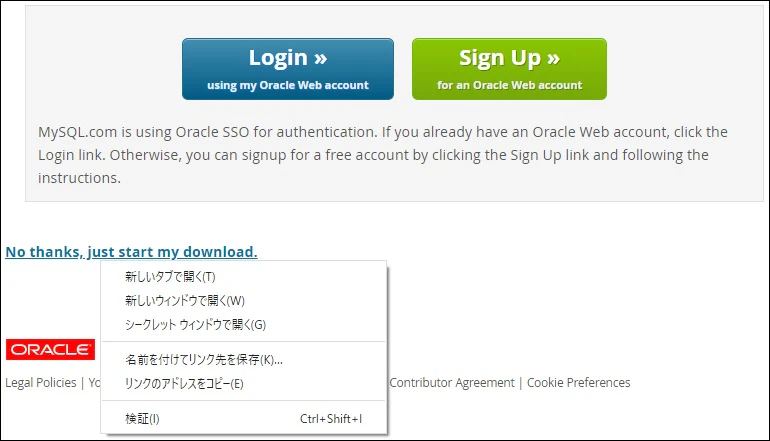
-
取得したパスを用いて、パッケージをダウンロードとインストール
// ***** の部分には、選択したバージョンに応じた値が入る
$ yum install https://dev.mysql.com/get/*****
- インストールしたパッケージの確認
$ yum info mysql-community-server
読み込んだプラグイン:fastestmirror
Loading mirror speeds from cached hostfile
 * base: ftp.riken.jp
 * extras: ftp.riken.jp
 * updates: ftp.riken.jp
利用可能なパッケージ
名前                : mysql-community-server
アーキテクチャー    : x86_64
バージョン          : 8.0.19
(以下省略)
インストール
- yumコマンドを用いてインストール
// インストール
$ yum install mysql-community-server
- インストールしたMySQLの確認
$ mysql --version
mysql  Ver 8.0.19 for Linux on x86_64 (MySQL Community Server - GPL)
起動と確認
// 起動
$ systemctl start mysqld.service
// 停止
$ systemctl start mysqld.service
// 自動起動設定(オフにする場合はdisable)
$ systemctl enable mysqld.service
// 状態確認
$ systemctl status mysqld.service
MySQLの初期設定
rootパスワードの確認
- 格納場所:/var/log/mysqld.log
// rootパスワード確認
$ cat /var/log/mysqld.log | grep Note
(省略)A temporary password is generated for root@localhost: (pass-phrase)
rootパスワードの変更
// MySQL起動
$ mysql -u root -p
Enter password: (確認したrootパスワードを入力)
// 一旦、任意のパスワードに変更
mysql> ALTER USER 'root'@'localhost' identified BY '(任意のパスワード)'
Query OK, 0 rows affected (0.01 sec)

// パスワードポリシー変更のおまじない
mysql> set global validate_password.length=4;
Query OK, 0 rows affected (0.00 sec)

// パスワードポリシー変更のおまじない
mysql> set global validate_password.policy=LOW;
Query OK, 0 rows affected (0.00 sec)

// rootパスワードを'Password'に変更
mysql> ALTER USER 'root'@'localhost' identified BY 'Password';
Query OK, 0 rows affected (0.01 sec)
- rootパスワードをPasswordに変更することができた。