
This is an English translation of 実装技術者向けバイキュービック補間入門 その4
Introduction
This explains typical problems encountered when enlarging or reducing images with bicubic interpolation.
Background: Difference between optical zoom in/out and scaling by bicubic interpolation
Optical zoom is (in principle) adjusting the distance between the subject and the camera.
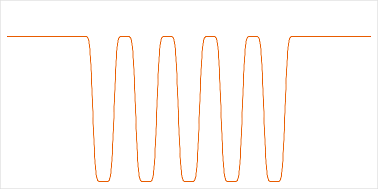
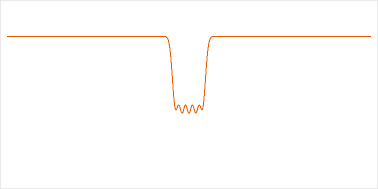
Below is a schematic showing the appearance of a stripe pattern photographed at distances of 1 meter and 6 meters.
| Subject |
|---|
 |
| Distance to subject |
Point spread function | Appearance | |
|---|---|---|---|
| 1 m | 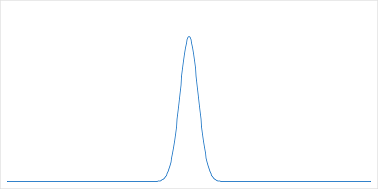 |
|
|
| 6 m | |
|
|
| When the scale is matched to the subject |
 |
|
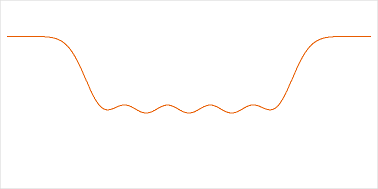
- When you zoom out (move away from the subject), the subject appears smaller, but the lens resolution and the point spread function remain constant, so the relative amount of blur with respect to the subject becomes larger. Therefore, if you scale the horizontal axis of the graph to match the apparent size of the subject, the graph becomes flatter.
- When you zoom in (move closer to the subject), the opposite occurs: the relative blur with respect to the subject becomes smaller, and the graph becomes steeper.
Note:
- Lens resolution: a performance metric indicating how fine detail the lens can resolve. Units are line pairs/mm or lines/mm.
- Point spread function (PSF): the response function for a point light source.
By contrast, bicubic interpolation leaves the input image unchanged and enlarges or reduces the image by changing the resampling interval. Expectations for image scaling are often to reproduce optical zoom in/out, so a mismatch in the expected relative blur causes a sense of unnaturalness.
Problem example 1: Unevenness occurs when reducing finely detailed patterns
| Input image | 1/8 scaled image |
|---|---|
 |
 |
Cause
When reducing with bicubic interpolation, the relative blur with respect to the subject remains the same, but fine patterns are resampled at coarse intervals, which easily produces unevenness. With optical zoom-out, the relative blur becomes larger and fine patterns are appropriately blurred and collapsed; sampling that blurred result makes less unevenness likely.
Workarounds
Blur the input image to increase the relative blur with respect to the subject, then reduce with bicubic interpolation.
The following is an example where the input was blurred with OpenCV's cv::GaussianBlur (ksize: 21x21) and then reduced with bicubic interpolation.
| Blurred image | 1/8 scaled image |
|---|---|
 |
 |
Alternatively (if you want a simple OpenCV solution), use INTER_AREA instead of INTER_CUBIC in cv::resize. The official documentation describes INTER_AREA as "resampling using pixel area relation," which means summing the values of pixels in the resampling area and dividing by the area - in other words, the average. Averaging compression is equivalent to a box filter, so it has a blurring effect. However, compared with Gaussian blurring, the image quality is slightly worse.
The following is an example reduced with INTER_AREA.
| 1/8 scaled image (with INTER_AREA) |
|---|
 |
Problem example 2: Enlarged images look blurry
Cause
Optical zoom-in reduces the relative blur with respect to the subject, but enlargement by bicubic interpolation only reduces the resampling interval, so the image can appear more blurred.
Workarounds
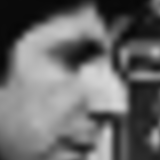
Applying sharpening to the image after bicubic enlargement can help somewhat. However, severely collapsed images like the 6 meters example above cannot be fully restored, so in some cases you may need to consider to apply learned super-resolution methods (GANs: generative adversarial networks, etc.).
The following example applies an unsharp mask as sharpening to the standard test image "Cameraman" (source: MIT Works Acquired Digitally). I tried various unsharp-mask parameters; for this example the visual improvement is limited.
| 8x enlarged image | After applying unsharp mask |
|---|---|
 |
 |
Problem example 3: Diagonal edges become jagged when enlarging CG illustrations
When you enlarge CG illustrations like anime-style drawings with bicubic interpolation, diagonal edges become jagged.
Below is an example of a 45-degree binary image enlarged with bicubic interpolation. (After enlargement, the region x:160, y:160, w:180, h:180 was cropped.)
| Input image | 8x enlarged image |
|---|---|
 |
 |
Cause
CG illustrations are not produced by a camera and thus have no blur. The input function becomes a step function with only two levels. Such a function is difficult to represent accurately by a Taylor expansion up to the second derivative (in the expansion $f(x)=f(x_j)+shf’(x_j)+s^2h^2f’’(x_j)/2+O(h^3)$, the remainder term $O(h^3)$ dominates).
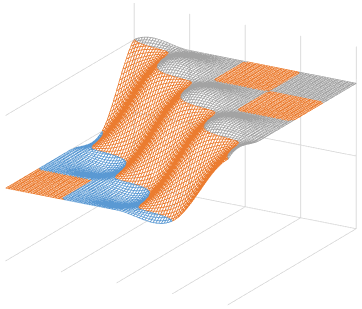
Intuitively, each edge pixel acts like a point source, and the interpolation result looks like an arrangement of one-quarter segments of the convolution kernel. Below are 3D plots of the bicubic convolution kernel and the bicubic interpolation of the 45-degree binary image from the same viewing angle.
| Convolution kernel | Bicubic interpolation of 45-degree binary image |
|---|---|
 |
 |
Workarounds
Slightly blur the input image and then enlarge with bicubic interpolation - this reduces jaggedness on diagonal edges.
The following example blurs slightly with OpenCV's cv::GaussianBlur (ksize: 5x5) and then enlarges with bicubic interpolation.
| Slightly blurred image | 8x enlarged image |
|---|---|
 |
 |
If any blur is unacceptable, consider learned super-resolution. CG illustrations have simple detailed structure, so applying learned super-resolution is expected to be well suited.
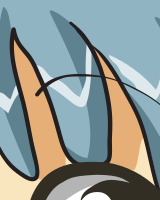
The following compares a 4x enlargement of an anime image (source: Wikipe-tan, drawn by Kasuga~jawiki) using bicubic interpolation and applying learned super-resolution (Real-ESRGAN). The original was an SVG, rendered to a 128px PNG used as the input image, and after enlargement a region x:120, y:80, w:160, h:200 was cropped.
The Real-ESRGAN model used is realesrgan-x4plus-anime, trained heavily on anime images. The enlarged result closely matches the image rendered directly from the original SVG at 4x size.
| Input image (128px rendered from SVG) |
Enlarged with bicubic interpolation |
Enlarged with learned super- resolution (Real-ESRGAN) |
Reference (512px rendered from SVG) |
|---|---|---|---|
 |
 |
 |
 |
References
-
Wenru Dong
What is OpenCV’s INTER_AREA Actually Doing?
https://medium.com/@wenrudong/what-is-opencvs-inter-area-actually-doing-282a626a09b3 -
Xintao Wang, Liangbin Xie, Chao Dong, Ying Shan
Real-ESRGAN: Training Real-World Blind Super-Resolution with Pure Synthetic Data
https://doi.org/10.48550/arXiv.2107.10833
Related Posts