
This is an English translation of 実装技術者向けバイキュービック補間入門 その3
Introduction
In "#2", It was explained about the parameter $a$, but in existing implementations other details can also differ. Sometimes these differences are not documented in official documentation, so caution is required. Below are some examples where problems may have occurred.
Resampling positions
In OpenCV image resizing (cv::resize), the resampling positions are set so that the centroid of the interpolated image does not shift relative to the input image. For example, when upscaling by an integer multiple, the pixel positions of the upscaled image are set to lie between the input image pixel positions. The following is an example for 2× upscaling.
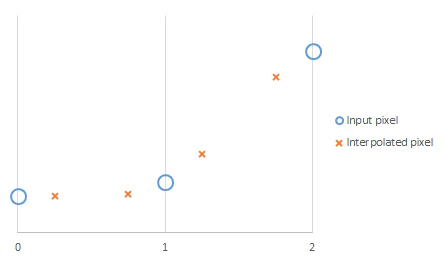
On the other hand, it is also possible to set positions so that they include the input image pixels.

The former is probably more common, but the latter has the advantage of fully including the input image information, which can be useful when reversibility is required or for image metrology and similar applications.
Extrapolation
Bicubic interpolation requires two pixels above/below and left/right for interpolation. In principle, the outermost area of the interpolated image is an invalid region where interpolation cannot be computed, but because it is sometimes preferable that these regions be “plausibly” interpolated even if imperfect, OpenCV’s cv::resize copies the outermost pixel values to extrapolate and then performs interpolation. The example below shows the pixel positions of the upscaled image when the input image width is 4 and the scale factor is 2. In this case, the three pixels at each end of the upscaled image are incompletely interpolated.

For reference, in OpenCV affine transforms (cv::warpAffine) the method of extrapolation interpolation can be choosed via the borderMode parameter.
Related Posts