
はじめに
Xのブックマークって皆さんはどう活用してますか?
毎日見るSNSなので、つい気軽にブクマをしてしまうけど、気づけばその数も膨大になって、それをまとめたい・・
ということで、それをやってみました
- 動作環境
・ OS : Windows11 pro
・ Tampermonkey : 5.4.1
・ twitter-web-exporter : 1.3.0
・ uv : 0.9.18 (Python 3.12.8)
・ openai : 2.14.0
・ python-dotenv : 1.2.1
Xのブクマをエクスポートする(twitter-web-exporter)
以下を使用します、導入方法は冗長になるので書きません。LLMにこのURL渡せば教えてくれます
導入後、Xのブックマークを開き、マウススクロールでブクマ全部を見える状態にします。
これは見えているブクマ分しか取れない(最後までスクロールして読み込みが必要)ので人間の作業を挟みます
twitter-web-exporterは、ページHTMLを取得して解析するタイプのスクレイピングではなく、X(twitter.com)のWebアプリが画面描画のために実行するGraphQL通信にネットワーク・インターセプタを挟み、取得済みのレスポンスJSONをブラウザ内で抽出・整形してエクスポートする形式
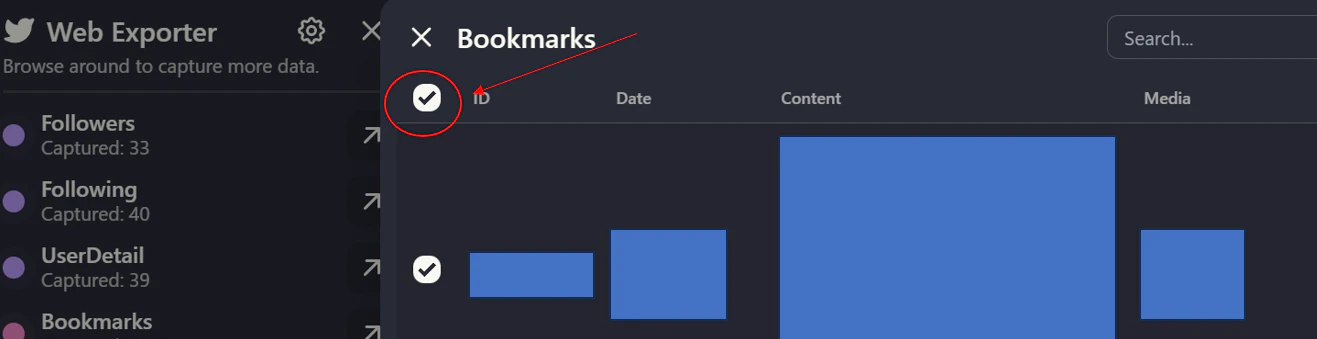
で、bookmarksをクリックして左にある「全チェック」をクリックした後に、Data lengthで件数が正しいことを確認後、「Export as」でjsonを選択(csvでもいいけど)すればOKです
その内容をLLMで自動分類させる
TOPIC_TAGSに分類したいタグ(これは人によって様々だと思うので汎用化までは未実施)を入れた上で、以下スクリプトで実施する
.envにはAPIキーと使用モデルを入れ、BATCH_SIZEとMAX_WORKERSで並列のバッチ実行数を入れる
※この場合1バッチ40データを8並列で処理させている
また、main.pyでのINPUT_JSONにはtwitter-web-exporterでの出力json名を、MERGE_OUTPUTには出力ファイル名を入れればいい。またjsonはmain.pyと同階層に置く前提
OpenAIのAPI無料枠に関しては以下を確認してください(OpenAIにシェアする代わりに無料枠が1日あたり最大100万トークン付与されるという設定)
https://platform.openai.com/settings/organization/data-controls/sharing
TOPIC_TAGSは工夫の余地があります。このサンプルの場合は境界線が曖昧なものもある(learnとtechとか)ので、そこはまだまだ工夫できると思います
OPENAI_API_KEY=sk-****
OPENAI_MODEL=gpt-5.1
BATCH_SIZE=40
MAX_WORKERS=8
import csv
import json
import os
import re
import time
from concurrent.futures import ThreadPoolExecutor, wait
from datetime import datetime

from dotenv import load_dotenv
from openai import OpenAI

# 設定
INPUT_JSON = os.getenv("INPUT_JSON", "twitter-Bookmarks-*******.json")
MERGE_OUTPUT = os.getenv("MERGE_OUTPUT", os.path.join("output", "bookmarks.csv"))
MERGE_FORMAT = os.getenv("MERGE_FORMAT", "csv")  # csv or json
LLM_MODEL = os.getenv("OPENAI_MODEL", "gpt-5.1")

# 分類タグ(タグは手動で決めたものでunknownは分類不能なら入れる箱)
TOPIC_TAGS = [
    "topic/invest",
    "topic/think",
    "topic/work",
    "topic/learn",
    "topic/tech",
    "topic/society",
    "topic/health",
    "topic/ent",
    "topic/people",
    "topic/unknown",
]

URL_RE = re.compile(r"https?://\S+")
NON_TEXT_RE = re.compile(r"[\s\u3000]+")


TAG_LIST_STR = ", ".join(TOPIC_TAGS)
SYSTEM_PROMPT = f"""
You are classifying X/Twitter bookmarks into a single topic tag.
Choose exactly one tag from: {TAG_LIST_STR}

Rules:
- Use topic/unknown if the text is too short, ambiguous, or media-only.
- If the tweet mentions multiple topics, pick the most central one.
- Do not invent new tags.
- Always include a non-empty reason string in Japanese for every item.
Return JSON only.
""".strip()


def normalize_text(text: str) -> str:
    return NON_TEXT_RE.sub(" ", text).strip()

def build_batch_payload(tweets: list[dict]) -> list[dict]:
    items = []
    for tweet in tweets:
        text = tweet.get("full_text") or ""
        media = tweet.get("media") or []
        cleaned = normalize_text(URL_RE.sub("", text))
        items.append(
            {
                "id": str(tweet.get("id", "")),
                "text": cleaned,
                "has_media": bool(media),
            }
        )
    return items


def create_response(
    client: OpenAI,
    model: str,
    user_payload: dict,
    schema: dict,
    timeout_s: float,
):
    """
    schema 期待形:
      {
        "name": "...",
        "schema": {... JSON Schema ...}
      }
    """
    # FIX: Responses API では response_format ではなく text.format を使う
    # FIX: text.format.name が必須
    return client.responses.create(
        model=model,
        input=[
            {"role": "system", "content": SYSTEM_PROMPT},
            {"role": "user", "content": json.dumps(user_payload, ensure_ascii=False)},
        ],
        text={
            "format": {
                "type": "json_schema",
                "name": schema["name"],       # ← 必須
                "schema": schema["schema"],   # ← JSON Schema 本体
                "strict": True,
            }
        },
        timeout=timeout_s,
    )


def classify_batch(
    client: OpenAI,
    tweets: list[dict],
    model: str,
    batch_id: int,
    timeout_s: float,
) -> dict[str, dict[str, str]]:
    payload = build_batch_payload(tweets)
    schema = {
        "name": "bookmark_classification",
        "schema": {
            "type": "object",
            "properties": {
                "items": {
                    "type": "array",
                    "items": {
                        "type": "object",
                        "properties": {
                            "id": {"type": "string"},
                            "tag": {
                                "type": "string",
                                "enum": TOPIC_TAGS,
                            },
                            "reason": {"type": "string", "minLength": 1},
                        },
                        "required": ["id", "tag", "reason"],
                        "additionalProperties": False,
                    },
                }
            },
            "required": ["items"],
            "additionalProperties": False,
        },
    }

    user_payload = {
        "items": payload,
        "tags": TOPIC_TAGS,
        "instructions": "Classify each item. Use topic/unknown if the text is too short or ambiguous.",
    }

    last_error = None
    print(f"LLM batch {batch_id} start ({len(tweets)} items)")
    for _ in range(3):
        try:
            response = create_response(client, model, user_payload, schema, timeout_s)
            text = response.output_text or ""
            data = json.loads(text)

            # Structured Outputs で object を強制しているので基本は data["items"] 想定
            items = data.get("items", []) if isinstance(data, dict) else []

            result = {}
            missing_reason = []
            for item in items:
                tag = item.get("tag", "topic/unknown")
                if tag not in TOPIC_TAGS:
                    tag = "topic/unknown"
                reason = item.get("reason", "").strip()
                if not reason:
                    missing_reason.append(item.get("id", ""))
                result[item.get("id", "")] = {
                    "tag": tag,
                    "reason": reason,
                }
            if missing_reason:
                raise ValueError(f"empty reason for ids: {missing_reason[:5]}")
            return result
        except Exception as exc:
            last_error = exc
            time.sleep(1.0)
    raise RuntimeError(f"LLM classification failed: {last_error}")


def chunk_list(items: list[dict], size: int) -> list[list[dict]]:
    return [items[i : i + size] for i in range(0, len(items), size)]


def flatten_keys(items: list[dict]) -> list[str]:
    keys = []
    seen = set()
    for item in items:
        for key in item.keys():
            if key not in seen:
                seen.add(key)
                keys.append(key)
    return keys


def sanitize_value(key: str, value):
    if isinstance(value, str) and key == "full_text":
        return " ".join(value.replace("\r\n", "\n").replace("\r", "\n").split("\n"))
    return value


def run_merge(data: list[dict], tag_map: dict[str, dict[str, str]]) -> None:
    json_fields = flatten_keys(data)

    merged = []
    missing = 0
    for tweet in data:
        tweet_id = str(tweet.get("id", ""))
        info = tag_map.get(tweet_id)
        if info is None:
            missing += 1
            info = {"tag": "topic/unknown", "reason": "判別不能のため"}
        tweet_out = dict(tweet)
        tweet_out["tag"] = info["tag"]
        tweet_out["reason"] = info["reason"]
        merged.append(tweet_out)

    os.makedirs(os.path.dirname(MERGE_OUTPUT), exist_ok=True)
    if MERGE_FORMAT == "json":
        with open(MERGE_OUTPUT, "w", encoding="utf-8") as f:
            json.dump(merged, f, ensure_ascii=False, indent=2)
    else:
        fieldnames = list(json_fields)
        for extra in ("tag", "reason"):
            if extra not in fieldnames:
                fieldnames.append(extra)
        with open(MERGE_OUTPUT, "w", encoding="utf-8-sig", newline="") as f:
            writer = csv.DictWriter(f, fieldnames=fieldnames)
            writer.writeheader()
            for item in merged:
                row = {key: sanitize_value(key, item.get(key)) for key in fieldnames}
                writer.writerow(row)

    print(f"merged: {len(merged)}")
    print(f"missing tags: {missing}")
    print(f"output: {MERGE_OUTPUT}")


def run_classify() -> tuple[list[dict], dict[str, dict[str, str]]]:
    load_dotenv()
    api_key = os.getenv("OPENAI_API_KEY")
    if not api_key:
        raise RuntimeError("OPENAI_API_KEY is missing. Set it in .env or environment.")

    input_path = INPUT_JSON
    model = LLM_MODEL
    batch_size = int(os.getenv("BATCH_SIZE", "40"))
    max_workers = int(os.getenv("MAX_WORKERS", str(min(8, (os.cpu_count() or 4)))))
    request_timeout = float(os.getenv("REQUEST_TIMEOUT", "60"))

    client = OpenAI(api_key=api_key)

    with open(input_path, "r", encoding="utf-8") as f:
        data = json.load(f)

    batches = chunk_list(data, batch_size)
    tag_map: dict[str, dict[str, str]] = {}
    total_batches = len(batches)
    completed_batches = 0

    max_batch_wait = float(os.getenv("MAX_BATCH_WAIT", "180"))

    with ThreadPoolExecutor(max_workers=max_workers) as executor:
        futures = {}
        for idx, batch in enumerate(batches, start=1):
            future = executor.submit(classify_batch, client, batch, model, idx, request_timeout)
            futures[future] = {
                "id": idx,
                "batch": batch,
                "start": time.monotonic(),
            }

        pending = set(futures.keys())
        while pending:
            done, pending = set(), set(pending)
            done_now, pending = wait(pending, timeout=1.0)
            done.update(done_now)

            for future in done:
                info = futures[future]
                batch_id = info["id"]
                batch = info["batch"]
                try:
                    results = future.result()
                except Exception as exc:
                    print(f"LLM batch {batch_id} error: {exc}")
                    results = {
                        str(t.get("id", "")): {
                            "tag": "topic/unknown",
                            "reason": f"batch error: {exc}",
                        }
                        for t in batch
                    }
                tag_map.update(results)
                completed_batches += 1
                print(f"LLM batches: {completed_batches}/{total_batches} completed")

            now = time.monotonic()
            for future in list(pending):
                info = futures[future]
                elapsed = now - info["start"]
                if elapsed > max_batch_wait:
                    batch_id = info["id"]
                    batch = info["batch"]
                    print(f"LLM batch {batch_id} timed out after {elapsed:.1f}s")
                    future.cancel()
                    results = {
                        str(t.get("id", "")): {
                            "tag": "topic/unknown",
                            "reason": f"batch timeout after {elapsed:.1f}s",
                        }
                        for t in batch
                    }
                    tag_map.update(results)
                    completed_batches += 1
                    print(f"LLM batches: {completed_batches}/{total_batches} completed")
                    pending.remove(future)

    return data, tag_map


if __name__ == "__main__":
    data, tag_map = run_classify()
    run_merge(data, tag_map)
これを実行すると、output/bookmarks.csvというcsvに結果が出ているはずであり、そこには元のjson項目に加えて分類タグとその分類理由が書かれている
これを使い、例えばObsidianに保存するなり、色々な活用ができると思う(このコードを改造してObsidian用にするのもアリ)
おわりに
Xのポストは「即効性」に優れているため、日々ブックマークを使う機会もあると思うので、年始というタイミングではなく、1か月に1回とかの定期的に情報を集約する仕組みを作るのが大事ですね(情報は古くなるので)
Xが廃れる時がくるまではブクマを使い倒しましょう