
M5Stack Chain DualKeyを買いました
M5Stack Global Innovation Contestで3rd Prizeを受賞し、ストアクーポンをいただいたので、クーポンを使って気になっていたM5Stack Chain DualKeyを買いました。

Chain JoyStickも合わせて買いました。これで、ミニマムなゲームコントローラーでも作ろうかと思っています。
Arduino用サンプルコードがわかりにくい
M5Stack ChainシリーズをArduinoで使うためのライブラリはM5Chainというライブラリが提供されています。
JoyStickのサンプルコード(2025/12/25時点)がこちら。
↑で見れないとき用にコピーしたもの(クリックで展開)
/*
 *SPDX-FileCopyrightText: 2025 M5Stack Technology CO LTD
 *
 *SPDX-License-Identifier: MIT
 */

#include "M5Chain.h"

#define TXD_PIN GPIO_NUM_6  // Tx
#define RXD_PIN GPIO_NUM_5  // Rx

Chain M5Chain;

device_list_t *devices_list = NULL;
uint16_t device_nums        = 0;
uint8_t operation_status    = 0;
chain_status_t chain_status = CHAIN_OK;

uint8_t rgb_test[5][3] = {
    {0xFF, 0x00, 0x00}, {0x00, 0xFF, 0x00}, {0x00, 0x00, 0xFF}, {0xFF, 0xFF, 0xFF}, {0x00, 0x00, 0x00},
};

void printDeviceList(device_list_t *devices)
{
    if (devices == NULL) {
        Serial.println("devices is NULL");
        return;
    }

    Serial.print("devices count: ");
    Serial.println(devices->count);

    for (uint8_t i = 0; i < devices->count; i++) {
        Serial.print("devices ID: ");
        Serial.println(devices->devices[i].id);
        Serial.print("devices type: ");
        Serial.println(devices->devices[i].device_type);
    }
}

void setup()
{
    Serial.begin(115200);
    Serial.println("M5Chain Joystick Test");
    M5Chain.begin(&Serial2, 115200, RXD_PIN, TXD_PIN);

    if (M5Chain.isDeviceConnected()) {
        Serial.println("devices is connected");
        chain_status = M5Chain.getDeviceNum(&device_nums);
        if (chain_status == CHAIN_OK) {
            devices_list          = (device_list_t *)malloc(sizeof(device_list_t));
            devices_list->count   = device_nums;
            devices_list->devices = (device_info_t *)malloc(sizeof(device_info_t) * device_nums);
            if (M5Chain.getDeviceList(devices_list)) {
                Serial.println("get devices list success");
                printDeviceList(devices_list);
            } else {
                Serial.println("get devices list failed");
            }
        } else {
            Serial.printf("error status:%d \r\n", chain_status);
            Serial.printf("devices num get failed.\r\n");
        }
    } else {
        Serial.println("devices is not connected.");
    }

    if (devices_list) {
        for (uint8_t i = 0; i < devices_list->count; i++) {
            if (devices_list->devices[i].device_type == CHAIN_JOYSTICK_TYPE_CODE) {
                chain_status = M5Chain.setRGBLight(devices_list->devices[i].id, 100, &operation_status);
                if (chain_status == CHAIN_OK && operation_status) {
                    Serial.printf("ID[%d] set rgb light success\r\n", devices_list->devices[i].id);
                } else {
                    Serial.printf("ID[%d] set rgb light failed, chain_status:%d  operation_status:%d \r\n",
                                  devices_list->devices[i].id, chain_status, operation_status);
                }
                for (uint8_t j = 0; j < 5; j++) {
                    uint8_t rgb[3] = {0};
                    chain_status =
                        M5Chain.setRGBValue(devices_list->devices[i].id, 0, 1, rgb_test[j], 3, &operation_status);
                    if (chain_status == CHAIN_OK && operation_status) {
                        Serial.printf("ID[%d] set rgb %d %d %d success\r\n", devices_list->devices[i].id,
                                      rgb_test[j][0], rgb_test[j][1], rgb_test[j][2]);
                    } else {
                        Serial.printf("ID[%d] set rgb %d %d %d failed, chain_status:%d  operation_status:%d \r\n",
                                      devices_list->devices[i].id, rgb_test[j][0], rgb_test[j][1], rgb_test[j][2],
                                      chain_status, operation_status);
                    }
                    chain_status = M5Chain.getRGBValue(devices_list->devices[i].id, 0, 1, rgb, 3, &operation_status);
                    if (chain_status == CHAIN_OK && operation_status) {
                        Serial.printf("ID[%d] get rgb %d %d %d success \r\n", devices_list->devices[i].id, rgb[0],
                                      rgb[1], rgb[2]);
                    } else {
                        Serial.printf("ID[%d] get rgb %d %d %d failed, chain_status:%d  operation_status:%d \r\n",
                                      devices_list->devices[i].id, rgb[0], rgb[1], rgb[2], chain_status,
                                      operation_status);
                    }
                    delay(500);
                }
                chain_status =
                    M5Chain.setKeyButtonTriggerInterval(devices_list->devices[i].id, BUTTON_DOUBLE_CLICK_TIME_200MS,
                                                        BUTTON_LONG_PRESS_TIME_3S, &operation_status);
                if (chain_status == CHAIN_OK && operation_status) {
                    Serial.printf("JOYSTICK ID[%d] set key button trigger interval success\r\n",
                                  devices_list->devices[i].id);
                } else {
                    Serial.printf(
                        "JOYSTICK ID[%d] set key button trigger interval failed, chain_status:%d  operation_status:%d "
                        "\r\n",
                        devices_list->devices[i].id, chain_status, operation_status);
                }
                chain_status =
                    M5Chain.setKeyButtonMode(devices_list->devices[i].id, CHAIN_BUTTON_REPORT_MODE, &operation_status);
                if (chain_status == CHAIN_OK && operation_status) {
                    Serial.printf("JOYSTICK ID[%d] set key button mode success\r\n", devices_list->devices[i].id);
                } else {
                    Serial.printf(
                        "JOYSTICK ID[%d] set key button mode failed, chain_status:%d  operation_status:%d \r\n",
                        devices_list->devices[i].id, chain_status, operation_status);
                }
            }
        }
    } else {
        Serial.println("devices list is NULL");
    }
}

void loop()
{
    if (devices_list) {
        for (uint8_t i = 0; i < devices_list->count; i++) {
            if (devices_list->devices[i].device_type == CHAIN_JOYSTICK_TYPE_CODE) {
                uint16_t xAdcValue = 0;
                uint16_t yAdcValue = 0;
                uint8_t xAdcValue8 = 0;
                uint8_t yAdcValue8 = 0;
                uint16_t mapRange[8];
                int16_t xMapAdcValue  = 0;
                int16_t yMapAdcValue  = 0;
                int8_t xMapAdcValue8  = 0;
                int8_t yMapAdcValue8  = 0;
                uint8_t button_status = 0;
                button_double_click_time_t button_double_click_time;
                button_long_press_time_t button_long_press_time;
                chain_button_press_type_t button_press_type;
                chain_button_mode_t button_mode;
                chain_status = M5Chain.getJoystick16Adc(devices_list->devices[i].id, &xAdcValue, &yAdcValue);
                if (chain_status == CHAIN_OK) {
                    Serial.printf("JOYSTICK ID[%d] xAdcValue:%d, yAdcValue:%d \r\n", devices_list->devices[i].id,
                                  xAdcValue, yAdcValue);
                } else {
                    Serial.printf("JOYSTICK ID[%d] get 16 adc value failed, chain_status:%d \r\n",
                                  devices_list->devices[i].id, chain_status);
                }
                chain_status = M5Chain.getJoystick8Adc(devices_list->devices[i].id, &xAdcValue8, &yAdcValue8);
                if (chain_status == CHAIN_OK) {
                    Serial.printf("JOYSTICK ID[%d] xAdcValue8:%d, yAdcValue8:%d \r\n", devices_list->devices[i].id,
                                  xAdcValue8, yAdcValue8);
                } else {
                    Serial.printf("JOYSTICK ID[%d] get 8 adc value failed, chain_status:%d \r\n",
                                  devices_list->devices[i].id, chain_status);
                }

                chain_status = M5Chain.getJoystickMappedRange(devices_list->devices[i].id, mapRange, JOYSTICK_MAP_SIZE);
                if (chain_status == CHAIN_OK) {
                    Serial.printf("JOYSTICK ID[%d] mapRange:%d %d %d %d %d %d %d %d \r\n", devices_list->devices[i].id,
                                  mapRange[0], mapRange[1], mapRange[2], mapRange[3], mapRange[4], mapRange[5],
                                  mapRange[6], mapRange[7]);
                } else {
                    Serial.printf("JOYSTICK ID[%d] get 16 adc map range failed, chain_status:%d \r\n",
                                  devices_list->devices[i].id, chain_status);
                }
                chain_status =
                    M5Chain.getJoystickMappedInt16Value(devices_list->devices[i].id, &xMapAdcValue, &yMapAdcValue);
                if (chain_status == CHAIN_OK) {
                    Serial.printf("JOYSTICK ID[%d] xMapAdcValue:%d, yMapAdcValue:%d \r\n", devices_list->devices[i].id,
                                  xMapAdcValue, yMapAdcValue);
                } else {
                    Serial.printf("JOYSTICK ID[%d] get 16 adc map value failed, chain_status:%d \r\n",
                                  devices_list->devices[i].id, chain_status);
                }
                chain_status =
                    M5Chain.getJoystickMappedInt8Value(devices_list->devices[i].id, &xMapAdcValue8, &yMapAdcValue8);
                if (chain_status == CHAIN_OK) {
                    Serial.printf("JOYSTICK ID[%d] xMapAdcValue8:%d, yMapAdcValue8:%d \r\n",
                                  devices_list->devices[i].id, xMapAdcValue8, yMapAdcValue8);
                } else {
                    Serial.printf("JOYSTICK ID[%d] get 8 adc map value failed, chain_status:%d \r\n",
                                  devices_list->devices[i].id, chain_status);
                }

                chain_status = M5Chain.getJoystickButtonStatus(devices_list->devices[i].id, &button_status);
                if (chain_status == CHAIN_OK) {
                    Serial.printf("JOYSTICK ID[%d] button status:%d \r\n", devices_list->devices[i].id, button_status);
                } else {
                    Serial.printf("JOYSTICK ID[%d] get button status failed, chain_status:%d \r\n",
                                  devices_list->devices[i].id, chain_status);
                }
                chain_status = M5Chain.getJoystickButtonTriggerInterval(
                    devices_list->devices[i].id, &button_double_click_time, &button_long_press_time);
                if (chain_status == CHAIN_OK) {
                    Serial.printf("JOYSTICK ID[%d] button double click time:%d, button long press time:%d \r\n",
                                  devices_list->devices[i].id, button_double_click_time, button_long_press_time);
                } else {
                    Serial.printf("JOYSTICK ID[%d] get button trigger interval failed, chain_status:%d \r\n",
                                  devices_list->devices[i].id, chain_status);
                }
                chain_status = M5Chain.getJoystickButtonMode(devices_list->devices[i].id, &button_mode);
                if (chain_status == CHAIN_OK) {
                    Serial.printf("JOYSTICK ID[%d] button mode:%d \r\n", devices_list->devices[i].id, button_mode);
                } else {
                    Serial.printf("JOYSTICK ID[%d] get button mode failed, chain_status:%d \r\n",
                                  devices_list->devices[i].id, chain_status);
                }
                while (M5Chain.getJoystickButtonPressStatus(devices_list->devices[i].id, &button_press_type)) {
                    switch (button_press_type) {
                        case CHAIN_BUTTON_PRESS_SINGLE:
                            Serial.printf("JOYSTICK ID[%d] button press type: single \r\n",
                                          devices_list->devices[i].id);
                            break;
                        case CHAIN_BUTTON_PRESS_DOUBLE:
                            Serial.printf("JOYSTICK ID[%d] button press type: double \r\n",
                                          devices_list->devices[i].id);
                            break;
                        case CHAIN_BUTTON_PRESS_LONG:
                            Serial.printf("JOYSTICK ID[%d] button press type: long \r\n", devices_list->devices[i].id);
                            break;
                    }
                }
            }
        }
    }
    delay(100);
}
JoyStickの状態を取るだけなのに、すごく難解じゃないですか?インデントも深いし…
Chainシリーズは、シリアル通信でデバイスを次々につなげられるのが特徴なのですが、device_list を管理するためのコードをユーザーに書かせるのはなかなか苦しいです。
mallocを使って動的メモリを扱ったりしているので、Arduinoを触るようなエンジョイ勢は挫折してしまうのではないでしょうか。
使いやすくするラッパーを作った
というわけで、M5Chainライブラリをもっと簡単に使えるようラッパークラスを作りました。
(ほぼGitHub Copilotに書いてもらいました)
ラッパークラスのコード
ラッパー側のコードになります。
M5ChainWrapper.h(クリックで展開)
/*
 * M5Chain Joystick Wrapper
 * Simple and easy-to-use wrapper for M5Chain Joystick
 */

#ifndef M5CHAIN_JOYSTICK_WRAPPER_H
#define M5CHAIN_JOYSTICK_WRAPPER_H

#include "M5Chain.h"

// ジョイスティックの方向
enum JoystickDirection {
  CENTER = 0,
  UP,
  DOWN,
  LEFT,
  RIGHT,
  UP_LEFT,
  UP_RIGHT,
  DOWN_LEFT,
  DOWN_RIGHT
};

// ボタンイベント
enum ButtonEvent {
  BUTTON_NONE = 0,
  BUTTON_SINGLE_CLICK,
  BUTTON_DOUBLE_CLICK,
  BUTTON_LONG_PRESS
};

// RGB色の定義
struct RGBColor {
  uint8_t r, g, b;

  static RGBColor Red() {
    return { 255, 0, 0 };
  }
  static RGBColor Green() {
    return { 0, 255, 0 };
  }
  static RGBColor Blue() {
    return { 0, 0, 255 };
  }
  static RGBColor White() {
    return { 255, 255, 255 };
  }
  static RGBColor Yellow() {
    return { 255, 255, 0 };
  }
  static RGBColor Cyan() {
    return { 0, 255, 255 };
  }
  static RGBColor Magenta() {
    return { 255, 0, 255 };
  }
  static RGBColor Off() {
    return { 0, 0, 0 };
  }
};

// ジョイスティッククラス
class M5ChainJoystick {
private:
  Chain* chain;
  uint8_t deviceId;
  bool initialized;

  // しきい値
  int16_t deadZone;

public:
  M5ChainJoystick()
    : chain(nullptr), deviceId(0), initialized(false), deadZone(20) {}

  // 初期化
  bool begin(Chain* chainInstance, uint8_t id) {
    chain = chainInstance;
    deviceId = id;
    initialized = true;

    // デフォルト設定
    setButtonTiming(BUTTON_DOUBLE_CLICK_TIME_200MS, BUTTON_LONG_PRESS_TIME_3S);  // ダブルクリック200ms, 長押し3s
    enableButtonEvents();
    setLEDBrightness(100);

    return true;
  }

  // ジョイスティックの値を取得(-100 ~ +100)
  bool getPosition(int8_t& x, int8_t& y) {
    if (!initialized) return false;

    int8_t rawX, rawY;
    chain_status_t status = chain->getJoystickMappedInt8Value(deviceId, &rawX, &rawY);

    if (status == CHAIN_OK) {
      x = rawX;
      y = rawY;
      return true;
    }
    return false;
  }

  // ジョイスティックの方向を取得
  JoystickDirection getDirection() {
    int8_t x, y;
    if (!getPosition(x, y)) return CENTER;

    // デッドゾーン処理
    bool isCenter = (abs(x) < deadZone && abs(y) < deadZone);
    if (isCenter) return CENTER;

    // 8方向判定
    if (abs(x) < deadZone) {
      return (y > 0) ? UP : DOWN;
    } else if (abs(y) < deadZone) {
      return (x > 0) ? RIGHT : LEFT;
    } else {
      if (x > 0 && y > 0) return UP_RIGHT;
      if (x > 0 && y < 0) return DOWN_RIGHT;
      if (x < 0 && y > 0) return UP_LEFT;
      if (x < 0 && y < 0) return DOWN_LEFT;
    }
    return CENTER;
  }

  // デッドゾーンを設定(0-100)
  void setDeadZone(int16_t zone) {
    deadZone = zone;
  }

  // ボタンが押されているか
  bool isButtonPressed() {
    if (!initialized) return false;

    uint8_t status;
    chain_status_t result = chain->getJoystickButtonStatus(deviceId, &status);
    return (result == CHAIN_OK && status == 1);
  }

  // ボタンイベントを取得
  ButtonEvent getButtonEvent() {
    if (!initialized) return BUTTON_NONE;

    chain_button_press_type_t pressType;
    if (chain->getJoystickButtonPressStatus(deviceId, &pressType)) {
      switch (pressType) {
        case CHAIN_BUTTON_PRESS_SINGLE:
          return BUTTON_SINGLE_CLICK;
        case CHAIN_BUTTON_PRESS_DOUBLE:
          return BUTTON_DOUBLE_CLICK;
        case CHAIN_BUTTON_PRESS_LONG:
          return BUTTON_LONG_PRESS;
        default:
          return BUTTON_NONE;
      }
    }
    return BUTTON_NONE;
  }

  // LED色を設定
  bool setLEDColor(RGBColor color) {
    if (!initialized) return false;

    uint8_t rgb[3] = { color.r, color.g, color.b };
    uint8_t status;
    chain_status_t result = chain->setRGBValue(deviceId, 0, 1, rgb, 3, &status);
    return (result == CHAIN_OK && status);
  }

  // LED明るさを設定(0-100)
  bool setLEDBrightness(uint8_t brightness) {
    if (!initialized) return false;

    uint8_t status;
    chain_status_t result = chain->setRGBLight(deviceId, brightness, &status);
    return (result == CHAIN_OK && status);
  }

  // LEDを消灯
  bool turnOffLED() {
    return setLEDColor(RGBColor::Off());
  }

  // ボタンイベントを有効化
  bool enableButtonEvents() {
    if (!initialized) return false;

    uint8_t status;
    chain_status_t result = chain->setKeyButtonMode(deviceId, CHAIN_BUTTON_REPORT_MODE, &status);
    return (result == CHAIN_OK && status);
  }

  // ボタンタイミングを設定(ms)
  bool setButtonTiming(button_double_click_time_t doubleClickTime, button_long_press_time_t longPressTime) {
    if (!initialized) {
      return false;
    }

    uint8_t status;
    chain_status_t result = chain->setKeyButtonTriggerInterval(deviceId, doubleClickTime, longPressTime, &status);
    return (result == CHAIN_OK && status);
  }

  // 生のADC値を取得(0-4095)
  bool getRawADC(uint16_t& x, uint16_t& y) {
    if (!initialized) {
      return false;
    }

    chain_status_t status = chain->getJoystick16Adc(deviceId, &x, &y);
    return (status == CHAIN_OK);
  }
};

// M5Chain管理クラス
class M5ChainManager {
private:
  Chain chain;
  M5ChainJoystick* joysticks;
  uint8_t joystickCount;

public:
  M5ChainManager()
    : joysticks(nullptr), joystickCount(0) {}

  ~M5ChainManager() {
    if (joysticks) {
      delete[] joysticks;
    }
  }

  // 初期化してジョイスティックを自動検出
  bool begin(HardwareSerial* serial, uint32_t baud,
             int8_t rxPin, int8_t txPin) {

    chain.begin(serial, baud, rxPin, txPin);

    if (!chain.isDeviceConnected()) {
      Serial.println("No Chain devices connected");
      return false;
    }

    // デバイス数を取得
    uint16_t deviceCount;
    if (chain.getDeviceNum(&deviceCount) != CHAIN_OK) {
      return false;
    }

    // デバイスリストを取得
    device_list_t deviceList;
    deviceList.count = deviceCount;
    deviceList.devices = new device_info_t[deviceCount];

    if (!chain.getDeviceList(&deviceList)) {
      delete[] deviceList.devices;
      return false;
    }

    // ジョイスティックのみを抽出
    uint8_t joyCount = 0;
    for (uint8_t i = 0; i < deviceList.count; i++) {
      if (deviceList.devices[i].device_type == CHAIN_JOYSTICK_TYPE_CODE) {
        joyCount++;
      }
    }

    if (joyCount > 0) {
      joysticks = new M5ChainJoystick[joyCount];
      joystickCount = 0;

      for (uint8_t i = 0; i < deviceList.count; i++) {
        if (deviceList.devices[i].device_type == CHAIN_JOYSTICK_TYPE_CODE) {
          joysticks[joystickCount].begin(&chain, deviceList.devices[i].id);
          Serial.printf("Joystick #%d initialized (ID: %d)\n",
                        joystickCount, deviceList.devices[i].id);
          joystickCount++;
        }
      }
    }

    delete[] deviceList.devices;
    return (joystickCount > 0);
  }

  // ジョイスティック数を取得
  uint8_t getJoystickCount() {
    return joystickCount;
  }

  // 指定インデックスのジョイスティックを取得
  M5ChainJoystick* getJoystick(uint8_t index) {
    if (index < joystickCount) {
      return &joysticks[index];
    }
    return nullptr;
  }

  // 最初のジョイスティックを取得(1個しか使わない場合)
  M5ChainJoystick* getFirstJoystick() {
    return getJoystick(0);
  }
};

#endif  // M5CHAIN_JOYSTICK_WRAPPER_H
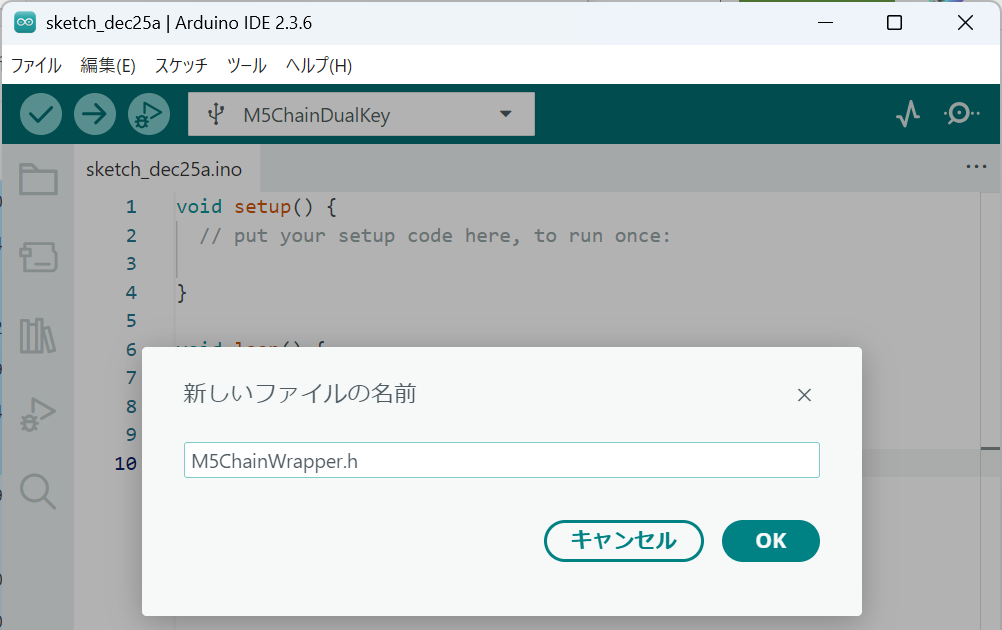
Arduino IDEでは右上の「…」から「新しいタブ」をクリックし、ファイル名にM5ChainWrapper.hと入力することでタブが追加できますので、できたタブにコードを貼り付けてください。

このラッパーを使ったサンプルコード
#include "M5Chain.h"
#include "M5ChainWrapper.h"

M5ChainManager chainManager;
M5ChainJoystick* joystick;

void setup() {
  Serial.begin(115200);
  Serial.println("M5Chain Joystick Test");

  // 初期化(自動検出)
  if (!chainManager.begin(&Serial2, 115200, GPIO_NUM_47, GPIO_NUM_48)) {
    Serial.println("Failed to initialize M5Chain");
    while (1) delay(100);
  }

  // 最初のジョイスティックを取得
  joystick = chainManager.getFirstJoystick();
  if (!joystick) {
    Serial.println("No joystick found");
    while (1) delay(100);
  }

  Serial.printf("Found %d joystick(s)\n", chainManager.getJoystickCount());

  // デッドゾーンを設定(オプション)
  joystick->setDeadZone(15);

  // LED設定
  joystick->setLEDColor(RGBColor::Green());
}

void loop() {
  // ジョイスティックの位置を取得
  int8_t x, y;
  if (joystick->getPosition(x, y)) {
    // 動きがあれば表示
    if (abs(x) > 15 || abs(y) > 15) {
      Serial.printf("Position: X=%d, Y=%d\n", x, y);
    }
  }

  // 方向を取得
  JoystickDirection dir = joystick->getDirection();
  static JoystickDirection lastDir = CENTER;

  if (dir != lastDir && dir != CENTER) {
    const char* dirNames[] = { "CENTER", "UP", "DOWN", "LEFT", "RIGHT",
                               "UP_LEFT", "UP_RIGHT", "DOWN_LEFT", "DOWN_RIGHT" };
    Serial.printf("Direction: %s\n", dirNames[dir]);
    lastDir = dir;
  } else if (dir == CENTER) {
    lastDir = CENTER;
  }

  // ボタンイベントを取得
  ButtonEvent event = joystick->getButtonEvent();
  switch (event) {
    case BUTTON_SINGLE_CLICK:
      Serial.println("Button: Single Click");
      joystick->setLEDColor(RGBColor::Blue());
      break;

    case BUTTON_DOUBLE_CLICK:
      Serial.println("Button: Double Click");
      joystick->setLEDColor(RGBColor::Red());
      break;

    case BUTTON_LONG_PRESS:
      Serial.println("Button: Long Press");
      joystick->setLEDColor(RGBColor::Yellow());
      break;

    case BUTTON_NONE:
    default:
      break;
  }

  delay(50);
}
だいぶすっきりしましたね。サンプルコードの行数も1/3程度になりました。
M5ChainManagerクラスがデバイス検出を行ってくれ、各デバイスのインスタンスを取得できるのであとはそのデバイスクラスのメソッドを呼ぶだけでデバイスが使えます。
これで、ユーザー側のコードはアプリケーションに集中して書くことができるようになりますね。
まとめ
M5StackのChainシリーズは配線不要でブロックのようにつなげていけるので、可愛くて好きです。
今回はJoyStickに限定しましたが、他のChainデバイスも同じように対応可能です。本来なら、本家ライブラリがもうちょっと使いやすいといいなと思います。
補足
2025/12/25現在、M5Chainライブラリがコンパイルできない問題があります。
プルリクエストを出しているので、そのうち反映されるかと思います。
一応修正ポイントはこちらです。
#ifndef _UNIT_CHAIN_BUS_HPP_
#define _UNIT_CHAIN_BUS_HPP_

- #include <ChainCommon.hpp>
+ #include "ChainCommon/ChainCommon.hpp"

/**
 * @brief Maximum size for I2C read operations.