0
0

Delete article

Deleted articles cannot be recovered.

Draft of this article would be also deleted.

Are you sure you want to delete this article?

More than 5 years have passed since last update.

CodeStar Railsテンプレート初期設定方法

0
Last updated at Posted at 2018-03-14

テンプレートから立ち上げて、 Rails 5.1にアップデートするまで。
初期設定をして、 RubyMineで開発をします。

RubyMineでやります。

プロジェクト作成

code commitへのログイン情報を IAM ユーザー選択 

認証情報タブ Screenshot from Gyazo

Screenshot from Gyazo

AWS CodeCommit の HTTPS Git 認証情報を落としてきて設定

複数のAWSアカウントを作っている人は、 ローカルマシンの ~/.ssh でホストごとにアクセスキーを切り替える設定を行う。

git clone

自分は Source tree でやってるので、 ID PASS を聞かれたら、AWS CodeCommit の HTTPS Git 認証情報を入力。

gem install bundle

gemfileを
gem 'rails', '5.1'
gem 'jbuilder'
gem 'listen'

bundle update

bundle exec rake secret

作った文字列をここの
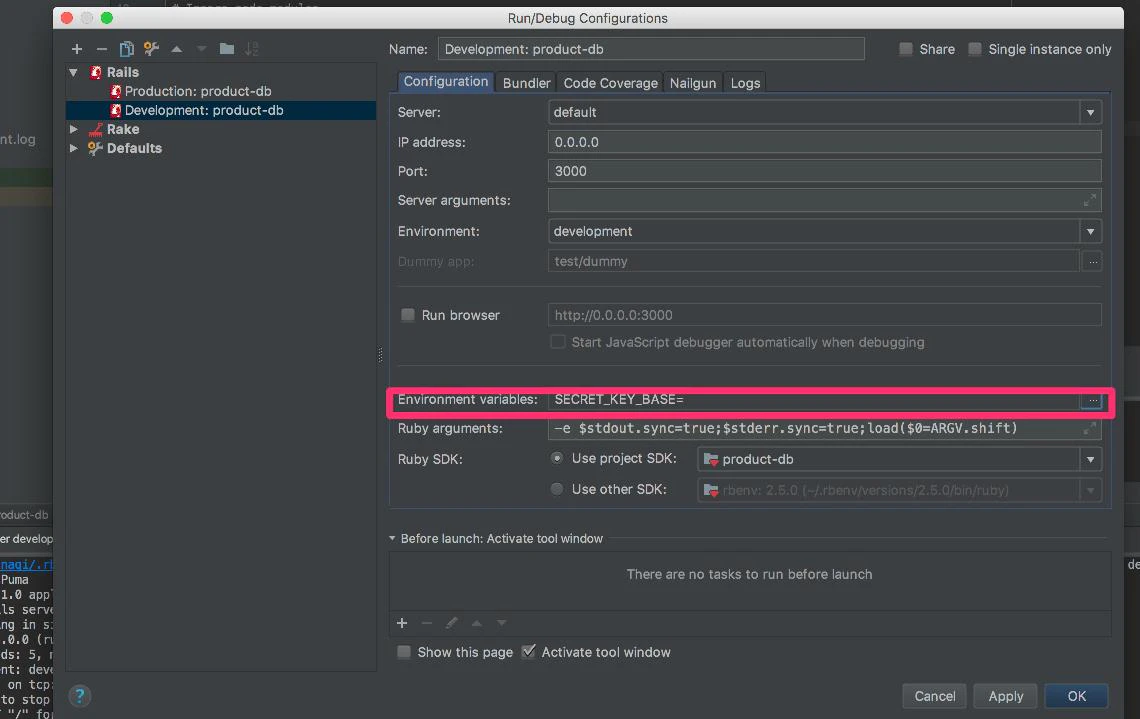
環境変数に追加1

環境変数に追加

https://www.evernote.com/l/AKnlXbOxRXFMjYBHez8_fyWJtZy1k5wiSL8
プロジェクトのSDKは標準でついていないのでプロジェクトに含まれていないRubyMineのSDKを選択

.gitignore を適当に作る

rubymineのでブレイクポイントを止めながらデバッグできる。

https://qiita.com/kikunantoka/items/dd22cf51071b93ba5b62
あとはこれでパスワードを管理しておけば問題なしかな。

0
0
0

Register as a new user and use Qiita more conveniently

  1. You get articles that match your needs
  2. You can efficiently read back useful information
  3. You can use dark theme
What you can do with signing up
0
0

Delete article

Deleted articles cannot be recovered.

Draft of this article would be also deleted.

Are you sure you want to delete this article?