
はじめに
表題通り、DifyでHTTPリクエストの結果をparseします。
プログラミングしていると、HTTPの結果をJSONではなく、parseした状態で利用できるといいなと感じていました。
ただ、あれこれやってみたんですが、結構苦戦。Dify周りの設定がよくわからず。。。ようやく形になったので、掲載しておきます!!
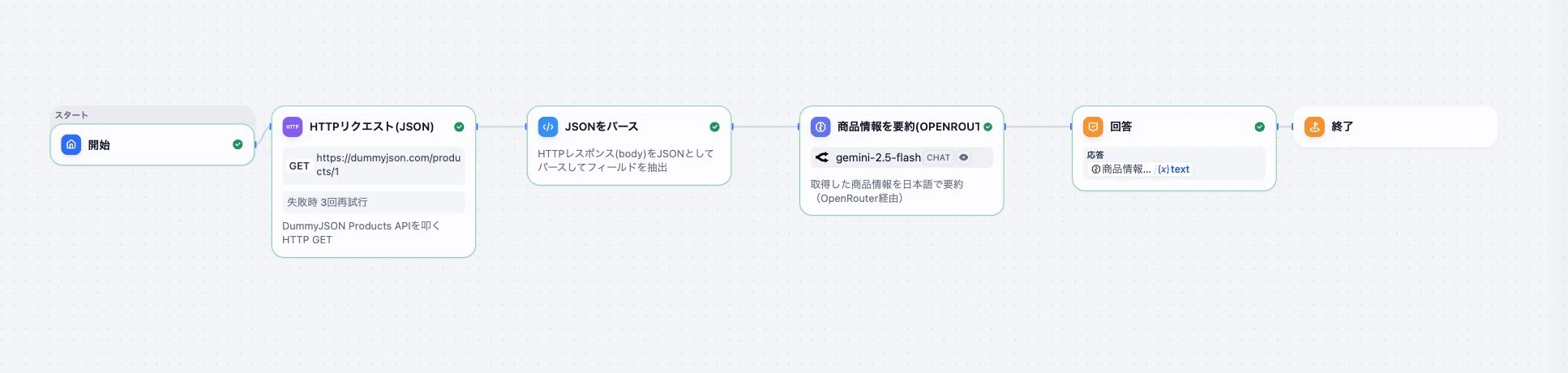
DSLファイル
app:
  description: シンプルなHTTP(JSON) + Code + LLM + Answerのサンプル(OpenRouter版)
  icon: None
  icon_background: '#FFEAD5'
  mode: workflow
  name: HTTP JSON Sample (OpenRouter)
  use_icon_as_answer_icon: false
dependencies:
- current_identifier: null
  type: marketplace
  value:
    marketplace_plugin_unique_identifier: langgenius/openrouter:0.0.29@8cd8262e782c8a529e9d6c8601b3bf06f3d3eac62247fd92787b7c0f2de622f6
    version: null
kind: app
version: 0.5.0
workflow:
  conversation_variables: []
  environment_variables: []
  features:
    file_upload:
      allowed_file_extensions:
      - .JPG
      - .JPEG
      - .PNG
      - .GIF
      - .WEBP
      - .SVG
      allowed_file_types:
      - image
      allowed_file_upload_methods:
      - local_file
      - remote_url
      enabled: false
      fileUploadConfig:
        audio_file_size_limit: 50
        batch_count_limit: 5
        file_size_limit: 15
        image_file_size_limit: 10
        video_file_size_limit: 100
        workflow_file_upload_limit: 10
      image:
        enabled: false
        number_limits: 3
        transfer_methods:
        - local_file
        - remote_url
      number_limits: 3
    opening_statement: ''
    retriever_resource:
      enabled: false
    sensitive_word_avoidance:
      enabled: false
    speech_to_text:
      enabled: false
    suggested_questions: []
    suggested_questions_after_answer:
      enabled: false
    text_to_speech:
      enabled: false
      language: ''
      voice: ''
  graph:
    edges:
    - data:
        isInIteration: false
        sourceType: start
        targetType: http-request
      id: start-to-http
      selected: false
      source: start
      sourceHandle: source
      target: http_1
      targetHandle: target
      type: custom
      zIndex: 0
    - data:
        isInIteration: false
        sourceType: http-request
        targetType: code
      id: http-to-code
      selected: false
      source: http_1
      sourceHandle: source
      target: parse_json
      targetHandle: target
      type: custom
      zIndex: 0
    - data:
        isInIteration: false
        sourceType: code
        targetType: llm
      id: code-to-llm
      selected: false
      source: parse_json
      sourceHandle: source
      target: llm_1
      targetHandle: target
      type: custom
      zIndex: 0
    - data:
        isInIteration: false
        sourceType: llm
        targetType: answer
      id: llm-to-answer
      selected: false
      source: llm_1
      sourceHandle: source
      target: answer
      targetHandle: target
      type: custom
      zIndex: 0
    - data:
        isInIteration: false
        sourceType: answer
        targetType: end
      id: answer-to-end
      selected: false
      source: answer
      sourceHandle: source
      target: end
      targetHandle: target
      type: custom
      zIndex: 0
    nodes:
    - data:
        desc: ''
        selected: false
        title: 開始
        type: start
        variables: []
      height: 71
      id: start
      position:
        x: 0
        y: 200
      positionAbsolute:
        x: 0
        y: 200
      selected: false
      sourcePosition: right
      targetPosition: left
      type: custom
      width: 242
    - data:
        authorization:
          config: null
          type: no-auth
        body:
          data:
          - type: text
            value: ''
          type: none
        desc: DummyJSON Products APIを叩くHTTP GET
        headers: ''
        method: get
        params: ''
        retry_config:
          max_retries: 3
          retry_enabled: true
          retry_interval: 100
        selected: false
        ssl_verify: true
        timeout:
          max_connect_timeout: 0
          max_read_timeout: 0
          max_write_timeout: 0
        title: HTTPリクエスト(JSON)
        type: http-request
        url: https://dummyjson.com/products/1
        variables: []
      height: 179
      id: http_1
      position:
        x: 260
        y: 200
      positionAbsolute:
        x: 260
        y: 200
      selected: false
      sourcePosition: right
      targetPosition: left
      type: custom
      width: 241
    - data:
        code: "import json\n\ndef main(body: str) -> dict:\n    \"\"\"\n    HTTPリクエストのレスポンス(JSON文字列)から\n\
          \    いくつかのフィールドを取り出して返却するサンプル。\n    \"\"\"\n    data = json.loads(body)\n\
          \n    title = data.get(\"title\")\n    price = data.get(\"price\")\n   \
          \ category = data.get(\"category\")\n    description = data.get(\"description\"\
          )\n\n    return {\n        \"title\": title,\n        \"price\": price,\n\
          \        \"category\": category,\n        \"description\": description,\n\
          \    }\n"
        code_language: python3
        dependencies: []
        desc: HTTPレスポンス(body)をJSONとしてパースしてフィールドを抽出
        outputs:
          category:
            children: null
            type: string
          description:
            children: null
            type: string
          price:
            children: null
            type: number
          title:
            children: null
            type: string
        selected: false
        title: JSONをパース
        type: code
        variables:
        - value_selector:
          - http_1
          - body
          variable: body
      height: 94
      id: parse_json
      position:
        x: 560
        y: 200
      positionAbsolute:
        x: 560
        y: 200
      selected: false
      sourcePosition: right
      targetPosition: left
      type: custom
      width: 241
    - data:
        context:
          enabled: false
          variable_selector: []
        desc: 取得した商品情報を日本語で要約(OpenRouter経由)
        model:
          completion_params:
            temperature: 0.7
          mode: chat
          name: google/gemini-2.5-flash
          provider: langgenius/openrouter/openrouter
        prompt_template:
        - id: sys
          role: system
          text: 'あなたは有能なアシスタントです。 与えられた商品の情報を、分かりやすい日本語で短く要約してください。

            '
        - id: user
          role: user
          text: '次の商品情報を要約してください。


            タイトル: {{#parse_json.title#}}

            価格: {{#parse_json.price#}}

            カテゴリ: {{#parse_json.category#}}

            説明: {{#parse_json.description#}}

            '
        selected: true
        title: 商品情報を要約(OpenRouter)
        type: llm
        variables: []
        vision:
          enabled: false
      height: 130
      id: llm_1
      position:
        x: 880
        y: 200
      positionAbsolute:
        x: 880
        y: 200
      selected: true
      sourcePosition: right
      targetPosition: left
      type: custom
      width: 241
    - data:
        answer: '{{#llm_1.text#}}'
        desc: ''
        selected: false
        title: 回答
        type: answer
        variables: []
      height: 101
      id: answer
      position:
        x: 1200
        y: 200
      positionAbsolute:
        x: 1200
        y: 200
      selected: false
      sourcePosition: right
      targetPosition: left
      type: custom
      width: 241
    - data:
        desc: ''
        outputs: []
        selected: false
        title: 終了
        type: end
      height: 50
      id: end
      position:
        x: 1460
        y: 200
      positionAbsolute:
        x: 1460
        y: 200
      selected: false
      sourcePosition: right
      targetPosition: left
      type: custom
      width: 241
    viewport:
      x: 150.01014050020314
      y: 126.33575807486841
      zoom: 0.5835857147802683
  rag_pipeline_variables: []
Jsonのパース方法
HTTPリクエストの結果は下記のような形です。
{
  "id": 1,
  "title": "Essence Mascara Lash Princess",
  "description": "The Essence Mascara Lash Princess is a popular mascara known for its volumizing and lengthening effects. Achieve dramatic lashes with this long-lasting and cruelty-free formula.",
  "category": "beauty",
  "price": 9.99,
  ...
}
→Dify上だと、jsonをそのまま使うと扱いにくいので、変数化していきます。
import json

def main(body: str) -> dict:
    """
    HTTPリクエストのレスポンス(JSON文字列)から
    いくつかのフィールドを取り出して返却するサンプル。
    """
    data = json.loads(body)

    title = data.get("title")
    price = data.get("price")
    category = data.get("category")
    description = data.get("description")

    return {
        "title": title,
        "price": price,
        "category": category,
        "description": description,
    }
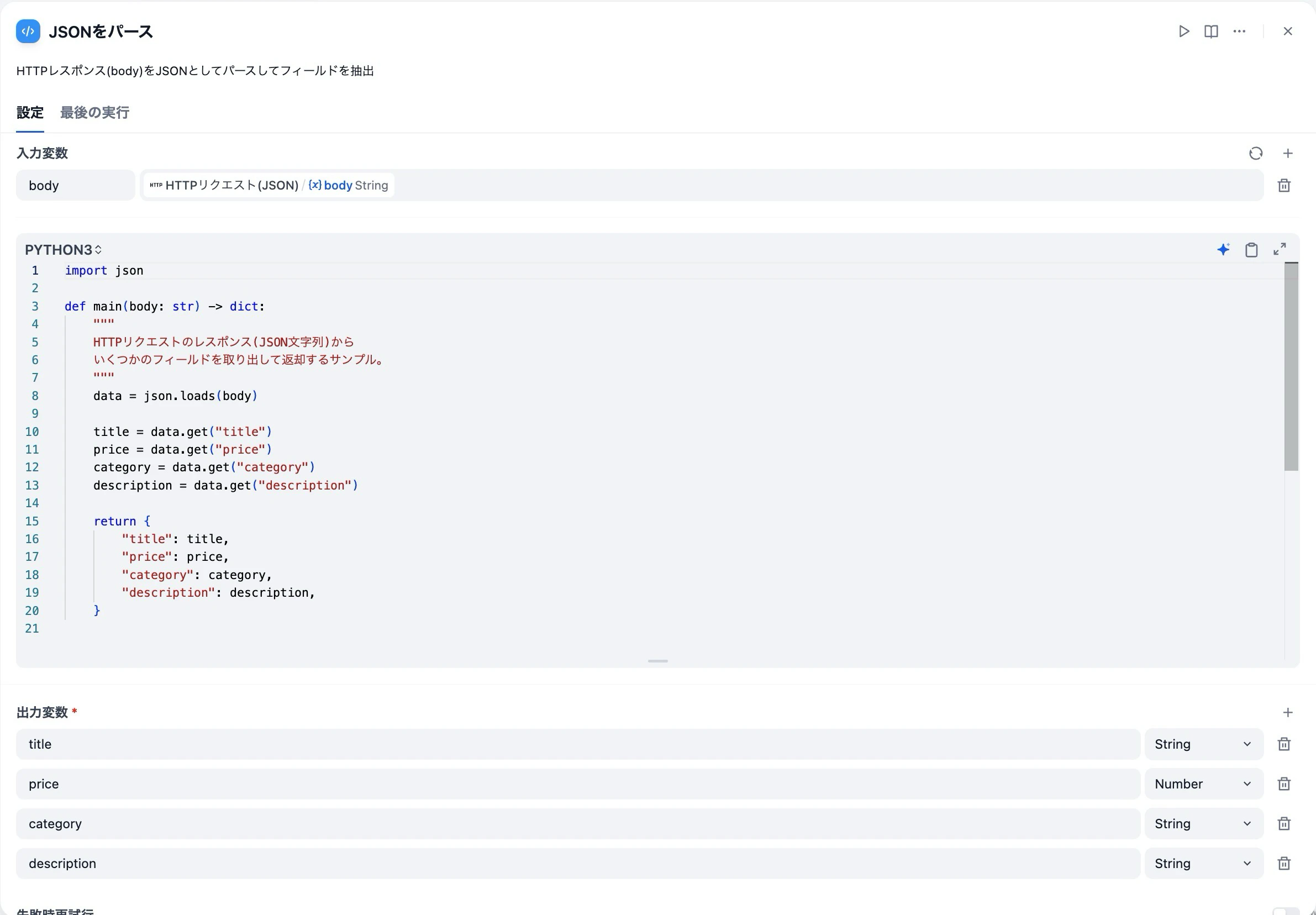
これでできました!!初歩の部分だったんですが、エラーやデバッグがおおく大変でした💦💦💦