
はじめに
前回の記事の続きです。今回は予定の Tool を足し、LLM に予定と天気を使い分けさせます。
前回は「今日19時に梅田へ行くんだけど、傘いる?」と、場所と時刻をこちらが言っていました。LLM は getWeather だけを呼びました。
Agentic AIを学びたい(Step2:LLMにgetWeatherを呼ばせる)
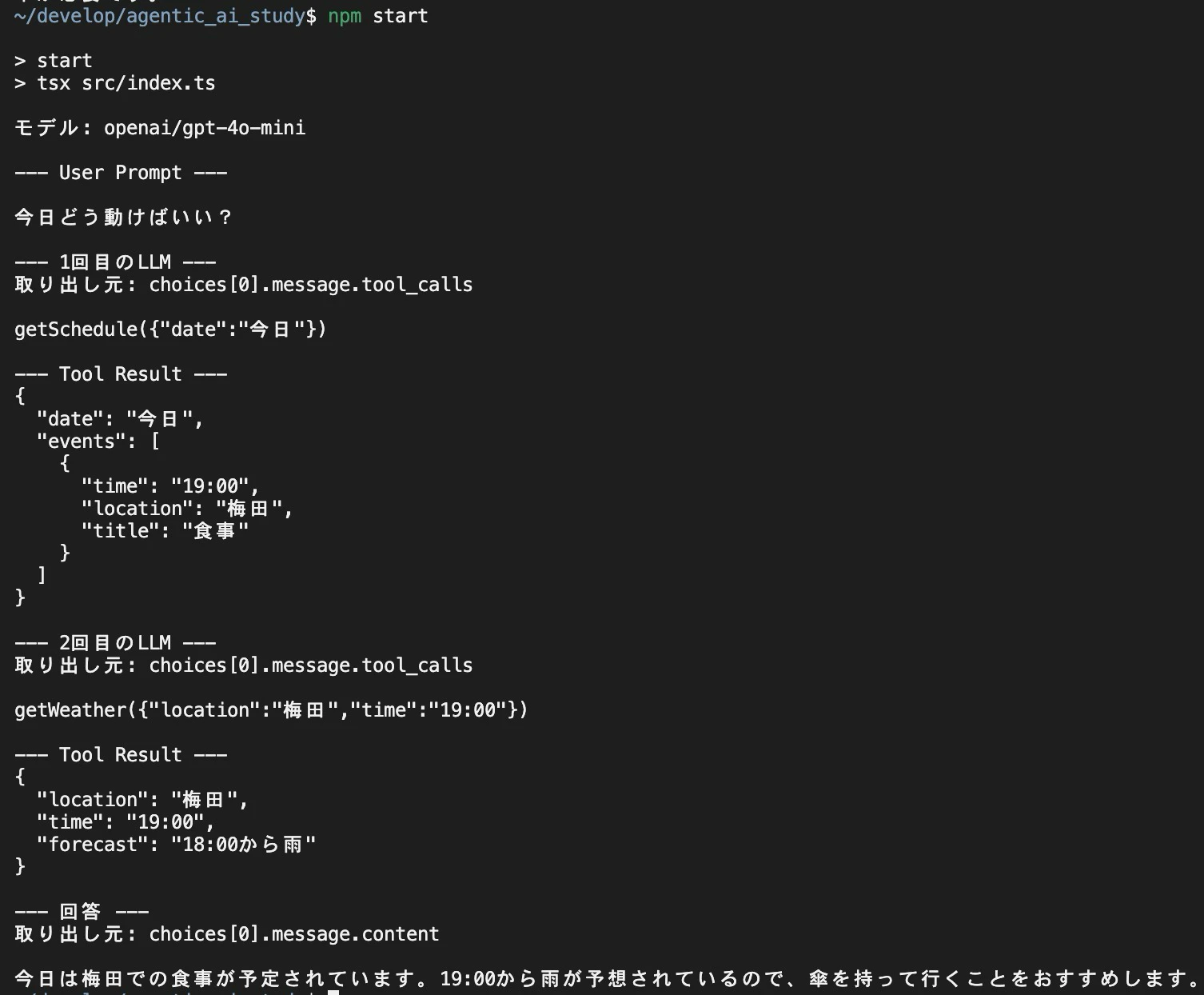
今回の入力は「今日どう動けばいい?」だけです。予定が分からないので、LLM は先に getSchedule を呼びます。結果が「19:00 梅田で食事」だったので、次に getWeather を呼びます。
返す予定も予報も、まだ固定のサンプルです。tools に入っているのは説明書です。関数を動かしているのは execute.ts で、聞き直しているのは runtime.ts です。LLM は、次にどの名前を呼ぶかを tool_calls で返します。
呼び出しは3回です。1回目が予定、2回目が天気、3回目が回答です。Tool が返ってくるあいだ、結果を戻して聞き直しています。この繰り返しを Agent Loop として整理するのは、まだ後の Step です。
ここまで src/index.ts にまとめていた処理を、責務ごとにファイルへ分けています。
成果物
シーケンス図
User
  今日どう動けばいい?
    ↓
runtime.ts  1回目
  getSchedule({ date: "今日" })
    ↓
execute.ts → schedule.ts
  19:00 梅田で食事
    ↓
runtime.ts  2回目
  getWeather({ location: "梅田", time: "19:00" })
    ↓
execute.ts → weather.ts
  18:00から雨
    ↓
runtime.ts  3回目
  choices[0].message.content
  今日は19:00に梅田で食事があります。傘を持って出かけた方が良いでしょう。
tools
  getSchedule(date)      schedule.ts
  getWeather(location, time)  weather.ts

1回目  tool_calls  getSchedule
2回目  tool_calls  getWeather
3回目  content     回答
Tool を選んでいるのは LLM です。runtime.ts がその名前を execute.ts に渡し、execute.ts が関数を実行します。
ディレクトリ構成
agentic_ai_study/
├─ src/
│  ├─ index.ts              起動
│  ├─ env.ts                .env の読み取り
│  ├─ agent/
│  │  ├─ prompts.ts         System Prompt と User Prompt
│  │  └─ runtime.ts         Tool が返るあいだ聞き直す
│  ├─ llm/
│  │  ├─ openrouter.ts      OpenRouter への送信
│  │  └─ types.ts           メッセージと Tool の型
│  └─ tools/
│     ├─ schedule.ts        getSchedule の説明と実装
│     ├─ weather.ts         getWeather の説明と実装
│     └─ execute.ts         名前を見て関数を動かす
├─ .env                     OPENROUTER_API_KEY と MODEL_NAME
├─ .env.example
├─ package.json             npm start
└─ tsconfig.json
npm start
  └─ tsx src/index.ts
       └─ agent/runtime.ts
コード
.env
OPENROUTER_API_KEY=xxx
MODEL_NAME=openai/gpt-4o-mini
src/index.ts
import "dotenv/config";
import { run } from "./agent/runtime.js";

run().catch((error: unknown) => {
  const message = error instanceof Error ? error.message : String(error);
  console.error(message);
  process.exitCode = 1;
});
src/agent/prompts.ts
export const USER_PROMPT = "今日どう動けばいい?";

export const SYSTEM_PROMPT = `あなたは外出前の準備を手伝うアシスタントです。
まず予定を getSchedule で確認してください。
予定に外出先と時刻がある場合は、次に getWeather でその場所と時刻の天気を確認してください。
一度の応答では Tool を1つだけ呼んでください。
予定も天気も、Tool の結果が出るまで推測してはいけません。
両方の結果が揃ったら、今日の動き方と傘の要否を日本語で短く答えてください。
移動時間は分からないので、出発時刻は答えに含めないでください。`;
src/agent/runtime.ts
import { requireEnv } from "../env.js";
import { callOpenRouter } from "../llm/openrouter.js";
import type { AssistantReply, ChatMessage, ChatResponse } from "../llm/types.js";
import { executeTool, tools } from "../tools/execute.js";
import { SYSTEM_PROMPT, USER_PROMPT } from "./prompts.js";

function readMessage(response: ChatResponse): AssistantReply {
  const message = response.choices?.[0]?.message;
  if (!message) {
    throw new Error("応答に choices[0].message がありません");
  }
  return message;
}

export async function run(): Promise<void> {
  console.log("モデル:", requireEnv("MODEL_NAME"));
  console.log("\n--- User Prompt ---\n");
  console.log(USER_PROMPT);

  const messages: ChatMessage[] = [
    { role: "system", content: SYSTEM_PROMPT },
    { role: "user", content: USER_PROMPT },
  ];

  for (let turn = 1; turn <= 4; turn += 1) {
    const message = readMessage(await callOpenRouter(messages, tools));
    const toolCalls = message.tool_calls ?? [];

    if (toolCalls.length === 0) {
      if (!message.content) {
        throw new Error("応答に choices[0].message.content がありません");
      }
      console.log("\n--- 回答 ---");
      console.log("取り出し元: choices[0].message.content\n");
      console.log(message.content);
      return;
    }

    console.log(`\n--- ${turn}回目のLLM ---`);
    console.log("取り出し元: choices[0].message.tool_calls\n");

    messages.push({
      role: "assistant",
      content: message.content ?? null,
      tool_calls: toolCalls,
    });

    for (const call of toolCalls) {
      const args = JSON.parse(call.function.arguments) as unknown;
      const result = executeTool(call);
      console.log(`${call.function.name}(${JSON.stringify(args)})`);
      console.log("\n--- Tool Result ---");
      console.log(JSON.stringify(result, null, 2));

      messages.push({
        role: "tool",
        tool_call_id: call.id,
        name: call.function.name,
        content: JSON.stringify(result),
      });
    }
  }

  throw new Error("Tool 呼び出しが4回を超えたため終了しました");
}
src/llm/openrouter.ts
import { requireEnv } from "../env.js";
import type { ChatMessage, ChatResponse, ToolDefinition } from "./types.js";

const OPENROUTER_URL = "https://openrouter.ai/api/v1/chat/completions";

export async function callOpenRouter(
  messages: ChatMessage[],
  tools: ToolDefinition[],
): Promise<ChatResponse> {
  const response = await fetch(OPENROUTER_URL, {
    method: "POST",
    headers: {
      Authorization: `Bearer ${requireEnv("OPENROUTER_API_KEY")}`,
      "Content-Type": "application/json",
    },
    body: JSON.stringify({
      model: requireEnv("MODEL_NAME"),
      messages,
      tools,
      provider: { require_parameters: true },
    }),
  });

  if (!response.ok) {
    const body = await response.text();
    throw new Error(`OpenRouter API error ${response.status}: ${body}`);
  }

  return (await response.json()) as ChatResponse;
}
src/tools/schedule.ts
import type { ToolDefinition } from "../llm/types.js";

export type ScheduleArgs = {
  date: string;
};

export type ScheduleResult = {
  date: string;
  events: Array<{
    time: string;
    location: string;
    title: string;
  }>;
};

export const scheduleTool: ToolDefinition = {
  type: "function",
  function: {
    name: "getSchedule",
    description: "指定した日の予定を取得する",
    parameters: {
      type: "object",
      properties: {
        date: {
          type: "string",
          description: "予定を確認する日。例: 今日",
        },
      },
      required: ["date"],
    },
  },
};

export function getSchedule(args: ScheduleArgs): ScheduleResult {
  return {
    date: args.date,
    events: [{ time: "19:00", location: "梅田", title: "食事" }],
  };
}
src/tools/weather.ts
import type { ToolDefinition } from "../llm/types.js";

export type WeatherArgs = {
  location: string;
  time: string;
};

export type WeatherResult = WeatherArgs & {
  forecast: string;
};

export const weatherTool: ToolDefinition = {
  type: "function",
  function: {
    name: "getWeather",
    description: "指定した場所と時刻の天気予報を取得する",
    parameters: {
      type: "object",
      properties: {
        location: {
          type: "string",
          description: "場所。例: 梅田",
        },
        time: {
          type: "string",
          description: "確認したい時刻。例: 19:00",
        },
      },
      required: ["location", "time"],
    },
  },
};

export function getWeather(args: WeatherArgs): WeatherResult {
  return {
    location: args.location,
    time: args.time,
    forecast: "18:00から雨",
  };
}
src/tools/execute.ts
import type { ToolCall, ToolDefinition } from "../llm/types.js";
import { getSchedule, scheduleTool, type ScheduleArgs } from "./schedule.js";
import { getWeather, weatherTool, type WeatherArgs } from "./weather.js";

export const tools: ToolDefinition[] = [scheduleTool, weatherTool];

function parseArgs<T extends object>(raw: string, keys: Array<keyof T>): T {
  const parsed: unknown = JSON.parse(raw);
  if (typeof parsed !== "object" || parsed === null) {
    throw new Error(`Tool の引数が想定と違います: ${raw}`);
  }
  for (const key of keys) {
    if (typeof (parsed as T)[key] !== "string") {
      throw new Error(`Tool の引数が想定と違います: ${raw}`);
    }
  }
  return parsed as T;
}

export function executeTool(call: ToolCall): unknown {
  switch (call.function.name) {
    case "getSchedule":
      return getSchedule(parseArgs<ScheduleArgs>(call.function.arguments, ["date"]));
    case "getWeather":
      return getWeather(
        parseArgs<WeatherArgs>(call.function.arguments, ["location", "time"]),
      );
    default:
      throw new Error(`未定義の Tool です: ${call.function.name}`);
  }
}
src/llm/types.ts
export type ToolDefinition = {
  type: "function";
  function: {
    name: string;
    description: string;
    parameters: {
      type: "object";
      properties: Record<string, { type: "string"; description: string }>;
      required: string[];
    };
  };
};

export type ToolCall = {
  id: string;
  type: "function";
  function: {
    name: string;
    arguments: string;
  };
};

export type ChatMessage =
  | { role: "system" | "user"; content: string }
  | { role: "assistant"; content: string | null; tool_calls?: ToolCall[] }
  | { role: "tool"; tool_call_id: string; name: string; content: string };

export type AssistantReply = {
  role?: string;
  content?: string | null;
  tool_calls?: ToolCall[];
};

export type ChatResponse = {
  choices?: Array<{
    message?: AssistantReply;
  }>;
};
src/env.ts
export function requireEnv(name: string): string {
  const value = process.env[name];
  if (!value) {
    throw new Error(`${name} を .env に設定してください`);
  }
  return value;
}
あとがき
SystemPromptとUserPromptの違いがわからなくなったので、スライド1枚にまとめました。
