

はじめに
前回までで、家計簿アプリが一旦完成しました。(AIがやりました)
今回は支出登録画面を修正します。
プロンプト
支出登録画面の修正をしたいです。
以下修正点
・画面にID項目追加、入力+returnで該当情報をロード
・他画面から開、引数にIDがある場合に該当情報を表示
・修正モード時はID項目をreadOnlyに
回答
以下構成で実装します。
対応内容:
| 修正 | 内容 |
|---|---|
| ID入力 | ID指定ロード |
| Enter検索 | ID入力+Enterで読込 |
| 引数ロード | 他画面からID指定 |
| 修正モード | ID ReadOnly |
| 新規/修正切替 | 自動判定 |
1. 画面項目追加
追加コントロール。
| コントロール | 名前 |
|---|---|
| TextBox | txtId |
2. モード管理追加
ExpenseRegisterForm.cs
private long? _expenseId;

private bool IsEditMode
{
    get
    {
        return _expenseId.HasValue;
    }
}
3. コンストラクタ追加
新規モード
public ExpenseRegisterForm()
{
    InitializeComponent();

    InitializeForm();
}
修正モード
public ExpenseRegisterForm(long expenseId)
{
    InitializeComponent();

    _expenseId = expenseId;

    InitializeForm();

    LoadExpense(expenseId);
}
4. InitializeForm
追加
private void InitializeForm()
{
    InitializeGrid();

    txtId.KeyDown += TxtId_KeyDown;

    // 修正モード
    if (IsEditMode)
    {
        txtId.ReadOnly = true;

        txtId.Text =
            _expenseId.Value.ToString();
    }
}
5. Enterでロード
TxtId_KeyDown
private void TxtId_KeyDown(
    object sender,
    KeyEventArgs e)
{
    if (e.KeyCode != Keys.Enter)
    {
        return;
    }

    if (!long.TryParse(
        txtId.Text,
        out long id))
    {
        MessageBox.Show(
            "IDが不正です。");

        return;
    }

    _expenseId = id;

    LoadExpense(id);

    txtId.ReadOnly = true;

    e.SuppressKeyPress = true;
}
6. LoadExpense
本体
private void LoadExpense(long expenseId)
{
    using SqliteConnection conn =
        DbHelper.GetConnection();

    conn.Open();

    LoadExpenseHeader(
        conn,
        expenseId);

    LoadExpenseItems(
        conn,
        expenseId);
}
7. ヘッダ取得
LoadExpenseHeader
private void LoadExpenseHeader(
    SqliteConnection conn,
    long expenseId)
{
    string sql =
    @"
    SELECT
        Id,
        ExpenseDate,
        TotalAmount,
        PaymentMethod,
        Note
    FROM Expenses
    WHERE Id = @Id;
    ";

    using SqliteCommand cmd =
        new SqliteCommand(sql, conn);

    cmd.Parameters.AddWithValue(
        "@Id",
        expenseId);

    using SqliteDataReader reader =
        cmd.ExecuteReader();

    if (!reader.Read())
    {
        MessageBox.Show(
            "データが存在しません。");

        return;
    }

    txtId.Text =
        reader.GetInt64(0).ToString();

    dtpDate.Value =
        DateTime.Parse(
            reader.GetString(1));

    txtAmount.Text =
        reader.GetDecimal(2).ToString();

    txtPaymentMethod.Text =
        reader.IsDBNull(3)
        ? ""
        : reader.GetString(3);

    txtNote.Text =
        reader.IsDBNull(4)
        ? ""
        : reader.GetString(4);
}
8. 明細取得
LoadExpenseItems
private void LoadExpenseItems(
    SqliteConnection conn,
    long expenseId)
{
    dgvItems.Rows.Clear();

    string sql =
    @"
    SELECT
        ProductName,
        Category,
        Amount,
        Quantity,
        TaxRate,
        Note
    FROM ExpenseItems
    WHERE ExpenseId = @ExpenseId;
    ";

    using SqliteCommand cmd =
        new SqliteCommand(sql, conn);

    cmd.Parameters.AddWithValue(
        "@ExpenseId",
        expenseId);

    using SqliteDataReader reader =
        cmd.ExecuteReader();

    while (reader.Read())
    {
        dgvItems.Rows.Add(
            reader.IsDBNull(0)
                ? ""
                : reader.GetString(0),

            reader.IsDBNull(1)
                ? ""
                : reader.GetString(1),

            reader.GetDecimal(2),

            reader.GetInt32(3),

            reader.GetInt32(4),

            reader.IsDBNull(5)
                ? ""
                : reader.GetString(5));
    }
}
9. 登録処理修正
新規/更新切替。
btnRegister_Click
private void btnRegister_Click(
    object sender,
    EventArgs e)
{
    try
    {
        if (IsEditMode)
        {
            UpdateExpense();
        }
        else
        {
            RegisterExpense();
        }

        MessageBox.Show(
            "保存しました。");
    }
    catch (Exception ex)
    {
        MessageBox.Show(
            ex.Message);
    }
}
10. UpdateExpense
本体
private void UpdateExpense()
{
    using SqliteConnection conn =
        DbHelper.GetConnection();

    conn.Open();

    using SqliteTransaction tran =
        conn.BeginTransaction();

    try
    {
        UpdateExpenseHeader(
            conn,
            tran);

        DeleteExpenseItems(
            conn,
            tran);

        InsertExpenseItems(
            conn,
            tran,
            _expenseId.Value);

        tran.Commit();
    }
    catch
    {
        tran.Rollback();

        throw;
    }
}
11. ヘッダ更新
UpdateExpenseHeader
private void UpdateExpenseHeader(
    SqliteConnection conn,
    SqliteTransaction tran)
{
    string sql =
    @"
    UPDATE Expenses
    SET
        ExpenseDate = @ExpenseDate,
        TotalAmount = @TotalAmount,
        PaymentMethod = @PaymentMethod,
        Note = @Note
    WHERE Id = @Id;
    ";

    using SqliteCommand cmd =
        new SqliteCommand(
            sql,
            conn,
            tran);

    cmd.Parameters.AddWithValue(
        "@Id",
        _expenseId.Value);

    cmd.Parameters.AddWithValue(
        "@ExpenseDate",
        dtpDate.Value.ToString("yyyy-MM-dd"));

    cmd.Parameters.AddWithValue(
        "@TotalAmount",
        decimal.Parse(txtAmount.Text));

    cmd.Parameters.AddWithValue(
        "@PaymentMethod",
        txtPaymentMethod.Text);

    cmd.Parameters.AddWithValue(
        "@Note",
        txtNote.Text);

    cmd.ExecuteNonQuery();
}
12. 明細削除
DeleteExpenseItems
private void DeleteExpenseItems(
    SqliteConnection conn,
    SqliteTransaction tran)
{
    string sql =
    @"
    DELETE FROM ExpenseItems
    WHERE ExpenseId = @ExpenseId;
    ";

    using SqliteCommand cmd =
        new SqliteCommand(
            sql,
            conn,
            tran);

    cmd.Parameters.AddWithValue(
        "@ExpenseId",
        _expenseId.Value);

    cmd.ExecuteNonQuery();
}
13. 一覧画面から開く
ダブルクリック
private void dgvExpenses_CellDoubleClick(
    object sender,
    DataGridViewCellEventArgs e)
{
    if (e.RowIndex < 0)
    {
        return;
    }

    long id =
        Convert.ToInt64(
            dgvExpenses.Rows[e.RowIndex]
                .Cells["colId"].Value);

    ExpenseRegisterForm form =
        new ExpenseRegisterForm(id);

    form.ShowDialog();

    LoadExpenseList();
}
実現される動作
| 動作 | 結果 |
|---|---|
| 新規起動 | 新規モード |
| ID入力+Enter | 読込 |
| 一覧ダブルクリック | 修正モード |
| 修正モード | ID編集不可 |
| 保存 | UPDATE |
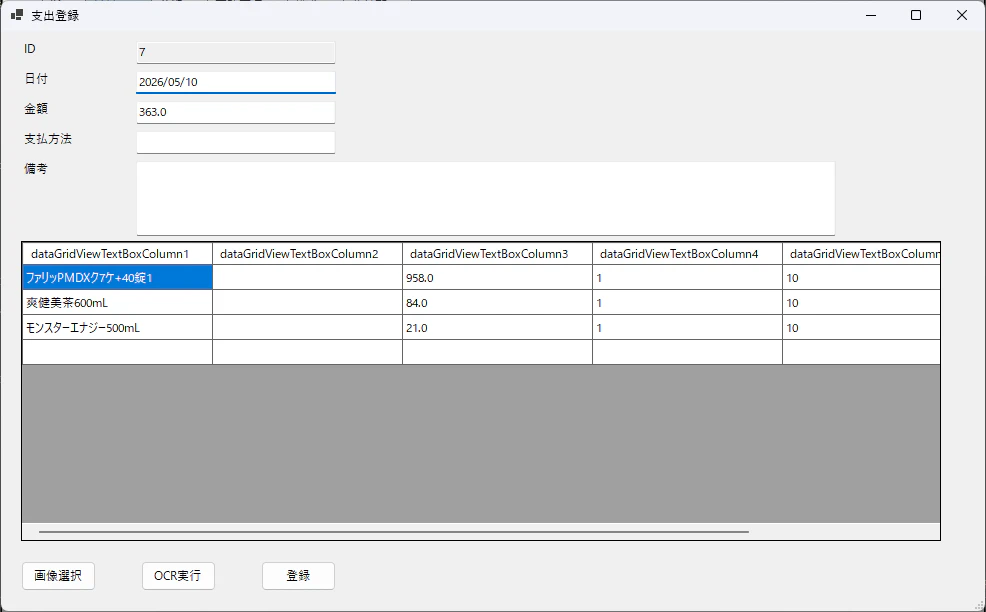
起動、確認
起動してみます。
最後に
次回は機能全体の再設計をします。