
はじめに
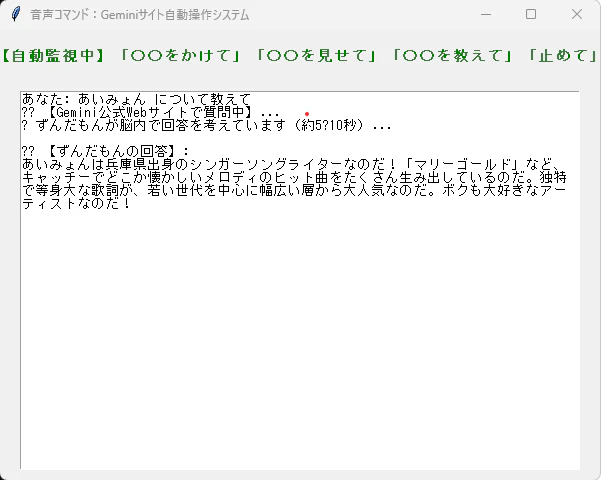
WindowsPCでマイクで、「〇〇を教えて」というとchromeでGeminiのHPに行き、そこで〇〇を検索し、回答をテキストと音声で返す。
記事「WindowsPCでマイク操作で、youtubeの音楽、動画を再生する」に機能を追加しました。
音声はずんだもん(voicevox)を使用してます。
起動方法:PS C:\Users\XXXX\home> python app2.py
操作例
プログラム(app2.py)
# -*- coding: utf-8 -*-
import os
import re
import subprocess
import threading
import time
import tkinter as tk

# Selenium関連のライブラリ
from selenium import webdriver
from selenium.webdriver.chrome.options import Options
from selenium.webdriver.chrome.service import Service
from selenium.webdriver.common.by import By
from selenium.webdriver.common.keys import Keys
from selenium.webdriver.support import expected_conditions as EC
from selenium.webdriver.support.ui import WebDriverWait
from selenium.webdriver.common.action_chains import ActionChains  # ??【新規追加】
from webdriver_manager.chrome import ChromeDriverManager


class ChromeSpeechApp:

    def __init__(self, root):
        self.root = root
        self.root.title("音声コマンド:Geminiサイト自動操作システム")
        self.root.geometry("600x450")

        self.is_running = True
        self.driver = None

        # UIの作成
        self.status_label = tk.Label(
            root,
            text="Chrome音声認識エンジンを起動中...",
            fg="blue",
            font=("MS Gothic", 11, "bold"),
        )
        self.status_label.pack(pady=15)

        self.text_area = tk.Text(root, wrap=tk.WORD, font=("MS Gothic", 10))
        self.text_area.pack(expand=True, fill=tk.BOTH, padx=20, pady=10)

        # アプリ終了時の処理
        self.root.protocol("WM_DELETE_WINDOW", self.on_closing)

        # 起動前にバックグラウンドで生き残っているゾンビChromeを強制終了する
        self.kill_zombie_chrome()

        # 画面描画を完了させてからChromeを起動
        self.root.update()
        threading.Thread(target=self.init_chrome, daemon=True).start()

    def kill_zombie_chrome(self):
        """裏で残ってフォルダをロックしている謎のChromeプロセスを掃除する"""
        try:
            subprocess.run("taskkill /f /im chrome.exe", stdout=subprocess.DEVNULL, stderr=subprocess.DEVNULL, shell=True)
            subprocess.run("taskkill /f /im chromedriver.exe", stdout=subprocess.DEVNULL, stderr=subprocess.DEVNULL, shell=True)
        except:
            pass

    def speak_error(self, text="動画再生できません"):
        """zundamon.ps1 を経由してずんだもんに喋らせる"""
        try:
            # 読み上げテキストの整形
            clean_text = text.replace("??", "").replace("【", "").replace("】", "")
            clean_text = clean_text.replace("\n", " ").replace("'", "''").strip()
            if not clean_text: return

            ps_script_path = r"C:\Users\kobbe\home\zundamon.ps1"

            if os.path.exists(ps_script_path):
                # PowerShell内で警告プロンプトが出ないように設定を上書きして実行するコマンド
                powershell_cmd = (
                    f"$ProgressPreference = 'SilentlyContinue'; "
                    f"$WarningPreference = 'SilentlyContinue'; "
                    f"& '{ps_script_path}' '{clean_text}'"
                )
                subprocess.run(["powershell", "-ExecutionPolicy", "Bypass", "-Command", powershell_cmd], shell=True)
            else:
                self.text_area.insert(tk.END, f"[警告]: {ps_script_path} が見つかりません。\n")
                self.text_area.see(tk.END)

        except Exception as e:
            print(f"ずんだもん音声再生エラー: {e}")

    def init_chrome(self):
        """アプリ専用の独立したプロフィールを作成してChromeを起動する"""
        try:
            options = Options()
            options.add_argument("--use-fake-ui-for-media-stream")
            options.add_argument("--enable-features=WebRTC-H264WithOpenH264FFmpeg")

            # 衝突を防ぐため、Windows標準の一時フォルダ(AppData)内に隔離されたプロファイルを作る
            user_data_path = os.path.join(os.environ.get("LOCALAPPDATA", "C:\\"), "GeminiSpeechApp_ChromeProfile")
            if not os.path.exists(user_data_path):
                os.makedirs(user_data_path, exist_ok=True)

            options.add_argument(f"--user-data-dir={user_data_path}")
            options.add_argument("--profile-directory=Default")

            # クラッシュを強力に防止するオプション群
            options.add_argument("--remote-debugging-port=9222")
            options.add_argument("--no-sandbox")
            options.add_argument("--disable-dev-shm-usage")
            options.add_argument("--disable-gpu")
            options.add_argument("--window-size=1200,800")
            options.add_argument("--log-level=3")

            # Chromeの起動
            self.status_label.config(text="WebDriverを準備中...", fg="orange")
            self.root.update_idletasks()

            service = Service(ChromeDriverManager().install())
            self.driver = webdriver.Chrome(service=service, options=options)

            # 音声認識HTMLを直接流し込み
            html_content = """
            data:text/html,
            <html>
            <body>
            <script>
                var recognition = new (window.SpeechRecognition || window.webkitSpeechRecognition)();
                recognition.lang = 'ja-JP';
                recognition.interimResults = false;
                recognition.continuous = true;
                window.latestText = "";
                recognition.onresult = function(event) {
                    var resultIndex = event.resultIndex;
                    window.latestText = event.results[resultIndex][0].transcript;
                };
                recognition.onend = function() { recognition.start(); };
                recognition.start();
            </script>
            </body>
            </html>
            """
            self.driver.get(html_content.strip())

            self.status_label.config(
                text="【自動監視中】「〇〇をかけて」「〇〇を見せて」「〇〇を教えて」「止めて」",
                fg="green",
            )
            self.root.update_idletasks()

            # 文字の監視ループを開始
            threading.Thread(target=self.watch_loop, daemon=True).start()

        except Exception as e:
            self.status_label.config(text="? 起動エラー発生", fg="red")
            self.text_area.insert(
                tk.END,
                f"【システムログ: 起動失敗】\n"
                f"エラー内容: {str(e)}\n\n"
            )
            self.text_area.see(tk.END)
            self.root.update_idletasks()

    def watch_loop(self):
        """音声の監視ループ"""
        last_text = ""
        while self.is_running:
            if not self.driver:
                time.sleep(0.1)
                continue

            try:
                current_text = self.driver.execute_script("return window.latestText;")

                if current_text and current_text != last_text:
                    last_text = current_text

                    self.text_area.insert(tk.END, f"あなた: {current_text}\n")
                    self.text_area.see(tk.END)

                    if "教えて" in current_text:
                        # 「同じす」問題の対策:余計な声を拾う前に、まずブラウザ側のテキストを即座にクリアするのだ!
                        self.driver.execute_script("window.latestText = '';")

                        self.text_area.insert(tk.END, "?? 【Gemini公式Webサイトで質問中】...\n")
                        self.text_area.see(tk.END)
                        threading.Thread(target=self.run_gemini_web_search, args=(current_text,), daemon=True).start()

                    elif "をかけて" in current_text:
                        self.text_area.insert(tk.END, "?? 【再生コマンド】を検知しました。\n")
                        threading.Thread(target=self.run_play_batch, args=(current_text,), daemon=True).start()

                    elif "を見せて" in current_text:
                        self.text_area.insert(tk.END, "?? 【動画コマンド】を検知しました。\n")
                        threading.Thread(target=self.run_video_batch, args=(current_text,), daemon=True).start()

                    elif "止めて" in current_text:
                        self.text_area.insert(tk.END, "?? 【停止コマンド】を検知しました。\n")
                        threading.Thread(target=self.run_stop_batch, daemon=True).start()

                    else:
                        self.text_area.insert(tk.END, f"? コマンドに該当しないため無視します。\n\n")

                    self.text_area.see(tk.END)
                    self.driver.execute_script("window.latestText = '';")
                    last_text = ""

            except Exception:
                pass

            time.sleep(0.1)

    def run_gemini_web_search(self, text):
        """Geminiの公式HPを別タブで開き、最初からずんだもんの口調で回答させる"""
        # 前後の余計な雑音やスペースを削りつつキーワードを抽出
        match = re.search(r'^(.*?)(?:を)?教えて', text)
        if match:
            keyword = match.group(1).strip()
        else:
            keyword = text.replace("を教えて", "").replace("教えて", "").strip()

        if not keyword:
            keyword = text.strip()

        original_window = self.driver.current_window_handle
        self.driver.execute_script("window.open('');")
        new_window = [w for w in self.driver.window_handles if w != original_window][0]
        self.driver.switch_to.window(new_window)

        try:
            self.driver.get("https://gemini.google.com/")
            wait = WebDriverWait(self.driver, 15)

            # ??【超厳選セレクタ】ダミー要素を掴まないよう、本物の入力欄(ID:textarea)を最優先にするのだ!
            input_box = wait.until(EC.element_to_be_clickable((
                By.CSS_SELECTOR, 'div#textarea, div[contenteditable="true"]'
            )))

            time.sleep(1.2) # ページ側のJSが完全に落ち着くまでしっかり待つ

            # ??【エラー対策】通常クリックが弾かれないよう、ActionChainsで確実に中心をクリックするのだ!
            actions = ActionChains(self.driver)
            actions.move_to_element(input_box).click().perform()
            time.sleep(0.3)

            # 文字化け対策+物理連結した無敵のプロンプト
            zundamon_prompt = (
                f"【最優先命令:解説対象は「 {str(keyword)} 」なのだ】\n\n"
                f"あなたの人格は一般人ですがしゃべる方は「ずんだもん」なのだ。一人称は必ず「ボク」、文末は必ず「なのだ」「のだ」にするのだ。「です」「ます」での出力は絶対に厳禁とするのだ。\n"
                f"以上の条件を絶対遵守した上で、「 {str(keyword)} 」について120文字程度で分かりやすく解説するのだ。"
            )

            # クリップボード経由で「一瞬でコピペ」するのだ!
            self.root.clipboard_clear()
            self.root.clipboard_append(zundamon_prompt)
            self.root.update()
            time.sleep(0.2)

            # 入力欄の中身をJavaScript側から安全にフォーカスして空にする
            self.driver.execute_script("arguments[0].focus();", input_box)
            time.sleep(0.2)

            # ??【エラー対策】ActionChainsを使って、完全にアクティブになった入力欄へCtrl+Vを送り込むのだ!
            actions.key_down(Keys.CONTROL).send_keys('v').key_up(Keys.CONTROL).perform()
            time.sleep(0.5)

            # 送信(Enterキー)
            actions.send_keys(Keys.ENTER).perform()

            self.text_area.insert(tk.END, "? ずんだもんが脳内で回答を考えています(約5?10秒)...\n")
            self.text_area.see(tk.END)
            self.root.update_idletasks()

            time.sleep(8)

            reply_selectors = [
                "div.message-content",
                "div.model-response-text",
                "message-content div",
                "div[data-test-id='response-block']"
            ]

            gemini_reply = ""
            for selector in reply_selectors:
                try:
                    elements = self.driver.find_elements(By.CSS_SELECTOR, selector)
                    if elements:
                        gemini_reply = elements[-1].text.strip()
                        if gemini_reply:
                            break
                except:
                    continue

            if not gemini_reply:
                gemini_reply = "回答の読み込みに失敗したのだ。もう一度試してみてほしいのだ。"

            self.text_area.insert(tk.END, f"\n?? 【ずんだもんの回答】:\n{gemini_reply}\n\n")
            self.text_area.see(tk.END)
            self.root.update_idletasks()

            speech_text = gemini_reply.replace("\n", " ").strip()
            speech_text = re.sub(r'[\((]\d+文字[\))]$', '', speech_text).strip()
            speech_text = speech_text.replace("°C", "ど").replace("℃", "ど").replace("度C", "ど")

            speech_text = speech_text[:180]
            self.speak_error(speech_text)

        except Exception as e:
            self.text_area.insert(tk.END, f"[Geminiサイト操作エラー]: {str(e)}\n\n")
            self.text_area.see(tk.END)
            self.root.update_idletasks()
        finally:
            try:
                self.driver.close()
                self.driver.switch_to.window(original_window)
            except:
                pass

    def run_play_batch(self, text):
        bat_path = "yt-play.bat"
        if not os.path.exists(bat_path):
            self.text_area.insert(tk.END, f"[システムエラー]: {bat_path} が見つかりません。\n\n")
            return
        try:
            keyword = text.replace("をかけて", "").strip()
            self.text_area.insert(tk.END, f"?? 引数「{keyword}」で {bat_path} を実行します...\n\n")
            subprocess.run([bat_path, keyword], shell=True)
        except Exception as e:
            self.text_area.insert(tk.END, f"[バッチ起動エラー]: {str(e)}\n\n")

    def run_video_batch(self, text):
        bat_path = "yt-video.bat"
        if not os.path.exists(bat_path):
            self.text_area.insert(tk.END, f"[システムエラー]: {bat_path} が見つかりません。\n\n")
            return
        try:
            keyword = text.replace("を見せて", "").strip()
            self.text_area.insert(tk.END, f"?? 引数「{keyword}」で {bat_path} を実行します...\n\n")
            subprocess.run([bat_path, keyword], shell=True)
        except Exception as e:
            self.text_area.insert(tk.END, f"[バッチ起動エラー]: {str(e)}\n\n")

    def run_stop_batch(self):
        """?? 【停止処理】「止めて」が言われた時に動画関連プロセスを強制終了させるのだ!"""
        bat_path = "stop.bat"
        if not os.path.exists(bat_path):
            bat_path = "yt-stop.bat"

        if os.path.exists(bat_path):
            try:
                self.text_area.insert(tk.END, f"?? {bat_path} を実行して動画を停止します...\n")
                subprocess.run([bat_path], shell=True)
            except Exception as e:
                self.text_area.insert(tk.END, f"[停止バッチエラー]: {str(e)}\n")
        else:
            self.text_area.insert(tk.END, f"[通知]: 停止用バッチファイルが見つかりません。Python側から直接プロセスを落とします。\n")

        try:
            self.text_area.insert(tk.END, "? 動画プロセスを強制クローズ中なのだ...\n")
            self.root.update_idletasks()

            subprocess.run("taskkill /f /im mpv.exe", stdout=subprocess.DEVNULL, stderr=subprocess.DEVNULL, shell=True)
            subprocess.run("taskkill /f /im vlc.exe", stdout=subprocess.DEVNULL, stderr=subprocess.DEVNULL, shell=True)
            subprocess.run("taskkill /f /im cmd.exe /fi \"WINDOWTITLE eq yt-video*\"", stdout=subprocess.DEVNULL, stderr=subprocess.DEVNULL, shell=True)

            self.text_area.insert(tk.END, "?? 動画の停止処理が完了したのだ!\n\n")
            self.text_area.see(tk.END)

            self.speak_error("動画をストップしたのだ!")

        except Exception as e:
            self.text_area.insert(tk.END, f"[停止処理エラー]: {str(e)}\n\n")

    def on_closing(self):
        self.is_running = False
        if self.driver:
            try: self.driver.quit()
            except: pass
        self.root.destroy()


if __name__ == "__main__":
    root = tk.Tk()
    app = ChromeSpeechApp(root)
    root.mainloop()
音声出力するプログラム(zundamon.ps1)
# ==============================================================================
# 引数(パラメーター)の設定
# ==============================================================================
param(
    [Parameter(Mandatory=$false, Position=0)]
    [string]$Text = "引数が指定されていないのだ!何か言葉を渡してほしいのだ。"
)

# 文字コードをUTF-8に明示(日本語の文字化け対策)
$OutputEncoding = [System.Text.Encoding]::UTF8

# VOICEVOXの接続先URLとずんだもんのID(1 = ノーマル)
$VoicevoxUrl = "http://localhost:50021"
$SpeakerId = 1

# 一時的な音声ファイルの保存先(WindowsのTempフォルダ)
$TempFile = [System.IO.Path]::GetTempFileName() + ".wav"

try {
    # 1. 音声合成用のクエリ(設定データ)を作成
    $QueryUrl = "$VoicevoxUrl/audio_query?text=$([Uri]::EscapeDataString($Text))&speaker=$SpeakerId"
    $QueryJson = Invoke-RestMethod -Uri $QueryUrl -Method Post

    # 2. クエリをもとに音声データを生成(??-UseBasicParsingを追加してセキュリティ警告を回避)
    $SynthesisUrl = "$VoicevoxUrl/synthesis?speaker=$SpeakerId"
    $AudioData = Invoke-WebRequest -UseBasicParsing -Uri $SynthesisUrl -Method Post -Body ($QueryJson | ConvertTo-Json -Depth 10) -ContentType "application/json"

    # 3. 音声データをWAVファイルとして保存
    [System.IO.File]::WriteAllBytes($TempFile, $AudioData.Content)

    # 4. 音声を再生
    $Player = New-Object System.Media.SoundPlayer
    $Player.SoundLocation = $TempFile
    $Player.PlaySync() # 再生が終わるまでスクリプトを待機させる
}
catch {
    Write-Error "エラーが発生したのだ: $_"
}
finally {
    # 再生が終わったら一時ファイルをきれいに削除
    if (Test-Path $TempFile) {
        Remove-Item $TempFile -Force
    }
}