
Tailscaleは無料で使えるVPNサービスで、自宅サーバーに外出先からアクセスしたり、複数のデバイスを同じネットワークに接続したりするのに便利です。
使い方等は「自宅の開発サーバーに外出中もSSHしたいのでTailscale(VPN・無料)を使ってみた」を参照ください。
今回はこのTailscaleが実家に帰っていざ使おうとしたところつながらなかったので、その原因調査と対応についてです。
Tailscaleがつながらない原因調査
まずはコマンドでステータスを確認
$ tailscale status
Logged out.
Log in at: https://login.tailscale.com/a/**********
ログアウトされていることがわかります(実家帰省前はログインしていました)。
次にtailscaledサービスのログを確認します。
$ sudo journalctl -u tailscaled --since "2025-12-25" --until "2025-12-27"
.
.
.
Dec 26 13:28:49 ***** tailscaled[*****]: control: RegisterReq: got response; nodeKeyExpired=true, machineAuthorized=true; authURL=false
Dec 26 13:28:49 ***** tailscaled[*****]: control: server reports new node key [Ccu5h] has expired
Dec 26 13:28:49 ***** tailscaled[*****]: control: doLogin(regen=true, hasUrl=false)
Dec 26 13:28:49 ***** tailscaled[*****]: control: Generating a new nodekey.
Dec 26 13:28:49 ***** tailscaled[*****]: control: RegisterReq: onode=[Ccu5h] node=[+53vC] fup=false nks=false
Dec 26 13:28:49 ***** tailscaled[*****]: control: RegisterReq: got response; nodeKeyExpired=false, machineAuthorized=false; authURL=true
Dec 26 13:28:49 ***** tailscaled[*****]: control: AuthURL is https://login.tailscale.com/a/**********
Dec 26 13:28:49 ***** tailscaled[*****]: control: doLogin(regen=false, hasUrl=true)
Dec 26 13:28:49 ***** tailscaled[*****]: control: RegisterReq: onode=[Ccu5h] node=[+53vC] fup=true nks=false
Dec 26 13:28:49 ***** tailscaled[*****]: Received auth URL: https://login.tailsc...
Dec 26 13:28:49 ***** tailscaled[*****]: Switching ipn state NoState -> NeedsLogin (WantRunning=true, nm=false)
.
.
.
node keyの期限切れにより、再認証ができずにログアウト状態になっているみたいです。
tailscaleのドキュメントにここら辺についての説明がありました。
- 参考: Key expiry https://tailscale.com/kb/1028/key-expiry
上記ドキュメントによるとデフォルトではセキュリティのため180日でnode keyが期限切れになるようで、デバイスごとに再認証が必要になるようです。
対策
基本的には、180日ごとに再ログインして認証を行う必要があります。
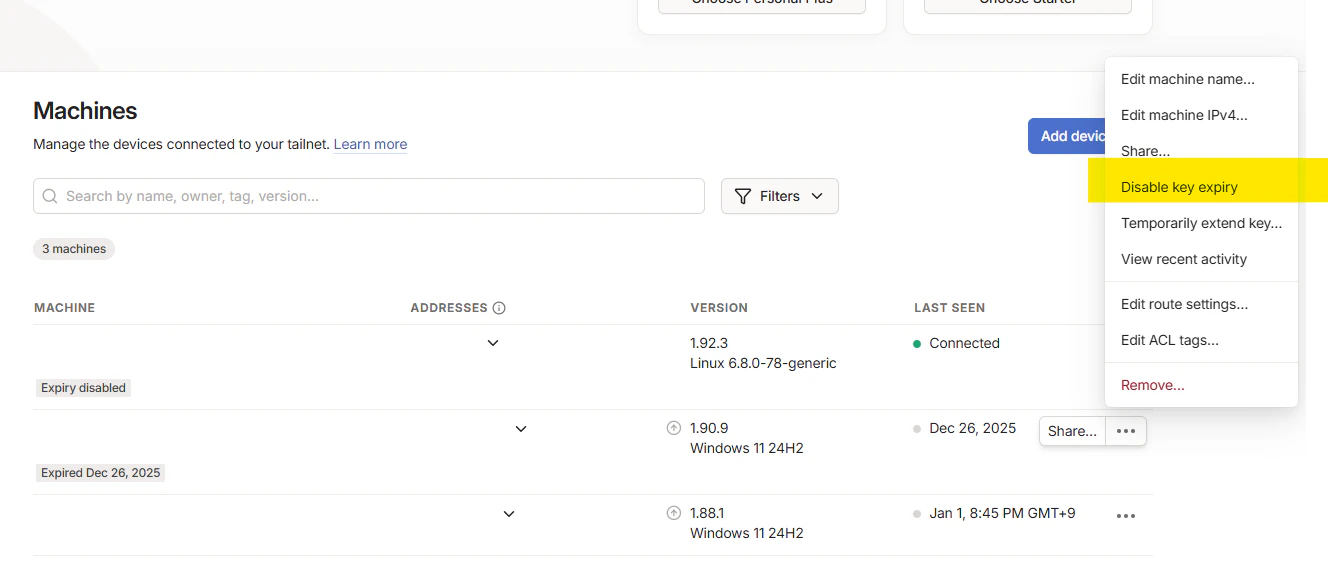
ただし、先ほどのドキュメントのDisabling key expiry
tailscaleの管理画面からDisabling key expiryで期限切れを無効化できるようです。
持ち歩かない自宅のサーバーなどでは無効化しても良いかもしれません。
再ログイン自体はtailscale statusで出てきたURLにブラウザでアクセスして認証を行うだけです。
$ tailscale status
Logged out.
Log in at: https://login.tailscale.com/a/*********