
はじめに
以前の記事でEVPN+VXLANを用いたマルチテナントネットワークを構築しました。「クラウドのネットワーク基盤はどう構築されているのか?」という興味からスタートしましたが、実際のところマルチテナント対応というのはあくまでも要件の一つでしかなく、「ネットワークの抽象化」がクラウドのネットワーク基盤の本質だと思っています。例えばAmazon VPCであれば、コマンドやWebアプリから操作でき、利用者がEVPNなどのプロトコルなどを意識する必要はありません。たとえば、以下のような状態になるのが理想です。
- 利用者は物理的な制約を意識しない
- 利用者はVPC、サブネットといった抽象化された概念だけを操作する
- すべてがWebAPI経由で公開されており、ネットワーク機器のCLIを意識しない
ということで今回は、EVPN+VXLANにより構築されるマルチテナントネットワーク基盤を抽象化して扱えるようなWebAPIを作ることと、Amazon VPCの(ごく一部の)再現を試みます。
リポジトリ
ディレクトリ構造
.
├── pyproject.toml
├── README.md
├── uv.lock
├── ansible
│   ├── group_vars
│   ├── host_vars
│   └── playbooks
├── containerlab
│   └── configs
└── src
    ├── kkloud_api
    │   ├── data
    │   ├── infrastructure
    │   ├── logs
    │   ├── model
    │   ├── router
    │   └── service
    └── kkloud_cli
再現対象とスコープ
実装するもの
- VPC(VRFによるテナント分離)
- サブネット(VLANによるサブネット分離)
- インターネットゲートウェイ(border leafによる外部接続)
- コマンドラインツール(AWSでいうところの
awsコマンド)
なお、CRUDのうちC(作成)、R(取得)、D(削除)の3つの機能を作ります。U(更新)はAnsibleで上手く実装できなかったため見送ります。
実装しない(できなかった)もの
-
ルートテーブル
「定義した通信しか通さない」という動きをするルーティングテーブル的な概念です。
処理の性質上許可ベースで制御したいですが、今回使ったcEOSではACLによるアクセス制御が利用できず、実装に無理があったため断念しました。 -
コンピュート機能(EC2的なもの)
各ホストも抽象化したかったですが、containerlabの環境でトランク接続をどうやるべきか、そもそもコンテナ上でdockerをどう動かすべきか、など複雑になりすぎたため断念しました。
トポロジ紹介
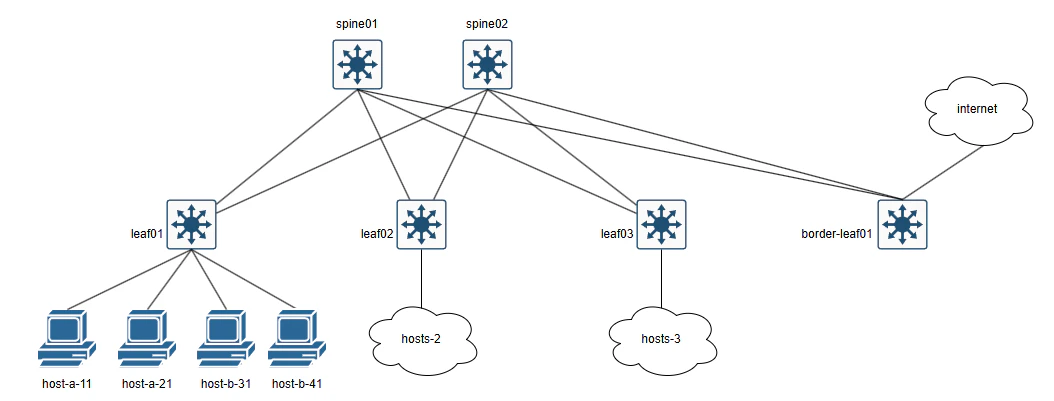
前回の記事で利用したトポロジとほぼ同じですが、新しくborder-leafを追加しています。これは主にインターネット接続のためのデフォルトルートを流すためのものです。ただし、containerlabのトポロジから実際のインターネットに接続するわけでありません。各VRF向けにデフォルトルートを広告し、ループバックインターフェースに設定された8.8.8.8/32でインターネットを模擬します。
環境はcontainerlabで構築します。また、ネットワーク機器としてArista cEOSを利用します。
アンダーレイにはeBGPを採用し、全ノードで異なるAS番号を利用します。また、オーバーレイにはEVPN, VXLANを利用します。各leafのBGPピアはアンダーレイ、オーバーレイともに対向のspineのみとピアを結び、spineはルートリフレクタ的な役割に徹してもらいます。これにより、全leafをフルメッシュで結ばなくても経路交換が行えるようにします。
ホスト接続はポートベースVLANで実装します。(なので完璧にアンダーレイを抽象化できたわけではありません)
分離という観点から見るとLinux Namespaceなどもありましたが、EVPNとの連携のしやすさを考えるとVRFでの分離のほうが適しているためEVPNで実装します。また、アンダーレイはスケーラビリティやEVPNとの統合を考えてBGPを採用しています。
トポロジファイル、startup-configは以下の通りとなります。
./containerlab/kkloud.clab.yml
name: kkloud

mgmt:
  ipv4-subnet: 172.20.20.0/24

topology:
  groups:
    ceos:
      kind: arista_ceos
      image: ceos:4.35.2F
    client:
      kind: linux
      image: ghcr.io/hellt/network-multitool:latest
  nodes:
    spine01:
      group: ceos
      mgmt-ipv4: 172.20.20.11
      startup-config: configs/spine01.cfg
      exec:
        - ip route del default
    spine02:
      group: ceos
      mgmt-ipv4: 172.20.20.12
      startup-config: configs/spine02.cfg
      exec:
        - ip route del default
    leaf01:
      group: ceos
      mgmt-ipv4: 172.20.20.21
      startup-config: configs/leaf01.cfg
      exec:
        - ip route del default
    leaf02:
      group: ceos
      mgmt-ipv4: 172.20.20.22
      startup-config: configs/leaf02.cfg
      exec:
        - ip route del default
    leaf03:
      group: ceos
      mgmt-ipv4: 172.20.20.23
      startup-config: configs/leaf03.cfg
      exec:
        - ip route del default
    border-leaf01:
      group: ceos
      mgmt-ipv4: 172.20.20.24
      startup-config: configs/border-leaf01.cfg
    host-a-11:
      group: client
      mgmt-ipv4: 172.20.20.31
      exec:
        - ip route del default
        - ip addr add 192.168.10.1/24 dev eth1
        - ip route add default via 192.168.10.254 dev eth1
        - ip link set eth1 up
    host-a-21:
      group: client
      mgmt-ipv4: 172.20.20.32
      exec:
        - ip route del default
        - ip addr add 192.168.20.1/24 dev eth1
        - ip route add default via 192.168.20.254 dev eth1
        - ip link set eth1 up
    host-b-31:
      group: client
      mgmt-ipv4: 172.20.20.33
      exec:
        - ip route del default
        - ip addr add 192.168.30.1/24 dev eth1
        - ip route add default via 192.168.30.254 dev eth1
        - ip link set eth1 up
    host-b-41:
      group: client
      mgmt-ipv4: 172.20.20.34
      exec:
        - ip route del default
        - ip addr add 192.168.40.1/24 dev eth1
        - ip route add default via 192.168.40.254 dev eth1
        - ip link set eth1 up
    host-a-12:
      group: client
      mgmt-ipv4: 172.20.20.35
      exec:
        - ip route del default
        - ip addr add 192.168.10.2/24 dev eth1
        - ip route add default via 192.168.10.254 dev eth1
        - ip link set eth1 up
    host-a-22:
      group: client
      mgmt-ipv4: 172.20.20.36
      exec:
        - ip route del default
        - ip addr add 192.168.20.2/24 dev eth1
        - ip route add default via 192.168.20.254 dev eth1
        - ip link set eth1 up
    host-b-32:
      group: client
      mgmt-ipv4: 172.20.20.37
      exec:
        - ip route del default
        - ip addr add 192.168.30.2/24 dev eth1
        - ip route add default via 192.168.30.254 dev eth1
        - ip link set eth1 up
    host-b-42:
      group: client
      mgmt-ipv4: 172.20.20.38
      exec:
        - ip route del default
        - ip addr add 192.168.40.2/24 dev eth1
        - ip route add default via 192.168.40.254 dev eth1
        - ip link set eth1 up
    host-a-13:
      group: client
      mgmt-ipv4: 172.20.20.39
      exec:
        - ip route del default
        - ip addr add 192.168.10.3/24 dev eth1
        - ip route add default via 192.168.10.254 dev eth1
        - ip link set eth1 up
    host-a-23:
      group: client
      mgmt-ipv4: 172.20.20.40
      exec:
        - ip route del default
        - ip addr add 192.168.20.3/24 dev eth1
        - ip route add default via 192.168.20.254 dev eth1
        - ip link set eth1 up
    host-b-33:
      group: client
      mgmt-ipv4: 172.20.20.41
      exec:
        - ip route del default
        - ip addr add 192.168.30.3/24 dev eth1
        - ip route add default via 192.168.30.254 dev eth1
        - ip link set eth1 up
    host-b-43:
      group: client
      mgmt-ipv4: 172.20.20.42
      exec:
        - ip route del default
        - ip addr add 192.168.40.3/24 dev eth1
        - ip route add default via 192.168.40.254 dev eth1
        - ip link set eth1 up
  links:
    - endpoints: ["spine01:eth1", "leaf01:eth1"]
    - endpoints: ["spine01:eth2", "leaf02:eth1"]
    - endpoints: ["spine01:eth3", "leaf03:eth1"]
    - endpoints: ["spine01:eth4", "border-leaf01:eth1"]
    - endpoints: ["spine02:eth1", "leaf01:eth2"]
    - endpoints: ["spine02:eth2", "leaf02:eth2"]
    - endpoints: ["spine02:eth3", "leaf03:eth2"]
    - endpoints: ["spine02:eth4", "border-leaf01:eth2"]
    - endpoints: ["leaf01:eth61", "host-a-11:eth1"]
    - endpoints: ["leaf01:eth62", "host-a-21:eth1"]
    - endpoints: ["leaf01:eth63", "host-b-31:eth1"]
    - endpoints: ["leaf01:eth64", "host-b-41:eth1"]
    - endpoints: ["leaf02:eth61", "host-a-12:eth1"]
    - endpoints: ["leaf02:eth62", "host-a-22:eth1"]
    - endpoints: ["leaf02:eth63", "host-b-32:eth1"]
    - endpoints: ["leaf02:eth64", "host-b-42:eth1"]
    - endpoints: ["leaf03:eth61", "host-a-13:eth1"]
    - endpoints: ["leaf03:eth62", "host-a-23:eth1"]
    - endpoints: ["leaf03:eth63", "host-b-33:eth1"]
    - endpoints: ["leaf03:eth64", "host-b-43:eth1"]
./containerlab/configs/spine01.cfg
!
no aaa root
!
username admin privilege 15 role network-admin secret sha512 /SMb9I8/nEWv7jw/NxKw5obQcacMjoX/n3xFT07UqigyjDOTPd4wkzqJ9q3BkFknckXlGi51aMA/
!
management api http-commands
   no shutdown
!
no service interface inactive port-id allocation disabled
!
service routing protocols model multi-agent
!
logging synchronous level critical
!
hostname spine01
!
spanning-tree mode mstp
!
system l1
   unsupported speed action error
   unsupported error-correction action error
!
management api gnmi
   transport grpc default
!
management api netconf
   transport ssh default
!
interface Ethernet1
   mtu 9054
   no switchport
   ip address 10.0.1.0/31
!
interface Ethernet2
   mtu 9054
   no switchport
   ip address 10.0.1.2/31
!
interface Ethernet3
   mtu 9054
   no switchport
   ip address 10.0.1.4/31
!
interface Ethernet4
   mtu 9054
   no switchport
   ip address 10.0.1.6/31
!
interface Loopback0
   ip address 10.255.0.1/32
!
interface Management0
   ip address 172.20.20.11/24
!
ip routing
!
router bgp 65001
   router-id 10.255.0.1
   no bgp default ipv4-unicast
   neighbor OVERLAY peer group
   neighbor OVERLAY update-source Loopback0
   neighbor OVERLAY ebgp-multihop 2
   neighbor OVERLAY send-community extended
   neighbor UNDERLAY peer group
   neighbor 10.0.1.1 peer group UNDERLAY
   neighbor 10.0.1.1 remote-as 65011
   neighbor 10.0.1.3 peer group UNDERLAY
   neighbor 10.0.1.3 remote-as 65012
   neighbor 10.0.1.5 peer group UNDERLAY
   neighbor 10.0.1.5 remote-as 65013
   neighbor 10.0.1.7 peer group UNDERLAY
   neighbor 10.0.1.7 remote-as 65014
   neighbor 10.255.0.11 peer group OVERLAY
   neighbor 10.255.0.11 remote-as 65011
   neighbor 10.255.0.12 peer group OVERLAY
   neighbor 10.255.0.12 remote-as 65012
   neighbor 10.255.0.13 peer group OVERLAY
   neighbor 10.255.0.13 remote-as 65013
   neighbor 10.255.0.14 peer group OVERLAY
   neighbor 10.255.0.14 remote-as 65014
   !
   address-family evpn
      neighbor OVERLAY activate
      neighbor OVERLAY next-hop-unchanged
   !
   address-family ipv4
      neighbor UNDERLAY activate
      network 10.255.0.1/32
!
./containerlab/configs/spine02.cfg
!
no aaa root
!
username admin privilege 15 role network-admin secret sha512 /xkF.csYpeER.qST8Y.
!
management api http-commands
   no shutdown
!
no service interface inactive port-id allocation disabled
!
service routing protocols model multi-agent
!
logging synchronous level critical
!
hostname spine02
!
spanning-tree mode mstp
!
system l1
   unsupported speed action error
   unsupported error-correction action error
!
management api gnmi
   transport grpc default
!
management api netconf
   transport ssh default
!
interface Ethernet1
   mtu 9054
   no switchport
   ip address 10.0.2.0/31
!
interface Ethernet2
   mtu 9054
   no switchport
   ip address 10.0.2.2/31
!
interface Ethernet3
   mtu 9054
   no switchport
   ip address 10.0.2.4/31
!
interface Ethernet4
   mtu 9054
   no switchport
   ip address 10.0.2.6/31
!
interface Loopback0
   ip address 10.255.0.2/32
!
interface Management0
   ip address 172.20.20.12/24
!
ip routing
!
router bgp 65002
   router-id 10.255.0.2
   no bgp default ipv4-unicast
   neighbor OVERLAY peer group
   neighbor OVERLAY update-source Loopback0
   neighbor OVERLAY ebgp-multihop 2
   neighbor OVERLAY send-community extended
   neighbor UNDERLAY peer group
   neighbor 10.0.2.1 peer group UNDERLAY
   neighbor 10.0.2.1 remote-as 65011
   neighbor 10.0.2.3 peer group UNDERLAY
   neighbor 10.0.2.3 remote-as 65012
   neighbor 10.0.2.5 peer group UNDERLAY
   neighbor 10.0.2.5 remote-as 65013
   neighbor 10.0.2.7 peer group UNDERLAY
   neighbor 10.0.2.7 remote-as 65014
   neighbor 10.255.0.11 peer group OVERLAY
   neighbor 10.255.0.11 remote-as 65011
   neighbor 10.255.0.12 peer group OVERLAY
   neighbor 10.255.0.12 remote-as 65012
   neighbor 10.255.0.13 peer group OVERLAY
   neighbor 10.255.0.13 remote-as 65013
   neighbor 10.255.0.14 peer group OVERLAY
   neighbor 10.255.0.14 remote-as 65014
   !
   address-family evpn
      neighbor OVERLAY activate
      neighbor OVERLAY next-hop-unchanged
   !
   address-family ipv4
      neighbor UNDERLAY activate
      network 10.255.0.2/32
!
./containerlab/configs/leaf01.cfg
!
no aaa root
!
username admin privilege 15 role network-admin secret sha512 /sFqTI8evbUSqn.y3RlICFAQSCowR1RwF6J5Tt5It5dpOs7cXcjS0BEV3rgdukEkEbpeD43IY2YotvoUzj8rUJ0
!
management api http-commands
   no shutdown
!
no service interface inactive port-id allocation disabled
!
service routing protocols model multi-agent
!
logging synchronous level critical
!
hostname leaf01
!
spanning-tree mode mstp
!
system l1
   unsupported speed action error
   unsupported error-correction action error
!
management api gnmi
   transport grpc default
!
management api netconf
   transport ssh default
!
interface Ethernet1
   mtu 9054
   no switchport
   ip address 10.0.1.1/31
!
interface Ethernet2
   mtu 9054
   no switchport
   ip address 10.0.2.1/31
!
interface Ethernet61
!
interface Ethernet62
!
interface Ethernet63
!
interface Ethernet64
!
interface Loopback0
   ip address 10.255.0.11/32
!
interface Management0
   ip address 172.20.20.21/24
!
interface Vxlan1
   vxlan source-interface Loopback0
   vxlan udp-port 4789
!
ip virtual-router mac-address aa:bb:cc:dd:ee:ff
!
ip routing
!
router bgp 65011
   router-id 10.255.0.11
   no bgp default ipv4-unicast
   neighbor OVERLAY peer group
   neighbor OVERLAY update-source Loopback0
   neighbor OVERLAY ebgp-multihop 2
   neighbor OVERLAY send-community extended
   neighbor UNDERLAY peer group
   neighbor 10.0.1.0 peer group UNDERLAY
   neighbor 10.0.1.0 remote-as 65001
   neighbor 10.0.2.0 peer group UNDERLAY
   neighbor 10.0.2.0 remote-as 65002
   neighbor 10.255.0.1 peer group OVERLAY
   neighbor 10.255.0.1 remote-as 65001
   neighbor 10.255.0.2 peer group OVERLAY
   neighbor 10.255.0.2 remote-as 65002
   !
   address-family evpn
      neighbor OVERLAY activate
   !
   address-family ipv4
      neighbor UNDERLAY activate
      network 10.255.0.11/32
!
./containerlab/configs/leaf02.cfg
!
no aaa root
!
username admin privilege 15 role network-admin secret sha512 .rOsFkKig3k.l2D2md0RlXlIh65mbirQbQJib/Y3BT0
!
management api http-commands
   no shutdown
!
no service interface inactive port-id allocation disabled
!
service routing protocols model multi-agent
!
logging synchronous level critical
!
hostname leaf02
!
spanning-tree mode mstp
!
system l1
   unsupported speed action error
   unsupported error-correction action error
!
management api gnmi
   transport grpc default
!
management api netconf
   transport ssh default
!
interface Ethernet1
   mtu 9054
   no switchport
   ip address 10.0.1.3/31
!
interface Ethernet2
   mtu 9054
   no switchport
   ip address 10.0.2.3/31
!
interface Ethernet61
!
interface Ethernet62
!
interface Ethernet63
!
interface Ethernet64
!
interface Loopback0
   ip address 10.255.0.12/32
!
interface Management0
   ip address 172.20.20.22/24
!
interface Vxlan1
   vxlan source-interface Loopback0
   vxlan udp-port 4789
!
ip virtual-router mac-address aa:bb:cc:dd:ee:ff
!
ip routing
!
router bgp 65012
   router-id 10.255.0.12
   no bgp default ipv4-unicast
   neighbor OVERLAY peer group
   neighbor OVERLAY update-source Loopback0
   neighbor OVERLAY ebgp-multihop 2
   neighbor OVERLAY send-community extended
   neighbor UNDERLAY peer group
   neighbor 10.0.1.2 peer group UNDERLAY
   neighbor 10.0.1.2 remote-as 65001
   neighbor 10.0.2.2 peer group UNDERLAY
   neighbor 10.0.2.2 remote-as 65002
   neighbor 10.255.0.1 peer group OVERLAY
   neighbor 10.255.0.1 remote-as 65001
   neighbor 10.255.0.2 peer group OVERLAY
   neighbor 10.255.0.2 remote-as 65002
   !
   address-family evpn
      neighbor OVERLAY activate
   !
   address-family ipv4
      neighbor UNDERLAY activate
      network 10.255.0.12/32
!
./containerlab/configs/leaf03.cfg
!
no aaa root
!
username admin privilege 15 role network-admin secret sha512 /sFqTI8evbUSqn.y3RlICFAQSCowR1RwF6J5Tt5It5dpOs7cXcjS0BEV3rgdukEkEbpeD43IY2YotvoUzj8rUJ0
!
management api http-commands
   no shutdown
!
no service interface inactive port-id allocation disabled
!
service routing protocols model multi-agent
!
logging synchronous level critical
!
hostname leaf03
!
spanning-tree mode mstp
!
system l1
   unsupported speed action error
   unsupported error-correction action error
!
management api gnmi
   transport grpc default
!
management api netconf
   transport ssh default
!
interface Ethernet1
   mtu 9054
   no switchport
   ip address 10.0.1.5/31
!
interface Ethernet2
   mtu 9054
   no switchport
   ip address 10.0.2.5/31
!
interface Ethernet61
!
interface Ethernet62
!
interface Ethernet63
!
interface Ethernet64
!
interface Loopback0
   ip address 10.255.0.13/32
!
interface Management0
   ip address 172.20.20.23/24
!
interface Vxlan1
   vxlan source-interface Loopback0
   vxlan udp-port 4789
!
ip virtual-router mac-address aa:bb:cc:dd:ee:ff
!
ip routing
!
router bgp 65013
   router-id 10.255.0.13
   no bgp default ipv4-unicast
   neighbor OVERLAY peer group
   neighbor OVERLAY update-source Loopback0
   neighbor OVERLAY ebgp-multihop 2
   neighbor OVERLAY send-community extended
   neighbor UNDERLAY peer group
   neighbor 10.0.1.4 peer group UNDERLAY
   neighbor 10.0.1.4 remote-as 65001
   neighbor 10.0.2.4 peer group UNDERLAY
   neighbor 10.0.2.4 remote-as 65002
   neighbor 10.255.0.1 peer group OVERLAY
   neighbor 10.255.0.1 remote-as 65001
   neighbor 10.255.0.2 peer group OVERLAY
   neighbor 10.255.0.2 remote-as 65002
   !
   address-family evpn
      neighbor OVERLAY activate
   !
   address-family ipv4
      neighbor UNDERLAY activate
      network 10.255.0.13/32
!
./containerlab/configs/border-leaf01.cfg
!
no aaa root
!
username admin privilege 15 role network-admin secret sha512 $6$m01rhzRowas6VLYW$3FcNUah5nYS5ypM4rfDfKqV9NOTKI/8PR.8q3D3Rd155BWyihhuHyWJxcN6PHBHYEjtELsjGTCgdwhyzUt2N5/
!
management api http-commands
   no shutdown
!
no service interface inactive port-id allocation disabled
!
service routing protocols model multi-agent
!
logging synchronous level critical
!
hostname border-leaf01
!
spanning-tree mode mstp
!
system l1
   unsupported speed action error
   unsupported error-correction action error
!
management api gnmi
   transport grpc default
!
management api netconf
   transport ssh default
!
interface Ethernet1
   mtu 9054
   no switchport
   ip address 10.0.1.7/31
!
interface Ethernet2
   mtu 9054
   no switchport
   ip address 10.0.2.7/31
!
interface Loopback0
   ip address 10.255.0.14/32
!
interface Management0
   ip address 172.20.20.24/24
!
interface Vxlan1
   vxlan source-interface Loopback0
   vxlan udp-port 4789
!
ip routing
!
ip route 0.0.0.0/0 172.20.20.1
!
router bgp 65014
   router-id 10.255.0.14
   no bgp default ipv4-unicast
   neighbor OVERLAY peer group
   neighbor OVERLAY update-source Loopback0
   neighbor OVERLAY ebgp-multihop 2
   neighbor OVERLAY send-community extended
   neighbor UNDERLAY peer group
   neighbor 10.0.1.6 peer group UNDERLAY
   neighbor 10.0.1.6 remote-as 65001
   neighbor 10.0.2.6 peer group UNDERLAY
   neighbor 10.0.2.6 remote-as 65002
   neighbor 10.255.0.1 peer group OVERLAY
   neighbor 10.255.0.1 remote-as 65001
   neighbor 10.255.0.2 peer group OVERLAY
   neighbor 10.255.0.2 remote-as 65002
   !
   address-family evpn
      neighbor OVERLAY activate
   !
   address-family ipv4
      neighbor UNDERLAY activate
      network 10.255.0.14/32
!
各機器には基本的なアンダーレイ設定やEVPN、VXLANの設定がされています。VRF、VLANなど分離にかかわる部分の設定は行っていないので、この状態の機器に対してWebAPI経由で設定投入を行っていきます。
利用環境・ライブラリなど
ネットワークシミュレータ: containerlab 0.74.3
ネットワーク機器: Arista cEOS 4.35.2F
プログラミング言語: Python 3.13.5
Webフレームワーク: FastAPI 0.135.3
設定投入: Ansible 2.20.4
設定取得: NAPALM 5.1.0
実現方法の検討
まず各機能を実現するうえで、何を行えば狙った通りの動作になるかを検討します。startup-configには基本的なEVPNなどの設定がされているので、VRFやVLANなどの分離に関する設定を追加で投入します。
VPC
VRFによりテナントの分離を行います。各leafでは追加で以下の設定が必要です。
- VRF定義
vrf instance [VRF名]
- VRFのルーティング有効化
ip routing vrf [VRF名]
- VXLANインターフェースにVRFとそのVNIを定義
interface Vxlan1
   vxlan vrf [VRF名] vni [L3VNI]
- EVPNでVRFを広告する設定
router bgp [AS番号]
   vlan-aware-bundle [VRF名]
      rd [RD]
      route-target both [RT]
      redistribute learned
   !
   vrf [VRF名]
      rd [RD]
      route-target import evpn [RT]
      route-target export evpn [RT]
      redistribute connected
また、border-leafでは各VRFのインターネットを模擬するため、これらに加えてインターネット模擬用のインターフェース作成、EVPNでの広告設定が必要です。
interface Loopback[L3VNI]
   ip address 8.8.8.8/32
!
router bgp [AS番号]
   vrf [VRF名]
      rd [RD]
      route-target import evpn [RT]
      route-target export evpn 65535:[L3VNI]

      ! デフォルトルートを広告する設定
      default-route export evpn

      ! 8.8.8.8/32を広告する設定
      redistribute static
サブネット
VLANによるサブネット分離を行います。各leafには以下の設定が必要です。
- VLAN作成
vlan [VLAN ID]
- VLAN SVI作成
interface Vlan[VLAN ID]
   ip address virtual [IPアドレス]
- VXLANインターフェースにVLANとそのVNIを定義
interface Vxlan1
   vxlan vlan [VLAN ID] vni [L2VNI]
- EVPNでVLANを広告する設定
router bgp [AS番号]
   vlan-aware-bundle [VRF名]
      vlan add [VLAN ID]
インターネットゲートウェイ
border-leaf01が広告するデフォルトルートをインポートするか否かで制御します。
今回の構成ではEVPN、VXLAN網にborder-leafも参加し、各VRF用のデフォルトルートを広告します。border-leaf01は65535:[L3VNI]というRTを使用してデフォルトルートを広告するので、各leafではこれをインポートする設定が必要になります。
- leafにて経路をインポートする設定
router bgp [AS番号]
   vrf [VRF名]
      route-target import evpn 65535:[L3VNI]
本来はどこかでNATをしてインターネットに出ていくのが望ましいですが、cEOSではNATに対応していなかったので簡易的な模擬となっています。
コマンドラインツール
AWSでいうところのawsコマンドです。
これはWebAPIを叩くだけのツールとして実装します。
Ansible設定
設定ファイル定義
ホストキーの検証を無効化します。また、ansible-vaultで暗号化するための設定をします。
[defaults]
host_key_checking = False
inventory = ./inventory.yml
vault_password_file = ./.vault_pass
インベントリと変数の定義
インベントリでは最低限の情報(接続先IPアドレス)のみ定義し、その他接続情報はグループの変数として定義します。各機器に固有の認証情報などはホストの変数として定義します。
---
all:
  children:
    fabric:
      children:
        spine:
          hosts:
            spine01:
              ansible_host: 172.20.20.11
            spine02:
              ansible_host: 172.20.20.12
        leaf:
          hosts:
            leaf01:
              ansible_host: 172.20.20.21
            leaf02:
              ansible_host: 172.20.20.22
            leaf03:
              ansible_host: 172.20.20.23
        border_leaf:
          hosts:
            border-leaf01:
              ansible_host: 172.20.20.24
---
ansible_network_os: arista.eos.eos
ansible_connection: network_cli
ansible_ssh_common_args: '-o StrictHostKeyChecking=no -o PreferredAuthentications=keyboard-interactive'
ansible_become: yes
ansible_become_method: enable
---
loopback_address: 10.255.0.1
bgp_asn: 65001
ansible_user: admin
ansible_password: !vault |
          $ANSIBLE_VAULT;1.1;AES256
          65633138643332623838623637333565653165343531353565363937313166386333353566316633
          3262636239303564363931303564656462333437363639610a343261616334313637323831366238
          38386234633065663536623264313062623532653037343834363538343662643366373661383264
          3038306231646161660a396537383830626430316262343034316663356334316130363965383630
          6434
./ansible/host_vars/spine02.yml
---
loopback_address: 10.255.0.2
bgp_asn: 65001
ansible_user: admin
ansible_password: !vault |
          $ANSIBLE_VAULT;1.1;AES256
          38653133663239323437313065313130306134356637613061643262333061343934396131303565
          3434303438656235306234323238666237376238346334310a343938313434613237376537646239
          66626161366561623434343333343237313564303632383237313465333136653535356166383964
          6139363464646131310a323863373466373137323633353464633362616631316330396662386331
          3834
./ansible/host_vars/leaf01.yml
---
loopback_address: 10.255.0.11
bgp_asn: 65011
ansible_user: admin
ansible_password: !vault |
          $ANSIBLE_VAULT;1.1;AES256
          66343366356131346266386237366637393666616462373232643532303262666534383061336266
          3164613533353736323436636364353238303738636163330a316532646434373563333661386639
          62333733356566333235343461646638666232303336323134373162386661306361643963366436
          3262633932356230660a666139393139633933333334303663613035663231643433383838356265
          3332
./ansible/host_vars/leaf02.yml
---
loopback_address: 10.255.0.12
bgp_asn: 65012
ansible_user: admin
ansible_password: !vault |
          $ANSIBLE_VAULT;1.1;AES256
          32663339313163653562613437386534646238613166636330346532326536383065613563613931
          6361633537306663383166633131363132343032393533340a376461646665346233636361393139
          36346136343266333763623930616430363238663836333336303563633036363734656264353362
          6461373830326532620a643666323838656438646537356466623632346632346136386437353137
          3433
./ansible/host_vars/leaf03.yml
---
loopback_address: 10.255.0.13
bgp_asn: 65013
ansible_user: admin
ansible_password: !vault |
          $ANSIBLE_VAULT;1.1;AES256
          63613462373232666136316362646162336365333864346534646432353461636237353964383133
          3039336134626438663763356539646536343035633462370a343261316263306536663437336564
          39663166666139326432623364333239646264353462306365373932356266343131623633663234
          3066646563386230390a366434323239653732353963346461343035306538613061323039653333
          3836
./ansible/host_vars/border-leaf01.yml
---
loopback_address: 10.255.0.14
bgp_asn: 65014
ansible_user: admin
ansible_password: !vault |
          $ANSIBLE_VAULT;1.1;AES256
          32316638653162663666373961653164636537383833356132303638353433386266306330393334
          6361373238633231366464326138626536346162386239660a393232616364663461613463636164
          32313437343630303732646537653531636564393338633036396563646232366536306239303732
          3432303566313431330a383333643838306532373862353537623164373238623534346465626134
          3538
プレイブック作成
VPC作成用プレイブック
先ほど検討した通りの内容を定義するプレイブックを作成します。
WebAPI側にロジックを持たせるので、プレイブックには持たないように作成します。
---
- hosts: leaf
  gather_facts: false
  tasks:
    - name: create vpc
      arista.eos.eos_config:
        lines:
          - "vrf instance {{ vpc_name }}"

    - name: enable ip routing on vpc
      arista.eos.eos_config:
        lines:
          - "ip routing vrf {{ vpc_name }}"

    - name: append vpc to vxlan config
      arista.eos.eos_config:
        lines: "vxlan vrf {{ vpc_name }} vni {{ vpc_vni }}"
        parents:
          - interface Vxlan1

    - name: append vpc to bgp config
      arista.eos.eos_config:
        lines:
          - "rd {{ loopback_address }}:{{ vpc_vni }}"
          - "route-target import evpn {{ vpc_vni }}:{{ vpc_vni }}"
          - "route-target export evpn {{ vpc_vni }}:{{ vpc_vni }}"
          - "redistribute connected"
        parents:
          - "router bgp {{ bgp_asn }}"
          - "vrf {{ vpc_name }}"

    - name: append vlan to bgp config
      arista.eos.eos_config:
        lines:
          - "rd {{ loopback_address }}:{{ vpc_vni | int + 1 }}"
          - "route-target both {{ vpc_vni | int + 1 }}:{{ vpc_vni | int + 1 }}"
          - "redistribute learned"
        parents:
          - "router bgp {{ bgp_asn }}"
          - "vlan-aware-bundle {{ vpc_name }}"


- hosts: border_leaf
  gather_facts: false
  tasks:
    - name: create vpc
      arista.eos.eos_config:
        lines:
          - "vrf instance {{ vpc_name }}"

    - name: enable ip routing on vpc
      arista.eos.eos_config:
        lines:
          - "ip routing vrf {{ vpc_name }}"

    - name: append vpc to vxlan config
      arista.eos.eos_config:
        lines: "vxlan vrf {{ vpc_name }} vni {{ vpc_vni }}"
        parents:
          - interface Vxlan1

    - name: create loopback for vpc
      arista.eos.eos_config:
        lines:
          - "vrf {{ vpc_name }}"
          - "ip address 8.8.8.8/32"
        parents:
          - "interface Loopback{{ vpc_vni }}"

    - name: create default route for vpc
      arista.eos.eos_static_routes:
        config:
          - vrf: "{{ vpc_name }}"
            address_families:
              - afi: ipv4
                routes:
                  - dest: 0.0.0.0/0
                    next_hops:
                      - interface: Loopback{{ vpc_vni }}

    - name: append vpc to bgp config
      arista.eos.eos_config:
        lines:
          - "rd {{ loopback_address }}:{{ vpc_vni }}"
          - "default-route export evpn"
          - "route-target import evpn {{ vpc_vni }}:{{ vpc_vni }}"
          - "route-target export evpn 65535:{{ vpc_vni }}"
          - "redistribute static"
        parents:
          - "router bgp {{ bgp_asn }}"
          - "vrf {{ vpc_name }}"
プレイブックは全体的に冪等性を意識していない作りになっています。冪等性があったほうがいいのはもちろんなんですが、重複するリソースの作成はWebAPIのロジックで弾くためこうしています。
VPC削除
同様に削除するプレイブックも作成していきます。コマンドの先頭にnoをつけることでリソースを削除しています。
---
- hosts: leaf
  gather_facts: false
  tasks:
    - name: delete vpc
      arista.eos.eos_config:
        lines:
          - "no vrf instance {{ vpc_name }}"

    - name: disable ip routing on vpc
      arista.eos.eos_config:
        lines:
          - "no ip routing vrf {{ vpc_name }}"

    - name: remove vpc from vxlan config
      arista.eos.eos_config:
        lines: "no vxlan vrf {{ vpc_name }} vni {{ vpc_vni }}"
        parents:
          - interface Vxlan1

    - name: remove vpc from bgp config
      arista.eos.eos_config:
        lines:
          - "no vrf {{ vpc_name }}"
        parents:
          - "router bgp {{ bgp_asn }}"

- hosts: border_leaf
  gather_facts: false
  tasks:
    - name: delete vpc
      arista.eos.eos_config:
        lines:
          - "no vrf instance {{ vpc_name }}"

    - name: disable ip routing on vpc
      arista.eos.eos_config:
        lines:
          - "no ip routing vrf {{ vpc_name }}"

    - name: remove loopback for vpc
      arista.eos.eos_config:
        lines:
          - "no interface Loopback{{ vpc_vni }}"

    - name: delete default route for vpc
      arista.eos.eos_static_routes:
        config:
          - vrf: "{{ vpc_name }}"
            address_families:
              - afi: ipv4
                routes:
                  - dest: 0.0.0.0/0
                    next_hops:
                      - interface: Loopback{{ vpc_vni }}
        state: deleted

    - name: remove vpc from bgp config
      arista.eos.eos_config:
        lines:
          - "no vrf {{ vpc_name }}"
        parents:
          - "router bgp {{ bgp_asn }}"
こんな感じでほかのプレイブックも作っていきます。
サブネット作成
---
- hosts: leaf
  gather_facts: false
  tasks:
    - name: create vlan
      arista.eos.eos_vlans:
        config:
          - name: "{{ subnet_name }}"
            vlan_id: "{{ subnet_vni }}"

    - name: create vlan interface
      arista.eos.eos_config:
        lines:
          - "vrf {{ vpc_name }}"
          - "ip address virtual {{ subnet_cidr_block | ansible.utils.ipaddr('net') | ansible.utils.ipaddr('-2') }}"
        parents:
          - "interface Vlan{{ subnet_vni }}"

    - name: append vlan to vxlan config
      arista.eos.eos_config:
        lines:
          - "vxlan vlan {{ subnet_vni }} vni {{ subnet_vni }}"
        parents:
          - interface Vxlan1

    - name: append vlan to bgp config
      arista.eos.eos_config:
        lines:
          - "vlan add {{ subnet_vni }}"
        parents:
          - "router bgp {{ bgp_asn }}"
          - "vlan-aware-bundle {{ vpc_name }}"
サブネット削除
---
- hosts: leaf
  gather_facts: false
  tasks:
    - name: delete vlan
      arista.eos.eos_vlans:
        config:
          - name: "{{ subnet_name }}"
            vlan_id: "{{ subnet_vni }}"
        state: deleted

    - name: delete vlan interface
      arista.eos.eos_config:
        lines:
          - "no interface Vlan{{ subnet_vni }}"

    - name: remove vlan from vxlan config
      arista.eos.eos_config:
        lines: "no vxlan vlan {{ subnet_vni }} vni {{ subnet_vni }}"
        parents:
          - interface Vxlan1

    - name: remove vlan from bgp config
      arista.eos.eos_config:
        lines:
          - "vlan remove {{ subnet_vni }}"
        parents:
          - "router bgp {{ bgp_asn }}"
          - "vlan-aware-bundle {{ vpc_name }}"
インターネットゲートウェイのアタッチ
---
- hosts: leaf
  gather_facts: false
  tasks:
    - name: Attach IGW to VPC
      arista.eos.eos_config:
        lines:
          - "route-target import evpn 65535:{{ vpc_vni }}"
        parents:
          - "router bgp {{ bgp_asn }}"
          - "vrf {{ vpc_name }}"
インターネットゲートウェイのデタッチ
---
- hosts: leaf
  gather_facts: false
  tasks:
    - name: Detach IGW from VPC
      arista.eos.eos_config:
        lines:
          - "no route-target import evpn 65535:{{ vpc_vni }}"
        parents:
          - "router bgp {{ bgp_asn }}"
          - "vrf {{ vpc_name }}"
WebAPI作成
データ保持方法の検討
今回はVPC、サブネットをWebAPIで操作するという関係上、どこかにこの情報を保持しておく必要があります。今回は小規模ですし、YAMLファイルに保存しておこうと思います。
初期のファイルは以下のようになります。
vpcs: []
subnets: []
ただし、同時編集等には対応できないため本格的にするならPostgreSQLなどを利用したほうがいいでしょう。
モデル定義
FastAPIで使用するPydanticのモデルを定義します。リクエストで情報が欲しい機能はVPC作成、サブネット作成なので、リクエスト用のモデルを定義します。また、DTO的に利用するためにVPC, Subnetのモデルを定義します。
from pydantic import BaseModel, field_validator, field_serializer
from ipaddress import IPv4Network


class RequestVPC(BaseModel):
    name: str
    cidr_block: IPv4Network


class VPC(RequestVPC):
    id: str
    vni: int
    is_attached_to_igw: bool

    @field_serializer("cidr_block")
    def serialize_cidr(self, v: IPv4Network):
        return str(v)

    @field_validator("cidr_block", mode="before")
    def parse_cidr(cls, v):
        if isinstance(v, str):
            return IPv4Network(v)
        return v
from pydantic import BaseModel, field_validator, field_serializer
from ipaddress import IPv4Network


class RequestSubnet(BaseModel):
    name: str
    cidr_block: IPv4Network


class Subnet(RequestSubnet):
    id: str
    vpc_id: str
    vni: int

    @field_serializer("cidr_block")
    def serialize_cidr(self, v: IPv4Network):
        return str(v)

    @field_validator("cidr_block", mode="before")
    def parse_cidr(cls, v):
        if isinstance(v, str):
            return IPv4Network(v)
        return v
@field_serializer, @field_validatorについてですが、IPアドレスの型としてIPv4Networkを使った場合、yaml.dump()メソッドで書き込むと不要な情報が付加されてしまい、YAMLとして読み込めなくなってしまいます。それを防止するためにこれらの変換メソッドを定義しています。
例外定義
組み込み例外を使ってもよかったんですが、うまいこと表現できなかったので自作しました。以下の5つを実装しています。
- VPCNotFoundError
- 要求されたVPCが存在しないときに送出
- VPCDeletionError
- VPC削除時、VPCにサブネットが残っていた場合に送出
- SubnetNotFoundError
- 要求されたサブネットが存在しない場合に送出
- SubnetInvalidCIDRError
- 要求されたサブネットがVPCのCIDR範囲外だった場合に送出
- SubnetOverlapError
- 既に作成済みのサブネットとCIDR範囲が重複していた場合に送出
class VPCNotFoundError(Exception):
    pass


class VPCDeletionError(Exception):
    pass


class SubnetNotFoundError(Exception):
    pass


class SubnetInvalidCIDRError(Exception):
    pass


class SubnetOverlapError(Exception):
    pass
ルータ定義
APIRouterを使用して、関連エンドポイントは別ファイルに定義します。ルートエンドポイントは403を返すようにしておきます。
from fastapi import FastAPI
from fastapi import status
from .router.api import router


app = FastAPI(
    title="KKloud API", version="1.0.0", description="API for KKloud services"
)
app.include_router(router)


@app.get(
    "/", status_code=status.HTTP_403_FORBIDDEN, description="Root endpoint is forbidden"
)
async def root():
    return {
        "message": "Access to the root endpoint is forbidden. Please use /api/v1 for API access."
    }


if __name__ == "__main__":
    import uvicorn

    uvicorn.run(app, host="0.0.0.0", port=8000)
API用のルーターです。以下のエンドポイントを実装しています。
- VPC取得(
/vpcs,GET) - VPC作成(
/vpcs,POST) - VPC削除(
/vpcs,DELETE) - サブネット取得(
/vpcs/{VPC ID}/subnets,GET) - サブネット作成(
/vpcs/{VPC ID}/subnets,POST) - サブネット削除(
/vpcs/{VPC ID}/subnets/{Subnet ID},DELETE) - インターネットゲートウェイの状態取得(
/vpcs/{VPC ID}/igw,GET) - インターネットゲートウェイのアタッチ(
/vpcs/{VPC ID}/igw,POST) - インターネットゲートウェイのデタッチ(
/vpcs/{VPC ID}/igw,DELETE)
from fastapi import APIRouter
from fastapi import HTTPException
from ..service.vpc_service import vpcs
from ..service.subnet_service import subnets
from ..service.fabric_service import fabrics
from ..model.vpc_models import RequestVPC
from ..model.subnet_models import RequestSubnet
from ..exceptions import (
    VPCNotFoundError,
    VPCDeletionError,
    SubnetInvalidCIDRError,
    SubnetNotFoundError,
)


router = APIRouter(prefix="/api/v1", tags=["VPCs API"])


@router.get("/vpcs")
async def get_vpcs():
    return {"vpcs": vpcs.get_all()}


@router.post("/vpcs", status_code=201)
async def create_vpc(vpc: RequestVPC):
    try:
        id: str = await vpcs.add(vpc)
        return {"message": "VPC created successfully", "vpc_id": id}
    except RuntimeError as e:
        raise HTTPException(status_code=500, detail=str(e))


@router.delete("/vpcs/{vpc_id}", status_code=204)
async def delete_vpc(vpc_id: str):
    try:
        await vpcs.delete(vpc_id)
        return {"message": f"VPC {vpc_id} deleted successfully"}
    except VPCNotFoundError as e:
        raise HTTPException(status_code=404, detail=str(e))
    except VPCDeletionError as e:
        raise HTTPException(status_code=400, detail=str(e))
    except RuntimeError as e:
        raise HTTPException(status_code=500, detail=str(e))


@router.get("/vpcs/{vpc_id}/subnets")
async def get_subnets(vpc_id: str):
    return {"subnets": subnets.get_all(vpc_id)}


@router.post("/vpcs/{vpc_id}/subnets", status_code=201)
async def create_subnet(vpc_id: str, request_subnet: RequestSubnet):
    try:
        id: str = subnets.add(vpc_id, request_subnet)
        return {"message": "Subnet created successfully", "subnet_id": id}
    except VPCNotFoundError as e:
        raise HTTPException(status_code=404, detail=str(e))
    except SubnetInvalidCIDRError as e:
        raise HTTPException(status_code=400, detail=str(e))
    except RuntimeError as e:
        raise HTTPException(status_code=500, detail=str(e))


@router.delete("/vpcs/{vpc_id}/subnets/{subnet_id}", status_code=204)
async def delete_subnet(vpc_id: str, subnet_id: str):
    try:
        subnets.delete(vpc_id, subnet_id)
        return {"message": f"Subnet {subnet_id} deleted successfully"}
    except (VPCNotFoundError, SubnetNotFoundError) as e:
        raise HTTPException(status_code=404, detail=str(e))
    except RuntimeError as e:
        raise HTTPException(status_code=500, detail=str(e))


@router.get("/vpcs/{vpc_id}/igw")
async def get_igw_states(vpc_id: str):
    vpc = vpcs.get(vpc_id)
    return {"is_attached": vpc.is_attached_to_igw}


@router.post("/vpcs/{vpc_id}/igw", status_code=201)
async def attach_igw(vpc_id: str):
    try:
        await vpcs.attach_igw(vpc_id)
        return {"message": f"IGW attached to VPC {vpc_id} successfully"}
    except ValueError as e:
        raise HTTPException(status_code=400, detail=str(e))
    except RuntimeError as e:
        raise HTTPException(status_code=500, detail=str(e))


@router.delete("/vpcs/{vpc_id}/igw", status_code=204)
async def detach_igw(vpc_id: str):
    try:
        await vpcs.detach_igw(vpc_id)
        return {"message": f"IGW detached from VPC {vpc_id} successfully"}
    except ValueError as e:
        raise HTTPException(status_code=400, detail=str(e))
    except RuntimeError as e:
        raise HTTPException(status_code=500, detail=str(e))
ルータではビジネスロジックを持たず、HTTP関連の処理のみ行います。
また、処理は非同期で行いたいので、各サービスの呼び出しにはawaitを付けておきます。
サービス層作成
ルータから呼び出されるメソッド群を作成していきます。
VPCやサブネットの作成可否の判断、VNIの割り当てなどはこの層で行います。
今回はVPCのL3VNIは100刻みで割り当て、サブネットのL2VNIはL3VNIの次の数字から最大64個まで作成できるようにしています。
VPC
VPC用のサービスを作成します。
import uuid
from ..model.vpc_models import VPC, RequestVPC
from ..infrastructure import vpc_runner as vpcs_infra
from ..infrastructure.vpc_loader import vpc_loader
from ..infrastructure.subnet_loader import subnet_loader
from ..infrastructure.logger import logger
from ..exceptions import VPCNotFoundError, VPCDeletionError


class VPCs:
    def __init__(self):
        """Initialize the VPCs service with the specified data file."""
        self.vpc_loader = vpc_loader
        self.subnet_loader = subnet_loader
        self.logger = logger

    def get_all(self) -> list[VPC]:
        """Return a list of all VPCs."""
        return self.vpc_loader.vpcs

    def get(self, vpc_id: str) -> VPC:
        """Return a VPC by its ID.

        Raises:
            VPCNotFoundError: If the VPC with the specified ID is not found.
        """
        for vpc in self.vpc_loader.vpcs:
            if vpc.id == vpc_id:
                return vpc
        raise VPCNotFoundError(f"VPC with id {vpc_id} not found")

    async def add(self, request_vpc: RequestVPC) -> str:
        """Add a new VPC based on the provided request data.

        Returns:
            vpc_id (str): The ID of the newly created VPC.
        Raises:
            RuntimeError: If the VPC creation fails.
        """
        vpc = VPC(
            id=f"vpc-{uuid.uuid4()}",
            name=request_vpc.name,
            cidr_block=request_vpc.cidr_block,
            vni=1
            if len(self.vpc_loader.vpcs) == 0
            else len(self.vpc_loader.vpcs) * 100,
            is_attached_to_igw=False,
        )

        try:
            await vpcs_infra.create_vpc(vpc)
        except RuntimeError:
            raise RuntimeError(f"Failed to create VPC with id {vpc.id}")

        self.vpc_loader.add(vpc)
        self.logger.info(f"Created VPC with id {vpc.id}")
        return vpc.id

    async def delete(self, vpc_id: str) -> None:
        """Delete a VPC by its ID.

        Raises:
            VPCNotFoundError: If the VPC with the specified ID is not found.
            VPCDeletionError: If the VPC have associated subnet.
            RuntimeError: If the VPC deletion fails.
        """
        vpc = None
        for v in self.vpc_loader.vpcs:
            if v.id == vpc_id:
                vpc = v
                break

        if vpc is None:
            raise VPCNotFoundError(f"VPC with id {vpc_id} not found")

        subnets_in_vpc = [
            subnet for subnet in self.subnet_loader.subnets if subnet.vpc_id == vpc_id
        ]
        if subnets_in_vpc:
            raise VPCDeletionError(
                f"Cannot delete VPC with id {vpc_id} because it has associated subnets. Please delete the subnets first."
            )

        try:
            await vpcs_infra.delete_vpc(vpc)
        except RuntimeError:
            raise RuntimeError(f"Failed to delete VPC with id {vpc_id}")

        self.vpc_loader.delete(vpc_id)
        self.logger.info(f"Deleted VPC with id {vpc.id}")

    async def attach_igw(self, vpc_id: str) -> None:
        """Attach an Internet Gateway (IGW) to a VPC.

        Raises:
            ValueError: If the VPC is already attached to an IGW.
            RuntimeError: If the IGW attach fails.
        """
        vpc = self.get(vpc_id)
        if vpc.is_attached_to_igw:
            raise ValueError(f"VPC with id {vpc_id} is already attached to IGW")

        try:
            await vpcs_infra.attach_igw(vpc)
        except RuntimeError:
            raise RuntimeError(f"Failed to attach IGW to VPC with id {vpc_id}")

        vpc.is_attached_to_igw = True
        self.vpc_loader.update(vpc)
        self.logger.info(f"Attached IGW to VPC with id {vpc.id}")

    async def detach_igw(self, vpc_id: str) -> None:
        """Detach an Internet Gateway (IGW) from a VPC.

        Raises:
            ValueError: If the VPC is not attached to an IGW.
            RuntimeError: If the IGW attach fails.
        """
        vpc = self.get(vpc_id)
        if not vpc.is_attached_to_igw:
            raise ValueError(f"VPC with id {vpc_id} is not attached to IGW")

        try:
            await vpcs_infra.detach_igw(vpc)
        except RuntimeError:
            raise RuntimeError(f"Failed to detach IGW from VPC with id {vpc_id}")

        vpc.is_attached_to_igw = False
        self.vpc_loader.update(vpc)
        self.logger.info(f"Detached IGW from VPC with id {vpc.id}")


vpcs = VPCs()
サブネット
同様にサブネット用サービスも定義します。
import uuid
from ipaddress import IPv4Network
from ..model.subnet_models import Subnet, RequestSubnet
from ..model.vpc_models import VPC
from ..infrastructure import subnet_runner as subnet_infra
from ..infrastructure.subnet_loader import subnet_loader
from ..infrastructure.vpc_loader import vpc_loader
from ..infrastructure.logger import logger
from ..exceptions import (
    VPCNotFoundError,
    SubnetInvalidCIDRError,
    SubnetOverlapError,
    SubnetNotFoundError,
)


class Subnets:
    def __init__(self):
        """Initialize the Subnets service with the specified data file."""
        self.vpc_loader = vpc_loader
        self.subnet_loader = subnet_loader
        self.logger = logger

    def get_all(self, vpc_id: str) -> list[Subnet]:
        """Return a list of all Subnets for a given VPC ID."""
        return [
            subnet for subnet in self.subnet_loader.subnets if subnet.vpc_id == vpc_id
        ]

    def get(self, subnet_id: str) -> Subnet:
        """Return a Subnet by its ID.

        Raises:
            ValueError: If the Subnet with the specified ID is not found.
        """
        for subnet in self.subnet_loader.subnets:
            if subnet.id == subnet_id:
                return subnet
        raise SubnetNotFoundError(f"Subnet with id {subnet_id} not found")

    def add(self, vpc_id: str, request_subnet: RequestSubnet) -> str:
        """Add a new Subnet to a VPC based on the provided request data.

        Returns:
            subnet_id (str): The ID of the newly created Subnet.
        Raises:
            VPCNotFoundError: If the VPC with the specified ID is not found.
            SubnetInvalidCIDRError: If the Subnet CIDR block is not within the VPC CIDR block.
            SubnetOverlapError: If the Subnet CIDR block overlaps with existing Subnets in the VPC.
            RuntimeError: If the Subnet creation fails.
        """
        # Validate VPC existence
        for v in self.vpc_loader.vpcs:
            if v.id == vpc_id:
                vpc: VPC = v
                break
        else:
            raise VPCNotFoundError(f"VPC with id {vpc_id} not found")

        # Validate Subnet CIDR block is within VPC CIDR block
        vpc_subnet = vpc.cidr_block
        if not IPv4Network(request_subnet.cidr_block).subnet_of(
            IPv4Network(vpc_subnet)
        ):
            raise SubnetInvalidCIDRError(
                f"Subnet CIDR block {request_subnet.cidr_block} is not within VPC CIDR block {vpc_subnet}"
            )

        # Validate Subnet CIDR block does not overlap with existing Subnets in the VPC
        if any(
            IPv4Network(request_subnet.cidr_block).overlaps(subnet.cidr_block)
            for subnet in self.get_all(vpc_id)
        ):
            raise SubnetOverlapError(
                f"Subnet CIDR block {request_subnet.cidr_block} overlaps with existing subnets in VPC {vpc_id}"
            )

        # Validate Subnet quantity does not exceed limit (64 subnets per VPC)
        if len(self.get_all(vpc_id)) >= 64:
            raise RuntimeError(f"Maximum number of subnets (64) exceeded for VPC {vpc_id}")

        subnet_obj = Subnet(
            id="subnet-" + str(uuid.uuid4()),
            vpc_id=vpc_id,
            name=request_subnet.name,
            cidr_block=request_subnet.cidr_block,
            vni=int(vpc.vni) + len(self.get_all(vpc_id)) + 1,
        )

        try:
            subnet_infra.create_subnet(subnet_obj, vpc)
        except RuntimeError:
            raise RuntimeError(
                f"Failed to create Subnet with id {subnet_obj.id} in VPC {vpc_id}"
            )

        self.subnet_loader.add(subnet_obj)
        self.logger.info(f"Created Subnet with id {subnet_obj.id} in VPC {vpc_id}")
        return subnet_obj.id

    def delete(self, vpc_id: str, subnet_id: str) -> None:
        """Delete a Subnet from a VPC.

        Raises:
            VPCNotFoundError: If the VPC is not found.
            SubnetNotFoundError: If the Subnet is not found.
            RuntimeError: If the Subnet deletion fails.
        """
        # Validate VPC existence
        for v in self.vpc_loader.vpcs:
            if v.id == vpc_id:
                vpc: VPC = v
                break
        else:
            raise VPCNotFoundError(f"VPC with id {vpc_id} not found")

        # Validate Subnet existence within the VPC
        for subnet in self.subnet_loader.subnets:
            if subnet.id == subnet_id and subnet.vpc_id == vpc_id:
                subnet: Subnet = subnet
                break
        else:
            raise SubnetNotFoundError(
                f"Subnet with id {subnet_id} not found in VPC {vpc_id}"
            )

        try:
            subnet_infra.delete_subnet(subnet, vpc)
        except RuntimeError:
            raise RuntimeError(
                f"Failed to delete Subnet with id {subnet_id} in VPC {vpc_id}"
            )

        self.subnet_loader.delete(subnet_id)
        self.logger.info(f"Deleted Subnet with id {subnet_id} in VPC {vpc_id}")


subnets = Subnets()
これらも非同期で処理を行いたいため、ルータから呼び出される処理はasyncをつけておきます。
インフラ層作成
インフラ層では、ファイル読み書き機能とAnsibleプレイブック実行機能、ロギング機能を作成します。
ファイル読み書き
VPC、サブネットのリポジトリとなるファイルの読み書きを担当させます。
import yaml
from ..model.vpc_models import VPC


class VPCLoader:
    def __init__(self, data_file="data/vpc_repository.yml"):
        """Initialize the VPCs service with the specified data file."""
        self._data_file: str = data_file
        self.vpcs: list[VPC] = self._load()

    def _load(self) -> list[VPC]:
        """Load VPCs from the YAML file."""
        with open(self._data_file, "r") as file:
            data = yaml.safe_load(file)
            return [VPC(**vpc) for vpc in data.get("vpcs", [])]

    def _save(self) -> None:
        """Save the current list of VPCs to the YAML file."""
        with open(self._data_file, "w") as file:
            yaml.dump({"vpcs": [vpc.model_dump() for vpc in self.vpcs]}, file)

    def add(self, vpc: VPC) -> None:
        """Add a new VPC to the list and save it to the YAML file."""
        self.vpcs.append(vpc)
        self._save()

    def delete(self, vpc_id: str) -> None:
        """Delete a VPC by its ID and save the updated list to the YAML file."""
        self.vpcs = [vpc for vpc in self.vpcs if vpc.id != vpc_id]
        self._save()

    def update(self, vpc: VPC) -> None:
        """Update an existing VPC and save the updated list to the YAML file."""
        self.vpcs = [v if v.id != vpc.id else vpc for v in self.vpcs]
        self._save()


vpc_loader = VPCLoader()
import yaml
from ..model.subnet_models import Subnet


class SubnetLoader:
    def __init__(self, data_file="data/subnet_repository.yml"):
        """Initialize the Subnets service with the specified data file."""
        self._data_file: str = data_file
        self.subnets: list[Subnet] = self._load()

    def _load(self) -> list[Subnet]:
        """Load Subnets from the YAML file."""
        with open(self._data_file, "r") as file:
            data = yaml.safe_load(file)
            return [Subnet(**subnet) for subnet in data.get("subnets", [])]

    def _save(self) -> None:
        """Save the current list of Subnets to the YAML file."""
        with open(self._data_file, "w") as file:
            yaml.dump(
                {"subnets": [subnet.model_dump() for subnet in self.subnets]}, file
            )

    def add(self, subnet: Subnet) -> None:
        """Add a new Subnet to the list and save it to the YAML file."""
        self.subnets.append(subnet)
        self._save()

    def delete(self, subnet_id: str) -> None:
        """Delete a Subnet by its ID and save the updated list to the YAML file."""
        self.subnets = [subnet for subnet in self.subnets if subnet.id != subnet_id]
        self._save()

    def update(self, subnet: Subnet) -> None:
        """Update an existing Subnet and save the updated list to the YAML file."""
        self.subnets = [s if s.id != subnet.id else subnet for s in self.subnets]
        self._save()


subnet_loader = SubnetLoader()
Ansibleプレイブック実行機能
クラスなどは作らず(状態を持たないように)プレイブックを実行する関数を定義します。
from ..model.vpc_models import VPC
import ansible_runner


async def create_vpc(vpc: VPC) -> None:
    """Create a VPC using Ansible playbook with the given VPC details.

    Raises:
        RuntimeError: If the Ansible playbook execution fails.
    """
    r = ansible_runner.run(
        private_data_dir="../../ansible/",
        playbook="playbooks/create_vpc.yml",
        extravars={
            "vpc_name": vpc.name,
            "vpc_cidr_block": str(vpc.cidr_block),
            "vpc_vni": vpc.vni,
        },
        quiet=True,
    )

    if r.rc != 0:
        raise RuntimeError(f"Failed to create VPC: {vpc.id}")


async def delete_vpc(vpc: VPC) -> None:
    """Delete a VPC using Ansible playbook with the given VPC details.

    Raises:
        RuntimeError: If the Ansible playbook execution fails.
    """
    r = ansible_runner.run(
        private_data_dir="../../ansible/",
        playbook="playbooks/delete_vpc.yml",
        extravars={
            "vpc_name": vpc.name,
            "vpc_cidr_block": str(vpc.cidr_block),
            "vpc_vni": vpc.vni,
        },
        quiet=True,
    )

    if r.rc != 0:
        raise RuntimeError(f"Failed to delete VPC: {vpc.id}")


async def attach_igw(vpc: VPC) -> None:
    """Attach an Internet Gateway (IGW) to a VPC using Ansible playbook with the given VPC details.

    Raises:
        RuntimeError: If the Ansible playbook execution fails.
    """
    r = ansible_runner.run(
        private_data_dir="../../ansible/",
        playbook="playbooks/attach_igw.yml",
        extravars={
            "vpc_name": vpc.name,
            "vpc_cidr_block": str(vpc.cidr_block),
            "vpc_vni": vpc.vni,
        },
        quiet=True,
    )

    if r.rc != 0:
        raise RuntimeError(f"Failed to attach IGW to VPC: {vpc.id}")


async def detach_igw(vpc: VPC) -> None:
    """Detach an Internet Gateway (IGW) from a VPC using Ansible playbook with the given VPC details.

    Raises:
        RuntimeError: If the Ansible playbook execution fails.
    """
    r = ansible_runner.run(
        private_data_dir="../../ansible/",
        playbook="playbooks/detach_igw.yml",
        extravars={
            "vpc_name": vpc.name,
            "vpc_cidr_block": str(vpc.cidr_block),
            "vpc_vni": vpc.vni,
        },
        quiet=True,
    )

    if r.rc != 0:
        raise RuntimeError(f"Failed to detach IGW from VPC: {vpc.id}")
from ..model.subnet_models import Subnet
from ..model.vpc_models import VPC
import ansible_runner


def create_subnet(subnet: Subnet, vpc: VPC) -> None:
    """Create a Subnet within a VPC using Ansible playbook with the given Subnet and VPC details.

    Raises:
        RuntimeError: If the Ansible playbook execution fails.
    """
    r = ansible_runner.run(
        private_data_dir="../../ansible/",
        playbook="playbooks/create_subnet.yml",
        extravars={
            "vpc_name": vpc.name,
            "subnet_name": subnet.name,
            "subnet_cidr_block": str(subnet.cidr_block),
            "subnet_vni": subnet.vni,
        },
        quiet=True,
    )

    if r.rc != 0:
        raise RuntimeError(f"Failed to create Subnet: {subnet.id}")


def delete_subnet(subnet: Subnet, vpc: VPC) -> None:
    """Delete a Subnet from a VPC using Ansible playbook with the given Subnet and VPC details.

    Raises:
        RuntimeError: If the Ansible playbook execution fails.
    """
    r = ansible_runner.run(
        private_data_dir="../../ansible/",
        playbook="playbooks/delete_subnet.yml",
        extravars={
            "vpc_name": vpc.name,
            "subnet_name": subnet.name,
            "subnet_cidr_block": str(subnet.cidr_block),
            "subnet_vni": subnet.vni,
        },
        quiet=True,
    )

    if r.rc != 0:
        raise RuntimeError(f"Failed to delete Subnet: {subnet.id}")
実行にはansible_runnerを利用し、引数で変数を渡します。シェルコマンドを直接実行するとOSコマンドインジェクションなどのリスクがありますが、これならばそのリスクを減らすことができます。
ロギング機能
このloggerを使ってサービス層ではロギングを行います。ローテーションできるようRotatingFileHandlerを利用します。
from logging import Formatter
from logging import getLogger
from logging.handlers import RotatingFileHandler
import os


LOG_DIR = "./logs"
os.makedirs(LOG_DIR, exist_ok=True)


_formatter = Formatter("%(asctime)s - %(levelname)s - %(message)s")
_handler = RotatingFileHandler(
    f"{LOG_DIR}/operations.log", maxBytes=1024 * 1024 * 5, backupCount=5
)
_handler.setFormatter(_formatter)
logger = getLogger(__name__)
logger.setLevel("INFO")
logger.addHandler(_handler)
CLIツール作成
これは比較的シンプルです。以下のように、引数に従ってAPIにリクエストを投げるようにするだけです。
def add_vpc(name: str, cidr_block: str):
    r = requests.post(f"{URL}/vpcs", json={"name": name, "cidr_block": cidr_block})
    print(json.dumps(r.json(), indent=2))
全文
import requests
import sys
import json


URL = "http://localhost:8000/api/v1"

def main():
    args = sys.argv[1:]
    if not args:
        print("Usage: kkloud [vpc|subnet] [options]")
        return

    command = args[0]
    if command == "vpc":
        vpc_controller(args[1:])
    elif command == "subnet":
        subnet_controller(args[1:])
    else:
        print(f"Unknown command: {command}")
        return


def vpc_controller(args: list[str]):
    if not args:
        print(f"Usage: kkloud vpc [list|add|delete|attach-igw|detach-igw] [options]")
        return

    if args[0] == "list":
        list_vpcs()
    elif args[0] == "add":
        if len(args) < 3:
            print(f"Usage: kkloud vpc add <name> <cidr_block>")
            return
        add_vpc(args[1], args[2])
    elif args[0] == "delete":
        if len(args) < 2:
            print(f"Usage: kkloud vpc delete <vpc_id>")
            return
        delete_vpc(args[1])
    elif args[0] == "attach-igw":
        if len(args) < 2:
            print(f"Usage: kkloud vpc attach-igw <vpc_id>")
            return
        attach_igw(args[1])
    elif args[0] == "detach-igw":
        if len(args) < 2:
            print(f"Usage: kkloud vpc detach-igw <vpc_id>")
            return
        detach_igw(args[1])
    else:
        print(f"Usage: kkloud vpc list")
        print(f"Usage: kkloud vpc add <name> <cidr_block>")
        print(f"Usage: kkloud vpc delete <vpc_id>")


def subnet_controller(args: list[str]):
    if not args:
        print(f"Usage: kkloud subnet [list|add|delete] [options]")
        return

    if args[0] == "list":
        if len(args) < 2:
            print(f"Usage: kkloud subnet list <vpc_id>")
            return
        list_subnets(args[1])
    elif args[0] == "add":
        if len(args) < 4:
            print(f"Usage: kkloud subnet add <vpc_id> <name> <cidr_block>")
            return
        add_subnet(args[1], args[2], args[3])
    elif args[0] == "delete":
        if len(args) < 3:
            print(f"Usage: kkloud subnet delete <vpc_id> <subnet_id>")
            return
        delete_subnet(args[1], args[2])
    else:
        print(f"Usage: kkloud subnet list <vpc_id>")
        print(f"Usage: kkloud subnet add <vpc_id> <name> <cidr_block>")
        print(f"Usage: kkloud subnet delete <vpc_id> <subnet_id>")


def list_vpcs():
    r = requests.get(f"{URL}/vpcs")
    print(json.dumps(r.json(), indent=2))


def add_vpc(name: str, cidr_block: str):
    r = requests.post(f"{URL}/vpcs", json={"name": name, "cidr_block": cidr_block})
    print(json.dumps(r.json(), indent=2))


def delete_vpc(vpc_id: str):
    r = requests.delete(f"{URL}/vpcs/{vpc_id}")
    print("VPC deleted successfully" if r.status_code == 204 else json.dumps(r.json(), indent=2))


def list_subnets(vpc_id: str):
    r = requests.get(f"{URL}/vpcs/{vpc_id}/subnets")
    print(json.dumps(r.json(), indent=2))


def add_subnet(vpc_id: str, name: str, cidr_block: str):
    r = requests.post(f"{URL}/vpcs/{vpc_id}/subnets", json={"name": name, "cidr_block": cidr_block})
    print(json.dumps(r.json(), indent=2))


def delete_subnet(vpc_id: str, subnet_id: str):
    r = requests.delete(f"{URL}/vpcs/{vpc_id}/subnets/{subnet_id}")
    print("VPC deleted successfully" if r.status_code == 204 else json.dumps(r.json(), indent=2))


def attach_igw(vpc_id: str):
    r = requests.post(f"{URL}/vpcs/{vpc_id}/igw")
    print(json.dumps(r.json(), indent=2))


def detach_igw(vpc_id: str):
    r = requests.delete(f"{URL}/vpcs/{vpc_id}/igw")
    print("IGW detached successfully" if r.status_code == 204 else json.dumps(r.json(), indent=2))


if __name__ == "__main__":
    main()
動作確認
containerlabの環境を起動し、APIを起動します。
cd containerlab/
clab deploy
cd ../src/kkloud_api/
fastapi dev
VPC作成
別のターミナルから、CLIコマンドでAPIを叩いてみます。
$ cd src/kkloud_cli/
$ python main.py vpc add tenant-a 192.168.0.0/16
すると画面に以下のような表示が出ます。
{
  "message": "VPC created successfully",
  "vpc_id": "vpc-8508ab74-dddb-42d8-a6e1-99c7f6f1573d"
}
リポジトリにも追加されていますし、実際にcEOSにも設定が投入されています。
vpcs:
- cidr_block: 192.168.0.0/16
  id: vpc-8508ab74-dddb-42d8-a6e1-99c7f6f1573d
  is_attached_to_igw: false
  name: tenant-a
  vni: 1
leaf01#sh run | in vrf
vrf instance tenant-a
   vxlan vrf tenant-a vni 1
ip routing vrf tenant-a
   vrf tenant-a
のちの確認のためにもう一つ追加しておきます。
$ python main.py vpc add tenant-b 192.168.0.0/16
VPC一覧表示
$ python main.py vpc list
{
  "vpcs": [
    {
      "name": "tenant-a",
      "cidr_block": "192.168.0.0/16",
      "id": "vpc-8508ab74-dddb-42d8-a6e1-99c7f6f1573d",
      "vni": 1,
      "is_attached_to_igw": false
    },
    {
      "name": "tenant-b",
      "cidr_block": "192.168.0.0/16",
      "id": "vpc-9fd656d1-6cb0-47a5-8992-73d5042bc065",
      "vni": 100,
      "is_attached_to_igw": false
    }
  ]
}
追加したVPCが2つとも表示されます。想定通りVNIは100刻みになっています。
サブネット作成
同じ要領で、サブネットも作ってみます。
# tenant-aに紐づくサブネットを作成
$ python main.py subnet add vpc-8508ab74-dddb-42d8-a6e1-99c7f6f1573d subnet10 192.168.10.0/24
$ python main.py subnet add vpc-8508ab74-dddb-42d8-a6e1-99c7f6f1573d subnet20 192.168.20.0/24

# tenant-bに紐づくサブネットを作成
$ python main.py subnet add vpc-9fd656d1-6cb0-47a5-8992-73d5042bc065 subnet30 192.168.30.0/24
$ python main.py subnet add vpc-9fd656d1-6cb0-47a5-8992-73d5042bc065 subnet40 192.168.40.0/24
subnets:
- cidr_block: 192.168.10.0/24
  id: subnet-4452122d-615a-4359-98d7-8d657648caed
  name: subnet10
  vni: 2
  vpc_id: vpc-8508ab74-dddb-42d8-a6e1-99c7f6f1573d
- cidr_block: 192.168.20.0/24
  id: subnet-c87b9f8f-a028-43d4-a4c1-04c07fb1fb0b
  name: subnet20
  vni: 3
  vpc_id: vpc-8508ab74-dddb-42d8-a6e1-99c7f6f1573d
- cidr_block: 192.168.30.0/24
  id: subnet-96ddb53d-0da6-49d9-9d78-3cff25816602
  name: subnet30
  vni: 101
  vpc_id: vpc-9fd656d1-6cb0-47a5-8992-73d5042bc065
- cidr_block: 192.168.40.0/24
  id: subnet-01fa29fb-d4ae-4a26-b600-5b5074b9dd36
  name: subnet40
  vni: 102
  vpc_id: vpc-9fd656d1-6cb0-47a5-8992-73d5042bc065
VNIはVPCのL3VNIから連番になっています。
leaf01#sh vlan b
VLAN  Name                             Status    Ports
----- -------------------------------- --------- -------------------------------
1     default                          active    Et61, Et62, Et63, Et64
2     subnet10                         active    Cpu, Vx1
3     subnet20                         active    Cpu, Vx1
101   subnet30                         active    Cpu, Vx1
102   subnet40                         active    Cpu, Vx1
正常に動いていそうです。
ちなみに、VPC作成の際に定義したCIDR範囲外のサブネットを作ろうとするとちゃんと弾かれます。
$ python main.py subnet add vpc-8508ab74-dddb-42d8-a6e1-99c7f6f1573d outersubnet 10.0.0.0/24
{
  "detail": "Subnet CIDR block 10.0.0.0/24 is not within VPC CIDR block 192.168.0.0/16"
}
サブネット一覧表示
$ python main.py subnet list vpc-8508ab74-dddb-42d8-a6e1-99c7f6f1573d
{
  "subnets": [
    {
      "name": "subnet10",
      "cidr_block": "192.168.10.0/24",
      "id": "subnet-4452122d-615a-4359-98d7-8d657648caed",
      "vpc_id": "vpc-8508ab74-dddb-42d8-a6e1-99c7f6f1573d",
      "vni": 2
    },
    {
      "name": "subnet20",
      "cidr_block": "192.168.20.0/24",
      "id": "subnet-c87b9f8f-a028-43d4-a4c1-04c07fb1fb0b",
      "vpc_id": "vpc-8508ab74-dddb-42d8-a6e1-99c7f6f1573d",
      "vni": 3
    }
  ]
}
$ python main.py subnet list vpc-9fd656d1-6cb0-47a5-8992-73d5042bc065
{
  "subnets": [
    {
      "name": "subnet30",
      "cidr_block": "192.168.30.0/24",
      "id": "subnet-96ddb53d-0da6-49d9-9d78-3cff25816602",
      "vpc_id": "vpc-9fd656d1-6cb0-47a5-8992-73d5042bc065",
      "vni": 101
    },
    {
      "name": "subnet40",
      "cidr_block": "192.168.40.0/24",
      "id": "subnet-01fa29fb-d4ae-4a26-b600-5b5074b9dd36",
      "vpc_id": "vpc-9fd656d1-6cb0-47a5-8992-73d5042bc065",
      "vni": 102
    }
  ]
}
こちらも想定通り動作しています。
IGWアタッチ
まずleafのtenant-a vrfが持つ経路を確認してみます。
leaf01#show ip route vrf tenant-a

VRF: tenant-a
Source Codes:
       C - connected, S - static, K - kernel,
--- omit ---
       CL - CBF Leaked Route

Gateway of last resort is not set

 C        192.168.10.0/24
           directly connected, Vlan2
 C        192.168.20.0/24
           directly connected, Vlan3
デフォルトルートを学習していません。それではアタッチしてみます。
$ python main.py vpc attach-igw vpc-8508ab74-dddb-42d8-a6e1-99c7f6f1573d
{
  "message": "IGW attached to VPC vpc-8508ab74-dddb-42d8-a6e1-99c7f6f1573d successfully"
}
leafの経路を確認します。
leaf01#show ip route vrf tenant-a

VRF: tenant-a
Source Codes:
       C - connected, S - static, K - kernel,
--- omit ---
       CL - CBF Leaked Route

Gateway of last resort:
 B E      0.0.0.0/0 [200/0]
           via VTEP 10.255.0.14 VNI 1 router-mac 00:1c:73:44:5e:31 local-interface Vxlan1

 C        192.168.10.0/24
           directly connected, Vlan2
 C        192.168.20.0/24
           directly connected, Vlan3
デフォルトルートを学習できています。また、リポジトリは以下のようになっています。
vpcs:
- cidr_block: 192.168.0.0/16
  id: vpc-8508ab74-dddb-42d8-a6e1-99c7f6f1573d
  is_attached_to_igw: true
  name: tenant-a
  vni: 1
正常にアタッチされていそうです。
ホストからの疎通確認
tenant-aのsubnet10, subnet20、tenant-bのsubnet30, subnet40をそれぞれホストに割り当て、通信を行ってみます。
今回ホスト接続は抽象化できていないので、手動でVLANをポートに割り当てます。
conf t
int eth61
   switchport access vlan 2
int eth62
   switchport access vlan 3
int eth63
   switchport access vlan 101
int eth64
   switchport access vlan 102
end
wr
VPC内の通信
tenant-aのhost-a-11からhost-a-13, host-a-23に通信してみます。
bash-5.0# ping 192.168.10.3
PING 192.168.10.3 (192.168.10.3) 56(84) bytes of data.
64 bytes from 192.168.10.3: icmp_seq=1 ttl=64 time=7.90 ms

bash-5.0# ping 192.168.20.3
PING 192.168.20.3 (192.168.20.3) 56(84) bytes of data.
64 bytes from 192.168.20.3: icmp_seq=1 ttl=62 time=23.4 ms
通信できています。
VPC外への通信
host-a-11からhost-b-33に通信してみます。
bash-5.0# ping 192.168.30.3
PING 192.168.30.3 (192.168.30.3) 56(84) bytes of data.
From 8.8.8.8 icmp_seq=1 Destination Host Unreachable
通信できていません。経路も学習していないので、テナント分離はきちんと動いています。
インターネットへの通信
host-a-11から8.8.8.8に通信してみます。
bash-5.0# ping 8.8.8.8
PING 8.8.8.8 (8.8.8.8) 56(84) bytes of data.
64 bytes from 8.8.8.8: icmp_seq=1 ttl=64 time=3.93 ms
通信できました。現在tenant-aはIGWがアタッチされているのでこう動きますが、tenant-bでは通信できません。
bash-5.0# ping 8.8.8.8
PING 8.8.8.8 (8.8.8.8) 56(84) bytes of data.
From 192.168.30.254 icmp_seq=1 Destination Net Unreachable
IGWデタッチ
$ python main.py vpc detach-igw vpc-8508ab74-dddb-42d8-a6e1-99c7f6f1573d
IGW detached successfully
vpcs:
- cidr_block: 192.168.0.0/16
  id: vpc-8508ab74-dddb-42d8-a6e1-99c7f6f1573d
  is_attached_to_igw: true
  name: tenant-a
  vni: 1
tenant-aのhost-a-11から8.8.8.8にpingしてみます。
bash-5.0# ping 8.8.8.8
PING 8.8.8.8 (8.8.8.8) 56(84) bytes of data.
From 192.168.10.254 icmp_seq=1 Destination Net Unreachable
leafで経路を確認してみます。
leaf01#sh ip route vrf tenant-a

VRF: tenant-a
Source Codes:
       C - connected, S - static, K - kernel,
--- omit ---
       CL - CBF Leaked Route

Gateway of last resort is not set

 C        192.168.10.0/24
           directly connected, Vlan2
 C        192.168.20.0/24
           directly connected, Vlan3
通信できず経路も消え、正常にデタッチされています。
サブネット削除
tenant-aのsubnet20を削除してみます。
$ python main.py subnet delete vpc-8508ab74-dddb-42d8-a6e1-99c7f6f1573d subnet-c87b9f8f-a028-43d4-a4c1-04c07fb1fb0b
Subnet deleted successfully
ちゃんとリポジトリ、ネットワーク機器からも消えています。
subnets:
- cidr_block: 192.168.10.0/24
  id: subnet-4452122d-615a-4359-98d7-8d657648caed
  name: subnet10
  vni: 2
  vpc_id: vpc-8508ab74-dddb-42d8-a6e1-99c7f6f1573d
- cidr_block: 192.168.30.0/24
  id: subnet-96ddb53d-0da6-49d9-9d78-3cff25816602
  name: subnet30
  vni: 101
  vpc_id: vpc-9fd656d1-6cb0-47a5-8992-73d5042bc065
- cidr_block: 192.168.40.0/24
  id: subnet-01fa29fb-d4ae-4a26-b600-5b5074b9dd36
  name: subnet40
  vni: 102
  vpc_id: vpc-9fd656d1-6cb0-47a5-8992-73d5042bc065
leaf01#sh vlan b
VLAN  Name                             Status    Ports
----- -------------------------------- --------- -------------------------------
1     default                          active
2     subnet10                         active    Cpu, Et61, Vx1
101   subnet30                         active    Cpu, Et63, Vx1
102   subnet40                         active    Cpu, Et64, Vx1
後ほどVPC削除を行うため、subnet10も削除しておきます。
$ python main.py subnet delete vpc-8508ab74-dddb-42d8-a6e1-99c7f6f1573d subnet-4452122d-615a-4359-98d7-8d657648caed
Subnet deleted successfully
VPC削除
VPC tenant-aを削除してみます。
$ python main.py vpc delete vpc-8508ab74-dddb-42d8-a6e1-99c7f6f1573d
VPC deleted successfully
同じくリポジトリ、ネットワーク機器から消えていることを確認します。
vpcs:
- cidr_block: 192.168.0.0/16
  id: vpc-9fd656d1-6cb0-47a5-8992-73d5042bc065
  is_attached_to_igw: false
  name: tenant-b
  vni: 100
leaf01#sh run | in vrf
vrf instance tenant-b
   vrf tenant-b
   vrf tenant-b
   vxlan vrf tenant-b vni 100
ip routing vrf tenant-b
   vrf tenant-b
tenant-bをサブネットが残った状態で削除しようとするとエラーが出ることも確認します。
$ python main.py vpc delete vpc-9fd656d1-6cb0-47a5-8992-73d5042bc065
{
  "detail": "Cannot delete VPC with id vpc-9fd656d1-6cb0-47a5-8992-73d5042bc065 because it has associated subnets. Please delete the subnets first."
}
ひとまず、一通りの機能は動いていそうです。
ドリフト検知機能を考えてみる
そもそもドリフトとは、IaC的な考えに基づいて構成された状態が手作業による変更によりソースコードとずれた状態のことを指します。これらは障害やセキュリティ対応のために応急処置的に変更された場合などに発生します。
今回のような環境の場合は大量のテナントやサブネットを扱いますが、そのような大量の設定値から細かな設定変更を追うことは困難ですし、ドリフトしている状態から様々な操作が行われると分離が壊れるなど障害発生の原因になりえます。なので、それをどうにかして検知できないかと以下のようなエンドポイントを作ってみました。
- ファブリック全体の健全性チェック(
/fabric_health,GET)
from ..service.fabric_service import fabrics

@router.get("/fabric_health")
async def get_fabric_health():
    try:
        fabrics.health_check()
        return {"is_healthy": True}
    except RuntimeError:
        return {"is_healthy": False}
サービスでは、ネットワーク機器の設定値とAPIで管理しているVPC等との整合性をチェックします。
running-configにVPCやサブネットがない場合はFalseが返るようにしています。
from ..infrastructure.vpc_loader import vpc_loader
from ..infrastructure.subnet_loader import subnet_loader
from ..infrastructure.fabric_runner import fabric_devices, ping_to_fabric


class Fabrics:
    def __init__(self):
        self.subnet = subnet_loader
        self.vpc = vpc_loader
        self.fabric_devices = fabric_devices
        self.fabric_devices.open()

    def health_check(self):
        """Check the health of the fabric."""
        self._check_configurations()
        if not all([self._ping_to_fabric()]):
            raise RuntimeError("Fabric health check failed")

    def _check_configurations(self):
        """Check the configurations of the fabric.

        Raises:
            RuntimeError: If the configurations of the fabric are not correct.
        """
        configs = self.fabric_devices.get_running_config()
        for config in configs:
            config_lines: list[str] = [line.strip() for line in config.splitlines()]
            if not self._check_vpcs(config_lines):
                raise RuntimeError("VPC check failed")
            if not self._check_subnets(config_lines):
                raise RuntimeError("VLAN check failed")
            if not self._check_igw(config_lines):
                raise RuntimeError("IGW check failed")

    def _check_vpcs(self, config_lines: list[str]) -> bool:
        """Check the VPCs of the fabric."""
        for vpc in self.vpc.vpcs:
            if f"vrf instance {vpc.name}" not in config_lines:
                return False
            if f"ip routing vrf {vpc.name}" not in config_lines:
                return False
            if f"vxlan vrf {vpc.name} vni {vpc.vni}" not in config_lines:
                return False
            if f"route-target import evpn {vpc.vni}:{vpc.vni}" not in config_lines:
                return False
            if f"route-target export evpn {vpc.vni}:{vpc.vni}" not in config_lines:
                return False
            if f"route-target both {vpc.vni + 1}:{vpc.vni + 1}" not in config_lines:
                return False
        return True

    def _check_subnets(self, config_lines: list[str]) -> bool:
        """Check the VLANs of the fabric."""
        for subnet in self.subnet.subnets:
            if f"vlan {subnet.vni}" not in config_lines:
                return False
            if f"interface Vlan{subnet.vni}" not in config_lines:
                return False
            if f"vxlan vlan {subnet.vni} vni {subnet.vni}" not in config_lines:
                return False
        return True

    def _check_igw(self, config_lines: list[str]) -> bool:
        """Check the IGW of the fabric."""
        for vpc in self.vpc.vpcs:
            if vpc.is_attached_to_igw:
                if f"route-target import evpn 65535:{vpc.vni}" not in config_lines:
                    return False
            else:
                if f"route-target import evpn 65535:{vpc.vni}" in config_lines:
                    return False
        return True

    def _ping_to_fabric(self) -> bool:
        """Ping the fabric to check its status."""
        try:
            ping_to_fabric()
            return True
        except RuntimeError:
            return False


fabrics = Fabrics()
インフラ層では、NAPALMでrunning-configを取得するクラス等を定義しています。
import yaml
from ipaddress import IPv4Address
from napalm import get_network_driver
import ansible_runner


class FabricDevices:
    def __init__(self):
        self._instances = []
        for addr in self._get_ansible_hosts().values():
            eos_driver = get_network_driver("eos")
            device = eos_driver(
                hostname=str(addr),
                username="admin",
                password="admin",
            )
            self._instances.append(device)

    def open(self):
        """Open connections to all fabric devices."""
        for instance in self._instances:
            instance.open()

    def close(self):
        """Close connections to all fabric devices."""
        for instance in self._instances:
            instance.close()

    def __enter__(self):
        self.open()
        return self

    def __exit__(self, _, __, ___):
        self.close()

    def _get_ansible_hosts(self) -> dict[str, IPv4Address]:
        """Parse the Ansible inventory file to get the hosts in the fabric."""
        with open("../../ansible/inventory.yml", "r") as f:
            inventory = yaml.safe_load(f)
        hosts = {}
        for host, host_vars in inventory["all"]["children"]["fabric"]["children"][
            "leaf"
        ]["hosts"].items():
            hosts[host] = IPv4Address(host_vars["ansible_host"])
        return hosts

    def get_running_config(self):
        """Get the running configuration of the fabric."""
        return [instance.get_config()["running"] for instance in self._instances]


fabric_devices = FabricDevices()


def ping_to_fabric():
    """Ping the fabric to check its status using Ansible.

    Raises:
        RuntimeError: If the Ansible playbook execution fails.
    """
    r = ansible_runner.run(
        private_data_dir="../../ansible/",
        playbook="playbooks/ping.yml",
        quiet=True,
    )

    if r.rc != 0:
        raise RuntimeError("Failed to get fabric status")
しかしこの作り方だと、「APIからの設定が適用されているか」という観点だけでしかチェックできないので機能としては不足しています。本来なら
- APIの設定が適用されているか
- ネットワーク機器に不要な設定が入っていないか
という双方向で過不足がないかをチェックする必要があると思います。
苦労した点
IGWの実装に苦労しました。border leafでVRF分離を行わず、全RTをインポートしていたら戻りパケットで分離が壊れるなど、一筋縄ではいかず色々と試行錯誤して今の形に落ち着きました。
また、ルートテーブルの試行錯誤も大変でした。結局断念しましたが、プログラム的な処理でなんとかならないのか、そもそもACL以外で実装できないのかを調査したり大変でした。PBRのルールをdropにして挙動を再現しようかとも思いましたが、拒否ベースでしか設定できず、サブネットの数により設定量が爆発するので断念しました。
今後に向けて
今回の構成では、L2通信を行えるようにVXLANでL2VNIを設定しました。しかしVLANを使ったために、4094個制限に引っかかってしまい、VXLANの強みがほぼ生かせない結果となってしまいました。今のままの構成ではVPCが41個目に追加されたVPCはサブネットを作れません。これを克服するには、やはりVXLAN網でL2VNIを使わないようにするしかないと思います。すべてのホストのIPアドレスを/32で学習し、EVPN Type-5でその経路情報を交換するというイメージです。しかし一体どう実装すればいいのか…という感じです。
また、コンピュート機能も実装できなかったので、これもリベンジしたいです。たとえばAWSのサービスは内部的にWebAPIで呼び出せるように設計されているようで、AWSのように疎結合にするにはコンピュート機能をどうすればいいのかという点が難しいですがやりがいがありそうです。
さいごに
ルートテーブルを実装できなかったことが心残りです。ルートテーブルは転送をソフトウェアで制御する仕組みであるため、SDN的に「コントローラが定義した通信のみ行う」という挙動を実現できるはずです。これを実装できていれば、結構ナウい感じのAPIになったのにと思います。
とはいえ、実装できなかったのはパケットフィルタが行えないというハードウェア的制約であり思想的なところではないので、今後は別のプラットフォーム上で実装してみようと思います。