1
1

Delete article

Deleted articles cannot be recovered.

Draft of this article would be also deleted.

Are you sure you want to delete this article?

More than 3 years have passed since last update.

GitHubのプライベートリポジトリをBitBucketに移行する

1
Last updated at Posted at 2021-11-01

1. GitHubでアクセストークンを発行する

GitHubにログインした状態でSettings > Developer settings > Personal access tokens > Generate new tokenを押下する。

Note(使用用途などを書くとよいと思われる)、期限、スコープを設定して、アクセストークンを発行したら、メモする。

2. BitBucketに移行する

BitBucketにログインした状態でCreate > インポート リポジトリを押下する。

下記の画像を参考に情報を入力して、[リポジトリのインポート]を押下する。
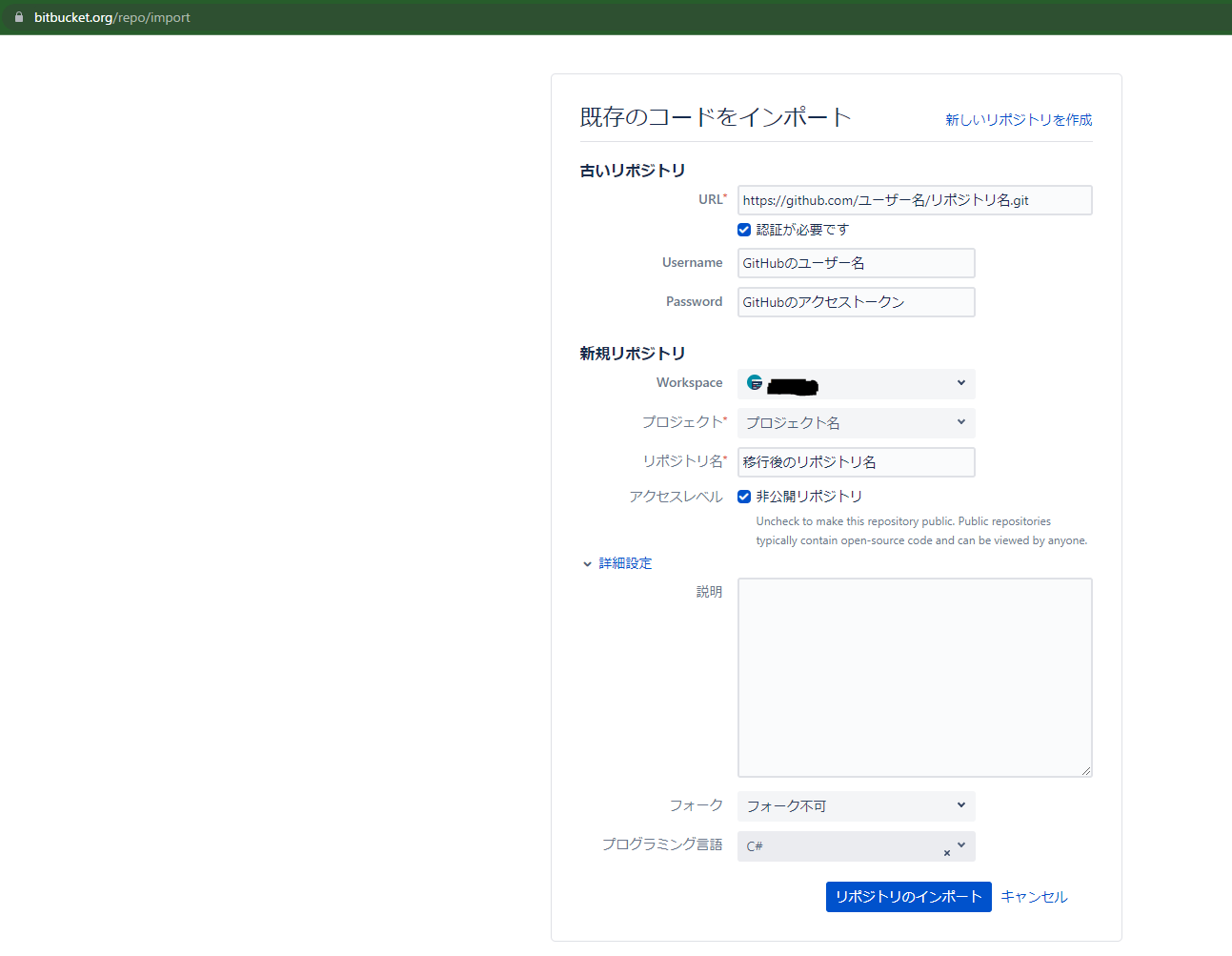
image.png

1
1
0

Register as a new user and use Qiita more conveniently

  1. You get articles that match your needs
  2. You can efficiently read back useful information
  3. You can use dark theme
What you can do with signing up
1
1

Delete article

Deleted articles cannot be recovered.

Draft of this article would be also deleted.

Are you sure you want to delete this article?