

はじめに
さくらインターネット Advent Calendar 2025 の22日目 シリーズ1となります。
この記事ではContainerlabというツールを使って、ネットワーク機器の検証を自動化してみたというお話です。
今回は私たちが一番よく使うAristaスイッチの仮想版cEOSで試しました。
なぜやるのか
私は普段さくらインターネットでGPUインフラのネットワーク設計に携わっています。
機器の台数が増えるにつれて、1台1台の設定検証を手順書ベースで対応するのは負荷が高く、事前に作ったオペレーションへ誤りが混入する可能性は考える必要がありました。
また、どこの段階から誤りが混入したのか、後から追いかけることも大きなコストだと感じています。
それならば、Configを更新した時点で、CI的な解決ができるようにすれば良いのではないかと考えました。
ここで言うCIとは、
- 設定変更をトリガーにして
- 検証環境を自動的に作り直し
- 問題があればすぐに気づける仕組み
のことを指しています。
この仕組みをContainerlabを中心に、Ansible/GitHubと連携することで実現してみました。
(お約束ですが、この記事は個人的な知識を元に再構築したメモのため、不明点があるときは個別にご連絡ください)
使ったツールたち
Containerlabとは
Nokiaさんが主導している検証基盤を構築するための自動化ツールです。
多くのネットワーク機器の仮想版に対応しており、検証に用いる仮想ネットワークを簡単に構築することができます。
詳細については、過去に大先輩が紹介しているので割愛しますが、他のツールと比べて個人的に魅力的なのは、下記のような点だと感じています。
- 仮想ネットワークの構成をYAMLのソースコードベースで管理することができる(再現性高)
- コンテナによって構成されるので、非常に高速に起動する(検証は回数を重ねるので、これが大きい)
Ansibleとは
Ansibleは、サーバーやネットワーク機器の設定や操作を自動化するための構成管理ツールです。
YAML形式で記述したPlaybookを用いて、機器の初期設定や設定変更、状態確認などを一貫した手順で実行することができます。
ファイル構成
下記のようなファイル構成を想定しています。
├── deploy_containerlab.yml        # Containerlab deploy + EOS config pushするansible playbook
├── hosts
├── files/                     # 今回は定数だが、実際はjinja2のtemplateを使う想定
│   ├── spine01.cfg
│   ├── spine02.cfg
│   ├── leaf01.cfg
│   ├── leaf02.cfg
│   ├── leaf03.cfg
│   └── leaf04.cfg
│
└── clos-testbed.clab.yml           # Containerlab のトポロジ
エージェントレスで動作するため、対象機器に専用のソフトウェアをインストールする必要がなく、SSHなどの標準的な手段で接続できる点が特徴です。
このため、ネットワーク機器や仮想スイッチなど、環境を問わず導入しやすいツールとなっています。
cEOSと組み合わせ
本質的には他のOSでも適用できる取り組みですが、特にAristaさんのcEOSとの相性が良いと感じました。
EOSは元々One binaryということで、プラットフォームに依存しない、高い互換性を売りにしています。そのため、仮想版のcEOSでも実機に極めて近いコンフィグを書くことができました。
また、containerlabの利用も推進しており、仮想版でありがちなインタフェース名の違いなど、細かい差分まで合わせるオプションが提供されていました。
Containerlab — user-defined interface mapping
Containerlab — additional interface naming considerations
検証用と商用のConfigでInterface名が違ってアッとなることがないのは、個人的には大きいと思います。
これらを考慮の上、Aristaの64ポートスイッチに見立てたcontainerlabのtopologyと立ち上げコマンドを下記に記載します。
$ cat hosts
[local]
localhost ansible_connection=local

# configの投入対象
[spine]
spine01 ansible_host=172.20.20.11

[leaf]
leaf01 ansible_host=172.20.20.21

[ceos:children]
spine
leaf

[ceos:vars]
ansible_network_os=arista.eos.eos
ansible_connection=network_cli
ansible_user=admin #ダミーの値なので適宜修正ください
ansible_password=admin  #ダミーの値なので適宜修正ください
ansible_ssh_common_args='-o StrictHostKeyChecking=no'  #本番では避けましょう
ansible_become = yes
ansible_become_method = enable
model = "cEOS"
$ cat clos-testbed.clab.yml
name: clos-testbed

mgmt:
  ipv4-subnet: 172.20.20.0/24

topology:
  nodes:
    spine01:
      kind: arista_ceos
      image: ceos:4.34.1F
      mgmt-ipv4: 172.20.20.11

    spine02:
      kind: arista_ceos
      image: ceos:4.34.1F
      mgmt-ipv4: 172.20.20.12

    leaf01:
      kind: arista_ceos
      image: ceos:4.34.1F
      mgmt-ipv4: 172.20.20.21

    leaf02:
      kind: arista_ceos
      image: ceos:4.34.1F
      mgmt-ipv4: 172.20.20.22

    leaf03:
      kind: arista_ceos
      image: ceos:4.34.1F
      mgmt-ipv4: 172.20.20.23

    leaf04:
      kind: arista_ceos
      image: ceos:4.34.1F
      mgmt-ipv4: 172.20.20.24

  links:
    - endpoints: ["spine01:eth1_1", "leaf01:eth63_1"]
    - endpoints: ["spine01:eth2_1", "leaf02:eth63_1"]
    - endpoints: ["spine01:eth3_1", "leaf03:eth63_1"]
    - endpoints: ["spine01:eth4_1", "leaf04:eth63_1"]
    - endpoints: ["spine02:eth1_1", "leaf01:eth64_1"]
    - endpoints: ["spine02:eth2_1", "leaf02:eth64_1"]
    - endpoints: ["spine02:eth3_1", "leaf03:eth64_1"]
    - endpoints: ["spine02:eth4_1", "leaf04:eth64_1"]
下記で環境を立ちあげることができます。
$ containerlab deploy
AnsibleとContainerlabを組み合わせる。
Ansibleでは、Containerlabを呼び出した環境の立ち上げから、設定の適用までをやってもらうことにします。
下記にこれらを行うためのplaybookと実行コマンドを掲載します。
$ cat deploy_containerlab.yml
---
- name: Deploy cEOS clos testbed by containerlab
  hosts: localhost
  become: false
  gather_facts: false

  vars:
    clab_topology_file: clos-testbed.clab.yml

  tasks:
    - name: Deploy containerlab topology
      ansible.builtin.command:
        cmd: containerlab deploy -t {{ clab_topology_file }}
      register: clab_deploy

    - name: Show containerlab deploy output
      ansible.builtin.debug:
        var: clab_deploy.stdout_lines

  tags: clab


- name: Push configuration to all EOS nodes
  hosts: ceos
  gather_facts: false

  vars:
    ansible_network_os: arista.eos.eos
    ansible_connection: network_cli

  tasks:
    - name: Wait for connection each ceos node (max 180s)
      ansible.builtin.wait_for_connection:
        timeout: 180
        delay: 10
      tags: config
    - name: Render and load intended config from file
      debug:
        msg: "{{ inventory_hostname }}"
    - name: Render and load intended config from file
      arista.eos.eos_config:
        src: "files/{{ inventory_hostname }}.cfg"
      register: eos_push

    - name: Show diff if exists
      debug:
        var: eos_push.diff
      when: eos_push.diff is defined

    - name: Get BGP summary (JSON)
      arista.eos.eos_command:
        commands:
          - "show ip bgp summary | json"
      register: bgp_json

    - name: Extract peer states
      set_fact:
        peer_states: >-
          {{
            bgp_json.stdout[0].vrfs.default.peers
            | dict2items
            | map(attribute='value.peerState')
            | list
          }}

    - name: Assert all BGP neighbors are Established
      assert:
        that:
          - peer_states | unique == ['Established']
        fail_msg: |
          Some BGP neighbors are NOT Established on {{ inventory_hostname }}.
          Current states: {{ peer_states }}
          ---- raw JSON ----
          {{ bgp_json.stdout[0] }}

  tags: config
Config例
$ cat files/spine01.cfg
!
hostname spine01
!
service routing protocols model multi-agent
!
no aaa root
!
interface Loopback0
   ip address 10.255.0.1/32
!
interface Ethernet1/1
   description Uplink to leaf01
   no switchport
   ip address 10.0.0.0/31
!
ip routing
!
router bgp 65000
   router-id 10.255.0.1
   maximum-paths 4
   !
   neighbor 10.0.0.1 remote-as 65101
   neighbor 10.0.0.1 description leaf01
!
end
$ cat files/leaf01.cfg
!
hostname leaf01
!
service routing protocols model multi-agent
!
no aaa root
!
interface Loopback0
   ip address 10.255.1.1/32
!
interface Ethernet63/1
   description Uplink to spine01
   no switchport
   ip address 10.0.0.1/31
!
ip routing
!
router bgp 65101
   router-id 10.255.1.1
   maximum-paths 4
   !
   neighbor 10.0.0.0 remote-as 65000
   neighbor 10.0.0.0 description spine01
!
end
※実際にお仕事で使う際はもっと考慮事項が多いので、適宜ansibleやjinjaの世界で解決が必要です(今回の主題ではないので超省略しています)
正常に完了すると、下記のようにchangedと表示されて、正常終了(返り値が0)になります。
$ ansible-playbook -i hosts deploy_containerlab.yml

PLAY [Deploy cEOS clos testbed by containerlab] *********************************************************************************************************************************************

TASK [Deploy containerlab topology] *********************************************************************************************************************************************************
[WARNING]: Platform linux on host localhost is using the discovered Python interpreter at /home/kiyokiyo/miniconda3/bin/python3.12, but future installation of another Python interpreter
could change the meaning of that path. See https://docs.ansible.com/ansible-core/2.18/reference_appendices/interpreter_discovery.html for more information.
changed: [localhost]

TASK [Show containerlab deploy output] ******************************************************************************************************************************************************
ok: [localhost] => {
    "clab_deploy.stdout_lines": [
        "╭───────────────────────────┬──────────────┬─────────┬────────────────╮",
        "│            Name           │  Kind/Image  │  State  │ IPv4/6 Address │",
        "├───────────────────────────┼──────────────┼─────────┼────────────────┤",
        "│ clab-clos-testbed-leaf01  │ arista_ceos  │ running │ 172.20.20.21   │",
        "│                           │ ceos:4.34.1F │         │ N/A            │",
        "├───────────────────────────┼──────────────┼─────────┼────────────────┤",
        "│ clab-clos-testbed-leaf02  │ arista_ceos  │ running │ 172.20.20.22   │",
        "│                           │ ceos:4.34.1F │         │ N/A            │",
        "├───────────────────────────┼──────────────┼─────────┼────────────────┤",
        "│ clab-clos-testbed-leaf03  │ arista_ceos  │ running │ 172.20.20.23   │",
        "│                           │ ceos:4.34.1F │         │ N/A            │",
        "├───────────────────────────┼──────────────┼─────────┼────────────────┤",
        "│ clab-clos-testbed-leaf04  │ arista_ceos  │ running │ 172.20.20.24   │",
        "│                           │ ceos:4.34.1F │         │ N/A            │",
        "├───────────────────────────┼──────────────┼─────────┼────────────────┤",
        "│ clab-clos-testbed-spine01 │ arista_ceos  │ running │ 172.20.20.11   │",
        "│                           │ ceos:4.34.1F │         │ N/A            │",
        "├───────────────────────────┼──────────────┼─────────┼────────────────┤",
        "│ clab-clos-testbed-spine02 │ arista_ceos  │ running │ 172.20.20.12   │",
        "│                           │ ceos:4.34.1F │         │ N/A            │",
        "╰───────────────────────────┴──────────────┴─────────┴────────────────╯"
    ]
}

PLAY [Push configuration to all EOS nodes] **************************************************************************************************************************************************

TASK [Wait for connection each ceos node (max 180s)] ****************************************************************************************************************************************
[WARNING]: The ssh_*_args options are deprecated and will be removed in a release after 2026-01-01. Please use the proxy_command option instead.
ok: [spine01]
ok: [leaf01]

TASK [Render and load intended config from file] ********************************************************************************************************************************************
ok: [leaf01] => {
    "msg": "leaf01"
}
ok: [spine01] => {
    "msg": "spine01"
}

TASK [Render and load intended config from file] ********************************************************************************************************************************************
[WARNING]: To ensure idempotency and correct diff the input configuration lines should be similar to how they appear if present in the running configuration on device including the
indentation
changed: [leaf01]
changed: [spine01]

TASK [Show diff if exists] ******************************************************************************************************************************************************************
ok: [spine01] => {
    "eos_push.diff": {
        "prepared": "--- system:/running-config\n+++ session:/ansible_176584421856-session-config\ninterface Ethernet1/1\n+   description Uplink to leaf01\n+   no switchport\n+   ip address 10.0.0.0/31\n+!\n+interface Loopback0\n+   ip address 10.255.0.1/32\n !\n-no ip routing\n+ip routing\n+!\n+router bgp 65000\n+   router-id 10.255.0.1\n+   maximum-paths 4\n+   neighbor 10.0.0.1 remote-as 65101\n+   neighbor 10.0.0.1 description leaf01"
    }
}
ok: [leaf01] => {
    "eos_push.diff": {
        "prepared": "--- system:/running-config\n+++ session:/ansible_176584421851-session-config\ninterface Ethernet63/1\n+   description Uplink to spine01\n+   no switchport\n+   ip address 10.0.0.1/31\n+!\n+interface Loopback0\n+   ip address 10.255.1.1/32\n !\n-no ip routing\n+ip routing\n+!\n+router bgp 65101\n+   router-id 10.255.1.1\n+   maximum-paths 4\n+   neighbor 10.0.0.0 remote-as 65000\n+   neighbor 10.0.0.0 description spine01"
    }
}

TASK [Wait until all BGP neighbors are Established (max 120s)] ******************************************************************************************************************************
FAILED - RETRYING: [leaf01]: Wait until all BGP neighbors are Established (max 120s) (12 retries left).
FAILED - RETRYING: [spine01]: Wait until all BGP neighbors are Established (max 120s) (12 retries left).
ok: [spine01]
ok: [leaf01]

TASK [Extract peer states] ******************************************************************************************************************************************************************
ok: [spine01]
ok: [leaf01]

TASK [Assert all BGP neighbors are Established] *********************************************************************************************************************************************
ok: [spine01] => {
    "changed": false,
    "msg": "All assertions passed"
}
ok: [leaf01] => {
    "changed": false,
    "msg": "All assertions passed"
}

PLAY RECAP **********************************************************************************************************************************************************************************
leaf01                     : ok=7    changed=1    unreachable=0    failed=0    skipped=0    rescued=0    ignored=0
localhost                  : ok=2    changed=1    unreachable=0    failed=0    skipped=0    rescued=0    ignored=0
spine01                    : ok=7    changed=1    unreachable=0    failed=0    skipped=0    rescued=0    ignored=0
実際にミスを起こしてみた
あえて、オペレーションのmistakeを混入してみます。
leafの"interface"を"unterface"に変えてやりなおしてみます。
すると、下記のようにfailとなり、エラーが返ってくることが判ります。
$ ansible-playbook -i hosts deploy_containerlab.yml
~snip~
TASK [Render and load intended config from file] ********************************************************************************************************************************************
fatal: [leaf01]: FAILED! => {"changed": false, "data": "unterface Ethernet63\r\n% Invalid input\r\nleaf01(config-s-ansible_17-if-Lo0)#", "msg": "unterface Ethernet63\r\n% Invalid input\r\nleaf01(config-s-ansible_17-if-Lo0)#"}
[WARNING]: To ensure idempotency and correct diff the input configuration lines should be similar to how they appear if present in the running configuration on device including the
indentation
changed: [spine01]
~snip~

PLAY RECAP **********************************************************************************************************************************************************************************
leaf01                     : ok=2    changed=0    unreachable=0    failed=1    skipped=0    rescued=0    ignored=0
localhost                  : ok=2    changed=1    unreachable=0    failed=0    skipped=0    rescued=0    ignored=0
spine01                    : ok=4    changed=1    unreachable=0    failed=0    skipped=0    rescued=0    ignored=0
次にBGPのASNを誤った想定で設定を適用してみます
TASK [Show diff if exists] ******************************************************************************************************************************************************************
skipping: [leaf01]
ok: [spine01] => {
    "eos_push.diff": {
        "prepared": "--- system:/running-config\n+++ session:/ansible_176584434155-session-config\nrouter bgp 65000\n-   neighbor 10.0.0.1 remote-as 65101\n+   neighbor 10.0.0.1 remote-as 65102"
    }
}
~snip~
TASK [Wait until all BGP neighbors are Established (max 120s)] ******************************************************************************************************************************
fatal: [leaf01]: FAILED! => {"attempts": 12, "changed": false, "stdout": [{"vrfs": {"default": {"asn": "65101", "peers": {"10.0.0.0": {"asn": "65000", "description": "spine01", "inMsgQueue": 0, "msgReceived": 33, "msgSent": 32, "outMsgQueue": 0, "peerState": "Active", "prefixAccepted": 0, "prefixAdvertised": 0, "prefixReceived": 0, "underMaintenance": false, "upDownTime": 1765844342.227564, "version": 4}}, "routerId": "10.255.1.1", "vrf": "default"}}}], "stdout_lines": [{"vrfs": {"default": {"asn": "65101", "peers": {"10.0.0.0": {"asn": "65000", "description": "spine01", "inMsgQueue": 0, "msgReceived": 33, "msgSent": 32, "outMsgQueue": 0, "peerState": "Active", "prefixAccepted": 0, "prefixAdvertised": 0, "prefixReceived": 0, "underMaintenance": false, "upDownTime": 1765844342.227564, "version": 4}}, "routerId": "10.255.1.1", "vrf": "default"}}}]}
fatal: [spine01]: FAILED! => {"attempts": 12, "changed": false, "stdout": [{"vrfs": {"default": {"asn": "65000", "peers": {"10.0.0.1": {"asn": "65102", "description": "leaf01", "inMsgQueue": 0, "msgReceived": 18, "msgSent": 35, "outMsgQueue": 0, "peerState": "Active", "prefixAccepted": 0, "prefixAdvertised": 0, "prefixReceived": 0, "underMaintenance": false, "upDownTime": 1765844342.225182, "version": 4}}, "routerId": "10.255.0.1", "vrf": "default"}}}], "stdout_lines": [{"vrfs": {"default": {"asn": "65000", "peers": {"10.0.0.1": {"asn": "65102", "description": "leaf01", "inMsgQueue": 0, "msgReceived": 18, "msgSent": 35, "outMsgQueue": 0, "peerState": "Active", "prefixAccepted": 0, "prefixAdvertised": 0, "prefixReceived": 0, "underMaintenance": false, "upDownTime": 1765844342.225182, "version": 4}}, "routerId": "10.255.0.1", "vrf": "default"}}}]}

PLAY RECAP **********************************************************************************************************************************************************************************
leaf01                     : ok=3    changed=0    unreachable=0    failed=1    skipped=1    rescued=0    ignored=0
spine01                    : ok=4    changed=1    unreachable=0    failed=1    skipped=0    rescued=0    ignored=0
今回はtypoとASNの誤り例ですが、実際はansible assertだけではなく、後から外部のテストツールを実行することでも各種項目を確認できます。
GitHub Actionsで発火する
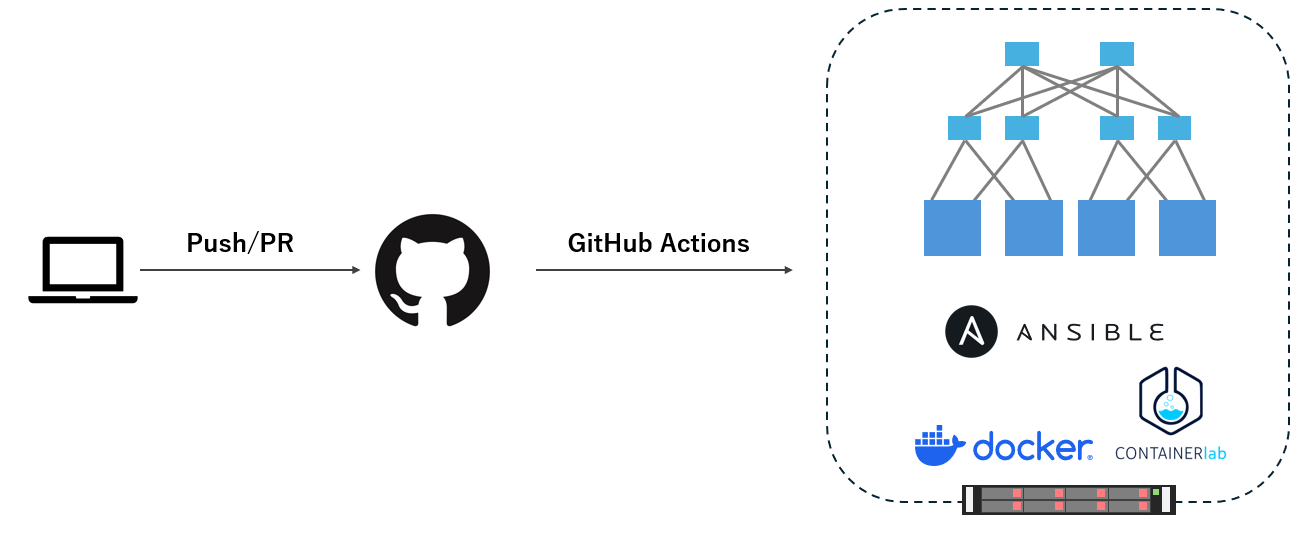
あとは、ここまでの手順を GitHub 上のソースコード更新(push / PR)をトリガーに自動実行できれば、CI っぽい流れになります。
構成イメージはざっくりこんな感じです。
- 開発者が Config / トポロジ / Playbook を修正して Git push / PR
- GitHub Actionsがトリガーされる
- Self-hosted Runner もしくは別サーバー上で下記実行
- ansible-playbook deploy_containerlab.yml を実行
- Containerlab で検証環境を立ち上げ
- cEOS に Config を投入
- BGP などの状態をチェック
- 結果を GitHub 上で確認
- 正常: Successとなる
- 失敗: どのTaskがどのノードで落ちたかログで追える
ここは環境依存の部分(Self-hosted Runner の立て方や、オンプレと GitHub.com の接続方法など)が大きいことから、GitHub Actionsのworkflowは記載をしていません。
代わりに、ここまでのフローを下記でイメージをまとめてみたので参考にしてください。
実際にやってみて
実際にやってみた結果、下記のような感想を持っています。
- 高速、かつ、環境自体をクリーンにする行程をcontainerlabと仮想OSで模擬できた
- 何回も環境を”まっさらにして構築できる”というのが非常に強み
- PushやPR単位でfailを見つけられることから、問題個所を特定しやすい
まとめ
Containerlabを中心にCIを組むことで、"小さなサイクルで" "実機が届く前に"検証することで、その精度を上げた例を記載しました。
もちろん、性能検証や最終的な動作確認は実機が必要だと思います。
しかし、実機は限られた時間しか使えないと思います。
そのような中、更新するたび、自動的に100回でも予行演習してくれるというのは非常に素晴らしいことではないでしょうか。
今後はvrnetlabの活用や、他のマルチベンダー適用も試行してみたいと思います。
追伸
ネタが絞り切れなくてシリーズ2も書いてしまいました。良かったらご覧ください