
概要
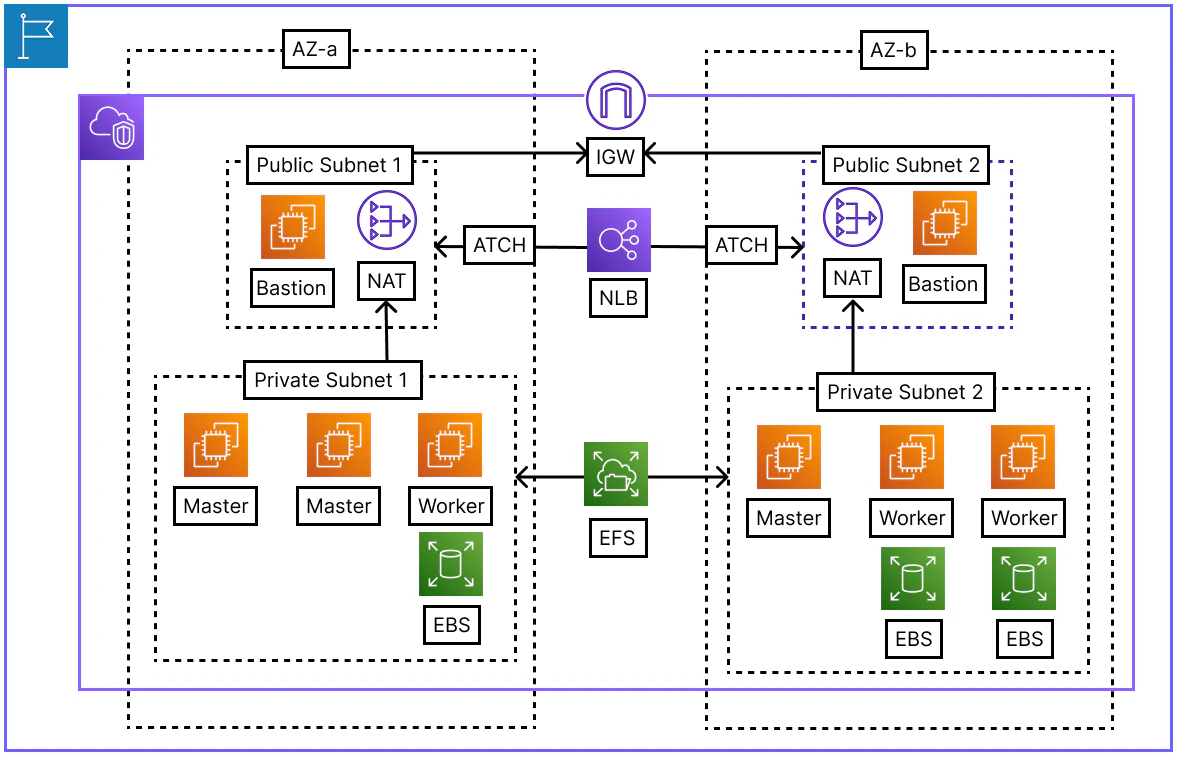
- TerraformとAnsibleを用いてクラスタを構築している
ArgoCD
- AnsibleのPlayBookでArgoCDをHelmでデプロイしておけば
- その後はArgoCDのAppsyncがクラスタに必要なチャートをデプロイしてくれる
- name: ArgoCD セットアップ
  hosts: main-master
  become: false
  tasks:
    - name: ArgoCD用のNamespace作成
      kubernetes.core.k8s:
        name: "argocd"
        kind: Namespace
        state: present
        kubeconfig: /home/ec2-user/.kube/config

    - name: ArgoCD Helm レポジトリ追加
      kubernetes.core.helm_repository:
        name: argo
        repo_url: "https://argoproj.github.io/argo-helm"

    - name: Helm レポジトリ更新
      command: helm repo update

    - name: LBCのWebhook設定削除
      shell: |
        kubectl delete mutatingwebhookconfigurations mservice.elbv2.k8s.aws --ignore-not-found
        kubectl delete validatingwebhookconfigurations vservice.elbv2.k8s.aws --ignore-not-found
      environment:
        KUBECONFIG: /home/ec2-user/.kube/config
      ignore_errors: yes

    - name: ArgoCD インストール
      kubernetes.core.helm:
        name: argocd
        chart_ref: argo/argo-cd
        release_namespace: "argocd"
        create_namespace: true
        wait: true
        values:
          server:
            service:
              type: NodePort
              nodePorts:
                http: 30080
            extraArgs:
              - --insecure

    - name: CRDの存在確認
      kubernetes.core.k8s_info:
        kind: CustomResourceDefinition
        name: applications.argoproj.io
      register: crd_info
      until: crd_info.resources | length > 0
      retries: 10
      delay: 5

    - name: ArgoCD root Applicationの作成
      kubernetes.core.k8s:
        state: present
        definition:
          apiVersion: argoproj.io/v1alpha1
          kind: Application
          metadata:
            name: root-app
            namespace: argocd
          spec:
            project: default
            source:
              repoURL: https://github.com/kanei0415/ktcloud-k8s-argocd-manifest.git
              targetRevision: HEAD
              path: Setup
            destination:
              server: https://kubernetes.default.svc
              namespace: default
            syncPolicy:
              automated:
                prune: true
                selfHeal: true
              syncOptions:
                - CreateNamespace=true
Argo Manifest
- app-of-appsのためのargocd-manifestのディレクトリ構造だ
➜  ktcloud-k8s-argocd-manifest git:(master) tree .
.
├── Addons
├── Apps
├── Charts
│   ├── ArgoCD
│   │   ├── Chart.lock
│   │   ├── Chart.yaml
│   │   └── values.yaml
│   └── Traefik
│       ├── Chart.lock
│       ├── Chart.yaml
│       └── values.yaml
└── Setup
    ├── Addons-app.yaml
    ├── Apps-app.yaml
    └── Charts-app.yaml

7 directories, 9 files
- まずは、TraefikとArgoCD自身をデプロイするようにした
apiVersion: argoproj.io/v1alpha1
kind: ApplicationSet
metadata:
  name: charts-app
  namespace: argocd
spec:
  generators:
  - list:
      elements:
      - path: Charts/Traefik
        appname: traefik
      - path: Charts/ArgoCD
        appname: argocd
  template:
    metadata:
      name: '{{appname}}'
    spec:
      project: default
      source:
        repoURL: "https://github.com/kanei0415/ktcloud-k8s-argocd-manifest.git"
        targetRevision: main
        path: '{{path}}'
      destination:
        server: https://kubernetes.default.svc
        namespace: default
      syncPolicy:
        automated:
          prune: true
          selfHeal: true
ArgoCD CLI
- Bastionを通じてマスターノードまで、sshジャンプをして接続する
➜ ktcloud-k8s-argocd-manifest git:(master) ssh -A -J ec2-user@43.203.147.220 ec2-user@10.0.4.232
- argocd cliをインストール
[ec2-user@b-master-01 ~]$ sudo curl -sSL -o /usr/local/bin/argocd https://github.com/argoproj/argo-cd/releases/latest/download/argocd-linux-amd64

[ec2-user@b-master-01 ~]$ sudo chmod +x /usr/local/bin/argocd

[ec2-user@b-master-01 ~]$ argocd version --client
- 下記のコマンドでArgoCDのadmin初期設定パスワードがわかる
[ec2-user@b-master-01 ~]$ kubectl -n argocd get secret argocd-initial-admin-secret -o jsonpath="{.data.password}" | base64 -d; echo
- ArgoCD CLIで argocd-serverにログインするためのコマンドだ
[ec2-user@b-master-01 ~]$ argocd login <b-master-01-ip>:30080 --username admin --insecure
- TraefikはDegradedからHealthyまで5分以上かかる
[ec2-user@b-master-01 ~]$ argocd app list
NAME             CLUSTER                         NAMESPACE  PROJECT  STATUS     HEALTH   SYNCPOLICY  CONDITIONS  REPO                                                          PATH            TARGET
argocd/argocd    https://kubernetes.default.svc  default    default  OutOfSync  Healthy  Auto-Prune  <none>      https://github.com/kanei0415/ktcloud-k8s-argocd-manifest.git  Charts/ArgoCD   main
argocd/root-app  https://kubernetes.default.svc  default    default  OutOfSync  Healthy  Auto-Prune  SyncError   https://github.com/kanei0415/ktcloud-k8s-argocd-manifest.git  Setup           HEAD
argocd/traefik   https://kubernetes.default.svc  default    default  Synced     Healthy  Auto-Prune  <none>      https://github.com/kanei0415/ktcloud-k8s-argocd-manifest.git  Charts/Traefik  main
CoreDNS lookup Failed
- ArgoCDがHealthyだが、argocd-manifestのTraefikチャートがデプロイされないトラブルがあった
- 「10.96.0.10:53: i/o timeout」つまり、CoreDNSに繋がらないのが問題の原因だ
[ec2-user@b-master-01 ~]$ argocd app get argocd/root-app

Name:               argocd/root-app

Project:            default

Server:             https://kubernetes.default.svc

Namespace:          default

URL:                https://argocd.example.com/applications/root-app

Source:

- Repo:             https://github.com/kanei0415/ktcloud-k8s-argocd-manifest.git

  Target:           HEAD

  Path:             Setup

SyncWindow:         Sync Allowed

Sync Policy:        Automated (Prune)

Sync Status:        Unknown

Health Status:      Healthy


CONDITION        MESSAGE                                                                                                                                                                                                                       LAST TRANSITION

ComparisonError  Failed to load target state: failed to generate manifest for source 1 of 1: rpc error: code = Unavailable desc = dns: A record lookup error: lookup argocd-repo-server on 10.96.0.10:53: dial udp 10.96.0.10:53: i/o timeout  2026-05-07 07:27:15 +0000 UTC
- K8SのCoreDNSのPodは両方とも稼働中でCoreDNSの問題ではなく
- Pod間のCalicoCNI通信が効いていないことが疑わしい
[ec2-user@b-master-01 ~]$ kubectl get pods -n kube-system -l k8s-app=kube-dns

NAME                       READY   STATUS    RESTARTS   AGE

coredns-55cb58b774-6fnkg   1/1     Running   0          23m

coredns-55cb58b774-tkqdj   1/1     Running   0          23m
- まず、AWSのEC2は基本的にAWSシステムから生成されていないIPアドレス(PodのIP)がSourceやDestに設定されたPacketをセキュリティの上遮断する
- CalicoCNIが正常に動作するには「source_dest_check = false」で、この機能をオフにする必要がある
resource "aws_instance" "ap-northeast-2a-master-node-01" {
  ami                  = "ami-087e08db3e40f7429"
  instance_type        = "t3.medium"
  subnet_id            = aws_subnet.private-ap-northeast-2a.id
  security_groups      = [aws_security_group.cluster-node-sg.id]
  key_name             = aws_key_pair.bastion-node-key.key_name
  iam_instance_profile = aws_iam_instance_profile.ktcloud-cluster-node-profile.name
  source_dest_check    = false

  user_data = <<-EOF
              #!/bin/bash
              hostnamectl set-hostname a-master-01
              EOF
}
- そしてCalicoCNIは内部的にBGP(TCP 179)を使用しているため
- そのインバウンド・アウトバウンドを許可するセキュリティーグループが必要だ
- 今度はノード間のインバウンド通信を全て許可する
resource "aws_security_group_rule" "cluster_node_self_ingress" {
  type                     = "ingress"
  from_port                = 0
  to_port                  = 0
  protocol                 = "-1"
  security_group_id        = aws_security_group.cluster-node-sg.id
  source_security_group_id = aws_security_group.cluster-node-sg.id
}
結論
- Ansibleでクラスタ内にargocd-manifestをVCS RootとしてApp-SyncするようにArgoCDをデプロイすることで、app-of-appsパタンを手軽に実装できる
- ArgoCDが走っているうちにはHelmチャートのデプロイも、アプロケーションのデプロイも遠隔リポジトリに定義づけられた使用がクラスタに転用されるGitOps状態になる