
Microsoft も Chromium の軍門に降り、いよいよ Mozilla しか残っていないのか?という状況で、少しでも応援しようという意味で Servo をビルドしたのでまとめる。
Servo
Mozilla が開発しているブラウザエンジン。
Rust で開発されており、超高速なパフォーマンスとメモリ安全を実現しているとのこと。
Firefox も CSS スタイルエンジンとして一部採用しているらしいし、いずれは Firefox の Backend として採用されるんだろう。
https://research.mozilla.org/servo-engines/
https://github.com/servo/servo
ビルド環境構築
- Windows 10 Pro 1803
以下を参考に、進めていく。
https://github.com/servo/servo#on-windows-msvc
Python 2.7
Python 2.7 と virtualenv が必要とのこと。
Python も既に入っているとは思うが、Scoop による導入と切り替え方を少しまとめる。
# そもそも入っていなければ入れておく
PS> scoop install python27

# scoop は、reset コマンドでバージョンの切り替えが出来る。
PS> scoop reset python
PS> python -V
# Python 3.7.2
PS> pip -V
# pip 18.1 from c:\users\username\scoop\apps\python\3.7.2\lib\site-packages\pip (python 3.7)

PS> scoop reset python27
PS> python -V
# Python 2.7.15
PS> pip -V
# pip 19.0.2 from c:\users\username\scoop\apps\python27\current\lib\site-packages (python 2.7)
PS> pip install virtualenv
GStreamer
Servo では、メディア系のバックエンドに GStreamer を利用している。
https://github.com/servo/media
以下からこれらをダウンロードし導入する。
https://gstreamer.freedesktop.org/data/pkg/windows/
- gstreamer-1.0-x86_64-1.15.1.msi
- gstreamer-1.0-devel-x86_64-1.15.1.msi
 インストールが完了したら、`LIB` 環境変数に `C:\gstreamer\1.0\x86_64\lib` を追加する。
Build Tools for Visual Studio 2017
Visual Studio Community 2017 を進められているが、諸事情で使えないなら Build Tools で十分だ。
導入方法は、この記事で説明しているので参考に。
1 つ注意が必要なのが、Visual C++ ATL/MFC のヘッダー/ライブラリもビルドに必要なのだが、デフォルトではチェックは入っていない ので、チェックする。

LLVM ( Optional )
ビルドを早くするためには、 LLVM の Pre-Built Binaries を入れておくと良いらしい。
https://releases.llvm.org/download.html
上記から Pre-Built Binaries をダウンロードし、インストールする。

PATH は System に追加しろとのこと。
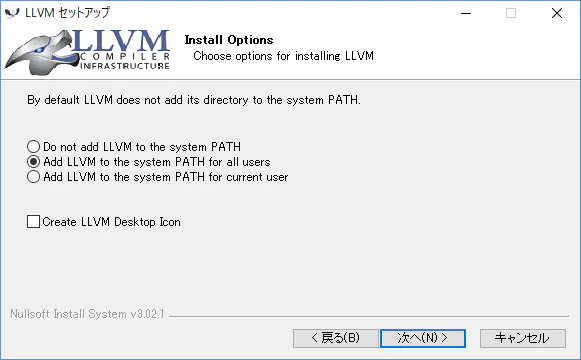
LLVM のリンカを利用するために、~\cargo\config に以下を追加する。
+ [target.x86_64-pc-windows-msvc]
+ linker = "lld-link.exe"
ビルド
まずは Servo のソースを取ってくる。git clone だけでまず 30 分位かかる。
PS> git clone https://github.com/servo/servo
PS> cd servo
これで準備は全て整ったので、ビルドバッチを叩く。
( 2 時間以上はかかるので、時間がある時にやろう。特に Cargo が動き出すと重くなるので注意。 )
PS> mach.bat build -d
以下、引っかかった部分をまとめる
1. ビルドに必要なツールをダウンロードする際のエラー
最初にビルドに必要なサブツールをダウンロードしている最中に、謎のエラーで落ちる時がある。
Installing missing MSVC dependencies...
Resuming download of https://servo-deps.s3.amazonaws.com/msvc-deps/llvm-7.0.0.zip ...
Downloading llvm-7.0.0: 100.0%
Extracting llvm-7.0.0...done
Error running mach:

    ['build', '-d']

The error occurred in code that was called by the mach command. This is either
a bug in the called code itself or in the way that mach is calling it.

You should consider filing a bug for this issue.

If filing a bug, please include the full output of mach, including this error
message.

The details of the failure are as follows:

WindowsError: [Error 5] アクセスが拒否されました。

  File "C:\servo\python\servo\build_commands.py", line 286, in build
    self.ensure_bootstrapped(target=target)
  File "C:\servo\python\servo\command_base.py", line 811, in ensure_bootstrapped
    Registrar.dispatch("bootstrap", context=self.context)
  File "C:\servo\python\_virtualenv\Lib\site-packages\mach\registrar.py", line 123, in dispatch
    return self._run_command_handler(handler, context=context, **kwargs)
  File "C:\servo\python\_virtualenv\Lib\site-packages\mach\registrar.py", line 90, in _run_command_handler
    result = fn(**kwargs)
  File "C:\servo\python\servo\bootstrap_commands.py", line 59, in bootstrap
    return bootstrap.bootstrap(self.context, force=force)
  File "C:\servo\python\servo\bootstrap.py", line 417, in bootstrap
    return bootstrapper(context, force=force)
  File "C:\servo\python\servo\bootstrap.py", line 343, in windows_msvc
    os.rename(extracted_path, package_dir(package))
エラーは出ているが実際取得はできているので、諦めず何度もビルドコマンドを叩けば 1 つずつでもパッケージは落ちてくる。
私は 7 回目辺りでようやく次に進んだ。
2. Rust Crate のビルド時に起こる VC 系のビルドエラー
No CMAKE_C_COMPILER / CMAKE_CXX_COMPILER could be found.
ビルドに必要なツールを取得後、Rustup update nightly して Cargo build が始まる。
この際、以下のように C/C++ のコンパイラを CMake が見つけられないというエラーが出る場合がある。
-- The C compiler identification is unknown
-- The CXX compiler identification is unknown
-- Configuring incomplete, errors occurred!

...

--- stderr
CMake Error at CMakeLists.txt:3 (project):
  No CMAKE_C_COMPILER could be found.


CMake Error at CMakeLists.txt:3 (project):
  No CMAKE_CXX_COMPILER could be found.
...
mach.bat を見ると、① %VS140COMNTOOLS% を参照して VC++ 2015 の中の vcvarsall.bat を探そうとし、② それが駄目なら Visual Studio 2017 の中のいずれかの Edition ( Community, Enterprise, BuildTools... ) の中から vcvarsall.bat を探し始める。
私の環境では、%VS140COMNTOOLS% が設定されているので VC++ 2015 でビルドを試みたが失敗していたので、解決策として、mach.bat を書き換えて最初から BuildTools for Visual Studio 2017 の方でビルドするようにしたら上手く行った。
error: linking with link.exe failed: exit code: 1120
これはまだ解決には至っていないようだ ( 2019-02-11 現在 )。
https://github.com/servo/servo/issues/22737
仕方なく、Release でビルドする。
PS> mach.bat build --release
3. Rust Crate のビルド時に起こる Python 系のビルドエラー
謎のフリーズ現象
エラーも何も出さずに止まってしまう事がある。
詳細に調べていくと、どうやら python\mach_bootstrap.py の処理の中で止まっているようだった。
mach.bat から呼び出された python\mach_bootstrap.py はその中で virtualenv 環境を構築し、以下依存モジュールを取得している。
- servo\python\requirements.txt
- servo\tests\wpt\web-platform-tests\tools\wptrunner\requirements.txt
- servo\tests\wpt\web-platform-tests\tools\wptrunner\requirements_firefox.txt
- servo\tests\wpt\web-platform-tests\tools\wptrunner\requirements_servo.txt
この中の requirements_firefox.txt の中にある mozdownload==1.25 が依存している treeherder-client<5.0.0,>=4.0.0 の whl が何故か落ちてこないでフリーズしているのが原因だった。
なので、まずは requirements_firefox.txt から該当パッケージをコメントアウトする。
marionette_driver==2.7.0
mozprofile==2.1.0
mozprocess == 0.26
mozcrash == 1.0
mozrunner==7.2.0
mozleak==0.2
mozinstall==2.0.0
- mozdownload==1.25
+ # mozdownload==1.25
mozversion==1.5
コメントアウトした mozdownload の依存パッケージ を個別に落とす。
PS> python -m pip install -I mozinfo>=0.9 progressbar2>=3.34.3 redo==2.0.2 'requests>=2.9.1,<3.0.0'
落ちてこなかった treeherder-client は、PyPI から whl ファイルを直接落とし インストールする。
PS> python -m pip install -I .\treeherder_client-4.0.0-py2-none-any.whl
virtualenv の問題
Servo は、mozjs という Crate に依存している。JavaScript エンジンと思われる。
https://github.com/servo/mozjs
こいつはこいつで vitualenv を使って自分専用の環境を作るのだが、これがなかなか上手くいかない。
普通にコマンドを手入力で python -m virtualenv \path\to\_virtualenv すると問題なく完了できるのに、mozjs 内部でやると何故か ImportError: No module named urllib3 が起こる。
PS> .\mach.bat build -d
# ...
#   Complete output from command c:\servo\target\debu...v\Scripts\python.exe - setuptools pip wheel:
#   Traceback (most recent call last):
#   File "<stdin>", line 13, in <module>
# ImportError: cannot import name main
mozjs のソースは << rustup Folder >>\.cargo\registry\src\github.com-XXXXXXX\mozjs_sys-0.61.6\mozjs\ 以下にある。
その中で virtualenv 環境を作っているのは、mozjs\python\mozbuild\mozbuild\virtalenv.py ファイル内の VirtualenvManager クラスの create メソッドになる。
試しにここで実行しているコマンドを以下のように直接打ってみても、やはり同様のエラーが出る。
PS> python.exe {{rustup の Folder}}\.cargo\registry\src\github.com-XXXXXXX\mozjs_sys-0.61.6\mozjs\third_party\python\virtualenv\virtualenv.py c:\servo\target\debug\build\mozjs_sys-XXXXXXX\out\_virtualenv
# ...
#   Complete output from command c:\servo\target\debu...v\Scripts\python.exe - setuptools pip wheel:
#   Traceback (most recent call last):
#   File "<stdin>", line 13, in <module>
# ImportError: cannot import name main
これは多分、mozjs\third_party に含まれる virtualenv\virtualenv.py が原因。
解決方法として、実行する virtualenv\virtualenv.py ファイルを System に入れた virtualenv の方にに切り替える。
    @property
    def virtualenv_script_path(self):
        """Path to virtualenv's own populator script."""
+         return ('C:\\Users\\username\\scoop\\apps\\python27\\current\\Lib\\site-packages\\virtualenv.py')
-         # return os.path.join(self.topsrcdir, 'third_party', 'python',
-         #     'virtualenv', 'virtualenv.py')
ImportError: No module named XXXX
これのオンパレードだった。
本当に足りない場合は、導入すれば解決するはずだが…
● ImportError: No module named urllib3
virtualenv が上手く作れなかった時に出た。
結局解決できなかったので、既に説明したように virtualenv.py ファイルを変える事で回避した。
未だ原因は不明だが、Windows の Path 長制限の可能性もあるとか。
● ImportError: No module named which
どのタイミングで出会ったエラーなのか忘れてしまったが、これが出たときがあった。
導入しようとしても、pip install which では見つけられない。
Pypi にリポジトリは一応ある が実体はなく、それは Google Code にある。
ファイル をダウンロードして、virtualenv 環境に直接インストールする必要がある。
PS> cd  which-1.1.0
PS> C:\servo\target\debug\build\mozjs_sys-XXXXXXXXXXXXX\out\_virtualenv\Scripts\python.exe .\setup.py install
そして、数時間後…
その後もハラハラしながら見守っていたが、何とか終わった。
エラーの調査時間を除けば、大体 3 時間程度であろうか。
ちょっとエラーが出てるが、一応終わっている。

libz.dll が無いとか。
いよいよ、実行の時
servo\target\release 以下に servo.exe が出来ているので、実行すると、
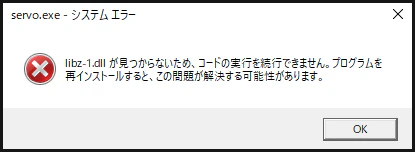
libz-1.dll が無いと。多分ビルド完了時のエラーと関係しているんだろう。
C:\gstreamer\1.0\x86_64\bin\libz-1.dll を servo\target\release にコピーする。
そうすれば、ようやく実行できる。

アイコン  が犬だった。
URL 入力欄も、右クリックのコンテキストメニューも、スクロールバーも出ないが、レンダリング / JavaScript エンジンと考えればそんなものか。
感想
時間はかかったが、Chromium も相当かかるのでこんなもんかな。
実際に使ってみて正直な感想は『あれ、思ったよりキビキビ動かないな』でした。
あと、めっちゃ落ちる。リンク先巡ると 2~3 ページ目で大体落ちる。
Windows 対応が甘めなのか、まだ品質が安定するレベルではないのか。
とはいえ、プロジェクト自体は 7 年前にスタートしており、そろそろ安定しても良いのでは。
PWA, WebRTC, WebPayment, WebCrypt, WebBluetooth, WebNFC, WebUSB, WebAuthn, WebVR... と、Web 仕様の方も凄い速度で進化しており、それに追従するだけでも大変だとは思うが、是非頑張ってほしい。
ちなみに、対応している Web API は ここの並び で伺い知れるが、結構対応しているようだ。